User Account Password - Change from WinRE

How to Change the User Account Password if Unable to Login to Windows

   Information
This tutorial will help you remove the existing user account password and set up a new password incase you have forgotten the user password using WinRE (Windows Recovery Environment)


Here's how:
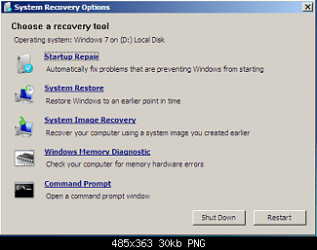
1. Boot to WinRE (Windows Recovery Environment).
1.png
2. Click on the Command Prompt option.


3. Type the following commands and press enter after each one:
  • C:
  • CD Windows\system32
  • ren cmd.exe cmd.old
  • ren magnify.exe cmd.exe
  • ren cmd.old magnify.exe
4. Restart computer.

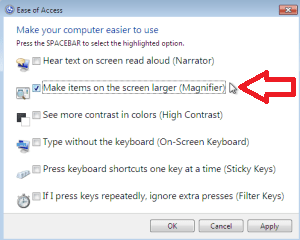
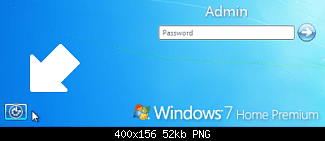
5. Click on Easy of Access centre left side bottom à Choose Magnify option.
2.png
3.png
6. A Command prompt opens up

7. Type: net user administrator /active:yes and press enter.

8. Restart the computer.

9. Logon on to the "Administrator" account, and then using User Accounts page in the Control Panel, remove or change the password of the other account.

10. Type Magnify.exe in Start Menu search box and press enter and open it.

11. Command prompt opens up

12. Type: net user administrator /active:no and press enter.

13. Restart the computer
NOTE: This will disable the administrator account.

14. Now, Boot to winRE again, and click on the Command Prompt option.


15. Type the following commands and press enter after each one:
  • C:
  • CD Windows\system32
  • ren magnify.exe cmd.old
  • ren cmd.exe magnify.exe
  • ren cmd.old cmd.exe
  • exit
16. Restart the computer – system logs on to the User account without asking for password provided there is only one user account.
That's it.
Special thanks for iseeuu for providing the screenshots.


Last edited by a moderator:
But my question is this: If this account ever has a problem with it's password to where I can't get in will I be able to use the password reset disk to reset the password instead of needing to access the Hidden Admin account?
Yes. As a matter of fact, it is safer and would be a better choice to use a reset disk instead of forcing a password change from a different account.

Cheers!
Robert

I knew it would be safer but will it work in all situations? Like, will resetting the password work even if the current password is corrupted?
That is the purpose of the reset disk. I can not answer in any further depth as I have not ever had a corrupted password or account, and have never had to use the password reset disk. Perhaps there is a member here at Seven Forums that has had this experience and will post here?

Cheers!
Robert
 

My Computer My Computer

At a glance

...
OS
...
Yes. As a matter of fact, it is safer and would be a better choice to use a reset disk instead of forcing a password change from a different account.

Cheers!
Robert

I knew it would be safer but will it work in all situations? Like, will resetting the password work even if the current password is corrupted?
That is the purpose of the reset disk. I can not answer in any further depth as I have not ever had a corrupted password or account, and have never had to use the password reset disk. Perhaps there is a member here at Seven Forums that has had this experience and will post here?

Cheers!
Robert

Alrighty, thank you the information you provided. Like you said, that is the purpose of a reset disk so it should work. I'll just keep this backup stored safely away.

But if someone else does post here with an in depth reply then I'll gladly read it.

Thanks again for the information Iseeuu.

Thank you for the great guide Dinesh!
 

My Computer My Computer

At a glance

Windows 7 Home Premium x64Intel Core i5-4690k8GBEVGA GeForce GTX 970
Computer type
PC/Desktop
Computer Manufacturer/Model Number
Custom build
OS
Windows 7 Home Premium x64
CPU
Intel Core i5-4690k
Motherboard
Gigabyte H97 SATA Express M.2 SSD UEFI DualBIOS DDR3 1600 LG
Memory
8GB
Graphics Card(s)
EVGA GeForce GTX 970
Monitor(s) Displays
2
Hard Drives
2:
- Samsung 850 EVO 250GB 2.5-Inch SATA III Internal SSD (MZ-75E250B/AM)
- Crucial MX300 275GB SATA 2.5 Inch Internal Solid State Drive - CT275MX300SSD1
PSU
Corsair 650x
Case
C70
Cooling
4 Fans
Internet Speed
Comcast Cable 22mbs
Antivirus
Microsoft Security Essentials
Browser
Chrome
You're welcome. :)
 

My Computer My Computer

At a glance

Windows® 8 Pro (64-bit)Intel® Core™ i5 Processor 2467M (1.60GHz, 3MB...6GB DDR3 System Memory at 1,333MHz (on BD 4GB...AMD Radeon™ HD7550M 1GB DDR3 (Ext. Graphic)
Computer Manufacturer/Model Number
Samsung NP530U4B-S02IN
OS
Windows® 8 Pro (64-bit)
CPU
Intel® Core™ i5 Processor 2467M (1.60GHz, 3MB L3 Cache)
Motherboard
Samsung Electronics
Memory
6GB DDR3 System Memory at 1,333MHz (on BD 4GB + 2GB x 1)
Graphics Card(s)
AMD Radeon™ HD7550M 1GB DDR3 (Ext. Graphic)
Sound Card
Realtek High Definition Audio
Monitor(s) Displays
35.56cm (14.0) SuperBright 300nit HD LED Display
Screen Resolution
1366x768
Hard Drives
1TB S-ATA II Hard Drive (5400RPM) with ExpressCache 16GB SSD
Internet Speed
sucks
Antivirus
Microsoft Security Essentials
Browser
Google Chrome (Sync enabled)
I hope never need it :P

It's a very good post,

Thanks :)
 

My Computer My Computer

At a glance

Windows Seven
OS
Windows Seven
You are welcome Ruivo.
 

My Computer My Computer

At a glance

Windows® 8 Pro (64-bit)Intel® Core™ i5 Processor 2467M (1.60GHz, 3MB...6GB DDR3 System Memory at 1,333MHz (on BD 4GB...AMD Radeon™ HD7550M 1GB DDR3 (Ext. Graphic)
Computer Manufacturer/Model Number
Samsung NP530U4B-S02IN
OS
Windows® 8 Pro (64-bit)
CPU
Intel® Core™ i5 Processor 2467M (1.60GHz, 3MB L3 Cache)
Motherboard
Samsung Electronics
Memory
6GB DDR3 System Memory at 1,333MHz (on BD 4GB + 2GB x 1)
Graphics Card(s)
AMD Radeon™ HD7550M 1GB DDR3 (Ext. Graphic)
Sound Card
Realtek High Definition Audio
Monitor(s) Displays
35.56cm (14.0) SuperBright 300nit HD LED Display
Screen Resolution
1366x768
Hard Drives
1TB S-ATA II Hard Drive (5400RPM) with ExpressCache 16GB SSD
Internet Speed
sucks
Antivirus
Microsoft Security Essentials
Browser
Google Chrome (Sync enabled)
i only have on account. and its the administrator

i just got this lap top like 5 months ago for graduation and i changed my password to something new and then i just totally forgot it. ive been trying everything. and see this would seem to help me except that i only have one account. and its the administrator. and my lap top doesnt have a disk loader. its a toshiba windows 7 home prem OA. Satellite T135D-S1320. i just really want to get back on if there is any way that you guys can help. i dont care if i get any lost data or have to start all over for that matter. so if any of you know how to help me id really appreicate it. thanksss. macy.
 

My Computer My Computer

At a glance

Toshiba Windows 7 Home Prem OA
OS
Toshiba Windows 7 Home Prem OA
Hard Drives
this is all i know about my laptop. its windows 7 home prem OA
its a Satellite T135D-S1320
I know its serial number. but just tell me if you need that
i just got this lap top like 5 months ago for graduation and i changed my password to something new and then i just totally forgot it. ive been trying everything. and see this would seem to help me except that i only have one account. and its the administrator. and my lap top doesnt have a disk loader. its a toshiba windows 7 home prem OA. Satellite T135D-S1320. i just really want to get back on if there is any way that you guys can help. i dont care if i get any lost data or have to start all over for that matter. so if any of you know how to help me id really appreicate it. thanksss. macy.
Hello macyy, and welcome to Windows Seven Forums.

Your Toshiba Satellite uses "Memory Cards". You can pick some up cheap at Wal-Mart or Best Buy locally, and use them like floppies, CDs or DVDs:

Buy Memory Stick - Best Memory Stick prices - Shopper.com

Since you did not create a "System Repair" CD, you will need to go to the web site in the link (with instructions) below and download a copy onto one of your new memory cards. Then reboot the laptop, boot to the memory card with the "System Repair" on it, and you should be able to use Dinesh's Tutorial just like if you had a CD.

Here are some other links that might help you get back going:

http://www.sevenforums.com/tutorials/2083-system-repair-disc-create.html

This link (and some others like it) explain how to use the Vista or Windows 7 ISO type file to make a bootable installation memory card. In your case, you would use the "System Repair" ISO file you download instead, but the instructions will work for any ISO type file.

http://www.sevenforums.com/tutorials/31541-windows-7-usb-dvd-download-tool.html

USB Bootable Vista Installation Flash Thumb Drive - Vista Forums

Forgot the Administrator's Password? - Windows Password Recovery - Windows Password Reset

Cheers!
Robert


My Computer My Computer

At a glance

...
OS
...
syskey protection

how to login to a computer when syskey is enabled... and it is asking for a password.. how to disable or reset the password of syskey from registry or elevated command prompt
 

My Computer My Computer

At a glance

Windows 7 Ultimate x86
OS
Windows 7 Ultimate x86
very very thanks
 

My Computer My Computer

At a glance

Windows 7 Home Premium
OS
Windows 7 Home Premium
Please help!

I was trying to password protect my computer with my username and I use the same password that I always use, a series of numbers, letters and symbols. Apparently, I typed it in wrong, twice, the same way because now I can not logon to my computer.

I've tried the steps above, but I still cannot get in.
I can not get to the command prompt screen.
I boot the computer and click F8.
This brings me to the Advanced Boot Options Screen.
If I click "Repair Your Computer", it takes me to a a box where it asks me to Select a Language, I click Next>then it asks me to access recovery options, log on as a local user. To access the command prompt as well, log on using an administrator account. The only User Name is the dropdown box is Jennifer and if I try to click OK without a password, it says "The user name or the password is incorrect."

If I click on "Safe Mode with Command Prompt", it takes me to the login screen, which I can't login to because I don't know the password.

If anyone out there can help me, I would be so grateful to you.
 

My Computer My Computer

At a glance

Windows 7
OS
Windows 7
I was trying to password protect my computer with my username and I use the same password that I always use, a series of numbers, letters and symbols. Apparently, I typed it in wrong, twice, the same way because now I can not logon to my computer.

I've tried the steps above, but I still cannot get in.
I can not get to the command prompt screen.
I boot the computer and click F8.
This brings me to the Advanced Boot Options Screen.
If I click "Repair Your Computer", it takes me to a a box where it asks me to Select a Language, I click Next>then it asks me to access recovery options, log on as a local user. To access the command prompt as well, log on using an administrator account. The only User Name is the dropdown box is Jennifer and if I try to click OK without a password, it says "The user name or the password is incorrect."

If I click on "Safe Mode with Command Prompt", it takes me to the login screen, which I can't login to because I don't know the password.

If anyone out there can help me, I would be so grateful to you.
Hi Jennifer, and welcome to Windows Seven Forums!

This tutorial can help only when the "Default" or "Hidden Administrator" account has not been given a password, or if the "Hidden Administrator" account password is known. When I install Windows 7 on my own computers, there are always two user accounts: one is the "Hidden Admin" account and the other is the account I have to give a name during the installation.

** it is an important step to make any computer more secure to log-in to the "Hidden Admin" account and password protect it. This keeps others from accessing this account without permission. **

When Windows 7 comes pre-installed by a manufacturer, you will need to find out from them whether the "Hidden Admin" account already has a password.

So it would be helpful if we had a little information about your computer? Are you the sole owner and user of this computer? Are there any other user accounts? Are any of them "Administrator" accounts?

If you are the sole owner / user of the computer and have never accessed the "Hidden Admin" account and given it a password, you should only need to go to "Safe Mode" (you would not need the "Command Prompt") and click on the Administrator icon (no password needed) to log-in. If the Manufacturer has given the account a password, you should find this info in the manual for your model.

If someone else has given the Administrator account a password, you need to ask them for help to reset your user account password.

Let us know if we may help you further?

Cheers!
Robert
 

My Computer My Computer

At a glance

...
OS
...
Hi Robert,

My answers are below in purple.


So it would be helpful if we had a little information about your computer? Are you the sole owner and user of this computer? Yes, it's a personal computer. Are there any other user accounts? No. Are any of them "Administrator" accounts? Yes, my own called "Jennifer".

If you are the sole owner / user of the computer and have never accessed the "Hidden Admin" account and given it a password, you should only need to go to "Safe Mode" (you would not need the "Command Prompt") and click on the Administrator icon (no password needed) to log-in. When I go into safe mode, it goes right back to the login screen and I can't login. If the Manufacturer has given the account a password, you should find this info in the manual for your model. I don't even see an option though after Safe Mode, to click on Admin icon. What is normally supposed to happen after you go into safe mode? Does the computer then login?


Thanks,
Jennifer
 

My Computer My Computer

At a glance

Windows 7
OS
Windows 7
When I go into safe mode, it goes right back to the login screen and I can't login. I don't even see an option though after Safe Mode, to click on Admin icon. What is normally supposed to happen after you go into safe mode? Does the computer then login?

Thanks,
Jennifer
When you go to "Safe Mode", an icon for the "Administrator" account should appear with the "User Account" icons. If the ONLY user account on your computer is the "Hidden Admin" account and you cannot provide the password to access that account then I can see only two options for you.

1) Check out this web site: Forgot the Administrator's Password? - Windows Password Recovery - Windows Password Reset

You may be able to download the software, burn it to a bootable CD, and use it to reset your Admin password.

2) Reinstall Windows 7 and follow the safe recommendations to create at least three user accounts: 1) password protect but do not use the "Hidden Admin" account, 2) create a "Limited User" account for everyday and web surfing use, 3) create an "Administrator" user account to use to maintain your computer and to recover from situations like this.

Cheers!
Robert
 

My Computer My Computer

At a glance

...
OS
...
Yes, I'm thinking I will have to just reinstall Windows :( Bummer.
 

My Computer My Computer

At a glance

Windows 7
OS
Windows 7
Yes, I'm thinking I will have to just reinstall Windows :( Bummer.
Have done that many times ... as part of my "computer education"! :D

Please let us know if we may be of any help there?

Cheers!
Robert
 

My Computer My Computer

At a glance

...
OS
...
just run safe mode only you should be able to login as administrator without a password provided none was created during the install of the system. then enter the control panel and user accounts find how to change or remove password in that account
 

My Computer My Computer

At a glance

Windows 7 Ultimate 32bit
OS
Windows 7 Ultimate 32bit
Thanks! Tried this today and it worked Can't say thanks enough.
 

My Computer My Computer

At a glance

Windows 7 64
OS
Windows 7 64
Thanks! Tried this today and it worked Can't say thanks enough.
Glad you found a solution that worked for you. And welcome to Windows Seven Forums!

Cheers!
 

My Computer My Computer

At a glance

...
OS
...
Dinesh,

This is awesome. But you are assuming that the person trying to rename the files have admin rights. In my case it is standard user with no admin rights and I have forgotten an admin user password which I am trying to recover. Getting to the command prompt in recovery mode is via the standard user and so I get Acecess Denied message while trying to rename the files. Help please !!
 

My Computer My Computer

At a glance

Windows Home
OS
Windows Home
Dinesh,

This is awesome. But you are assuming that the person trying to rename the files have admin rights. In my case it is standard user with no admin rights and I have forgotten an admin user password which I am trying to recover. Getting to the command prompt in recovery mode is via the standard user and so I get Acecess Denied message while trying to rename the files. Help please !!
Hi prafulp, and welcome to Windows Seven Forums!

This tutorial shows a way to "activate" (by that we mean to cause the "Default Admin" account login to show when starting Windows) the "Default Admin" account when you do not have access to any account with admin privileges, and that either you have not created a password for the "Default Admin" account yet or know the correct password and can log-in.

If you have password protected the "Default Admin" account and do not know the password now, the only possible solution is to download the software that erases or replaces the password as mentioned in other links. Be sure you are aware of the risks to your computer if you attempt this solution.

Cheers!
Robert
 

My Computer My Computer

At a glance

...
OS
...
Back
Top