User Account Password - Change

How to Change the Password for Your or Another User Account in Windows 7

   Information
This will show you how to change the password for either your user account, or for another user account through the Control Panel in Windows 7 and Vista.
   Note
If you change the password of a user account that is automatically logged on to at Windows 7 startup, then you will also need to change the password there for that user account.
   Warning
If you change the password for a user account other than your own, then that user account will lose access to it's EFS encrypted files, personal certificates, and stored passwords for websites or network resources.

If the other user account doesn't have any of these, or doesn't mind losing them, then changing the password while logged in as an administrator is a fast and easy way to recover the other user account from a forgotten password.


OPTION ONE

To Change the Password for Your User Account in "User Accounts"

1. Open the Control Panel (icons view), and click on User Accounts.

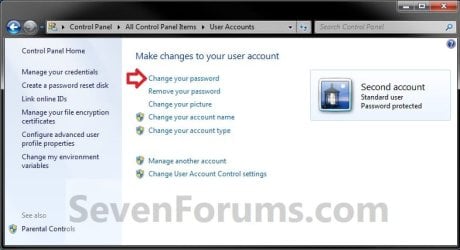
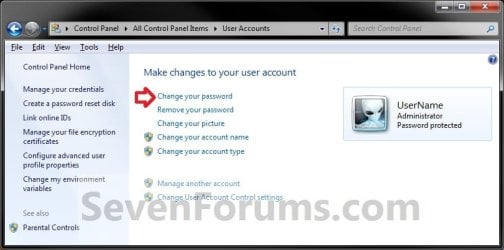
2. Click on Change your password. (see screenshots below) Current_A-1.jpg
Current_S-1.jpg

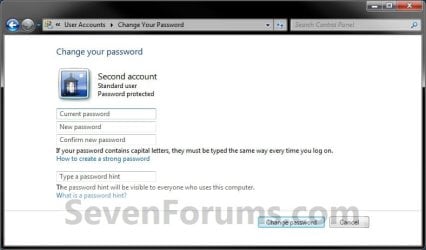
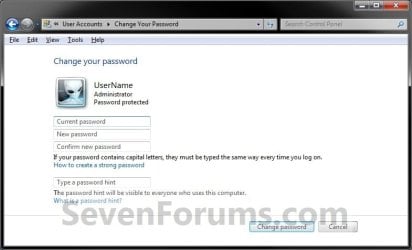
3. Type in your current password that you created previously, type in the new password once, twice to confirm new password, an optional password hint, then click on Change password. (see screenshots below) Current_A-2.jpg
Current_S-2.jpg

4. When finished, you can now close the User Accounts window if you like. (see screenshots below step 2)


OPTION TWO

To Change the Password for Another User Account in "User Accounts"

1. Log on to any administrator account on the computer.
NOTE: You must be logged in as administrator to be able to change another account's password.

2. Open the Control Panel (icons view), and click on User Accounts.

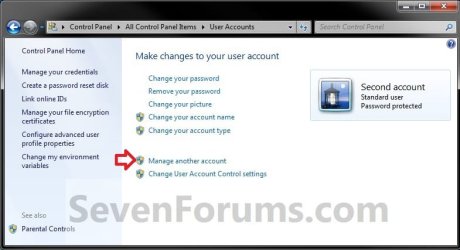
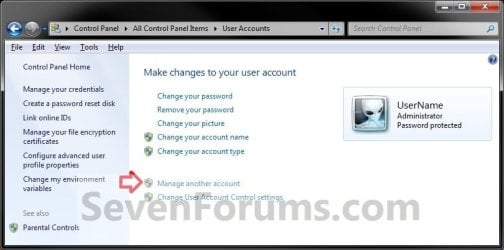
3. Click on Manage another account. (see screenshots below) Other_A-1.jpg
Other_S-1.jpg

4. If prompted by UAC, then click on Yes (if logged in as administrator) or type in the administrator's password (if logged in as standard user).

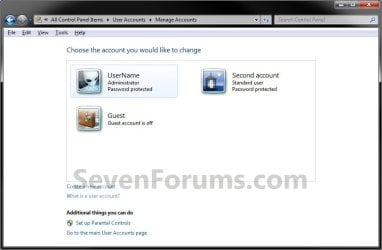
5. Select the user account that you want to change the password of. (see screenshot below) Other-select.jpg
6. Click on Change the password. (see screenshot below) Other_A-2.jpg
7. Type in the new password once, twice to confirm new password, an optional password hint, then click on Change password. (see screenshot below) Other-A-3.jpg
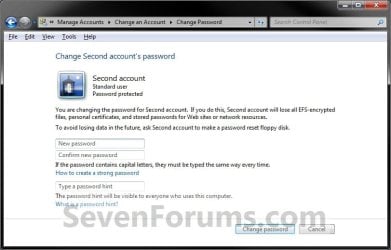
8. When finished, you can now close the Change an Account window if you like. (see screenshot below step 6)


OPTION THREE

To Change the Password for Any User Account in Command Prompt

1. Open an elevated command prompt.

2. Do step 3 or 4 below for which command you would prefer to use.

3. To Change User Account's Password A) In the elevated command prompt, type the command below and press Enter. (see screenshot below)
NOTE: Substitute UserName in the command below with the actual user name of the user account on the computer that you want to change the password for. Substitute NewPassword in the command below with the password you want for this user account. net user UserName NewPassword


For example: My user account's name is Brink and I want to change the password to MyPassword, so I would type this below exactly and press Enter.


net user Brink MyPassword
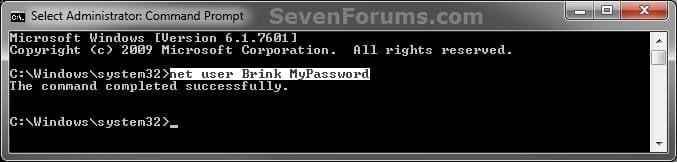

CMD-2.jpg
C) Go to step 5 below.
4. To Change or Remove User Account's Password

   Note
To Change Password = Enter a password when prompted.

To Remove Password = Press Enter without entering a password when prompted.

A) In the elevated command prompt, type the command below and press Enter. (see screenshot below)
NOTE: Substitute UserName in the command below with the actual user name of the user account on the computer that you want to change the password for. net user UserName *


For example: My user account's name is Brink, so I would type this below exactly and press Enter.


net user Brink *
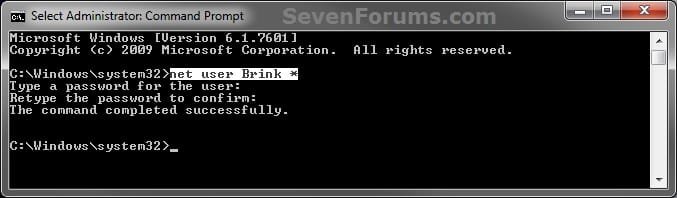

CMD-1.jpg
B) When prompted, enter a password twice, and press Enter after each time. (see screenshot above)
NOTE: You will not see the password as you are typing it.

C) Go to step 5 below.
5. If sucessfully changed, then you can close the elevated command prompt.
That's it,
Shawn


Last edited:
Hi. I followed your guide, but I don't get prompted for a password at LOG IN to that specific username account. And my PC has only one to begin with, no guest account. I want to set a password at LOG IN to this account; and not on screen saver or anything. Just to log in. Weather the machine was rebooted or switched accounts (but not on the screen saver). Thank You!!!
 

My Computer My Computer

Computer type
PC/Desktop
Computer Manufacturer/Model Number
*MY* production
OS
Microsoft Windows 7 Ultimate 64Bit
CPU
Intel(R) i7(TM) @ 3.50GHz
Motherboard
ASUS P34
Memory
32GB
Graphics Card(s)
NVIDIA GeForce 9500 GT 1GB
Sound Card
some onboard sound
Monitor(s) Displays
Dell E228WFP
Screen Resolution
1680x1050 pixs
Hard Drives
Western Digital Caviar 2TB

Western Digital Passport 320GB
(portable drive)

OCZ Vector 256GB SSD
PSU
Antec 750W
Case
Coolermaster Storm Scout
Cooling
ZALMAN 120mm 2 Ball Cooling Fan x 4
Keyboard
A4Tech
Mouse
A4Tech NB-75D (Battery Free)
Internet Speed
Comcast Cable Internet
Browser
Google Chrome
Other Info
Second machine I built
Hello Ilya,

The tutorial will only create a password for the user account if successfully done. First make sure that the user account is password protected now.

Here are a few items to check for what you wanted:
Hope this helps, :)
Shawn
 

My Computer My Computer

Computer type
PC/Desktop
Computer Manufacturer/Model Number
Self built custom
OS
64-bit Windows 11 Pro for Workstations
CPU
Intel i7-8700K OC'd to 5 GHz
Motherboard
ASUS ROG Maximus XI Formula Z390
Memory
64 GB (4x16GB) G.SKILL TridentZ RGB DDR4 3600 MHz
Graphics Card(s)
ASUS ROG-STRIX-GTX1080TI-O11G-GAMING
Sound Card
Integrated
Monitor(s) Displays
2 x Samsung Odyssey G7 27"
Screen Resolution
2560x1440
Hard Drives
1TB Samsung 990 PRO M.2,
4TB Samsung 990 PRO PRO M.2,
TerraMaster F8 SSD Plus NAS
PSU
Seasonic Prime Titanium 850W
Case
Thermaltake Core P3
Cooling
Corsair Hydro H115i
Keyboard
Logitech wireless K800
Mouse
Logitech MX Master 4
Internet Speed
2 Gb/s Download and 100 Mb/s Upload
Antivirus
Malwarebyte Anti-Malware Premium
Browser
Google Chrome
Other Info
Logitech Z625 speaker system,
Logitech BRIO 4K Pro webcam,
HP Color LaserJet Pro MFP M477fdn,
APC SMART-UPS RT 1000 XL - SURT1000XLI,
Galaxy S23 Plus phone
Hello Ilya,

The tutorial will only create a password for the user account if successfully done. First make sure that the user account is password protected now.
Shawn

THANK YOU!! The issue is solved. Thank you Shawn.
 

My Computer My Computer

Computer type
PC/Desktop
Computer Manufacturer/Model Number
*MY* production
OS
Microsoft Windows 7 Ultimate 64Bit
CPU
Intel(R) i7(TM) @ 3.50GHz
Motherboard
ASUS P34
Memory
32GB
Graphics Card(s)
NVIDIA GeForce 9500 GT 1GB
Sound Card
some onboard sound
Monitor(s) Displays
Dell E228WFP
Screen Resolution
1680x1050 pixs
Hard Drives
Western Digital Caviar 2TB

Western Digital Passport 320GB
(portable drive)

OCZ Vector 256GB SSD
PSU
Antec 750W
Case
Coolermaster Storm Scout
Cooling
ZALMAN 120mm 2 Ball Cooling Fan x 4
Keyboard
A4Tech
Mouse
A4Tech NB-75D (Battery Free)
Internet Speed
Comcast Cable Internet
Browser
Google Chrome
Other Info
Second machine I built
You're most welcome. I'm happy to hear that you got it sorted. :)
 

My Computer My Computer

Computer type
PC/Desktop
Computer Manufacturer/Model Number
Self built custom
OS
64-bit Windows 11 Pro for Workstations
CPU
Intel i7-8700K OC'd to 5 GHz
Motherboard
ASUS ROG Maximus XI Formula Z390
Memory
64 GB (4x16GB) G.SKILL TridentZ RGB DDR4 3600 MHz
Graphics Card(s)
ASUS ROG-STRIX-GTX1080TI-O11G-GAMING
Sound Card
Integrated
Monitor(s) Displays
2 x Samsung Odyssey G7 27"
Screen Resolution
2560x1440
Hard Drives
1TB Samsung 990 PRO M.2,
4TB Samsung 990 PRO PRO M.2,
TerraMaster F8 SSD Plus NAS
PSU
Seasonic Prime Titanium 850W
Case
Thermaltake Core P3
Cooling
Corsair Hydro H115i
Keyboard
Logitech wireless K800
Mouse
Logitech MX Master 4
Internet Speed
2 Gb/s Download and 100 Mb/s Upload
Antivirus
Malwarebyte Anti-Malware Premium
Browser
Google Chrome
Other Info
Logitech Z625 speaker system,
Logitech BRIO 4K Pro webcam,
HP Color LaserJet Pro MFP M477fdn,
APC SMART-UPS RT 1000 XL - SURT1000XLI,
Galaxy S23 Plus phone
I have a guest account and have been locked out of my Admin account.
I can open an elevated CMD here (opens to system32) but when I try any of the given methods, I get -
"The user name could not be found"
 

My Computer My Computer

Computer Manufacturer/Model Number
Lenovo Y560
OS
Windows 7 Home Premium x64
CPU
Intel Core i5
Motherboard
M460 @ 2.53GHz
Memory
4 GB
Graphics Card(s)
ATI Mobility Radeon HD 5370

My Computer My Computer

Computer type
PC/Desktop
Computer Manufacturer/Model Number
Self built custom
OS
64-bit Windows 11 Pro for Workstations
CPU
Intel i7-8700K OC'd to 5 GHz
Motherboard
ASUS ROG Maximus XI Formula Z390
Memory
64 GB (4x16GB) G.SKILL TridentZ RGB DDR4 3600 MHz
Graphics Card(s)
ASUS ROG-STRIX-GTX1080TI-O11G-GAMING
Sound Card
Integrated
Monitor(s) Displays
2 x Samsung Odyssey G7 27"
Screen Resolution
2560x1440
Hard Drives
1TB Samsung 990 PRO M.2,
4TB Samsung 990 PRO PRO M.2,
TerraMaster F8 SSD Plus NAS
PSU
Seasonic Prime Titanium 850W
Case
Thermaltake Core P3
Cooling
Corsair Hydro H115i
Keyboard
Logitech wireless K800
Mouse
Logitech MX Master 4
Internet Speed
2 Gb/s Download and 100 Mb/s Upload
Antivirus
Malwarebyte Anti-Malware Premium
Browser
Google Chrome
Other Info
Logitech Z625 speaker system,
Logitech BRIO 4K Pro webcam,
HP Color LaserJet Pro MFP M477fdn,
APC SMART-UPS RT 1000 XL - SURT1000XLI,
Galaxy S23 Plus phone
This last Monday 03, i changed my Log On OS password after a year of using the same...

Just to mention that its always good to change sometimes an existing password.

This tutorial make it easy for everyone.
 

My Computer My Computer

Computer type
PC/Desktop
Computer Manufacturer/Model Number
Custom Build
OS
Windows 7 Professional SP1 - x64 [Non-UEFI Boot]
CPU
Ivy Bridge Core i5 3570K (Delidded)
Motherboard
Asus P8Z77-V LE PLUS
Memory
G.Skill "Ares" DDR3 PC3-12800 - 1600MHz (16Gb)
Graphics Card(s)
Asus Dual-RX480-O4G
Sound Card
Creative Sound Blaster Z w/5.1 sound system
Monitor(s) Displays
Asus IPS 23"
Screen Resolution
16/9
Hard Drives
Internal:
500Go Sata 6Gb/s (x2)
500Go Sata 3Gb/s (x2)
SSD 60Go Sata 6Gb/s
PSU
In Win C 900W Series 80+ Platinum
Case
Thermaltake Chaser A71
Cooling
Custom Water Cooling Loop
Keyboard
Cooler Master QuickFire XTi
Mouse
Razer Imperator 2012 (4G)
Antivirus
MSE
Browser
IE 11.0.xxx Rtm
Other Info
"Raid0" with Intel Smart Response Technology (HDD/SSD)
Password Did Not Meet Requirements

per "How to Change the Password for Your or Another User Account in Windows 7"

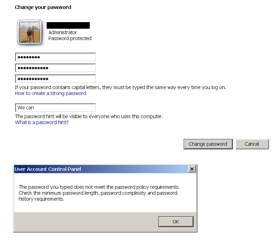
I tried your steps 1, 2 and 3 but run into the same issue each time ... "The password does not meet the password policy requirements. Check the minimum password length (8 char), password complexity (upper and lower case letters, incl number and special character), and password history requirements (no consecutive letters from username, or passwords used on other MS accounts/apps).

Any insight?
 
Last edited:

My Computer My Computer

Computer type
PC/Desktop
Computer Manufacturer/Model Number
Hp
OS
Windows 7 professional 64bit
CPU
I5
Memory
8 gbytes
Antivirus
Mcafee
Browser
Various

My Computer My Computer

Computer type
PC/Desktop
Computer Manufacturer/Model Number
Self built custom
OS
64-bit Windows 11 Pro for Workstations
CPU
Intel i7-8700K OC'd to 5 GHz
Motherboard
ASUS ROG Maximus XI Formula Z390
Memory
64 GB (4x16GB) G.SKILL TridentZ RGB DDR4 3600 MHz
Graphics Card(s)
ASUS ROG-STRIX-GTX1080TI-O11G-GAMING
Sound Card
Integrated
Monitor(s) Displays
2 x Samsung Odyssey G7 27"
Screen Resolution
2560x1440
Hard Drives
1TB Samsung 990 PRO M.2,
4TB Samsung 990 PRO PRO M.2,
TerraMaster F8 SSD Plus NAS
PSU
Seasonic Prime Titanium 850W
Case
Thermaltake Core P3
Cooling
Corsair Hydro H115i
Keyboard
Logitech wireless K800
Mouse
Logitech MX Master 4
Internet Speed
2 Gb/s Download and 100 Mb/s Upload
Antivirus
Malwarebyte Anti-Malware Premium
Browser
Google Chrome
Other Info
Logitech Z625 speaker system,
Logitech BRIO 4K Pro webcam,
HP Color LaserJet Pro MFP M477fdn,
APC SMART-UPS RT 1000 XL - SURT1000XLI,
Galaxy S23 Plus phone
Thank you, but no luck

Interesting information, but changes did not help. Initial setting was "disabled". Tried enabled, but no change in outcome.
 

My Computer My Computer

Computer type
PC/Desktop
Computer Manufacturer/Model Number
Hp
OS
Windows 7 professional 64bit
CPU
I5
Memory
8 gbytes
Antivirus
Mcafee
Browser
Various
Just to verify, but did you also check the "Minimum password length" policy?
 

My Computer My Computer

Computer type
PC/Desktop
Computer Manufacturer/Model Number
Self built custom
OS
64-bit Windows 11 Pro for Workstations
CPU
Intel i7-8700K OC'd to 5 GHz
Motherboard
ASUS ROG Maximus XI Formula Z390
Memory
64 GB (4x16GB) G.SKILL TridentZ RGB DDR4 3600 MHz
Graphics Card(s)
ASUS ROG-STRIX-GTX1080TI-O11G-GAMING
Sound Card
Integrated
Monitor(s) Displays
2 x Samsung Odyssey G7 27"
Screen Resolution
2560x1440
Hard Drives
1TB Samsung 990 PRO M.2,
4TB Samsung 990 PRO PRO M.2,
TerraMaster F8 SSD Plus NAS
PSU
Seasonic Prime Titanium 850W
Case
Thermaltake Core P3
Cooling
Corsair Hydro H115i
Keyboard
Logitech wireless K800
Mouse
Logitech MX Master 4
Internet Speed
2 Gb/s Download and 100 Mb/s Upload
Antivirus
Malwarebyte Anti-Malware Premium
Browser
Google Chrome
Other Info
Logitech Z625 speaker system,
Logitech BRIO 4K Pro webcam,
HP Color LaserJet Pro MFP M477fdn,
APC SMART-UPS RT 1000 XL - SURT1000XLI,
Galaxy S23 Plus phone
Still no luck

Thanks, OK ... Minimum password length was set to zero. I changed it to 8 and tried again. Still no luck.
 

My Computer My Computer

Computer type
PC/Desktop
Computer Manufacturer/Model Number
Hp
OS
Windows 7 professional 64bit
CPU
I5
Memory
8 gbytes
Antivirus
Mcafee
Browser
Various
Does it accept the password if you typed one that met all the requirements you mentioned below?

Check the minimum password length (8 char), password complexity (upper and lower case letters, incl number and special character)
 

My Computer My Computer

Computer type
PC/Desktop
Computer Manufacturer/Model Number
Self built custom
OS
64-bit Windows 11 Pro for Workstations
CPU
Intel i7-8700K OC'd to 5 GHz
Motherboard
ASUS ROG Maximus XI Formula Z390
Memory
64 GB (4x16GB) G.SKILL TridentZ RGB DDR4 3600 MHz
Graphics Card(s)
ASUS ROG-STRIX-GTX1080TI-O11G-GAMING
Sound Card
Integrated
Monitor(s) Displays
2 x Samsung Odyssey G7 27"
Screen Resolution
2560x1440
Hard Drives
1TB Samsung 990 PRO M.2,
4TB Samsung 990 PRO PRO M.2,
TerraMaster F8 SSD Plus NAS
PSU
Seasonic Prime Titanium 850W
Case
Thermaltake Core P3
Cooling
Corsair Hydro H115i
Keyboard
Logitech wireless K800
Mouse
Logitech MX Master 4
Internet Speed
2 Gb/s Download and 100 Mb/s Upload
Antivirus
Malwarebyte Anti-Malware Premium
Browser
Google Chrome
Other Info
Logitech Z625 speaker system,
Logitech BRIO 4K Pro webcam,
HP Color LaserJet Pro MFP M477fdn,
APC SMART-UPS RT 1000 XL - SURT1000XLI,
Galaxy S23 Plus phone
Thank you for your response. Unfortunately, I am far too familiar with password complexity standards. Win 7 Pro (as user with full administrator privileges) will not accept my request to change password, even though the complexity is above and beyond what is generally considered very strong.
 

My Computer My Computer

Computer type
PC/Desktop
Computer Manufacturer/Model Number
Hp
OS
Windows 7 professional 64bit
CPU
I5
Memory
8 gbytes
Antivirus
Mcafee
Browser
Various
Did you include a character that is not supported?

As a test, try a few different password combinations that just meet the min requirements.
 

My Computer My Computer

Computer type
PC/Desktop
Computer Manufacturer/Model Number
Self built custom
OS
64-bit Windows 11 Pro for Workstations
CPU
Intel i7-8700K OC'd to 5 GHz
Motherboard
ASUS ROG Maximus XI Formula Z390
Memory
64 GB (4x16GB) G.SKILL TridentZ RGB DDR4 3600 MHz
Graphics Card(s)
ASUS ROG-STRIX-GTX1080TI-O11G-GAMING
Sound Card
Integrated
Monitor(s) Displays
2 x Samsung Odyssey G7 27"
Screen Resolution
2560x1440
Hard Drives
1TB Samsung 990 PRO M.2,
4TB Samsung 990 PRO PRO M.2,
TerraMaster F8 SSD Plus NAS
PSU
Seasonic Prime Titanium 850W
Case
Thermaltake Core P3
Cooling
Corsair Hydro H115i
Keyboard
Logitech wireless K800
Mouse
Logitech MX Master 4
Internet Speed
2 Gb/s Download and 100 Mb/s Upload
Antivirus
Malwarebyte Anti-Malware Premium
Browser
Google Chrome
Other Info
Logitech Z625 speaker system,
Logitech BRIO 4K Pro webcam,
HP Color LaserJet Pro MFP M477fdn,
APC SMART-UPS RT 1000 XL - SURT1000XLI,
Galaxy S23 Plus phone
Thank you for the suggestion. I have tried more than five different combinations. No Luck
 

My Computer My Computer

Computer type
PC/Desktop
Computer Manufacturer/Model Number
Hp
OS
Windows 7 professional 64bit
CPU
I5
Memory
8 gbytes
Antivirus
Mcafee
Browser
Various

My Computer My Computer

Computer type
PC/Desktop
Computer Manufacturer/Model Number
Self built custom
OS
64-bit Windows 11 Pro for Workstations
CPU
Intel i7-8700K OC'd to 5 GHz
Motherboard
ASUS ROG Maximus XI Formula Z390
Memory
64 GB (4x16GB) G.SKILL TridentZ RGB DDR4 3600 MHz
Graphics Card(s)
ASUS ROG-STRIX-GTX1080TI-O11G-GAMING
Sound Card
Integrated
Monitor(s) Displays
2 x Samsung Odyssey G7 27"
Screen Resolution
2560x1440
Hard Drives
1TB Samsung 990 PRO M.2,
4TB Samsung 990 PRO PRO M.2,
TerraMaster F8 SSD Plus NAS
PSU
Seasonic Prime Titanium 850W
Case
Thermaltake Core P3
Cooling
Corsair Hydro H115i
Keyboard
Logitech wireless K800
Mouse
Logitech MX Master 4
Internet Speed
2 Gb/s Download and 100 Mb/s Upload
Antivirus
Malwarebyte Anti-Malware Premium
Browser
Google Chrome
Other Info
Logitech Z625 speaker system,
Logitech BRIO 4K Pro webcam,
HP Color LaserJet Pro MFP M477fdn,
APC SMART-UPS RT 1000 XL - SURT1000XLI,
Galaxy S23 Plus phone
continued failure to reset password

Interesting option. There must be something very odd. The problem has plagued me for years.
 

Attachments

  • failed password change.png
    failed password change.png
    12 KB · Views: 80

My Computer My Computer

Computer type
PC/Desktop
Computer Manufacturer/Model Number
Hp
OS
Windows 7 professional 64bit
CPU
I5
Memory
8 gbytes
Antivirus
Mcafee
Browser
Various
Is this still after resetting security policies back to default?
 

My Computer My Computer

Computer type
PC/Desktop
Computer Manufacturer/Model Number
Self built custom
OS
64-bit Windows 11 Pro for Workstations
CPU
Intel i7-8700K OC'd to 5 GHz
Motherboard
ASUS ROG Maximus XI Formula Z390
Memory
64 GB (4x16GB) G.SKILL TridentZ RGB DDR4 3600 MHz
Graphics Card(s)
ASUS ROG-STRIX-GTX1080TI-O11G-GAMING
Sound Card
Integrated
Monitor(s) Displays
2 x Samsung Odyssey G7 27"
Screen Resolution
2560x1440
Hard Drives
1TB Samsung 990 PRO M.2,
4TB Samsung 990 PRO PRO M.2,
TerraMaster F8 SSD Plus NAS
PSU
Seasonic Prime Titanium 850W
Case
Thermaltake Core P3
Cooling
Corsair Hydro H115i
Keyboard
Logitech wireless K800
Mouse
Logitech MX Master 4
Internet Speed
2 Gb/s Download and 100 Mb/s Upload
Antivirus
Malwarebyte Anti-Malware Premium
Browser
Google Chrome
Other Info
Logitech Z625 speaker system,
Logitech BRIO 4K Pro webcam,
HP Color LaserJet Pro MFP M477fdn,
APC SMART-UPS RT 1000 XL - SURT1000XLI,
Galaxy S23 Plus phone
Back
Top