User Account Picture - Change

How to Change Your User Account Logon Picture in Windows 7

   Information
This will show you how to choose and change your user account logon picture that will display on the Windows 7 Welcome screen and Start menu to any .bmp, .dip, .rle, .gif, .jpg, or .png image that you select.

The image should only be up to 128x128 pixels in size for the best display results and to prevent it from being automatically cropped to fit the user picture display box. If it is bigger than this, just resize it. Otherwise, your image may be cut off or not centered properly.
   Note
These are hidden locations.

Accounts | Default Picture Location All - Default Pictures | C:\ProgramData\Microsoft\User Account Pictures\Default Pictures
Standard - Administrator | C:\ProgramData\Microsoft\User Account Pictures\user.bmp
Guest | C:\ProgramData\Microsoft\User Account Pictures\guest.bmp


The user account picture is stored in the hidden folder below as (username).bmp.
C:\Users\(username)\AppData\Local\Temp


Here's How:
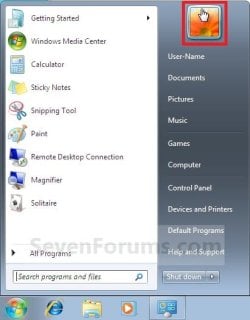
1. Open the Start menu, and click on your user picture. (see screenshot below)
Start_Menu.jpg
A) Go to step 3.
OR

2. Open the Control Panel (icons view), and click on the User Accounts icon.
A) Click on the Change your picture link. (see screenshot below)

User_Accounts.jpg
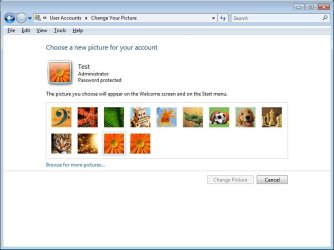
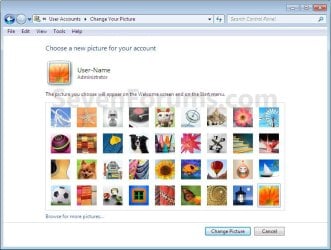
3. Select a picture from the default Windows 7 pictures, or click on the Browse for more pictures link and navigate to a image of your own to use instead. (see screenshot below)
Pictures.jpg
A) Click on the Change Picture button. (see screenshot above)
That's it,
Shawn


Last edited:
How would i go about deleting the picture and the frame entirely? I can't find any answers, but alot of questions when searching it on google. Help pleasee.
 

My Computer

OS
Windows 7
Hello Bryce, and welcome to Seven Forums.

Sorry, but you cannot do so unless you use some 3rd party program like Vista Start Menu to replace the Start Menu with.

Hope this helps,
Shawn
 

My Computer

Computer type
PC/Desktop
Computer Manufacturer/Model Number
Self built custom
OS
64-bit Windows 11 Pro for Workstations
CPU
Intel i7-8700K OC'd to 5 GHz
Motherboard
ASUS ROG Maximus XI Formula Z390
Memory
64 GB (4x16GB) G.SKILL TridentZ RGB DDR4 3600 MHz
Graphics Card(s)
ASUS ROG-STRIX-GTX1080TI-O11G-GAMING
Sound Card
Integrated
Monitor(s) Displays
2 x Samsung Odyssey G7 27"
Screen Resolution
2560x1440
Hard Drives
1TB Samsung 990 PRO M.2,
4TB Samsung 990 PRO PRO M.2,
TerraMaster F8 SSD Plus NAS
PSU
Seasonic Prime Titanium 850W
Case
Thermaltake Core P3
Cooling
Corsair Hydro H115i
Keyboard
Logitech wireless K800
Mouse
Logitech MX Master 4
Internet Speed
2 Gb/s Download and 100 Mb/s Upload
Antivirus
Malwarebyte Anti-Malware Premium
Browser
Google Chrome
Other Info
Logitech Z625 speaker system,
Logitech BRIO 4K Pro webcam,
HP Color LaserJet Pro MFP M477fdn,
APC SMART-UPS RT 1000 XL - SURT1000XLI,
Galaxy S23 Plus phone
Thanks for the warm welcome. But i was referring to picture on the login screen. Does the answer remain the same?

Thanks,
Bryce
 

My Computer

OS
Windows 7

My Computer

Computer type
PC/Desktop
Computer Manufacturer/Model Number
Self built custom
OS
64-bit Windows 11 Pro for Workstations
CPU
Intel i7-8700K OC'd to 5 GHz
Motherboard
ASUS ROG Maximus XI Formula Z390
Memory
64 GB (4x16GB) G.SKILL TridentZ RGB DDR4 3600 MHz
Graphics Card(s)
ASUS ROG-STRIX-GTX1080TI-O11G-GAMING
Sound Card
Integrated
Monitor(s) Displays
2 x Samsung Odyssey G7 27"
Screen Resolution
2560x1440
Hard Drives
1TB Samsung 990 PRO M.2,
4TB Samsung 990 PRO PRO M.2,
TerraMaster F8 SSD Plus NAS
PSU
Seasonic Prime Titanium 850W
Case
Thermaltake Core P3
Cooling
Corsair Hydro H115i
Keyboard
Logitech wireless K800
Mouse
Logitech MX Master 4
Internet Speed
2 Gb/s Download and 100 Mb/s Upload
Antivirus
Malwarebyte Anti-Malware Premium
Browser
Google Chrome
Other Info
Logitech Z625 speaker system,
Logitech BRIO 4K Pro webcam,
HP Color LaserJet Pro MFP M477fdn,
APC SMART-UPS RT 1000 XL - SURT1000XLI,
Galaxy S23 Plus phone
Dear Brink,

Can we change the position of user account's picture on Logon Screen? I mean that if I can move the picture to the new position, top-right for example.

Thanks :)
 

My Computer

Computer Manufacturer/Model Number
HP Compaq 6520s
OS
Windows 7
CPU
Core 2 Duo
Memory
3GB
Hello Chung, and welcome to Seven Forums.

Sorry, but not unless some unknown 3rd party program can do it. :(
 

My Computer

Computer type
PC/Desktop
Computer Manufacturer/Model Number
Self built custom
OS
64-bit Windows 11 Pro for Workstations
CPU
Intel i7-8700K OC'd to 5 GHz
Motherboard
ASUS ROG Maximus XI Formula Z390
Memory
64 GB (4x16GB) G.SKILL TridentZ RGB DDR4 3600 MHz
Graphics Card(s)
ASUS ROG-STRIX-GTX1080TI-O11G-GAMING
Sound Card
Integrated
Monitor(s) Displays
2 x Samsung Odyssey G7 27"
Screen Resolution
2560x1440
Hard Drives
1TB Samsung 990 PRO M.2,
4TB Samsung 990 PRO PRO M.2,
TerraMaster F8 SSD Plus NAS
PSU
Seasonic Prime Titanium 850W
Case
Thermaltake Core P3
Cooling
Corsair Hydro H115i
Keyboard
Logitech wireless K800
Mouse
Logitech MX Master 4
Internet Speed
2 Gb/s Download and 100 Mb/s Upload
Antivirus
Malwarebyte Anti-Malware Premium
Browser
Google Chrome
Other Info
Logitech Z625 speaker system,
Logitech BRIO 4K Pro webcam,
HP Color LaserJet Pro MFP M477fdn,
APC SMART-UPS RT 1000 XL - SURT1000XLI,
Galaxy S23 Plus phone
Hello Chung, and welcome to Seven Forums.

Sorry, but not unless some unknown 3rd party program can do it. :(

Thanks anyway. I can wait :cool:
 

My Computer

Computer Manufacturer/Model Number
HP Compaq 6520s
OS
Windows 7
CPU
Core 2 Duo
Memory
3GB
Thanks for the tutorial Brink.

Do you know if there's a way (perhaps via group policy or a 3rd party tool) to allow a domain user to update their user account picture once and keep the latest available on whichever domain computer they log on to?
 

My Computer

Computer Manufacturer/Model Number
DIY
OS
Windows 7
CPU
Intel Core i7 920
Motherboard
Asus P6T
Memory
Corsair DDR3-1600 C8 2 GB x 3
Graphics Card(s)
EVGA GeForce GTX 275
Monitor(s) Displays
Samsung 46" LCD TV (LN46A860)
Hard Drives
Intel X25-M G2 160GB
Samsung 1.5 TB x 10
PSU
Corsair 620W
Case
Antec P182SE
You're Windy, and welcome to Seven Forums.

I do not have much experience with domains, but I believe that it is determined by the user account on the computer connecting to the domain instead. I do not know of a way. :(
 

My Computer

Computer type
PC/Desktop
Computer Manufacturer/Model Number
Self built custom
OS
64-bit Windows 11 Pro for Workstations
CPU
Intel i7-8700K OC'd to 5 GHz
Motherboard
ASUS ROG Maximus XI Formula Z390
Memory
64 GB (4x16GB) G.SKILL TridentZ RGB DDR4 3600 MHz
Graphics Card(s)
ASUS ROG-STRIX-GTX1080TI-O11G-GAMING
Sound Card
Integrated
Monitor(s) Displays
2 x Samsung Odyssey G7 27"
Screen Resolution
2560x1440
Hard Drives
1TB Samsung 990 PRO M.2,
4TB Samsung 990 PRO PRO M.2,
TerraMaster F8 SSD Plus NAS
PSU
Seasonic Prime Titanium 850W
Case
Thermaltake Core P3
Cooling
Corsair Hydro H115i
Keyboard
Logitech wireless K800
Mouse
Logitech MX Master 4
Internet Speed
2 Gb/s Download and 100 Mb/s Upload
Antivirus
Malwarebyte Anti-Malware Premium
Browser
Google Chrome
Other Info
Logitech Z625 speaker system,
Logitech BRIO 4K Pro webcam,
HP Color LaserJet Pro MFP M477fdn,
APC SMART-UPS RT 1000 XL - SURT1000XLI,
Galaxy S23 Plus phone
is there a way to find the photo that I'm currently using?

I really like the image I have, but I'm unable to find the original to reuse in another account!

can I find the image that is being actively used? so I can steal it and use it again for my new account?

odd request I know,
but I'll NEVER be able to re google where I found this image. :(

any ideas where the active user account image is stored?

I most likely had photoshop open,
copy/pasted, resized it and didnt save the orig nor the project file. :-/
 

My Computer

Computer Manufacturer/Model Number
theCloud
OS
Win 2k8 R2 64bit
CPU
16x cores. 2 x Intel Xeon E5-2670, eight-core "Sandy Bridge"
Memory
60.5 GB of memory
Hard Drives
3370GB
Internet Speed
64mb down | 20mb up
Hello DevLano, and welcome to Seven Forums.

The image will be stored on your computer somewhere. If you know the file extension of it (BMP, GIF, JPG, or PNG), then you can do a search on your C: drive using *jpg (or whatever the file extension is) to find all them to go through to find it. It may take a bit, but you should be able to find it this way.

Hope this helps,
Shawn
 

My Computer

Computer type
PC/Desktop
Computer Manufacturer/Model Number
Self built custom
OS
64-bit Windows 11 Pro for Workstations
CPU
Intel i7-8700K OC'd to 5 GHz
Motherboard
ASUS ROG Maximus XI Formula Z390
Memory
64 GB (4x16GB) G.SKILL TridentZ RGB DDR4 3600 MHz
Graphics Card(s)
ASUS ROG-STRIX-GTX1080TI-O11G-GAMING
Sound Card
Integrated
Monitor(s) Displays
2 x Samsung Odyssey G7 27"
Screen Resolution
2560x1440
Hard Drives
1TB Samsung 990 PRO M.2,
4TB Samsung 990 PRO PRO M.2,
TerraMaster F8 SSD Plus NAS
PSU
Seasonic Prime Titanium 850W
Case
Thermaltake Core P3
Cooling
Corsair Hydro H115i
Keyboard
Logitech wireless K800
Mouse
Logitech MX Master 4
Internet Speed
2 Gb/s Download and 100 Mb/s Upload
Antivirus
Malwarebyte Anti-Malware Premium
Browser
Google Chrome
Other Info
Logitech Z625 speaker system,
Logitech BRIO 4K Pro webcam,
HP Color LaserJet Pro MFP M477fdn,
APC SMART-UPS RT 1000 XL - SURT1000XLI,
Galaxy S23 Plus phone
I would also like to use my picture, from Vista upgrade. I can not find it. I dont know the name either. As its from the Vista opeatioin system its not with the default Win 7 files.

Any idea where the file is kept for ones account?
 

My Computer

OS
Windows 7 Home Premium
Hello Phil,

Do you have a screenshot of this image or something to go to help us help you with it? Here's a screenshot of the default display picture images from Vista. Is it one of these?

Vista.jpg

Hope this helps,
Shawn
 

My Computer

Computer type
PC/Desktop
Computer Manufacturer/Model Number
Self built custom
OS
64-bit Windows 11 Pro for Workstations
CPU
Intel i7-8700K OC'd to 5 GHz
Motherboard
ASUS ROG Maximus XI Formula Z390
Memory
64 GB (4x16GB) G.SKILL TridentZ RGB DDR4 3600 MHz
Graphics Card(s)
ASUS ROG-STRIX-GTX1080TI-O11G-GAMING
Sound Card
Integrated
Monitor(s) Displays
2 x Samsung Odyssey G7 27"
Screen Resolution
2560x1440
Hard Drives
1TB Samsung 990 PRO M.2,
4TB Samsung 990 PRO PRO M.2,
TerraMaster F8 SSD Plus NAS
PSU
Seasonic Prime Titanium 850W
Case
Thermaltake Core P3
Cooling
Corsair Hydro H115i
Keyboard
Logitech wireless K800
Mouse
Logitech MX Master 4
Internet Speed
2 Gb/s Download and 100 Mb/s Upload
Antivirus
Malwarebyte Anti-Malware Premium
Browser
Google Chrome
Other Info
Logitech Z625 speaker system,
Logitech BRIO 4K Pro webcam,
HP Color LaserJet Pro MFP M477fdn,
APC SMART-UPS RT 1000 XL - SURT1000XLI,
Galaxy S23 Plus phone
Is there some reason that when I change my account picture it updates the Login Screen and start menu but it does not update the saved passwords box that opens through Internet Explorer?

I changed my picture but it still just shows the silly flower everytime IE does the saved passwords...
 

My Computer

Computer Manufacturer/Model Number
Dell Inspiron 1720
OS
Window 7
CPU
Intel Core2Duo T9300
Memory
4GB Duel Channel
Graphics Card(s)
Nvidia 8600m GT
ty,very helpful
 

My Computer

Computer type
PC/Desktop
Computer Manufacturer/Model Number
Custom - GigaByte Motherboard
OS
Windows 7 Home Premium 32bit.
CPU
amd athlon 62x2 duelcore 4200 2.2ghz
Motherboard
Gigabyte
Memory
2 gig
Graphics Card(s)
nvidia gforce 6400
Hard Drives
western digital
Antivirus
avg
Browser
mozilla
Back
Top