User Folders - Restore Default Location

How to Restore Default Location of User Folders in Windows 7 and Windows 8

   Information
This will show you how to restore the default location of all or a single user folder of your choice in Windows 7 and Windows 8.

   Note
If you have duplicate user folders instead, then you will need to backup the contents of the duplicate user folders, do OPTION TWO below, delete the duplicate folders, then you may need to restart the computer a couple of times first before the default location is restored.

Windows 8.1 Update released on April 8th 2014 via Windows Update, renamed SkyDrive to OneDrive.


CONTENTS:
  • Option One: To Restore Default Location of User Folders in Properties
  • Option Two: To Restore Default Location of User Folders using a BAT file


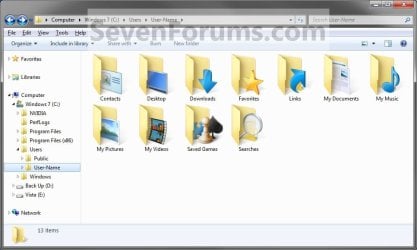
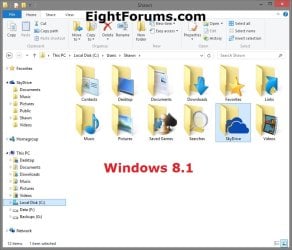
EXAMPLE: User folders
NOTE: This is at the default C:\Users\(user-name) location.
Example1.jpg

Windows_8.1.jpg


OPTION ONE

To Restore Default Location of User Folders in Properties


NOTE: If using this option does not restore the user folder back to the default location, then use OPTION TWO below instead.
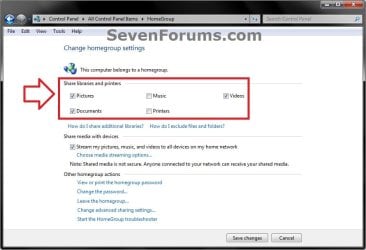
1. If you are in a homegroup, then you will need to change the homegroup settings to no longer share the user folder (ex: My Music) that you want to move first by unchecking the folder and clicking on Save Changes. (see screenshot below)
NOTE: This is so the user folder (ex: My Music) will not be shared on the homegroup anymore.
Homegroup.jpg
2. Press the Windows+R keys to open the Run dialog, type shell:UsersFilesFolder, and press enter.
NOTE: This will open your C:\Users\(user-name) folder.

3. Right click or press and hold on the user folder (ex: My Music) that you want to restore the default location for, and click/tap on Properties.

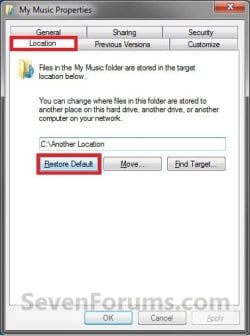
4. Click/tap on the Location tab, and Restore Default button. (See screenshot below)
Properties1.jpg
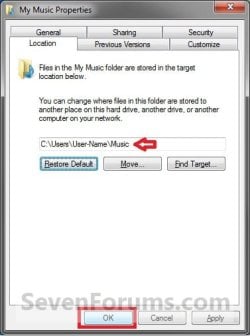
5. Click/tap on OK. (See screenshot below)
NOTE: Notice that the location has changed to the default C:\Users\(user-name) location.
Properties2.jpg
6. Click/tap on Yes. (See screenshot below)
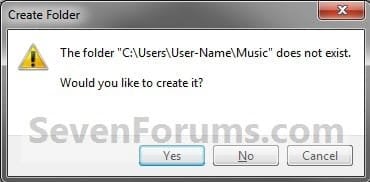
Properties3.jpg

   Note
If you have a folder in the default location named for the user folder already, then you will not see this dialog box.

Windows 8 will not have the "My" in front of the user folder name anymore.

User Folder | Folder Name Contacts |Contacts
Desktop |Desktop
My Documents |Documents
Downloads |Downloads
Favorites |Favorites
Links |Links
My Music |Music
My Pictures |Pictures
OneDrive (Windows 8.1 Update)|OneDrive
Saved Games |Saved Games
Searches |Searches
SkyDrive (Windows 8.1)|SkyDrive
My Videos |Videos


7. Click/tap on Yes. (See screenshot below)
WARNING: If you do not click/tap on Yes, then you will have two copies of this user folder at the C:\Users\(user-name) location. One will be a normal folder (same name) with the contents and the other as the now restored user folder. It is recommended that you click/tap on YES.
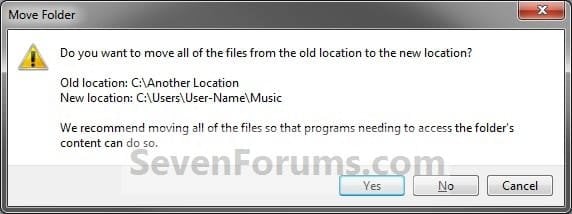
Properties4.jpg
8. After a few seconds when the location has been restored, the Properties window (screenshot under step 5) will then close.

9. If you are in a homegroup, then you can now change the homegroup settings back to share the user folder (ex: My Music) again if you like by checking the folder and clicking on Save Changes. (see screenshot below)
Homegroup.jpg


OPTION TWO

To Restore Default Location of User Folders using a BAT file


   Note
This is an example of the contents of the .bat files below. The parts in red are what will vary per .bat file based on what user folder it is for.

Code:
@echo off 
 
taskkill /f /im explorer.exe
 
timeout /t 2 /nobreak >nul
 
if not exist "%UserProfile%\[B][COLOR=red]Pictures[/COLOR][/B]" mkdir "%UserProfile%\[COLOR=red][B]Pictures[/B][/COLOR]"
 
reg add "HKCU\Software\Microsoft\Windows\CurrentVersion\Explorer\Shell Folders" /v "[COLOR=red][B]My Pictures[/B][/COLOR]" /t REG_SZ /d "C:\Users\%USERNAME%\[COLOR=red][B]Pictures[/B][/COLOR]" /f
 
reg add "HKCU\Software\Microsoft\Windows\CurrentVersion\Explorer\User Shell Folders" /v "[COLOR=red][B]My Pictures[/B][/COLOR]" /t REG_EXPAND_SZ /d %%USERPROFILE%%"\[COLOR=red][B]Pictures[/B][/COLOR]" /f
 
attrib +r -s -h "%USERPROFILE%\[COLOR=red][B]Pictures[/B][/COLOR]" /S /D
 
timeout /t 1 /nobreak >nul
 
start explorer.exe


1. Do step 2 to 13 below for what user folder you need to restore the default location of.


2. To Restore the Default Contacts Folder Location
A) Click/tap on the download button below to download the file below, and go to step 14 below.

Restore_Contacts_Default_Location.bat


Download


3. To Restore the Default Desktop Folder Location
A) Click/tap on the download button below to download the file below, and go to step 14 below.

Restore_Desktop_Default_Location.bat


Download


4. To Restore the Default My Documents Folder Location
A) Click/tap on the download button below to download the file below, and go to step 14 below.

Restore_Documents_Default_Location.bat


Download


5. To Restore the Default Downloads Folder Location
A) Click/tap on the download button below to download the file below, and go to step 14 below.

Restore_Downloads_Default_Location.bat


Download


6. To Restore the Default Favorites Folder Location
A) Click/tap on the download button below to download the file below, and go to step 14 below.

Restore_Favorites_Default_Location.bat


Download


7. To Restore the Default Links Folder Location
A) Click/tap on the download button below to download the file below, and go to step 14 below.

Restore_Links_Default_Location.bat


Download


8. To Restore the Default My Music Folder Location
A) Click/tap on the download button below to download the file below, and go to step 14 below.

Restore_Music_Default_Location.bat


Download


9. To Restore Default OneDrive Folder Location in Windows 8.1 Update
A) Click/tap on the download button below to download the file below, and go to step 14 below.

Restore_OneDrive_Default_Location.bat


Download


10. To Restore the Default My Pictures Folder Location
A) Click/tap on the download button below to download the file below, and go to step 14 below.

Restore_Pictures_Default_Location.bat


Download


11. To Restore the Default Saved Games Folder Location
A) Click/tap on the download button below to download the file below, and go to step 14 below.

Restore_Saved_Games_Default_Location.bat


Download


12. To Restore the Default Searches Folder Location
A) Click/tap on the download button below to download the file below, and go to step 14 below.

Restore_Searches_Default_Location.bat


Download


13. To Restore the Default My Videos Folder Location
A) Click/tap on the download button below to download the file below, and go to step 14 below.

Restore_Videos_Default_Location.bat


Download


14. Save the .bat file to your Desktop.

15. Unblock the downloaded .bat file(s).

16. Double click/tap on the downloaded .bat file to run it.

17. The .bat file will now kill explorer causing your screen to go blank, then open a command prompt to quickly restore the default location of the folder in the registry, restore the default attributes of the folder, restart explorer, and close the command prompt.

18. Repeat step 1 above for any other user folder you need to restore the default location of.

19. When finished, check the user folder(s) to verify that they have been restored to their default location.

20. If the user folder(s) still have not been restored to their default locations, then restart the computer and check again.

21. When restored, copy your files from the old folder location back into your now restored default folder location in "C:\Users\(user-name)".


That's it,
Shawn


Attachments

Last edited:
Lost Location Tabs

I'm missing a Location tab in Properties for the My Documents, My Music and My Pictures folders. The My Videos folder does have a Location tab. Therefore I used Option 2, copied the problem folders to "C:\Jim Copy" and deleted the folders in "C:\Users\Jim". I then did steps 3, 7, and 12 through 20. In step 20 I didn't have to do anything because the default paths were already there. I then did step 23 for Documents, Music and Pictures. When I did step 25, the shell:My Music and shell:My Pictures went to a dead end. I tried shell:My Videos and it took me to the My Videos folder as it should. When I did step 25 for shell:Personal search it took me to a Documents folder instead of My Documents. This Documents folder does have a Location tab. I tried renaming Documents to My Documents but then the folder didn't have a Location tab so I changed it back to Documents. Below are the Users Jim folders before trying to correct it and the Regedit Shell list.
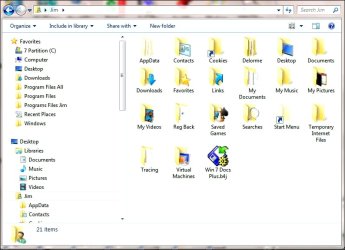
What am I doing wrong? :(
 

Attachments

  • Jim User Folders.jpg
    Jim User Folders.jpg
    201.8 KB · Views: 250
  • Regedit Shell.jpg
    Regedit Shell.jpg
    563.1 KB · Views: 256

My Computer

Computer Manufacturer/Model Number
Toshiba Satellite l500
OS
Microsoft Windows 7 Professional 32 Bit
CPU
Intel Corei3 m330 @2.13GHZ
Motherboard
Toshiba
Memory
4.00 GB
Graphics Card(s)
Intel Graphics Media Accelerator HD
Sound Card
Intel
Screen Resolution
1366 x 768 x59 hertz
Hard Drives
TI105774WOB
PSU
Standard Laptop Supply
Case
Standard Laptop Case
Cooling
Standard Laptop Cooling
Keyboard
Integrated Laptop
Mouse
Mitsumi
Internet Speed
52kbps
Hello Jim,

Have you already restarted the computer a few times? Sometimes it may take a bit and a few restarts for the default folder to return.
 

My Computer

Computer type
PC/Desktop
Computer Manufacturer/Model Number
Self built custom
OS
64-bit Windows 11 Pro for Workstations
CPU
Intel i7-8700K OC'd to 5 GHz
Motherboard
ASUS ROG Maximus XI Formula Z390
Memory
64 GB (4x16GB) G.SKILL TridentZ RGB DDR4 3600 MHz
Graphics Card(s)
ASUS ROG-STRIX-GTX1080TI-O11G-GAMING
Sound Card
Integrated
Monitor(s) Displays
2 x Samsung Odyssey G7 27"
Screen Resolution
2560x1440
Hard Drives
1TB Samsung 990 PRO M.2,
4TB Samsung 990 PRO PRO M.2,
TerraMaster F8 SSD Plus NAS
PSU
Seasonic Prime Titanium 850W
Case
Thermaltake Core P3
Cooling
Corsair Hydro H115i
Keyboard
Logitech wireless K800
Mouse
Logitech MX Master 4
Internet Speed
2 Gb/s Download and 100 Mb/s Upload
Antivirus
Malwarebyte Anti-Malware Premium
Browser
Google Chrome
Other Info
Logitech Z625 speaker system,
Logitech BRIO 4K Pro webcam,
HP Color LaserJet Pro MFP M477fdn,
APC SMART-UPS RT 1000 XL - SURT1000XLI,
Galaxy S23 Plus phone
Hi Brink,
I restarted several times but no change.
 

My Computer

Computer Manufacturer/Model Number
Toshiba Satellite l500
OS
Microsoft Windows 7 Professional 32 Bit
CPU
Intel Corei3 m330 @2.13GHZ
Motherboard
Toshiba
Memory
4.00 GB
Graphics Card(s)
Intel Graphics Media Accelerator HD
Sound Card
Intel
Screen Resolution
1366 x 768 x59 hertz
Hard Drives
TI105774WOB
PSU
Standard Laptop Supply
Case
Standard Laptop Case
Cooling
Standard Laptop Cooling
Keyboard
Integrated Laptop
Mouse
Mitsumi
Internet Speed
52kbps
Ok. Time for plan B.

If you like, you can create a new administrator account, then copy all of the contents of the old user account's C:\Users\(user-name) folders (including hidden AppData folder) into the corresponding new account's C:\Users\(user-name) folder. After everything checks out ok, you can delete the old user account while logged in the new user account.
 

My Computer

Computer type
PC/Desktop
Computer Manufacturer/Model Number
Self built custom
OS
64-bit Windows 11 Pro for Workstations
CPU
Intel i7-8700K OC'd to 5 GHz
Motherboard
ASUS ROG Maximus XI Formula Z390
Memory
64 GB (4x16GB) G.SKILL TridentZ RGB DDR4 3600 MHz
Graphics Card(s)
ASUS ROG-STRIX-GTX1080TI-O11G-GAMING
Sound Card
Integrated
Monitor(s) Displays
2 x Samsung Odyssey G7 27"
Screen Resolution
2560x1440
Hard Drives
1TB Samsung 990 PRO M.2,
4TB Samsung 990 PRO PRO M.2,
TerraMaster F8 SSD Plus NAS
PSU
Seasonic Prime Titanium 850W
Case
Thermaltake Core P3
Cooling
Corsair Hydro H115i
Keyboard
Logitech wireless K800
Mouse
Logitech MX Master 4
Internet Speed
2 Gb/s Download and 100 Mb/s Upload
Antivirus
Malwarebyte Anti-Malware Premium
Browser
Google Chrome
Other Info
Logitech Z625 speaker system,
Logitech BRIO 4K Pro webcam,
HP Color LaserJet Pro MFP M477fdn,
APC SMART-UPS RT 1000 XL - SURT1000XLI,
Galaxy S23 Plus phone
Success

Hurray, It worked. I now have Location tabs. Now I have to clean up Windows Virtual XP. I looks like I'll have to install the programs again in the one that's attached to the new User. :p
 

My Computer

Computer Manufacturer/Model Number
Toshiba Satellite l500
OS
Microsoft Windows 7 Professional 32 Bit
CPU
Intel Corei3 m330 @2.13GHZ
Motherboard
Toshiba
Memory
4.00 GB
Graphics Card(s)
Intel Graphics Media Accelerator HD
Sound Card
Intel
Screen Resolution
1366 x 768 x59 hertz
Hard Drives
TI105774WOB
PSU
Standard Laptop Supply
Case
Standard Laptop Case
Cooling
Standard Laptop Cooling
Keyboard
Integrated Laptop
Mouse
Mitsumi
Internet Speed
52kbps
That's great news Jim. :)
 

My Computer

Computer type
PC/Desktop
Computer Manufacturer/Model Number
Self built custom
OS
64-bit Windows 11 Pro for Workstations
CPU
Intel i7-8700K OC'd to 5 GHz
Motherboard
ASUS ROG Maximus XI Formula Z390
Memory
64 GB (4x16GB) G.SKILL TridentZ RGB DDR4 3600 MHz
Graphics Card(s)
ASUS ROG-STRIX-GTX1080TI-O11G-GAMING
Sound Card
Integrated
Monitor(s) Displays
2 x Samsung Odyssey G7 27"
Screen Resolution
2560x1440
Hard Drives
1TB Samsung 990 PRO M.2,
4TB Samsung 990 PRO PRO M.2,
TerraMaster F8 SSD Plus NAS
PSU
Seasonic Prime Titanium 850W
Case
Thermaltake Core P3
Cooling
Corsair Hydro H115i
Keyboard
Logitech wireless K800
Mouse
Logitech MX Master 4
Internet Speed
2 Gb/s Download and 100 Mb/s Upload
Antivirus
Malwarebyte Anti-Malware Premium
Browser
Google Chrome
Other Info
Logitech Z625 speaker system,
Logitech BRIO 4K Pro webcam,
HP Color LaserJet Pro MFP M477fdn,
APC SMART-UPS RT 1000 XL - SURT1000XLI,
Galaxy S23 Plus phone
Plan B Care

I did discover after some house cleaning and careful examination that the new My Pictures folder was missing the Location tab. I did plan B over and discovered that it's important to only copy the CONTENTS of the old user folders and NOT the folders themselves. Copying folders without a Location tab seems to make another folder without a Location tab but a copy of just the contents avoids the problem.

Thank you Brink, I learned a lot with your help. ;)
 

My Computer

Computer Manufacturer/Model Number
Toshiba Satellite l500
OS
Microsoft Windows 7 Professional 32 Bit
CPU
Intel Corei3 m330 @2.13GHZ
Motherboard
Toshiba
Memory
4.00 GB
Graphics Card(s)
Intel Graphics Media Accelerator HD
Sound Card
Intel
Screen Resolution
1366 x 768 x59 hertz
Hard Drives
TI105774WOB
PSU
Standard Laptop Supply
Case
Standard Laptop Case
Cooling
Standard Laptop Cooling
Keyboard
Integrated Laptop
Mouse
Mitsumi
Internet Speed
52kbps
I'm happy to hear that you got it sorted Jim. Thank you for posting back with your results. :)
 

My Computer

Computer type
PC/Desktop
Computer Manufacturer/Model Number
Self built custom
OS
64-bit Windows 11 Pro for Workstations
CPU
Intel i7-8700K OC'd to 5 GHz
Motherboard
ASUS ROG Maximus XI Formula Z390
Memory
64 GB (4x16GB) G.SKILL TridentZ RGB DDR4 3600 MHz
Graphics Card(s)
ASUS ROG-STRIX-GTX1080TI-O11G-GAMING
Sound Card
Integrated
Monitor(s) Displays
2 x Samsung Odyssey G7 27"
Screen Resolution
2560x1440
Hard Drives
1TB Samsung 990 PRO M.2,
4TB Samsung 990 PRO PRO M.2,
TerraMaster F8 SSD Plus NAS
PSU
Seasonic Prime Titanium 850W
Case
Thermaltake Core P3
Cooling
Corsair Hydro H115i
Keyboard
Logitech wireless K800
Mouse
Logitech MX Master 4
Internet Speed
2 Gb/s Download and 100 Mb/s Upload
Antivirus
Malwarebyte Anti-Malware Premium
Browser
Google Chrome
Other Info
Logitech Z625 speaker system,
Logitech BRIO 4K Pro webcam,
HP Color LaserJet Pro MFP M477fdn,
APC SMART-UPS RT 1000 XL - SURT1000XLI,
Galaxy S23 Plus phone
I just want to thank you. Now I will tell you why :D

I was running Windows 7 on an older machine and it wasn't very stable, so I got a nice fast new box. I'd been waiting for SSD's to come down in price but couldn't wait any longer so got a 64 GB one thinking I would put My Documents, Music, Pics and most of the programs on the terabyte SATA I took out of the old box. Only I ended up losing My Music folder. Here's how:

I made a folder called Barbara on the E drive (that's the user name on the C drive) and moved the My Documents folder to it. That went fine. Then I moved the My Music folder to the Barbara folder. And *poof* I couldn't see it anymore. Mind you this folder was empty, I had yet to copy my backup to it. And also note that yes, I have a good backup, actually two. One on an external drive and one online. Note to people reading this, there are two kinds of users, those who have lost data and those who will lose data.


So I followed your instructions in this tutorial to restore it. Rebooted several times and it still didn't show. I'm thinking to myself I could see having to reboot but your statement that sometimes it takes a few reboots for fix didn't really hit me as something that would work. I had to leave for the day so I shut down. Note that walking away from a frustrating problem is often a good idea. So once away I thought to myself, if I don't find a way to fix it I will just create a new profile and ditch this one. The machine was all of a day old and hardly had anything installed that couldn't be easily moved to a different user. No big deal and lesson learned.
While looking for a fix I found someone who did the exact same thing, (naming the folder the same as the user name on c:\user) the answer he was given was not what I was looking for however so apparently it's NOT a good idea to do what I did heh.

Anyway, I get home last night and turn on machine and lo and behold there is the My Music folder back in my user folder on the C drive. I was quite amazed. :o
I was able to move the My Documents back where it started using location/restore default and the Barbara folder was not showing on E which was weird so I formatted the drive which was empty anyway and started over.

I've now moved everything over the proper way and all is fine.
 

My Computer

OS
Windows 7 Professional 64 bit
Hello Halleycat, and welcome to Seven Forums.

I'm happy to hear that you got everything sorted. Thank you for posting back with your findings. :)
 

My Computer

Computer type
PC/Desktop
Computer Manufacturer/Model Number
Self built custom
OS
64-bit Windows 11 Pro for Workstations
CPU
Intel i7-8700K OC'd to 5 GHz
Motherboard
ASUS ROG Maximus XI Formula Z390
Memory
64 GB (4x16GB) G.SKILL TridentZ RGB DDR4 3600 MHz
Graphics Card(s)
ASUS ROG-STRIX-GTX1080TI-O11G-GAMING
Sound Card
Integrated
Monitor(s) Displays
2 x Samsung Odyssey G7 27"
Screen Resolution
2560x1440
Hard Drives
1TB Samsung 990 PRO M.2,
4TB Samsung 990 PRO PRO M.2,
TerraMaster F8 SSD Plus NAS
PSU
Seasonic Prime Titanium 850W
Case
Thermaltake Core P3
Cooling
Corsair Hydro H115i
Keyboard
Logitech wireless K800
Mouse
Logitech MX Master 4
Internet Speed
2 Gb/s Download and 100 Mb/s Upload
Antivirus
Malwarebyte Anti-Malware Premium
Browser
Google Chrome
Other Info
Logitech Z625 speaker system,
Logitech BRIO 4K Pro webcam,
HP Color LaserJet Pro MFP M477fdn,
APC SMART-UPS RT 1000 XL - SURT1000XLI,
Galaxy S23 Plus phone
These repair steps are really valuable for repairing Location tab when it disappears. But you have to get the regedit listings verbatim according to the excellent charts.

Is it likely Users are botching these in the first place by dragging User folders onto the separate data HD or partition rather than following the correct steps to change User folder location via Location tab?
 
Hello Greg.

Thank you. Yeah it can be real easy to mess up with the slightest deviation from the steps.
 

My Computer

Computer type
PC/Desktop
Computer Manufacturer/Model Number
Self built custom
OS
64-bit Windows 11 Pro for Workstations
CPU
Intel i7-8700K OC'd to 5 GHz
Motherboard
ASUS ROG Maximus XI Formula Z390
Memory
64 GB (4x16GB) G.SKILL TridentZ RGB DDR4 3600 MHz
Graphics Card(s)
ASUS ROG-STRIX-GTX1080TI-O11G-GAMING
Sound Card
Integrated
Monitor(s) Displays
2 x Samsung Odyssey G7 27"
Screen Resolution
2560x1440
Hard Drives
1TB Samsung 990 PRO M.2,
4TB Samsung 990 PRO PRO M.2,
TerraMaster F8 SSD Plus NAS
PSU
Seasonic Prime Titanium 850W
Case
Thermaltake Core P3
Cooling
Corsair Hydro H115i
Keyboard
Logitech wireless K800
Mouse
Logitech MX Master 4
Internet Speed
2 Gb/s Download and 100 Mb/s Upload
Antivirus
Malwarebyte Anti-Malware Premium
Browser
Google Chrome
Other Info
Logitech Z625 speaker system,
Logitech BRIO 4K Pro webcam,
HP Color LaserJet Pro MFP M477fdn,
APC SMART-UPS RT 1000 XL - SURT1000XLI,
Galaxy S23 Plus phone
You da man!! Brilliant work :)
 

My Computer

Computer Manufacturer/Model Number
Me!
OS
Windows 7 Home Premium 64bit
CPU
Athalon AM3 x945
Motherboard
Gigabyte Ultra Durable
Memory
4g Adata
Graphics Card(s)
Asus Radeon 5850
Sound Card
Onboard
Monitor(s) Displays
2 x Samsung 23: LED
Hard Drives
160gb Intel SSD
500gb WD Caviar Green
500gb WD Elements Portable
PSU
Antec 700W
Case
Lian Li (very old but beautiful) brushed aluminium
Cooling
Lots
Thank you so much! :D

I don't know how I managed to do it but I was changing the location of the Pictures folder and backing a few things up etc. and I managed to delete my Pictures folder. I tried everything I could and couldn't get it to work.

Followed option 2 of this tutorial all the way through and after a restart my pictures folder is back and works perfectly! :D
 

My Computer

Computer Manufacturer/Model Number
HP Pavilion a6632uk
OS
Windows 7 Ultimate x64
CPU
AMD Phenom 8550 Triple-Core 2.20GHz
Motherboard
Asus M2N68‐LA
Memory
Crucial 4 X 1GB DDR2 800MHz
Graphics Card(s)
NVIDIA GeForce 9500 GS
Sound Card
On Board
Monitor(s) Displays
Samsung SyncMaster 2032BW
Screen Resolution
1680 x 1050
Hard Drives
640GB WD Caviar Blue SATA x2
PSU
300W As Shipped
Case
As Shipped
Cooling
CPU Fan, Case Fan & Graphics Card Fan
Keyboard
Microsoft Wireless Keyboard 3000 (YMC-00001)
Mouse
Microsoft Wireless Mouse 5000 (MGC-00001)
Internet Speed
3.5Mb/s
Other Info
Original HP Pavilion a6632uk with:

- PCI 5 Port USB 2.0 Hub (1 Internal & 4 External)
- Additional USB Header (2 x USB 2.0)
- Additional Samsung SH-S223L 22x DVD±RW SATA DL Lightscribe Black Drive - OEM
- Processor Re-set using Artic Silver 5 Heat Sink Compound
- 15 in 1 Card Reader
- HP Pocket Media Drive

Full Specifications:

http://bit.ly/bZSivd
You're most welcome Edward. I glad to hear that you got it back. :)
 

My Computer

Computer type
PC/Desktop
Computer Manufacturer/Model Number
Self built custom
OS
64-bit Windows 11 Pro for Workstations
CPU
Intel i7-8700K OC'd to 5 GHz
Motherboard
ASUS ROG Maximus XI Formula Z390
Memory
64 GB (4x16GB) G.SKILL TridentZ RGB DDR4 3600 MHz
Graphics Card(s)
ASUS ROG-STRIX-GTX1080TI-O11G-GAMING
Sound Card
Integrated
Monitor(s) Displays
2 x Samsung Odyssey G7 27"
Screen Resolution
2560x1440
Hard Drives
1TB Samsung 990 PRO M.2,
4TB Samsung 990 PRO PRO M.2,
TerraMaster F8 SSD Plus NAS
PSU
Seasonic Prime Titanium 850W
Case
Thermaltake Core P3
Cooling
Corsair Hydro H115i
Keyboard
Logitech wireless K800
Mouse
Logitech MX Master 4
Internet Speed
2 Gb/s Download and 100 Mb/s Upload
Antivirus
Malwarebyte Anti-Malware Premium
Browser
Google Chrome
Other Info
Logitech Z625 speaker system,
Logitech BRIO 4K Pro webcam,
HP Color LaserJet Pro MFP M477fdn,
APC SMART-UPS RT 1000 XL - SURT1000XLI,
Galaxy S23 Plus phone
thank you very much this was an awesome tute!
 

My Computer

OS
Windows 7 Ultimate x64
You're most welcome Funkyu, and welcome to Seven Forums. :)
 

My Computer

Computer type
PC/Desktop
Computer Manufacturer/Model Number
Self built custom
OS
64-bit Windows 11 Pro for Workstations
CPU
Intel i7-8700K OC'd to 5 GHz
Motherboard
ASUS ROG Maximus XI Formula Z390
Memory
64 GB (4x16GB) G.SKILL TridentZ RGB DDR4 3600 MHz
Graphics Card(s)
ASUS ROG-STRIX-GTX1080TI-O11G-GAMING
Sound Card
Integrated
Monitor(s) Displays
2 x Samsung Odyssey G7 27"
Screen Resolution
2560x1440
Hard Drives
1TB Samsung 990 PRO M.2,
4TB Samsung 990 PRO PRO M.2,
TerraMaster F8 SSD Plus NAS
PSU
Seasonic Prime Titanium 850W
Case
Thermaltake Core P3
Cooling
Corsair Hydro H115i
Keyboard
Logitech wireless K800
Mouse
Logitech MX Master 4
Internet Speed
2 Gb/s Download and 100 Mb/s Upload
Antivirus
Malwarebyte Anti-Malware Premium
Browser
Google Chrome
Other Info
Logitech Z625 speaker system,
Logitech BRIO 4K Pro webcam,
HP Color LaserJet Pro MFP M477fdn,
APC SMART-UPS RT 1000 XL - SURT1000XLI,
Galaxy S23 Plus phone
Many thanks, Shawn. I was completely baffled with the duplicate folders. Have now returned "My Documents" to my system and will never try to redirect the folder again. You are a life saver.
 

My Computer

OS
Windows 7 Professional 32bit
You're most welcome Bowmma, and welcome to Seven Forums. I happy to hear that you got it sorted out.
smile.gif
 

My Computer

Computer type
PC/Desktop
Computer Manufacturer/Model Number
Self built custom
OS
64-bit Windows 11 Pro for Workstations
CPU
Intel i7-8700K OC'd to 5 GHz
Motherboard
ASUS ROG Maximus XI Formula Z390
Memory
64 GB (4x16GB) G.SKILL TridentZ RGB DDR4 3600 MHz
Graphics Card(s)
ASUS ROG-STRIX-GTX1080TI-O11G-GAMING
Sound Card
Integrated
Monitor(s) Displays
2 x Samsung Odyssey G7 27"
Screen Resolution
2560x1440
Hard Drives
1TB Samsung 990 PRO M.2,
4TB Samsung 990 PRO PRO M.2,
TerraMaster F8 SSD Plus NAS
PSU
Seasonic Prime Titanium 850W
Case
Thermaltake Core P3
Cooling
Corsair Hydro H115i
Keyboard
Logitech wireless K800
Mouse
Logitech MX Master 4
Internet Speed
2 Gb/s Download and 100 Mb/s Upload
Antivirus
Malwarebyte Anti-Malware Premium
Browser
Google Chrome
Other Info
Logitech Z625 speaker system,
Logitech BRIO 4K Pro webcam,
HP Color LaserJet Pro MFP M477fdn,
APC SMART-UPS RT 1000 XL - SURT1000XLI,
Galaxy S23 Plus phone
Triuble with the command prompt

Hi I have got to the copy and paste part into elevated command prompt and I am tearing my hair out. Keep getting a Parameter format not correct. Have changed the userprofile to mine.

Any ideas what I may be doing wrong?
 

My Computer

Computer type
PC/Desktop
Computer Manufacturer/Model Number
Arbico Computers
OS
Windows 7 Pro x64
CPU
Intel i7 2.66GHz @ 3.6GHz
Motherboard
Gigabit EX58 UD5
Memory
6GB Corsair PC10600 1333Mhz DDR3
Graphics Card(s)
1GB nVidia GTX 280
Sound Card
Creative X-Fi Xtreme Audio 7.1
Monitor(s) Displays
NEC 22470WNX
Screen Resolution
1920 x 1200
Hard Drives
DISK 0 - System - WDC Blue 149GB ~
DISK 1 - Data - 1TB Samsung F1 Spinpoint (3 platter) ~
DISK 2 - Copy Data - 1TB Samsung F1 Spinpoint (3 platter)
PSU
Corsair HX 1000w
Case
Coolermaster Cosmos S
Cooling
Zalman CNPS 9700 LED
Internet Speed
16 - 17Kbps Down ~ 700 -850Kbps Up
Browser
Using SRWareIron, Google Chrome, Firefox, IE9 in that order
Other Info
Billion 7800 N Wireless Router ~
Develo dLan 200AVPlus HomePlug
System drive and data disks encrypted with truecrypt 7.1a
Back
Top