User Profiles - Create and Move During Windows 7 Installation

How to Create User Accounts on another Partition or Disk During Windows 7 Installation

   Information
There are several methods to move user profiles to another disk or partition after you have installed Windows 7. The easiest way is to use Audit Mode and System Preparation Tool, both built-in Windows 7 features, to permanently move the location of the folder Users.

This tutorial shows how to relocate both Users and ProgramData to another disk or partition when doing a new, fresh and clean install of Windows 7. If you have already installed Seven, and you'd like to move those folders away from their default location in C: drive, please read first post number 22 in this thread. Follow the steps told in that post, and continue then from beginning of the page 4 in this tutorial.
When Windows 7 is installed, 5 or 6 system folders are created depending on chosen bit-version:

  • PerfLogs (Performance Logs), where Windows stores performance and reliability logs
  • Program Files, where applications and software are installed. Windows x86 (32-bit) stores all applications here, Windows x64 (64-bit) only native 64-bit applications
  • Program Files (x86), only in Windows x64. All non-x64 applications are stored here
  • Windows, which contains core operating system files and drivers
  • ProgramData, where some applications store application and user specific settings and configuration files
  • Users. This is the "home" of all user folders. When a new user account is created and this new user logs in first time, Windows creates a set of user specific folders Users\New_User
Moving Windows and Program Files folders is not recommend by Microsoft. However, moving both Users and ProgramData folders is safe and can save a lot of space on system disk. Pictures, mp3’s videos, documents and so on, a user folder with its subfolders can be tens, sometimes hundreds of gigabytes.

For instance, using this laptop of mine as an example, the total size of Users folder and subfolders is at the moment about 240 GB. The size of ProgramData folder is at the moment almost 18 GB. I simply could not have these folders stored in my system C: drive, there’s not enough space.

When installing Windows 7, I recommend using Windows System Preparation Tool (Sysprep) in so called Audit Mode to relocate Users and ProgramData, leaving C: drive only for Windows and applications.

   Warning

An upgraded Windows cannot be sysprepped. As this method is based in sysprepping, this tutorial is valid only for Windows setups which have not been upgraded.

This means that if you have for instance in-place upgraded Vista to Seven, you cannot sysprep. The same applies if you have upgraded from a lesser edition to a better edition, for instance from Windows 7 Home Premium to Professional.

Notice that a repair install is also an upgrade install, so if you have ever done a repair install (= in-place upgrade to same edition), you cannot sysprep.

In other words, when sysprepping an existing Windows setup it only works if the Windows was installed clean and has never been upgraded or repaired using repair install, or if it is the original pre-installed Windows.

Using this method causes Windows 7 to lose activation information, and it needs to be reactivated afterwards. If your Windows 7 is an OEM version, you might not be able to reactivate it, at least not without phone activation option.

   Warning
IE10 Users: Please read this article first: Sysprep Fatal Error With IE 10 (FIX) | System Administration


Complete tutorial as PDF: View attachment Relocate User folders during Windows 7 installation.pdf (1.22 MB)

Kari


Last edited:
Moving Windows and Program Files folders is not recommend by Microsoft. However, moving both Users and ProgramData folders is safe and can save a lot of space on system disk. Pictures, mp3’s videos, documents and so on, a user folder with its subfolders can be tens, sometimes hundreds of gigabytes.

I don't think it would be a good idea.
 

My Computer My Computer

Computer type
PC/Desktop
Computer Manufacturer/Model Number
Home Built Desktop By DataTech
OS
Windows 7 Ultimate X64 SP1
CPU
Intel i5-2550K, Differing ~4.4-4.8GHz No built in GPU
Motherboard
ASUS P8Z68-V PRO/GEN3
Memory
16GB G.Skill Sniper 1866MHz @ 2133MHz 2x8GB
Graphics Card(s)
ASUS GTX650TIB-DC2OC-2GD5, (650TI Boost)
Sound Card
Onboard Realtek 5-1
Monitor(s) Displays
Samsung P2570HD
Screen Resolution
1920x1080
Hard Drives
Samsung 840 Pro 256GB SSD for OS, 500GB Seagate Constellation (Enterprise drive) for Data
PSU
Corsair HX650W
Case
Inwin Dragon Rider
Cooling
Hyper 212 EVO w/two Noctua fans, push-pull, @1300 RPM
Keyboard
E-Z Eyes, bright yellow keys with large characters
Mouse
steelseries SENSEI Laser Pro Gaming
Internet Speed
48-51Mbs Mbs down, 11 Mbs up Xfinity Cable
Antivirus
Norton Internet Security 2013
Browser
IE 10, Opera, Pale Moon if needed
Other Info
4 case fans, LG BluRay-RE, ASUS DVD-RW, Mr. Fusion power supply, 1.21 gigawatts.
Would it be possible to include both the Program Files folder and the Program Files (x86) folder in the XML or would that break something for Windows.
It is a difficult task which includes quite a lot tinkering with junctions and symbolic links. I have played with it enough to understand to totally forget the idea.

Due to it's complexity and numerous ways it can go wrong I have not included this procedure in my tutorial, and I will not in any circumstances offer support or advice on this subject. Call me chicken if you want to ;) but I do not want to spend my evenings answering all those "Oh s*** it totally messed my Windows!" posts.

To give you an idea how to start if you want to research the issue by yourself, type mklink /? on command prompt to get started with linking folders. These articles might help, too:
There are some third party applications to move installed apps from system drive to another drive. See this article about one of these: SSD Boost Manager Seamlessly Moves Files and Programs Between Hard Drives

My solution is to manually edit installation path when installing new apps. Honestly, how often do you need install something? It takes a few seconds to click Browse button on setup dialog of a program to change the installation path.

Just for information, this gets even trickier on Windows 8 as Win 8 Store Apps and Store itself refuse to co-operate if ProgramData is relocated so my recommendation is to only relocate Users on Win 8.

Kari
 

My Computer My Computer

Computer type
Laptop
Computer Manufacturer/Model Number
HP ENVY 17-1150eg
OS
Windows 10 Pro x64 EN-GB
CPU
1.6 GHz Intel Core i7-720QM Processor
Memory
6 GB
Graphics Card(s)
ATI Mobility Radeon HD 5850 Graphics
Sound Card
Beats sound system with integrated subwoofer
Monitor(s) Displays
17" laptop display, 22" LED and 32" Full HD TV through HDMI
Screen Resolution
1600*900 (1), 1920*1080 (2&3)
Hard Drives
Internal: 2 x 500 GB SATA Hard Disk Drive 7200 rpm
External: 2TB for backups, 3TB USB3 network drive for media
Cooling
As Envy runs a bit warm, I have it on a Cooler Master pad
Keyboard
Logitech diNovo Media Desktop Laser (bluetooth)
Mouse
Logitech Performance Mouse MX
Internet Speed
50/10 Mbps VDSL
Antivirus
Windows Defender 4.3.9431.0
Browser
Maxthon 3.5.2., IE11
Thanks for your response. I think I'll just count my blessings for what you've already given me and take your advice about unnecessarily fooling around with the Program Files folders. Everything is working perfectly, so I think the old adage, "don't fix it if it ain't broken", certainly applies here.

...and thanks again!
Nick
 

My Computer My Computer

OS
Windows 7 Home Premium 64 bit/Fedora 17 LXDE
CPU
i7 3770K
Motherboard
ASUS P8Z77-V Pro/Thunderbolt
Memory
2x4GB G.skill Trident X series 2400
Hard Drives
60GB Intel 520
500GB Western Digital spinner
Internet Speed
5-6 Mb/s
In my opinion that is a wise decision, Nick.

BTW, here's a mind game to play: Try to guess how much HD space your Program Files (and Program Files (x86) in 64-bit Windows) folder takes. When you have a figure in your mind, right click the Program Files folder icon, select properties and check.

I bet you will get surprised: It's quite small, in fact quite often a lot smaller than users assume.

Kari
 

My Computer My Computer

Computer type
Laptop
Computer Manufacturer/Model Number
HP ENVY 17-1150eg
OS
Windows 10 Pro x64 EN-GB
CPU
1.6 GHz Intel Core i7-720QM Processor
Memory
6 GB
Graphics Card(s)
ATI Mobility Radeon HD 5850 Graphics
Sound Card
Beats sound system with integrated subwoofer
Monitor(s) Displays
17" laptop display, 22" LED and 32" Full HD TV through HDMI
Screen Resolution
1600*900 (1), 1920*1080 (2&3)
Hard Drives
Internal: 2 x 500 GB SATA Hard Disk Drive 7200 rpm
External: 2TB for backups, 3TB USB3 network drive for media
Cooling
As Envy runs a bit warm, I have it on a Cooler Master pad
Keyboard
Logitech diNovo Media Desktop Laser (bluetooth)
Mouse
Logitech Performance Mouse MX
Internet Speed
50/10 Mbps VDSL
Antivirus
Windows Defender 4.3.9431.0
Browser
Maxthon 3.5.2., IE11
Wow. You're right. Only about 2 GB and I've already got just about everything really I need in there. My Program Data and Appdata folders that were moved over to my HDD via your tutorial, however, seem, comparatively, to be growing by leaps and bounds and I expect they will collectively exceed the volume of the Program Files folders in fairly short order if they maintain the same delta.

Thanks again. I'm really satisfied with the way this setup is working out.
Nick
 

My Computer My Computer

OS
Windows 7 Home Premium 64 bit/Fedora 17 LXDE
CPU
i7 3770K
Motherboard
ASUS P8Z77-V Pro/Thunderbolt
Memory
2x4GB G.skill Trident X series 2400
Hard Drives
60GB Intel 520
500GB Western Digital spinner
Internet Speed
5-6 Mb/s
:)

Apps and programs are normally much smaller than we users think. Folders and files stored in Program Files only store the app itself, the static part of it.

Dynamically changing parts like user preferences, settings and so on you have already moved: user specific files to NEW_DRIVE:\Users\Your_Username\AppData\***\App_Name (hidden folder, *** here one of AppData's subfolders Local, LocalLow or Roaming) and those for all users to NEW_DRIVE:\ProgramData\App_Name (also a hidden folder).

It is common that an application's combined ProgramData and AppData takes more space than app folder itself in Program Files.

All this just to explain a bit more why I think that moving Program Files really is unnecessary.

Kari
 

My Computer My Computer

Computer type
Laptop
Computer Manufacturer/Model Number
HP ENVY 17-1150eg
OS
Windows 10 Pro x64 EN-GB
CPU
1.6 GHz Intel Core i7-720QM Processor
Memory
6 GB
Graphics Card(s)
ATI Mobility Radeon HD 5850 Graphics
Sound Card
Beats sound system with integrated subwoofer
Monitor(s) Displays
17" laptop display, 22" LED and 32" Full HD TV through HDMI
Screen Resolution
1600*900 (1), 1920*1080 (2&3)
Hard Drives
Internal: 2 x 500 GB SATA Hard Disk Drive 7200 rpm
External: 2TB for backups, 3TB USB3 network drive for media
Cooling
As Envy runs a bit warm, I have it on a Cooler Master pad
Keyboard
Logitech diNovo Media Desktop Laser (bluetooth)
Mouse
Logitech Performance Mouse MX
Internet Speed
50/10 Mbps VDSL
Antivirus
Windows Defender 4.3.9431.0
Browser
Maxthon 3.5.2., IE11
Thanks for the mini-lesson, Kari. Good Information to have. You don't seem like such an angry old man.

Now, if you'll excuse me, I have to yell at some kids to get off my lawn.
 

My Computer My Computer

OS
Windows 7 Home Premium 64 bit/Fedora 17 LXDE
CPU
i7 3770K
Motherboard
ASUS P8Z77-V Pro/Thunderbolt
Memory
2x4GB G.skill Trident X series 2400
Hard Drives
60GB Intel 520
500GB Western Digital spinner
Internet Speed
5-6 Mb/s
Kari,

I looking to do this but i need to make sure I'm doing it right. I have already installed windows 7. First i need to follow post #22

Then start the script from the PDF.

Does that mean that i need to insert my installation media while im in audit mode?
Code:
cpi:offlineImage cpi:source="wim:E:/sources/install.wim#Windows 7 ULTIMATE
 

My Computer My Computer

OS
Windows 7 Ultimate x64
Yes, when you run sysprep the install media (install.wim) must be available.

Boot to Audit Mode, edit answer file as needed checking / modifying the bit architecture, new folder locations, path to install.wim and Windows version. Run sysprep.

That's it.

Kari
 

My Computer My Computer

Computer type
Laptop
Computer Manufacturer/Model Number
HP ENVY 17-1150eg
OS
Windows 10 Pro x64 EN-GB
CPU
1.6 GHz Intel Core i7-720QM Processor
Memory
6 GB
Graphics Card(s)
ATI Mobility Radeon HD 5850 Graphics
Sound Card
Beats sound system with integrated subwoofer
Monitor(s) Displays
17" laptop display, 22" LED and 32" Full HD TV through HDMI
Screen Resolution
1600*900 (1), 1920*1080 (2&3)
Hard Drives
Internal: 2 x 500 GB SATA Hard Disk Drive 7200 rpm
External: 2TB for backups, 3TB USB3 network drive for media
Cooling
As Envy runs a bit warm, I have it on a Cooler Master pad
Keyboard
Logitech diNovo Media Desktop Laser (bluetooth)
Mouse
Logitech Performance Mouse MX
Internet Speed
50/10 Mbps VDSL
Antivirus
Windows Defender 4.3.9431.0
Browser
Maxthon 3.5.2., IE11
Okay Thanks Kari, I will give it a go this weekend and post back.
 

My Computer My Computer

OS
Windows 7 Ultimate x64
Just finished. Everything worked great. One thing to keep in mind for everyone.

<ProfilesDirectory>d:\Users</ProfilesDirectory>
<ProgramData>d:\ProgramData</ProgramData>

Whats in red is not always the drive letter that you need. I know mine was F. I dont believe it was mentioned in the tutorial, but if it was then sorry for bringing it up.

Kari, great work.
 

My Computer My Computer

OS
Windows 7 Ultimate x64
I assigned my data drive "K" since one can't always predict how w7 is going to name the drives.
 

My Computer My Computer

Computer type
PC/Desktop
Computer Manufacturer/Model Number
Home Built Desktop By DataTech
OS
Windows 7 Ultimate X64 SP1
CPU
Intel i5-2550K, Differing ~4.4-4.8GHz No built in GPU
Motherboard
ASUS P8Z68-V PRO/GEN3
Memory
16GB G.Skill Sniper 1866MHz @ 2133MHz 2x8GB
Graphics Card(s)
ASUS GTX650TIB-DC2OC-2GD5, (650TI Boost)
Sound Card
Onboard Realtek 5-1
Monitor(s) Displays
Samsung P2570HD
Screen Resolution
1920x1080
Hard Drives
Samsung 840 Pro 256GB SSD for OS, 500GB Seagate Constellation (Enterprise drive) for Data
PSU
Corsair HX650W
Case
Inwin Dragon Rider
Cooling
Hyper 212 EVO w/two Noctua fans, push-pull, @1300 RPM
Keyboard
E-Z Eyes, bright yellow keys with large characters
Mouse
steelseries SENSEI Laser Pro Gaming
Internet Speed
48-51Mbs Mbs down, 11 Mbs up Xfinity Cable
Antivirus
Norton Internet Security 2013
Browser
IE 10, Opera, Pale Moon if needed
Other Info
4 case fans, LG BluRay-RE, ASUS DVD-RW, Mr. Fusion power supply, 1.21 gigawatts.
Masterfully Cogent Windows 7 Install

As both a newby and a newcomer to the Windows 7 Forums, I searched high-and-low for information on how to set-up a Windows 7 installation which would allow maximum use of my HDD (1TB) for data and user profile storage.

Most of the other guides I came across (not in the Windows 7 Forums) all seemed to involve some sort of fudge which resulted in considerable registry edits post-install or broken Windows installations.

Not so your masterful guide, Kari, which, in conjunction with the Clean Install Guide by Brink made for a clean installation first time.:) My only fail was to fail to back-up my LAN drivers beforehand -- but then all novices have to learn somewhere.

Many, many thanks!
 

My Computer My Computer

Computer Manufacturer/Model Number
Samsung Series 5 Notebook
OS
Windows 7 HomePremium
Hi Talprofs, welcome to the Seven Forums. Nice to hear it worked for you. I especially respect the fact that you joined to thank :cool:.

Kari
 

My Computer My Computer

Computer type
Laptop
Computer Manufacturer/Model Number
HP ENVY 17-1150eg
OS
Windows 10 Pro x64 EN-GB
CPU
1.6 GHz Intel Core i7-720QM Processor
Memory
6 GB
Graphics Card(s)
ATI Mobility Radeon HD 5850 Graphics
Sound Card
Beats sound system with integrated subwoofer
Monitor(s) Displays
17" laptop display, 22" LED and 32" Full HD TV through HDMI
Screen Resolution
1600*900 (1), 1920*1080 (2&3)
Hard Drives
Internal: 2 x 500 GB SATA Hard Disk Drive 7200 rpm
External: 2TB for backups, 3TB USB3 network drive for media
Cooling
As Envy runs a bit warm, I have it on a Cooler Master pad
Keyboard
Logitech diNovo Media Desktop Laser (bluetooth)
Mouse
Logitech Performance Mouse MX
Internet Speed
50/10 Mbps VDSL
Antivirus
Windows Defender 4.3.9431.0
Browser
Maxthon 3.5.2., IE11
hello kari nice guide the only one i have found. i whille relocate myn user map because i have e ssd in myn pc but i have already instal win 7 but i dont know very good how i can do.
how must i complete this whitout trouble?
I have read the guid i just understand it not so corectly if you pleaze can help me whit this
(sorry for the bad english
 

My Computer My Computer

OS
win7 hom 64
Hi Scorpio, welcome to the Seven Forums.

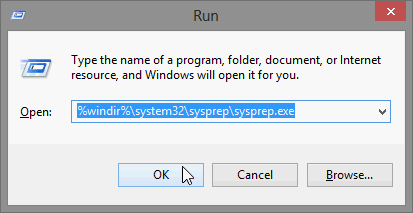
Close first all programs. Press Win-key + R to open Run dialog. Copy this command and paste it to Run:
Code:
%windir%\system32\sysprep\sysprep.exe /audit /reboot
Like this:

2013-02-12_200333.png

Now click OK. Your Windows reboots to Audit Mode and you can continue from tutorial, beginning of page 4.

Kari
 

My Computer My Computer

Computer type
Laptop
Computer Manufacturer/Model Number
HP ENVY 17-1150eg
OS
Windows 10 Pro x64 EN-GB
CPU
1.6 GHz Intel Core i7-720QM Processor
Memory
6 GB
Graphics Card(s)
ATI Mobility Radeon HD 5850 Graphics
Sound Card
Beats sound system with integrated subwoofer
Monitor(s) Displays
17" laptop display, 22" LED and 32" Full HD TV through HDMI
Screen Resolution
1600*900 (1), 1920*1080 (2&3)
Hard Drives
Internal: 2 x 500 GB SATA Hard Disk Drive 7200 rpm
External: 2TB for backups, 3TB USB3 network drive for media
Cooling
As Envy runs a bit warm, I have it on a Cooler Master pad
Keyboard
Logitech diNovo Media Desktop Laser (bluetooth)
Mouse
Logitech Performance Mouse MX
Internet Speed
50/10 Mbps VDSL
Antivirus
Windows Defender 4.3.9431.0
Browser
Maxthon 3.5.2., IE11
this i understand it is much stepps do do i dont understand good whit making and delleting the user map i dont want to get it broken
 

My Computer My Computer

OS
win7 hom 64
Is there a way that I can RE relocate my users & programdata folders a second time without doing a fresh install of windows 7?
 

My Computer My Computer

OS
Windows 7 Professional 64Bit
You can always boot to Audit Mode and repeat the procedure, as many times as you want to. If for instance you want to move Users and ProgramData back to default locations on C:, simply edit the answer file to put the locations C:\Users and C:\ProgramData between the respective tags in FolderLocations and run sysprep with the answer file:
Code:
...
...
<FolderLocations>
<ProfilesDirectory>[COLOR="DarkRed"][B][SIZE="3"]C[/SIZE][/B]:\Users[/COLOR]</ProfilesDirectory>
<ProgramData>[COLOR="DarkRed"][B][SIZE="3"]C[/SIZE][/B]:\ProgramData[/COLOR]</ProgramData>
</FolderLocations>
...
...
Please notice that the bigger the Users and ProgramData folders are, the longer the process will take as they will be physically moved to required location.

Kari
 

My Computer My Computer

Computer type
Laptop
Computer Manufacturer/Model Number
HP ENVY 17-1150eg
OS
Windows 10 Pro x64 EN-GB
CPU
1.6 GHz Intel Core i7-720QM Processor
Memory
6 GB
Graphics Card(s)
ATI Mobility Radeon HD 5850 Graphics
Sound Card
Beats sound system with integrated subwoofer
Monitor(s) Displays
17" laptop display, 22" LED and 32" Full HD TV through HDMI
Screen Resolution
1600*900 (1), 1920*1080 (2&3)
Hard Drives
Internal: 2 x 500 GB SATA Hard Disk Drive 7200 rpm
External: 2TB for backups, 3TB USB3 network drive for media
Cooling
As Envy runs a bit warm, I have it on a Cooler Master pad
Keyboard
Logitech diNovo Media Desktop Laser (bluetooth)
Mouse
Logitech Performance Mouse MX
Internet Speed
50/10 Mbps VDSL
Antivirus
Windows Defender 4.3.9431.0
Browser
Maxthon 3.5.2., IE11
How do I boot into audit mode using my already installed Win 7?
 

My Computer My Computer

OS
Windows 7 Professional 64Bit
Back
Top