
User Profiles - Create and Move During Windows 7 Installation

How to Create User Accounts on another Partition or Disk During Windows 7 Installation

   Information
There are several methods to move user profiles to another disk or partition after you have installed Windows 7. The easiest way is to use Audit Mode and System Preparation Tool, both built-in Windows 7 features, to permanently move the location of the folder Users.

This tutorial shows how to relocate both Users and ProgramData to another disk or partition when doing a new, fresh and clean install of Windows 7. If you have already installed Seven, and you'd like to move those folders away from their default location in C: drive, please read first post number 22 in this thread. Follow the steps told in that post, and continue then from beginning of the page 4 in this tutorial.
When Windows 7 is installed, 5 or 6 system folders are created depending on chosen bit-version:

  • PerfLogs (Performance Logs), where Windows stores performance and reliability logs
  • Program Files, where applications and software are installed. Windows x86 (32-bit) stores all applications here, Windows x64 (64-bit) only native 64-bit applications
  • Program Files (x86), only in Windows x64. All non-x64 applications are stored here
  • Windows, which contains core operating system files and drivers
  • ProgramData, where some applications store application and user specific settings and configuration files
  • Users. This is the "home" of all user folders. When a new user account is created and this new user logs in first time, Windows creates a set of user specific folders Users\New_User
Moving Windows and Program Files folders is not recommend by Microsoft. However, moving both Users and ProgramData folders is safe and can save a lot of space on system disk. Pictures, mp3’s videos, documents and so on, a user folder with its subfolders can be tens, sometimes hundreds of gigabytes.

For instance, using this laptop of mine as an example, the total size of Users folder and subfolders is at the moment about 240 GB. The size of ProgramData folder is at the moment almost 18 GB. I simply could not have these folders stored in my system C: drive, there’s not enough space.

When installing Windows 7, I recommend using Windows System Preparation Tool (Sysprep) in so called Audit Mode to relocate Users and ProgramData, leaving C: drive only for Windows and applications.

   Warning

An upgraded Windows cannot be sysprepped. As this method is based in sysprepping, this tutorial is valid only for Windows setups which have not been upgraded.

This means that if you have for instance in-place upgraded Vista to Seven, you cannot sysprep. The same applies if you have upgraded from a lesser edition to a better edition, for instance from Windows 7 Home Premium to Professional.

Notice that a repair install is also an upgrade install, so if you have ever done a repair install (= in-place upgrade to same edition), you cannot sysprep.

In other words, when sysprepping an existing Windows setup it only works if the Windows was installed clean and has never been upgraded or repaired using repair install, or if it is the original pre-installed Windows.

Using this method causes Windows 7 to lose activation information, and it needs to be reactivated afterwards. If your Windows 7 is an OEM version, you might not be able to reactivate it, at least not without phone activation option.

   Warning
IE10 Users: Please read this article first: Sysprep Fatal Error With IE 10 (FIX) | System Administration


Complete tutorial as PDF: View attachment Relocate User folders during Windows 7 installation.pdf (1.22 MB)

Kari


Last edited:
Kari,

Very well done regarding your posts............very clear, and very easy to understand!

Background:
My nothing unusual basic setup as delivered:
New Laptop - HP Pavilion G6 running W7 Home Premium 64 bit, pre-installed by OEM on 1 TB SATA drive:

System 199 MB NTFS (System, Active, Primary Partition)
(C:) 912.66 GB NTFS (Boot, Page File, Crash Dump, Primary Partition)
Recovery (D:) 14.70 GB NTFS (Primary Partition)
HP_TOOLS (E:) 3.97 GB FAT32 (Primary Partition)

My initial alterations:
Straight out of the box, cleaned (de-bloated), no other software whatsoever installed yet, not connected to internet. Drive re., partitioned very smoothly with Partition Wizard (nice little tool):

System 199 MB NTFS (System, Active, Primary Partition)
(C:) 100.00 GB NTFS (Boot, Page File, Crash Dump, Logical Drive)
Data (G:) 406.33 GB NTFS (Logical Drive)
Multimedia (H:) 406.33 GB NTFS (Logical Drive)
Recovery (D:) 14.70 GB NTFS (Primary Partition)
HP_TOOLS (E:) 3.97 GB FAT32 (Primary Partition)

All now backed up and cloned.

Current Position:
Chose to move only the location of "Users" to Data (G:), leaving ProgramData on (C:), and therefore deleted the appropriate line re., ProgramData from the XML-script. Edited the other parts of the script as per Tutorial to suit my particular circumstances. Followed all of your instructions to the letter using all of your posts and the Tutorial (page 4 onwards).............all apparently went to plan.............no errors, correct boots etc., etc., etc., except...................."Users" still remain stubbornly on (C:). Tried four times now, and each time with the same result.

With all of the above in mind, I very much suspect that this has absolutely nothing to do with any re-partitioning, and everything to do with the fact that it is an OEM pre-installed OS without any OS installation disks supplied (as is usual in such circumstances). I have made the usual 'one-off' set of recovery disks (4 disks in total) for future reinstallation if necessary, and I have therefore had to use those in lieu of an original OS disk.

Checking this through, I cannot locate "install.wim" anywhere at all on any of the recovery disks, or on any of the hard drive partitions, which would appear to make the "offlineImage cpi:source" part of the XML-script useless. Windows Explorer does not allow a detailed analysis of the contents of the recovery disks, or the Recovery (D:) partition, only displaying the headline icons for the file contents...........don't know if I've explained that well enough, but anyway, you'll know exactly what I mean if you've ever explored a typical recovery disk set created via an OEM installation.

Any thoughts and / or ideas?
What can I do to make this a success?
Have you or anyone else experienced this problem and then successfully resolved it?

Bearing in mind the vast number of OEM pre-installed OS laptops being sold, there is probably an equally vast number of other owners out there with exactly the same problem, tearing their hair out wondering how to make your method work for them.

H E L P pleeeease! :confused:

Thanks,

Amicus
Welcome to the forum Amicus,

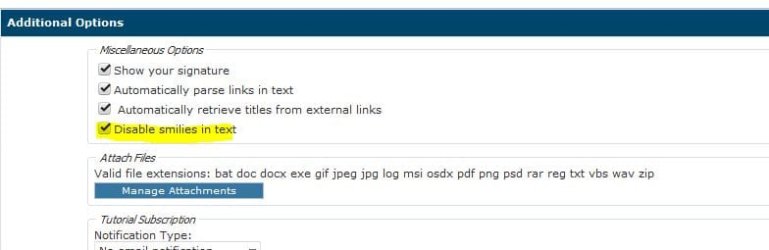
You can disable smilies to get of rid them when not needed.
 

Attachments

  • Capture.JPG
    Capture.JPG
    27.4 KB · Views: 175

My Computer My Computer

At a glance

Win 10 Pro x64Intel I5-2500K @3.3GHz16GB G.Skill Ripjaws X (4x4GB)EVGA GeForce 750 Ti SC 2GB
Computer type
PC/Desktop
Computer Manufacturer/Model Number
Self Built
OS
Win 10 Pro x64
CPU
Intel I5-2500K @3.3GHz
Motherboard
Asrock P67 Extreme4
Memory
16GB G.Skill Ripjaws X (4x4GB)
Graphics Card(s)
EVGA GeForce 750 Ti SC 2GB
Sound Card
ASUS Xonar DG 5.1 Channels 24-bit 96KHz PCI Interface Sound
Monitor(s) Displays
auria eq2367
Screen Resolution
1920 x 1080
Hard Drives
250GB Samsung 850 EVO SSD
1TB WD Blue
1TB Hitachi
PSU
SeaSonic X 650W 80 Plus Gold
Case
Corsair Obsidian 750D
Cooling
Corsair H60, Three 140mm case fans
Keyboard
Logitech Wireless Keyboard K520
Mouse
Logitech Wireless Mouse M310
Internet Speed
Wave Broadband ~ 100 dn 5 up
Antivirus
Windows Defender, Malwarebytes Premium
Browser
Edge, IE11, Chrome
Other Info
Laptop specs: HP g7-1365dx /
CPU: AMD A6-3420M APU with Radeon(tm) HD Graphics /
RAM: Crucial 8Gb (2x4Gb) /
SSD: Crucial M4-CT128M4SSD2 ATA Device/ FW 000F /
GFX: AMD Radeon HD 6520G /
OS: Windows 10 Pro x64
Thks Derekimo,

Good to join in, although I wish I was providing a helpful contribution rather than with a newbie question!

Cheers,

A

(Smileys now disabled)
 

My Computer My Computer

At a glance

Windows 7 Home Premium 64 bit
OS
Windows 7 Home Premium 64 bit
Thks Derekimo,

Good to join in, although I wish I was providing a helpful contribution rather than with a newbie question!

Cheers,

A

(Smileys now disabled)

You're welcome, we're all newbies at one time or another.

It would be pretty boring if we already knew everything. :D
 

My Computer My Computer

At a glance

Win 10 Pro x64Intel I5-2500K @3.3GHz16GB G.Skill Ripjaws X (4x4GB)EVGA GeForce 750 Ti SC 2GB
Computer type
PC/Desktop
Computer Manufacturer/Model Number
Self Built
OS
Win 10 Pro x64
CPU
Intel I5-2500K @3.3GHz
Motherboard
Asrock P67 Extreme4
Memory
16GB G.Skill Ripjaws X (4x4GB)
Graphics Card(s)
EVGA GeForce 750 Ti SC 2GB
Sound Card
ASUS Xonar DG 5.1 Channels 24-bit 96KHz PCI Interface Sound
Monitor(s) Displays
auria eq2367
Screen Resolution
1920 x 1080
Hard Drives
250GB Samsung 850 EVO SSD
1TB WD Blue
1TB Hitachi
PSU
SeaSonic X 650W 80 Plus Gold
Case
Corsair Obsidian 750D
Cooling
Corsair H60, Three 140mm case fans
Keyboard
Logitech Wireless Keyboard K520
Mouse
Logitech Wireless Mouse M310
Internet Speed
Wave Broadband ~ 100 dn 5 up
Antivirus
Windows Defender, Malwarebytes Premium
Browser
Edge, IE11, Chrome
Other Info
Laptop specs: HP g7-1365dx /
CPU: AMD A6-3420M APU with Radeon(tm) HD Graphics /
RAM: Crucial 8Gb (2x4Gb) /
SSD: Crucial M4-CT128M4SSD2 ATA Device/ FW 000F /
GFX: AMD Radeon HD 6520G /
OS: Windows 10 Pro x64
Welcome Amicus, Derek's right we gotta start somewhere. I joined because I had a noob issue with Win 7, got it solved and hung around to annoy people.:D
 

My Computer My Computer

At a glance

Windows 7 Ultimate X64 SP1Intel i5-2550K, Differing ~4.4-4.8GHz No buil...16GB G.Skill Sniper 1866MHz @ 2133MHz 2x8GBASUS GTX650TIB-DC2OC-2GD5, (650TI Boost)
Computer type
PC/Desktop
Computer Manufacturer/Model Number
Home Built Desktop By DataTech
OS
Windows 7 Ultimate X64 SP1
CPU
Intel i5-2550K, Differing ~4.4-4.8GHz No built in GPU
Motherboard
ASUS P8Z68-V PRO/GEN3
Memory
16GB G.Skill Sniper 1866MHz @ 2133MHz 2x8GB
Graphics Card(s)
ASUS GTX650TIB-DC2OC-2GD5, (650TI Boost)
Sound Card
Onboard Realtek 5-1
Monitor(s) Displays
Samsung P2570HD
Screen Resolution
1920x1080
Hard Drives
Samsung 840 Pro 256GB SSD for OS, 500GB Seagate Constellation (Enterprise drive) for Data
PSU
Corsair HX650W
Case
Inwin Dragon Rider
Cooling
Hyper 212 EVO w/two Noctua fans, push-pull, @1300 RPM
Keyboard
E-Z Eyes, bright yellow keys with large characters
Mouse
steelseries SENSEI Laser Pro Gaming
Internet Speed
48-51Mbs Mbs down, 11 Mbs up Xfinity Cable
Antivirus
Norton Internet Security 2013
Browser
IE 10, Opera, Pale Moon if needed
Other Info
4 case fans, LG BluRay-RE, ASUS DVD-RW, Mr. Fusion power supply, 1.21 gigawatts.
Greetings Britton30,

Thks.........I can only aspire to be a similar stalwart. Ya' never know!
 

My Computer My Computer

At a glance

Windows 7 Home Premium 64 bit
OS
Windows 7 Home Premium 64 bit
In THIS for example, is that the entire script to convert to a xml file or a modification of the larger one from the tutorial?
Sorry, my bad, explained that badly.

It means that change that part in the answer file that I have highlighted red, the drive/path. Other than that you run sysprep with this answer file as told in the tutorial.

Let's break those four lines of the script apart:

First, as in HTML and other languages, an XML answer file needs tags to start a procedure and end it. Start tag syntax is <TagName>, and end tag </TagName>. As you can see, it's almost as tags we use here at SF; if you want bold text in your post you need a start tag [B] so text here between start and end tags is shown bold, and an end tag [/B].

In sysprep answer file "language" the tag name in this case is FolderLocations. Between the FolderLocations tabs you tell A) which system folders to move and B) where to move them.

Each system folder we move must be inside its own tags. The tag name for Users folder is ProfilesDirectory and for the ProgramData the tag is simply called ProgramData.

So, the syntax of these four lines in this answer file is:

  1. Start tag for relocating system folders
  2. Start tag for Users folder - new location of Users folder - end tag for Users folder
  3. Start tag for ProgramData folder - new location of ProgramData folder - end tag for ProgramData folder
  4. End tag for relocating system folders
Or in XML:
  1. <FolderLocations>
  2. <ProfilesDirectory>X:\Users</ProfilesDirectory>
  3. <ProgramData>X:\ProgramData</ProgramData>
  4. </FolderLocations>
    (X = the drive where you want these folders to be moved)
An example scenario:

You have relocated both Users and ProgramData to D: using the method and answer file told in this tutorial. For one or another reason you need to restore both folders to their original, default location C:

You simply boot to Audit Mode (if still not known how, read post# 22 again), edit the answer file to set new folder locations between the FolderLocations tags, and run sysprep using the modified answer file, as told in tutorial starting from page 4.

Notice that in this case both folders usually already contain some files. The more content those folders have, the more time this takes, for Windows must now move not only the (empty) folders but also everything in them.

Good luck and a lot of patience!

Kari
 
Last edited:

My Computer My Computer

At a glance

Windows 10 Pro x64 EN-GB1.6 GHz Intel Core i7-720QM Processor6 GBATI Mobility Radeon HD 5850 Graphics
Computer type
Laptop
Computer Manufacturer/Model Number
HP ENVY 17-1150eg
OS
Windows 10 Pro x64 EN-GB
CPU
1.6 GHz Intel Core i7-720QM Processor
Memory
6 GB
Graphics Card(s)
ATI Mobility Radeon HD 5850 Graphics
Sound Card
Beats sound system with integrated subwoofer
Monitor(s) Displays
17" laptop display, 22" LED and 32" Full HD TV through HDMI
Screen Resolution
1600*900 (1), 1920*1080 (2&3)
Hard Drives
Internal: 2 x 500 GB SATA Hard Disk Drive 7200 rpm
External: 2TB for backups, 3TB USB3 network drive for media
Cooling
As Envy runs a bit warm, I have it on a Cooler Master pad
Keyboard
Logitech diNovo Media Desktop Laser (bluetooth)
Mouse
Logitech Performance Mouse MX
Internet Speed
50/10 Mbps VDSL
Antivirus
Windows Defender 4.3.9431.0
Browser
Maxthon 3.5.2., IE11
thanks Kari, that helps a lot! I appreciate it and will give it a try. This is for the wife's PC and she can afford the space on the SSD for ProgramData.
 

My Computer My Computer

At a glance

Windows 7 Ultimate X64 SP1Intel i5-2550K, Differing ~4.4-4.8GHz No buil...16GB G.Skill Sniper 1866MHz @ 2133MHz 2x8GBASUS GTX650TIB-DC2OC-2GD5, (650TI Boost)
Computer type
PC/Desktop
Computer Manufacturer/Model Number
Home Built Desktop By DataTech
OS
Windows 7 Ultimate X64 SP1
CPU
Intel i5-2550K, Differing ~4.4-4.8GHz No built in GPU
Motherboard
ASUS P8Z68-V PRO/GEN3
Memory
16GB G.Skill Sniper 1866MHz @ 2133MHz 2x8GB
Graphics Card(s)
ASUS GTX650TIB-DC2OC-2GD5, (650TI Boost)
Sound Card
Onboard Realtek 5-1
Monitor(s) Displays
Samsung P2570HD
Screen Resolution
1920x1080
Hard Drives
Samsung 840 Pro 256GB SSD for OS, 500GB Seagate Constellation (Enterprise drive) for Data
PSU
Corsair HX650W
Case
Inwin Dragon Rider
Cooling
Hyper 212 EVO w/two Noctua fans, push-pull, @1300 RPM
Keyboard
E-Z Eyes, bright yellow keys with large characters
Mouse
steelseries SENSEI Laser Pro Gaming
Internet Speed
48-51Mbs Mbs down, 11 Mbs up Xfinity Cable
Antivirus
Norton Internet Security 2013
Browser
IE 10, Opera, Pale Moon if needed
Other Info
4 case fans, LG BluRay-RE, ASUS DVD-RW, Mr. Fusion power supply, 1.21 gigawatts.
Hi Kari,

Any chance you could look at the particular problem presented in my original post 1 day ago?

If you can solve it, I feel certain that it would assist countless others in this situation, not just me.

Thanks in anticipation.
 

My Computer My Computer

At a glance

Windows 7 Home Premium 64 bit
OS
Windows 7 Home Premium 64 bit
Hi Amicus, welcome to the Seven Forums.

Simply, you can not sysprep the system without install media. Please find either an install DVD for your Windows 7 edition, or download a Windows 7 ISO image for your edition and burn it to DVD.

Kari
 

My Computer My Computer

At a glance

Windows 10 Pro x64 EN-GB1.6 GHz Intel Core i7-720QM Processor6 GBATI Mobility Radeon HD 5850 Graphics
Computer type
Laptop
Computer Manufacturer/Model Number
HP ENVY 17-1150eg
OS
Windows 10 Pro x64 EN-GB
CPU
1.6 GHz Intel Core i7-720QM Processor
Memory
6 GB
Graphics Card(s)
ATI Mobility Radeon HD 5850 Graphics
Sound Card
Beats sound system with integrated subwoofer
Monitor(s) Displays
17" laptop display, 22" LED and 32" Full HD TV through HDMI
Screen Resolution
1600*900 (1), 1920*1080 (2&3)
Hard Drives
Internal: 2 x 500 GB SATA Hard Disk Drive 7200 rpm
External: 2TB for backups, 3TB USB3 network drive for media
Cooling
As Envy runs a bit warm, I have it on a Cooler Master pad
Keyboard
Logitech diNovo Media Desktop Laser (bluetooth)
Mouse
Logitech Performance Mouse MX
Internet Speed
50/10 Mbps VDSL
Antivirus
Windows Defender 4.3.9431.0
Browser
Maxthon 3.5.2., IE11
Hi Kari,

Good to talk with you!

I fully appreciate your comment re., install media, but as other contributers have said before me, I do indeed have install media and have tried to use it.............that is to say, the recovery disk set made in the usual way as recommended by the OEM...............surely all necessary install media is contained within the recovery disk set, otherwise any recovery, clean or repair, would fail?

If that is correct, "install.wim" will be present within the recovery disk set media...............we just need to work out a method of telling Sysprep to find it? Or perhaps OEM's use do not use "install.wim" as part of the installation commands?

Thanks.

Amicus
 
Last edited:

My Computer My Computer

At a glance

Windows 7 Home Premium 64 bit
OS
Windows 7 Home Premium 64 bit
No, the recovery disk set is not a normal Windows install media. You need Windows 7 install disk or ISO. Sorry.

Kari
 

My Computer My Computer

At a glance

Windows 10 Pro x64 EN-GB1.6 GHz Intel Core i7-720QM Processor6 GBATI Mobility Radeon HD 5850 Graphics
Computer type
Laptop
Computer Manufacturer/Model Number
HP ENVY 17-1150eg
OS
Windows 10 Pro x64 EN-GB
CPU
1.6 GHz Intel Core i7-720QM Processor
Memory
6 GB
Graphics Card(s)
ATI Mobility Radeon HD 5850 Graphics
Sound Card
Beats sound system with integrated subwoofer
Monitor(s) Displays
17" laptop display, 22" LED and 32" Full HD TV through HDMI
Screen Resolution
1600*900 (1), 1920*1080 (2&3)
Hard Drives
Internal: 2 x 500 GB SATA Hard Disk Drive 7200 rpm
External: 2TB for backups, 3TB USB3 network drive for media
Cooling
As Envy runs a bit warm, I have it on a Cooler Master pad
Keyboard
Logitech diNovo Media Desktop Laser (bluetooth)
Mouse
Logitech Performance Mouse MX
Internet Speed
50/10 Mbps VDSL
Antivirus
Windows Defender 4.3.9431.0
Browser
Maxthon 3.5.2., IE11
Code:
<cpi:offlineImage cpi:source="[COLOR=red]wim:E:/sources/install.wim[/COLOR]#Windows 7 ULTIMATE" xmlns:cpi="urn:schemas-microsoft-com:cpi" />
In the same light Kari, I will need to use the Windows DVD to run the answer file to move ProgramData back to C: then?
 

My Computer My Computer

At a glance

Windows 7 Ultimate X64 SP1Intel i5-2550K, Differing ~4.4-4.8GHz No buil...16GB G.Skill Sniper 1866MHz @ 2133MHz 2x8GBASUS GTX650TIB-DC2OC-2GD5, (650TI Boost)
Computer type
PC/Desktop
Computer Manufacturer/Model Number
Home Built Desktop By DataTech
OS
Windows 7 Ultimate X64 SP1
CPU
Intel i5-2550K, Differing ~4.4-4.8GHz No built in GPU
Motherboard
ASUS P8Z68-V PRO/GEN3
Memory
16GB G.Skill Sniper 1866MHz @ 2133MHz 2x8GB
Graphics Card(s)
ASUS GTX650TIB-DC2OC-2GD5, (650TI Boost)
Sound Card
Onboard Realtek 5-1
Monitor(s) Displays
Samsung P2570HD
Screen Resolution
1920x1080
Hard Drives
Samsung 840 Pro 256GB SSD for OS, 500GB Seagate Constellation (Enterprise drive) for Data
PSU
Corsair HX650W
Case
Inwin Dragon Rider
Cooling
Hyper 212 EVO w/two Noctua fans, push-pull, @1300 RPM
Keyboard
E-Z Eyes, bright yellow keys with large characters
Mouse
steelseries SENSEI Laser Pro Gaming
Internet Speed
48-51Mbs Mbs down, 11 Mbs up Xfinity Cable
Antivirus
Norton Internet Security 2013
Browser
IE 10, Opera, Pale Moon if needed
Other Info
4 case fans, LG BluRay-RE, ASUS DVD-RW, Mr. Fusion power supply, 1.21 gigawatts.
Hi Kari,

Ok thanks, understood.................however, some questions spring to mind.

1) In exactly what way is the OEM recovery disk set not a normal Windows install media?

2) Surely the OEM recovery disks contain everything needed for a W7 install? Otherwise in the event of a HD replacement and subsequent install of the OS, the installation would fail, which of course it doesn't. Can the answer file text not be amended to suit?

I have downloaded and burned a W7 ISO from the relevant SevenForum link, and I will attempt to use that instead. Whilst writing, have these ISO's been checked and verified as not containing any viruses and / or hidden rootkits etc., which may have been laid deep inside by Digital River or even any other who knows what organisation or individual? Please understand that I'm in no way casting any dispertions whatsoever against "Digital River" of course, but these days we all need to consider our privacy and freedom.

3) Will the use of the ISO W7 media now completely overwrite my existing System installation, or will the Sysrep / Audit text be the only thing used, and merely locate the "Users" and if I wish, the "ProgramData" to the partition / drive of my choice, leaving all other parts of my original installation untouched and intact?

Amicus
 
Last edited:

My Computer My Computer

At a glance

Windows 7 Home Premium 64 bit
OS
Windows 7 Home Premium 64 bit
I can answer a bit. OEM disks install media have been modified to suit the individual manufacturer and some files may be different and/or moved from a retail Win 7 DVD. They are meant to restore an appliance PC to out of box, OEM state.

The iso files from MDL and Digital River referenced here are safe, I've used them too. They are the same ones you would get if you purchased a license from Microsoft online and directed to download the OS.
 

My Computer My Computer

At a glance

Windows 7 Ultimate X64 SP1Intel i5-2550K, Differing ~4.4-4.8GHz No buil...16GB G.Skill Sniper 1866MHz @ 2133MHz 2x8GBASUS GTX650TIB-DC2OC-2GD5, (650TI Boost)
Computer type
PC/Desktop
Computer Manufacturer/Model Number
Home Built Desktop By DataTech
OS
Windows 7 Ultimate X64 SP1
CPU
Intel i5-2550K, Differing ~4.4-4.8GHz No built in GPU
Motherboard
ASUS P8Z68-V PRO/GEN3
Memory
16GB G.Skill Sniper 1866MHz @ 2133MHz 2x8GB
Graphics Card(s)
ASUS GTX650TIB-DC2OC-2GD5, (650TI Boost)
Sound Card
Onboard Realtek 5-1
Monitor(s) Displays
Samsung P2570HD
Screen Resolution
1920x1080
Hard Drives
Samsung 840 Pro 256GB SSD for OS, 500GB Seagate Constellation (Enterprise drive) for Data
PSU
Corsair HX650W
Case
Inwin Dragon Rider
Cooling
Hyper 212 EVO w/two Noctua fans, push-pull, @1300 RPM
Keyboard
E-Z Eyes, bright yellow keys with large characters
Mouse
steelseries SENSEI Laser Pro Gaming
Internet Speed
48-51Mbs Mbs down, 11 Mbs up Xfinity Cable
Antivirus
Norton Internet Security 2013
Browser
IE 10, Opera, Pale Moon if needed
Other Info
4 case fans, LG BluRay-RE, ASUS DVD-RW, Mr. Fusion power supply, 1.21 gigawatts.
Hi Britton30,

Yep, understood, but my puzzlement still remains. Whilst it is recognised that most if not all OEM's will ensure that the "one-off" recovery media (including the W7 OS) created by the user will only be able to be used by the particular equipment upon which the recovery media was created, I am unclear as to how all that is accomplished apparently without the inclusion of an "install.wim"................and moreover, if it is indeed included, why I can't access it!

I assume therefore, that the "install.wim" is either hidden within the recovery media and not readily(or shall I say normally) accessible to the user, or it is re-named to another "wim", which may or may not also be hidden?

Perhaps the answer resides in editing the OEM's System Locked Pre-installation (SPL 2.1 for W7) procedure?

What do you think?

Your thoughts Kari?

Amicus
 

My Computer My Computer

At a glance

Windows 7 Home Premium 64 bit
OS
Windows 7 Home Premium 64 bit
Hi Britton30,

Yep, understood, but my puzzlement still remains. Whilst it is recognised that most if not all OEM's will ensure that the "one-off" recovery media (including the W7 OS) created by the user will only be able to be used by the particular equipment upon which the recovery media was created, I am unclear as to how all that is accomplished apparently without the inclusion of an "install.wim"................and moreover, if it is indeed included, why I can't access it!

I assume therefore, that the "install.wim" is either hidden within the recovery media and not readily(or shall I say normally) accessible to the user, or it is re-named to another "wim", which may or may not also be hidden?

Perhaps the answer resides in editing the OEM's System Locked Pre-installation (SPL 2.1 for W7) procedure?

What do you think?

Your thoughts Kari?

Amicus

Hi Amicus,

This comment here,

I have made the usual 'one-off' set of recovery disks (4 disks in total) for future reinstallation if necessary, and I have therefore had to use those in lieu of an original OS disk.

Sounds like the reason you cannot find an install.wim, just a guess though since you can fit a complete install iso on one DVD.

Is this comment still your original intent?

Chose to move only the location of "Users" to Data (G), leaving ProgramData on (C)

Maybe this tutorial would be a better option for you,

http://www.sevenforums.com/tutorials/87555-user-profile-change-default-location.html
 

My Computer My Computer

At a glance

Win 10 Pro x64Intel I5-2500K @3.3GHz16GB G.Skill Ripjaws X (4x4GB)EVGA GeForce 750 Ti SC 2GB
Computer type
PC/Desktop
Computer Manufacturer/Model Number
Self Built
OS
Win 10 Pro x64
CPU
Intel I5-2500K @3.3GHz
Motherboard
Asrock P67 Extreme4
Memory
16GB G.Skill Ripjaws X (4x4GB)
Graphics Card(s)
EVGA GeForce 750 Ti SC 2GB
Sound Card
ASUS Xonar DG 5.1 Channels 24-bit 96KHz PCI Interface Sound
Monitor(s) Displays
auria eq2367
Screen Resolution
1920 x 1080
Hard Drives
250GB Samsung 850 EVO SSD
1TB WD Blue
1TB Hitachi
PSU
SeaSonic X 650W 80 Plus Gold
Case
Corsair Obsidian 750D
Cooling
Corsair H60, Three 140mm case fans
Keyboard
Logitech Wireless Keyboard K520
Mouse
Logitech Wireless Mouse M310
Internet Speed
Wave Broadband ~ 100 dn 5 up
Antivirus
Windows Defender, Malwarebytes Premium
Browser
Edge, IE11, Chrome
Other Info
Laptop specs: HP g7-1365dx /
CPU: AMD A6-3420M APU with Radeon(tm) HD Graphics /
RAM: Crucial 8Gb (2x4Gb) /
SSD: Crucial M4-CT128M4SSD2 ATA Device/ FW 000F /
GFX: AMD Radeon HD 6520G /
OS: Windows 10 Pro x64
Hi Derekimo,

Yep, thought of that, and I've already tried inserting each of the recovery disks in turn (as per a normal recovery install) but also individually on four separate attemps.................none worked.

I can't see or locate "install.wim" on any of the 4 recovery disks (if indeed it exists there at all................though frankly I am puzzled as to how it would not be present) via Windows Explorer.

Yep, I do still choose to move only the location of "Users" to Data (G) leaving "ProgramData on (C), and yep, thanks, I am aware of and have read the Tutorial to which you refer. However, that is not quite the same as a re-install.
 
Last edited:

My Computer My Computer

At a glance

Windows 7 Home Premium 64 bit
OS
Windows 7 Home Premium 64 bit
Hi Derekimo,

Yep, thought of that, and I've already tried inserting each of the recovery disks in turn (as per a normal recovery install) but also individually on four separate attemps.................none worked.

I can't see or locate "install.wim" on any of the 4 recovery disks (if indeed it exists there at all................though frankly I am puzzled as to how it would not be present) via Windows Explorer.

Yep, I do still chose to move only the location of "Users" to Data (G) leaving "ProgramData on (C), and yep, thanks, I am aware of and have read the Tutorial to which you refer. However, that is not quite the same as a re-install.

OK, since you want a reinstall why not just use the iso from Digital River, the install.wim is in the sources folder.

(FYI, you need to check that box "Disable smilies in text" for each post.)
 

My Computer My Computer

At a glance

Win 10 Pro x64Intel I5-2500K @3.3GHz16GB G.Skill Ripjaws X (4x4GB)EVGA GeForce 750 Ti SC 2GB
Computer type
PC/Desktop
Computer Manufacturer/Model Number
Self Built
OS
Win 10 Pro x64
CPU
Intel I5-2500K @3.3GHz
Motherboard
Asrock P67 Extreme4
Memory
16GB G.Skill Ripjaws X (4x4GB)
Graphics Card(s)
EVGA GeForce 750 Ti SC 2GB
Sound Card
ASUS Xonar DG 5.1 Channels 24-bit 96KHz PCI Interface Sound
Monitor(s) Displays
auria eq2367
Screen Resolution
1920 x 1080
Hard Drives
250GB Samsung 850 EVO SSD
1TB WD Blue
1TB Hitachi
PSU
SeaSonic X 650W 80 Plus Gold
Case
Corsair Obsidian 750D
Cooling
Corsair H60, Three 140mm case fans
Keyboard
Logitech Wireless Keyboard K520
Mouse
Logitech Wireless Mouse M310
Internet Speed
Wave Broadband ~ 100 dn 5 up
Antivirus
Windows Defender, Malwarebytes Premium
Browser
Edge, IE11, Chrome
Other Info
Laptop specs: HP g7-1365dx /
CPU: AMD A6-3420M APU with Radeon(tm) HD Graphics /
RAM: Crucial 8Gb (2x4Gb) /
SSD: Crucial M4-CT128M4SSD2 ATA Device/ FW 000F /
GFX: AMD Radeon HD 6520G /
OS: Windows 10 Pro x64
Trying the ISO method now as we type............give me 5 mins., and I'll let you know the result.

(I know, I could have sworn I'd done so, oh well..)
 

My Computer My Computer

At a glance

Windows 7 Home Premium 64 bit
OS
Windows 7 Home Premium 64 bit
Oh dear, not good! Why oh why is this not working!!! What is going wrong!!!

Following every instruction to the letter, and still no joy!! I'll try again.
 

My Computer My Computer

At a glance

Windows 7 Home Premium 64 bit
OS
Windows 7 Home Premium 64 bit
Back
Top