User Profiles - Create and Move During Windows 7 Installation

How to Create User Accounts on another Partition or Disk During Windows 7 Installation

   Information
There are several methods to move user profiles to another disk or partition after you have installed Windows 7. The easiest way is to use Audit Mode and System Preparation Tool, both built-in Windows 7 features, to permanently move the location of the folder Users.

This tutorial shows how to relocate both Users and ProgramData to another disk or partition when doing a new, fresh and clean install of Windows 7. If you have already installed Seven, and you'd like to move those folders away from their default location in C: drive, please read first post number 22 in this thread. Follow the steps told in that post, and continue then from beginning of the page 4 in this tutorial.
When Windows 7 is installed, 5 or 6 system folders are created depending on chosen bit-version:

  • PerfLogs (Performance Logs), where Windows stores performance and reliability logs
  • Program Files, where applications and software are installed. Windows x86 (32-bit) stores all applications here, Windows x64 (64-bit) only native 64-bit applications
  • Program Files (x86), only in Windows x64. All non-x64 applications are stored here
  • Windows, which contains core operating system files and drivers
  • ProgramData, where some applications store application and user specific settings and configuration files
  • Users. This is the "home" of all user folders. When a new user account is created and this new user logs in first time, Windows creates a set of user specific folders Users\New_User
Moving Windows and Program Files folders is not recommend by Microsoft. However, moving both Users and ProgramData folders is safe and can save a lot of space on system disk. Pictures, mp3’s videos, documents and so on, a user folder with its subfolders can be tens, sometimes hundreds of gigabytes.

For instance, using this laptop of mine as an example, the total size of Users folder and subfolders is at the moment about 240 GB. The size of ProgramData folder is at the moment almost 18 GB. I simply could not have these folders stored in my system C: drive, there’s not enough space.

When installing Windows 7, I recommend using Windows System Preparation Tool (Sysprep) in so called Audit Mode to relocate Users and ProgramData, leaving C: drive only for Windows and applications.

   Warning

An upgraded Windows cannot be sysprepped. As this method is based in sysprepping, this tutorial is valid only for Windows setups which have not been upgraded.

This means that if you have for instance in-place upgraded Vista to Seven, you cannot sysprep. The same applies if you have upgraded from a lesser edition to a better edition, for instance from Windows 7 Home Premium to Professional.

Notice that a repair install is also an upgrade install, so if you have ever done a repair install (= in-place upgrade to same edition), you cannot sysprep.

In other words, when sysprepping an existing Windows setup it only works if the Windows was installed clean and has never been upgraded or repaired using repair install, or if it is the original pre-installed Windows.

Using this method causes Windows 7 to lose activation information, and it needs to be reactivated afterwards. If your Windows 7 is an OEM version, you might not be able to reactivate it, at least not without phone activation option.

   Warning
IE10 Users: Please read this article first: Sysprep Fatal Error With IE 10 (FIX) | System Administration


Complete tutorial as PDF: View attachment Relocate User folders during Windows 7 installation.pdf (1.22 MB)

Kari


Last edited:
Ok....I have one just didn't want to reactivate it unnecessarily in case there was another way &/or finite number of times you could.

I abandoned the switching user folders procedure as sysprep.exe gave an error the first few times then finally did get me to where you create a new temporary user acct but after that wasn't behaving per the instructions so I decided I was better off leaving well enough alone!

The only things different now is desktop background picture is missing, MS Security Essentials is telling me it's not "configured" (it was previously) & asking me to validate Windows.
 
Last edited:

My Computers My Computers

  • At a glance

    Windows 7 Home Premium 64bit with SP1, OEMIntel Core i7-3770G Skill 8GB (2x4GB) Ripkaws PC3-12800 DDR3 16...EVGA, GeForce GTX 560 Ti FPB (AR) 1GB GDDR5 4...
    Computer type
    PC/Desktop
    OS
    Windows 7 Home Premium 64bit with SP1, OEM
    CPU
    Intel Core i7-3770
    Motherboard
    Gigabyte GA-Z77X-UD3H LGA1155
    Memory
    G Skill 8GB (2x4GB) Ripkaws PC3-12800 DDR3 1600MHz
    Graphics Card(s)
    EVGA, GeForce GTX 560 Ti FPB (AR) 1GB GDDR5 4104MHz
    Sound Card
    Creative Sound Blaster Audigy SE, 7.1 channels, 24 bit
    Monitor(s) Displays
    HP ZR24w
    Screen Resolution
    1920x1200 - 60Hz
    Hard Drives
    Intel 60GB 520 Series SSD, MLC SandForce SF-2281, 550/475 MB/s

    WD 1TB Caviar Blue, SATA 6 Gb/s, 7200 RPM
    PSU
    Seasonic X-560, 80 PLUS Gold
    Case
    Cooler Master Elite 430
    Cooling
    2 stock fans
  • Antivirus
    MS Security Essentials
sysprep.exe does not reboot

Hi folks,

I've gone through the tutorial posted by Kari to get my default user profiles away from C: to my own F: on the hard disk.

I am running Windows7 Home Premium (64bit) on an Intel CPU with processor architecture = amd64.

Now, I followed this tutorial (http://www.sevenforums.com/attachme...ser-folders-during-windows-7-installation.pdf), and got to the point where you run the sysprep.exe command with the unattend option.

After that, I get the message saying that Sysprep is working and processing cleanup phase Sysprep plugins, but nothing happens afterwards, i.e. no restart.

If I try to force it to do sysprep.exe /oobe, then I get a message

"A fatal error occurred while trying to sysprep the machine."

Now, I am in a bit of a jam. I don't know if rebooting the machine will simply cause everything to hang and I will never be able to boot into the freshly prepared machine, or if everything will turn out well. So, help would be life-saving...:cry:

The only thing I am not sure of is whether I needed to have the Win7 DVD in my E: drive when running sysprep with the unattend option as the .xml refers to the E: drive. I haven't got a win7 disk as my notebook was pre-installed.

Here's the setuperr.log showing the original error messages I got when trying to run sysprep with the unattend option:


Code:
2012-07-08 00:34:15, Info                  SYSPRP ========================================================
2012-07-08 00:34:15, Info                  SYSPRP ===          Beginning of a new sysprep run          ===
2012-07-08 00:34:15, Info                  SYSPRP ========================================================
2012-07-08 00:34:15, Info       [0x0f004d] SYSPRP The time is now 2012-07-08 00:34:15
2012-07-08 00:34:15,  Info       [0x0f004e] SYSPRP Initialized SysPrep log at C:\Windows\System32\sysprep\Panther
2012-07-08 00:34:15, Info       [0x0f0054] SYSPRP ValidateUser:User has required privileges to sysprep machine
2012-07-08  00:34:15, Info       [0x0f007e] SYSPRP FCreateTagFile:Tag file  C:\Windows\System32\sysprep\Sysprep_succeeded.tag does not already  exist, no need to delete anything
2012-07-08 00:34:15, Info       [0x0f005f] SYSPRP ParseCommands:Found supported command line option 'AUDIT'
2012-07-08 00:34:15, Info       [0x0f005f] SYSPRP ParseCommands:Found supported command line option 'REBOOT'
2012-07-08 00:34:15, Info       [0x0f005f] SYSPRP ParseCommands:Found supported command line option 'UNATTEND'
2012-07-08 00:34:15, Info        [0x0f004a] SYSPRP WaitThread:Entering spawned waiting thread
2012-07-08  00:34:15, Info                         [sysprep.exe]  UnattendFindAnswerFile: Looking at explicitly provided unattend file  [F:\relocate.xml]...
2012-07-08 00:34:15,  Info                         [sysprep.exe] UnattendFindAnswerFile:  [F:\relocate.xml] meets criteria for an explicitly provided unattend  file.
2012-07-08 00:34:15, Info                  SYSPRP SysprepSearchForUnattend: Using unattend file at [F:\relocate.xml].
2012-07-08 00:34:15, Info                  SYSPRP  WinMain:Found unattend file at [F:\relocate.xml]; caching...
2012-07-08 00:34:15, Info       [0x0f00ac] SYSPRP WinMain:Processing 'cleanup' external provider request.
2012-07-08 00:34:15, Info       [0x0f006c] SYSPRP RunExternalDlls:Running DLLs listed in registry for phase 3
2012-07-08 00:34:15, Info       [0x0f008a] SYSPRP RunRegistryDlls:Retrieved section name for this phase as Cleanup
2012-07-08  00:34:15, Warning    [0x0f008f] SYSPRP RunRegistryDlls:Registry key is  either empty or malformed:  SOFTWARE\Microsoft\Windows\CurrentVersion\Setup\SysPrepExternal\Cleanup
2012-07-08 00:34:15, Info       [0x0f003f] SYSPRP WinMain:Processing 'cleanup' internal provider request.
2012-07-08 00:34:15, Info       [0x0f006c] SYSPRP RunExternalDlls:Running DLLs listed in registry for  phase 3
2012-07-08 00:34:15, Info       [0x0f008a] SYSPRP RunRegistryDlls:Retrieved section name for this phase as Cleanup
2012-07-08  00:34:15, Info       [0x0f008b] SYSPRP RunRegistryDlls:Found entrypoint  in registry at  SOFTWARE\Microsoft\Windows\CurrentVersion\Setup\SysPrep\Cleanup\{67196725-a666-73a6-a048-412e48a3b856};  will try to launch 'C:\Windows\System32\spopk.dll,Sysprep_Clean_Opk'
2012-07-08  00:34:15, Info       [0x0f0080] SYSPRP LaunchDll:Found  'C:\Windows\System32\spopk.dll,Sysprep_Clean_Opk'; executing it
2012-07-08  00:34:15, Info       [0x0f0081] SYSPRP LaunchDll:Successfully executed  'C:\Windows\System32\spopk.dll,Sysprep_Clean_Opk' without error
2012-07-08  00:34:15, Info       [0x0f008b] SYSPRP RunRegistryDlls:Found entrypoint  in registry at   SOFTWARE\Microsoft\Windows\CurrentVersion\Setup\SysPrep\Cleanup\{1e7f4452-a4b4-5a32-d01e-70397b096ced};  will try to launch 'sqmapi.dll,SqmSysprepCleanup'
2012-07-08 00:34:15, Info       [0x0f0080] SYSPRP LaunchDll:Found 'sqmapi.dll,SqmSysprepCleanup'; executing it
2012-07-08 00:34:15, Info       [0x0f0081] SYSPRP LaunchDll:Successfully executed 'sqmapi.dll,SqmSysprepCleanup' without error
2012-07-08  00:34:15, Info       [0x0f008b] SYSPRP RunRegistryDlls:Found entrypoint  in registry at  SOFTWARE\Microsoft\Windows\CurrentVersion\Setup\SysPrep\Cleanup\{2c8a362b-4dc1-38b9-c4d8-ce732ddcc48e};  will try to launch  'C:\Windows\System32\wevtapi.dll,EvtIntSysprepCleanup'
2012-07-08  00:34:15, Info       [0x0f0080] SYSPRP LaunchDll:Found  'C:\Windows\System32\wevtapi.dll,EvtIntSysprepCleanup'; executing it
2012-07-08  00:34:15,  Info       [0x0f0081] SYSPRP LaunchDll:Successfully executed  'C:\Windows\System32\wevtapi.dll,EvtIntSysprepCleanup' without error
2012-07-08  00:34:15, Info       [0x0f008b] SYSPRP RunRegistryDlls:Found entrypoint  in registry at  SOFTWARE\Microsoft\Windows\CurrentVersion\Setup\SysPrep\Cleanup\{86297dc3-52b0-7d4e-f9a8-572bb66ac5ae};  will try to launch  'C:\Windows\System32\LangCleanupSysprepAction.dll,Sysprep_Generalize_MUILangCleanup'
2012-07-08  00:34:15, Info       [0x0f0080] SYSPRP LaunchDll:Found  'C:\Windows\System32\LangCleanupSysprepAction.dll,Sysprep_Generalize_MUILangCleanup';  executing it
2012-07-08 00:34:15, Info                  SYSPRP Sysprep_Generalize_MUILangCleanup Start.
2012-07-08 00:34:15,  Info                  SYSPRP Disabling CMF cache SUCCEEDED
2012-07-08 00:34:15, Info                  SYSPRP Removing scheduled task for running lpremove.exe and all related data
2012-07-08 00:34:15, Info                  SYSPRP Removing scheduled task for lpremove.exe succeeed
2012-07-08 00:34:15, Info                  SYSPRP Removing MUIUnattend-OOBE handshake value
2012-07-08 00:34:15, Info                  SYSPRP MUIUnattend-OOBE handshake value is not present on the system
2012-07-08 00:34:15,  Info                  SYSPRP Sysprep_Generalize_MUILangCleanup End.
2012-07-08  00:34:15, Info       [0x0f0081] SYSPRP LaunchDll:Successfully executed  'C:\Windows\System32\LangCleanupSysprepAction.dll,Sysprep_Generalize_MUILangCleanup'  without error
2012-07-08 00:34:15, Info       [0x0f008b] SYSPRP  RunRegistryDlls:Found entrypoint in registry at  SOFTWARE\Microsoft\Windows\CurrentVersion\Setup\SysPrep\Cleanup\{03513543-c453-2e4f-3200-c2f12d89732a};  will try to launch  'C:\Windows\System32\shsetup.dll,Sysprep_Cleanup_Shell'
2012-07-08  00:34:15, Info       [0x0f0080] SYSPRP LaunchDll:Found  'C:\Windows\System32\shsetup.dll,Sysprep_Cleanup_Shell'; executing it
2012-07-08 00:34:15,  Info                         [shsetup] Sysprep_Cleanup_Shell entered
2012-07-08  00:34:15, Info                         [shsetup] SHDeleteValue on  'Software\Microsoft\Windows\CurrentVersion\OOBE' + 'SkipMachineOOBE'  returned 2
2012-07-08 00:34:15, Info                          [shsetup] SHDeleteValue on  'Software\Microsoft\Windows\CurrentVersion\OOBE' + 'SkipUserOOBE'  returned 2
2012-07-08 00:34:15, Info                         [shsetup] SHDeleteValue on  'Software\Microsoft\Windows\CurrentVersion\OOBE' + 'HideEULAPage' returned 2
2012-07-08  00:34:15, Info                         [shsetup] SHDeleteValue on  'Software\Microsoft\Windows\CurrentVersion\OOBE' + 'NetworkLocation'  returned 2
2012-07-08 00:34:15, Info                          [shsetup] SHDeleteValue on  'Software\Microsoft\Windows\CurrentVersion\OOBE' + 'ProtectYourPC'  returned 2
2012-07-08 00:34:15, Info                          [shsetup] SHDeleteValue on  'Software\Microsoft\Windows\CurrentVersion\Setup\OOBE' +  'MediaBootInstall' returned 2
2012-07-08 00:34:15,  Info                         [shsetup] SHDeleteValue on  'Software\Microsoft\Windows\CurrentVersion\Setup\OOBE' +  'SetupDisplayedProductKey' returned 2
2012-07-08 00:34:15,  Info                         [shsetup] SHDeleteValue on  'Software\Microsoft\Windows\CurrentVersion\Setup\OOBE' +  'SetupDisplayedEula' returned 2
2012-07-08 00:34:15,  Info                         [shsetup] SHDeleteValue on  'Software\Microsoft\Windows\CurrentVersion\Setup\OOBE' +  'SetupDisplayedLanguageSelection' returned 2
2012-07-08 00:34:15,  Info                         [shsetup] SHDeleteValue on  'Software\Microsoft\Windows\CurrentVersion\Setup\OOBE' + 'SetupSQMOptIn'  returned 2
2012-07-08 00:34:15, Info                          [shsetup] SHDeleteValue on  'Software\Microsoft\Windows\CurrentVersion\Setup\OOBE' +  'UnattendCreatedUser' returned 2
2012-07-08 00:34:15,  Info                         [shsetup] SHDeleteValue on  'Software\Microsoft\Windows\CurrentVersion\Setup\OOBE' +  'UnattendSetTimeZone' returned 2
2012-07-08 00:34:15,  Info                         [shsetup] SHDeleteValue on  'Software\Microsoft\Windows\CurrentVersion\Setup\OOBE' +  'UnattendSetAutologon' returned 2
2012-07-08 00:34:15,  Info                         [shsetup] SHDeleteValue on  'Software\Microsoft\Windows NT\CurrentVersion\WinLogon' +  'AutoAdminLogon' returned 2
2012-07-08 00:34:15,  Info                         [shsetup] SHDeleteValue on  'Software\Microsoft\Windows NT\CurrentVersion\WinLogon' +  'DefaultUserName' returned 2
2012-07-08 00:34:15,  Info                         [shsetup] SHDeleteValue on  'Software\Microsoft\Windows NT\CurrentVersion\WinLogon' +  'DefaultDomainName' returned 2
2012-07-08 00:34:15,  Info                         [shsetup] SHDeleteKey on  'SOFTWARE\Policies\Microsoft\Windows  NT\CurrentVersion\NetworkList\Signatures\FirstNetwork' returned 2
2012-07-08  00:34:15, Info                         [shsetup] SHDeleteValue on  'System\CurrentControlSet\Control\Network\NetworkLocationWizard' +  'HideWizard' returned 2
2012-07-08 00:34:15,  Info                         [shsetup] Deleting temp files for 'S-1-5-18'
2012-07-08  00:34:15, Info                         [shsetup]  SHCreateItemFromParsingName failed on  'C:\Windows\system32\config\systemprofile\AppData\Roaming\Microsoft\Windows\Recent'  (0x80070002)
2012-07-08 00:34:15, Info                          [shsetup] SHCreateItemFromParsingName failed on  'C:\Windows\system32\config\systemprofile\AppData\Local\Temp'  (0x80070002)
2012-07-08 00:34:15,  Info                         [shsetup] IFileOperation::PerformOperations returned 0x8000ffff
2012-07-08 00:34:15, Info                         [shsetup] Cleaning up user hive for 'S-1-5-19'
2012-07-08  00:34:15, Info                         [shsetup] SHDeleteValue on  'Software\Microsoft\Windows\CurrentVersion\Explorer' +  'ExplorerStartupTraceRecorded' returned 2
2012-07-08 00:34:15, Info                         [shsetup] SHDeleteValue on  'System\CurrentControlSet\Control\Network\NetworkLocationWizard' + 'ShowCount' returned 2
2012-07-08  00:34:15, Info                         [shsetup] SHDeleteKey on  'Software\Microsoft\Windows\CurrentVersion\Explorer\RecentDocs' returned  2
2012-07-08 00:34:15, Info                         [shsetup]  SHDeleteKey on  'Software\Microsoft\Windows\CurrentVersion\Explorer\RunMRU' returned 2
2012-07-08  00:34:15, Info                         [shsetup] SHDeleteValue on  'Software\Microsoft\Windows\CurrentVersion\Explorer\Advanced' +  'StartMenuInit' returned 2
2012-07-08 00:34:15,  Info                         [shsetup] SHDeleteValue on  'Software\Microsoft\Windows\CurrentVersion\Explorer\Taskband' +  'Favorites' returned 2
2012-07-08 00:34:15,  Info                         [shsetup] SHDeleteValue on  'Software\Microsoft\Windows\CurrentVersion\Explorer\Taskband' +  'FavoritesChanges' returned 2
2012-07-08 00:34:15,  Info                         [shsetup] SHDeleteValue on  'Software\Microsoft\Windows\CurrentVersion\Explorer\Taskband' +  'FavoritesVersion' returned 2
2012-07-08 00:34:15,  Info                         [shsetup] SHDeleteValue on  'Software\Microsoft\Windows\CurrentVersion\Explorer\Taskband' +  'FavoritesResolve' returned 2
2012-07-08 00:34:15,  Info                         [shsetup] SHDeleteValue on  'Software\Microsoft\Windows\CurrentVersion\Explorer\StartPage' +  'Favorites' returned 2
2012-07-08 00:34:15,  Info                         [shsetup] SHDeleteValue on  'Software\Microsoft\Windows\CurrentVersion\Explorer\StartPage' +  'FavoritesChanges' returned 2
2012-07-08 00:34:15,  Info                         [shsetup] SHDeleteValue on  'Software\Microsoft\Windows\CurrentVersion\Explorer\StartPage' +  'FavoritesVersion' returned 2
2012-07-08 00:34:15,  Info                         [shsetup] SHDeleteValue on  'Software\Microsoft\Windows\CurrentVersion\Explorer\StartPage' +  'FavoritesResolve' returned 2
2012-07-08 00:34:15,  Info                         [shsetup] SHDeleteValue on  'Software\Microsoft\Windows\CurrentVersion\Explorer\VisualEffects\Fontsmoothing'  + 'DefaultApplied' returned 2
2012-07-08 00:34:15,  Info                         [shsetup] SHDeleteValue on  'Software\Microsoft\Windows\CurrentVersion\Explorer\Desktop\CleanupWiz' +  'Last used time' returned 2
2012-07-08 00:34:15, Info                         [shsetup] Deleting temp files for 'S-1-5-19'
2012-07-08  00:34:15, Info                         [shsetup] Deleting contents of  'C:\Windows\ServiceProfiles\LocalService\AppData\Roaming\Microsoft\Windows\Recent'
2012-07-08 00:34:15, Info                         [shsetup]  Deleting contents of 'C:\Windows\ServiceProfiles\LocalService\AppData\Local\Temp'
2012-07-08 00:34:15, Info                         [shsetup] IFileOperation::PerformOperations returned 0x8000ffff
2012-07-08 00:34:15, Info                         [shsetup] Cleaning up user hive for 'S-1-5-20'
2012-07-08  00:34:15, Info                         [shsetup] SHDeleteValue on  'Software\Microsoft\Windows\CurrentVersion\Explorer' +  'ExplorerStartupTraceRecorded' returned 2
2012-07-08 00:34:15,  Info                         [shsetup] SHDeleteValue on  'System\CurrentControlSet\Control\Network\NetworkLocationWizard' +  'ShowCount' returned 2
2012-07-08 00:34:15,  Info                         [shsetup] SHDeleteKey on  'Software\Microsoft\Windows\CurrentVersion\Explorer\RecentDocs' returned  2
2012-07-08 00:34:15, Info                         [shsetup]  SHDeleteKey on  'Software\Microsoft\Windows\CurrentVersion\Explorer\RunMRU' returned 2
2012-07-08  00:34:15,  Info                         [shsetup] SHDeleteValue on  'Software\Microsoft\Windows\CurrentVersion\Explorer\Advanced' +  'StartMenuInit' returned 2
2012-07-08 00:34:15,  Info                         [shsetup] SHDeleteValue on  'Software\Microsoft\Windows\CurrentVersion\Explorer\Taskband' +  'Favorites' returned 2
2012-07-08 00:34:15,  Info                         [shsetup] SHDeleteValue on  'Software\Microsoft\Windows\CurrentVersion\Explorer\Taskband' +  'FavoritesChanges' returned 2
2012-07-08 00:34:15,  Info                         [shsetup] SHDeleteValue on  'Software\Microsoft\Windows\CurrentVersion\Explorer\Taskband' +  'FavoritesVersion' returned 2
2012-07-08 00:34:15,  Info                         [shsetup] SHDeleteValue on  'Software\Microsoft\Windows\CurrentVersion\Explorer\Taskband' +  'FavoritesResolve' returned 2
2012-07-08 00:34:15,  Info                         [shsetup] SHDeleteValue on  'Software\Microsoft\Windows\CurrentVersion\Explorer\StartPage' +  'Favorites' returned 2
2012-07-08 00:34:15,  Info                         [shsetup] SHDeleteValue on  'Software\Microsoft\Windows\CurrentVersion\Explorer\StartPage' +  'FavoritesChanges' returned 2
2012-07-08 00:34:15,  Info                         [shsetup] SHDeleteValue on  'Software\Microsoft\Windows\CurrentVersion\Explorer\StartPage' +  'FavoritesVersion' returned 2
2012-07-08 00:34:15,  Info                         [shsetup] SHDeleteValue on  'Software\Microsoft\Windows\CurrentVersion\Explorer\StartPage' +  'FavoritesResolve' returned 2
2012-07-08 00:34:15,  Info                         [shsetup] SHDeleteValue on  'Software\Microsoft\Windows\CurrentVersion\Explorer\VisualEffects\Fontsmoothing'  + 'DefaultApplied' returned 2
2012-07-08 00:34:15,  Info                         [shsetup] SHDeleteValue on  'Software\Microsoft\Windows\CurrentVersion\Explorer\Desktop\CleanupWiz' +  'Last used time' returned 2
2012-07-08 00:34:15, Info                         [shsetup] Deleting temp files for 'S-1-5-20'
2012-07-08  00:34:15,  Info                         [shsetup] Deleting contents of  'C:\Windows\ServiceProfiles\NetworkService\AppData\Roaming\Microsoft\Windows\Recent'
2012-07-08  00:34:15, Info                         [shsetup] Deleting contents of  'C:\Windows\ServiceProfiles\NetworkService\AppData\Local\Temp'
2012-07-08 00:34:15, Info                         [shsetup] IFileOperation::PerformOperations returned 0x8000ffff
2012-07-08 00:34:15, Info                         [shsetup] Cleaning up  user hive for 'S-1-5-21-2456247031-3383404085-1376443083-1000'
2012-07-08  00:34:15, Info                         [shsetup] SHDeleteValue on  'Software\Microsoft\Windows\CurrentVersion\Explorer' +  'ExplorerStartupTraceRecorded' returned 2
2012-07-08 00:34:15,  Info                         [shsetup] SHDeleteValue on  'System\CurrentControlSet\Control\Network\NetworkLocationWizard' +  'ShowCount' returned 2
2012-07-08 00:34:15,  Info                         [shsetup] SHDeleteKey on  'Software\Microsoft\Windows\CurrentVersion\Explorer\RecentDocs' returned  2
2012-07-08 00:34:15,  Info                         [shsetup] SHDeleteKey on 'Software\Microsoft\Windows\CurrentVersion\Explorer\RunMRU' returned 2
2012-07-08  00:34:15, Info                         [shsetup] SHDeleteValue on  'Software\Microsoft\Windows\CurrentVersion\Explorer\Advanced' +  'StartMenuInit' returned 2
2012-07-08 00:34:15,  Info                         [shsetup] SHDeleteValue on  'Software\Microsoft\Windows\CurrentVersion\Explorer\Taskband' +  'Favorites' returned 2
2012-07-08 00:34:15,  Info                         [shsetup] SHDeleteValue on  'Software\Microsoft\Windows\CurrentVersion\Explorer\Taskband' +  'FavoritesChanges' returned 2
2012-07-08 00:34:15,  Info                         [shsetup] SHDeleteValue on  'Software\Microsoft\Windows\CurrentVersion\Explorer\Taskband' +  'FavoritesVersion' returned 2
2012-07-08 00:34:15,  Info                         [shsetup] SHDeleteValue on  'Software\Microsoft\Windows\CurrentVersion\Explorer\Taskband' +  'FavoritesResolve' returned 2
2012-07-08 00:34:15,  Info                         [shsetup] SHDeleteValue on  'Software\Microsoft\Windows\CurrentVersion\Explorer\StartPage' +  'Favorites' returned 2
2012-07-08 00:34:15,  Info                         [shsetup] SHDeleteValue on  'Software\Microsoft\Windows\CurrentVersion\Explorer\StartPage' +  'FavoritesChanges' returned 2
2012-07-08 00:34:15,  Info                         [shsetup] SHDeleteValue on  'Software\Microsoft\Windows\CurrentVersion\Explorer\StartPage' +  'FavoritesVersion' returned 2
2012-07-08 00:34:15,  Info                         [shsetup] SHDeleteValue on  'Software\Microsoft\Windows\CurrentVersion\Explorer\StartPage' +  'FavoritesResolve' returned 2
2012-07-08 00:34:15,  Info                         [shsetup] SHDeleteValue on  'Software\Microsoft\Windows\CurrentVersion\Explorer\VisualEffects\Fontsmoothing'  + 'DefaultApplied' returned 2
2012-07-08 00:34:15,  Info                         [shsetup] SHDeleteValue on  'Software\Microsoft\Windows\CurrentVersion\Explorer\Desktop\CleanupWiz' +  'Last used time' returned 2
2012-07-08 00:34:15,  Info                         [shsetup] Deleting temp files for 'S-1-5-21-2456247031-3383404085-1376443083-1000'
2012-07-08  00:34:15, Info                         [shsetup] Deleting contents of  'C:\Users\UpdatusUser\AppData\Roaming\Microsoft\Windows\Recent'
2012-07-08 00:34:15, Info                         [shsetup] Deleting contents of 'C:\Users\UpdatusUser\AppData\Local\Temp'
2012-07-08 00:34:15, Info                         [shsetup] IFileOperation::PerformOperations  returned 0x8000ffff
2012-07-08 00:34:15,  Info                         [shsetup] Cleaning up user hive for  'S-1-5-21-2456247031-3383404085-1376443083-500'
2012-07-08 00:34:15,  Info                         [shsetup] SHDeleteValue on  'Software\Microsoft\Windows\CurrentVersion\Explorer' +  'ExplorerStartupTraceRecorded' returned 2
2012-07-08 00:34:15,  Info                         [shsetup] SHDeleteValue on  'System\CurrentControlSet\Control\Network\NetworkLocationWizard' +  'ShowCount' returned 2
2012-07-08 00:34:15,  Info                         [shsetup] SHDeleteKey on  'Software\Microsoft\Windows\CurrentVersion\Explorer\RecentDocs' returned  0
2012-07-08 00:34:15, Info                         [shsetup]  SHDeleteKey on  'Software\Microsoft\Windows\CurrentVersion\Explorer\RunMRU' returned 2
2012-07-08  00:34:15, Info                         [shsetup] SHDeleteValue on  'Software\Microsoft\Windows\CurrentVersion\Explorer\Advanced' +  'StartMenuInit' returned 2
2012-07-08 00:34:15,  Info                         [shsetup] SHDeleteValue on  'Software\Microsoft\Windows\CurrentVersion\Explorer\Taskband' +  'Favorites' returned 2
2012-07-08 00:34:15,  Info                         [shsetup] SHDeleteValue on  'Software\Microsoft\Windows\CurrentVersion\Explorer\Taskband' +  'FavoritesChanges' returned 2
2012-07-08 00:34:15,  Info                         [shsetup] SHDeleteValue on  'Software\Microsoft\Windows\CurrentVersion\Explorer\Taskband' +  'FavoritesVersion' returned 2
2012-07-08 00:34:15,  Info                         [shsetup] SHDeleteValue on  'Software\Microsoft\Windows\CurrentVersion\Explorer\Taskband' +  'FavoritesResolve' returned 2
2012-07-08 00:34:15,  Info                         [shsetup] SHDeleteValue on  'Software\Microsoft\Windows\CurrentVersion\Explorer\StartPage' +  'Favorites' returned 2
2012-07-08 00:34:15,  Info                         [shsetup] SHDeleteValue on  'Software\Microsoft\Windows\CurrentVersion\Explorer\StartPage' +  'FavoritesChanges' returned 2
2012-07-08 00:34:15,  Info                         [shsetup] SHDeleteValue on  'Software\Microsoft\Windows\CurrentVersion\Explorer\StartPage' +  'FavoritesVersion' returned 2
2012-07-08 00:34:15,  Info                         [shsetup] SHDeleteValue on  'Software\Microsoft\Windows\CurrentVersion\Explorer\StartPage' +  'FavoritesResolve' returned 2
2012-07-08 00:34:15,  Info                         [shsetup] SHDeleteValue on  'Software\Microsoft\Windows\CurrentVersion\Explorer\VisualEffects\Fontsmoothing'  + 'DefaultApplied' returned 2
2012-07-08 00:34:15,  Info                         [shsetup] SHDeleteValue on  'Software\Microsoft\Windows\CurrentVersion\Explorer\Desktop\CleanupWiz' +  'Last used time' returned 2
2012-07-08 00:34:15,  Info                         [shsetup] Deleting temp files for  'S-1-5-21-2456247031-3383404085-1376443083-500'
2012-07-08 00:34:15,  Info                         [shsetup] Deleting contents of  'C:\Users\Administrator\AppData\Roaming\Microsoft\Windows\Recent'
2012-07-08 00:34:15,  Info                         [shsetup] Deleting contents of 'C:\Users\Administrator\AppData\Local\Temp'
2012-07-08 00:34:15, Info                         [shsetup] IFileOperation::PerformOperations returned 0x00000000
2012-07-08 00:34:15, Info                         [shsetup] SanitizeDeskBands entered
2012-07-08 00:34:15, Info                         [shsetup] SanitizeDeskBands exit
2012-07-08 00:34:15,  Info                         [shsetup] PrimeStartMenuShortcuts entered
2012-07-08 00:34:16, Info                         [shsetup] PrimeStartMenuShortcuts exit
2012-07-08 00:34:16, Info                         [shsetup] Sysprep_Cleanup_Shell exit
2012-07-08  00:34:16, Info       [0x0f0081] SYSPRP LaunchDll:Successfully executed  'C:\Windows\System32\shsetup.dll,Sysprep_Cleanup_Shell' without error
2012-07-08  00:34:16, Info       [0x0f008b] SYSPRP RunRegistryDlls:Found entrypoint  in registry at   SOFTWARE\Microsoft\Windows\CurrentVersion\Setup\SysPrep\Cleanup\{1f954290-a3bd-7c6b-ac99-fda4b6fe1603};  will try to launch 'wer.dll,WerSysprepCleanup'
2012-07-08 00:34:16, Info       [0x0f0080] SYSPRP LaunchDll:Found 'wer.dll,WerSysprepCleanup'; executing it
2012-07-08 00:34:16, Info       [0x0f0081] SYSPRP LaunchDll:Successfully executed 'wer.dll,WerSysprepCleanup' without error
2012-07-08  00:34:16, Info       [0x0f008b] SYSPRP RunRegistryDlls:Found entrypoint  in registry at  SOFTWARE\Microsoft\Windows\CurrentVersion\Setup\SysPrep\Cleanup\{67011352-10f6-73b5-0c1b-833a374ea884};  will try to launch 'C:\Windows\System32\spnet.dll,Sysprep_Clean_Net'
2012-07-08  00:34:16, Info       [0x0f0080] SYSPRP LaunchDll:Found  'C:\Windows\System32\spnet.dll,Sysprep_Clean_Net'; executing it
2012-07-08 00:34:16,  Info       [0x0f0008] SYSPRP spnet.dll::IsDomainMember:This machine is not joined to a domain
2012-07-08 00:34:16, Info       [0x0f000e] SYSPRP spnet.dll::UnjoinNetworkDomain:Not a domain member, nothing to do


moz-screenshot.png
 
Last edited by a moderator:

My Computer My Computer

At a glance

Windows 7 Home Premium 64bit
Computer Manufacturer/Model Number
HP Pavilion dv7
OS
Windows 7 Home Premium 64bit
Hi Vivkr, welcome to the Seven Forums.

First, answer file (.xml) can not be located on a DVD drive. It needs to be on the root of an HDD.

Second, you need install.wim. In other words, you need to have either Windows 7 installation DVD or installation files extracted on a folder.

So: answer file (for example relocate.xml) needs to be on root of an HDD. Install.wim needs to be found, either on an installation DVD or on a folder where installation files are extracted to. Sysprep command must include the location of .xml file, and answer file has to include the location of install.wim

Kari
 

My Computer My Computer

At a glance

Windows 10 Pro x64 EN-GB1.6 GHz Intel Core i7-720QM Processor6 GBATI Mobility Radeon HD 5850 Graphics
Computer type
Laptop
Computer Manufacturer/Model Number
HP ENVY 17-1150eg
OS
Windows 10 Pro x64 EN-GB
CPU
1.6 GHz Intel Core i7-720QM Processor
Memory
6 GB
Graphics Card(s)
ATI Mobility Radeon HD 5850 Graphics
Sound Card
Beats sound system with integrated subwoofer
Monitor(s) Displays
17" laptop display, 22" LED and 32" Full HD TV through HDMI
Screen Resolution
1600*900 (1), 1920*1080 (2&3)
Hard Drives
Internal: 2 x 500 GB SATA Hard Disk Drive 7200 rpm
External: 2TB for backups, 3TB USB3 network drive for media
Cooling
As Envy runs a bit warm, I have it on a Cooler Master pad
Keyboard
Logitech diNovo Media Desktop Laser (bluetooth)
Mouse
Logitech Performance Mouse MX
Internet Speed
50/10 Mbps VDSL
Antivirus
Windows Defender 4.3.9431.0
Browser
Maxthon 3.5.2., IE11
From the detail below the answer file:
Row 14: Change the drive letter in wim:E to that of your CD/DVD drive where your Windows 7
installation DVD currently is
So you will need to have some install media attached with the correct drive letter. It can be on a DVD or USB flash drive.
 

My Computer My Computer

At a glance

Windows 7 Ultimate X64 SP1Intel i5-2550K, Differing ~4.4-4.8GHz No buil...16GB G.Skill Sniper 1866MHz @ 2133MHz 2x8GBASUS GTX650TIB-DC2OC-2GD5, (650TI Boost)
Computer type
PC/Desktop
Computer Manufacturer/Model Number
Home Built Desktop By DataTech
OS
Windows 7 Ultimate X64 SP1
CPU
Intel i5-2550K, Differing ~4.4-4.8GHz No built in GPU
Motherboard
ASUS P8Z68-V PRO/GEN3
Memory
16GB G.Skill Sniper 1866MHz @ 2133MHz 2x8GB
Graphics Card(s)
ASUS GTX650TIB-DC2OC-2GD5, (650TI Boost)
Sound Card
Onboard Realtek 5-1
Monitor(s) Displays
Samsung P2570HD
Screen Resolution
1920x1080
Hard Drives
Samsung 840 Pro 256GB SSD for OS, 500GB Seagate Constellation (Enterprise drive) for Data
PSU
Corsair HX650W
Case
Inwin Dragon Rider
Cooling
Hyper 212 EVO w/two Noctua fans, push-pull, @1300 RPM
Keyboard
E-Z Eyes, bright yellow keys with large characters
Mouse
steelseries SENSEI Laser Pro Gaming
Internet Speed
48-51Mbs Mbs down, 11 Mbs up Xfinity Cable
Antivirus
Norton Internet Security 2013
Browser
IE 10, Opera, Pale Moon if needed
Other Info
4 case fans, LG BluRay-RE, ASUS DVD-RW, Mr. Fusion power supply, 1.21 gigawatts.
Well! I figured out that I had exceeded the maximum number of syspreps allowed by Microsoft.

Luckily, this post helped me out of the mess:

Sysprep your Windows OS for more than 3 times | IT in a box

I must say however that I could not move the user profiles. I thought I had all the settings correct in my .xml but anyway, I am going to ditch it for now.

Vivek
 

My Computer My Computer

At a glance

Windows 7 Home Premium 64bit
Computer Manufacturer/Model Number
HP Pavilion dv7
OS
Windows 7 Home Premium 64bit
Hi Kari,

Thanks for the response. I think I wasn't quite clear there. The .xml is on an HDD partition. What I definitely didn't have was the correct path to the install.wim

I guess I had better try that later, I had enough of a scare for today.

Vivek
 

My Computer My Computer

At a glance

Windows 7 Home Premium 64bit
Computer Manufacturer/Model Number
HP Pavilion dv7
OS
Windows 7 Home Premium 64bit
setting SkipRearm value at end of sysprep process

OK! I am all set to repeat the above process to move my user profiles now. So, I am gonna be changing the registry settings to allow me to run sysprep again and then go through these steps.

Just one question though:

Should I set SkipRearm to 1 or 0 once I am done? Does it make any difference? If so, then what?

From what I read on Microsoft's own page technet.microsoft.com/en-us/library/cc722350(WS.10).aspx - Translator
, I would gather that one should actually always leave this value at 1 as there is no advantage of setting it to 0, that setting causing grace period timers to elapse making any future sysprep impossible (dunno how final that impossible is).

As a matter of fact, I'd rather set SkipRearm = 1 in the XML file used for sysprep /unattend. Any comments?

Thanks,
Vivek
 

My Computer My Computer

At a glance

Windows 7 Home Premium 64bit
Computer Manufacturer/Model Number
HP Pavilion dv7
OS
Windows 7 Home Premium 64bit
As a matter of fact, I'd rather set SkipRearm = 1 in the XML file used for sysprep /unattend. Any comments?

Thanks,
Vivek

Comment: Do not touch rearm values.
 

My Computer My Computer

At a glance

Windows 10 Pro x64 EN-GB1.6 GHz Intel Core i7-720QM Processor6 GBATI Mobility Radeon HD 5850 Graphics
Computer type
Laptop
Computer Manufacturer/Model Number
HP ENVY 17-1150eg
OS
Windows 10 Pro x64 EN-GB
CPU
1.6 GHz Intel Core i7-720QM Processor
Memory
6 GB
Graphics Card(s)
ATI Mobility Radeon HD 5850 Graphics
Sound Card
Beats sound system with integrated subwoofer
Monitor(s) Displays
17" laptop display, 22" LED and 32" Full HD TV through HDMI
Screen Resolution
1600*900 (1), 1920*1080 (2&3)
Hard Drives
Internal: 2 x 500 GB SATA Hard Disk Drive 7200 rpm
External: 2TB for backups, 3TB USB3 network drive for media
Cooling
As Envy runs a bit warm, I have it on a Cooler Master pad
Keyboard
Logitech diNovo Media Desktop Laser (bluetooth)
Mouse
Logitech Performance Mouse MX
Internet Speed
50/10 Mbps VDSL
Antivirus
Windows Defender 4.3.9431.0
Browser
Maxthon 3.5.2., IE11
Hi Kari,

But don't I need to set the Rearm value to 1 in order to be able to run sysprep now? At present, it is set to 0.
Sorry if I didn't get the gist of what you are doing with your method. I am a newbie.

Regards,
Vivek
 

My Computer My Computer

At a glance

Windows 7 Home Premium 64bit
Computer Manufacturer/Model Number
HP Pavilion dv7
OS
Windows 7 Home Premium 64bit
Ah, that's what you mean. Yes, set SkipRearm to 1. Leaving it to 0 restores your windows to OOBE state.
 

My Computer My Computer

At a glance

Windows 10 Pro x64 EN-GB1.6 GHz Intel Core i7-720QM Processor6 GBATI Mobility Radeon HD 5850 Graphics
Computer type
Laptop
Computer Manufacturer/Model Number
HP ENVY 17-1150eg
OS
Windows 10 Pro x64 EN-GB
CPU
1.6 GHz Intel Core i7-720QM Processor
Memory
6 GB
Graphics Card(s)
ATI Mobility Radeon HD 5850 Graphics
Sound Card
Beats sound system with integrated subwoofer
Monitor(s) Displays
17" laptop display, 22" LED and 32" Full HD TV through HDMI
Screen Resolution
1600*900 (1), 1920*1080 (2&3)
Hard Drives
Internal: 2 x 500 GB SATA Hard Disk Drive 7200 rpm
External: 2TB for backups, 3TB USB3 network drive for media
Cooling
As Envy runs a bit warm, I have it on a Cooler Master pad
Keyboard
Logitech diNovo Media Desktop Laser (bluetooth)
Mouse
Logitech Performance Mouse MX
Internet Speed
50/10 Mbps VDSL
Antivirus
Windows Defender 4.3.9431.0
Browser
Maxthon 3.5.2., IE11
This guide no longer works for some reason.

I'm trying to get this with a new ssd but it's not working anymore. I'm using the same windows usb and the same relocate.xml that I used last time but I'm getting the parsing error. I have no idea why.

I'm loading the xml from a hdd, install.wim from the usb.

Needless to say after 10 reinstalls I've had enough. Nuts to it.

Guide no longer works.
 

My Computer My Computer

At a glance

Win 7 64bit Pro
OS
Win 7 64bit Pro
This guide no longer works for some reason.

I'm trying to get this with a new ssd but it's not working anymore. I'm using the same windows usb and the same relocate.xml that I used last time but I'm getting the parsing error. I have no idea why.

I'm loading the xml from a hdd, install.wim from the usb.

Needless to say after 10 reinstalls I've had enough. Nuts to it.

Guide no longer works.
After reading your post yesterday evening, I decided to run some tests.

I have USB stick install media both for 7 Ultimate and Enterprise, 8 Consumer Preview and 8 Release Preview. I also have an extra laptop for test purposes which I can format and reinstall, nothing important is stored on that laptop.

First test, Install 7 Ultimate, running sysprep while installing as described in tutorial, using the answer file (script) as written in tutorial. Absolutely no problems, both Users and ProgramData folders were relocated to D: as I wanted.

Next test 7 Enterprise, everything again OK.

Windows 8 Release Preview, same answer file. Relocated only Users, Windows Store on Metro UI does not like it when ProgramData is relocated. No problems, Users folder was relocated.

Conclusion from tests last night: the tutorial and answer file are working fine, without problems.

I continued my tests early this morning with virtual machines and existing Windows 7 installation on a desktop. I wanted to be sure about the answer file working also when relocating Users and ProgramData when both folders already exist on default location C: and contain quite a lot of data.

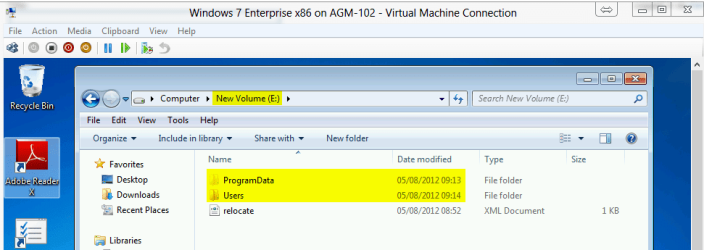
Again, no problems. The answer file works as it should work. Here's a screenshot of my last test, relocating both Users and Programdata on a virtual 7 Enterprise. As you can see, both folders were relocated, created on a new location only a few minutes ago:

Region.png

The tutorial works. The answer file in tutorial works.


Kari
 
Last edited:

My Computer My Computer

At a glance

Windows 10 Pro x64 EN-GB1.6 GHz Intel Core i7-720QM Processor6 GBATI Mobility Radeon HD 5850 Graphics
Computer type
Laptop
Computer Manufacturer/Model Number
HP ENVY 17-1150eg
OS
Windows 10 Pro x64 EN-GB
CPU
1.6 GHz Intel Core i7-720QM Processor
Memory
6 GB
Graphics Card(s)
ATI Mobility Radeon HD 5850 Graphics
Sound Card
Beats sound system with integrated subwoofer
Monitor(s) Displays
17" laptop display, 22" LED and 32" Full HD TV through HDMI
Screen Resolution
1600*900 (1), 1920*1080 (2&3)
Hard Drives
Internal: 2 x 500 GB SATA Hard Disk Drive 7200 rpm
External: 2TB for backups, 3TB USB3 network drive for media
Cooling
As Envy runs a bit warm, I have it on a Cooler Master pad
Keyboard
Logitech diNovo Media Desktop Laser (bluetooth)
Mouse
Logitech Performance Mouse MX
Internet Speed
50/10 Mbps VDSL
Antivirus
Windows Defender 4.3.9431.0
Browser
Maxthon 3.5.2., IE11
good work kari, thats a lot of time spent to keep our members informed.
kudos!
 

My Computer My Computer

At a glance

Microsoft Windows 7 Home Premium 64-bit 7600IIx4 amd athelon 635 processor2x2gbati radeon HD 5450
Computer Manufacturer/Model Number
Hewlett packard/p6512uk
OS
Microsoft Windows 7 Home Premium 64-bit 7600
CPU
IIx4 amd athelon 635 processor
Motherboard
FOXCONN 2AA9
Memory
2x2gb
Graphics Card(s)
ati radeon HD 5450
Sound Card
(1) Realtek High Definition Audio (2) AMD High Definition
Monitor(s) Displays
samsung lcd tv 32"
Screen Resolution
1360x 768
Hard Drives
(1) WDC WD10 01FAES-60Z2A0 SATA Disk Device (2) Maxtor OneTouch USB Device (3) ST310003 33AS USB Device (4) WD My Book 1111 USB Device
PSU
?
Cooling
air!
Keyboard
wireless hp
Mouse
wireless Hp,optical
Internet Speed
1.10mb/s
Antivirus
MSE
Browser
Firefox
Thanks Julian.
 

My Computer My Computer

At a glance

Windows 10 Pro x64 EN-GB1.6 GHz Intel Core i7-720QM Processor6 GBATI Mobility Radeon HD 5850 Graphics
Computer type
Laptop
Computer Manufacturer/Model Number
HP ENVY 17-1150eg
OS
Windows 10 Pro x64 EN-GB
CPU
1.6 GHz Intel Core i7-720QM Processor
Memory
6 GB
Graphics Card(s)
ATI Mobility Radeon HD 5850 Graphics
Sound Card
Beats sound system with integrated subwoofer
Monitor(s) Displays
17" laptop display, 22" LED and 32" Full HD TV through HDMI
Screen Resolution
1600*900 (1), 1920*1080 (2&3)
Hard Drives
Internal: 2 x 500 GB SATA Hard Disk Drive 7200 rpm
External: 2TB for backups, 3TB USB3 network drive for media
Cooling
As Envy runs a bit warm, I have it on a Cooler Master pad
Keyboard
Logitech diNovo Media Desktop Laser (bluetooth)
Mouse
Logitech Performance Mouse MX
Internet Speed
50/10 Mbps VDSL
Antivirus
Windows Defender 4.3.9431.0
Browser
Maxthon 3.5.2., IE11
Wow! Thats some effort - great dedication Kari.
 

My Computer My Computer

At a glance

Windows 10 Pro x64 ; Xubuntu x64Intel i7 860 @ 2.80 GHz O/C'ed to 4.0GHz16GB Corsair Vengance DDR3 @ 661 MHz Dual Cha...EVGA NVidia GTX 560 1024MB
Computer type
PC/Desktop
Computer Manufacturer/Model Number
Golden Mk. I.4
OS
Windows 10 Pro x64 ; Xubuntu x64
CPU
Intel i7 860 @ 2.80 GHz O/C'ed to 4.0GHz
Motherboard
Gigabyte P55A-UD3R Rev.1. Award BIOS F13
Memory
16GB Corsair Vengance DDR3 @ 661 MHz Dual Channel (9-9-9-24)
Graphics Card(s)
EVGA NVidia GTX 560 1024MB
Sound Card
Realtek Integrated
Monitor(s) Displays
Dual Samsung SyncMaster 2494HS
Screen Resolution
1920*1080 and 1920*1080
Hard Drives
1*Samsung 840 EVO 120GB SSD;
1*OCZ Vertex 2 60GB SSD;
2*Samsung F3 SpinPoint 1TB in RAID0;
1*Samsung F1 SpinPoint 1TB;
2*Western Digital 1TB External USB 3.0
1*Western Digital 500GB External USB 3.0
1*Seagate 500GB External USB 2.0
PSU
Thermaltake ToughPower QFan 750W
Case
Thermaltake Element S VK60001W2Z
Cooling
Corsair H60 Water Cooling, 2*230mm and 2*80mm case fans
Keyboard
Logitech G110
Mouse
Logitech MX518
This guide no longer works for some reason.

I'm trying to get this with a new ssd but it's not working anymore. I'm using the same windows usb and the same relocate.xml that I used last time but I'm getting the parsing error. I have no idea why.

I'm loading the xml from a hdd, install.wim from the usb.

Needless to say after 10 reinstalls I've had enough. Nuts to it.

Guide no longer works.
After reading your post yesterday evening, I decided to run some tests.

I have USB stick install media both for 7 Ultimate and Enterprise, 8 Consumer Preview and 8 Release Preview. I also have an extra laptop for test purposes which I can format and reinstall, nothing important is stored on that laptop.

First test, Install 7 Ultimate, running sysprep while installing as described in tutorial, using the answer file (script) as written in tutorial. Absolutely no problems, both Users and ProgramData folders were relocated to D: as I wanted.

Next test 7 Enterprise, everything again OK.

Windows 8 Release Preview, same answer file. Relocated only Users, Windows Store on Metro UI does not like it when ProgramData is relocated. No problems, Users folder was relocated.

Conclusion from tests last night: the tutorial and answer file are working fine, without problems.

I continued my tests early this morning with virtual machines and existing Windows 7 installation on a desktop. I wanted to be sure about the answer file working also when relocating Users and ProgramData when both folders already exist on default location C: and contain quite a lot of data.

Again, no problems. The answer file works as it should work. Here's a screenshot of my last test, relocating both Users and Programdata on a virtual 7 Enterprise. As you can see, both folders were relocated, created on a new location only a few minutes ago:

View attachment 224885

The tutorial works. The answer file in tutorial works.


Kari


Kari,

Hi, sorry I didn't mean to sound curt. I was just frustrated greatly because I'm not joking when I say I installed 10 times to the same error.

My frustration grows because I have used your guide before using my same Windows 7 Pr 64Bit bootable USB. This time around I used the exact same relocate.xml file I create backed then (found on my USB) to perform these steps. I got the parsing error each and ever time, which was incredibly frustrating.

I saw a few people having the exact same issue in this thread but they never seemed to get a resolution.

I tried having the answer file on the C: drive, I tried having the answer file on the D: drive (I understand it couldn't be on the USB/DVD, but had to be on the root of a physical drive). I tried rewriting (recopying) the answer file from your PDF and starting over. Nothing worked at all :(

The only difference between the first time I followed this guide (with great success) and yesterday was that I'm using an SSD to install to. That's it :( Same motherboard, system hardware, etc.

In the end I gave up and used this software:

Software by Joseph Cox

Which does the same thing.

I created an account called Temp on first boot. Renamed my existing User's folder, ran that software, created my account, logged into it and then copied over my data.

I then booted back into the Windows 7 USB, hit Shift+F10 to bring up the command prompt and deleted C:ProgramData and created a junction to it on the D: drive. I did the same for C:\Users just in case any programs are dumb enough to hardcode %SystemDrive%\Users.

Again, apologies for being or sounding curt. I got there in the end, though. I have no idea why the XML file wouldn't parse or whether something was going on with drive letters, but using that software and symlinking tricks did the job for me.
 

My Computer My Computer

At a glance

Win 7 64bit Pro
OS
Win 7 64bit Pro
Most common parsing errors occur when:
  • Answer file is not found or it contains errors
  • Answer file has either wrong bit reference (x86 / amd64), wrong paths or wrong Windows edition
  • Install.wim is not found
  • A service is preventing sysprep to run (most typically WMPNetworkSvc)
Anyway, good to hear you finally got it working. Never heard of that tool, though.

Kari
 

My Computer My Computer

At a glance

Windows 10 Pro x64 EN-GB1.6 GHz Intel Core i7-720QM Processor6 GBATI Mobility Radeon HD 5850 Graphics
Computer type
Laptop
Computer Manufacturer/Model Number
HP ENVY 17-1150eg
OS
Windows 10 Pro x64 EN-GB
CPU
1.6 GHz Intel Core i7-720QM Processor
Memory
6 GB
Graphics Card(s)
ATI Mobility Radeon HD 5850 Graphics
Sound Card
Beats sound system with integrated subwoofer
Monitor(s) Displays
17" laptop display, 22" LED and 32" Full HD TV through HDMI
Screen Resolution
1600*900 (1), 1920*1080 (2&3)
Hard Drives
Internal: 2 x 500 GB SATA Hard Disk Drive 7200 rpm
External: 2TB for backups, 3TB USB3 network drive for media
Cooling
As Envy runs a bit warm, I have it on a Cooler Master pad
Keyboard
Logitech diNovo Media Desktop Laser (bluetooth)
Mouse
Logitech Performance Mouse MX
Internet Speed
50/10 Mbps VDSL
Antivirus
Windows Defender 4.3.9431.0
Browser
Maxthon 3.5.2., IE11
Most common parsing errors occur when:
  • Answer file is not found or it contains errors
  • Answer file has either wrong bit reference (x86 / amd64), wrong paths or wrong Windows edition
  • Install.wim is not found
  • A service is preventing sysprep to run (most typically WMPNetworkSvc)
Anyway, good to hear you finally got it working. Never heard of that tool, though.

Kari

Here's the answer file I was using:

Code:
<?xml version="1.0" encoding="utf-8"?>
<unattend xmlns="urn:schemas-microsoft-com:unattend">
    <settings pass="oobeSystem">
        <component name="Microsoft-Windows-Shell-Setup" processorArchitecture="amd64" publicKeyToken="31bf3856ad364e35" language="neutral" versionScope="nonSxS" xmlns:wcm="http://schemas.microsoft.com/WMIConfig/2002/State" xmlns:xsi="http://www.w3.org/2001/XMLSchema-instance">
            <FolderLocations>
                <ProfilesDirectory>D:\Users</ProfilesDirectory>
                <ProgramData>D:\ProgramData</ProgramData>
            </FolderLocations>
        </component>
    </settings>
    <cpi:offlineImage cpi:source="wim:E:/sources/install.wim#Windows 7 PROFESSIONAL" xmlns:cpi="urn:schemas-microsoft-com:cpi" />
</unattend>
 

My Computer My Computer

At a glance

Win 7 64bit Pro
OS
Win 7 64bit Pro
That answer file is correct and should work if:
  • You are using a 64-bit Professional
  • Would like to locate Users and ProgramData to root of D:
  • Windows install media is located on E:
Might be a stupid question but you mentioned using USB Flash install media? Apparently you have HD partitions C: and D:, so normally the DVD/CD drive would be E:, so please confirm is your USB stick really E:?

Kari
 

My Computer My Computer

At a glance

Windows 10 Pro x64 EN-GB1.6 GHz Intel Core i7-720QM Processor6 GBATI Mobility Radeon HD 5850 Graphics
Computer type
Laptop
Computer Manufacturer/Model Number
HP ENVY 17-1150eg
OS
Windows 10 Pro x64 EN-GB
CPU
1.6 GHz Intel Core i7-720QM Processor
Memory
6 GB
Graphics Card(s)
ATI Mobility Radeon HD 5850 Graphics
Sound Card
Beats sound system with integrated subwoofer
Monitor(s) Displays
17" laptop display, 22" LED and 32" Full HD TV through HDMI
Screen Resolution
1600*900 (1), 1920*1080 (2&3)
Hard Drives
Internal: 2 x 500 GB SATA Hard Disk Drive 7200 rpm
External: 2TB for backups, 3TB USB3 network drive for media
Cooling
As Envy runs a bit warm, I have it on a Cooler Master pad
Keyboard
Logitech diNovo Media Desktop Laser (bluetooth)
Mouse
Logitech Performance Mouse MX
Internet Speed
50/10 Mbps VDSL
Antivirus
Windows Defender 4.3.9431.0
Browser
Maxthon 3.5.2., IE11
Yeah it was E: at the time of install.

I installed to just C: (only the SSD plugged in) got to welcome screen, booted to Audit mode. Then, powered off, plugged in d: drive and rebooted back to audit mode. I specifically went into disk management to make the USB stick drive E:!
 

My Computer My Computer

At a glance

Win 7 64bit Pro
OS
Win 7 64bit Pro
Back
Top