User Profiles - Create and Move During Windows 7 Installation

How to Create User Accounts on another Partition or Disk During Windows 7 Installation

   Information
There are several methods to move user profiles to another disk or partition after you have installed Windows 7. The easiest way is to use Audit Mode and System Preparation Tool, both built-in Windows 7 features, to permanently move the location of the folder Users.

This tutorial shows how to relocate both Users and ProgramData to another disk or partition when doing a new, fresh and clean install of Windows 7. If you have already installed Seven, and you'd like to move those folders away from their default location in C: drive, please read first post number 22 in this thread. Follow the steps told in that post, and continue then from beginning of the page 4 in this tutorial.
When Windows 7 is installed, 5 or 6 system folders are created depending on chosen bit-version:

  • PerfLogs (Performance Logs), where Windows stores performance and reliability logs
  • Program Files, where applications and software are installed. Windows x86 (32-bit) stores all applications here, Windows x64 (64-bit) only native 64-bit applications
  • Program Files (x86), only in Windows x64. All non-x64 applications are stored here
  • Windows, which contains core operating system files and drivers
  • ProgramData, where some applications store application and user specific settings and configuration files
  • Users. This is the "home" of all user folders. When a new user account is created and this new user logs in first time, Windows creates a set of user specific folders Users\New_User
Moving Windows and Program Files folders is not recommend by Microsoft. However, moving both Users and ProgramData folders is safe and can save a lot of space on system disk. Pictures, mp3’s videos, documents and so on, a user folder with its subfolders can be tens, sometimes hundreds of gigabytes.

For instance, using this laptop of mine as an example, the total size of Users folder and subfolders is at the moment about 240 GB. The size of ProgramData folder is at the moment almost 18 GB. I simply could not have these folders stored in my system C: drive, there’s not enough space.

When installing Windows 7, I recommend using Windows System Preparation Tool (Sysprep) in so called Audit Mode to relocate Users and ProgramData, leaving C: drive only for Windows and applications.

   Warning

An upgraded Windows cannot be sysprepped. As this method is based in sysprepping, this tutorial is valid only for Windows setups which have not been upgraded.

This means that if you have for instance in-place upgraded Vista to Seven, you cannot sysprep. The same applies if you have upgraded from a lesser edition to a better edition, for instance from Windows 7 Home Premium to Professional.

Notice that a repair install is also an upgrade install, so if you have ever done a repair install (= in-place upgrade to same edition), you cannot sysprep.

In other words, when sysprepping an existing Windows setup it only works if the Windows was installed clean and has never been upgraded or repaired using repair install, or if it is the original pre-installed Windows.

Using this method causes Windows 7 to lose activation information, and it needs to be reactivated afterwards. If your Windows 7 is an OEM version, you might not be able to reactivate it, at least not without phone activation option.

   Warning
IE10 Users: Please read this article first: Sysprep Fatal Error With IE 10 (FIX) | System Administration


Complete tutorial as PDF: View attachment Relocate User folders during Windows 7 installation.pdf (1.22 MB)

Kari


Last edited:
Thanks for this info. I just wanted to confirm that it still works this way in Windows 8 RTM. I've only tried on 64bit pro, but working a charm.
 

My Computer My Computer

At a glance

Windows 8 Pro
OS
Windows 8 Pro

My Computer My Computer

At a glance

Windows 7 Ultimate X64 SP1Intel i5-2550K, Differing ~4.4-4.8GHz No buil...16GB G.Skill Sniper 1866MHz @ 2133MHz 2x8GBASUS GTX650TIB-DC2OC-2GD5, (650TI Boost)
Computer type
PC/Desktop
Computer Manufacturer/Model Number
Home Built Desktop By DataTech
OS
Windows 7 Ultimate X64 SP1
CPU
Intel i5-2550K, Differing ~4.4-4.8GHz No built in GPU
Motherboard
ASUS P8Z68-V PRO/GEN3
Memory
16GB G.Skill Sniper 1866MHz @ 2133MHz 2x8GB
Graphics Card(s)
ASUS GTX650TIB-DC2OC-2GD5, (650TI Boost)
Sound Card
Onboard Realtek 5-1
Monitor(s) Displays
Samsung P2570HD
Screen Resolution
1920x1080
Hard Drives
Samsung 840 Pro 256GB SSD for OS, 500GB Seagate Constellation (Enterprise drive) for Data
PSU
Corsair HX650W
Case
Inwin Dragon Rider
Cooling
Hyper 212 EVO w/two Noctua fans, push-pull, @1300 RPM
Keyboard
E-Z Eyes, bright yellow keys with large characters
Mouse
steelseries SENSEI Laser Pro Gaming
Internet Speed
48-51Mbs Mbs down, 11 Mbs up Xfinity Cable
Antivirus
Norton Internet Security 2013
Browser
IE 10, Opera, Pale Moon if needed
Other Info
4 case fans, LG BluRay-RE, ASUS DVD-RW, Mr. Fusion power supply, 1.21 gigawatts.
Unfortunately, I had (two days ago) already installed Windows 7 Ult x64 SP1 before discovering this forum. I also have all the drivers for my motherboard/video cards installed as well. If I want to try the "post Windows 7 install" procedure to move my Users and ProgramData folders now, should I wait to install the 100+ additional Windows Updates since SP1 or doesn't it matter. Further, I have a UEFI motherboard and Windows 7 is installed on an SSD configured as GPT, not MBR. I have not installed any other software yet. Also, the system is joined to a domain. Does anyone have any opinions or experience or concerns regarding my situation and moving the two folders. Thank you for any help/suggestions.
 

My Computer My Computer

At a glance

Windows 7 Ultimate x64 SP1Intel i7 3930kG.Skill F3-14900 32GB2 x EVGA nVidia GTX570HD
Computer Manufacturer/Model Number
Custom
OS
Windows 7 Ultimate x64 SP1
CPU
Intel i7 3930k
Motherboard
ASUS P9X79 Pro
Memory
G.Skill F3-14900 32GB
Graphics Card(s)
2 x EVGA nVidia GTX570HD
Hard Drives
SAMSUNG 830 SSD
WD 500GB HDD
PSU
Thermaltake 1200W
Case
NZXT Switch 810
Cooling
Zalman CNPS9900Max

My Computer My Computer

At a glance

Windows 7 Ultimate X64 SP1Intel i5-2550K, Differing ~4.4-4.8GHz No buil...16GB G.Skill Sniper 1866MHz @ 2133MHz 2x8GBASUS GTX650TIB-DC2OC-2GD5, (650TI Boost)
Computer type
PC/Desktop
Computer Manufacturer/Model Number
Home Built Desktop By DataTech
OS
Windows 7 Ultimate X64 SP1
CPU
Intel i5-2550K, Differing ~4.4-4.8GHz No built in GPU
Motherboard
ASUS P8Z68-V PRO/GEN3
Memory
16GB G.Skill Sniper 1866MHz @ 2133MHz 2x8GB
Graphics Card(s)
ASUS GTX650TIB-DC2OC-2GD5, (650TI Boost)
Sound Card
Onboard Realtek 5-1
Monitor(s) Displays
Samsung P2570HD
Screen Resolution
1920x1080
Hard Drives
Samsung 840 Pro 256GB SSD for OS, 500GB Seagate Constellation (Enterprise drive) for Data
PSU
Corsair HX650W
Case
Inwin Dragon Rider
Cooling
Hyper 212 EVO w/two Noctua fans, push-pull, @1300 RPM
Keyboard
E-Z Eyes, bright yellow keys with large characters
Mouse
steelseries SENSEI Laser Pro Gaming
Internet Speed
48-51Mbs Mbs down, 11 Mbs up Xfinity Cable
Antivirus
Norton Internet Security 2013
Browser
IE 10, Opera, Pale Moon if needed
Other Info
4 case fans, LG BluRay-RE, ASUS DVD-RW, Mr. Fusion power supply, 1.21 gigawatts.
Thanks Gary...

I decided to take the plunge and follow the procedure for moving Users and ProgramData after Windows 7 was already installed. Since I hadn’t yet gone too far in completing my installation (loading various apps, etc,) I figured it was something I could risk. I un-joined the domain first and the process went smoothly enough…I thought I noticed an extra reboot during “preparing your computer for first use,” but SysPrep worked exactly as explained in the tutorial. I had trouble getting a profile for my (domain) user account when joining the domain again. Windows 7 kept creating a temporary profile for that account. After a quick search, I found that I had to edit the registry to get rid of a backup entry for the previous instance of the domain user account. Works perfectly now.

Thanks, Kari, for the thorough research and write-up for both cases. :D
 

My Computer My Computer

At a glance

Windows 7 Ultimate x64 SP1Intel i7 3930kG.Skill F3-14900 32GB2 x EVGA nVidia GTX570HD
Computer Manufacturer/Model Number
Custom
OS
Windows 7 Ultimate x64 SP1
CPU
Intel i7 3930k
Motherboard
ASUS P9X79 Pro
Memory
G.Skill F3-14900 32GB
Graphics Card(s)
2 x EVGA nVidia GTX570HD
Hard Drives
SAMSUNG 830 SSD
WD 500GB HDD
PSU
Thermaltake 1200W
Case
NZXT Switch 810
Cooling
Zalman CNPS9900Max
Good job, glad it all works for you. :)
 

My Computer My Computer

At a glance

Windows 7 Ultimate X64 SP1Intel i5-2550K, Differing ~4.4-4.8GHz No buil...16GB G.Skill Sniper 1866MHz @ 2133MHz 2x8GBASUS GTX650TIB-DC2OC-2GD5, (650TI Boost)
Computer type
PC/Desktop
Computer Manufacturer/Model Number
Home Built Desktop By DataTech
OS
Windows 7 Ultimate X64 SP1
CPU
Intel i5-2550K, Differing ~4.4-4.8GHz No built in GPU
Motherboard
ASUS P8Z68-V PRO/GEN3
Memory
16GB G.Skill Sniper 1866MHz @ 2133MHz 2x8GB
Graphics Card(s)
ASUS GTX650TIB-DC2OC-2GD5, (650TI Boost)
Sound Card
Onboard Realtek 5-1
Monitor(s) Displays
Samsung P2570HD
Screen Resolution
1920x1080
Hard Drives
Samsung 840 Pro 256GB SSD for OS, 500GB Seagate Constellation (Enterprise drive) for Data
PSU
Corsair HX650W
Case
Inwin Dragon Rider
Cooling
Hyper 212 EVO w/two Noctua fans, push-pull, @1300 RPM
Keyboard
E-Z Eyes, bright yellow keys with large characters
Mouse
steelseries SENSEI Laser Pro Gaming
Internet Speed
48-51Mbs Mbs down, 11 Mbs up Xfinity Cable
Antivirus
Norton Internet Security 2013
Browser
IE 10, Opera, Pale Moon if needed
Other Info
4 case fans, LG BluRay-RE, ASUS DVD-RW, Mr. Fusion power supply, 1.21 gigawatts.
Not working for me :/

Hello everyone, especially Kari, very nice tutorial you have here.

However it's not working for me. Everything behaves like said in tutorial, except that after running script with sysprep and restarting nothing has changed. Both Users and ProgramData are still on C: disk.

I might say that i don't have SSD disk, so it's more like i want to separate those data from system partition. Also i don't care much about data in those folders, stuff i care about i store somewhere else.

I rather wrote down whole list of clean installation, in case i missed something important.

1) I created bootable USB with Win7 Enterprise 32bit and booted from it. Could this be an issue somehow ? You are mentioning CD/DVD only all the time.

2) Once booted on screen with language selection, i hit Shift+F10 and run diskpart in command line. I selected disk for installation and ran "clean all" (according to this: http://www.sevenforums.com/tutorials/91339-ssd-hdd-optimize-windows-reinstallation.html?filter).

3) Once completed (after 3 hours) i created and formatted 200MB "System Reserved" partition followed by 60GB "Windows 7" partition and rest of space (630GB) filled with partition "Data". I had assigned letters C a D as usual, leaving first small without letter.

4) Now finally back to Win installation. In the screen with selection of partition it all looks kinda odd. I see there twice "Unallocated Space" of size "0.0" at the beginning and end of the list. Every partition contains some data already, it shows free space little bit lower than total size. System Reserved has only 182MB free and other two are smaller by 0.1GB. Not sure if that means something. Anyway, i picked "Windows 7" partition and hit Next.

5) After first reboot i had set bios back to boot from HDD. Installation continues, there is second reboot and once i get to screen for entering username, i hit Ctrl+Shift+F3 without typing anything else, computer reboots.

6) In audit mode i confirmed network as Home and Cancel next screen with sharing and homegroup. Than i Cancel sysprep tool dialog window.

7) Folder Options and enabled showing hidden files and file extensions.

8) C:\Users exists and contains Administrator, Public and Default subfolders. Directory C:\ProgramData some Microsoft stuff.

9) Created relocate.xml file to root of D: disk and checked all settings. I created D:\internals folder as i want to have both of those in there.

10) Finally ran the script with sysprep.exe as stated in tutorial, it restarted and after restart both folders are still in place... :/

I am not sure what purpose has offlineImage there, but i even tried copying content from usb stick to D drive and changing path to it, in case the usb is not available for some reason. Didn't helped.

Also i tried to shortening paths to usual D:\Users and D:\ProgramData, same result.
 

My Computer My Computer

At a glance

Windows 7 Enterprise 64bitIntel Core i5 3470DDR3 Corsair XMS3 8GBNVidia GeForce GTX 260 (Gainward)
Computer type
PC/Desktop
OS
Windows 7 Enterprise 64bit
CPU
Intel Core i5 3470
Motherboard
ASUS P8Z77-M
Memory
DDR3 Corsair XMS3 8GB
Graphics Card(s)
NVidia GeForce GTX 260 (Gainward)
Sound Card
Realtek High Definition Audio
Monitor(s) Displays
LG 22''
Screen Resolution
1680 x 1050
Hard Drives
SSD Crucial M4 128GB
Seagate 750GB (7200.10)
Seagate 320GB (7200.8)
Seagate 250GB (7200.8)
Case
Fractal Design Define R4 - Black Pearl
Cooling
Arctic Freezer 13 + Artic Accelero Extreme Plus II
Internet Speed
cabel, 30MBit
Antivirus
Avast
Browser
Comodo Dragon, Waterfox
Code:
 <ProfilesDirectory>D:\[COLOR=red]internals[/COLOR]\Users</ProfilesDirectory> 
<ProgramData>D:\[COLOR=red]internals[/COLOR]\ProgramData</ProgramData>

You have the red word added which is not in the original script. There's something wrong with the slashes too I think. Kari will probably comment soon.
 

My Computer My Computer

At a glance

Windows 7 Ultimate X64 SP1Intel i5-2550K, Differing ~4.4-4.8GHz No buil...16GB G.Skill Sniper 1866MHz @ 2133MHz 2x8GBASUS GTX650TIB-DC2OC-2GD5, (650TI Boost)
Computer type
PC/Desktop
Computer Manufacturer/Model Number
Home Built Desktop By DataTech
OS
Windows 7 Ultimate X64 SP1
CPU
Intel i5-2550K, Differing ~4.4-4.8GHz No built in GPU
Motherboard
ASUS P8Z68-V PRO/GEN3
Memory
16GB G.Skill Sniper 1866MHz @ 2133MHz 2x8GB
Graphics Card(s)
ASUS GTX650TIB-DC2OC-2GD5, (650TI Boost)
Sound Card
Onboard Realtek 5-1
Monitor(s) Displays
Samsung P2570HD
Screen Resolution
1920x1080
Hard Drives
Samsung 840 Pro 256GB SSD for OS, 500GB Seagate Constellation (Enterprise drive) for Data
PSU
Corsair HX650W
Case
Inwin Dragon Rider
Cooling
Hyper 212 EVO w/two Noctua fans, push-pull, @1300 RPM
Keyboard
E-Z Eyes, bright yellow keys with large characters
Mouse
steelseries SENSEI Laser Pro Gaming
Internet Speed
48-51Mbs Mbs down, 11 Mbs up Xfinity Cable
Antivirus
Norton Internet Security 2013
Browser
IE 10, Opera, Pale Moon if needed
Other Info
4 case fans, LG BluRay-RE, ASUS DVD-RW, Mr. Fusion power supply, 1.21 gigawatts.
I know, i have added "internals" as i want to have both folders in D:\internals subfolder and not just in root. I presumed it doesn't much matter which path i select there and i could even rename Users to Profiles or something else. Anyway as i said, i tried it without "internals" with same result.
 

My Computer My Computer

At a glance

Windows 7 Enterprise 64bitIntel Core i5 3470DDR3 Corsair XMS3 8GBNVidia GeForce GTX 260 (Gainward)
Computer type
PC/Desktop
OS
Windows 7 Enterprise 64bit
CPU
Intel Core i5 3470
Motherboard
ASUS P8Z77-M
Memory
DDR3 Corsair XMS3 8GB
Graphics Card(s)
NVidia GeForce GTX 260 (Gainward)
Sound Card
Realtek High Definition Audio
Monitor(s) Displays
LG 22''
Screen Resolution
1680 x 1050
Hard Drives
SSD Crucial M4 128GB
Seagate 750GB (7200.10)
Seagate 320GB (7200.8)
Seagate 250GB (7200.8)
Case
Fractal Design Define R4 - Black Pearl
Cooling
Arctic Freezer 13 + Artic Accelero Extreme Plus II
Internet Speed
cabel, 30MBit
Antivirus
Avast
Browser
Comodo Dragon, Waterfox
Hi Fredy, welcome to the Seven Forums.

If your install media is / was located in E: and you wanted to relocate Users and ProgramData on D:, your answer file script is OK and contains no errors. It is totally OK to use subfolders for Users and ProgramData, they do not have to be on root. Your D:\Internals\Users path is not a problem.

Could this issue of yours be so simple you have just forgotten to exit Audit Mode as told in the tutorial (Exiting Audit Mode, page 6)?

If you follow the tutorial to the letter, after running sysprep with your answer file you reboot back to Audit Mode. At this point, nothing has been moved, relocated or changed; No, instead your system has only prepared folders to be relocated. The relocation, moving itself, only occurs when you exit Audit Mode and boot to Welcome (OOBE).

Kari
 

My Computer My Computer

At a glance

Windows 10 Pro x64 EN-GB1.6 GHz Intel Core i7-720QM Processor6 GBATI Mobility Radeon HD 5850 Graphics
Computer type
Laptop
Computer Manufacturer/Model Number
HP ENVY 17-1150eg
OS
Windows 10 Pro x64 EN-GB
CPU
1.6 GHz Intel Core i7-720QM Processor
Memory
6 GB
Graphics Card(s)
ATI Mobility Radeon HD 5850 Graphics
Sound Card
Beats sound system with integrated subwoofer
Monitor(s) Displays
17" laptop display, 22" LED and 32" Full HD TV through HDMI
Screen Resolution
1600*900 (1), 1920*1080 (2&3)
Hard Drives
Internal: 2 x 500 GB SATA Hard Disk Drive 7200 rpm
External: 2TB for backups, 3TB USB3 network drive for media
Cooling
As Envy runs a bit warm, I have it on a Cooler Master pad
Keyboard
Logitech diNovo Media Desktop Laser (bluetooth)
Mouse
Logitech Performance Mouse MX
Internet Speed
50/10 Mbps VDSL
Antivirus
Windows Defender 4.3.9431.0
Browser
Maxthon 3.5.2., IE11
Oh wow, i really did miss that part. I kind a scrolled down to images with moved folders and didn't notice "Exiting Audit Mode". Ok, i am still in audit mode and installing drivers and some basic software, so i can create system backup from it. I hope it will not screw up some installed things after i exit audit mode. Anyway, thanks for help, i really felt dumb now :)
 

My Computer My Computer

At a glance

Windows 7 Enterprise 64bitIntel Core i5 3470DDR3 Corsair XMS3 8GBNVidia GeForce GTX 260 (Gainward)
Computer type
PC/Desktop
OS
Windows 7 Enterprise 64bit
CPU
Intel Core i5 3470
Motherboard
ASUS P8Z77-M
Memory
DDR3 Corsair XMS3 8GB
Graphics Card(s)
NVidia GeForce GTX 260 (Gainward)
Sound Card
Realtek High Definition Audio
Monitor(s) Displays
LG 22''
Screen Resolution
1680 x 1050
Hard Drives
SSD Crucial M4 128GB
Seagate 750GB (7200.10)
Seagate 320GB (7200.8)
Seagate 250GB (7200.8)
Case
Fractal Design Define R4 - Black Pearl
Cooling
Arctic Freezer 13 + Artic Accelero Extreme Plus II
Internet Speed
cabel, 30MBit
Antivirus
Avast
Browser
Comodo Dragon, Waterfox
Just remember that the OOBE boot after Audit Mode is like first boot ever: you need to name the computer and create first, initial user.

IF you do this AFTER you have installed Windows 7 and created some users, you can't use existing usernames at this point. An example:

You have installed Windows creating a user Fredy. Later you have created three more users Tom, Dick & Harry. User profiles exist on C:\Users and already contain some files and folders.

Now you decide to use sysprep to relocate Users. You enter Audit Mode, run the answer file and exit Audit Mode by booting to Welcome (OOBE) mode. Your computer thinks now it is the very first time it is booted and stops to ask initial username and computer name. At this point however the users Fredy, Tom, Dick and Harry exist in register so Windows does not accept those usernames (duplicate usernames not allowed).

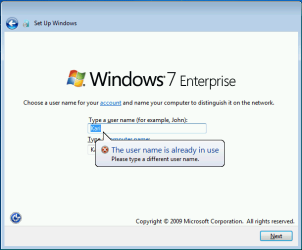
In my test system I for instance already have the user Kari. If I now make an OOBE boot and give initial username Kari, I will get this:

OOBE_Initial_User.PNG

I recommend using username Test at this point, just to get further. When you then finally enter the Welcome screen, you can see your old original users plus the newly created Test:

OOBE_Initial_User_2.PNG

Login using your old, original username and when in Windows go to Control Panel > Users and delete Test account.

Kari
 

My Computer My Computer

At a glance

Windows 10 Pro x64 EN-GB1.6 GHz Intel Core i7-720QM Processor6 GBATI Mobility Radeon HD 5850 Graphics
Computer type
Laptop
Computer Manufacturer/Model Number
HP ENVY 17-1150eg
OS
Windows 10 Pro x64 EN-GB
CPU
1.6 GHz Intel Core i7-720QM Processor
Memory
6 GB
Graphics Card(s)
ATI Mobility Radeon HD 5850 Graphics
Sound Card
Beats sound system with integrated subwoofer
Monitor(s) Displays
17" laptop display, 22" LED and 32" Full HD TV through HDMI
Screen Resolution
1600*900 (1), 1920*1080 (2&3)
Hard Drives
Internal: 2 x 500 GB SATA Hard Disk Drive 7200 rpm
External: 2TB for backups, 3TB USB3 network drive for media
Cooling
As Envy runs a bit warm, I have it on a Cooler Master pad
Keyboard
Logitech diNovo Media Desktop Laser (bluetooth)
Mouse
Logitech Performance Mouse MX
Internet Speed
50/10 Mbps VDSL
Antivirus
Windows Defender 4.3.9431.0
Browser
Maxthon 3.5.2., IE11
Yeah, i understood that part. I am still running unnamed computer with only Administrator user. I want to make backup with drivers and everything basic in this state and later just take this backup and create user.
 

My Computer My Computer

At a glance

Windows 7 Enterprise 64bitIntel Core i5 3470DDR3 Corsair XMS3 8GBNVidia GeForce GTX 260 (Gainward)
Computer type
PC/Desktop
OS
Windows 7 Enterprise 64bit
CPU
Intel Core i5 3470
Motherboard
ASUS P8Z77-M
Memory
DDR3 Corsair XMS3 8GB
Graphics Card(s)
NVidia GeForce GTX 260 (Gainward)
Sound Card
Realtek High Definition Audio
Monitor(s) Displays
LG 22''
Screen Resolution
1680 x 1050
Hard Drives
SSD Crucial M4 128GB
Seagate 750GB (7200.10)
Seagate 320GB (7200.8)
Seagate 250GB (7200.8)
Case
Fractal Design Define R4 - Black Pearl
Cooling
Arctic Freezer 13 + Artic Accelero Extreme Plus II
Internet Speed
cabel, 30MBit
Antivirus
Avast
Browser
Comodo Dragon, Waterfox
Hi, I was able to get into audit mode, and partitioned my drive. I saved the script to drive C: but when i command prompt, i can't get it to accept the command. I have a brand new computer and the OS is already on drive C:, so i started from where it asked me to enter user name and computer name. Iam moving the user/program data folders to drive E: as per the script. I pasted the script into drive C: and E: but not sure how to get to root. The script looks like this, <?xml version="1.0" encoding="utf-8"?>
<unattend xmlns="urn:schemas-microsoft-com:unattend">
<settings pass="oobeSystem">
<component name="Microsoft-Windows-Shell-Setup" processorArchitecture="amd64" publicKeyToken="31bf3856ad364e35" language="neutral" versionScope="nonSxS" xmlns:wcm="http://schemas.microsoft.com/WMIConfig/2002/State" xmlns:xsi="http://www.w3.org/2001/XMLSchema-instance">
<FolderLocations>
<ProfilesDirectory>e:\Users</ProfilesDirectory>
<ProgramData>e:\ProgramData</ProgramData>
</FolderLocations>
</component>
</settings>
<cpi:offlineImage cpi:source="wim:C:/sources/install.wim#Windows 7 HOMEPREMIUM" xmlns:cpi="urn:schemas-microsoft-com:cpi" />
</unattend>


In the script where it says wim:C:, thats where is OS is not on DVD/CD. When i try to type in c\Windows\System32\Sysprep, it just takes me back to the prompt C:\Users\Administrator. What am i doing wrong??
 

My Computer My Computer

At a glance

Windows 7 Pro 64 bit, Vista home premium 64 b...Intel® Core™ 2 Duo Processor P84004GBNVIDA GeForce 9800M GTS
Computer Manufacturer/Model Number
Gateway P-7801u FX, Laptop
OS
Windows 7 Pro 64 bit, Vista home premium 64 bit, XP Pro 32 bit
CPU
Intel® Core™ 2 Duo Processor P8400
Motherboard
Intel PM45 chipset
Memory
4GB
Graphics Card(s)
NVIDA GeForce 9800M GTS
The line in answer file that is pointing to install.wim file have to point to location of where you have the Windows installation media, not to where you have installed Windows.

So, this line in your answer file is wrong:
<cpi:offlineImage cpi:source="wim:C:/sources/install.wim#Windows 7 HOMEPREMIUM" xmlns:cpi="urn:schemas-microsoft-com:cpi" />
It is pointing to your Windows on C:, not to install media as it should be. You have to have Windows installation media, either as original Windows 7 installation DVD or Windows 7 ISO file burned to DVD or USB stick, and then edit that line to point to that media. For instance if your Windows is installed on C: and your Windows installation DVD is on G:, that line should be:
<cpi:offlineImage cpi:source="wim:G:/sources/install.wim#Windows 7 HOMEPREMIUM" xmlns:cpi="urn:schemas-microsoft-com:cpi" />

Also, do not save the answer file on C:, save it on root of another drive.

Kari
 

My Computer My Computer

At a glance

Windows 10 Pro x64 EN-GB1.6 GHz Intel Core i7-720QM Processor6 GBATI Mobility Radeon HD 5850 Graphics
Computer type
Laptop
Computer Manufacturer/Model Number
HP ENVY 17-1150eg
OS
Windows 10 Pro x64 EN-GB
CPU
1.6 GHz Intel Core i7-720QM Processor
Memory
6 GB
Graphics Card(s)
ATI Mobility Radeon HD 5850 Graphics
Sound Card
Beats sound system with integrated subwoofer
Monitor(s) Displays
17" laptop display, 22" LED and 32" Full HD TV through HDMI
Screen Resolution
1600*900 (1), 1920*1080 (2&3)
Hard Drives
Internal: 2 x 500 GB SATA Hard Disk Drive 7200 rpm
External: 2TB for backups, 3TB USB3 network drive for media
Cooling
As Envy runs a bit warm, I have it on a Cooler Master pad
Keyboard
Logitech diNovo Media Desktop Laser (bluetooth)
Mouse
Logitech Performance Mouse MX
Internet Speed
50/10 Mbps VDSL
Antivirus
Windows Defender 4.3.9431.0
Browser
Maxthon 3.5.2., IE11
Ok, since my windows media is on drive C: and not on an installation DVD, you are saying to burn the OS from the computer to disk, then have it point to that disk media i.e. my DVD drive is D: so it would be <cpi:offlineImage cpi:source="wim:D:/sources/install.wim#Windows 7 HOMEPREMIUM". is that correct? Also, can i save to root of drive E: which is where the users folders will be, and when you say save to Root, what does that mean exactly.. I previously just opened drive E: and pasted it there!!!! Thanks for the help this is my first time.
 

My Computer My Computer

At a glance

Windows 7 Pro 64 bit, Vista home premium 64 b...Intel® Core™ 2 Duo Processor P84004GBNVIDA GeForce 9800M GTS
Computer Manufacturer/Model Number
Gateway P-7801u FX, Laptop
OS
Windows 7 Pro 64 bit, Vista home premium 64 bit, XP Pro 32 bit
CPU
Intel® Core™ 2 Duo Processor P8400
Motherboard
Intel PM45 chipset
Memory
4GB
Graphics Card(s)
NVIDA GeForce 9800M GTS
No, you can't just copy your Windows from C: to a DVD. You need an official, real Windows 7 installation DVD, or installation ISO file burned to disk or to USB stick.

For explanation of root, see here: Root directory - Wikipedia, the free encyclopedia

Kari
 

My Computer My Computer

At a glance

Windows 10 Pro x64 EN-GB1.6 GHz Intel Core i7-720QM Processor6 GBATI Mobility Radeon HD 5850 Graphics
Computer type
Laptop
Computer Manufacturer/Model Number
HP ENVY 17-1150eg
OS
Windows 10 Pro x64 EN-GB
CPU
1.6 GHz Intel Core i7-720QM Processor
Memory
6 GB
Graphics Card(s)
ATI Mobility Radeon HD 5850 Graphics
Sound Card
Beats sound system with integrated subwoofer
Monitor(s) Displays
17" laptop display, 22" LED and 32" Full HD TV through HDMI
Screen Resolution
1600*900 (1), 1920*1080 (2&3)
Hard Drives
Internal: 2 x 500 GB SATA Hard Disk Drive 7200 rpm
External: 2TB for backups, 3TB USB3 network drive for media
Cooling
As Envy runs a bit warm, I have it on a Cooler Master pad
Keyboard
Logitech diNovo Media Desktop Laser (bluetooth)
Mouse
Logitech Performance Mouse MX
Internet Speed
50/10 Mbps VDSL
Antivirus
Windows Defender 4.3.9431.0
Browser
Maxthon 3.5.2., IE11
So the recovery data i can burn to DVD won't do it.??? All i have is the recovery info that was installed on the new computer.
 

My Computer My Computer

At a glance

Windows 7 Pro 64 bit, Vista home premium 64 b...Intel® Core™ 2 Duo Processor P84004GBNVIDA GeForce 9800M GTS
Computer Manufacturer/Model Number
Gateway P-7801u FX, Laptop
OS
Windows 7 Pro 64 bit, Vista home premium 64 bit, XP Pro 32 bit
CPU
Intel® Core™ 2 Duo Processor P8400
Motherboard
Intel PM45 chipset
Memory
4GB
Graphics Card(s)
NVIDA GeForce 9800M GTS

My Computer My Computer

At a glance

Windows 10 Pro x64 ; Xubuntu x64Intel i7 860 @ 2.80 GHz O/C'ed to 4.0GHz16GB Corsair Vengance DDR3 @ 661 MHz Dual Cha...EVGA NVidia GTX 560 1024MB
Computer type
PC/Desktop
Computer Manufacturer/Model Number
Golden Mk. I.4
OS
Windows 10 Pro x64 ; Xubuntu x64
CPU
Intel i7 860 @ 2.80 GHz O/C'ed to 4.0GHz
Motherboard
Gigabyte P55A-UD3R Rev.1. Award BIOS F13
Memory
16GB Corsair Vengance DDR3 @ 661 MHz Dual Channel (9-9-9-24)
Graphics Card(s)
EVGA NVidia GTX 560 1024MB
Sound Card
Realtek Integrated
Monitor(s) Displays
Dual Samsung SyncMaster 2494HS
Screen Resolution
1920*1080 and 1920*1080
Hard Drives
1*Samsung 840 EVO 120GB SSD;
1*OCZ Vertex 2 60GB SSD;
2*Samsung F3 SpinPoint 1TB in RAID0;
1*Samsung F1 SpinPoint 1TB;
2*Western Digital 1TB External USB 3.0
1*Western Digital 500GB External USB 3.0
1*Seagate 500GB External USB 2.0
PSU
Thermaltake ToughPower QFan 750W
Case
Thermaltake Element S VK60001W2Z
Cooling
Corsair H60 Water Cooling, 2*230mm and 2*80mm case fans
Keyboard
Logitech G110
Mouse
Logitech MX518
THanks MUCH !! I'll give it a shot.
 

My Computer My Computer

At a glance

Windows 7 Pro 64 bit, Vista home premium 64 b...Intel® Core™ 2 Duo Processor P84004GBNVIDA GeForce 9800M GTS
Computer Manufacturer/Model Number
Gateway P-7801u FX, Laptop
OS
Windows 7 Pro 64 bit, Vista home premium 64 bit, XP Pro 32 bit
CPU
Intel® Core™ 2 Duo Processor P8400
Motherboard
Intel PM45 chipset
Memory
4GB
Graphics Card(s)
NVIDA GeForce 9800M GTS
Back
Top