User Profiles - Create and Move During Windows 7 Installation

How to Create User Accounts on another Partition or Disk During Windows 7 Installation

   Information
There are several methods to move user profiles to another disk or partition after you have installed Windows 7. The easiest way is to use Audit Mode and System Preparation Tool, both built-in Windows 7 features, to permanently move the location of the folder Users.

This tutorial shows how to relocate both Users and ProgramData to another disk or partition when doing a new, fresh and clean install of Windows 7. If you have already installed Seven, and you'd like to move those folders away from their default location in C: drive, please read first post number 22 in this thread. Follow the steps told in that post, and continue then from beginning of the page 4 in this tutorial.
When Windows 7 is installed, 5 or 6 system folders are created depending on chosen bit-version:

  • PerfLogs (Performance Logs), where Windows stores performance and reliability logs
  • Program Files, where applications and software are installed. Windows x86 (32-bit) stores all applications here, Windows x64 (64-bit) only native 64-bit applications
  • Program Files (x86), only in Windows x64. All non-x64 applications are stored here
  • Windows, which contains core operating system files and drivers
  • ProgramData, where some applications store application and user specific settings and configuration files
  • Users. This is the "home" of all user folders. When a new user account is created and this new user logs in first time, Windows creates a set of user specific folders Users\New_User
Moving Windows and Program Files folders is not recommend by Microsoft. However, moving both Users and ProgramData folders is safe and can save a lot of space on system disk. Pictures, mp3’s videos, documents and so on, a user folder with its subfolders can be tens, sometimes hundreds of gigabytes.

For instance, using this laptop of mine as an example, the total size of Users folder and subfolders is at the moment about 240 GB. The size of ProgramData folder is at the moment almost 18 GB. I simply could not have these folders stored in my system C: drive, there’s not enough space.

When installing Windows 7, I recommend using Windows System Preparation Tool (Sysprep) in so called Audit Mode to relocate Users and ProgramData, leaving C: drive only for Windows and applications.

   Warning

An upgraded Windows cannot be sysprepped. As this method is based in sysprepping, this tutorial is valid only for Windows setups which have not been upgraded.

This means that if you have for instance in-place upgraded Vista to Seven, you cannot sysprep. The same applies if you have upgraded from a lesser edition to a better edition, for instance from Windows 7 Home Premium to Professional.

Notice that a repair install is also an upgrade install, so if you have ever done a repair install (= in-place upgrade to same edition), you cannot sysprep.

In other words, when sysprepping an existing Windows setup it only works if the Windows was installed clean and has never been upgraded or repaired using repair install, or if it is the original pre-installed Windows.

Using this method causes Windows 7 to lose activation information, and it needs to be reactivated afterwards. If your Windows 7 is an OEM version, you might not be able to reactivate it, at least not without phone activation option.

   Warning
IE10 Users: Please read this article first: Sysprep Fatal Error With IE 10 (FIX) | System Administration


Complete tutorial as PDF: View attachment Relocate User folders during Windows 7 installation.pdf (1.22 MB)

Kari


Last edited:
Hi,

Great step-by-step PDF document "Relocate User folders during Windows 7 installation ". It says under the section "Creating a script for System Preparation Tool":

Row 14: Change the drive letter in wim:E to that of your CD/DVD drive where your Windows 7 installation DVD currently is

I am installing from a USB flash drive. This may sound like a silly question, but will Windows install assign a drive letter to the flash drive? And is there a way to figure it out what it is? Theoretically it should be after C (my SSD), D (letter assigned to my DVD drive by Windows) and E(my second hard drive) - so it should be F:, right?

Thx

Ron

Welcome to Seven Forums rsaritzky.
That's not a silly question, I used a USB flash drive to do this too. Yes, w7 should assign letter F to your USB drive. If not, make note of what letter is does get and edit the answer file.
 
Last edited by a moderator:

My Computer My Computer

At a glance

Windows 7 Ultimate X64 SP1Intel i5-2550K, Differing ~4.4-4.8GHz No buil...16GB G.Skill Sniper 1866MHz @ 2133MHz 2x8GBASUS GTX650TIB-DC2OC-2GD5, (650TI Boost)
Computer type
PC/Desktop
Computer Manufacturer/Model Number
Home Built Desktop By DataTech
OS
Windows 7 Ultimate X64 SP1
CPU
Intel i5-2550K, Differing ~4.4-4.8GHz No built in GPU
Motherboard
ASUS P8Z68-V PRO/GEN3
Memory
16GB G.Skill Sniper 1866MHz @ 2133MHz 2x8GB
Graphics Card(s)
ASUS GTX650TIB-DC2OC-2GD5, (650TI Boost)
Sound Card
Onboard Realtek 5-1
Monitor(s) Displays
Samsung P2570HD
Screen Resolution
1920x1080
Hard Drives
Samsung 840 Pro 256GB SSD for OS, 500GB Seagate Constellation (Enterprise drive) for Data
PSU
Corsair HX650W
Case
Inwin Dragon Rider
Cooling
Hyper 212 EVO w/two Noctua fans, push-pull, @1300 RPM
Keyboard
E-Z Eyes, bright yellow keys with large characters
Mouse
steelseries SENSEI Laser Pro Gaming
Internet Speed
48-51Mbs Mbs down, 11 Mbs up Xfinity Cable
Antivirus
Norton Internet Security 2013
Browser
IE 10, Opera, Pale Moon if needed
Other Info
4 case fans, LG BluRay-RE, ASUS DVD-RW, Mr. Fusion power supply, 1.21 gigawatts.
Can you migrate from this setup to Windows 8 Pro via upgrade media?

A while back when I upgraded my mobo and CPU, along with adding an SSD to my system, I used this tutorial successfully. I intend to either buy the pre-order Windows 8 Pro upgrade Retail Box w/ Disk that Micro Center is offering for $38.88 or wait until after Christmas and download the Windows 8 Pro upgrade from Windows.com for $39.99 and make my own backup copy.

I just wish to know if Kari, Britton30, or anyone else can confirm whether the upgrade will go smoothly with Users and ProgramData folders located on my HDD and the other system folders installed to my SSD.

If not, can I move my Users and ProgramData folders over to the SSD and successfully upgrade, or will I need to move what I wish to keep from my SSD to my HDD, reformat the SSD, do a clean install of Windows 7 from disk/usb and then upgrade from the Windows 8 upgrade disk/usb?

And, if the upgrade goes smoothly without migrating the Users and ProgramData folders over to my SSD, am I correct to assume that the Windows 8 will install in its entirety to the SSD, or will it actually install its relative system folders across my SSD and HDD in a similar fashion as my Windows 7 install is currently split?

Finally, it dawns upon me that I used this tutorial without coming back to thank you Kari for your valuable information. That was unintentionally rude of me, but better late than never, if you will permit. Thank you.
 

My Computer My Computer

At a glance

Windows 7 Home Premium 64 bitAMD Phenom IIx4 965 BE 125WG.SKILL Ripjaws Series 4GB DDR3 1333, 1.5v, 9...XFX XXX Radeon HD 5870
Computer Manufacturer/Model Number
Homebuilt
OS
Windows 7 Home Premium 64 bit
CPU
AMD Phenom IIx4 965 BE 125W
Motherboard
MSI 790FX-GD70
Memory
G.SKILL Ripjaws Series 4GB DDR3 1333, 1.5v, 9-9-9-24
Graphics Card(s)
XFX XXX Radeon HD 5870
Sound Card
Onboard Realtek ALC889
Monitor(s) Displays
HP 2509m
Hard Drives
Western Digital WD5001AALS Caviar Black Hard Drive
PSU
Antec Truepower New 750W
Case
Cooler Master HAF 932
Cooling
Zalman CNPS10X Extreme w Arctic Silver 5
I'm not sure how to go about an upgrade, I've asked Kari, the author, to have a look.
 

My Computer My Computer

At a glance

Windows 7 Ultimate X64 SP1Intel i5-2550K, Differing ~4.4-4.8GHz No buil...16GB G.Skill Sniper 1866MHz @ 2133MHz 2x8GBASUS GTX650TIB-DC2OC-2GD5, (650TI Boost)
Computer type
PC/Desktop
Computer Manufacturer/Model Number
Home Built Desktop By DataTech
OS
Windows 7 Ultimate X64 SP1
CPU
Intel i5-2550K, Differing ~4.4-4.8GHz No built in GPU
Motherboard
ASUS P8Z68-V PRO/GEN3
Memory
16GB G.Skill Sniper 1866MHz @ 2133MHz 2x8GB
Graphics Card(s)
ASUS GTX650TIB-DC2OC-2GD5, (650TI Boost)
Sound Card
Onboard Realtek 5-1
Monitor(s) Displays
Samsung P2570HD
Screen Resolution
1920x1080
Hard Drives
Samsung 840 Pro 256GB SSD for OS, 500GB Seagate Constellation (Enterprise drive) for Data
PSU
Corsair HX650W
Case
Inwin Dragon Rider
Cooling
Hyper 212 EVO w/two Noctua fans, push-pull, @1300 RPM
Keyboard
E-Z Eyes, bright yellow keys with large characters
Mouse
steelseries SENSEI Laser Pro Gaming
Internet Speed
48-51Mbs Mbs down, 11 Mbs up Xfinity Cable
Antivirus
Norton Internet Security 2013
Browser
IE 10, Opera, Pale Moon if needed
Other Info
4 case fans, LG BluRay-RE, ASUS DVD-RW, Mr. Fusion power supply, 1.21 gigawatts.
@ KantversusHume:

I really do not know, haven't tried yet an in-place upgrade from 7 with relocated Users to 8. One thing I know is that on 8, Windows Store does not work and most of so called Metro apps do not work when ProgramData is relocated, looks like 8 wants it to be on C:.

I have in-place upgraded Vista (both ProgramData and Users relocated) to 7 without any problems, so I guess also 7 to 8 should go just fine. Might be a good idea to move (relocate) ProgramData back to its original location before upgrading simply by running the sysprep again for reasons told above.

This answer file / script moves ProgramData back to its default location on C: drive:
<?xml version="1.0" encoding="utf-8"?>
<unattend xmlns="urn:schemas-microsoft-com:unattend">
<settings pass="oobeSystem">
<component name="Microsoft-Windows-Shell-Setup" processorArchitecture="amd64" publicKeyToken="31bf3856ad364e35" language="neutral" versionScope="nonSxS" xmlns:wcm="http://schemas.microsoft.com/WMIConfig/2002/State" xmlns:xsi="http://www.w3.org/2001/XMLSchema-instance">
<FolderLocations>
<ProgramData>C:\ProgramData</ProgramData>
</FolderLocations>

</component>
</settings>
<cpi:offlineImage cpi:source="wim:E:/sources/install.wim#Windows 7 ULTIMATE" xmlns:cpi="urn:schemas-microsoft-com:cpi" />
</unattend>

Kari
 

My Computer My Computer

At a glance

Windows 10 Pro x64 EN-GB1.6 GHz Intel Core i7-720QM Processor6 GBATI Mobility Radeon HD 5850 Graphics
Computer type
Laptop
Computer Manufacturer/Model Number
HP ENVY 17-1150eg
OS
Windows 10 Pro x64 EN-GB
CPU
1.6 GHz Intel Core i7-720QM Processor
Memory
6 GB
Graphics Card(s)
ATI Mobility Radeon HD 5850 Graphics
Sound Card
Beats sound system with integrated subwoofer
Monitor(s) Displays
17" laptop display, 22" LED and 32" Full HD TV through HDMI
Screen Resolution
1600*900 (1), 1920*1080 (2&3)
Hard Drives
Internal: 2 x 500 GB SATA Hard Disk Drive 7200 rpm
External: 2TB for backups, 3TB USB3 network drive for media
Cooling
As Envy runs a bit warm, I have it on a Cooler Master pad
Keyboard
Logitech diNovo Media Desktop Laser (bluetooth)
Mouse
Logitech Performance Mouse MX
Internet Speed
50/10 Mbps VDSL
Antivirus
Windows Defender 4.3.9431.0
Browser
Maxthon 3.5.2., IE11
Thanks for the response y'all. Per your advice Kari, I will likely move ProgramData back to C Drive. That said, it will likely be a couple of months before I upgrade (just wanted to get a physical copy of the the upgrade while it was on sale for the same price as the download promotion going on through January).

Kari, if you--or anyone else who reads this--do choose to do an in-place upgrade from Window 7 to Window 8 with Users and/or ProgramData from Windows 7 still relocated prior to the upgrade, please post your results here, so long as you don't mind adding those to this thread.
 

My Computer My Computer

At a glance

Windows 7 Home Premium 64 bitAMD Phenom IIx4 965 BE 125WG.SKILL Ripjaws Series 4GB DDR3 1333, 1.5v, 9...XFX XXX Radeon HD 5870
Computer Manufacturer/Model Number
Homebuilt
OS
Windows 7 Home Premium 64 bit
CPU
AMD Phenom IIx4 965 BE 125W
Motherboard
MSI 790FX-GD70
Memory
G.SKILL Ripjaws Series 4GB DDR3 1333, 1.5v, 9-9-9-24
Graphics Card(s)
XFX XXX Radeon HD 5870
Sound Card
Onboard Realtek ALC889
Monitor(s) Displays
HP 2509m
Hard Drives
Western Digital WD5001AALS Caviar Black Hard Drive
PSU
Antec Truepower New 750W
Case
Cooler Master HAF 932
Cooling
Zalman CNPS10X Extreme w Arctic Silver 5
Whats the best way to set up a stable & Recoverable system & partition

Please Help! Need to set up a stable & Recoverable system & partition ideas if setup has Win 7 on 120GB SSD with User Files on 2 TB HDD? Am sort of a novice & an visual learner so screen shots would be helpful. Been putting all this off till I find all information to do it right the first time.

New build, am planning on using script to relocate User folders during install, this seemed to work well when I did it to a friends CPU,....one question is what optimizations do I do for the SSD I plan I on using Crucial 128 M4 SSD.

The SSD Optimization Guide Redesigned @ The SSD Review « The Worlds Dedicated SSD Education and Review Resource. The SSD Review all these still advisable to do as well as safe to use on the Crucial 128 M4 SSD?

My Main ? is how to partition 2TB WD Black, such as to have my user files on a partition w/ some programs, maybe, need partition with an image of the OS,and one for a backup info on set up for incremental backup, or whatever is best option??, I have external 1 TB drive as well.Worries 1)How to clone if it has its user files on D. 2) best way to partition for stability, recover-ability ( never did much with cloning or drive backup before...I know, shame on me!Screen shots help greatly, I have neurological issue MS so please be patient. Anyone's help would be great on this matter.
 
Last edited:

My Computer My Computer

At a glance

Windows 7 Ultimate x64I5-2500k unlocked8 gigs Gskill
OS
Windows 7 Ultimate x64
CPU
I5-2500k unlocked
Motherboard
ASUS P8Z68-V
Memory
8 gigs Gskill
Monitor(s) Displays
19"Samsung
Hard Drives
Crucal M4 120 GB
WD Black 2TB 64 cache
PSU
Corsair 750 TX
Case
Haf 932
Cooling
Corsaiir-H60
Keyboard
logitech-k800
Mouse
logitech-Preformance MX
Tried this method on Windows 8 Pro and it generates a fatal error. Any suggestions for a workaround?
 

My Computer My Computer

At a glance

Windows 8 Professional
OS
Windows 8 Professional
Hey, I used the Relocate User folders during Windows 7 installation.pdf when installing Windows 7 and everything went great and has been for a couple years now. However, today I was going to upgrade my SSD and somehow Windows now can't find the user profile location and it just logs me in to the default desktop. The only thing I had done toward the SSD swap was swapping around some SATA cords and plugging in the new drive.

The user folders are all there where they used to be but I get a message saying C:\Windows\system32\config\systemfrofile\Desktop refers to a location that is unavailable. Etc...

Any idea how to get everything pointed in the right direction again?
 

My Computer My Computer

At a glance

Windows 7 64-bit Home PremiumIntel Core i7 920 D0OCZ3X1600R2LV6GK 6GBEVGA GTX 260
OS
Windows 7 64-bit Home Premium
CPU
Intel Core i7 920 D0
Motherboard
EVGA X58 3X SLI E758
Memory
OCZ3X1600R2LV6GK 6GB
Graphics Card(s)
EVGA GTX 260
Hard Drives
OCZ Agility2 120GB; WD Caviar Black 1TB
PSU
Rosewill Bronze 1000W
Case
Antec Nine Hundred
Cooling
Zalman CNPS 9900
I did some more digging, and my profile is defaulting to backup status. Other profiles are working fine. When looking in HKEY_LOCAL_MACHINE\SOFTWARE\Microsoft\Windows_NT\CurrentVersion\ProfileList I see a .bak profile with a ProfileImagePath pointing to the correct location and another profile of the same name except not a .bak and it doesn't point to the correct location.

I found some directions on how to fix it, but I thought I'd run it by you guys first.

To solve the problem, login to an administrator account other than the one that has the issue.

Next modify the key name that doesn't have the .bak to .ba.


Now Rename the key that HAS the .bak and remove the .bak.


Finally modify the key name that HAS the .ba to .bak


Once that is done, you will need to modify a few more things in the key without the .bak.

We need to change the RefCount to 0

We need to clear the state in State to 0

Now its time to reboot and try to login.
Windows 7 Profiles Wont Load. Stuck with Backup Status. — Micro IT Blog
 

My Computer My Computer

At a glance

Windows 7 64-bit Home PremiumIntel Core i7 920 D0OCZ3X1600R2LV6GK 6GBEVGA GTX 260
OS
Windows 7 64-bit Home Premium
CPU
Intel Core i7 920 D0
Motherboard
EVGA X58 3X SLI E758
Memory
OCZ3X1600R2LV6GK 6GB
Graphics Card(s)
EVGA GTX 260
Hard Drives
OCZ Agility2 120GB; WD Caviar Black 1TB
PSU
Rosewill Bronze 1000W
Case
Antec Nine Hundred
Cooling
Zalman CNPS 9900
Can this script be run again, or undone? I have a few problems.
 

My Computer My Computer

At a glance

Windows 7 Home Premium 64 bit3.20 gigahertz Intel Core i7-3930K16.0 GBNVIDIA GeForce GTX 680 2GB
Computer type
PC/Desktop
Computer Manufacturer/Model Number
Custom Built
OS
Windows 7 Home Premium 64 bit
CPU
3.20 gigahertz Intel Core i7-3930K
Motherboard
Board: ASUS P9X79 PRO Rev 1.xx
Memory
16.0 GB
Graphics Card(s)
NVIDIA GeForce GTX 680 2GB
Sound Card
NVIDIA High Definition Audio
Monitor(s) Displays
CMO CMC 22 W
Screen Resolution
1680x1050
Hard Drives
ATA SanDisk SDSSDX12 SCSI Disk Device (120.03 GB)
ATA ST2000DM001-1CH1 SCSI Disk Device (2000.40 GB)
Case
Coolermaster HAF XM Case with Window
Cooling
Coolermaster Hyper 212 EVO CPU Cooler
Keyboard
Microsoft
Mouse
Microsoft
Sysprep can be run again using this answer file, for instance if you want / need to move Users and ProgramData back to default locations on C: you just edit the answer file respectively. Just change the FolderLocations values back to default like this:
Code:
<FolderLocations>
<ProfilesDirectory>C:\Users</ProfilesDirectory>
<ProgramData>C:\ProgramData</ProgramData>
</FolderLocations>
Boot to Audit Mode, run Sysprep with edited answer file and that's it.

Kari
 

My Computer My Computer

At a glance

Windows 10 Pro x64 EN-GB1.6 GHz Intel Core i7-720QM Processor6 GBATI Mobility Radeon HD 5850 Graphics
Computer type
Laptop
Computer Manufacturer/Model Number
HP ENVY 17-1150eg
OS
Windows 10 Pro x64 EN-GB
CPU
1.6 GHz Intel Core i7-720QM Processor
Memory
6 GB
Graphics Card(s)
ATI Mobility Radeon HD 5850 Graphics
Sound Card
Beats sound system with integrated subwoofer
Monitor(s) Displays
17" laptop display, 22" LED and 32" Full HD TV through HDMI
Screen Resolution
1600*900 (1), 1920*1080 (2&3)
Hard Drives
Internal: 2 x 500 GB SATA Hard Disk Drive 7200 rpm
External: 2TB for backups, 3TB USB3 network drive for media
Cooling
As Envy runs a bit warm, I have it on a Cooler Master pad
Keyboard
Logitech diNovo Media Desktop Laser (bluetooth)
Mouse
Logitech Performance Mouse MX
Internet Speed
50/10 Mbps VDSL
Antivirus
Windows Defender 4.3.9431.0
Browser
Maxthon 3.5.2., IE11
Thanks Kari.
 

My Computer My Computer

At a glance

Windows 7 Home Premium 64 bit3.20 gigahertz Intel Core i7-3930K16.0 GBNVIDIA GeForce GTX 680 2GB
Computer type
PC/Desktop
Computer Manufacturer/Model Number
Custom Built
OS
Windows 7 Home Premium 64 bit
CPU
3.20 gigahertz Intel Core i7-3930K
Motherboard
Board: ASUS P9X79 PRO Rev 1.xx
Memory
16.0 GB
Graphics Card(s)
NVIDIA GeForce GTX 680 2GB
Sound Card
NVIDIA High Definition Audio
Monitor(s) Displays
CMO CMC 22 W
Screen Resolution
1680x1050
Hard Drives
ATA SanDisk SDSSDX12 SCSI Disk Device (120.03 GB)
ATA ST2000DM001-1CH1 SCSI Disk Device (2000.40 GB)
Case
Coolermaster HAF XM Case with Window
Cooling
Coolermaster Hyper 212 EVO CPU Cooler
Keyboard
Microsoft
Mouse
Microsoft
Do I have to run the whole script again? I got a fatal error when starting at the beginning of the script. I started with your advice on message 22. C:\Windows\System32\Sysprep\Sysprep.exe /audit /reboot,

Should I have put D:\ instead of C:\

Sorry to sound so dense.
 
Last edited:

My Computer My Computer

At a glance

Windows 7 Home Premium 64 bit3.20 gigahertz Intel Core i7-3930K16.0 GBNVIDIA GeForce GTX 680 2GB
Computer type
PC/Desktop
Computer Manufacturer/Model Number
Custom Built
OS
Windows 7 Home Premium 64 bit
CPU
3.20 gigahertz Intel Core i7-3930K
Motherboard
Board: ASUS P9X79 PRO Rev 1.xx
Memory
16.0 GB
Graphics Card(s)
NVIDIA GeForce GTX 680 2GB
Sound Card
NVIDIA High Definition Audio
Monitor(s) Displays
CMO CMC 22 W
Screen Resolution
1680x1050
Hard Drives
ATA SanDisk SDSSDX12 SCSI Disk Device (120.03 GB)
ATA ST2000DM001-1CH1 SCSI Disk Device (2000.40 GB)
Case
Coolermaster HAF XM Case with Window
Cooling
Coolermaster Hyper 212 EVO CPU Cooler
Keyboard
Microsoft
Mouse
Microsoft
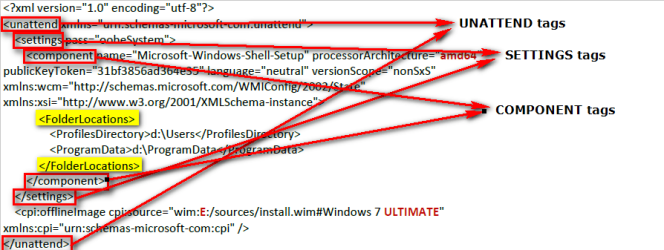
My previous post might have been a bit confusing: Yes, every time you run sysprep with an answer file (= script) it has to meet requirements for an answer file. It is not enough to make an answer file that only contains FolderLocations tags.

An answer file has so called tags to tell sysprep what kind of information it contains. Tags are like names for certain procedure, to mark where it starts and finishes. The start tag is written in between less than ( < ) and greater than ( > ) brackets: <TAGNAME>. The closing tag also contains a slash sign ( / ) to mark end of the tag: </TAGNAME>.

For this relocation task an answer file has to have FolderLocations tags in between Component tags, which have to be in between Settings tags which have to be in between Unattend tags.

Sounds complicated? The structure of an answer file:

<UNATTEND>
<SETTINGS>
<COMPONENT>
<FOLDERLOCATIONS>
</FOLDERLOCATIONS>

</COMPONENT>
</SETTINGS>
</UNATTEND>

The same a bit more graphical:

AnswerFile_Syntax.png
(Click to enlarge.)

This answer file can be used in both locating Users and ProgramData to a new non-default location as well as in moving said folders back to default location on C: as told in my previous post.

Kari
 

My Computer My Computer

At a glance

Windows 10 Pro x64 EN-GB1.6 GHz Intel Core i7-720QM Processor6 GBATI Mobility Radeon HD 5850 Graphics
Computer type
Laptop
Computer Manufacturer/Model Number
HP ENVY 17-1150eg
OS
Windows 10 Pro x64 EN-GB
CPU
1.6 GHz Intel Core i7-720QM Processor
Memory
6 GB
Graphics Card(s)
ATI Mobility Radeon HD 5850 Graphics
Sound Card
Beats sound system with integrated subwoofer
Monitor(s) Displays
17" laptop display, 22" LED and 32" Full HD TV through HDMI
Screen Resolution
1600*900 (1), 1920*1080 (2&3)
Hard Drives
Internal: 2 x 500 GB SATA Hard Disk Drive 7200 rpm
External: 2TB for backups, 3TB USB3 network drive for media
Cooling
As Envy runs a bit warm, I have it on a Cooler Master pad
Keyboard
Logitech diNovo Media Desktop Laser (bluetooth)
Mouse
Logitech Performance Mouse MX
Internet Speed
50/10 Mbps VDSL
Antivirus
Windows Defender 4.3.9431.0
Browser
Maxthon 3.5.2., IE11
Thanks Kari. It all started fine, but when the Sysprep cleanup phase was running, I got another fatal error. So it did not finish. Perhaps I should leave things as they are.

I am trying to activate an intercept dll. (from Geert de Peuter) to Corel Painter X. However, since I redirected the User Accounts to another drive, I cannot access the C drive, which is the SSD, which of course holds the Program Files (x86). I do not know of another way to activate this dll.
 
Last edited:

My Computer My Computer

At a glance

Windows 7 Home Premium 64 bit3.20 gigahertz Intel Core i7-3930K16.0 GBNVIDIA GeForce GTX 680 2GB
Computer type
PC/Desktop
Computer Manufacturer/Model Number
Custom Built
OS
Windows 7 Home Premium 64 bit
CPU
3.20 gigahertz Intel Core i7-3930K
Motherboard
Board: ASUS P9X79 PRO Rev 1.xx
Memory
16.0 GB
Graphics Card(s)
NVIDIA GeForce GTX 680 2GB
Sound Card
NVIDIA High Definition Audio
Monitor(s) Displays
CMO CMC 22 W
Screen Resolution
1680x1050
Hard Drives
ATA SanDisk SDSSDX12 SCSI Disk Device (120.03 GB)
ATA ST2000DM001-1CH1 SCSI Disk Device (2000.40 GB)
Case
Coolermaster HAF XM Case with Window
Cooling
Coolermaster Hyper 212 EVO CPU Cooler
Keyboard
Microsoft
Mouse
Microsoft
I installed my Os this way and I can access my C drive. You must have another issue. I have two rigs setup using Kari's answer file and both C drive are accessible.
 

My Computer My Computer

At a glance

Windows 7 Ultimate X64 SP1Intel i5-2550K, Differing ~4.4-4.8GHz No buil...16GB G.Skill Sniper 1866MHz @ 2133MHz 2x8GBASUS GTX650TIB-DC2OC-2GD5, (650TI Boost)
Computer type
PC/Desktop
Computer Manufacturer/Model Number
Home Built Desktop By DataTech
OS
Windows 7 Ultimate X64 SP1
CPU
Intel i5-2550K, Differing ~4.4-4.8GHz No built in GPU
Motherboard
ASUS P8Z68-V PRO/GEN3
Memory
16GB G.Skill Sniper 1866MHz @ 2133MHz 2x8GB
Graphics Card(s)
ASUS GTX650TIB-DC2OC-2GD5, (650TI Boost)
Sound Card
Onboard Realtek 5-1
Monitor(s) Displays
Samsung P2570HD
Screen Resolution
1920x1080
Hard Drives
Samsung 840 Pro 256GB SSD for OS, 500GB Seagate Constellation (Enterprise drive) for Data
PSU
Corsair HX650W
Case
Inwin Dragon Rider
Cooling
Hyper 212 EVO w/two Noctua fans, push-pull, @1300 RPM
Keyboard
E-Z Eyes, bright yellow keys with large characters
Mouse
steelseries SENSEI Laser Pro Gaming
Internet Speed
48-51Mbs Mbs down, 11 Mbs up Xfinity Cable
Antivirus
Norton Internet Security 2013
Browser
IE 10, Opera, Pale Moon if needed
Other Info
4 case fans, LG BluRay-RE, ASUS DVD-RW, Mr. Fusion power supply, 1.21 gigawatts.
Hi Britton, so how exactly do you access the c drive?
 

My Computer My Computer

At a glance

Windows 7 Home Premium 64 bit3.20 gigahertz Intel Core i7-3930K16.0 GBNVIDIA GeForce GTX 680 2GB
Computer type
PC/Desktop
Computer Manufacturer/Model Number
Custom Built
OS
Windows 7 Home Premium 64 bit
CPU
3.20 gigahertz Intel Core i7-3930K
Motherboard
Board: ASUS P9X79 PRO Rev 1.xx
Memory
16.0 GB
Graphics Card(s)
NVIDIA GeForce GTX 680 2GB
Sound Card
NVIDIA High Definition Audio
Monitor(s) Displays
CMO CMC 22 W
Screen Resolution
1680x1050
Hard Drives
ATA SanDisk SDSSDX12 SCSI Disk Device (120.03 GB)
ATA ST2000DM001-1CH1 SCSI Disk Device (2000.40 GB)
Case
Coolermaster HAF XM Case with Window
Cooling
Coolermaster Hyper 212 EVO CPU Cooler
Keyboard
Microsoft
Mouse
Microsoft
Could you please describe what are you trying to do on C: drive, and what do you mean by saying you can't access it?

Kari
 

My Computer My Computer

At a glance

Windows 10 Pro x64 EN-GB1.6 GHz Intel Core i7-720QM Processor6 GBATI Mobility Radeon HD 5850 Graphics
Computer type
Laptop
Computer Manufacturer/Model Number
HP ENVY 17-1150eg
OS
Windows 10 Pro x64 EN-GB
CPU
1.6 GHz Intel Core i7-720QM Processor
Memory
6 GB
Graphics Card(s)
ATI Mobility Radeon HD 5850 Graphics
Sound Card
Beats sound system with integrated subwoofer
Monitor(s) Displays
17" laptop display, 22" LED and 32" Full HD TV through HDMI
Screen Resolution
1600*900 (1), 1920*1080 (2&3)
Hard Drives
Internal: 2 x 500 GB SATA Hard Disk Drive 7200 rpm
External: 2TB for backups, 3TB USB3 network drive for media
Cooling
As Envy runs a bit warm, I have it on a Cooler Master pad
Keyboard
Logitech diNovo Media Desktop Laser (bluetooth)
Mouse
Logitech Performance Mouse MX
Internet Speed
50/10 Mbps VDSL
Antivirus
Windows Defender 4.3.9431.0
Browser
Maxthon 3.5.2., IE11
Hi Britton, so how exactly do you access the c drive?
I open Computer, see the Cdrive, double click and it opens and shows files on it.
 

My Computer My Computer

At a glance

Windows 7 Ultimate X64 SP1Intel i5-2550K, Differing ~4.4-4.8GHz No buil...16GB G.Skill Sniper 1866MHz @ 2133MHz 2x8GBASUS GTX650TIB-DC2OC-2GD5, (650TI Boost)
Computer type
PC/Desktop
Computer Manufacturer/Model Number
Home Built Desktop By DataTech
OS
Windows 7 Ultimate X64 SP1
CPU
Intel i5-2550K, Differing ~4.4-4.8GHz No built in GPU
Motherboard
ASUS P8Z68-V PRO/GEN3
Memory
16GB G.Skill Sniper 1866MHz @ 2133MHz 2x8GB
Graphics Card(s)
ASUS GTX650TIB-DC2OC-2GD5, (650TI Boost)
Sound Card
Onboard Realtek 5-1
Monitor(s) Displays
Samsung P2570HD
Screen Resolution
1920x1080
Hard Drives
Samsung 840 Pro 256GB SSD for OS, 500GB Seagate Constellation (Enterprise drive) for Data
PSU
Corsair HX650W
Case
Inwin Dragon Rider
Cooling
Hyper 212 EVO w/two Noctua fans, push-pull, @1300 RPM
Keyboard
E-Z Eyes, bright yellow keys with large characters
Mouse
steelseries SENSEI Laser Pro Gaming
Internet Speed
48-51Mbs Mbs down, 11 Mbs up Xfinity Cable
Antivirus
Norton Internet Security 2013
Browser
IE 10, Opera, Pale Moon if needed
Other Info
4 case fans, LG BluRay-RE, ASUS DVD-RW, Mr. Fusion power supply, 1.21 gigawatts.
Hi Kari, since I changed the Users Account, according to your excellent tutorial, when I do a cmd I get the D drive. I need to activate an intercept dll. to Corel Painter X. For that I need the C drive.

However, I thought that if I could undo the Users Account, then all would be back to normal and I could then access the C drive with a cmd.

Is there a reason why the Sysprep cleanup phase, which was running, returns a fatal error?
 

My Computer My Computer

At a glance

Windows 7 Home Premium 64 bit3.20 gigahertz Intel Core i7-3930K16.0 GBNVIDIA GeForce GTX 680 2GB
Computer type
PC/Desktop
Computer Manufacturer/Model Number
Custom Built
OS
Windows 7 Home Premium 64 bit
CPU
3.20 gigahertz Intel Core i7-3930K
Motherboard
Board: ASUS P9X79 PRO Rev 1.xx
Memory
16.0 GB
Graphics Card(s)
NVIDIA GeForce GTX 680 2GB
Sound Card
NVIDIA High Definition Audio
Monitor(s) Displays
CMO CMC 22 W
Screen Resolution
1680x1050
Hard Drives
ATA SanDisk SDSSDX12 SCSI Disk Device (120.03 GB)
ATA ST2000DM001-1CH1 SCSI Disk Device (2000.40 GB)
Case
Coolermaster HAF XM Case with Window
Cooling
Coolermaster Hyper 212 EVO CPU Cooler
Keyboard
Microsoft
Mouse
Microsoft
Back
Top