User Profiles - Create and Move During Windows 7 Installation

How to Create User Accounts on another Partition or Disk During Windows 7 Installation

   Information
There are several methods to move user profiles to another disk or partition after you have installed Windows 7. The easiest way is to use Audit Mode and System Preparation Tool, both built-in Windows 7 features, to permanently move the location of the folder Users.

This tutorial shows how to relocate both Users and ProgramData to another disk or partition when doing a new, fresh and clean install of Windows 7. If you have already installed Seven, and you'd like to move those folders away from their default location in C: drive, please read first post number 22 in this thread. Follow the steps told in that post, and continue then from beginning of the page 4 in this tutorial.
When Windows 7 is installed, 5 or 6 system folders are created depending on chosen bit-version:

  • PerfLogs (Performance Logs), where Windows stores performance and reliability logs
  • Program Files, where applications and software are installed. Windows x86 (32-bit) stores all applications here, Windows x64 (64-bit) only native 64-bit applications
  • Program Files (x86), only in Windows x64. All non-x64 applications are stored here
  • Windows, which contains core operating system files and drivers
  • ProgramData, where some applications store application and user specific settings and configuration files
  • Users. This is the "home" of all user folders. When a new user account is created and this new user logs in first time, Windows creates a set of user specific folders Users\New_User
Moving Windows and Program Files folders is not recommend by Microsoft. However, moving both Users and ProgramData folders is safe and can save a lot of space on system disk. Pictures, mp3’s videos, documents and so on, a user folder with its subfolders can be tens, sometimes hundreds of gigabytes.

For instance, using this laptop of mine as an example, the total size of Users folder and subfolders is at the moment about 240 GB. The size of ProgramData folder is at the moment almost 18 GB. I simply could not have these folders stored in my system C: drive, there’s not enough space.

When installing Windows 7, I recommend using Windows System Preparation Tool (Sysprep) in so called Audit Mode to relocate Users and ProgramData, leaving C: drive only for Windows and applications.

   Warning

An upgraded Windows cannot be sysprepped. As this method is based in sysprepping, this tutorial is valid only for Windows setups which have not been upgraded.

This means that if you have for instance in-place upgraded Vista to Seven, you cannot sysprep. The same applies if you have upgraded from a lesser edition to a better edition, for instance from Windows 7 Home Premium to Professional.

Notice that a repair install is also an upgrade install, so if you have ever done a repair install (= in-place upgrade to same edition), you cannot sysprep.

In other words, when sysprepping an existing Windows setup it only works if the Windows was installed clean and has never been upgraded or repaired using repair install, or if it is the original pre-installed Windows.

Using this method causes Windows 7 to lose activation information, and it needs to be reactivated afterwards. If your Windows 7 is an OEM version, you might not be able to reactivate it, at least not without phone activation option.

   Warning
IE10 Users: Please read this article first: Sysprep Fatal Error With IE 10 (FIX) | System Administration


Complete tutorial as PDF: View attachment Relocate User folders during Windows 7 installation.pdf (1.22 MB)

Kari


Last edited:
Madness

Ok here are the result....

So first i install different Win7 more than 20 times .....

i did also Ghost ... and use different Install ISO....from MS

Fact is , it want be work on my Computer, maybe there are more than 3 Partition on the disk....
or the Partition can not be work in a extended Partition. Nobody knows it.

Ok i talk to MS in the End .... Rubbish or what ever they say ...

RESULT In the END!!!! WASTE OF TIME..


My Computer My Computer

Computer type
Laptop
Computer Manufacturer/Model Number
HP
OS
WIN7 PROF X64
There's something else wrong in your system. If you cannot troubleshoot the Windows Update (see links in my earlier post), the best would be to reinstall. If you decide to do so, please do not relocate Users and ProgramData to a logical partition.

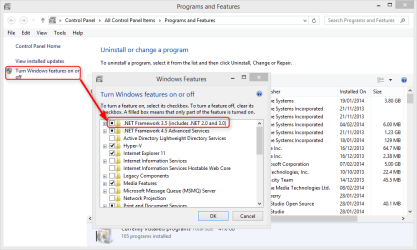
By the way, before trying these updates did you enable NET framework 3.5 from Control Panel > Programs and Features > Turn Windows features on and off:

2014-02-13_20h12_02.png

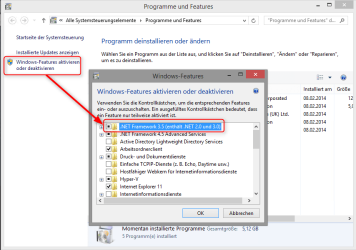
In German Windows, Systemsteurerung > Programme und Features > Windows-Features aktivieren oder deaktivieren:

2014-02-13_20h23_49.png
 

My Computer My Computer

Computer type
Laptop
Computer Manufacturer/Model Number
HP ENVY 17-1150eg
OS
Windows 10 Pro x64 EN-GB
CPU
1.6 GHz Intel Core i7-720QM Processor
Memory
6 GB
Graphics Card(s)
ATI Mobility Radeon HD 5850 Graphics
Sound Card
Beats sound system with integrated subwoofer
Monitor(s) Displays
17" laptop display, 22" LED and 32" Full HD TV through HDMI
Screen Resolution
1600*900 (1), 1920*1080 (2&3)
Hard Drives
Internal: 2 x 500 GB SATA Hard Disk Drive 7200 rpm
External: 2TB for backups, 3TB USB3 network drive for media
Cooling
As Envy runs a bit warm, I have it on a Cooler Master pad
Keyboard
Logitech diNovo Media Desktop Laser (bluetooth)
Mouse
Logitech Performance Mouse MX
Internet Speed
50/10 Mbps VDSL
Antivirus
Windows Defender 4.3.9431.0
Browser
Maxthon 3.5.2., IE11
Something wrong

Hi Again

I think im old enough to use google or look for some answers about net 3.5.1 and also to do reinstalling this in my machine
And also i read in this forum here, about Framework 3.5.1 its include with Win 7 to switch it on
In case of any delay on WIN 7 Updates....

this fault is not this prob anyway. I switched this already on in the system control panel and where windows function switch off and on

Did you try ever a HP DVD Install ROM .. i think not!!!

WHY does THE WINDOWS UPDATES WORKS,!!! if I DO NOT RELOCATE THE FOLDERS??
THATS IS THE QUESTION??????????????????
 
Last edited:

My Computer My Computer

Computer type
Laptop
Computer Manufacturer/Model Number
HP
OS
WIN7 PROF X64
I think im old enough to use google or look for some answers about net 3.5.1 and also to do reinstalling this in my machine
I wasn't implying you are not old enough to search Google when asking if you did enable the NET Framework 3.1. I was trying to politely cover all possibilities.

As you make it clear you are old enough to use Google, I recommend you to use Google Translate to type your questions in German and translate them to English and then copying the English translation and posting it here, as I have some difficulties to understand some content in your posts.

Have you done relocating several times already (multiple installs), and each time those Framework 3.51 updates fail?

I want to make this really clear: When the process is done as instructed, following instructions to the letter, and when you are using a valid Windows setup with valid Windows install media, Windows Update has no issues related to relocated ProgramData or Users folders.

You have not answered if you tried troubleshooting Windows Update as I asked you to do in my earlier post?

Anyway, I am not forcing you to use this method. If you are sure the Windows Update issue is due relocating folders as per this tutorial, please do not do it. Install Windows normally and forget the whole thing.

ODER in DEUTSCH die Scheiße funktioniert nicht !!!
That vulgar statement deserves no comments. However, I want to say this: read this thread through and you'll notice we have solved each issue members have had with relocating by sysprepping. In 90% of the cases it has been a direct user error, an error caused by user himself, and the rest has been cases where sysprep does simply not work and which are told in the beginning of the tutorial, so basically they are user errors, too (trying to sysprep an upgraded Windows, for instance).

Kari
 

My Computer My Computer

Computer type
Laptop
Computer Manufacturer/Model Number
HP ENVY 17-1150eg
OS
Windows 10 Pro x64 EN-GB
CPU
1.6 GHz Intel Core i7-720QM Processor
Memory
6 GB
Graphics Card(s)
ATI Mobility Radeon HD 5850 Graphics
Sound Card
Beats sound system with integrated subwoofer
Monitor(s) Displays
17" laptop display, 22" LED and 32" Full HD TV through HDMI
Screen Resolution
1600*900 (1), 1920*1080 (2&3)
Hard Drives
Internal: 2 x 500 GB SATA Hard Disk Drive 7200 rpm
External: 2TB for backups, 3TB USB3 network drive for media
Cooling
As Envy runs a bit warm, I have it on a Cooler Master pad
Keyboard
Logitech diNovo Media Desktop Laser (bluetooth)
Mouse
Logitech Performance Mouse MX
Internet Speed
50/10 Mbps VDSL
Antivirus
Windows Defender 4.3.9431.0
Browser
Maxthon 3.5.2., IE11
Network failed

Hi Kari,

this have nothing to do with the translation. I know finish is very difficult and i don't know how god is your Saxon german .

But after several times when there is no end this makes me crazy... OK (sorry)

One Point in your Manuel

Relocate User folders during Windows 7 installation.pdf


see "When Windows stops for asking you to set network location, choose one you prefer:"

Maybe the prob ist the missing Network Card ?

This screen is missing in my Installation . But i think it is doesn't matter. OR IMPORTANT ???

Kind regards
 

My Computer My Computer

Computer type
Laptop
Computer Manufacturer/Model Number
HP
OS
WIN7 PROF X64
Hi Kari,

this have nothing to do with the translation. I know finish is very difficult and i don't know how god is your Saxon german .


Finnish being difficult has nothing to do with this, nor does my Sächsische dialekt which by the way is quite good.

I meant this is an English site and we recommend people to translate their questions in Google or Bing or whatever if they feel uncertain about their English.

This for instance puzzles me, I seem to be unable to understand it:

And also i read in this forum here, about Framework 3.5.1 its include with Win 7 to switch it on
In case of any delay on WIN 7 Updates....

One Point in your Manuel see "When Windows stops for asking you to set network location, choose one you prefer:"

Maybe the prob ist the missing Network Card ?

This screen is missing in my Installation . But i think it is doesn't matter. OR IMPORTANT ???
If Windows finds a network adapter and is able to configure it while finalizing installation, it asks about your preferred network location (Home, Work, Public). The missing network location setting screen implies that no configured network adapters are found. Again, not sure I do understand you correctly but if your PC has no network adapter it can't connect to Windows Update?
 

My Computer My Computer

Computer type
Laptop
Computer Manufacturer/Model Number
HP ENVY 17-1150eg
OS
Windows 10 Pro x64 EN-GB
CPU
1.6 GHz Intel Core i7-720QM Processor
Memory
6 GB
Graphics Card(s)
ATI Mobility Radeon HD 5850 Graphics
Sound Card
Beats sound system with integrated subwoofer
Monitor(s) Displays
17" laptop display, 22" LED and 32" Full HD TV through HDMI
Screen Resolution
1600*900 (1), 1920*1080 (2&3)
Hard Drives
Internal: 2 x 500 GB SATA Hard Disk Drive 7200 rpm
External: 2TB for backups, 3TB USB3 network drive for media
Cooling
As Envy runs a bit warm, I have it on a Cooler Master pad
Keyboard
Logitech diNovo Media Desktop Laser (bluetooth)
Mouse
Logitech Performance Mouse MX
Internet Speed
50/10 Mbps VDSL
Antivirus
Windows Defender 4.3.9431.0
Browser
Maxthon 3.5.2., IE11
Ok

Hallo Kari

eigentlich wollte ich dir per PM schreiben. geht irgend wie nicht...

""And also i read in this forum here, about Framework 3.5.1 its include with Win 7 to switch it on
In case of any delay on WIN 7 Updates....""

das heißt auf deutsch so in etwa : ich habe es hier im Forum gelesen wie ich die Funktion an und abschalte für das Modul Framework 3.5.1 in Windows 7
Falles es Probleme damit gibt...

Das andere bezieht sich auf deine Gebrauchsanweisung, hier der Wortlaut für die Netzwerk einstellung .

Also ich wüßte nicht wo ich den Fehler gemacht haben sollte... in der Installation

Ach ja nach der Installation wird natürlich der NIC Treiber manuell installiert!

So keine 100MB Partition eine C/D/E/F das CDROM ist G und ist auch in der relocate.xml so angegeben s. U-

<?xml version="1.0" encoding="utf-8"?>
<unattend xmlns="urn:schemas-microsoft-com:unattend">
<settings pass="oobeSystem">
<component name="Microsoft-Windows-Shell-Setup" processorArchitecture="amd64" publicKeyToken="31bf3856ad364e35" language="neutral" versionScope="nonSxS" xmlns:wcm="http://schemas.microsoft.com/WMIConfig/2002/State" xmlns:xsi="http://www.w3.org/2001/XMLSchema-instance">
<FolderLocations>
<ProfilesDirectory>d:\Users</ProfilesDirectory>
<ProgramData>d:\ProgramData</ProgramData>
</FolderLocations>
</component>
</settings>
<cpi:offlineImage cpi:source="wim:G:/sources/install.wim#Windows 7 PROFESSIONAL" xmlns:cpi="urn:schemas-microsoft-com:cpi" />
</unattend>
 

My Computer My Computer

Computer type
Laptop
Computer Manufacturer/Model Number
HP
OS
WIN7 PROF X64
GODADDY.COM suspicions

Hi Folks!

Keine Antwort ist auch Eine

Back to this tread from MS......

Relocation of the Users directory and the ProgramData directory to a drive other than the drive that contains the Windows directory

Relocation of the Users directory and the ProgramData directory to a drive other than the drive that contains the Windows directory
This article describes the changes in policy for the relocation of the Users directory and the ProgramData directory to a drive other than the %systemdrive% drive in Windows operating systems.
Notice
Caution Using the ProgramData setting to redirect folders to a drive other than the system volume will block your ability to upgrade to future versions of Windows.

By changing the default location of the user profile directories or program data folders to a volume other than the system volume, you cannot service your Windows installation. Any updates, fixes, or service packs cannot be applied to the installation. We recommend that you do not change the location of the user profile directories or program data folders.

that's the reason why there is NO Tool Application out now, to change the drive folder

In german ... Wahrscheinlich will da jemand einen WIN_Trabbi 7.XX bauen :D jetzt ist mir auch klar warum dein DENGLISH so schlecht ist... "Gänsefleisch mal `n Kofferraum uffmachen?" Aber erst nach der Wende nach Finnland reisen dürfen.

it makes no sense have to have a crypt server? Kari who and how is behind you? Stasi 2.0
 

My Computer My Computer

Computer type
Laptop
Computer Manufacturer/Model Number
HP
OS
WIN7 PROF X64
I just hate it when people turn their "I think that..." and "I have heard that ..." and other superstitious beliefs in facts.

Here some comments about your last post:

Hi Folks!
Keine Antwort ist auch Eine

I only response to posts written in English, as per forum rules. I told you earlier to use an online translator, type your questions there in German, then copy the English translation and paste it here.

Back to this tread from MS......
Relocation of the Users directory and the ProgramData directory to a drive other than the drive that contains the Windows directory


Relocation of the Users directory and the ProgramData directory to a drive other than the drive that contains the Windows directory

This article describes the changes in policy for the relocation of the Users directory and the ProgramData directory to a drive other than the %systemdrive% drive in Windows operating systems.
Notice
Caution Using the ProgramData setting to redirect folders to a drive other than the system volume will block your ability to upgrade to future versions of Windows.

By changing the default location of the user profile directories or program data folders to a volume other than the system volume, you cannot service your Windows installation. Any updates, fixes, or service packs cannot be applied to the installation. We recommend that you do not change the location of the user profile directories or program data folders.

Did you read the whole article, or just the lines you thought might support your idiotic statements? That Microsoft article you linked to is written 8 years ago for Windows Vista. Since then the Windows have evolved, as have the Sysprep tool.

If you had read further, you’d find this:
Microsoft said:
There are various reasons why you may want to relocate the Users directory or the ProgramData directory to other drives.

For Windows, the most common reasons are as follows:
• It is easier to back up data from a single drive and from a drive that contains only user files.
• It is easier to rebuild the operating system drive on a user’s computer if user data is located on a separate volume. In this case, the drive that contains the Windows directory can be formatted, and Windows can be reinstalled without having to worry about how to remove user data.

For Windows Server, the most common reason is as follows:
• There are performance improvements when you relocate the Users directory and the ProgramData directory to a drive other than the operating system drive.

For information about how to use the answer file setting, go to the following Microsoft website:
FolderLocations

For information about the answer file setting when you are using Windows ADK, go to the following Microsoft website:
FolderLocations (updated)

For more information about the FolderLocation settings in the Windows Vista Unattend.xml file, click the following article number to view the article in the Microsoft Knowledge Base:
929831 A description of known issues with the FolderLocation settings in the Windows Vista Unattend.xml file

Microsoft tells it's OK to go further, given detailed instructions. The highlighted link at the bottom of the above quote gives then a full list of known issues (sadly again for Vista, not Seven and Eight). The only major issue is that you cannot upgrade a sysprepped Windows as it is, but you need to prepare a sysprepped Windows for upgrade as told in this tutorial, part 15: http://www.sevenforums.com/tutorials/319903-windows-7-image-customize-audit-mode-sysprep.html

that's the reason why there is NO Tool Application out now, to change the drive folder
That is totally absolutely utterly pure BS!

Of course there is a Microsoft Tool for this procedure. It's called System Preparation Tool (Sysprep), which is used with so called answer files which in their turn are created with another Microsoft Tool System Image Manager.

The screenshot from a tutorial of mine shows exactly how the System Image Manager Tool is used to change the locations of Users and ProgramData folders on Windows 7:

304593d1391385189-windows-7-image-customize-audit-mode-sysprep-folderlocations_1.png


In german ... Wahrscheinlich will da jemand einen WIN_Trabbi 7.XX bauen :D jetzt ist mir auch klar warum dein DENGLISH so schlecht ist... "Gänsefleisch mal `n Kofferraum uffmachen?" Aber erst nach der Wende nach Finnland reisen dürfen.
it makes no sense have to have a crypt server? Kari who and how is behind you? Stasi 2.0
I will not comment your insults.

You have still not answered my questions about if you did troubleshoot Windows Update, and if you have done this (relocating while installing) already several times and if your update issue has appeared every time.


Conclusion:

   Information
I would like to remind the future readers of this thread about certain facts:
  • Relocating Users and ProgramData will absolutely bring no Update or Upgrade issues. It is true, though, that in-place upgrading Windows to a superior edition of the same version or to next version when at least one of its system folders is located on another drive than C: will not work without preparing Windows for upgrade as told in another tutorial, part 15: http://www.sevenforums.com/attachme...mize-audit-mode-sysprep-folderlocations_1.png
  • Upgrading by clean installing is of course always possible.
  • This thread is a living proof that there are no issues in this procedure. We have solved each and every issue various members have had with this, always finding out that the culprit was an error caused by user either mistyping the answer file, using non-valid install media and so on.
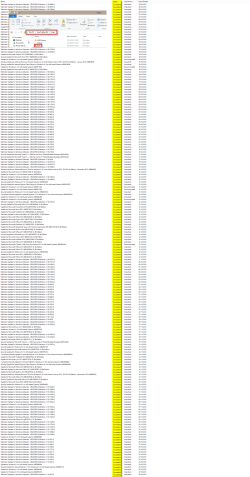
  • Counting all reinstalls since the day first beta versions of Windows 7 were published, I have done this procedure at least 100 times since that. I have personally had absolutely no update or upgrade issues due relocated system folders, nor have there been any issues on computers I maintain for my work. See the screenshot below showing this Windows 8.1 Pro laptop's update history, Users folder relocated on E: since the day I installed Windows:
304228-walkthrough-customize-windows-7-image-audit-mode-sysprep-2014-01-31_075252.png
(You need to click a few times to enlarge image enough.)


Kari
 
Last edited:

My Computer My Computer

Computer type
Laptop
Computer Manufacturer/Model Number
HP ENVY 17-1150eg
OS
Windows 10 Pro x64 EN-GB
CPU
1.6 GHz Intel Core i7-720QM Processor
Memory
6 GB
Graphics Card(s)
ATI Mobility Radeon HD 5850 Graphics
Sound Card
Beats sound system with integrated subwoofer
Monitor(s) Displays
17" laptop display, 22" LED and 32" Full HD TV through HDMI
Screen Resolution
1600*900 (1), 1920*1080 (2&3)
Hard Drives
Internal: 2 x 500 GB SATA Hard Disk Drive 7200 rpm
External: 2TB for backups, 3TB USB3 network drive for media
Cooling
As Envy runs a bit warm, I have it on a Cooler Master pad
Keyboard
Logitech diNovo Media Desktop Laser (bluetooth)
Mouse
Logitech Performance Mouse MX
Internet Speed
50/10 Mbps VDSL
Antivirus
Windows Defender 4.3.9431.0
Browser
Maxthon 3.5.2., IE11
Ok OK

It seems like i do a fault in case there is some easy translation by the way.. OR MAYBE this understud is GOOGLE Translate?

Oh that rule i dont Know only english .. ADMIN DELETE MY BAD GERMAN Plz

Ok i Apologie ME...
 

My Computer My Computer

Computer type
Laptop
Computer Manufacturer/Model Number
HP
OS
WIN7 PROF X64
Kari, thank you so much for your fantastic tutorial. Worked great on a fresh install. However, I do have a question about an already installed Windows 7 that I've been using now for several months. I read Post 22 you linked to and I think I understand what to do. But my question is what happens to programs that are already installed? Will I need to reinstall them so they know where ProgramData folders are, do you know?
 

My Computer My Computer

Computer type
PC/Desktop
Computer Manufacturer/Model Number
Custom Build
OS
Windows 7 Ultimate x64
CPU
i7-3770k
Motherboard
Asrock Z77 Extreme4
Memory
Crucial Ballistix (2 x 8gb)
Graphics Card(s)
Zotac GTX 660
Sound Card
On board Realtek HD
Monitor(s) Displays
LG L246WP
Screen Resolution
1920 x 1200
Hard Drives
Samsung 840 Pro (256gb)
WD 1tb Blue
PSU
SeaSonic 500w
Cooling
Cooler Master Hyper 212 Evo
Keyboard
Logitech MK550
Mouse
Evoluent Vertical Mouse
Antivirus
AVG
Browser
Coolnovo
Kari, thank you so much for your fantastic tutorial. Worked great on a fresh install. However, I do have a question about an already installed Windows 7 that I've been using now for several months. I read Post 22 you linked to and I think I understand what to do. But my question is what happens to programs that are already installed? Will I need to reinstall them so they know where ProgramData folders are, do you know?

Audit Mode, sysprepping Windows and everything else described in this tutorial are meant to be used when creating the install image, in other words while installing. When done when no user profiles have been created for a fresh Windows, the procedure always works.

As the sysprep as used in this tutorial changes environment variable values for locations of Users and Programdata folders, this procedure can also be done on an existing installation, with several existing user profiles and installed software because the changed environment variable values tell Windows exactly where to find those folders.

However, there are a few things you should consider before starting:
  • Relocating existing user profiles can really take a long time, depending on how much data there is to move
  • Some programs are badly coded using absolute location paths instead of environment variables, meaning you most probably end up with two Users folders (C: and "X:") as well as two ProgramData folders (see this post for more information)
  • If you have in-place upgraded your Seven from Vista or from inferior edition of Seven for instance with Anytime Upgrade, you cannot do this. The same if you have ever done a so called repair installation which is nothing but an in-place upgrade to same edition. Sysprep simply refuses to work on an upgraded Windows
My recommendation is simply to go ahead, the worst case scenario is you need to reinstall some software but I doubt it. I have done this tens of times on an existing Windows setup, never had any issues.

Kari
 

My Computer My Computer

Computer type
Laptop
Computer Manufacturer/Model Number
HP ENVY 17-1150eg
OS
Windows 10 Pro x64 EN-GB
CPU
1.6 GHz Intel Core i7-720QM Processor
Memory
6 GB
Graphics Card(s)
ATI Mobility Radeon HD 5850 Graphics
Sound Card
Beats sound system with integrated subwoofer
Monitor(s) Displays
17" laptop display, 22" LED and 32" Full HD TV through HDMI
Screen Resolution
1600*900 (1), 1920*1080 (2&3)
Hard Drives
Internal: 2 x 500 GB SATA Hard Disk Drive 7200 rpm
External: 2TB for backups, 3TB USB3 network drive for media
Cooling
As Envy runs a bit warm, I have it on a Cooler Master pad
Keyboard
Logitech diNovo Media Desktop Laser (bluetooth)
Mouse
Logitech Performance Mouse MX
Internet Speed
50/10 Mbps VDSL
Antivirus
Windows Defender 4.3.9431.0
Browser
Maxthon 3.5.2., IE11
My recommendation is simply to go ahead, the worst case scenario is you need to reinstall some software but I doubt it. I have done this tens of times on an existing Windows setup, never had any issues.

Kari

Thanks for your reply, Kari, I really appreciate it. I have Windows 7 and some programs on the C drive which is my SSD. I also have data and some programs on a mechanical drive, D drive. I built my system this past July and did a fresh install. At the time, I moved my User folders (My Documents, My Picutures, etc.) to the D drive, but all the ProgramData is on my C drive. I am the administrator, and there are no other accounts except Public and Default.

I think I will go ahead and try it. If it messes things up, I'll just restore my backup image, or simply reinstall any programs that need to be. I don't have a whole lot of stuff on my PC yet, so I think now is the time to try it.

Do you know when changing the ProgramData folders, if it also changes the location for Windows temp files? If not, is there a way to change location of the TEMP directory? I'd like to have temp files on my D drive, if possible.

Thanks again for your help.
 

My Computer My Computer

Computer type
PC/Desktop
Computer Manufacturer/Model Number
Custom Build
OS
Windows 7 Ultimate x64
CPU
i7-3770k
Motherboard
Asrock Z77 Extreme4
Memory
Crucial Ballistix (2 x 8gb)
Graphics Card(s)
Zotac GTX 660
Sound Card
On board Realtek HD
Monitor(s) Displays
LG L246WP
Screen Resolution
1920 x 1200
Hard Drives
Samsung 840 Pro (256gb)
WD 1tb Blue
PSU
SeaSonic 500w
Cooling
Cooler Master Hyper 212 Evo
Keyboard
Logitech MK550
Mouse
Evoluent Vertical Mouse
Antivirus
AVG
Browser
Coolnovo

My Computer My Computer

Computer type
Laptop
Computer Manufacturer/Model Number
HP ENVY 17-1150eg
OS
Windows 10 Pro x64 EN-GB
CPU
1.6 GHz Intel Core i7-720QM Processor
Memory
6 GB
Graphics Card(s)
ATI Mobility Radeon HD 5850 Graphics
Sound Card
Beats sound system with integrated subwoofer
Monitor(s) Displays
17" laptop display, 22" LED and 32" Full HD TV through HDMI
Screen Resolution
1600*900 (1), 1920*1080 (2&3)
Hard Drives
Internal: 2 x 500 GB SATA Hard Disk Drive 7200 rpm
External: 2TB for backups, 3TB USB3 network drive for media
Cooling
As Envy runs a bit warm, I have it on a Cooler Master pad
Keyboard
Logitech diNovo Media Desktop Laser (bluetooth)
Mouse
Logitech Performance Mouse MX
Internet Speed
50/10 Mbps VDSL
Antivirus
Windows Defender 4.3.9431.0
Browser
Maxthon 3.5.2., IE11
Would like to do this on a fresh from factory computer....

Kari,

Thanks for your work on this.

I want to do this on freesh from factory computer I have coming.

It seems to cover installing from a CD/DVD but not from an initial setup. My concern is this part:

WOULD THIS BE C: INSTEAD
<cpi:offlineImage cpi:source="wim:E:/sources/install.wim#Windows 7 ULTIMATE" xmlns:cpi="urn:schemas-microsoft-com:cpi" />

I also came across this:

Don't move your Windows user profiles folder to another drive | ZDNet

It seems there can be problems when moving the user profiles with upgrading and service packs. Is this true?

Suggestions?

Thanks for your time and any help, advice you can give.

Andy
 

My Computer My Computer

Computer type
PC/Desktop
Computer Manufacturer/Model Number
Dell
OS
Windows 7 Professional
Hi Andy, welcome to the Seven Forums.

Kari,

It seems to cover installing from a CD/DVD but not from an initial setup. My concern is this part:

WOULD THIS BE C: INSTEAD
<cpi:offlineImage cpi:source="wim:E:/sources/install.wim#Windows 7 ULTIMATE" xmlns:cpi="urn:schemas-microsoft-com:cpi" />
No, you need access to a valid Windows 7 install media. You can download a Windows 7 ISO file and burn it to a DVD or USB if you don't get one with your PC, download links can be found for instance in Step 1 in this tutorial: http://www.sevenforums.com/tutorials/1649-clean-install-windows-7-a.html

I also came across this:

Don't move your Windows user profiles folder to another drive | ZDNet

It seems there can be problems when moving the user profiles with upgrading and service packs. Is this true?

Suggestions?
That misleading and outdated article has puzzled me since I saw it, so much that it made me to write another tutorial. In the very first sentence of that tutorial I link to this same article, see it yourself: http://www.sevenforums.com/tutorials/319903-windows-7-image-customize-audit-mode-sysprep.html

First you need to understand the basic rules of sysprepping (this method is done with Sysprep):
  1. You cannot upgrade a Windows setup if some system folders are located outside the C: drive using Sysprep
  2. You cannot sysprep an upgraded Windows
Now both of these "rules" are easy to work around. For #1., when you want to upgrade a 7 Home Premium to 7 Professional or 7 Professional to 8 Pro (just to give two examples), you simply relocate the Users folder back to C: before starting the upgrade process.

For the #2, you need to edit a value or two in registry, thereafter you can sysprep an upgraded Windows.

The article you mentioned says you cannot update or upgrade after relocating Users and / or ProgramData folders. This simply is not correct information and I have given the article a lot of thoughts, what made a respected IT writer to publish something like this? The only reference to an official Microsoft article (http://technet.microsoft.com/en-us/library/cc722177(v=WS.10).aspx) he has is an outdated one, published for Vista so many years ago both Windows and especially the Sysprep tool have changed a lot since that.

Summary: Windows Update works without issues also when Users and / ProgramData folders in Windows 7 are relocated to another drive. An in-place upgrade is not possible by default after you have sysprepped your Windows, but can be easily done changing some values in registry.

What does Microsoft have to say about this? Let's search for a more recent Microsoft article than the one mentioned in that ZDNet article bothering you, see for instance this: Relocation of the Users directory and the ProgramData directory to a drive other than the drive that contains the Windows directory, from which here a short quote:

%systemdrive% is defined as the drive that contains the Windows directory. There are various reasons why you may want to relocate the Users directory or the ProgramData directory to other drives.

For Windows, the most common reasons are as follows:
  • It is easier to back up data from a single drive and from a drive that contains only user files.
  • It is easier to rebuild the operating system drive on a user’s computer if user data is located on a separate volume. In this case, the drive that contains the Windows directory can be formatted, and Windows can be reinstalled without having to worry about how to remove user data.
Although also this article was originally written for Vista, it is more recent and contains more accurate information. Here's another interesting quote from this article:

Note If you use the FolderLocations unattend setting to move user data to a location other than the %systemdrive% drive, some servicing components may not be installed. These components may include critical updates, security updates, hotfixes, and service packs. This issue is resolved if you have installed the servicing stack update for Windows Vista Service Pack 1 (SP1) described in Microsoft Knowledge Base article 937287.

To put this short: The method described in this tutorial uses a built-in, native Microsoft Windows tool Sysprep, designed for this, and is completely safe. The relocating method is not created by me but by Microsoft, the makers of Windows, who have not only made it possible but also clearly tell why a user might want to do it.

There are a lot of happy geeks saving space on C: after using this method. As you can see if you read through all 800 posts in this thread, all issues we have covered have been caused by user, either a typo or wrongly given command and so on. Absolutely no update issues, no broken computers, nothing.

Kari
 
Last edited:

My Computer My Computer

Computer type
Laptop
Computer Manufacturer/Model Number
HP ENVY 17-1150eg
OS
Windows 10 Pro x64 EN-GB
CPU
1.6 GHz Intel Core i7-720QM Processor
Memory
6 GB
Graphics Card(s)
ATI Mobility Radeon HD 5850 Graphics
Sound Card
Beats sound system with integrated subwoofer
Monitor(s) Displays
17" laptop display, 22" LED and 32" Full HD TV through HDMI
Screen Resolution
1600*900 (1), 1920*1080 (2&3)
Hard Drives
Internal: 2 x 500 GB SATA Hard Disk Drive 7200 rpm
External: 2TB for backups, 3TB USB3 network drive for media
Cooling
As Envy runs a bit warm, I have it on a Cooler Master pad
Keyboard
Logitech diNovo Media Desktop Laser (bluetooth)
Mouse
Logitech Performance Mouse MX
Internet Speed
50/10 Mbps VDSL
Antivirus
Windows Defender 4.3.9431.0
Browser
Maxthon 3.5.2., IE11
I'm one of the many happy geeks who has used this method on 3 systems now. All are working very well. As Kari mentioned, I had some problems but they were due to typos and spelling. With Windows one must be exact.;)
 

My Computer My Computer

Computer type
PC/Desktop
Computer Manufacturer/Model Number
Home Built Desktop By DataTech
OS
Windows 7 Ultimate X64 SP1
CPU
Intel i5-2550K, Differing ~4.4-4.8GHz No built in GPU
Motherboard
ASUS P8Z68-V PRO/GEN3
Memory
16GB G.Skill Sniper 1866MHz @ 2133MHz 2x8GB
Graphics Card(s)
ASUS GTX650TIB-DC2OC-2GD5, (650TI Boost)
Sound Card
Onboard Realtek 5-1
Monitor(s) Displays
Samsung P2570HD
Screen Resolution
1920x1080
Hard Drives
Samsung 840 Pro 256GB SSD for OS, 500GB Seagate Constellation (Enterprise drive) for Data
PSU
Corsair HX650W
Case
Inwin Dragon Rider
Cooling
Hyper 212 EVO w/two Noctua fans, push-pull, @1300 RPM
Keyboard
E-Z Eyes, bright yellow keys with large characters
Mouse
steelseries SENSEI Laser Pro Gaming
Internet Speed
48-51Mbs Mbs down, 11 Mbs up Xfinity Cable
Antivirus
Norton Internet Security 2013
Browser
IE 10, Opera, Pale Moon if needed
Other Info
4 case fans, LG BluRay-RE, ASUS DVD-RW, Mr. Fusion power supply, 1.21 gigawatts.
I also am extremely happy after using this method on 2 new PC's. I wish I'd known about it before I installed Windows 7 at home. I am going to attempt to do this on the PC that already has Windows 7 installed.

With that said, I do have a question. I had already moved the user's My Documents folder. What will happen when I use this method since that user is already on my second HDD. Will it create a duplicate of that user? Would it be better to first move that user's documents back to the C drive where the OS is installed?
 

My Computer My Computer

Computer type
PC/Desktop
Computer Manufacturer/Model Number
Custom Build
OS
Windows 7 Ultimate x64
CPU
i7-3770k
Motherboard
Asrock Z77 Extreme4
Memory
Crucial Ballistix (2 x 8gb)
Graphics Card(s)
Zotac GTX 660
Sound Card
On board Realtek HD
Monitor(s) Displays
LG L246WP
Screen Resolution
1920 x 1200
Hard Drives
Samsung 840 Pro (256gb)
WD 1tb Blue
PSU
SeaSonic 500w
Cooling
Cooler Master Hyper 212 Evo
Keyboard
Logitech MK550
Mouse
Evoluent Vertical Mouse
Antivirus
AVG
Browser
Coolnovo
I had already moved the user's My Documents folder. What will happen when I use this method since that user is already on my second HDD. Will it create a duplicate of that user? Would it be better to first move that user's documents back to the C drive where the OS is installed?
When relocating the main profile folder Users with sysprep in an existing Windows setup, all user folders must be located under the current location of it. If your Users folder is at the moment located in C: (C:\Users), you must first move your Documents folder back there (C:\Users\Your_Username\Documents).

When done, you are ready to sysprep. Please notice that this can take quite some time, depending on how much data the various user profiles contain. Also keep on your mind that Sysprep removes the activation data; find your product key before starting, Windows needs to be re-activated afterwards.

And, of course, an important reminder:

   Warning

An upgraded Windows cannot be sysprepped. As this method is based in sysprepping, this tutorial is valid only for Windows setups which have not been upgraded.

This means that if you have for instance in-place upgraded Vista to Seven, you cannot sysprep. The same applies if you have upgraded from a lesser edition to a better edition, for instance from Windows 7 Home Premium to Professional.

Notice that a repair install is also an upgrade install, so if you have ever done a repair install (= in-place upgrade to same edition), you cannot sysprep.

In other words, when sysprepping an existing Windows setup it only works if the Windows was installed clean and has never been upgraded or repaired using repair install, or if it is the original pre-installed Windows.


Kari
 
Last edited:

My Computer My Computer

Computer type
Laptop
Computer Manufacturer/Model Number
HP ENVY 17-1150eg
OS
Windows 10 Pro x64 EN-GB
CPU
1.6 GHz Intel Core i7-720QM Processor
Memory
6 GB
Graphics Card(s)
ATI Mobility Radeon HD 5850 Graphics
Sound Card
Beats sound system with integrated subwoofer
Monitor(s) Displays
17" laptop display, 22" LED and 32" Full HD TV through HDMI
Screen Resolution
1600*900 (1), 1920*1080 (2&3)
Hard Drives
Internal: 2 x 500 GB SATA Hard Disk Drive 7200 rpm
External: 2TB for backups, 3TB USB3 network drive for media
Cooling
As Envy runs a bit warm, I have it on a Cooler Master pad
Keyboard
Logitech diNovo Media Desktop Laser (bluetooth)
Mouse
Logitech Performance Mouse MX
Internet Speed
50/10 Mbps VDSL
Antivirus
Windows Defender 4.3.9431.0
Browser
Maxthon 3.5.2., IE11
Thanks!

Kari,

Thanks for your help.

Sorry i did not read thoroughly enough, but after 20 pages, I just went ahead and posted my question.

I get the new computer in a week. I will certainly post you on how it goes.

Take care,

Andy
 

My Computer My Computer

Computer type
PC/Desktop
Computer Manufacturer/Model Number
Dell
OS
Windows 7 Professional
Back
Top