User Profiles - Create and Move During Windows 7 Installation

How to Create User Accounts on another Partition or Disk During Windows 7 Installation

   Information
There are several methods to move user profiles to another disk or partition after you have installed Windows 7. The easiest way is to use Audit Mode and System Preparation Tool, both built-in Windows 7 features, to permanently move the location of the folder Users.

This tutorial shows how to relocate both Users and ProgramData to another disk or partition when doing a new, fresh and clean install of Windows 7. If you have already installed Seven, and you'd like to move those folders away from their default location in C: drive, please read first post number 22 in this thread. Follow the steps told in that post, and continue then from beginning of the page 4 in this tutorial.
When Windows 7 is installed, 5 or 6 system folders are created depending on chosen bit-version:

  • PerfLogs (Performance Logs), where Windows stores performance and reliability logs
  • Program Files, where applications and software are installed. Windows x86 (32-bit) stores all applications here, Windows x64 (64-bit) only native 64-bit applications
  • Program Files (x86), only in Windows x64. All non-x64 applications are stored here
  • Windows, which contains core operating system files and drivers
  • ProgramData, where some applications store application and user specific settings and configuration files
  • Users. This is the "home" of all user folders. When a new user account is created and this new user logs in first time, Windows creates a set of user specific folders Users\New_User
Moving Windows and Program Files folders is not recommend by Microsoft. However, moving both Users and ProgramData folders is safe and can save a lot of space on system disk. Pictures, mp3’s videos, documents and so on, a user folder with its subfolders can be tens, sometimes hundreds of gigabytes.

For instance, using this laptop of mine as an example, the total size of Users folder and subfolders is at the moment about 240 GB. The size of ProgramData folder is at the moment almost 18 GB. I simply could not have these folders stored in my system C: drive, there’s not enough space.

When installing Windows 7, I recommend using Windows System Preparation Tool (Sysprep) in so called Audit Mode to relocate Users and ProgramData, leaving C: drive only for Windows and applications.

   Warning

An upgraded Windows cannot be sysprepped. As this method is based in sysprepping, this tutorial is valid only for Windows setups which have not been upgraded.

This means that if you have for instance in-place upgraded Vista to Seven, you cannot sysprep. The same applies if you have upgraded from a lesser edition to a better edition, for instance from Windows 7 Home Premium to Professional.

Notice that a repair install is also an upgrade install, so if you have ever done a repair install (= in-place upgrade to same edition), you cannot sysprep.

In other words, when sysprepping an existing Windows setup it only works if the Windows was installed clean and has never been upgraded or repaired using repair install, or if it is the original pre-installed Windows.

Using this method causes Windows 7 to lose activation information, and it needs to be reactivated afterwards. If your Windows 7 is an OEM version, you might not be able to reactivate it, at least not without phone activation option.

   Warning
IE10 Users: Please read this article first: Sysprep Fatal Error With IE 10 (FIX) | System Administration


Complete tutorial as PDF: View attachment Relocate User folders during Windows 7 installation.pdf (1.22 MB)

Kari


Last edited:
Yes. I thought you'd like to do this on an existing Windows setup which is also possible. You will have no issues doiung this on a new, clean install.
 

My Computer My Computer

At a glance

Windows 10 Pro x64 EN-GB1.6 GHz Intel Core i7-720QM Processor6 GBATI Mobility Radeon HD 5850 Graphics
Computer type
Laptop
Computer Manufacturer/Model Number
HP ENVY 17-1150eg
OS
Windows 10 Pro x64 EN-GB
CPU
1.6 GHz Intel Core i7-720QM Processor
Memory
6 GB
Graphics Card(s)
ATI Mobility Radeon HD 5850 Graphics
Sound Card
Beats sound system with integrated subwoofer
Monitor(s) Displays
17" laptop display, 22" LED and 32" Full HD TV through HDMI
Screen Resolution
1600*900 (1), 1920*1080 (2&3)
Hard Drives
Internal: 2 x 500 GB SATA Hard Disk Drive 7200 rpm
External: 2TB for backups, 3TB USB3 network drive for media
Cooling
As Envy runs a bit warm, I have it on a Cooler Master pad
Keyboard
Logitech diNovo Media Desktop Laser (bluetooth)
Mouse
Logitech Performance Mouse MX
Internet Speed
50/10 Mbps VDSL
Antivirus
Windows Defender 4.3.9431.0
Browser
Maxthon 3.5.2., IE11
Long time ago since last installation. How can I format the SSD before clean installation? When I enter the Win7 DVD I can do custom install but not format the partition in between. Attached you see that on the SSD I have now a partition of 17GB Recovery partititon, and partition "OS-install 94.83GB with only 5% free space.

How can I prepare the SSD optimally formatted for the Windows install?

Thanks for your fast responses :)

Fred
 

Attachments

  • disk_situation.JPG
    disk_situation.JPG
    74.9 KB · Views: 390

My Computer My Computer

At a glance

Win7 Enterprise 64 bitCore i7
Computer type
PC/Desktop
Computer Manufacturer/Model Number
Custom
OS
Win7 Enterprise 64 bit
CPU
Core i7
Hello

It took me all day to get Windows installed properly. I needed chipset and landriver update, etc to get Windows working. the sysprep went OK, but after running it. I had the user profile folders on C: and D: but after saving the Home sharing password file in Documents it came to de C-drive and not D:

I carefully followed your instructions and tried even twice. Below is the content of the relocate xml file:

<?xml version="1.0" encoding="utf-8"?>
<unattend xmlns="urn:schemas-microsoft-com:unattend">
<settings pass="oobeSystem">
<component name="Microsoft-Windows-Shell-Setup" processorArchitecture="amd64"
publicKeyToken="31bf3856ad364e35" language="neutral" versionScope="nonSxS"
xmlns:wcm="http://schemas.microsoft.com/WMIConfig/2002/State"
xmlns:xsi="http://www.w3.org/2001/XMLSchema-instance">
<FolderLocations>
<ProfilesDirectory>d:\Users</ProfilesDirectory>
<ProgramData>d:\ProgramData</ProgramData>
</FolderLocations>
</component>
</settings>
<cpi:offlineImage cpi:source="wim:E:/sources/install.wim#Windows 7 HOMEPREMIUM"

xmlns:cpi="urn:schemas-microsoft-com:cpi" />
</unattend>
 

My Computer My Computer

At a glance

Win7 Enterprise 64 bitCore i7
Computer type
PC/Desktop
Computer Manufacturer/Model Number
Custom
OS
Win7 Enterprise 64 bit
CPU
Core i7
Your system specs say yoyu have Enterprise edition, but in the answer file you have Home Premium?

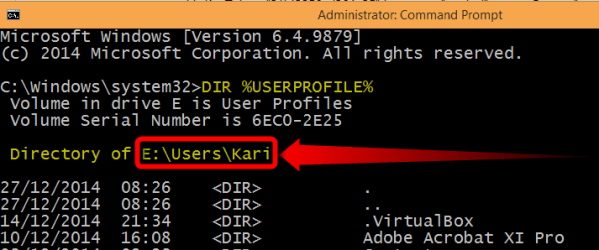
Please test this: Open an elevated command prompt, type DIR %USERPROFILE%:

2014-12-30_17h48_30.png

Press Enter, check which folder was listed. If it's C:\Users\Your_Username something is wrong. If it's D:\Users\Your_Username in your case (E:\Users\Kari in my case) everything is as it should be:

2014-12-30_17h49_37.png

In most cases even if the Users folder is relocated there remains a folder called Users on C: drive. This should not be deleted, some obscure programs might need it. There's no reason to panic, this C:\Users will remain very small, only a few bytes. If it disturbs you, you can hide it.

Kari
 

My Computer My Computer

At a glance

Windows 10 Pro x64 EN-GB1.6 GHz Intel Core i7-720QM Processor6 GBATI Mobility Radeon HD 5850 Graphics
Computer type
Laptop
Computer Manufacturer/Model Number
HP ENVY 17-1150eg
OS
Windows 10 Pro x64 EN-GB
CPU
1.6 GHz Intel Core i7-720QM Processor
Memory
6 GB
Graphics Card(s)
ATI Mobility Radeon HD 5850 Graphics
Sound Card
Beats sound system with integrated subwoofer
Monitor(s) Displays
17" laptop display, 22" LED and 32" Full HD TV through HDMI
Screen Resolution
1600*900 (1), 1920*1080 (2&3)
Hard Drives
Internal: 2 x 500 GB SATA Hard Disk Drive 7200 rpm
External: 2TB for backups, 3TB USB3 network drive for media
Cooling
As Envy runs a bit warm, I have it on a Cooler Master pad
Keyboard
Logitech diNovo Media Desktop Laser (bluetooth)
Mouse
Logitech Performance Mouse MX
Internet Speed
50/10 Mbps VDSL
Antivirus
Windows Defender 4.3.9431.0
Browser
Maxthon 3.5.2., IE11

Hey,

I performed a fresh install using audit mode and system preparation tool to relocate user profiles and programdata to partition D on my SSD but have since noticed programdata is also on C partition as well?

ProgramData>Microsoft>Search>Data>Applications>Windows>GatherlLogs>SystemIndex < with other various files and folders. There is another subfolder under ProgramData>Microsoft>Windows>Caches < has some Database file types?

I plan to install boot restore software Faronic's Deep Freeze and hope by relocating userprofiles and programdata to an excluded/unprotected partition D and just protect partition C that it's enough to protect from malware whilst preserving my desired configured working environment? All my personal files are archived on separate internal hard disk drives
 

My Computer My Computer

At a glance

Windows 7 Ultimate 6.1 x842.93Ghz Intel Pentium 41GBNVIDIA GeForce 8400 GS
Computer type
PC/Desktop
Computer Manufacturer/Model Number
Packard Bell NEC PB34305801
OS
Windows 7 Ultimate 6.1 x84
CPU
2.93Ghz Intel Pentium 4
Motherboard
GA-8TRC410M-NF
Memory
1GB
Graphics Card(s)
NVIDIA GeForce 8400 GS
Sound Card
Realtek High Definition Audio
Monitor(s) Displays
Generic PnP Monitor (17.1")
Screen Resolution
1280x1024
Hard Drives
Corsair Force 3 120GB SSD
Western Digital Caviar Green 2TB x 2 (Internal)
Western Digital My Book Live Duo 4TB NAS (2x2TB Greens)
Keyboard
Perixx PERIDUO-701U Wireless RF2 4Ghz USB Keyboard
Mouse
Belkin Optical Glow Mouse
Internet Speed
Advertised 20Meg - Actual 1.4MB/Sec (Sky Broadband)
Antivirus
Avira Internet Security
Browser
Firefox

My Computer My Computer

At a glance

Windows 10 Pro x64 EN-GB1.6 GHz Intel Core i7-720QM Processor6 GBATI Mobility Radeon HD 5850 Graphics
Computer type
Laptop
Computer Manufacturer/Model Number
HP ENVY 17-1150eg
OS
Windows 10 Pro x64 EN-GB
CPU
1.6 GHz Intel Core i7-720QM Processor
Memory
6 GB
Graphics Card(s)
ATI Mobility Radeon HD 5850 Graphics
Sound Card
Beats sound system with integrated subwoofer
Monitor(s) Displays
17" laptop display, 22" LED and 32" Full HD TV through HDMI
Screen Resolution
1600*900 (1), 1920*1080 (2&3)
Hard Drives
Internal: 2 x 500 GB SATA Hard Disk Drive 7200 rpm
External: 2TB for backups, 3TB USB3 network drive for media
Cooling
As Envy runs a bit warm, I have it on a Cooler Master pad
Keyboard
Logitech diNovo Media Desktop Laser (bluetooth)
Mouse
Logitech Performance Mouse MX
Internet Speed
50/10 Mbps VDSL
Antivirus
Windows Defender 4.3.9431.0
Browser
Maxthon 3.5.2., IE11
Thanks for the prompt response, this forum never ceases to amaze me with how fast its users respond :) I tried to add to your rep but it requests I spread it around.. great tutorial and thanks for the added support
 

My Computer My Computer

At a glance

Windows 7 Ultimate 6.1 x842.93Ghz Intel Pentium 41GBNVIDIA GeForce 8400 GS
Computer type
PC/Desktop
Computer Manufacturer/Model Number
Packard Bell NEC PB34305801
OS
Windows 7 Ultimate 6.1 x84
CPU
2.93Ghz Intel Pentium 4
Motherboard
GA-8TRC410M-NF
Memory
1GB
Graphics Card(s)
NVIDIA GeForce 8400 GS
Sound Card
Realtek High Definition Audio
Monitor(s) Displays
Generic PnP Monitor (17.1")
Screen Resolution
1280x1024
Hard Drives
Corsair Force 3 120GB SSD
Western Digital Caviar Green 2TB x 2 (Internal)
Western Digital My Book Live Duo 4TB NAS (2x2TB Greens)
Keyboard
Perixx PERIDUO-701U Wireless RF2 4Ghz USB Keyboard
Mouse
Belkin Optical Glow Mouse
Internet Speed
Advertised 20Meg - Actual 1.4MB/Sec (Sky Broadband)
Antivirus
Avira Internet Security
Browser
Firefox
You are welcome :).

I will also accept single malt whisky instead of rep!
 

My Computer My Computer

At a glance

Windows 10 Pro x64 EN-GB1.6 GHz Intel Core i7-720QM Processor6 GBATI Mobility Radeon HD 5850 Graphics
Computer type
Laptop
Computer Manufacturer/Model Number
HP ENVY 17-1150eg
OS
Windows 10 Pro x64 EN-GB
CPU
1.6 GHz Intel Core i7-720QM Processor
Memory
6 GB
Graphics Card(s)
ATI Mobility Radeon HD 5850 Graphics
Sound Card
Beats sound system with integrated subwoofer
Monitor(s) Displays
17" laptop display, 22" LED and 32" Full HD TV through HDMI
Screen Resolution
1600*900 (1), 1920*1080 (2&3)
Hard Drives
Internal: 2 x 500 GB SATA Hard Disk Drive 7200 rpm
External: 2TB for backups, 3TB USB3 network drive for media
Cooling
As Envy runs a bit warm, I have it on a Cooler Master pad
Keyboard
Logitech diNovo Media Desktop Laser (bluetooth)
Mouse
Logitech Performance Mouse MX
Internet Speed
50/10 Mbps VDSL
Antivirus
Windows Defender 4.3.9431.0
Browser
Maxthon 3.5.2., IE11
You are welcome :).

I will also accept single malt whisky instead of rep!

30Dec2013 post #717
Kari,
My 36 year old son was very pleased to receive Laphroaig Triple Wood for Christmas.
Kind regards,
namitutonka

Most of the programs will know how to create folders if a needed folder does not exist, but to be on the safe side I would create the C:\Users, C:\Users\Public and C:\Users\Your_Username folders.

Forgetting this trivial issue and moving on to real essential questions, both single malts you mentioned are really good. The main difference is the casks used; Laphroaig Triple Wood is first matured in American oak barrels (used previously for bourbon), finalized in sherry casks. This together with the traditional Laphroaig distilling methods gives it a nice, deep color and a very strong, nice smoke flavor.

Ardbeg Uigeadail is matured only in sherry casks, which together with Ardbeg's traditional distilling methods gives it a walnut like flavor and almost dark red color. Both single malts are excellent, in a scale 0 to 100 I would give Laphroaig 90 and Ardbeg 85.

Kari
 

My Computer My Computer

At a glance

Windows 7 Enterprise x64i5 3570K delidded 4.2Ghz8Gb DDR3 1600 CL9 @ 800MHz - Kingston HyperxAMD Radeon 6670
Computer type
PC/Desktop
Computer Manufacturer/Model Number
Gigabyte GA-Z77-UD5H rev 1.1
OS
Windows 7 Enterprise x64
CPU
i5 3570K delidded 4.2Ghz
Motherboard
Gigabyte GA-Z77X-UD5H rev 1.1
Memory
8Gb DDR3 1600 CL9 @ 800MHz - Kingston Hyperx
Graphics Card(s)
AMD Radeon 6670
Sound Card
Integrated Realtek ALC898
Monitor(s) Displays
Acer S201HL
Screen Resolution
1600 X 900
Hard Drives
OCZ Agility 4 - 250Gb
Single 1TB Toshiba
PSU
Antec Neo ECO 400W
Case
CoolerMaster HAF 922
Cooling
Noctua NH-D14
Keyboard
Logitech K120
Mouse
Razer Death Adder 3500DPI
Antivirus
Emisisoft Internet Security - Full Version
Browser
Firefox
Other Info
BIOS: f16mod10 Tweaktown.com
Hi Kari,
A few years ago when I built my system I followed your tutorial to move the default location of user folders to my 1TB D: HDD, and installed Win7 on the 128GB SSD. Due to an unresolvable infinite repair loop problem, I'm now planning to just do a clean re-install of the OS on the SSD.
Is it possible to do a clean re-install on to the SSD, and have the new installation recognize the existing user folders on the D-drive (HDD)?
Thanks in advance,
Kieran
 

My Computer My Computer

At a glance

Windows 7 UltimateIntel core i5-2500k8GB Patriot Signature PC3-12400 DDR3XFX HD-685X-ZCFC Radion HD 6850 1GB
Computer type
PC/Desktop
Computer Manufacturer/Model Number
self built
OS
Windows 7 Ultimate
CPU
Intel core i5-2500k
Motherboard
Gigabyte GA-Z68XP-UD3
Memory
8GB Patriot Signature PC3-12400 DDR3
Graphics Card(s)
XFX HD-685X-ZCFC Radion HD 6850 1GB
Sound Card
On-board Realtek ALC889
Monitor(s) Displays
ASUS ASVS248HP
Screen Resolution
1920x1080
Hard Drives
Crucial 128GB M4 SSD
Samsung 1TB green something or other
PSU
Corsair TX650 650W 80Plus-Bronze
Case
Bitfenix Outlaw
Cooling
Stock
Keyboard
Some random old HP thing from an old computer.
Mouse
Some random wireless Microsoft mouse. Has a blue light.
Internet Speed
~20mbps comcast cable (they say I get 80-100mbps)
Antivirus
Windows Security Essentials
Browser
Chrome, IE11, rarely FF.
Other Info
Router = ASUS RT-N66U Gigabit 802.11n router
Also own and use a MS Surface Pro3 with 8GB ram, 256GB ssd. Love it. Not crazy about Win8.1, but overall love the Surface.
No Kieran, I am afraid it is not possible. Windows always starts after a clean install with empty user profile folders (read: no personal content).

The drive where you have the Users folder now located should not contain a folder named Users when you sysprep. It should also not be renamed to something else but totally removed. This is the short checklist to do what you want to do correctly:
  • Backup your personal content from all user profiles to an external drive
    • Do not include the AppData folders in this backup! Using old appdata on new installation is a sure way to get a screwed up Windows. Only copy and backup the docs, pics, music, videos, saved games and such
  • Shutdown the PC
  • Disconnect the HDD, only leaving the SSD connected
  • Boot with Windows 7 install media, perform a clean install
  • When installation is done and you get to first dialog asking you to create the initial first user account, enter Audit Mode with CTRL+SHIFT+F3
  • When in Audit Mode, close the Sysprep GUI by clicking Cancel and shutdown the PC
  • Connect the HDD
  • Boot the PC, it boots automatically back to Audit Mode
  • Wipe the HDD clean, create a partition for the Users folder
  • Run the Sysprep relocating the Users folder
  • When ready and you are on the Windows desktop with your usual user account, restore the backed up personal content
Kari
 
Last edited:

My Computer My Computer

At a glance

Windows 10 Pro x64 EN-GB1.6 GHz Intel Core i7-720QM Processor6 GBATI Mobility Radeon HD 5850 Graphics
Computer type
Laptop
Computer Manufacturer/Model Number
HP ENVY 17-1150eg
OS
Windows 10 Pro x64 EN-GB
CPU
1.6 GHz Intel Core i7-720QM Processor
Memory
6 GB
Graphics Card(s)
ATI Mobility Radeon HD 5850 Graphics
Sound Card
Beats sound system with integrated subwoofer
Monitor(s) Displays
17" laptop display, 22" LED and 32" Full HD TV through HDMI
Screen Resolution
1600*900 (1), 1920*1080 (2&3)
Hard Drives
Internal: 2 x 500 GB SATA Hard Disk Drive 7200 rpm
External: 2TB for backups, 3TB USB3 network drive for media
Cooling
As Envy runs a bit warm, I have it on a Cooler Master pad
Keyboard
Logitech diNovo Media Desktop Laser (bluetooth)
Mouse
Logitech Performance Mouse MX
Internet Speed
50/10 Mbps VDSL
Antivirus
Windows Defender 4.3.9431.0
Browser
Maxthon 3.5.2., IE11
Thanks very much for the prompt reply.
Is it absolutely necessary to wipe the HDD clean?
 

My Computer My Computer

At a glance

Windows 7 UltimateIntel core i5-2500k8GB Patriot Signature PC3-12400 DDR3XFX HD-685X-ZCFC Radion HD 6850 1GB
Computer type
PC/Desktop
Computer Manufacturer/Model Number
self built
OS
Windows 7 Ultimate
CPU
Intel core i5-2500k
Motherboard
Gigabyte GA-Z68XP-UD3
Memory
8GB Patriot Signature PC3-12400 DDR3
Graphics Card(s)
XFX HD-685X-ZCFC Radion HD 6850 1GB
Sound Card
On-board Realtek ALC889
Monitor(s) Displays
ASUS ASVS248HP
Screen Resolution
1920x1080
Hard Drives
Crucial 128GB M4 SSD
Samsung 1TB green something or other
PSU
Corsair TX650 650W 80Plus-Bronze
Case
Bitfenix Outlaw
Cooling
Stock
Keyboard
Some random old HP thing from an old computer.
Mouse
Some random wireless Microsoft mouse. Has a blue light.
Internet Speed
~20mbps comcast cable (they say I get 80-100mbps)
Antivirus
Windows Security Essentials
Browser
Chrome, IE11, rarely FF.
Other Info
Router = ASUS RT-N66U Gigabit 802.11n router
Also own and use a MS Surface Pro3 with 8GB ram, 256GB ssd. Love it. Not crazy about Win8.1, but overall love the Surface.
No, it's not necessary. What is important is that it does not contain any Windows system folders or files from any old installation, not even renamed.

If the only system folder the HDD contains is Users, backup the personal content and remove the folder. Also if you had used this method to relocate the ProgramData folder, remove it, too.

All other content can stay on the HDD. Notice that backing up the content of the Users folder to another folder on the same drive is a no go, too. The user files will in that case remain flagges belonging to an older Windows insallation.
 

My Computer My Computer

At a glance

Windows 10 Pro x64 EN-GB1.6 GHz Intel Core i7-720QM Processor6 GBATI Mobility Radeon HD 5850 Graphics
Computer type
Laptop
Computer Manufacturer/Model Number
HP ENVY 17-1150eg
OS
Windows 10 Pro x64 EN-GB
CPU
1.6 GHz Intel Core i7-720QM Processor
Memory
6 GB
Graphics Card(s)
ATI Mobility Radeon HD 5850 Graphics
Sound Card
Beats sound system with integrated subwoofer
Monitor(s) Displays
17" laptop display, 22" LED and 32" Full HD TV through HDMI
Screen Resolution
1600*900 (1), 1920*1080 (2&3)
Hard Drives
Internal: 2 x 500 GB SATA Hard Disk Drive 7200 rpm
External: 2TB for backups, 3TB USB3 network drive for media
Cooling
As Envy runs a bit warm, I have it on a Cooler Master pad
Keyboard
Logitech diNovo Media Desktop Laser (bluetooth)
Mouse
Logitech Performance Mouse MX
Internet Speed
50/10 Mbps VDSL
Antivirus
Windows Defender 4.3.9431.0
Browser
Maxthon 3.5.2., IE11
Great, thanks. I will attempt this tonight or tomorrow.
Again, thanks for the prompt replies.
 

My Computer My Computer

At a glance

Windows 7 UltimateIntel core i5-2500k8GB Patriot Signature PC3-12400 DDR3XFX HD-685X-ZCFC Radion HD 6850 1GB
Computer type
PC/Desktop
Computer Manufacturer/Model Number
self built
OS
Windows 7 Ultimate
CPU
Intel core i5-2500k
Motherboard
Gigabyte GA-Z68XP-UD3
Memory
8GB Patriot Signature PC3-12400 DDR3
Graphics Card(s)
XFX HD-685X-ZCFC Radion HD 6850 1GB
Sound Card
On-board Realtek ALC889
Monitor(s) Displays
ASUS ASVS248HP
Screen Resolution
1920x1080
Hard Drives
Crucial 128GB M4 SSD
Samsung 1TB green something or other
PSU
Corsair TX650 650W 80Plus-Bronze
Case
Bitfenix Outlaw
Cooling
Stock
Keyboard
Some random old HP thing from an old computer.
Mouse
Some random wireless Microsoft mouse. Has a blue light.
Internet Speed
~20mbps comcast cable (they say I get 80-100mbps)
Antivirus
Windows Security Essentials
Browser
Chrome, IE11, rarely FF.
Other Info
Router = ASUS RT-N66U Gigabit 802.11n router
Also own and use a MS Surface Pro3 with 8GB ram, 256GB ssd. Love it. Not crazy about Win8.1, but overall love the Surface.
You are welcome. Let us know how it went.
 

My Computer My Computer

At a glance

Windows 10 Pro x64 EN-GB1.6 GHz Intel Core i7-720QM Processor6 GBATI Mobility Radeon HD 5850 Graphics
Computer type
Laptop
Computer Manufacturer/Model Number
HP ENVY 17-1150eg
OS
Windows 10 Pro x64 EN-GB
CPU
1.6 GHz Intel Core i7-720QM Processor
Memory
6 GB
Graphics Card(s)
ATI Mobility Radeon HD 5850 Graphics
Sound Card
Beats sound system with integrated subwoofer
Monitor(s) Displays
17" laptop display, 22" LED and 32" Full HD TV through HDMI
Screen Resolution
1600*900 (1), 1920*1080 (2&3)
Hard Drives
Internal: 2 x 500 GB SATA Hard Disk Drive 7200 rpm
External: 2TB for backups, 3TB USB3 network drive for media
Cooling
As Envy runs a bit warm, I have it on a Cooler Master pad
Keyboard
Logitech diNovo Media Desktop Laser (bluetooth)
Mouse
Logitech Performance Mouse MX
Internet Speed
50/10 Mbps VDSL
Antivirus
Windows Defender 4.3.9431.0
Browser
Maxthon 3.5.2., IE11
Hi Kari,
Quick question about backing up the Users folder content. The folder contains several users' folders. Can I move a user's folder (e.g. d:\users\kieran) to the root of the HDD (out of the Users system folder) and then delete the Users folder? Or will having the user folder "kieran" (now d:\kieran) mess up Win7? Is an individual user folder also a system file?
Thanks
Kieran
EDIT:
I just realized you already answered this question. :P
 
Last edited:

My Computer My Computer

At a glance

Windows 7 UltimateIntel core i5-2500k8GB Patriot Signature PC3-12400 DDR3XFX HD-685X-ZCFC Radion HD 6850 1GB
Computer type
PC/Desktop
Computer Manufacturer/Model Number
self built
OS
Windows 7 Ultimate
CPU
Intel core i5-2500k
Motherboard
Gigabyte GA-Z68XP-UD3
Memory
8GB Patriot Signature PC3-12400 DDR3
Graphics Card(s)
XFX HD-685X-ZCFC Radion HD 6850 1GB
Sound Card
On-board Realtek ALC889
Monitor(s) Displays
ASUS ASVS248HP
Screen Resolution
1920x1080
Hard Drives
Crucial 128GB M4 SSD
Samsung 1TB green something or other
PSU
Corsair TX650 650W 80Plus-Bronze
Case
Bitfenix Outlaw
Cooling
Stock
Keyboard
Some random old HP thing from an old computer.
Mouse
Some random wireless Microsoft mouse. Has a blue light.
Internet Speed
~20mbps comcast cable (they say I get 80-100mbps)
Antivirus
Windows Security Essentials
Browser
Chrome, IE11, rarely FF.
Other Info
Router = ASUS RT-N66U Gigabit 802.11n router
Also own and use a MS Surface Pro3 with 8GB ram, 256GB ssd. Love it. Not crazy about Win8.1, but overall love the Surface.
Hi Kari,
Quick question about backing up the Users folder content. The folder contains several users' folders. Can I move a user's folder (e.g. d:\users\kieran) to the root of the HDD (out of the Users system folder) and then delete the Users folder? Or will having the user folder "kieran" (now d:\kieran) mess up Win7? Is an individual user folder also a system file?
Thanks
Kieran
EDIT:
I just realized you already answered this question. :P

Although about a different version of Windows, I suggest you read this question at our sister site the TenForums.com, and my response to it: Users Folder - Move Location in Windows 10 - Page 4 - Windows 10 Forums
 

My Computer My Computer

At a glance

Windows 10 Pro x64 EN-GB1.6 GHz Intel Core i7-720QM Processor6 GBATI Mobility Radeon HD 5850 Graphics
Computer type
Laptop
Computer Manufacturer/Model Number
HP ENVY 17-1150eg
OS
Windows 10 Pro x64 EN-GB
CPU
1.6 GHz Intel Core i7-720QM Processor
Memory
6 GB
Graphics Card(s)
ATI Mobility Radeon HD 5850 Graphics
Sound Card
Beats sound system with integrated subwoofer
Monitor(s) Displays
17" laptop display, 22" LED and 32" Full HD TV through HDMI
Screen Resolution
1600*900 (1), 1920*1080 (2&3)
Hard Drives
Internal: 2 x 500 GB SATA Hard Disk Drive 7200 rpm
External: 2TB for backups, 3TB USB3 network drive for media
Cooling
As Envy runs a bit warm, I have it on a Cooler Master pad
Keyboard
Logitech diNovo Media Desktop Laser (bluetooth)
Mouse
Logitech Performance Mouse MX
Internet Speed
50/10 Mbps VDSL
Antivirus
Windows Defender 4.3.9431.0
Browser
Maxthon 3.5.2., IE11
Hi Kari,
The re-install of W7 to my SSD was going well... until I stepped away during the final windows update period (end of step 5 in your "old school geek" tutorial). In step 4, I chose not to set up User profiles yet, as I thought having a clean backup image with no users would be good given the situation with my HDD. So I did not set up any user profiles yet. Instead, I went ahead with step 5, and installed all the latest drivers, a few programs (IE11, chrome) and then set windows update off to do its thing, and I went to bed. When I returned to the computer just now, the system had gone to sleep. I woke it up with a mouse shake, and it was asking for a username and password to log in. I just clicked the continue arrow, and it went to the Welcome Screen, showing one user, Administrator and it was logged in. I tried clicking on it, and it says the account has been disabled. So I'm stuck. Should I re-boot? Start the re-install over again from scratch (really would rather not, but wouldn't be the end of the world)?
Thanks again for your help,
Kieran
 

My Computer My Computer

At a glance

Windows 7 UltimateIntel core i5-2500k8GB Patriot Signature PC3-12400 DDR3XFX HD-685X-ZCFC Radion HD 6850 1GB
Computer type
PC/Desktop
Computer Manufacturer/Model Number
self built
OS
Windows 7 Ultimate
CPU
Intel core i5-2500k
Motherboard
Gigabyte GA-Z68XP-UD3
Memory
8GB Patriot Signature PC3-12400 DDR3
Graphics Card(s)
XFX HD-685X-ZCFC Radion HD 6850 1GB
Sound Card
On-board Realtek ALC889
Monitor(s) Displays
ASUS ASVS248HP
Screen Resolution
1920x1080
Hard Drives
Crucial 128GB M4 SSD
Samsung 1TB green something or other
PSU
Corsair TX650 650W 80Plus-Bronze
Case
Bitfenix Outlaw
Cooling
Stock
Keyboard
Some random old HP thing from an old computer.
Mouse
Some random wireless Microsoft mouse. Has a blue light.
Internet Speed
~20mbps comcast cable (they say I get 80-100mbps)
Antivirus
Windows Security Essentials
Browser
Chrome, IE11, rarely FF.
Other Info
Router = ASUS RT-N66U Gigabit 802.11n router
Also own and use a MS Surface Pro3 with 8GB ram, 256GB ssd. Love it. Not crazy about Win8.1, but overall love the Surface.
The thing with the built-in admin profile in Audit Mode is that if you sign out for any reason, locking the PC for a moment to get a cup of coffee or let it go to sleep or hibernate, the account will be disabled. Luckily, it will only be disabled for that session, a reboot fixes it.

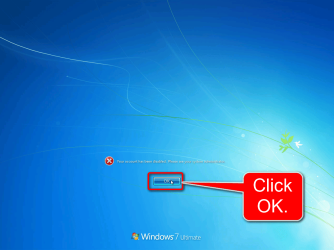
A reboot brings Windows back to Audit Mode and you can continue, no harm done. On the page where it tells you the account is disabled after trying to sign back in, click OK, then the small arrowhead in Shutdown options and select Restart.

Click OK:

2015-04-04_17h07_57.png

Open the Shutdown options menu by clicking the arrowhead, select Restart from the menu that opens:

2015-04-04_17h09_50.png

In the future when in Audit Mode, do not lock the PC, sign out or let the PC sleep or hibernate. If you do, no harm is done but Windows must be restarted to let the built-in admin sign back to Audit Mode.
 

My Computer My Computer

At a glance

Windows 10 Pro x64 EN-GB1.6 GHz Intel Core i7-720QM Processor6 GBATI Mobility Radeon HD 5850 Graphics
Computer type
Laptop
Computer Manufacturer/Model Number
HP ENVY 17-1150eg
OS
Windows 10 Pro x64 EN-GB
CPU
1.6 GHz Intel Core i7-720QM Processor
Memory
6 GB
Graphics Card(s)
ATI Mobility Radeon HD 5850 Graphics
Sound Card
Beats sound system with integrated subwoofer
Monitor(s) Displays
17" laptop display, 22" LED and 32" Full HD TV through HDMI
Screen Resolution
1600*900 (1), 1920*1080 (2&3)
Hard Drives
Internal: 2 x 500 GB SATA Hard Disk Drive 7200 rpm
External: 2TB for backups, 3TB USB3 network drive for media
Cooling
As Envy runs a bit warm, I have it on a Cooler Master pad
Keyboard
Logitech diNovo Media Desktop Laser (bluetooth)
Mouse
Logitech Performance Mouse MX
Internet Speed
50/10 Mbps VDSL
Antivirus
Windows Defender 4.3.9431.0
Browser
Maxthon 3.5.2., IE11
OK, I recovered from that problem, and now have another. After installing several programs (per step 5) I shut down as I had to be away from the pc for a few days. Upon reboot just now, I got to audit mode, stopped WMPNetworksvc, then set sysprep to "audit" and "quit" and closed it. I was then given this message: "A fatal error occured while trying to sysprep the machine." Not sure what to do now. Re-do the clean re-install? Ignore and continue?
Thanks...
EDIT: I checked registry HKLM/system/setup/status/sysprepstatus and GeneralizationState is 7, and CleanupState is 1.
slmgr /dlv yields a remaining windows rearm count of 4.
Also tried uninstall & reinstall of msdtc.
re-ran sysprep, set to audit & quit, and still got the fatal error.
EDIT2: I decided to try to create the system image at this point, as I was pretty much ready to do so anyway. Alas, when I tried to run windows "create a system image" I got the error, "This service cannot be started in Safe Mode (0x8007043C)"
:(
Thanks again for any help...
Kieran
 
Last edited:

My Computer My Computer

At a glance

Windows 7 UltimateIntel core i5-2500k8GB Patriot Signature PC3-12400 DDR3XFX HD-685X-ZCFC Radion HD 6850 1GB
Computer type
PC/Desktop
Computer Manufacturer/Model Number
self built
OS
Windows 7 Ultimate
CPU
Intel core i5-2500k
Motherboard
Gigabyte GA-Z68XP-UD3
Memory
8GB Patriot Signature PC3-12400 DDR3
Graphics Card(s)
XFX HD-685X-ZCFC Radion HD 6850 1GB
Sound Card
On-board Realtek ALC889
Monitor(s) Displays
ASUS ASVS248HP
Screen Resolution
1920x1080
Hard Drives
Crucial 128GB M4 SSD
Samsung 1TB green something or other
PSU
Corsair TX650 650W 80Plus-Bronze
Case
Bitfenix Outlaw
Cooling
Stock
Keyboard
Some random old HP thing from an old computer.
Mouse
Some random wireless Microsoft mouse. Has a blue light.
Internet Speed
~20mbps comcast cable (they say I get 80-100mbps)
Antivirus
Windows Security Essentials
Browser
Chrome, IE11, rarely FF.
Other Info
Router = ASUS RT-N66U Gigabit 802.11n router
Also own and use a MS Surface Pro3 with 8GB ram, 256GB ssd. Love it. Not crazy about Win8.1, but overall love the Surface.
Back
Top