User Profiles - Create and Move During Windows 7 Installation

How to Create User Accounts on another Partition or Disk During Windows 7 Installation

   Information
There are several methods to move user profiles to another disk or partition after you have installed Windows 7. The easiest way is to use Audit Mode and System Preparation Tool, both built-in Windows 7 features, to permanently move the location of the folder Users.

This tutorial shows how to relocate both Users and ProgramData to another disk or partition when doing a new, fresh and clean install of Windows 7. If you have already installed Seven, and you'd like to move those folders away from their default location in C: drive, please read first post number 22 in this thread. Follow the steps told in that post, and continue then from beginning of the page 4 in this tutorial.
When Windows 7 is installed, 5 or 6 system folders are created depending on chosen bit-version:

  • PerfLogs (Performance Logs), where Windows stores performance and reliability logs
  • Program Files, where applications and software are installed. Windows x86 (32-bit) stores all applications here, Windows x64 (64-bit) only native 64-bit applications
  • Program Files (x86), only in Windows x64. All non-x64 applications are stored here
  • Windows, which contains core operating system files and drivers
  • ProgramData, where some applications store application and user specific settings and configuration files
  • Users. This is the "home" of all user folders. When a new user account is created and this new user logs in first time, Windows creates a set of user specific folders Users\New_User
Moving Windows and Program Files folders is not recommend by Microsoft. However, moving both Users and ProgramData folders is safe and can save a lot of space on system disk. Pictures, mp3’s videos, documents and so on, a user folder with its subfolders can be tens, sometimes hundreds of gigabytes.

For instance, using this laptop of mine as an example, the total size of Users folder and subfolders is at the moment about 240 GB. The size of ProgramData folder is at the moment almost 18 GB. I simply could not have these folders stored in my system C: drive, there’s not enough space.

When installing Windows 7, I recommend using Windows System Preparation Tool (Sysprep) in so called Audit Mode to relocate Users and ProgramData, leaving C: drive only for Windows and applications.

   Warning

An upgraded Windows cannot be sysprepped. As this method is based in sysprepping, this tutorial is valid only for Windows setups which have not been upgraded.

This means that if you have for instance in-place upgraded Vista to Seven, you cannot sysprep. The same applies if you have upgraded from a lesser edition to a better edition, for instance from Windows 7 Home Premium to Professional.

Notice that a repair install is also an upgrade install, so if you have ever done a repair install (= in-place upgrade to same edition), you cannot sysprep.

In other words, when sysprepping an existing Windows setup it only works if the Windows was installed clean and has never been upgraded or repaired using repair install, or if it is the original pre-installed Windows.

Using this method causes Windows 7 to lose activation information, and it needs to be reactivated afterwards. If your Windows 7 is an OEM version, you might not be able to reactivate it, at least not without phone activation option.

   Warning
IE10 Users: Please read this article first: Sysprep Fatal Error With IE 10 (FIX) | System Administration


Complete tutorial as PDF: View attachment Relocate User folders during Windows 7 installation.pdf (1.22 MB)

Kari


Last edited:
I've performed the sysprep when I put my machine together. Thanks! However...I now have a sharing/permissions issue (unrelated to sysprep). In order to fix it, I need to do a repair install of windows. I get errors when I try to do so, seemingly related to the my user profiles not being collocated with my OS.

Should there be such an issue? Or, should a simple repair install be possible after having done a sysprep?

(I'd hate to wipe my machine and have to conduct a clean install. I mean, I'd REALLY hate to do that.)

Thanks,
Ken
 

My Computer My Computer

At a glance

Microsoft Windows 7 Home Premium 64-bit 7601 ...AMD FX(tm)-8350 Eight-Core Processor16.00 GBNVIDIA GeForce GTX 670
Computer type
PC/Desktop
Computer Manufacturer/Model Number
Custom build
OS
Microsoft Windows 7 Home Premium 64-bit 7601 Multiprocessor Free Service Pack 1
CPU
AMD FX(tm)-8350 Eight-Core Processor
Motherboard
ASUSTeK Computer INC. M5A88-M
Memory
16.00 GB
Graphics Card(s)
NVIDIA GeForce GTX 670
Sound Card
(1) Realtek High Definition Audio (2) NVIDIA Virtual Audio
Monitor(s) Displays
Through AVR to one of two TV/Projector
Screen Resolution
1920 x 1080 x 32 bits (4294967296 colors) @ 60 Hz
Hard Drives
Samsung SSD 850 PRO 256G SATA Disk Device
Case
Silverstone GD09
Cooling
Air
Antivirus
Kaspersky Internet Security, 2015
Should there be such an issue? Or, should a simple repair install be possible after having done a sysprep?
Unfortunately, the only thing you can do is to move the Users folder back to C: drive, repair install, then relocate the Users folder back to another location.

Please read the instructions on our sister site the Ten Forums. Although made for Windows 7 to 10 upgrade scenarios, the instructions apply as such also for your situation: Users Folder - Move Location in Windows 10 - Windows 10 Forums
 

My Computer My Computer

At a glance

Windows 10 Pro x64 EN-GB1.6 GHz Intel Core i7-720QM Processor6 GBATI Mobility Radeon HD 5850 Graphics
Computer type
Laptop
Computer Manufacturer/Model Number
HP ENVY 17-1150eg
OS
Windows 10 Pro x64 EN-GB
CPU
1.6 GHz Intel Core i7-720QM Processor
Memory
6 GB
Graphics Card(s)
ATI Mobility Radeon HD 5850 Graphics
Sound Card
Beats sound system with integrated subwoofer
Monitor(s) Displays
17" laptop display, 22" LED and 32" Full HD TV through HDMI
Screen Resolution
1600*900 (1), 1920*1080 (2&3)
Hard Drives
Internal: 2 x 500 GB SATA Hard Disk Drive 7200 rpm
External: 2TB for backups, 3TB USB3 network drive for media
Cooling
As Envy runs a bit warm, I have it on a Cooler Master pad
Keyboard
Logitech diNovo Media Desktop Laser (bluetooth)
Mouse
Logitech Performance Mouse MX
Internet Speed
50/10 Mbps VDSL
Antivirus
Windows Defender 4.3.9431.0
Browser
Maxthon 3.5.2., IE11
Kari,

I was afraid of that. The sysprep tutorial was perfect for my purposes and I've enjoyed not worrying about SSD size limitations for my User Profile(s). (OS on SSD, profiles on larger spinners.)

Now I'll have to do some data shifting to shrink my profiles down so they'll fit on the SSD.

Thanks,
Ken
 

My Computer My Computer

At a glance

Microsoft Windows 7 Home Premium 64-bit 7601 ...AMD FX(tm)-8350 Eight-Core Processor16.00 GBNVIDIA GeForce GTX 670
Computer type
PC/Desktop
Computer Manufacturer/Model Number
Custom build
OS
Microsoft Windows 7 Home Premium 64-bit 7601 Multiprocessor Free Service Pack 1
CPU
AMD FX(tm)-8350 Eight-Core Processor
Motherboard
ASUSTeK Computer INC. M5A88-M
Memory
16.00 GB
Graphics Card(s)
NVIDIA GeForce GTX 670
Sound Card
(1) Realtek High Definition Audio (2) NVIDIA Virtual Audio
Monitor(s) Displays
Through AVR to one of two TV/Projector
Screen Resolution
1920 x 1080 x 32 bits (4294967296 colors) @ 60 Hz
Hard Drives
Samsung SSD 850 PRO 256G SATA Disk Device
Case
Silverstone GD09
Cooling
Air
Antivirus
Kaspersky Internet Security, 2015
Now I'll have to do some data shifting to shrink my profiles down so they'll fit on the SSD.

Yes, that's important, not only for that you can move the Users back to C: but also for that the process would be faster. I have done it numerous times, what I do is I almost completely empty the individual profiles first by moving all docs, pics, videos, music and such for all profiles to an external drive making the user profile folders as empty as I can, do then the sysprep moving almost empty Users folder back to C:, repair install, sysprep the Users folder back to another drive and finally restore the profile data from external backup.
 

My Computer My Computer

At a glance

Windows 10 Pro x64 EN-GB1.6 GHz Intel Core i7-720QM Processor6 GBATI Mobility Radeon HD 5850 Graphics
Computer type
Laptop
Computer Manufacturer/Model Number
HP ENVY 17-1150eg
OS
Windows 10 Pro x64 EN-GB
CPU
1.6 GHz Intel Core i7-720QM Processor
Memory
6 GB
Graphics Card(s)
ATI Mobility Radeon HD 5850 Graphics
Sound Card
Beats sound system with integrated subwoofer
Monitor(s) Displays
17" laptop display, 22" LED and 32" Full HD TV through HDMI
Screen Resolution
1600*900 (1), 1920*1080 (2&3)
Hard Drives
Internal: 2 x 500 GB SATA Hard Disk Drive 7200 rpm
External: 2TB for backups, 3TB USB3 network drive for media
Cooling
As Envy runs a bit warm, I have it on a Cooler Master pad
Keyboard
Logitech diNovo Media Desktop Laser (bluetooth)
Mouse
Logitech Performance Mouse MX
Internet Speed
50/10 Mbps VDSL
Antivirus
Windows Defender 4.3.9431.0
Browser
Maxthon 3.5.2., IE11
Kari,

I'm attempting to move User folders again on a clean install. I've downloaded the AIK ISO. Rather than burn to a disc, I wanted to "burn" to a USB using rufus. But, I get an indication that the ISO file isn't compatible. Do you know if this is possible? I want to install the AIK onto the clean install in Audit Mode. I've only been successful when I create the answer file on the system that I intend to use it on.

Regards
 

My Computer My Computer

At a glance

Windows 7 Professional x64 SP1Intel i7-980x @ 3.6GHzCorsair 12GB DDR3 RAM (3x4GB)EVGA NVIDIA GeForce GTX 760 SC
Computer type
PC/Desktop
Computer Manufacturer/Model Number
Custom Build
OS
Windows 7 Professional x64 SP1
CPU
Intel i7-980x @ 3.6GHz
Motherboard
Intel DX58SO
Memory
Corsair 12GB DDR3 RAM (3x4GB)
Graphics Card(s)
EVGA NVIDIA GeForce GTX 760 SC
Sound Card
Intel High Definition 7.1 Audio Subsystem - Realtek ALC889
Monitor(s) Displays
Dual Display - LG Electronics Flatron L227WTG
Screen Resolution
1680 x 1050 60Hz 32-bit
Hard Drives
2 Seagate Constellation ST1000NM0033 1TB SATA 6Gb/s HDDs configured as Intel SATA Array 0, RST RAID 1, Vol. 0 (C:\) & Vol. 1 (D:\), & 2 Seagate Barracuda ST500DM002 500GB SATA 6Gb/s HDDs configured as Intel SATA Array 1 RST RAID 1, Vol. 0 (E:\)
PSU
Corsair HX850W
Case
Antec P182
Cooling
Stock Intel i7-980x Cooling Solution + 4 120mm Case Fans
Keyboard
Microsoft Wireless Multimedia Keyboard 1.1
Mouse
Microsoft Standard Wireless Optical Mouse
Internet Speed
DSL - 3.0 Mb/s download 768 Kb/s upload
Antivirus
ESET Smart Security 12, Defender & SuperAntiSpyware Pro
Browser
Firefox Quantum 64-bit
Other Info
Optical Drives: Pioneer DVR-216R & TSSTcorp SH-S223Q, Anker USB 3.0 PCI-E Card, Hauppauge WinTV-HVR 2250 Dual TV Tuner Board for Windows Media Center, Bose Companion 3 Series II multimedia speaker system, APC Smart-UPS SMT1500
Kari,

I'm attempting to move User folders again on a clean install. I've downloaded the AIK ISO. Rather than burn to a disc, I wanted to "burn" to a USB using rufus. But, I get an indication that the ISO file isn't compatible. Do you know if this is possible? I want to install the AIK onto the clean install in Audit Mode. I've only been successful when I create the answer file on the system that I intend to use it on.

Regards
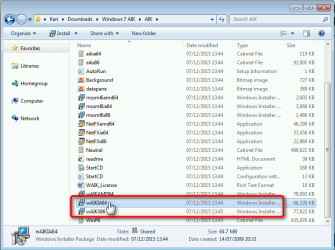
Rufus can't burn it because the AIK ISO is not bootable. An easy workaround is to extract the ISO to a folder (for instance 7Zip can extract ISO files), format a USB Flash drive and simply copy the extracted folder to it, then run the installer selecting correct bit version:

2015-12-07_13h58_42.png

Alternatively you can download this Zip archive from my OneDrive. It contains the AIK ISO extracted to a folder ready to be copied to your USB Flash drive.

Kari
 

My Computer My Computer

At a glance

Windows 10 Pro x64 EN-GB1.6 GHz Intel Core i7-720QM Processor6 GBATI Mobility Radeon HD 5850 Graphics
Computer type
Laptop
Computer Manufacturer/Model Number
HP ENVY 17-1150eg
OS
Windows 10 Pro x64 EN-GB
CPU
1.6 GHz Intel Core i7-720QM Processor
Memory
6 GB
Graphics Card(s)
ATI Mobility Radeon HD 5850 Graphics
Sound Card
Beats sound system with integrated subwoofer
Monitor(s) Displays
17" laptop display, 22" LED and 32" Full HD TV through HDMI
Screen Resolution
1600*900 (1), 1920*1080 (2&3)
Hard Drives
Internal: 2 x 500 GB SATA Hard Disk Drive 7200 rpm
External: 2TB for backups, 3TB USB3 network drive for media
Cooling
As Envy runs a bit warm, I have it on a Cooler Master pad
Keyboard
Logitech diNovo Media Desktop Laser (bluetooth)
Mouse
Logitech Performance Mouse MX
Internet Speed
50/10 Mbps VDSL
Antivirus
Windows Defender 4.3.9431.0
Browser
Maxthon 3.5.2., IE11
Thank you Kari, that is what I did with 7Zip and it worked perfectly. The Users folder and the ProgramData folder were moved to D:.

However, it appears at least one firm, Hauppauge, tv tuner card and media center type program, seems to want their application to use a ProgramData folder on C:. I noticed that it apparently was created during the program install.

Also, and I don't know what caused this, it appears that the ProgramData\Microsoft\Search\Data folder is on both D: and C:. I noticed a problem with search in the Windows Logs and with Indexing paused, so an investigation revealed that I have two ProgramData\Microsoft\Search\Data folders.

Do you think that is an indication that it might not be a good idea to move the ProgramData folder from C: to D:?

If the move just causes confusion for the OS, then it might be better to leave the ProgramData folder on C:.

Regards
 
Last edited:

My Computer My Computer

At a glance

Windows 7 Professional x64 SP1Intel i7-980x @ 3.6GHzCorsair 12GB DDR3 RAM (3x4GB)EVGA NVIDIA GeForce GTX 760 SC
Computer type
PC/Desktop
Computer Manufacturer/Model Number
Custom Build
OS
Windows 7 Professional x64 SP1
CPU
Intel i7-980x @ 3.6GHz
Motherboard
Intel DX58SO
Memory
Corsair 12GB DDR3 RAM (3x4GB)
Graphics Card(s)
EVGA NVIDIA GeForce GTX 760 SC
Sound Card
Intel High Definition 7.1 Audio Subsystem - Realtek ALC889
Monitor(s) Displays
Dual Display - LG Electronics Flatron L227WTG
Screen Resolution
1680 x 1050 60Hz 32-bit
Hard Drives
2 Seagate Constellation ST1000NM0033 1TB SATA 6Gb/s HDDs configured as Intel SATA Array 0, RST RAID 1, Vol. 0 (C:\) & Vol. 1 (D:\), & 2 Seagate Barracuda ST500DM002 500GB SATA 6Gb/s HDDs configured as Intel SATA Array 1 RST RAID 1, Vol. 0 (E:\)
PSU
Corsair HX850W
Case
Antec P182
Cooling
Stock Intel i7-980x Cooling Solution + 4 120mm Case Fans
Keyboard
Microsoft Wireless Multimedia Keyboard 1.1
Mouse
Microsoft Standard Wireless Optical Mouse
Internet Speed
DSL - 3.0 Mb/s download 768 Kb/s upload
Antivirus
ESET Smart Security 12, Defender & SuperAntiSpyware Pro
Browser
Firefox Quantum 64-bit
Other Info
Optical Drives: Pioneer DVR-216R & TSSTcorp SH-S223Q, Anker USB 3.0 PCI-E Card, Hauppauge WinTV-HVR 2250 Dual TV Tuner Board for Windows Media Center, Bose Companion 3 Series II multimedia speaker system, APC Smart-UPS SMT1500
Thank you Kari, that is what I did with 7Zip and it worked perfectly. The Users folder and the ProgramData folder were moved to D:.

However, it appears at least one firm, Hauppauge, tv tuner card and media center type program, seems to want their application to use a ProgramData folder on C:. I noticed that it apparently was created during the program install.

Also, and I don't know what caused this, it appears that the ProgramData\Microsoft\Search\Data folder is on both D: and C:. I noticed a problem with search in the Windows Logs and with Indexing paused, so an investigation revealed that I have two ProgramData\Microsoft\Search\Data folders.

Do you think that is an indication that it might not be a good idea to move the ProgramData folder from C: to D:?

If the move just causes confusion for the OS, then it might be better to leave the ProgramData folder on C:.

Regards
That is not a problem. At some point you might even notice that Users folder will be re-created on C: containing AppData from a single app, nothing else. In any case these folders on C: will remain tiny, a few kilobytes and are causing no harm.

A bit more explained in this post.
 

My Computer My Computer

At a glance

Windows 10 Pro x64 EN-GB1.6 GHz Intel Core i7-720QM Processor6 GBATI Mobility Radeon HD 5850 Graphics
Computer type
Laptop
Computer Manufacturer/Model Number
HP ENVY 17-1150eg
OS
Windows 10 Pro x64 EN-GB
CPU
1.6 GHz Intel Core i7-720QM Processor
Memory
6 GB
Graphics Card(s)
ATI Mobility Radeon HD 5850 Graphics
Sound Card
Beats sound system with integrated subwoofer
Monitor(s) Displays
17" laptop display, 22" LED and 32" Full HD TV through HDMI
Screen Resolution
1600*900 (1), 1920*1080 (2&3)
Hard Drives
Internal: 2 x 500 GB SATA Hard Disk Drive 7200 rpm
External: 2TB for backups, 3TB USB3 network drive for media
Cooling
As Envy runs a bit warm, I have it on a Cooler Master pad
Keyboard
Logitech diNovo Media Desktop Laser (bluetooth)
Mouse
Logitech Performance Mouse MX
Internet Speed
50/10 Mbps VDSL
Antivirus
Windows Defender 4.3.9431.0
Browser
Maxthon 3.5.2., IE11
That may be the case for various other programs that were programmed by lazy programmers, but what about two Windows\ProgramData\Microsoft\Search\..., folders?

This is a new clean install and I'm getting more windows log search related errors and warnings than I would like to see. I suspect that two ProgramData folders may be contributing to the issues.

On the C: drive ProgramData folder, the Flexnet folder is Adobe Acrobat 9 Standard, the Hauppauge is my TV tuner card software and I don't know what caused the Microsoft folder. The majority of the Microsoft ProgramData is on the D: drive.

Flexnet appears on both the C: and D: drives as well. That could be due installing Acrobat twice; first installing Acrobat version 9.0.0 from the distribution CD and then removing the program and installing version 9.0.8 from a download. This program should've updated to version 9.5.5, but it appears Adobe has removed the update from their website.

If it was just Adobe and Hauppauge that demanded a C: drive ProgramData folder, I'd be inclined to let it go, but when Win 7 appears to be duplicating the ProgramData\Microsoft\Search folder with additional sub-folders, it causes me some concern.

Screen Shot.jpg

Screen Shot 2.jpg
 
Last edited:

My Computer My Computer

At a glance

Windows 7 Professional x64 SP1Intel i7-980x @ 3.6GHzCorsair 12GB DDR3 RAM (3x4GB)EVGA NVIDIA GeForce GTX 760 SC
Computer type
PC/Desktop
Computer Manufacturer/Model Number
Custom Build
OS
Windows 7 Professional x64 SP1
CPU
Intel i7-980x @ 3.6GHz
Motherboard
Intel DX58SO
Memory
Corsair 12GB DDR3 RAM (3x4GB)
Graphics Card(s)
EVGA NVIDIA GeForce GTX 760 SC
Sound Card
Intel High Definition 7.1 Audio Subsystem - Realtek ALC889
Monitor(s) Displays
Dual Display - LG Electronics Flatron L227WTG
Screen Resolution
1680 x 1050 60Hz 32-bit
Hard Drives
2 Seagate Constellation ST1000NM0033 1TB SATA 6Gb/s HDDs configured as Intel SATA Array 0, RST RAID 1, Vol. 0 (C:\) & Vol. 1 (D:\), & 2 Seagate Barracuda ST500DM002 500GB SATA 6Gb/s HDDs configured as Intel SATA Array 1 RST RAID 1, Vol. 0 (E:\)
PSU
Corsair HX850W
Case
Antec P182
Cooling
Stock Intel i7-980x Cooling Solution + 4 120mm Case Fans
Keyboard
Microsoft Wireless Multimedia Keyboard 1.1
Mouse
Microsoft Standard Wireless Optical Mouse
Internet Speed
DSL - 3.0 Mb/s download 768 Kb/s upload
Antivirus
ESET Smart Security 12, Defender & SuperAntiSpyware Pro
Browser
Firefox Quantum 64-bit
Other Info
Optical Drives: Pioneer DVR-216R & TSSTcorp SH-S223Q, Anker USB 3.0 PCI-E Card, Hauppauge WinTV-HVR 2250 Dual TV Tuner Board for Windows Media Center, Bose Companion 3 Series II multimedia speaker system, APC Smart-UPS SMT1500
Your decision, of course. I would do what I always do, just leave the folders on C: because as I mentioned in my previous post, they will remain meaningless small and do not cause any harm or affect the functionality of Windows. On the contrary, removing any system files or folders might cause issues.
 

My Computer My Computer

At a glance

Windows 10 Pro x64 EN-GB1.6 GHz Intel Core i7-720QM Processor6 GBATI Mobility Radeon HD 5850 Graphics
Computer type
Laptop
Computer Manufacturer/Model Number
HP ENVY 17-1150eg
OS
Windows 10 Pro x64 EN-GB
CPU
1.6 GHz Intel Core i7-720QM Processor
Memory
6 GB
Graphics Card(s)
ATI Mobility Radeon HD 5850 Graphics
Sound Card
Beats sound system with integrated subwoofer
Monitor(s) Displays
17" laptop display, 22" LED and 32" Full HD TV through HDMI
Screen Resolution
1600*900 (1), 1920*1080 (2&3)
Hard Drives
Internal: 2 x 500 GB SATA Hard Disk Drive 7200 rpm
External: 2TB for backups, 3TB USB3 network drive for media
Cooling
As Envy runs a bit warm, I have it on a Cooler Master pad
Keyboard
Logitech diNovo Media Desktop Laser (bluetooth)
Mouse
Logitech Performance Mouse MX
Internet Speed
50/10 Mbps VDSL
Antivirus
Windows Defender 4.3.9431.0
Browser
Maxthon 3.5.2., IE11
It could have been one of the several hundred Windows updates that caused the duplicate Windows search folder on C:. It wasn't there after I loaded the OS from the distribution DVD and ran the system prep answer file in Audit Mode.
 

My Computer My Computer

At a glance

Windows 7 Professional x64 SP1Intel i7-980x @ 3.6GHzCorsair 12GB DDR3 RAM (3x4GB)EVGA NVIDIA GeForce GTX 760 SC
Computer type
PC/Desktop
Computer Manufacturer/Model Number
Custom Build
OS
Windows 7 Professional x64 SP1
CPU
Intel i7-980x @ 3.6GHz
Motherboard
Intel DX58SO
Memory
Corsair 12GB DDR3 RAM (3x4GB)
Graphics Card(s)
EVGA NVIDIA GeForce GTX 760 SC
Sound Card
Intel High Definition 7.1 Audio Subsystem - Realtek ALC889
Monitor(s) Displays
Dual Display - LG Electronics Flatron L227WTG
Screen Resolution
1680 x 1050 60Hz 32-bit
Hard Drives
2 Seagate Constellation ST1000NM0033 1TB SATA 6Gb/s HDDs configured as Intel SATA Array 0, RST RAID 1, Vol. 0 (C:\) & Vol. 1 (D:\), & 2 Seagate Barracuda ST500DM002 500GB SATA 6Gb/s HDDs configured as Intel SATA Array 1 RST RAID 1, Vol. 0 (E:\)
PSU
Corsair HX850W
Case
Antec P182
Cooling
Stock Intel i7-980x Cooling Solution + 4 120mm Case Fans
Keyboard
Microsoft Wireless Multimedia Keyboard 1.1
Mouse
Microsoft Standard Wireless Optical Mouse
Internet Speed
DSL - 3.0 Mb/s download 768 Kb/s upload
Antivirus
ESET Smart Security 12, Defender & SuperAntiSpyware Pro
Browser
Firefox Quantum 64-bit
Other Info
Optical Drives: Pioneer DVR-216R & TSSTcorp SH-S223Q, Anker USB 3.0 PCI-E Card, Hauppauge WinTV-HVR 2250 Dual TV Tuner Board for Windows Media Center, Bose Companion 3 Series II multimedia speaker system, APC Smart-UPS SMT1500
Kari, I've read that you have indicated that Win 10 isn't compatible with a ProgramData folder on D:. After I loaded the OS and moved the folders, I had about 15 updates fail to install on their first attempt. Most subsequently installed. One error I get in my Windows Logs for Application is related to the Win 10 upgrade updates. Is it possible the Win 10 upgrade updates are causing the duplicate ProgamData folder on C:?

Faulting application name: GWXUX.exe, version: 6.3.9600.18064, time stamp: 0x56042d8f

Faulting module name: ntdll.dll, version: 6.1.7601.19045, time stamp: 0x56259295

Exception code: 0xc0000005

Fault offset: 0x000000000004ac04

Faulting process id: 0x1ddc

Faulting application start time: 0x01d134a2492ae39f

Faulting application path: C:\Windows\System32\GWX\GWXUX.exe

Faulting module path: C:\Windows\SYSTEM32\ntdll.dll

Report Id: 87823f99-a095-11e5-8cbe-386077b56e17
 

My Computer My Computer

At a glance

Windows 7 Professional x64 SP1Intel i7-980x @ 3.6GHzCorsair 12GB DDR3 RAM (3x4GB)EVGA NVIDIA GeForce GTX 760 SC
Computer type
PC/Desktop
Computer Manufacturer/Model Number
Custom Build
OS
Windows 7 Professional x64 SP1
CPU
Intel i7-980x @ 3.6GHz
Motherboard
Intel DX58SO
Memory
Corsair 12GB DDR3 RAM (3x4GB)
Graphics Card(s)
EVGA NVIDIA GeForce GTX 760 SC
Sound Card
Intel High Definition 7.1 Audio Subsystem - Realtek ALC889
Monitor(s) Displays
Dual Display - LG Electronics Flatron L227WTG
Screen Resolution
1680 x 1050 60Hz 32-bit
Hard Drives
2 Seagate Constellation ST1000NM0033 1TB SATA 6Gb/s HDDs configured as Intel SATA Array 0, RST RAID 1, Vol. 0 (C:\) & Vol. 1 (D:\), & 2 Seagate Barracuda ST500DM002 500GB SATA 6Gb/s HDDs configured as Intel SATA Array 1 RST RAID 1, Vol. 0 (E:\)
PSU
Corsair HX850W
Case
Antec P182
Cooling
Stock Intel i7-980x Cooling Solution + 4 120mm Case Fans
Keyboard
Microsoft Wireless Multimedia Keyboard 1.1
Mouse
Microsoft Standard Wireless Optical Mouse
Internet Speed
DSL - 3.0 Mb/s download 768 Kb/s upload
Antivirus
ESET Smart Security 12, Defender & SuperAntiSpyware Pro
Browser
Firefox Quantum 64-bit
Other Info
Optical Drives: Pioneer DVR-216R & TSSTcorp SH-S223Q, Anker USB 3.0 PCI-E Card, Hauppauge WinTV-HVR 2250 Dual TV Tuner Board for Windows Media Center, Bose Companion 3 Series II multimedia speaker system, APC Smart-UPS SMT1500
Kari, I've read that you have indicated that Win 10 isn't compatible with a ProgramData folder on D:. After I loaded the OS and moved the folders, I had about 15 updates fail to install on their first attempt. Most subsequently installed. One error I get in my Windows Logs for Application is related to the Win 10 upgrade updates. Is it possible the Win 10 upgrade updates are causing the duplicate ProgamData folder on C:?
The only way to know for sure is to start from scratch, this time not relocating the ProgramData. As far as I know and judging by my own experience, ProgramData location has nothing to do with your update issue. This is also supported by the fact that you have double ProgramData folders; if the update needs to find the C:\PrograData, it's there.
 

My Computer My Computer

At a glance

Windows 10 Pro x64 EN-GB1.6 GHz Intel Core i7-720QM Processor6 GBATI Mobility Radeon HD 5850 Graphics
Computer type
Laptop
Computer Manufacturer/Model Number
HP ENVY 17-1150eg
OS
Windows 10 Pro x64 EN-GB
CPU
1.6 GHz Intel Core i7-720QM Processor
Memory
6 GB
Graphics Card(s)
ATI Mobility Radeon HD 5850 Graphics
Sound Card
Beats sound system with integrated subwoofer
Monitor(s) Displays
17" laptop display, 22" LED and 32" Full HD TV through HDMI
Screen Resolution
1600*900 (1), 1920*1080 (2&3)
Hard Drives
Internal: 2 x 500 GB SATA Hard Disk Drive 7200 rpm
External: 2TB for backups, 3TB USB3 network drive for media
Cooling
As Envy runs a bit warm, I have it on a Cooler Master pad
Keyboard
Logitech diNovo Media Desktop Laser (bluetooth)
Mouse
Logitech Performance Mouse MX
Internet Speed
50/10 Mbps VDSL
Antivirus
Windows Defender 4.3.9431.0
Browser
Maxthon 3.5.2., IE11
Now that I'm aware of this condition that occurred sometime after the system prep operation, I could start over and check to see when it occurs.

I'm thinking that I will install the OS, enter OOBE Mode, then install the Intel Chipset driver, and then all the updates. Then go into Audit Mode and perform the system prep/answer file operation, back to OOBE mode with a disposable User account, reboot to my original User account, delete the disposable User account, and then check the file structure after each application is installed. Also, I think I'll hide all known Win 10 upgrade updates rather than let them install.
 

My Computer My Computer

At a glance

Windows 7 Professional x64 SP1Intel i7-980x @ 3.6GHzCorsair 12GB DDR3 RAM (3x4GB)EVGA NVIDIA GeForce GTX 760 SC
Computer type
PC/Desktop
Computer Manufacturer/Model Number
Custom Build
OS
Windows 7 Professional x64 SP1
CPU
Intel i7-980x @ 3.6GHz
Motherboard
Intel DX58SO
Memory
Corsair 12GB DDR3 RAM (3x4GB)
Graphics Card(s)
EVGA NVIDIA GeForce GTX 760 SC
Sound Card
Intel High Definition 7.1 Audio Subsystem - Realtek ALC889
Monitor(s) Displays
Dual Display - LG Electronics Flatron L227WTG
Screen Resolution
1680 x 1050 60Hz 32-bit
Hard Drives
2 Seagate Constellation ST1000NM0033 1TB SATA 6Gb/s HDDs configured as Intel SATA Array 0, RST RAID 1, Vol. 0 (C:\) & Vol. 1 (D:\), & 2 Seagate Barracuda ST500DM002 500GB SATA 6Gb/s HDDs configured as Intel SATA Array 1 RST RAID 1, Vol. 0 (E:\)
PSU
Corsair HX850W
Case
Antec P182
Cooling
Stock Intel i7-980x Cooling Solution + 4 120mm Case Fans
Keyboard
Microsoft Wireless Multimedia Keyboard 1.1
Mouse
Microsoft Standard Wireless Optical Mouse
Internet Speed
DSL - 3.0 Mb/s download 768 Kb/s upload
Antivirus
ESET Smart Security 12, Defender & SuperAntiSpyware Pro
Browser
Firefox Quantum 64-bit
Other Info
Optical Drives: Pioneer DVR-216R & TSSTcorp SH-S223Q, Anker USB 3.0 PCI-E Card, Hauppauge WinTV-HVR 2250 Dual TV Tuner Board for Windows Media Center, Bose Companion 3 Series II multimedia speaker system, APC Smart-UPS SMT1500
Now that I'm aware of this condition that occurred sometime after the system prep operation, I could start over and check to see when it occurs.

I'm thinking that I will install the OS, enter OOBE Mode, then install the Intel Chipset driver, and then all the updates. Then go into Audit Mode and perform the system prep/answer file operation, back to OOBE mode with a disposable User account, reboot to my original User account, delete the disposable User account, and then check the file structure after each application is installed. Also, I think I'll hide all known Win 10 upgrade updates rather than let them install.

Why on earth would you like to do it that way?

I would do it like this, not apologizing for calling it the correct way:
  • Install Windows 7
  • Enter Audit Mode before any user accounts have been created
  • In Audit Mode, install whatever drivers and software I need to install (as told in this tutorial)
  • Create the Answer File to relocate the folders
  • Sysprep
Sysprepping an existing Windows installation with existing user accounts is just a workaround, an alternative for those who have already installed Windows and created users but are running low on storage on C: drive.

Sysprep should always be used in Audit Mode on a virgin installation with no existing users. It works in most cases also when users already exist on an existing Windows installation but it is then naturally more prone to various issues.

Kari
 

My Computer My Computer

At a glance

Windows 10 Pro x64 EN-GB1.6 GHz Intel Core i7-720QM Processor6 GBATI Mobility Radeon HD 5850 Graphics
Computer type
Laptop
Computer Manufacturer/Model Number
HP ENVY 17-1150eg
OS
Windows 10 Pro x64 EN-GB
CPU
1.6 GHz Intel Core i7-720QM Processor
Memory
6 GB
Graphics Card(s)
ATI Mobility Radeon HD 5850 Graphics
Sound Card
Beats sound system with integrated subwoofer
Monitor(s) Displays
17" laptop display, 22" LED and 32" Full HD TV through HDMI
Screen Resolution
1600*900 (1), 1920*1080 (2&3)
Hard Drives
Internal: 2 x 500 GB SATA Hard Disk Drive 7200 rpm
External: 2TB for backups, 3TB USB3 network drive for media
Cooling
As Envy runs a bit warm, I have it on a Cooler Master pad
Keyboard
Logitech diNovo Media Desktop Laser (bluetooth)
Mouse
Logitech Performance Mouse MX
Internet Speed
50/10 Mbps VDSL
Antivirus
Windows Defender 4.3.9431.0
Browser
Maxthon 3.5.2., IE11
Now that I'm aware of this condition that occurred sometime after the system prep operation, I could start over and check to see when it occurs.

I'm thinking that I will install the OS, enter OOBE Mode, then install the Intel Chipset driver, and then all the updates. Then go into Audit Mode and perform the system prep/answer file operation, back to OOBE mode with a disposable User account, reboot to my original User account, delete the disposable User account, and then check the file structure after each application is installed. Also, I think I'll hide all known Win 10 upgrade updates rather than let them install.

Why on earth would you like to do it that way?

I would do it like this, not apologizing for calling it the correct way:
  • Install Windows 7
  • Enter Audit Mode before any user accounts have been created
  • In Audit Mode, install whatever drivers and software I need to install (as told in this tutorial)
  • Create the Answer File to relocate the folders
  • Sysprep
Sysprepping an existing Windows installation with existing user accounts is just a workaround, an alternative for those who have already installed Windows and created users but are running low on storage on C: drive.
Sysprep should always be used in Audit Mode on a virgin installation with no existing users. It works in most cases also when users already exist on an existing Windows installation but it is then naturally more prone to various issues.

Kari

I was thinking that perhaps one of the several hundred Windows Updates changed something that caused the system to create a ProgramData/Microsoft/Search folder tree on C: drive. Since Windows Updates don't install in Audit Mode before the User Accounts are created, if the system was updated and then system prepped, it would resolve the ProgramData folder on C: drive issue, because it would move the folders to D: without subsequent modifications.

Actually, I haven't done anything yet. I'm still investigating this current install.

I did send Hauppauge Support an email inquiring about their program development. I got an interesting response.

My original inquiry:
Problem description: I installed WinTV v8 on my Win 7 Pro x64 system. During the
OS install, I used the Microsoft AIK to move my User and ProgramData folders to
the D:. I noticed after installing the Hauppauge software, it appears that the
WinTV installer created a new ProgramData folder on C:. I think it also created
some User/Pubic folders on C: as well. I suspect this is a bug in the software.
Perhaps the software developers programed the install to use only a
C:\ProgramData folder. Perhaps it would be better if they used variables to
better adapt to the OS configuration. I would like to know if there is a way to
confirm my suspicion. Also, I would suggest the next version of the software be
fixed to not create its own ProgramData folder. Regards

Hauppauge Support response:
Hello,

Response from one of our developers:

we actually check the OS for the path to program data here:

Key=SOFTWARE\Wow6432Node\Microsoft\Windows\CurrentVersion\Explorer\Shell Folders
Value Name=Common AppData

I suspect the app that was used to move the folders hasn't updated this reg key set.]

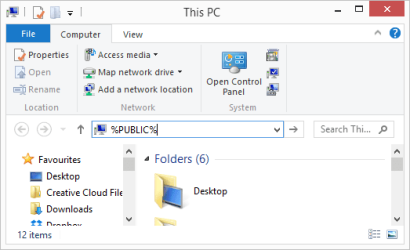
The one for C:\Users\Public is found using enviroment variable
%PUBLIC%

If you type this into the explorer bar it will show the value stored
for your PC by the OS

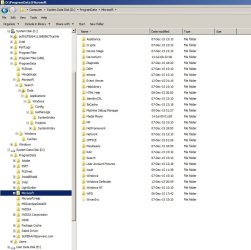
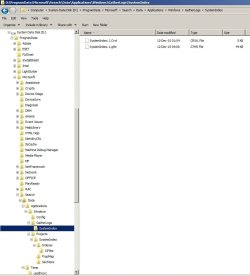
pic 1.png
pic 2.pngpic 3.png


Regards,
Jerry Fox

Technical Support
Hauppauge Computer Works
New York
http://www.hauppauge.com


For more online information please refer to:
http://www.hauppauge.com/site/support/support_faq.html

Please include previous correspondence when replying.

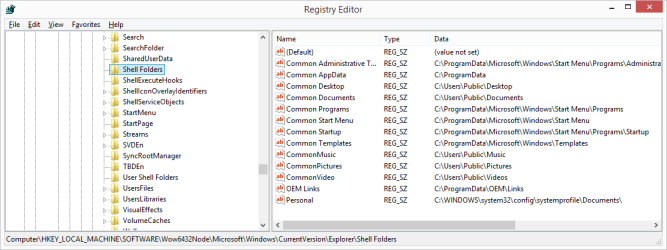
A screen shot of the key used by Hauppauge WinTV developers to locate folders on my machine after system prepped and updated:

Screen Shot 1.jpg

So, the data for that key shows all my folders on C: drive.

Either there is a bug in the AIK/answer file/system prep/move folders method, or something changed that shell folders data back to the c: drive.
 
Last edited:

My Computer My Computer

At a glance

Windows 7 Professional x64 SP1Intel i7-980x @ 3.6GHzCorsair 12GB DDR3 RAM (3x4GB)EVGA NVIDIA GeForce GTX 760 SC
Computer type
PC/Desktop
Computer Manufacturer/Model Number
Custom Build
OS
Windows 7 Professional x64 SP1
CPU
Intel i7-980x @ 3.6GHz
Motherboard
Intel DX58SO
Memory
Corsair 12GB DDR3 RAM (3x4GB)
Graphics Card(s)
EVGA NVIDIA GeForce GTX 760 SC
Sound Card
Intel High Definition 7.1 Audio Subsystem - Realtek ALC889
Monitor(s) Displays
Dual Display - LG Electronics Flatron L227WTG
Screen Resolution
1680 x 1050 60Hz 32-bit
Hard Drives
2 Seagate Constellation ST1000NM0033 1TB SATA 6Gb/s HDDs configured as Intel SATA Array 0, RST RAID 1, Vol. 0 (C:\) & Vol. 1 (D:\), & 2 Seagate Barracuda ST500DM002 500GB SATA 6Gb/s HDDs configured as Intel SATA Array 1 RST RAID 1, Vol. 0 (E:\)
PSU
Corsair HX850W
Case
Antec P182
Cooling
Stock Intel i7-980x Cooling Solution + 4 120mm Case Fans
Keyboard
Microsoft Wireless Multimedia Keyboard 1.1
Mouse
Microsoft Standard Wireless Optical Mouse
Internet Speed
DSL - 3.0 Mb/s download 768 Kb/s upload
Antivirus
ESET Smart Security 12, Defender & SuperAntiSpyware Pro
Browser
Firefox Quantum 64-bit
Other Info
Optical Drives: Pioneer DVR-216R & TSSTcorp SH-S223Q, Anker USB 3.0 PCI-E Card, Hauppauge WinTV-HVR 2250 Dual TV Tuner Board for Windows Media Center, Bose Companion 3 Series II multimedia speaker system, APC Smart-UPS SMT1500
If the AIK/answer file/system prep operation is not changing the registry explorer\shell folder location data, then I would think that this conflicting information in the registry is likely the source of programs randomly creating ProgramData folders on the C: drive. There may be a setting in the AIK answer file creation operation that will resolve this issue.
 

My Computer My Computer

At a glance

Windows 7 Professional x64 SP1Intel i7-980x @ 3.6GHzCorsair 12GB DDR3 RAM (3x4GB)EVGA NVIDIA GeForce GTX 760 SC
Computer type
PC/Desktop
Computer Manufacturer/Model Number
Custom Build
OS
Windows 7 Professional x64 SP1
CPU
Intel i7-980x @ 3.6GHz
Motherboard
Intel DX58SO
Memory
Corsair 12GB DDR3 RAM (3x4GB)
Graphics Card(s)
EVGA NVIDIA GeForce GTX 760 SC
Sound Card
Intel High Definition 7.1 Audio Subsystem - Realtek ALC889
Monitor(s) Displays
Dual Display - LG Electronics Flatron L227WTG
Screen Resolution
1680 x 1050 60Hz 32-bit
Hard Drives
2 Seagate Constellation ST1000NM0033 1TB SATA 6Gb/s HDDs configured as Intel SATA Array 0, RST RAID 1, Vol. 0 (C:\) & Vol. 1 (D:\), & 2 Seagate Barracuda ST500DM002 500GB SATA 6Gb/s HDDs configured as Intel SATA Array 1 RST RAID 1, Vol. 0 (E:\)
PSU
Corsair HX850W
Case
Antec P182
Cooling
Stock Intel i7-980x Cooling Solution + 4 120mm Case Fans
Keyboard
Microsoft Wireless Multimedia Keyboard 1.1
Mouse
Microsoft Standard Wireless Optical Mouse
Internet Speed
DSL - 3.0 Mb/s download 768 Kb/s upload
Antivirus
ESET Smart Security 12, Defender & SuperAntiSpyware Pro
Browser
Firefox Quantum 64-bit
Other Info
Optical Drives: Pioneer DVR-216R & TSSTcorp SH-S223Q, Anker USB 3.0 PCI-E Card, Hauppauge WinTV-HVR 2250 Dual TV Tuner Board for Windows Media Center, Bose Companion 3 Series II multimedia speaker system, APC Smart-UPS SMT1500
This is a great tutorial and Kari's personal help has been one of the reasons this is a great tutorial.

As indicated in my previous posts and Kari's assistance, rather than copy or transcribe the answer file, I created it using the Microsoft AIK. There is some slight difference in my answer file and the example posted here, but they are essentially the same.

I followed the tutorial and performed a clean install of OEM Win 7 Pro x64 from the distribution DVD and immediately entered Audit Mode to install drivers, driver software and a few utilities. I then performed the system prep operation and successfully moved my Users folder and ProgramData folder. After I entered the OOBE Mode, I updated the OS, installed a few more utilities and my applications. I then noticed that I had two User folders and two ProgramData folders; one each on C: and D:. One of the C:\ProgramData subfolders was Microsoft\Search. It was small compared to the one on D:, and must have been created by an Windows Update. The following programs also appeared to prefer a C: drive ProgramData folder: Adobe Acrobat, Hauppauge WinTV, Motorola Bluetooth driver software, HP printer drivers and driver software, and NVIDIA driver software. All my other programs seemed to go along with the D:\ProgramData folder. Hauppauge WinTV also preferred Users\Public folders on C:.

As was suggested by Hauppauge Support, it appears that the answer file system prep operation failed to change the drive for a few keys in the registry. Apparently, various software programs used different keys and variables to determine their install configuration. After further investigation of my clean install and Users folder and ProgramData folder move from C: to D:, I observed two registry keys that still indicated C: drive was the correct location for the two folders that were moved to D:

The keys:

Computer\HKey_Local_Machine\Software\Wow6432Node\Microsoft\Windows\CurrentVersion\explorer\Shell Folders

Computer\HKEY_Local_Machine\Software\Microsoft\Windows\CurrentVersion\Explorer\Shell Folders

The C: drive was indicated for various folder paths in the Key Data.

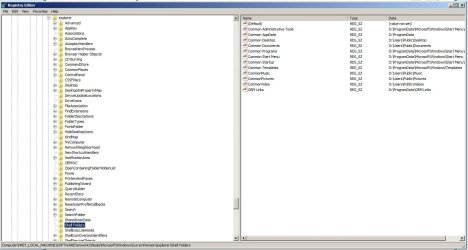
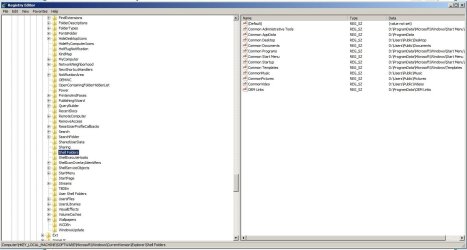
My solution was to delete the programs that installed a C:\ drive Users folder and ProgramData folder and manually edit the registry to change the unmodified Key Data from C:\ to D:\. Also, I cut the C:\ProgramData\Microsoft\Search folder and merged it with the same folder tree on the D:\ drive. I then subsequently reinstalled the programs and they successfully installed with D:\ Users folders and ProgramData folders. Screenshots of the edited key are attached below.

I followed the standard safety precautions before I edited my registry. I had an image of the install, and I backed up the keys before I performed the edits.

This solution was successful and I confirmed by reviewing the Windows Logs and SFC /scannow. I think this solution was necessary, because I was getting an unusual amount of errors in the Windows Logs.

My recommendation is that the first task after entering the OOBE Mode after Audit Mode/system prep is to check the registry keys indicated above and manually edit them before you allow Windows Update to run and before you install any additional software. If you do, you should only have a Users folder and ProgramData folder on D: drive after you perform Windows Update and install additional applications.

screenshot 2.jpg

screenshot 1.jpg

These screenshots show the C:\ changed to D:\ for the various paths indicated in the Data column.
 
Last edited:

My Computer My Computer

At a glance

Windows 7 Professional x64 SP1Intel i7-980x @ 3.6GHzCorsair 12GB DDR3 RAM (3x4GB)EVGA NVIDIA GeForce GTX 760 SC
Computer type
PC/Desktop
Computer Manufacturer/Model Number
Custom Build
OS
Windows 7 Professional x64 SP1
CPU
Intel i7-980x @ 3.6GHz
Motherboard
Intel DX58SO
Memory
Corsair 12GB DDR3 RAM (3x4GB)
Graphics Card(s)
EVGA NVIDIA GeForce GTX 760 SC
Sound Card
Intel High Definition 7.1 Audio Subsystem - Realtek ALC889
Monitor(s) Displays
Dual Display - LG Electronics Flatron L227WTG
Screen Resolution
1680 x 1050 60Hz 32-bit
Hard Drives
2 Seagate Constellation ST1000NM0033 1TB SATA 6Gb/s HDDs configured as Intel SATA Array 0, RST RAID 1, Vol. 0 (C:\) & Vol. 1 (D:\), & 2 Seagate Barracuda ST500DM002 500GB SATA 6Gb/s HDDs configured as Intel SATA Array 1 RST RAID 1, Vol. 0 (E:\)
PSU
Corsair HX850W
Case
Antec P182
Cooling
Stock Intel i7-980x Cooling Solution + 4 120mm Case Fans
Keyboard
Microsoft Wireless Multimedia Keyboard 1.1
Mouse
Microsoft Standard Wireless Optical Mouse
Internet Speed
DSL - 3.0 Mb/s download 768 Kb/s upload
Antivirus
ESET Smart Security 12, Defender & SuperAntiSpyware Pro
Browser
Firefox Quantum 64-bit
Other Info
Optical Drives: Pioneer DVR-216R & TSSTcorp SH-S223Q, Anker USB 3.0 PCI-E Card, Hauppauge WinTV-HVR 2250 Dual TV Tuner Board for Windows Media Center, Bose Companion 3 Series II multimedia speaker system, APC Smart-UPS SMT1500
What a mess you've created Micro$oft!

I read the OP (actually Change folder/file location - use Move, Symbolic link or Junction?)and a few posts in this thread. Sounds like Kari is very thorough. I admit I haven't used sysprep very much. I am skeptical that using it will yield better results than other (much easier) methods would. I am very open to being proven wrong (not that anyone should feel obligated), but IMnsHO many of the issues I've noticed related to migrating folders in "unusual" ways can be attributed to a very big company not having adequate control over their product management and quality control standards, like testing for hardcoded paths, which often happen b/c programmers are pressured to make schedule deadlines or there aren't adequate review processes to catch them before code/feature freeze.

It's not easy to make all the moving parts behave AND take into account all the legacy considerations AND appease corporate AND consumer interests AND make marketing AND shareholders all happy.

[rant pause]

I have been working on overhauling my system and incorporating an SSD. My perspective about file systems comes mainly from the Unix world, tho I've been a Windows user continuously since the days of DOS, so I've seen the evolution from FAT to NTFS. I haven't had too much respect for M$ engineering "talent" for some time now, and this SSD / overhaul project has not helped to improve it.

There is no good reason that applications should give a hoot about the physical location of data, generally speaking. Sure, characteristics like optical, removable etc are important, but this HDD or that one, why should the app care? That's one of the main reasons for designing links at the filesystem level, so disk space can be managed transparently. But oh no, we can't have users making "arbitrary" decisions on the structure and layout of their hard drive space, why, it would be madness, chaos and sheer anarchy!!!

I started with a clean install, and before I created any users I opened a command shell and created junctions to relocate Program Files + (x86) + ProgramData + Users to HDD drives. I updated 2 major areas of the registry to correspond to the new locations, a step that shouldn't be necessary at all. Initially I used mklink /D, due to the "symbolic link" name, thinking it worked the same as in the Unix/Linux world. Many things just didn't work, like updates and the performance rating tool in system properties. Going back and researching I discovered the way links are resolved in NTFS and that the correct form to use was mklink /J when all elements are on the same host.

I noticed Kari said that Mico$oft "doesn't recommend" relocating Program Files. Why not? That is an obvious place to segregate the core OS from user installed apps, and for developers (and retired devs like me) we install A LOT of software. The registry is such a pain to deal with and makes it so much more difficult to move things around. It is a terrible design approach that just won't die. I would easily fill an SSD in no time at all had I left Program* folders on the SSD.

I followed another's lead in the method I employed to move data off %SYSROOT% and it works OK 98% of the time. I have noticed several "anomalies" that require attention, and can see there are still plenty of spots in the registry hardwired with "C:\Program Files" I may need to fix to eliminate some of these odd behaviors, for example:

  1. Marking a downloaded update (KBxxxxxxx) as hidden doesn't persist, and the updates get installed anyway, such as those nagging GWX updates to upgrade to Windows 10.
  2. Sleep doesn't activate (it immediately wakes back up)
  3. Various user preferences don't retain their settings, but most work as expected.
  4. Explorer confuses folder names similar to "Program files", whereas they show up correctly in a dir command listing (I renamed the originals before I created the junctions but in explorer it looks like duplicate names).
I admire Kari's systematic and thorough approach, but I'll bet there are issues it doesn't resolve, and that's simply b/c Windoze is a behemoth whose elements are difficult to control. I would be willing to bet that after following this sysprep method you can still find hardcoded paths in the registry contrary to the new locations, or even if that isn't the case for user profile references would have a developers 120 - 240GB SSD filled in no time at all. Actually, relocating Program Files is bar far the most straighforward set of folders to migrate as there are no self referencing junctions in them. Getting the registry to conform is an entirely different matter tho.
 

My Computer My Computer

At a glance

Windows 7 Ultimate x64, Windows 7 Home Premiu...Phenom quad16GBNvidia 520
Computer type
PC/Desktop
Computer Manufacturer/Model Number
Asus, custom build
OS
Windows 7 Ultimate x64, Windows 7 Home Premium x64
CPU
Phenom quad
Motherboard
M4A785-M
Memory
16GB
Graphics Card(s)
Nvidia 520
Hard Drives
Seagate 1TB, White Label 1TB, Toshiba 680GB, Vertex2 80GB SSD
Antivirus
Bitdefender
Browser
Firefox, IE11
Hi Kari,

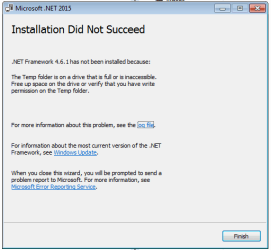
I did as per your tutorial but have encountered difficulties in installing several programs after the folders have been successfully moved to the other disk. Specifically, I am unable to install programs that require .NET framework. I tried installing the framework on its own but still received an error as attached. I have also noticed that windows update check is always running but never seem to fetch anything.

I greatly appreciate your tutorial and hope that you can help me in resolving this too.

Thanks!
 

Attachments

  • Capture.PNG
    Capture.PNG
    8.7 KB · Views: 235
  • Capture1.PNG
    Capture1.PNG
    6.9 KB · Views: 230

My Computer My Computer

At a glance

Windows 7 Home Premium 64bit
Computer type
PC/Desktop
OS
Windows 7 Home Premium 64bit
Motherboard
Asus H87
Back
Top