User profiles

sargan

New member
Member
VIP
Local time
10:15 AM
Messages
164
On advice here - when I installed W7 ... I followed:
http://www.sevenforums.com/tutorials/87555-user-profile-change-default-location.html

and kept OS on my C:\ and put user profile with its mass of video, pictures & music on a separate drive, and apps on a 3rd drive .... the advice here was have SSD drive for OS only, everything else on separate drives.

Due to some instability I wanted to run Windows repair ... and it failed as it does not support user profiles being in a separate location to OS ... so currently can't repair.

Started looking around and find this pretty fundamental warning:
www.zdnet.com/dont-move-your-windows-user-profiles-folder-to-another-drive-7000022142/

Unless anybody knows how to carry out system disk repair (upgrade) in current setup, I'm going to have to move my profiles back, and if that is the case may have to look at alternate config if Microsoft clearly do not support this and will not support this configuration when I go to upgrade from W7.

Any thoughts ?
 

My Computer

Computer type
PC/Desktop
Computer Manufacturer/Model Number
custom build
OS
W7 64 bit ultimate
CPU
i5 3570 3.4G Ivybridge
Motherboard
ASUS P8Z77-V LE
Memory
16GB Ram – Corsair XMS
Graphics Card(s)
MSI GTX G650 Hawk - Frzr II
Sound Card
on-mobo
Monitor(s) Displays
26" Samsung digital
Hard Drives
OS on SSD – Crucial M4 120GB
programme & data on 1TB HDD (Caviar Black)
Pics & video on 1TB HDD (Caviar Black)
PSU
Cooler Master M2 Silent Pro PSU
Case
Fractal R3 case
Cooling
Coolermaster Hper 212 EVO + Artic silver paste
Internet Speed
3MB
Antivirus
KIS
Note: The link you posted is messed up, it resolves to:

Code:
http://www.sevenforums.com/www.zdnet.com/dont-move-your-windows-user-profiles-folder-to-another-drive-7000022142/
should be:

Code:
http://www.zdnet.com/dont-move-your-windows-user-profiles-folder-to-another-drive-7000022142/
See the rebuttal by Keri on page 4 of the responses, near the bottom:

I have to most respectfully disagree!

As far as I can recall, this is the first time I have to disagree with you :). Not because I have written a few tutorials on those "third party websites" as you put it to instruct in doing this but because what you are saying is simply not valid and true.

Let's start with this extract from your article:

"Important

This setting should be used only in a test environment. By changing the default location of the user profile directories or program data folders to a volume other than the System volume, you will not be able to service your Windows installation. Any updates, fixes, or service packs will fail to be applied to the installation. Microsoft does not recommend that you change the location of the user profile directories or program data folders. [emphasis added]"

That is, to put it simple, absolutely totally not true. Since introduction of Windows Vista all my Windows systems private and business have had the main Users folder relocated on another partition than C: using sysprep and unattended answer file. I have never had any issues with Windows update nor with in-place upgrade installations.

As the method discussed changes the value of an internal windows environment variable, it is so well "hard coded" in system that Windows Update will recognize it and has no issues.

When upgrading I simply run sysprep on Windows first, using an answer file I relocate the Users folder back from E: to C:, reboot, run in-place upgrade and sysprep once again, moving Users back to E:.

Not a single issue. This laptop I'm using now was upgraded in above mentioned way from 7 to 8 august of 2012 and again August this year to 8.1, system files and folders except Users folder on C:, Users on E:, and the machine is working just fine, all updates done, Windows Update working as it should.

As Windows has evolved, so have its tools like sysprep. You did notice that the TechNet article you are referring to is already several years old (for instance it's using Vista Home Premium to Vista Ultimate as an upgrade example)?.

I can understand that there must be days with nothing new to write. However, scandalizing totally working methods and spreading false information is not a good way to get something published, if you ask my opinion.

Kari
4d4ab16c537a90d3d7134a7db8232d31

KariFinn
16 December, 2013 21:17
Also this thread:

http://www.sevenforums.com/general-...-upgrade-8-1-pro-if-7-user-profile-moved.html
 

My Computer

Computer type
PC/Desktop
Computer Manufacturer/Model Number
Lenovo IdeaCenter 450
OS
Windows 10 Pro X64
CPU
Intel Quad Core i7-4770 @ 3.4Ghz
Memory
16.0GB PC3-12800 DDR3 SDRAM 1600 MHz
Graphics Card(s)
Intel Integrated HD Graphics
Sound Card
Realtek HD Audio
Monitor(s) Displays
HP 22" LCD
Screen Resolution
1680 x 1050
Hard Drives
250GB Samsung EVO SATA-3 SSD
2TB Seagate ST2000DM001 SATA-2
1.5TB Seagate ST3150041AS SATA
Keyboard
Dell USB
Mouse
Lenovo USB
Internet Speed
Cable via Road Runner 3MB Upload, 30MB Download
Antivirus
Windows Defender, MBAM Pro, MBAE
Browser
Seamonkey
Other Info
UEFI/GPT
PLDS DVD-RW DH16AERSH

My Computer

Computer type
Laptop
Computer Manufacturer/Model Number
HP ENVY 17-1150eg
OS
Windows 10 Pro x64 EN-GB
CPU
1.6 GHz Intel Core i7-720QM Processor
Memory
6 GB
Graphics Card(s)
ATI Mobility Radeon HD 5850 Graphics
Sound Card
Beats sound system with integrated subwoofer
Monitor(s) Displays
17" laptop display, 22" LED and 32" Full HD TV through HDMI
Screen Resolution
1600*900 (1), 1920*1080 (2&3)
Hard Drives
Internal: 2 x 500 GB SATA Hard Disk Drive 7200 rpm
External: 2TB for backups, 3TB USB3 network drive for media
Cooling
As Envy runs a bit warm, I have it on a Cooler Master pad
Keyboard
Logitech diNovo Media Desktop Laser (bluetooth)
Mouse
Logitech Performance Mouse MX
Internet Speed
50/10 Mbps VDSL
Antivirus
Windows Defender 4.3.9431.0
Browser
Maxthon 3.5.2., IE11
The issue is though is that I cannot upgrade as Windows does not support profiles on separate partition, I want to run upgrade(repair)
I can't simply move profiles back as they are too large to fit on SSD
It will require a lot of effort to move files elsewhere to reduce profile to a size that can be moved back .... and having moved files elsewhere I might as well then leave profiles on C;\ to avoid effort in future.

The tutorial was good ... but end result seems to screw you for upgrades without a lot of extra work.
 

My Computer

Computer type
PC/Desktop
Computer Manufacturer/Model Number
custom build
OS
W7 64 bit ultimate
CPU
i5 3570 3.4G Ivybridge
Motherboard
ASUS P8Z77-V LE
Memory
16GB Ram – Corsair XMS
Graphics Card(s)
MSI GTX G650 Hawk - Frzr II
Sound Card
on-mobo
Monitor(s) Displays
26" Samsung digital
Hard Drives
OS on SSD – Crucial M4 120GB
programme & data on 1TB HDD (Caviar Black)
Pics & video on 1TB HDD (Caviar Black)
PSU
Cooler Master M2 Silent Pro PSU
Case
Fractal R3 case
Cooling
Coolermaster Hper 212 EVO + Artic silver paste
Internet Speed
3MB
Antivirus
KIS
Using your own brain for thinking is always allowed...

Of course you can move the profile folders back to C:. Simply move your personal docs, pics and media (the content of the folders you have moved) from folders like Documents, Music, Pictures, Videos and so on in Users\Your_Username to an external device to make the current profile folders as empty as possible.

Now move the profile folders back to C: using the same method originally used for moving the folders, and upgrade.

Kari
 
Last edited:

My Computer

Computer type
Laptop
Computer Manufacturer/Model Number
HP ENVY 17-1150eg
OS
Windows 10 Pro x64 EN-GB
CPU
1.6 GHz Intel Core i7-720QM Processor
Memory
6 GB
Graphics Card(s)
ATI Mobility Radeon HD 5850 Graphics
Sound Card
Beats sound system with integrated subwoofer
Monitor(s) Displays
17" laptop display, 22" LED and 32" Full HD TV through HDMI
Screen Resolution
1600*900 (1), 1920*1080 (2&3)
Hard Drives
Internal: 2 x 500 GB SATA Hard Disk Drive 7200 rpm
External: 2TB for backups, 3TB USB3 network drive for media
Cooling
As Envy runs a bit warm, I have it on a Cooler Master pad
Keyboard
Logitech diNovo Media Desktop Laser (bluetooth)
Mouse
Logitech Performance Mouse MX
Internet Speed
50/10 Mbps VDSL
Antivirus
Windows Defender 4.3.9431.0
Browser
Maxthon 3.5.2., IE11
Understand I can move this off ... just taking Hrs to move to backup drives.

If I have to do this every time I want to use 'repair' or when I come to upgrade, doesn't this then defeat the benefits ?

I did follow original article and it worked fine, clear easy to follow steps .... but as I now have Profiles with a large amount of data. Having to move this off ... (My docs, pics, music, videos etc.) to allow restore of profiles to C:\
Wouldn't it be best to permananently locate those elsewhere ... in which case then the profiles are no longer huge .. and there seems to be little benefit to moving them off the C:\ ?

I know there is the idea that is you get an OS failure then you can quickly restore ... but in reality as your programs are on a separate HDD ... none of these are going to work with newly installed OS - registry will be wrong (or am I missing something)
 

My Computer

Computer type
PC/Desktop
Computer Manufacturer/Model Number
custom build
OS
W7 64 bit ultimate
CPU
i5 3570 3.4G Ivybridge
Motherboard
ASUS P8Z77-V LE
Memory
16GB Ram – Corsair XMS
Graphics Card(s)
MSI GTX G650 Hawk - Frzr II
Sound Card
on-mobo
Monitor(s) Displays
26" Samsung digital
Hard Drives
OS on SSD – Crucial M4 120GB
programme & data on 1TB HDD (Caviar Black)
Pics & video on 1TB HDD (Caviar Black)
PSU
Cooler Master M2 Silent Pro PSU
Case
Fractal R3 case
Cooling
Coolermaster Hper 212 EVO + Artic silver paste
Internet Speed
3MB
Antivirus
KIS
Understand I can move this off ... just taking Hrs to move to backup drives.
It's totally up to you. If you do not want to wait, just reinstall from scratch. At least your personal data is safe without any additional backup on locations you have moved it to.

If I have to do this every time I want to use 'repair' or when I come to upgrade, doesn't this then defeat the benefits ?
Again, it's totally up to you to decide your priorities when setting up a Windows computer. If your main priority is to get a working system where user data and the system are separated, locating on different drives, then you move the personal content to be stored on another drive using a method that best suits you.

However, if you main concern is to keep your system all time ready for a possible future repair or in-place upgrade installation then you simply do not move anything, do not change any default locations of any folder.

did follow original article and it worked fine, clear easy to follow steps .... but as I now have Profiles with a large amount of data. Having to move this off ... (My docs, pics, music, videos etc.) to allow restore of profiles to C:\
Wouldn't it be best to permananently locate those elsewhere ... in which case then the profiles are no longer huge .. and there seems to be little benefit to moving them off the C:\ ?
In your case a working solution could be to not move anything but use Libraries instead.

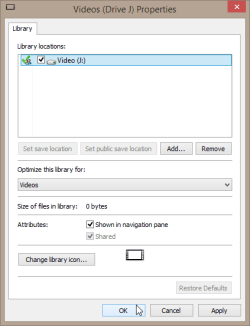
An example scenario from my computer: I have stored all videos and movies on various genre related root level folders on drive J:. I have also created a new library called Videos (Drive J):

2014-09-18_13h33_31.png

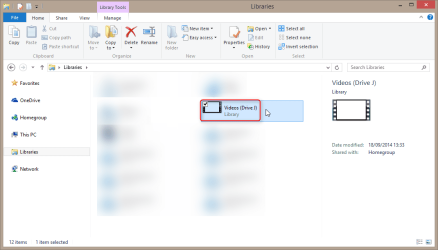
This library contains the whole drive J: and nothing else:

2014-09-18_13h35_20.png

Because the library content is a drive, when I now open this library it shows the root of the drive J: (folders like Comedy, Action, Drama, Documentaries and so on) and I can browse and use them normally.

Library takes a few kilobits on C:, all the content is on J:.


I know there is the idea that is you get an OS failure then you can quickly restore ... but in reality as your programs are on a separate HDD ... none of these are going to work with newly installed OS - registry will be wrong (or am I missing something)
Two main points in storing your personal data on a separate drive is to reduce the amount of used space on C: and to keep them safe in case of a crash or such.

Whatever method is used for this is irrelevant. Each user should think of a worse case scenario and create a recovery strategy in case that ever happens. In my case for instance, I have relocated the complete main profile folder to drive E: and created a system image containing only the system reserved partition and drive C:. If I need to restore my system, I simply restore the image which then automatically picks up my user data and all profiles on E:. Fast and easy.

Kari
 

My Computer

Computer type
Laptop
Computer Manufacturer/Model Number
HP ENVY 17-1150eg
OS
Windows 10 Pro x64 EN-GB
CPU
1.6 GHz Intel Core i7-720QM Processor
Memory
6 GB
Graphics Card(s)
ATI Mobility Radeon HD 5850 Graphics
Sound Card
Beats sound system with integrated subwoofer
Monitor(s) Displays
17" laptop display, 22" LED and 32" Full HD TV through HDMI
Screen Resolution
1600*900 (1), 1920*1080 (2&3)
Hard Drives
Internal: 2 x 500 GB SATA Hard Disk Drive 7200 rpm
External: 2TB for backups, 3TB USB3 network drive for media
Cooling
As Envy runs a bit warm, I have it on a Cooler Master pad
Keyboard
Logitech diNovo Media Desktop Laser (bluetooth)
Mouse
Logitech Performance Mouse MX
Internet Speed
50/10 Mbps VDSL
Antivirus
Windows Defender 4.3.9431.0
Browser
Maxthon 3.5.2., IE11
Back
Top