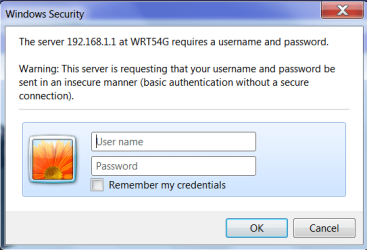
Solved Username and Password window

ballpet

New member
Local time
2:01 PM
Messages
7
My frustration is with the window that pops up when I need to access something that requires a username and/or password. There is grayed out text that appears in each field to tell me what I should be entering there. There are applications such as Linksys routers that don't have a username (instructions are that "username" is left blank), just a password however there does not seem to be a way to leave the username blank--as soon as I move to the password field the damn message reapears. Today I had to make some changes to my router settings and had to use one of our XP boxes to get access, win-7 just refused to get shot of the word "username" in that field. Is there a way to deactivate this feature? Is it necessary to dumb down the process so much in assuming that the user can't figure out what the fields are for from the text to the left of them?
 

My Computer My Computer

At a glance

win-7/64 ProAMD X3 85508 GbATI 3450
Computer Manufacturer/Model Number
Certified Data
OS
win-7/64 Pro
CPU
AMD X3 8550
Motherboard
BiostarTA780G M2+
Memory
8 Gb
Graphics Card(s)
ATI 3450
Sound Card
6 CH HD Audio on MB
Monitor(s) Displays
Samsung
Hard Drives
2 SATA onboard, Linksys network drives and a couple of USB drives
Case
18" tower
Keyboard
Key Tronic C/W a AT to PS2 adapter..it just keeps on clickin
Mouse
MS Intellimouse USB/PS2

My Computer My Computer

At a glance

Windows 7 Ultimate (SP1)AMD Sempron 3600+ATI Radeon Xpress 1150
Computer Manufacturer/Model Number
Vostro
OS
Windows 7 Ultimate (SP1)
CPU
AMD Sempron 3600+
Graphics Card(s)
ATI Radeon Xpress 1150
Screen Resolution
1200 x 800
Hard Drives
WD Scorpio Blue 500 GB
Image attached...I hope!
 

Attachments

  • Login Screen .png
    Login Screen .png
    16.2 KB · Views: 18

My Computer My Computer

At a glance

win-7/64 ProAMD X3 85508 GbATI 3450
Computer Manufacturer/Model Number
Certified Data
OS
win-7/64 Pro
CPU
AMD X3 8550
Motherboard
BiostarTA780G M2+
Memory
8 Gb
Graphics Card(s)
ATI 3450
Sound Card
6 CH HD Audio on MB
Monitor(s) Displays
Samsung
Hard Drives
2 SATA onboard, Linksys network drives and a couple of USB drives
Case
18" tower
Keyboard
Key Tronic C/W a AT to PS2 adapter..it just keeps on clickin
Mouse
MS Intellimouse USB/PS2
Have you just tried x-ing out of the windows a few times? I had this window pop up for some university stuff and I just x-ed out and kept going.

Would that work in this case or do you need to enter credentials?
 

My Computer My Computer

At a glance

Windows 7 Ultimate (SP1)AMD Sempron 3600+ATI Radeon Xpress 1150
Computer Manufacturer/Model Number
Vostro
OS
Windows 7 Ultimate (SP1)
CPU
AMD Sempron 3600+
Graphics Card(s)
ATI Radeon Xpress 1150
Screen Resolution
1200 x 800
Hard Drives
WD Scorpio Blue 500 GB
He does need the password to get into the WRT54G. Are you sure you have the correct password? The default password for one is admin with no username. If you changed it, I'd just make very sure you have the password right, case and all, and that capslock isn't on.
 

My Computer My Computer

At a glance

W7 Professional x64Core 2 Duo 2.932 GBATI Radeon 4695
Computer Manufacturer/Model Number
HP 6000 Pro Micro Tower
OS
W7 Professional x64
CPU
Core 2 Duo 2.93
Memory
2 GB
Graphics Card(s)
ATI Radeon 4695
Monitor(s) Displays
Two HP 17's
Hard Drives
150GB Sata Drive
Case
Tiny. Kinda cute.
Keyboard
HP Supplied. Surprisingly nice.
Mouse
Gateway Mouse from an E2610D
Internet Speed
45 mbps
Guys, the problem is Windows 7 isn't letting him continue without putting in a username, but the router will return a 403 if *any* username is inputted. He knows the password, as per the original post he logged into the router from a Windows XP machine. The problem lies in that Windows 7 is like "CAN'T LET YOU DO THAT STARFOX" if he tries to leave the username field blank.
 

My Computer My Computer

At a glance

7x64 SP1Intel 2600K8GB SamsungMSI 670
OS
7x64 SP1
CPU
Intel 2600K
Motherboard
Intel DZ77GA-70K
Memory
8GB Samsung
Graphics Card(s)
MSI 670
Sound Card
HT Omega Striker 7.1
Monitor(s) Displays
Dell U2412M
Screen Resolution
1920x1200
Hard Drives
2x 3TB WD Green
1x 4TB Hitachi
1x Intel 330 Series 180GB SSD
PSU
Corsair HX850
Look up the username and password for your router, after your positive you have it, reset the router then you can get into it and do what you want. I`m pretty sure it`s Username admin password is blank.
 

My Computer My Computer

At a glance

Windows 7 Ultimate 64BitC2D E82008GB PNY PC2-6400BFG 9600GT x 2
Computer Manufacturer/Model Number
Myself
OS
Windows 7 Ultimate 64Bit
CPU
C2D E8200
Motherboard
XFX 750i
Memory
8GB PNY PC2-6400
Graphics Card(s)
BFG 9600GT x 2
Sound Card
Stock XFX Optical
Monitor(s) Displays
Gateway 22" HD Display
Hard Drives
C: 1 TB G: 500 GB H: 500 GB
PSU
Ultra LSP 550 Pro Lifetime Series
Case
Xion2
Cooling
ThermalTake
Yes, I'm sure that I got the PW right, to start with I did a cut and paste from my PW file. I have just finished resetting the PW in the router (entry through an XP box), confirmed it by exiting and re-entering, then proceded to the W-7 box and attemped with the same PW (cut and paste to eliminate finger trouble) and was not allowed in. I am fully convinced that the word "user name" is passed to the router which not liking it, rejects access. This appears to be an Win-7 problem. I'll now head over to the Linksys forums and see what joy I find there regards a solution. Having to get into the guts of the routers is not an everyday occurance, but if one has to and doesn't have a non W-7 box to go it then you have a problem.
 

My Computer My Computer

At a glance

win-7/64 ProAMD X3 85508 GbATI 3450
Computer Manufacturer/Model Number
Certified Data
OS
win-7/64 Pro
CPU
AMD X3 8550
Motherboard
BiostarTA780G M2+
Memory
8 Gb
Graphics Card(s)
ATI 3450
Sound Card
6 CH HD Audio on MB
Monitor(s) Displays
Samsung
Hard Drives
2 SATA onboard, Linksys network drives and a couple of USB drives
Case
18" tower
Keyboard
Key Tronic C/W a AT to PS2 adapter..it just keeps on clickin
Mouse
MS Intellimouse USB/PS2
During the cut and paste, you aren't accidentally including a space or something in the cut right?
 

My Computer My Computer

At a glance

Windows 7 Ultimate (SP1)AMD Sempron 3600+ATI Radeon Xpress 1150
Computer Manufacturer/Model Number
Vostro
OS
Windows 7 Ultimate (SP1)
CPU
AMD Sempron 3600+
Graphics Card(s)
ATI Radeon Xpress 1150
Screen Resolution
1200 x 800
Hard Drives
WD Scorpio Blue 500 GB
A simple fix would be (from the XP box) to add a Username and good password, then you can access it from Win 7.

I don't have anything I can test with to see if I can reproduce your problem, but I've not seen anyone else report it.
 

My Computer My Computer

At a glance

Windows 10 Pro X64Intel Quad Core i7-4770 @ 3.4Ghz16.0GB PC3-12800 DDR3 SDRAM 1600 MHzIntel Integrated HD Graphics
Computer type
PC/Desktop
Computer Manufacturer/Model Number
Lenovo IdeaCenter 450
OS
Windows 10 Pro X64
CPU
Intel Quad Core i7-4770 @ 3.4Ghz
Memory
16.0GB PC3-12800 DDR3 SDRAM 1600 MHz
Graphics Card(s)
Intel Integrated HD Graphics
Sound Card
Realtek HD Audio
Monitor(s) Displays
HP 22" LCD
Screen Resolution
1680 x 1050
Hard Drives
250GB Samsung EVO SATA-3 SSD
2TB Seagate ST2000DM001 SATA-2
1.5TB Seagate ST3150041AS SATA
Keyboard
Dell USB
Mouse
Lenovo USB
Internet Speed
Cable via Road Runner 3MB Upload, 30MB Download
Antivirus
Windows Defender, MBAM Pro, MBAE
Browser
Seamonkey
Other Info
UEFI/GPT
PLDS DVD-RW DH16AERSH
having been there, done than I watch for it, this has happened too many times to be finger trouble. I should note that I have the same issue on both my W-7 boxs. So far I haven't found any reference on this on the Linksys forums.

Bloody Hell!, I just hand entered the PW and it took....Case closed

Next time I have to get into the router I'll just type it in

Thanks everyone for your suggestions..
 

My Computer My Computer

At a glance

win-7/64 ProAMD X3 85508 GbATI 3450
Computer Manufacturer/Model Number
Certified Data
OS
win-7/64 Pro
CPU
AMD X3 8550
Motherboard
BiostarTA780G M2+
Memory
8 Gb
Graphics Card(s)
ATI 3450
Sound Card
6 CH HD Audio on MB
Monitor(s) Displays
Samsung
Hard Drives
2 SATA onboard, Linksys network drives and a couple of USB drives
Case
18" tower
Keyboard
Key Tronic C/W a AT to PS2 adapter..it just keeps on clickin
Mouse
MS Intellimouse USB/PS2
Back
Top