using 100 %

syem

New member
Local time
10:47 PM
Messages
2
all please help me.

I want to ask if I connect to the network via cable then my laptop will go up 100 in task manager, but if I connect to the network via wifi does not happen 100% process

please give advice
 

My Computer

OS
32 bit windows 7 enterprise
Could you be more specific as to which process exactly is sucking all the processor?
 

My Computer

Computer Manufacturer/Model Number
Insane hobo technologies. ;-)
OS
Windows 7 x64
CPU
Intel i7 2600k
Motherboard
Asrock z68 extreme 4 gen 3
Memory
G.skill Ripjaw 16gigs @ 1866
Graphics Card(s)
Nvidia gtx580 (evga)
Sound Card
Integrated HD audio + hdmi
Monitor(s) Displays
24" ASUS widescreen + 42" insignia
Screen Resolution
1080p (1920x1080)
Hard Drives
128 Samsung 830
256 Samsung 840
3 x 1tb storage drive (various)
1 western digital 1tb (eSATA)
1 Seagate 1tb (eSATA)
PSU
1 kilowatt SLI/Crossfire rated Silverstone modular
Case
NZXT Phantom + additional 220 fan
Cooling
Zalmann
Keyboard
Microsoft wireless 3000 (v2)
Mouse
MS - wireless 5000 (bluetrack)
Internet Speed
depends on if you ask me or my provider.
Other Info
The above information is provided as is, and the author assumes no responsibility for issues it may cause with your sanity or fanboyism.
all


when i connect to wifi only CPU usage 4%
if I connect using cable lan will increase to 100%
 

My Computer

OS
32 bit windows 7 enterprise
When the cpu usage is up at 100%, open the task manager (ctrl + alt + del) and find out what process is using up the biggest percent of the cpu, and let us know. Also, when you connect the cable lan are you shutting off the wifi? I doubt if that matters, but what the heck.
 

My Computer

Computer Manufacturer/Model Number
HP G60t
OS
windows7 64 bit
CPU
Processor Intel(R) Core(TM)2 Duo CPU T6600 @ 2.20GHz, 2
Memory
3G
Graphics Card(s)
Name Mobile Intel(R) 4 Series Express Chipset Family
Sound Card
Name Conexant Pebble High Definition SmartAudio
Screen Resolution
Resolution 1366 x 768 x 59 hertz
Hard Drives
Model ST9320325AS ATA Device
Size 298.09 GB (320,072,772,096 bytes)
Keyboard
Description Standard PS/2 Keyboard
Mouse
Hardware Type Synaptics PS/2 Port TouchPad
Dear syem,
A hearty welcome to windows seven forum!


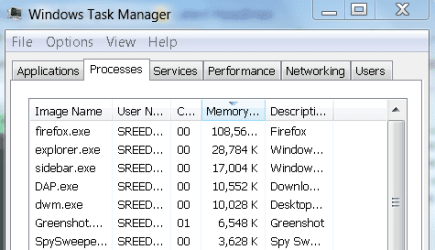
As RobbieR detailed, 1)open the Task manager, 2)open "Processes"3) click on "processes"tab, so that they arrange themselves in a descending order (see my snapshot below) of usage and post the top 5 culprits and 4) you must do this (naturellement) with the cable connection!

The needle of suspicion points to browsers like Firefox, especially when the connectivity is good as is with the cable! Boy, that fox has a fire in the belly!:)

regards,
Sreedhav
 

Attachments

  • Windows Task Manager_2011-03-22_14-18-54.png
    Windows Task Manager_2011-03-22_14-18-54.png
    10.3 KB · Views: 2

My Computer

Computer Manufacturer/Model Number
Sony Vaio C series VPCCB35FN laptop
OS
MS Windows 7 Home Premium 64-bit SP1
CPU
IntelCore [email protected]; Sandy Bridge 32nm Tech.
Motherboard
Sony Vaio Version:C609NJYJ
Memory
4096Mb RAM; Single ChannelDDR3@665MHz; DRAM Freq:662MHz
Graphics Card(s)
AMD Radeon HD 6630M; GPU:Whistler;BIOS Core&mem Clock:123.36
Sound Card
REALTEK High Definition Audio Device; INTEL Display Card
Monitor(s) Displays
Generic PnP Intel HD;Resolution:1920*1040 Pixels; BPP:32bits
Screen Resolution
Current Resolution:1920*1080 Pixels; Monitor Frequency:60Hz
Hard Drives
Internal HD:TOSHIBA MK5061GSY; Real Size:488 GB;NTFS; 3 Partitions; SATA; HEADS:16

External HDD: WD Elements 1023 PORTABLE; Estimated Size: 1TB; NTFS; 3 Partitions
Cooling
Lateral Exhaust with a Cooling Pad Placed Beneath.
Keyboard
Logitech Bluetooth+ Generic Integrated K-B
Mouse
Logitech Bluetooth
Internet Speed
2MBPS
Other Info
1)Trend Micro Titanium Maximum Security Suite Version:3
2)SAS-PRO

3)MBAM--PRO


4)WATERFOX+IE9 +WOT+LINKEXTEND+ DRWEBCUREIT LINK CHECKER

5)SPYWAREBLASTER

6) WINPATROL PLUS

7) SANDBOXIE and
8) A BIT OF COMMON SENSE.
As fellow geeks here already asked, please post a screenshot showing which processes are "eating" your resources. These tutorials tell you how to make and post screenshots on Seven Forums:
http://www.sevenforums.com/tutorials/9717-screenshot-paint.html
http://www.sevenforums.com/tutorials/9733-screenshots-files-upload-post-seven-forums.html


When the cpu usage is up at 100%, open the task manager (ctrl + alt + del) and find out what process is using up the biggest percent of the cpu, and let us know.
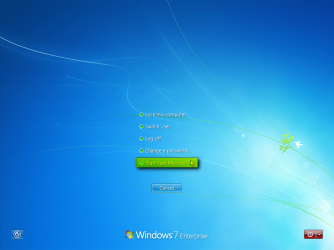
Pressing CTRL + ALT + DEL in Windows 7 does not open Task Manager. It opens a switch user / lock computer screen. In this screen you then have to click Start Task Manager:

Start_Task_Manager.png

You can also start Task Manager by right clicking an empty spot on Taskbar, then selecting Start Task Manager from context menu.

As RobbieR detailed, 1)open the Task manager, 2)open "Processes"3) click on "processes"tab, so that they arrange themselves in a descending order (see my snapshot below) of usage and post the top 5 culprits and 4) you must do this (naturellement) with the cable connection!

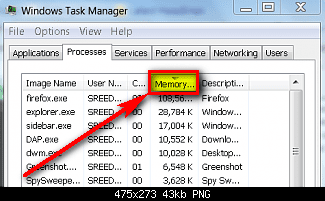
A small error there. Open Processes tab, click column title Memory:

Windows Task Manager_2011-03-22_14-18-54.png

Now make a screenshot and post it here.

:) Kari
 

My Computer

Computer type
Laptop
Computer Manufacturer/Model Number
HP ENVY 17-1150eg
OS
Windows 10 Pro x64 EN-GB
CPU
1.6 GHz Intel Core i7-720QM Processor
Memory
6 GB
Graphics Card(s)
ATI Mobility Radeon HD 5850 Graphics
Sound Card
Beats sound system with integrated subwoofer
Monitor(s) Displays
17" laptop display, 22" LED and 32" Full HD TV through HDMI
Screen Resolution
1600*900 (1), 1920*1080 (2&3)
Hard Drives
Internal: 2 x 500 GB SATA Hard Disk Drive 7200 rpm
External: 2TB for backups, 3TB USB3 network drive for media
Cooling
As Envy runs a bit warm, I have it on a Cooler Master pad
Keyboard
Logitech diNovo Media Desktop Laser (bluetooth)
Mouse
Logitech Performance Mouse MX
Internet Speed
50/10 Mbps VDSL
Antivirus
Windows Defender 4.3.9431.0
Browser
Maxthon 3.5.2., IE11
Dear kari,
Such are the slings and arrows of outrageous fortune;)! I stand corrected! As you said, rt.clicking in an empty space in the task bar is my method of choice!It's so cool and the sum of such small utilities have made Win.7 a giant success.

Thanks,
Sreedhav
 

My Computer

Computer Manufacturer/Model Number
Sony Vaio C series VPCCB35FN laptop
OS
MS Windows 7 Home Premium 64-bit SP1
CPU
IntelCore [email protected]; Sandy Bridge 32nm Tech.
Motherboard
Sony Vaio Version:C609NJYJ
Memory
4096Mb RAM; Single ChannelDDR3@665MHz; DRAM Freq:662MHz
Graphics Card(s)
AMD Radeon HD 6630M; GPU:Whistler;BIOS Core&mem Clock:123.36
Sound Card
REALTEK High Definition Audio Device; INTEL Display Card
Monitor(s) Displays
Generic PnP Intel HD;Resolution:1920*1040 Pixels; BPP:32bits
Screen Resolution
Current Resolution:1920*1080 Pixels; Monitor Frequency:60Hz
Hard Drives
Internal HD:TOSHIBA MK5061GSY; Real Size:488 GB;NTFS; 3 Partitions; SATA; HEADS:16

External HDD: WD Elements 1023 PORTABLE; Estimated Size: 1TB; NTFS; 3 Partitions
Cooling
Lateral Exhaust with a Cooling Pad Placed Beneath.
Keyboard
Logitech Bluetooth+ Generic Integrated K-B
Mouse
Logitech Bluetooth
Internet Speed
2MBPS
Other Info
1)Trend Micro Titanium Maximum Security Suite Version:3
2)SAS-PRO

3)MBAM--PRO


4)WATERFOX+IE9 +WOT+LINKEXTEND+ DRWEBCUREIT LINK CHECKER

5)SPYWAREBLASTER

6) WINPATROL PLUS

7) SANDBOXIE and
8) A BIT OF COMMON SENSE.
CTRL+Shift+Esc. Thats what i use for windows 7.

It may go upto 100% for a short time, i think it will jump back to normal. Did you checked for sufficient time?

YBL
 

My Computer

Computer Manufacturer/Model Number
AMD _(Assembled)_
OS
Dual Booting Windows 7 64-Bit Ultimate Edition and Fedora 16.
CPU
AMD Phenom X4 925
Motherboard
MSI 785g-E53
Memory
4gb DDR3 G.skill RipJaws
Graphics Card(s)
ATI Radeon HD 6770
Sound Card
Realtek
Monitor(s) Displays
Dell IN2020M LED
Screen Resolution
1600*900 20"
Hard Drives
Seagate 500 Gibs
External 320 Gb Western Digital(Got Glitchy)
PSU
Cooler Master
Case
Cooler Master
Cooling
Cooler Master
Keyboard
Logitech K100
Mouse
Razor Death Adder v2 3500 dPi (Razer Goliathus Pad)
Internet Speed
Back to college Internet with Cyberroam X|
I would consider a full scan using MalwareBytes.

The fact that your system is using so much when hard connected to the net may be a sign of infection and is worth checking out.


OS
 

My Computer

Computer Manufacturer/Model Number
Compaq Desktop
OS
Windows 7 Ultimate x64
CPU
AMD Sempron Dual Core
Memory
3GB
Graphics Card(s)
NVIDIA GeForce 6150SE nForce 430
Screen Resolution
1024x768
Hard Drives
150GB Sata
I would consider a full scan using MalwareBytes.

The fact that your system is using so much when hard connected to the net may be a sign of infection and is worth checking out.


OS
Nice catch, didn't even think this. You are The Man, OS!

Kari
 

My Computer

Computer type
Laptop
Computer Manufacturer/Model Number
HP ENVY 17-1150eg
OS
Windows 10 Pro x64 EN-GB
CPU
1.6 GHz Intel Core i7-720QM Processor
Memory
6 GB
Graphics Card(s)
ATI Mobility Radeon HD 5850 Graphics
Sound Card
Beats sound system with integrated subwoofer
Monitor(s) Displays
17" laptop display, 22" LED and 32" Full HD TV through HDMI
Screen Resolution
1600*900 (1), 1920*1080 (2&3)
Hard Drives
Internal: 2 x 500 GB SATA Hard Disk Drive 7200 rpm
External: 2TB for backups, 3TB USB3 network drive for media
Cooling
As Envy runs a bit warm, I have it on a Cooler Master pad
Keyboard
Logitech diNovo Media Desktop Laser (bluetooth)
Mouse
Logitech Performance Mouse MX
Internet Speed
50/10 Mbps VDSL
Antivirus
Windows Defender 4.3.9431.0
Browser
Maxthon 3.5.2., IE11
I would consider a full scan using MalwareBytes.

The fact that your system is using so much when hard connected to the net may be a sign of infection and is worth checking out.


OS

Dear Orbital Shark,
Top notch point, no doubt there! I have seen that adding a MBAM scanning combined with the portable version of Superantispyware(which needs no updating) will increase the yield! Link : SUPERAntiSpyware.com - SUPERAntiSpyware Portable Scanner

regards,
Sreedhav
 

My Computer

Computer Manufacturer/Model Number
Sony Vaio C series VPCCB35FN laptop
OS
MS Windows 7 Home Premium 64-bit SP1
CPU
IntelCore [email protected]; Sandy Bridge 32nm Tech.
Motherboard
Sony Vaio Version:C609NJYJ
Memory
4096Mb RAM; Single ChannelDDR3@665MHz; DRAM Freq:662MHz
Graphics Card(s)
AMD Radeon HD 6630M; GPU:Whistler;BIOS Core&mem Clock:123.36
Sound Card
REALTEK High Definition Audio Device; INTEL Display Card
Monitor(s) Displays
Generic PnP Intel HD;Resolution:1920*1040 Pixels; BPP:32bits
Screen Resolution
Current Resolution:1920*1080 Pixels; Monitor Frequency:60Hz
Hard Drives
Internal HD:TOSHIBA MK5061GSY; Real Size:488 GB;NTFS; 3 Partitions; SATA; HEADS:16

External HDD: WD Elements 1023 PORTABLE; Estimated Size: 1TB; NTFS; 3 Partitions
Cooling
Lateral Exhaust with a Cooling Pad Placed Beneath.
Keyboard
Logitech Bluetooth+ Generic Integrated K-B
Mouse
Logitech Bluetooth
Internet Speed
2MBPS
Other Info
1)Trend Micro Titanium Maximum Security Suite Version:3
2)SAS-PRO

3)MBAM--PRO


4)WATERFOX+IE9 +WOT+LINKEXTEND+ DRWEBCUREIT LINK CHECKER

5)SPYWAREBLASTER

6) WINPATROL PLUS

7) SANDBOXIE and
8) A BIT OF COMMON SENSE.
Also, if 1 can afford to buy MalwaeBytes it adds realtime protection that puts an instant stop on any site that tries to access your machine. Even if using apps like µtorrent
 

My Computer

Computer Manufacturer/Model Number
Compaq Desktop
OS
Windows 7 Ultimate x64
CPU
AMD Sempron Dual Core
Memory
3GB
Graphics Card(s)
NVIDIA GeForce 6150SE nForce 430
Screen Resolution
1024x768
Hard Drives
150GB Sata
I was a member in certain help sites where even the mention of µtorrent was like a red flag to an already enraged Spanish bull in it's prime! LOL! You may see the security software listed out in my system specs. Now, many internet security suites,for ex.,KAS, Panda and Avast offer their own virtualized playpens where the browser is protected! Neat trick, i must say! I have Panda Global security 2011 on my laptop.

regards,
Sreedhav
 

My Computer

Computer Manufacturer/Model Number
Sony Vaio C series VPCCB35FN laptop
OS
MS Windows 7 Home Premium 64-bit SP1
CPU
IntelCore [email protected]; Sandy Bridge 32nm Tech.
Motherboard
Sony Vaio Version:C609NJYJ
Memory
4096Mb RAM; Single ChannelDDR3@665MHz; DRAM Freq:662MHz
Graphics Card(s)
AMD Radeon HD 6630M; GPU:Whistler;BIOS Core&mem Clock:123.36
Sound Card
REALTEK High Definition Audio Device; INTEL Display Card
Monitor(s) Displays
Generic PnP Intel HD;Resolution:1920*1040 Pixels; BPP:32bits
Screen Resolution
Current Resolution:1920*1080 Pixels; Monitor Frequency:60Hz
Hard Drives
Internal HD:TOSHIBA MK5061GSY; Real Size:488 GB;NTFS; 3 Partitions; SATA; HEADS:16

External HDD: WD Elements 1023 PORTABLE; Estimated Size: 1TB; NTFS; 3 Partitions
Cooling
Lateral Exhaust with a Cooling Pad Placed Beneath.
Keyboard
Logitech Bluetooth+ Generic Integrated K-B
Mouse
Logitech Bluetooth
Internet Speed
2MBPS
Other Info
1)Trend Micro Titanium Maximum Security Suite Version:3
2)SAS-PRO

3)MBAM--PRO


4)WATERFOX+IE9 +WOT+LINKEXTEND+ DRWEBCUREIT LINK CHECKER

5)SPYWAREBLASTER

6) WINPATROL PLUS

7) SANDBOXIE and
8) A BIT OF COMMON SENSE.
Back
Top