
Using old drive in new computer

Bob Myers

New member
Local time
3:54 PM
Messages
32
At this time there is nothing wrong with my drive or OS(7) but my machine seems to be short on power for running my CAD/CAM programming. Screen will lock up and churn fora bit, then take off and run. I have 4g memory, but it says it only recognizes 3.5g. Fellow machinist running same program said I need a better graphics card and more CPU power, so the search is on. I do not wish to start over from scratch with my programs and would simply love to just put my drive into a new computer, either buy a barebones or store the takeout drive.
I tried this once before with another 7 machine I have and it would not boot and run, return original drive and it was happy again.
Can this be done without investing in some expensive, time consuming data transfer program?
 

Attachments
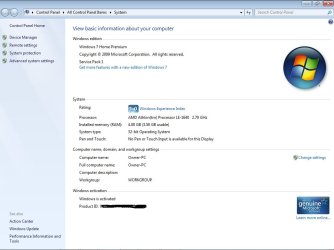
  • w7 screenshot.jpg
    w7 screenshot.jpg
    58.7 KB · Views: 3

My Computer

Computer type
PC/Desktop
Computer Manufacturer/Model Number
compaq
OS
7 home premium 32 bit
CPU
AMD Athlon LE1640
Memory
2g
http://www.sevenforums.com/tutorials/292068-make-windows-7-bootable-after-motherboard-swap.html

Moving an OS drive to a new computer isn't child's play, so it's not surprising you had problems in previous attempts.

You could try Paragon Adaptive Restore from the above link.

I see that you are using 32 bit Windows 7.

If you decide to go to 64 bit Windows and want to use more than 3.5 GB of RAM, I don't think you have any choice but to do a completely clean new install.
 

My Computer

Computer type
PC/Desktop
Computer Manufacturer/Model Number
Ignatz Special; 4 speed manual gearbox; factory air conditioning; one of one
OS
Windows 7 Home Premium SP1, 64-bit
CPU
Intel Skylake i5-6600K, not overclocked
Motherboard
AsRock Z170M Extreme 4, micro ATX
Memory
8 GB HyperX DDR4-2666 (2 x 4 GB)
Graphics Card(s)
none; graphics are integrated on CPU
Sound Card
onboard: Realtek ALC1150; external: USB Behringer UF0-202
Monitor(s) Displays
Dell S2340M 23 inch IPS
Screen Resolution
1600 x 900
Hard Drives
System: Crucial MX100 series SSD, 128 GB;
Data: Samsung Spinpoint 103SJ, 1 TB;
Backup: WD Caviar Green WD30EZRX-00D8PB0, 3 TB
PSU
Rosewill SilentNight 500 watt fanless, semi-modular
Case
Antec Solo II
Cooling
Noctua NH-U12S; Noctua F12 intake, Noctua S12A exhaust
Keyboard
Microsoft 200 6JH-00001 USB
Mouse
Dell or Microsoft optical wired; USB
Antivirus
Microsoft Security Essentials and Malwarebytes Premium
Browser
Pale Moon
Other Info
All fans PWM; speeds at idle: CPU circa 500 rpm; intake circa 600 rpm; exhaust circa 600 rpm; CPU temps 27 idle and 47 C load in a warm room (27 C/81 F) when running Intel Extreme Tuning Utility stress test.
Would the 64 bit in a new machine be better for graphics and such than my 32 in same machine? I do realize using 64 I can upgrade to lots more memory.
How about just installing 64 bit into my existing machine, any benefit there?
Yes, i am informatively challenged on computers, give me a machining problem and i am golden though
 

My Computer

Computer type
PC/Desktop
Computer Manufacturer/Model Number
compaq
OS
7 home premium 32 bit
CPU
AMD Athlon LE1640
Memory
2g
Would the 64 bit in a new machine be better for graphics and such than my 32 in same machine? I do realize using 64 I can upgrade to lots more memory.
How about just installing 64 bit into my existing machine, any benefit there?
Yes, i am informatively challenged on computers, give me a machining problem and i am golden though

I assume that CPU you have is an AMD Sempron LE-1640.

It's quite puny, scoring 759 on the Passmark CPU benchmark.

By way of comparison, a mid level machine from around 2010 would score 4,000 to 6,000.

I'm wondering how old that PC is?

What CPUs do your fellow machinists use when using the same CAD/CAM program? For all I know, that program requires very little CPU muscle. Or it may be quite demanding.

A typical PC user probably would not notice any difference by simply changing from 32 bit to 64 bit. There may be some peculiarity with your CAD/CAM program that might make it more efficient on 64 bit. I don't know. But more CPU power would certainly help.

Are your fellow machinists using more than 4 GB of RAM? It's hard to say if more RAM alone would help you without knowing details of the programs you use.

When doing your CAD/CAM work, have you looked at Task Manager to see how much RAM you are actually using at that moment?

My offhand recommendation would be to change to a much stronger CPU for certain. And quite possibly going to 64 bit if you have any reason at all to believe that your current 4 GB of RAM is insufficient.

You may be able to use Paragon Adaptive Restore successfully if you are willing to stay with 32 bit, but you must face the prospect that it will fail and you would need to do a clean install. Are you willing to do that if push comes to shove?
 

My Computer

Computer type
PC/Desktop
Computer Manufacturer/Model Number
Ignatz Special; 4 speed manual gearbox; factory air conditioning; one of one
OS
Windows 7 Home Premium SP1, 64-bit
CPU
Intel Skylake i5-6600K, not overclocked
Motherboard
AsRock Z170M Extreme 4, micro ATX
Memory
8 GB HyperX DDR4-2666 (2 x 4 GB)
Graphics Card(s)
none; graphics are integrated on CPU
Sound Card
onboard: Realtek ALC1150; external: USB Behringer UF0-202
Monitor(s) Displays
Dell S2340M 23 inch IPS
Screen Resolution
1600 x 900
Hard Drives
System: Crucial MX100 series SSD, 128 GB;
Data: Samsung Spinpoint 103SJ, 1 TB;
Backup: WD Caviar Green WD30EZRX-00D8PB0, 3 TB
PSU
Rosewill SilentNight 500 watt fanless, semi-modular
Case
Antec Solo II
Cooling
Noctua NH-U12S; Noctua F12 intake, Noctua S12A exhaust
Keyboard
Microsoft 200 6JH-00001 USB
Mouse
Dell or Microsoft optical wired; USB
Antivirus
Microsoft Security Essentials and Malwarebytes Premium
Browser
Pale Moon
Other Info
All fans PWM; speeds at idle: CPU circa 500 rpm; intake circa 600 rpm; exhaust circa 600 rpm; CPU temps 27 idle and 47 C load in a warm room (27 C/81 F) when running Intel Extreme Tuning Utility stress test.
Great advice above.

I also watch the Task manager Performance tab or Resource Monitor to compare the CPU to Memory use in heavy tasks like that. It will clue you quickly which is deficient, or in this case possible which is more deficient. For example on this Lenovo notebook my CPU rarely gets above 75% but the Memory hardly goes above 50%, telling me I'm overpowered for my uses, and that the RAM probably outmatches the CPU. Since I have a Core i5 I can calculate that I really probably only need 6gb instead of 8gb RAM. But having too much RAM is never a problem, only an example.
 
With just my normal stuff open the CPU is at 12%, memory fluctuates between 40 and 60%. If I start the CAD/CAM program in addition to all else that is open, and do a cutting demo the CPU jumps to 100%, memory jumps to 90-100% and fluctuates depending on how busy the tooling is.

So, at the least I need something 2 or 3 times as fast as my processor, and at least 50% more memory. May I presume to be correct with this?
 

My Computer

Computer type
PC/Desktop
Computer Manufacturer/Model Number
compaq
OS
7 home premium 32 bit
CPU
AMD Athlon LE1640
Memory
2g
Go online, do some research. Get the fastest cpu that motherboard supports, they are all over Ebay, the video card can easily be upgraded too.

You can`t just install 64 bit on your current machine, the cpu has to be 64 bit capable and it would not gain you anything right now.

Please post the exact make and model of the pc for me.
 

My Computer

Computer type
PC/Desktop
Computer Manufacturer/Model Number
Skylake Special #666
OS
Windows 10 Pro x64
CPU
Intel Core i7 6700K
Motherboard
Asus Sabertooth Z170 Mark 1
Memory
GSkill TridentZ RGB 16GB 3600 16-16-16-36
Graphics Card(s)
EVGA GTX 980 Ti SC x2
Sound Card
Realtek High Definition
Monitor(s) Displays
AOC G2460PG
Screen Resolution
1920 x 1080 144Hz
Hard Drives
Samsung 860 Pro 256GB, Seagate Barracuda 4TB x2
PSU
EVGA 1000 P2, EVGA White Custom Braided Cables
Case
Corsair Vengeance C70 Gunmetal Black
Cooling
Corsair H100i v2, Corsair ML120 x2, Thermal Grizzly Kryonaut
Keyboard
Logitech G910 Orion Spectrum
Mouse
Logitech G700s
Internet Speed
Verizon Fios Quantum Gateway 75/75
Antivirus
Windows Defender, Malwarebytes Free 3.8.3
Browser
Chrome
Other Info
Corsair SP120 x4, LG Blu-ray Drive, Durabrand HT-395 100 Watt Dolby Digital Amp, Corsair H2100 Wireless 7.1 Headset
compaq presario SR 5605F
Graphics=VIDIA GeForce 6150SE Graphics
 

My Computer

Computer type
PC/Desktop
Computer Manufacturer/Model Number
compaq
OS
7 home premium 32 bit
CPU
AMD Athlon LE1640
Memory
2g
When referring to 64 bit I meant if i bought a newer better machine, would it be advantageous at that point to upgrade to 64
 

My Computer

Computer type
PC/Desktop
Computer Manufacturer/Model Number
compaq
OS
7 home premium 32 bit
CPU
AMD Athlon LE1640
Memory
2g
Motherboard Specifications, M2N68-LA (Ivy8) | HP® Support

above link to your computer at HP says it supports these processors:

Socket type: AM2
Motherboard supports the following processor upgrades:

Athlon 64 up to 3800+
Athlon 64 X2 with Dual Core technology up to 4800+ (up to 65 watt TDP)
Sempron - All

The Passmark benchmark for the AMD 64 Dual Core 4800+ is 1370, less than double what you've got now from that LE 1640 Sempron.

I wouldn't bother upgrading it, but it's your call depending on your budget and willingness to do a clean install. The thing is about 7 years old and really outdated from the motherboard on up.

At the same link, it says max memory supported is 4 GB.
 

My Computer

Computer type
PC/Desktop
Computer Manufacturer/Model Number
Ignatz Special; 4 speed manual gearbox; factory air conditioning; one of one
OS
Windows 7 Home Premium SP1, 64-bit
CPU
Intel Skylake i5-6600K, not overclocked
Motherboard
AsRock Z170M Extreme 4, micro ATX
Memory
8 GB HyperX DDR4-2666 (2 x 4 GB)
Graphics Card(s)
none; graphics are integrated on CPU
Sound Card
onboard: Realtek ALC1150; external: USB Behringer UF0-202
Monitor(s) Displays
Dell S2340M 23 inch IPS
Screen Resolution
1600 x 900
Hard Drives
System: Crucial MX100 series SSD, 128 GB;
Data: Samsung Spinpoint 103SJ, 1 TB;
Backup: WD Caviar Green WD30EZRX-00D8PB0, 3 TB
PSU
Rosewill SilentNight 500 watt fanless, semi-modular
Case
Antec Solo II
Cooling
Noctua NH-U12S; Noctua F12 intake, Noctua S12A exhaust
Keyboard
Microsoft 200 6JH-00001 USB
Mouse
Dell or Microsoft optical wired; USB
Antivirus
Microsoft Security Essentials and Malwarebytes Premium
Browser
Pale Moon
Other Info
All fans PWM; speeds at idle: CPU circa 500 rpm; intake circa 600 rpm; exhaust circa 600 rpm; CPU temps 27 idle and 47 C load in a warm room (27 C/81 F) when running Intel Extreme Tuning Utility stress test.
When referring to 64 bit I meant if i bought a newer better machine, would it be advantageous at that point to upgrade to 64

Probably---if for no other reason than that it would remove your 4 GB RAM limitation.

You can't go above 4 GB on your current motherboard even if you converted to 64 bit.

Nearly any new machine would support 64 bit and much more RAM.

Windows 7 Home Premium has a 16 GB RAM limitation, but that may well be plenty for you.

If you buy a new machine with Windows already installed, pretty good chance it will be 64 bit Windows.
 

My Computer

Computer type
PC/Desktop
Computer Manufacturer/Model Number
Ignatz Special; 4 speed manual gearbox; factory air conditioning; one of one
OS
Windows 7 Home Premium SP1, 64-bit
CPU
Intel Skylake i5-6600K, not overclocked
Motherboard
AsRock Z170M Extreme 4, micro ATX
Memory
8 GB HyperX DDR4-2666 (2 x 4 GB)
Graphics Card(s)
none; graphics are integrated on CPU
Sound Card
onboard: Realtek ALC1150; external: USB Behringer UF0-202
Monitor(s) Displays
Dell S2340M 23 inch IPS
Screen Resolution
1600 x 900
Hard Drives
System: Crucial MX100 series SSD, 128 GB;
Data: Samsung Spinpoint 103SJ, 1 TB;
Backup: WD Caviar Green WD30EZRX-00D8PB0, 3 TB
PSU
Rosewill SilentNight 500 watt fanless, semi-modular
Case
Antec Solo II
Cooling
Noctua NH-U12S; Noctua F12 intake, Noctua S12A exhaust
Keyboard
Microsoft 200 6JH-00001 USB
Mouse
Dell or Microsoft optical wired; USB
Antivirus
Microsoft Security Essentials and Malwarebytes Premium
Browser
Pale Moon
Other Info
All fans PWM; speeds at idle: CPU circa 500 rpm; intake circa 600 rpm; exhaust circa 600 rpm; CPU temps 27 idle and 47 C load in a warm room (27 C/81 F) when running Intel Extreme Tuning Utility stress test.
Of course buying a new machine would solve his problems, but he doesn`t even want to invest in data migration software.
 

My Computer

Computer type
PC/Desktop
Computer Manufacturer/Model Number
Skylake Special #666
OS
Windows 10 Pro x64
CPU
Intel Core i7 6700K
Motherboard
Asus Sabertooth Z170 Mark 1
Memory
GSkill TridentZ RGB 16GB 3600 16-16-16-36
Graphics Card(s)
EVGA GTX 980 Ti SC x2
Sound Card
Realtek High Definition
Monitor(s) Displays
AOC G2460PG
Screen Resolution
1920 x 1080 144Hz
Hard Drives
Samsung 860 Pro 256GB, Seagate Barracuda 4TB x2
PSU
EVGA 1000 P2, EVGA White Custom Braided Cables
Case
Corsair Vengeance C70 Gunmetal Black
Cooling
Corsair H100i v2, Corsair ML120 x2, Thermal Grizzly Kryonaut
Keyboard
Logitech G910 Orion Spectrum
Mouse
Logitech G700s
Internet Speed
Verizon Fios Quantum Gateway 75/75
Antivirus
Windows Defender, Malwarebytes Free 3.8.3
Browser
Chrome
Other Info
Corsair SP120 x4, LG Blu-ray Drive, Durabrand HT-395 100 Watt Dolby Digital Amp, Corsair H2100 Wireless 7.1 Headset
Your current graphics card scores 24 on the Passmark video benchmark.

As a comparison, here are some other figures:

Typical current mid range card: 300 or higher.

Intel HD 4600: 729. This is built into the CPU on some current Intel processors.

High end gaming cards: 4000 or higher.
 

My Computer

Computer type
PC/Desktop
Computer Manufacturer/Model Number
Ignatz Special; 4 speed manual gearbox; factory air conditioning; one of one
OS
Windows 7 Home Premium SP1, 64-bit
CPU
Intel Skylake i5-6600K, not overclocked
Motherboard
AsRock Z170M Extreme 4, micro ATX
Memory
8 GB HyperX DDR4-2666 (2 x 4 GB)
Graphics Card(s)
none; graphics are integrated on CPU
Sound Card
onboard: Realtek ALC1150; external: USB Behringer UF0-202
Monitor(s) Displays
Dell S2340M 23 inch IPS
Screen Resolution
1600 x 900
Hard Drives
System: Crucial MX100 series SSD, 128 GB;
Data: Samsung Spinpoint 103SJ, 1 TB;
Backup: WD Caviar Green WD30EZRX-00D8PB0, 3 TB
PSU
Rosewill SilentNight 500 watt fanless, semi-modular
Case
Antec Solo II
Cooling
Noctua NH-U12S; Noctua F12 intake, Noctua S12A exhaust
Keyboard
Microsoft 200 6JH-00001 USB
Mouse
Dell or Microsoft optical wired; USB
Antivirus
Microsoft Security Essentials and Malwarebytes Premium
Browser
Pale Moon
Other Info
All fans PWM; speeds at idle: CPU circa 500 rpm; intake circa 600 rpm; exhaust circa 600 rpm; CPU temps 27 idle and 47 C load in a warm room (27 C/81 F) when running Intel Extreme Tuning Utility stress test.
Of course buying a new machine would solve his problems, but he doesn`t even want to invest in data migration software.

Yeah, if he has no budget, he's stuck.

But if he could spend even 400 to 500 it would make a world of difference.
 

My Computer

Computer type
PC/Desktop
Computer Manufacturer/Model Number
Ignatz Special; 4 speed manual gearbox; factory air conditioning; one of one
OS
Windows 7 Home Premium SP1, 64-bit
CPU
Intel Skylake i5-6600K, not overclocked
Motherboard
AsRock Z170M Extreme 4, micro ATX
Memory
8 GB HyperX DDR4-2666 (2 x 4 GB)
Graphics Card(s)
none; graphics are integrated on CPU
Sound Card
onboard: Realtek ALC1150; external: USB Behringer UF0-202
Monitor(s) Displays
Dell S2340M 23 inch IPS
Screen Resolution
1600 x 900
Hard Drives
System: Crucial MX100 series SSD, 128 GB;
Data: Samsung Spinpoint 103SJ, 1 TB;
Backup: WD Caviar Green WD30EZRX-00D8PB0, 3 TB
PSU
Rosewill SilentNight 500 watt fanless, semi-modular
Case
Antec Solo II
Cooling
Noctua NH-U12S; Noctua F12 intake, Noctua S12A exhaust
Keyboard
Microsoft 200 6JH-00001 USB
Mouse
Dell or Microsoft optical wired; USB
Antivirus
Microsoft Security Essentials and Malwarebytes Premium
Browser
Pale Moon
Other Info
All fans PWM; speeds at idle: CPU circa 500 rpm; intake circa 600 rpm; exhaust circa 600 rpm; CPU temps 27 idle and 47 C load in a warm room (27 C/81 F) when running Intel Extreme Tuning Utility stress test.
If you can`t afford a new pc right now then I would, upgrade the cpu to the maximum, and get a better video card. start searching Ebay for the top cpu that ignatz listed, you will be amazed at the price, and you can get a better PCI-E video card then you have for under $200. And make sure you are running PC2 6400 speed ram, that`s the fastest the board can use.
If that is integrated video which I think it is, any dedicated video you card you add will be 100 % better.
 

My Computer

Computer type
PC/Desktop
Computer Manufacturer/Model Number
Skylake Special #666
OS
Windows 10 Pro x64
CPU
Intel Core i7 6700K
Motherboard
Asus Sabertooth Z170 Mark 1
Memory
GSkill TridentZ RGB 16GB 3600 16-16-16-36
Graphics Card(s)
EVGA GTX 980 Ti SC x2
Sound Card
Realtek High Definition
Monitor(s) Displays
AOC G2460PG
Screen Resolution
1920 x 1080 144Hz
Hard Drives
Samsung 860 Pro 256GB, Seagate Barracuda 4TB x2
PSU
EVGA 1000 P2, EVGA White Custom Braided Cables
Case
Corsair Vengeance C70 Gunmetal Black
Cooling
Corsair H100i v2, Corsair ML120 x2, Thermal Grizzly Kryonaut
Keyboard
Logitech G910 Orion Spectrum
Mouse
Logitech G700s
Internet Speed
Verizon Fios Quantum Gateway 75/75
Antivirus
Windows Defender, Malwarebytes Free 3.8.3
Browser
Chrome
Other Info
Corsair SP120 x4, LG Blu-ray Drive, Durabrand HT-395 100 Watt Dolby Digital Amp, Corsair H2100 Wireless 7.1 Headset
The budget is pretty well blown for next few weeks so a complete new machine isn't totally out of question, just looking at becoming more informed about what to buy.
I did purchase a processor, according to place I bought it from I should have it tomorrow, it is a Athlon 64 X2. Video card will be next upgrade, I do fully understand it is needed.
If this doesn't make my machine liveable until March or so when I can spring for a new machine with more power then I can always buy one one credit, migrate the info from this drive and take this one home to use. As sad as it is,, it is better than the machine I have at home.
Unless some one has a recommendation for video card I guess we are in limbo here until I fit the new processor in
 

My Computer

Computer type
PC/Desktop
Computer Manufacturer/Model Number
compaq
OS
7 home premium 32 bit
CPU
AMD Athlon LE1640
Memory
2g
Friend has one of these cards, is it a worthwhile upgrade fro me, at $25?
XFX ATI Radeon HD 1GB DDR2 SDRAM
HD-465X-ZDFC
 

My Computer

Computer type
PC/Desktop
Computer Manufacturer/Model Number
compaq
OS
7 home premium 32 bit
CPU
AMD Athlon LE1640
Memory
2g
Like I said any PIC express video card is better then what you have.

That card is old and has ddr2 memory, see if he will let you try it out before he makes you pay him.

Then run WEI to see if the score goes up and by how much.

XFX HD-465X-ZDFC Radeon HD 4650 1GB 128-bit GDDR2 PCI Express 2.0 x16 HDCP Ready Video Card - Newegg.com

I would recommend an nvidia card with at least 2 GB of memory.

EVGA GeForce GTX 750 Ti 02G-P4-3751-KR G-SYNC Support 2GB Video Card - Newegg.com

The thing is you don`t use your card for gaming, you use it for that program you listed. Others that know about that should chime in :)

But going back to your original question, in the future, when you do buy a new pc, you don`t have to have your old drive boot up in it. You simply hook up the drive and copy and paste your data over to the new machine. You don`t have to buy any software to transfer data, but you will have to install your programs onto the new machine, hopefully that`s not a problem for you.

Maybe you could post a snip of your WEI ( Windows Experience Index ) now so we have an idea of what you have.

Example of my Gateway GT5404 heavily updated without the ssd, just a Seagate hard drive.
 
Last edited:

My Computer

Computer type
PC/Desktop
Computer Manufacturer/Model Number
Skylake Special #666
OS
Windows 10 Pro x64
CPU
Intel Core i7 6700K
Motherboard
Asus Sabertooth Z170 Mark 1
Memory
GSkill TridentZ RGB 16GB 3600 16-16-16-36
Graphics Card(s)
EVGA GTX 980 Ti SC x2
Sound Card
Realtek High Definition
Monitor(s) Displays
AOC G2460PG
Screen Resolution
1920 x 1080 144Hz
Hard Drives
Samsung 860 Pro 256GB, Seagate Barracuda 4TB x2
PSU
EVGA 1000 P2, EVGA White Custom Braided Cables
Case
Corsair Vengeance C70 Gunmetal Black
Cooling
Corsair H100i v2, Corsair ML120 x2, Thermal Grizzly Kryonaut
Keyboard
Logitech G910 Orion Spectrum
Mouse
Logitech G700s
Internet Speed
Verizon Fios Quantum Gateway 75/75
Antivirus
Windows Defender, Malwarebytes Free 3.8.3
Browser
Chrome
Other Info
Corsair SP120 x4, LG Blu-ray Drive, Durabrand HT-395 100 Watt Dolby Digital Amp, Corsair H2100 Wireless 7.1 Headset
When adding a Video Card you need to make sure the PSU can supply enough power.
From what I see the OEM PSU is rated at 250 Watts (and the PC is apx 6 years old ?)
Compaq Presario SR5605F Desktop PC Product Specifications | HP® Support

This one recommends a minimum 400 Watt PSU
XFX HD-465X-ZDFC Radeon HD 4650 1GB 128-bit GDDR2 PCI Express 2.0 x16 HDCP Ready Video Card - Newegg.com

This one recommends a minimum 300 Watt PSU
EVGA GeForce GTX 750 Ti 02G-P4-3751-KR G-SYNC Support 2GB Video Card - Newegg.com
 

My Computer

Computer type
PC/Desktop
Computer Manufacturer/Model Number
home built
OS
Multi-Boot W7_Pro_x64 W8.1_Pro_x64 W10_Pro_x64 +Linux_VMs +Chromium_VM
CPU
AMD Athlon II x4 620
Motherboard
Gigabyte GA-MA785G-UD3H
Memory
6GB GSkill DDR2 800
Graphics Card(s)
AMD 4670 GPU + AMD 4200 IGP
Sound Card
on board Realtek ALC889A
Monitor(s) Displays
RCA 40" LCD TV, Insignia 32" LCD TV, HP 15" LCD monitor
Screen Resolution
1680 x 1050
Hard Drives
OCZ Vertex 3 120GB,
Samsung F3 1TB (3),
Several others - WD, Seagate, Hitachi, ...
PSU
Corsair 500 W
Case
Rosewill mid tower
Cooling
CM 90mm rifle
Keyboard
Gyration wireless, Logitech wireless, Dell USB wired
Mouse
Gyration wireless, Logitech wireless, V7 USB wired
Internet Speed
Spectrum - 100Mbps D / 10Mbps U
Antivirus
Avast, MBAM3, EMET, WinPatrol
Browser
Pale Moon, Firefox, IE
Other Info
2 multi-boot PC's
Mainly HTPC/Office/Gen purpose (no gaming).
Trendnet USB KVM.
LG DVD burner/Blue Ray Player.
Tray system for removable SATA backup drives.

Not currently OCd, under-volted.
I use Hybrid sleep, rarely re-boot or shutdown.

Hauppauge HD-PVR, Avermedia PCIe TV Tuner, Hauppauge PCI TV Tuner.
Compare the install you have to the perfect install compiled in Clean Reinstall Windows 7 which is based on what's worked best in tens of thousands of installs we've directly helped with here. Over a million consumers have used that tutorial without a single complaint, nor have they returned with problems if they stick with the tools and methods given.
 
Back
Top