Uxtheme patch loops login screen

Zain574

New member
Local time
11:29 PM
Messages
9
I recently tried to install some custom themes and no matter what software I used to patch the system files I would get the same result. Once I reboot the windows login screen will loop saying please wait... I have tried leaving the computer on for a hour but It was still looping :(

If someone could help me fix this problem I'd appreciate it alot :D:D:D
 

My Computer

OS
Windows 7 Ultimate
I recently tried to install some custom themes and no matter what software I used to patch the system files I would get the same result. Once I reboot the windows login screen will loop saying please wait... I have tried leaving the computer on for a hour but It was still looping :(

If someone could help me fix this problem I'd appreciate it alot :D:D:D

Do you have a backup we can restore from?

Do you have a win 7 dvd to do a repair install?

Ken
 

My Computer

Computer Manufacturer/Model Number
HP Pavillion dv-7 1005 Tx
OS
Win 8 Release candidate 8400
CPU
[email protected]
Memory
4 gigs
Graphics Card(s)
Nvidia 9600M
Sound Card
HD built-in
Monitor(s) Displays
17" Wxga
Screen Resolution
1440x900
Cooling
none
Internet Speed
45Mb down 5Mb up
I've got a dvd but no back up sadly :\
 

My Computer

OS
Windows 7 Ultimate

My Computer

Computer Manufacturer/Model Number
HP Touchsmart IQ771.uk
OS
Windows 7 Ultimate x64
CPU
AMD Turion(tm) 64 X2 Mobile Technology TL-56
Motherboard
ASUS Pheonix
Memory
3GB Nanya PC2-6400 DDR2-SDRAM SO-DIM (400MHz)
Graphics Card(s)
NVIDIA GeForce Go 7600 256MB GDDR3 SDRAM
Sound Card
High Definition Intergrated NVIDIA MCP51
Monitor(s) Displays
46" Sony Bravia HDTV
Screen Resolution
1600x1200
Hard Drives
1.5TB Samsug
320GB Seagate ST3320820AS - SATA 3Gb/s 8MB
500GB Maxtor Basics STM305003EHD301-RK
Internet Speed
↓6.32 Mb/s ↑0.35 Mb/s ↔26ms
Other Info
BIOS - American Megatrends Inc. 5.07
Ethernet Port - NVIDIA nForce 10/100/1000 Mbps
DVD Drive - TSSTcorp DVDR/RW TS-T632L
I used safe mode to unpatch the files and then rebooted and which solved it but I still can't get themes working :\
 

My Computer

OS
Windows 7 Ultimate

My Computer

Computer type
PC/Desktop
Computer Manufacturer/Model Number
Self Built
OS
Win 10 Pro x64
CPU
Intel I5-2500K @3.3GHz
Motherboard
Asrock P67 Extreme4
Memory
16GB G.Skill Ripjaws X (4x4GB)
Graphics Card(s)
EVGA GeForce 750 Ti SC 2GB
Sound Card
ASUS Xonar DG 5.1 Channels 24-bit 96KHz PCI Interface Sound
Monitor(s) Displays
auria eq2367
Screen Resolution
1920 x 1080
Hard Drives
250GB Samsung 850 EVO SSD
1TB WD Blue
1TB Hitachi
PSU
SeaSonic X 650W 80 Plus Gold
Case
Corsair Obsidian 750D
Cooling
Corsair H60, Three 140mm case fans
Keyboard
Logitech Wireless Keyboard K520
Mouse
Logitech Wireless Mouse M310
Internet Speed
Wave Broadband ~ 100 dn 5 up
Antivirus
Windows Defender, Malwarebytes Premium
Browser
Edge, IE11, Chrome
Other Info
Laptop specs: HP g7-1365dx /
CPU: AMD A6-3420M APU with Radeon(tm) HD Graphics /
RAM: Crucial 8Gb (2x4Gb) /
SSD: Crucial M4-CT128M4SSD2 ATA Device/ FW 000F /
GFX: AMD Radeon HD 6520G /
OS: Windows 10 Pro x64
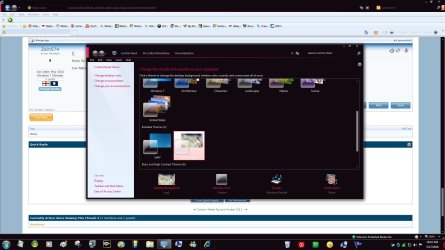
Well I just did what you said the cmd fized somethings but I still can't get the themes working :( when i load a theme it switches to aero basic also the preview for the skin appears black in the personalization window

http://i41.tinypic.com/15gpgte.png
 

My Computer

OS
Windows 7 Ultimate
It looks like you just need to add some wallpapers to it, maybe you can explain a little more. And can you post a link to the theme your trying to use so we can try and see if there's something else we can help you out with.
 

My Computer

Computer type
PC/Desktop
Computer Manufacturer/Model Number
Self Built
OS
Win 10 Pro x64
CPU
Intel I5-2500K @3.3GHz
Motherboard
Asrock P67 Extreme4
Memory
16GB G.Skill Ripjaws X (4x4GB)
Graphics Card(s)
EVGA GeForce 750 Ti SC 2GB
Sound Card
ASUS Xonar DG 5.1 Channels 24-bit 96KHz PCI Interface Sound
Monitor(s) Displays
auria eq2367
Screen Resolution
1920 x 1080
Hard Drives
250GB Samsung 850 EVO SSD
1TB WD Blue
1TB Hitachi
PSU
SeaSonic X 650W 80 Plus Gold
Case
Corsair Obsidian 750D
Cooling
Corsair H60, Three 140mm case fans
Keyboard
Logitech Wireless Keyboard K520
Mouse
Logitech Wireless Mouse M310
Internet Speed
Wave Broadband ~ 100 dn 5 up
Antivirus
Windows Defender, Malwarebytes Premium
Browser
Edge, IE11, Chrome
Other Info
Laptop specs: HP g7-1365dx /
CPU: AMD A6-3420M APU with Radeon(tm) HD Graphics /
RAM: Crucial 8Gb (2x4Gb) /
SSD: Crucial M4-CT128M4SSD2 ATA Device/ FW 000F /
GFX: AMD Radeon HD 6520G /
OS: Windows 10 Pro x64
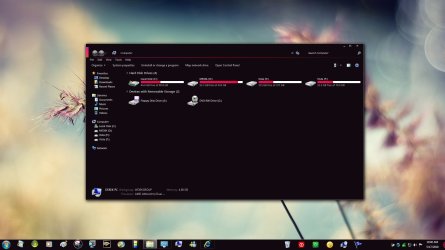
Looks like it's working for me, I didn't change the explorer but here's a couple screenshots from mine. Maybe post a question to the creator of that theme in the link you gave me above.
 

Attachments

  • zune.jpg
    zune.jpg
    338.8 KB · Views: 67
  • zune 2.jpg
    zune 2.jpg
    346.8 KB · Views: 41

My Computer

Computer type
PC/Desktop
Computer Manufacturer/Model Number
Self Built
OS
Win 10 Pro x64
CPU
Intel I5-2500K @3.3GHz
Motherboard
Asrock P67 Extreme4
Memory
16GB G.Skill Ripjaws X (4x4GB)
Graphics Card(s)
EVGA GeForce 750 Ti SC 2GB
Sound Card
ASUS Xonar DG 5.1 Channels 24-bit 96KHz PCI Interface Sound
Monitor(s) Displays
auria eq2367
Screen Resolution
1920 x 1080
Hard Drives
250GB Samsung 850 EVO SSD
1TB WD Blue
1TB Hitachi
PSU
SeaSonic X 650W 80 Plus Gold
Case
Corsair Obsidian 750D
Cooling
Corsair H60, Three 140mm case fans
Keyboard
Logitech Wireless Keyboard K520
Mouse
Logitech Wireless Mouse M310
Internet Speed
Wave Broadband ~ 100 dn 5 up
Antivirus
Windows Defender, Malwarebytes Premium
Browser
Edge, IE11, Chrome
Other Info
Laptop specs: HP g7-1365dx /
CPU: AMD A6-3420M APU with Radeon(tm) HD Graphics /
RAM: Crucial 8Gb (2x4Gb) /
SSD: Crucial M4-CT128M4SSD2 ATA Device/ FW 000F /
GFX: AMD Radeon HD 6520G /
OS: Windows 10 Pro x64
Sorry for the late reply I've been out and asleep. Well the theme I'm trying to apply is by DJ Gx http://www.sevenforums.com/themes-styles/78817-zune-quickplay-win7.html

I've followed all the instruction Gx posts in the readme and i tried to do it again using the method posted above but it still didn't work. As I apply it my theme switches to the basic one.
Coz Uxtheme is not patched . To run a third party custom theme, you need to patch three system files namely themeservice.dll, themeui.dll and uxtheme.dll . As and when the three is patched, you can apply a third party theme like the one you are trying.

Follow the tutorial http://www.sevenforums.com/tutorials/28377-theme-how-apply-custom-themes.html, download and run the appropriate patcher from the link provided there, and then I hope your theme will work perfectly.

Please post back what happened after following the tutorial :)
 

My Computer

Computer type
PC/Desktop
Computer Manufacturer/Model Number
Self Assembled
OS
Microsoft Windows 10 Pro Insider Preview 64-bit
CPU
Intel(R) Core(TM) i3-4130 CPU @ 3.40GHz
Motherboard
Gigabyte Technology Co., Ltd. B85M-D3H
Memory
Corsair Vengence 4GB x2 (8.00GB Dual-Channel DDR3 @ 798MHz)
Graphics Card(s)
2047MB GeForce GTS 450 (ZOTAC International)
Sound Card
Onboard (Realtek High Definition Audio)
Monitor(s) Displays
LG Flatron E2040T
Screen Resolution
1600x900
Hard Drives
Western Digital 1 TB
Seagate 500 GB
PSU
Corsair VS550
Case
Cooler Master K380
Cooling
Cooler Master Seidon 120V Plus
Keyboard
Logitech MK260r
Mouse
Logitech MK260r
Internet Speed
PMPL Broadband
Antivirus
Windows Defender + MBAM
Browser
Firefox
Other Info
Dell Studio 15" Laptop
Coz Uxtheme is not patched . To run a third party custom theme, you need to patch three system files namely themeservice.dll, themeui.dll and uxtheme.dll . As and when the three is patched, you can apply a third party theme like the one you are trying.

Follow the tutorial http://www.sevenforums.com/tutorials/28377-theme-how-apply-custom-themes.html, download and run the appropriate patcher from the link provided there, and then I hope your theme will work perfectly.

Please post back what happened after following the tutorial :)

Yeah I followed it and well after patching and rebooting as it gets to the login screen it just loops on please wait. If you want I could record it with my camera to show you what I mean
 

My Computer

OS
Windows 7 Ultimate
Yeah I followed it and well after patching and rebooting as it gets to the login screen it just loops on please wait. If you want I could record it with my camera to show you what I mean
This time again ?
Usually Patching uxtheme doesnot harm logonui , and that's why it is interesting . To get rid of the logon screen loop, try http://www.sevenforums.com/tutorials/681-startup-repair.html at least five consecutive times with restarts . When it logs on to windows successfully, then try to apply the theme. I hope this time it will work :)
 

My Computer

Computer type
PC/Desktop
Computer Manufacturer/Model Number
Self Assembled
OS
Microsoft Windows 10 Pro Insider Preview 64-bit
CPU
Intel(R) Core(TM) i3-4130 CPU @ 3.40GHz
Motherboard
Gigabyte Technology Co., Ltd. B85M-D3H
Memory
Corsair Vengence 4GB x2 (8.00GB Dual-Channel DDR3 @ 798MHz)
Graphics Card(s)
2047MB GeForce GTS 450 (ZOTAC International)
Sound Card
Onboard (Realtek High Definition Audio)
Monitor(s) Displays
LG Flatron E2040T
Screen Resolution
1600x900
Hard Drives
Western Digital 1 TB
Seagate 500 GB
PSU
Corsair VS550
Case
Cooler Master K380
Cooling
Cooler Master Seidon 120V Plus
Keyboard
Logitech MK260r
Mouse
Logitech MK260r
Internet Speed
PMPL Broadband
Antivirus
Windows Defender + MBAM
Browser
Firefox
Other Info
Dell Studio 15" Laptop
Well that didn't still work and so since my stuff was backed up already I decided to re-install. Luckily this time the uxthemepatch was successful but I failed once again becuase as soon as I selected the theme it changes me to basic aero. I think I'll stop bothering you guys for a moment since I'll try contacting the creator of it on his dviantART page. Thanks for all the help guys I really did appericate and learned a few things on the way :D
 

My Computer

OS
Windows 7 Ultimate
You're Welcome,
Good luck, I hope you get it figured out. Let us know how it turns out.
 

My Computer

Computer type
PC/Desktop
Computer Manufacturer/Model Number
Self Built
OS
Win 10 Pro x64
CPU
Intel I5-2500K @3.3GHz
Motherboard
Asrock P67 Extreme4
Memory
16GB G.Skill Ripjaws X (4x4GB)
Graphics Card(s)
EVGA GeForce 750 Ti SC 2GB
Sound Card
ASUS Xonar DG 5.1 Channels 24-bit 96KHz PCI Interface Sound
Monitor(s) Displays
auria eq2367
Screen Resolution
1920 x 1080
Hard Drives
250GB Samsung 850 EVO SSD
1TB WD Blue
1TB Hitachi
PSU
SeaSonic X 650W 80 Plus Gold
Case
Corsair Obsidian 750D
Cooling
Corsair H60, Three 140mm case fans
Keyboard
Logitech Wireless Keyboard K520
Mouse
Logitech Wireless Mouse M310
Internet Speed
Wave Broadband ~ 100 dn 5 up
Antivirus
Windows Defender, Malwarebytes Premium
Browser
Edge, IE11, Chrome
Other Info
Laptop specs: HP g7-1365dx /
CPU: AMD A6-3420M APU with Radeon(tm) HD Graphics /
RAM: Crucial 8Gb (2x4Gb) /
SSD: Crucial M4-CT128M4SSD2 ATA Device/ FW 000F /
GFX: AMD Radeon HD 6520G /
OS: Windows 10 Pro x64
Well just thought I'd report back and no luck he hasn't replied :\ and I've decided to stick to aero look with just the explorer changed so it's okay now can you lock this now?
 

My Computer

OS
Windows 7 Ultimate
Does this happen with certain theme or all the theme you tried so far
 

My Computer

OS
window's 7
CPU
core 2 quad
Motherboard
gigabyte
Memory
2gb corsair
Graphics Card(s)
ati hd4850
Monitor(s) Displays
lg
Screen Resolution
1600 X 900
Case
power logic
Other Info
none of the spec above is accurate
It happens with all themes but I have only tried using themes from the same author only so it could be something with his themes. I'll download some others and report back.

EDIT: Got these themes working

7Pro Final for 7 by *krissirk on deviantART

elan by *webtrance on deviantART

EDIT 2: Got the alternative white version of the them from earlier working still no luck with the black one :\

EDI 3:Got the black one working finally i guess it's good that I didn't give up lol and well before anybody asks what i did different it was nothing I was doignt he same as befoer
 
Last edited:

My Computer

OS
Windows 7 Ultimate
Well I just did what you said the cmd fized somethings but I still can't get the themes working :( when i load a theme it switches to aero basic also the preview for the skin appears black in the personalization window

http://i41.tinypic.com/15gpgte.png

You need to put the files you want to display at

C:\Windows\Resources\Themes.

Then, it will definitely work. :p
 

My Computer

Computer Manufacturer/Model Number
Dell XPS M1530 - Lenovo Y510p
OS
Windows 8.1 (Update 1) Both Machines
CPU
Intel Core 2 Duo T8300 - 2.4GHZ & Intel Core i7 4700MQ
Memory
4GB @ 800 MHz DDR2 & 16GB @ 1600 MHz DDR3
Graphics Card(s)
Nvidia Geforce 8600m GT & 750m SLI
Sound Card
Sigmatel High Definition Audio 5.1
Monitor(s) Displays
Samsung SyncMaster 2494
Screen Resolution
1680 x 1050 (Laptop) && 1920 x 1080
Hard Drives
Hitachi 320 GB, @7200 RPM
Internet Speed
480/100 KB/s DL/UP
Browser
Opera, Palemoon, Chrome, Internet Explorer 11

My Computer

Computer Manufacturer/Model Number
Custom Build
OS
W7 RTM Ultimate x64
CPU
Intel Q8400 @ 2.66GHZ
Motherboard
Gigabyte GA-EG45M-UD2H
Memory
4GB DDR2-800
Graphics Card(s)
Gainward GTS 450 GLH 1GB Edition
Sound Card
Integrated 8 Channel
Monitor(s) Displays
AOC 23.6 Inch Widescreen LCD
Screen Resolution
1920x1080
Hard Drives
Seagate 500GB Internal
Western Digital 1TB Internal

Hitachi 1TB External
PSU
Apevia Java Power 500W
Case
Cooler Master HAF 922 Black
Cooling
Stock Intel CPU Fan
Keyboard
HP SK-2960 Multimedia Keyboard
Mouse
Logitech M350 Wireless Gaming Mouse
Internet Speed
1.5MB
Back
Top