
Vandal Switches

Andreas W

New member
Power User
Local time
10:32 PM
Messages
309
Location
Malmö, Sweden
Hello got 2 questions, are all Vandal Switches able to work as a power/reset button as some sites do not state that they are Momentary ones. Second question is I got a 800D case and at the back there is holes for WC, how would I measure the size of that hole, ruler straight over from left to right? and if I were to put a vandal switch in that hole can I keep the rubber or would that interfere with anything electrical wise, I don't think so but want to be at the safe side. The reason why is that my power button is so rarely used and the reboot even less so would like to hide them from showing in the front of the case
 

Attachments
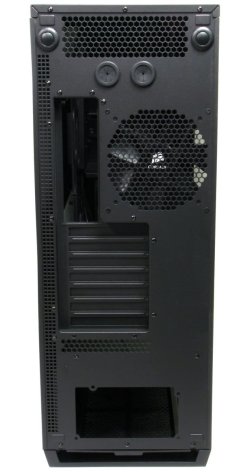
  • 800-ex-07-600.jpg
    800-ex-07-600.jpg
    64 KB · Views: 5

My Computer

Computer type
PC/Desktop
OS
Windows 7 Home Premium x64
CPU
Intel Core i7 860 (Lynnfield)
Motherboard
Asus P7P55D (LGA1156)
Memory
Corsair Vengeance 9,9,9,24 1600Mhz 1.50v 2x4G
Graphics Card(s)
Asus nVidia 560 GTX
Sound Card
Asus Xonar DG
Monitor(s) Displays
Acer P235H & NEC E201W
Screen Resolution
1920x1080 & 900x1600
Hard Drives
2
PSU
Corsair 650 Modular
Case
Corsair 800D
Cooling
Corsair H80 with Noctua fans
Keyboard
Ducky Shine
Mouse
tT Theron
Internet Speed
100/100
Browser
IE10
The two sites I've bought switches from list both momentary and latched (either on or off). The easiest way to measure the hole is with a ruler (metric), this won't be accurate but it will give you an idea if you need the 16mm or 22mm switch. The switch doesn't need to be grounded so the rubber will have no effect on the operation of the switch. It would be a better idea to remove the rubber piece so the switch is more securely mounted.

momentary switches: http://www.frozencpu.com/cat/l3/g52...omentary_Vandal_Resistant_Switches-Page1.html
 

My Computer

Computer type
PC/Desktop
Computer Manufacturer/Model Number
custom build
OS
Windows 7 Professional 64bit
CPU
Intel i7-5960X
Motherboard
EVGA X99 Classified
Memory
64GB Corsair Dominator 2400MHz
Graphics Card(s)
3 EVGA GTX980's
Sound Card
on board
Monitor(s) Displays
3 Dell E2715H 27"
Screen Resolution
1920x1080 (5760x1080)
Hard Drives
Samsung 950 Pro 1TB M.2 SSD,
Western Digital Black 2TB HDD's x5
Western Digital Black 1TB HDD's x3
PSU
Corsair AX1200i
Case
Corsair 750D
Cooling
Corsair H110i GT
Keyboard
Corsair K70
Mouse
Corsair M45
Internet Speed
250 down/10 up
Antivirus
Microsoft Security Essentials
Browser
IE 11, Google Chrome

My Computer

Computer type
PC/Desktop
Computer Manufacturer/Model Number
Custom Build
OS
Windows 7 Professional SP1 - x64 [Non-UEFI Boot]
CPU
Ivy Bridge Core i5 3570K (Delidded)
Motherboard
Asus P8Z77-V LE PLUS
Memory
G.Skill "Ares" DDR3 PC3-12800 - 1600MHz (16Gb)
Graphics Card(s)
Asus Dual-RX480-O4G
Sound Card
Creative Sound Blaster Z w/5.1 sound system
Monitor(s) Displays
Asus IPS 23"
Screen Resolution
16/9
Hard Drives
Internal:
500Go Sata 6Gb/s (x2)
500Go Sata 3Gb/s (x2)
SSD 60Go Sata 6Gb/s
PSU
In Win C 900W Series 80+ Platinum
Case
Thermaltake Chaser A71
Cooling
Custom Water Cooling Loop
Keyboard
Cooler Master QuickFire XTi
Mouse
Razer Imperator 2012 (4G)
Antivirus
MSE
Browser
IE 11.0.xxx Rtm
Other Info
"Raid0" with Intel Smart Response Technology (HDD/SSD)
That site is where I have checked it for as I like the complete set or it might have been Performance PC that had it but they have a full set for 25$ with switch and cable already connected and I already own a extension cable so don't need to worry about the length. But if I want to measure the current hole it is correct that I go from edge of the hole in the middle to the edge of opposite hole?

And if I don't want to use the led on them I simply don't plug that cable in right?
 

My Computer

Computer type
PC/Desktop
OS
Windows 7 Home Premium x64
CPU
Intel Core i7 860 (Lynnfield)
Motherboard
Asus P7P55D (LGA1156)
Memory
Corsair Vengeance 9,9,9,24 1600Mhz 1.50v 2x4G
Graphics Card(s)
Asus nVidia 560 GTX
Sound Card
Asus Xonar DG
Monitor(s) Displays
Acer P235H & NEC E201W
Screen Resolution
1920x1080 & 900x1600
Hard Drives
2
PSU
Corsair 650 Modular
Case
Corsair 800D
Cooling
Corsair H80 with Noctua fans
Keyboard
Ducky Shine
Mouse
tT Theron
Internet Speed
100/100
Browser
IE10
That site is where I have checked it for as I like the complete set or it might have been Performance PC that had it but they have a full set for 25$ with switch and cable already connected and I already own a extension cable so don't need to worry about the length. But if I want to measure the current hole it is correct that I go from edge of the hole in the middle to the edge of opposite hole?

And if I don't want to use the led on them I simply don't plug that cable in right?


Yes to both of your questions.
 

My Computer

Computer type
PC/Desktop
Computer Manufacturer/Model Number
custom build
OS
Windows 7 Professional 64bit
CPU
Intel i7-5960X
Motherboard
EVGA X99 Classified
Memory
64GB Corsair Dominator 2400MHz
Graphics Card(s)
3 EVGA GTX980's
Sound Card
on board
Monitor(s) Displays
3 Dell E2715H 27"
Screen Resolution
1920x1080 (5760x1080)
Hard Drives
Samsung 950 Pro 1TB M.2 SSD,
Western Digital Black 2TB HDD's x5
Western Digital Black 1TB HDD's x3
PSU
Corsair AX1200i
Case
Corsair 750D
Cooling
Corsair H110i GT
Keyboard
Corsair K70
Mouse
Corsair M45
Internet Speed
250 down/10 up
Antivirus
Microsoft Security Essentials
Browser
IE 11, Google Chrome
Thanks a lot for answering.

http://www.aquatuning.se/product_in...-Aluminum-black--blue-ring-lighting-6pin.html This switch here according to the site its suppose to be able to use it as power or reset but it don't say momentary, looked at Frozen CPU and they want 35 dollars for shipping which is just ridiculus. So can I assume that one is the correct one as the recommended cable seem to indicate a premade cable with 2x 2 pin connectors
 
Last edited:

My Computer

Computer type
PC/Desktop
OS
Windows 7 Home Premium x64
CPU
Intel Core i7 860 (Lynnfield)
Motherboard
Asus P7P55D (LGA1156)
Memory
Corsair Vengeance 9,9,9,24 1600Mhz 1.50v 2x4G
Graphics Card(s)
Asus nVidia 560 GTX
Sound Card
Asus Xonar DG
Monitor(s) Displays
Acer P235H & NEC E201W
Screen Resolution
1920x1080 & 900x1600
Hard Drives
2
PSU
Corsair 650 Modular
Case
Corsair 800D
Cooling
Corsair H80 with Noctua fans
Keyboard
Ducky Shine
Mouse
tT Theron
Internet Speed
100/100
Browser
IE10
Thanks a lot for answering.

Aquatuning - Din vatten och moddnings återförsäljare - Vandalismustaster 19mm Aluminium schwarz, blau Ring beleuchtet Phobya push-button vandalism-proof / bell push 19mm Aluminum black, blue ring lighting 6pin 71086 This switch here according to the site its suppose to be able to use it as power or reset but it don't say momentary, looked at Frozen CPU and they want 35 dollars for shipping which is just ridiculus. So can I assume that one is the correct one as the recommended cable seem to indicate a premade cable with 2x 2 pin connectors

That will be far cheaper to grab those on aquatuning + the premade Phobya cable.

I just would had wished they have those cables set with a 4 pins molex to act as normal switch On/Off...guess will have to build my own on a cheapest way melted with one of those phobya cable.
 

My Computer

Computer type
PC/Desktop
Computer Manufacturer/Model Number
Custom Build
OS
Windows 7 Professional SP1 - x64 [Non-UEFI Boot]
CPU
Ivy Bridge Core i5 3570K (Delidded)
Motherboard
Asus P8Z77-V LE PLUS
Memory
G.Skill "Ares" DDR3 PC3-12800 - 1600MHz (16Gb)
Graphics Card(s)
Asus Dual-RX480-O4G
Sound Card
Creative Sound Blaster Z w/5.1 sound system
Monitor(s) Displays
Asus IPS 23"
Screen Resolution
16/9
Hard Drives
Internal:
500Go Sata 6Gb/s (x2)
500Go Sata 3Gb/s (x2)
SSD 60Go Sata 6Gb/s
PSU
In Win C 900W Series 80+ Platinum
Case
Thermaltake Chaser A71
Cooling
Custom Water Cooling Loop
Keyboard
Cooler Master QuickFire XTi
Mouse
Razer Imperator 2012 (4G)
Antivirus
MSE
Browser
IE 11.0.xxx Rtm
Other Info
"Raid0" with Intel Smart Response Technology (HDD/SSD)
Yes, ordering them from Aquatuning is 50% cheaper for me which says quite a bit. But I rather ask and get confirmation that it is correct switch then buy it and it would be the wrong switch and something goes wrong
 

My Computer

Computer type
PC/Desktop
OS
Windows 7 Home Premium x64
CPU
Intel Core i7 860 (Lynnfield)
Motherboard
Asus P7P55D (LGA1156)
Memory
Corsair Vengeance 9,9,9,24 1600Mhz 1.50v 2x4G
Graphics Card(s)
Asus nVidia 560 GTX
Sound Card
Asus Xonar DG
Monitor(s) Displays
Acer P235H & NEC E201W
Screen Resolution
1920x1080 & 900x1600
Hard Drives
2
PSU
Corsair 650 Modular
Case
Corsair 800D
Cooling
Corsair H80 with Noctua fans
Keyboard
Ducky Shine
Mouse
tT Theron
Internet Speed
100/100
Browser
IE10
Sure is a lot of work for one little push switch. That will still be there when your done. It just won't work. If you remove the front switch now you have a hole. If you plug the hole it will most likely look worse than the button switch.
 

My Computer

Computer type
PC/Desktop
Computer Manufacturer/Model Number
Home made Desktop
OS
Windows 10 Pro. 64/ version 1709 Windows 7 Pro/64
CPU
Intel i7-6800K @ 4.3
Motherboard
ASUS X-99 Deluxe II
Memory
Corsair Platinum 16 gig @2400
Graphics Card(s)
EVGA GTX 1070 OC
Monitor(s) Displays
Asus 27" LED LCD/VE278Q
Screen Resolution
1920-1080 or 1280-720 HDMI
Hard Drives
INTEL SSD 730-240 Gb Sata 3.0/
PSU
EVGA Platium 1200W
Case
Phanteks Luxe Tempered Glass 8 fans/ one radiator
Cooling
XSPC/ Water Cooled CPU
Keyboard
Das 4 Professional
Mouse
Logitech M705/MX Anywhere 2-S
Internet Speed
100 mbits
Antivirus
Microsoft Security Essentials/ Malwarebytes Premium 3.0/ SAS
Browser
I.E. 11 default/Firefox/ ISP Time Warner Cable/Spectrum
Other Info
LG BluRay Burner/
Sound system-KLipsch-THX/
Icy Dock ssd Hot Swap bays.
Not quite sure what you mean Layback Bear the holes at the back are already there made by Corsiar, so if the switch is the same size as the already made hole it take very little time to install it
 

My Computer

Computer type
PC/Desktop
OS
Windows 7 Home Premium x64
CPU
Intel Core i7 860 (Lynnfield)
Motherboard
Asus P7P55D (LGA1156)
Memory
Corsair Vengeance 9,9,9,24 1600Mhz 1.50v 2x4G
Graphics Card(s)
Asus nVidia 560 GTX
Sound Card
Asus Xonar DG
Monitor(s) Displays
Acer P235H & NEC E201W
Screen Resolution
1920x1080 & 900x1600
Hard Drives
2
PSU
Corsair 650 Modular
Case
Corsair 800D
Cooling
Corsair H80 with Noctua fans
Keyboard
Ducky Shine
Mouse
tT Theron
Internet Speed
100/100
Browser
IE10
Are you going to leave the switch still mounted in the front of the case?
Your post #1
The reason why is that my power button is so rarely used and the reboot even less so would like to hide them from showing in the front of the case

You want to hide the switch. The only way I can think of is removing the front switch. Once you remove the front switch what are you going to do to hide the hole that the switch was in.
 

My Computer

Computer type
PC/Desktop
Computer Manufacturer/Model Number
Home made Desktop
OS
Windows 10 Pro. 64/ version 1709 Windows 7 Pro/64
CPU
Intel i7-6800K @ 4.3
Motherboard
ASUS X-99 Deluxe II
Memory
Corsair Platinum 16 gig @2400
Graphics Card(s)
EVGA GTX 1070 OC
Monitor(s) Displays
Asus 27" LED LCD/VE278Q
Screen Resolution
1920-1080 or 1280-720 HDMI
Hard Drives
INTEL SSD 730-240 Gb Sata 3.0/
PSU
EVGA Platium 1200W
Case
Phanteks Luxe Tempered Glass 8 fans/ one radiator
Cooling
XSPC/ Water Cooled CPU
Keyboard
Das 4 Professional
Mouse
Logitech M705/MX Anywhere 2-S
Internet Speed
100 mbits
Antivirus
Microsoft Security Essentials/ Malwarebytes Premium 3.0/ SAS
Browser
I.E. 11 default/Firefox/ ISP Time Warner Cable/Spectrum
Other Info
LG BluRay Burner/
Sound system-KLipsch-THX/
Icy Dock ssd Hot Swap bays.
Ah now I see what you mean, my front switches are already removed as I have modded the front, so atm using the military switches but grown a bit tired of them
 

My Computer

Computer type
PC/Desktop
OS
Windows 7 Home Premium x64
CPU
Intel Core i7 860 (Lynnfield)
Motherboard
Asus P7P55D (LGA1156)
Memory
Corsair Vengeance 9,9,9,24 1600Mhz 1.50v 2x4G
Graphics Card(s)
Asus nVidia 560 GTX
Sound Card
Asus Xonar DG
Monitor(s) Displays
Acer P235H & NEC E201W
Screen Resolution
1920x1080 & 900x1600
Hard Drives
2
PSU
Corsair 650 Modular
Case
Corsair 800D
Cooling
Corsair H80 with Noctua fans
Keyboard
Ducky Shine
Mouse
tT Theron
Internet Speed
100/100
Browser
IE10
Back
Top