Varied BSODs, Drivers/Memory

AutSamurai

New member
Local time
6:51 PM
Messages
38
Hey everybody.

So I've had my first new build for over about a month now, and so far, I'm fairly happy along the lines of performance. However, I've been getting blue screens every day, about anywhere from 1 to 3 or 4 times a day. Most times while running just Chrome, others, and less often, while gaming.

Now, I'm typically getting errors like PFN_LIST_CORRUPT and MEMORY_MANAGEMENT, but I'm getting some other odd ones, as you can see if you take a gander at my dumps.

So from what I've researched, these issues are typically coming from either faulty memory or bad drivers. So here's what I've done so far:

  • Ran Memtest86+ for about 9 passes overnight, with both sticks of ram in. No errors detected, moved on.
  • Ran Driver Verifier. Located two bad drivers: iomap64.sys, an Asus software-related driver that frankly shouldn't have been there, and a Nvidia driver. Deleted the former, ran a clean install of the most recent Nvidia drivers using their installer.
  • Removed AVG Antivirus with Revo Uninstaller. Replaced with Microsoft Security Essentials and Malwarebytes.

And yet, I'm still getting BSODs.

Through my mostly uninformed excursions into the land of Windows Debugger, a few words that seem like red flags to me are VISTA_DRIVER_FAULT and memory_corruption. I can kind of guess what these might mean, but I'm not really going anywhere fast.

Any help at all is appreciated! Following the guide, my dumps/etc. are available below, as requested in the guidelines thread. You can see my specs on my profile.

Thanks!

(Oh, and sorry for any issues in this post. I'll correct anything that needs to be changed.)
 
Last edited:

My Computer

Computer type
PC/Desktop
Computer Manufacturer/Model Number
Custom
OS
Windows 7 Professional 64-bit SP1
CPU
Intel Core-i5 4670k @3.4gHz
Motherboard
Asrock Z87 Extreme3
Memory
8GB Crucial Ballistix Sport 1600mHz
Graphics Card(s)
Asus GTX760
Monitor(s) Displays
Asus VS248
Screen Resolution
1920x1080
Hard Drives
1TB Western Digital Blue
PSU
Corsair CX600
Case
Fractal Design Define R4
Cooling
Cooler Master Hyper 212 EVO
Keyboard
Gigabyte Aivia Osmium
Mouse
Alienware TactX Mouse (Let's not talk about that.)
Antivirus
Malwarebytes, Microsoft Security Essentials
Browser
Google Chrome
So from what I've researched, these issues are typically coming from either faulty memory or bad drivers. So here's what I've done so far:

  • Ran Memtest86+ for about 9 passes overnight, with both sticks of ram in. No errors detected, moved on.
  • Ran Driver Verifier. Located two bad drivers: iomap64.sys, an Asus software-related driver that frankly shouldn't have been there, and a Nvidia driver. Deleted the former, ran a clean install of the most recent Nvidia drivers using their installer.
  • Removed AVG Antivirus with Revo Uninstaller. Replaced with Microsoft Security Essentials and Malwarebytes.

And yet, I'm still getting BSODs.
Depending on your statement, you have done all possible tasks that can be done to debug your bugchecks. But the interesting fact is, if the BSODs point to memory with various different bugchecks, memtest returns no negative report, and driver verifier is catching different drivers as failing, the issue is a bad one.

Still, have two more tests .....

1. Stress test the CPU.
Hardware - Stress Test With Prime95

2. Get a spare PSU (from friends or family) and apply it there. See if anything changes or not.

If sill nothing is found, and the situation is the same, we are at a loss, and have to blame the motherboard.
 

My Computer

Computer type
PC/Desktop
Computer Manufacturer/Model Number
Self Assembled
OS
Microsoft Windows 10 Pro Insider Preview 64-bit
CPU
Intel(R) Core(TM) i3-4130 CPU @ 3.40GHz
Motherboard
Gigabyte Technology Co., Ltd. B85M-D3H
Memory
Corsair Vengence 4GB x2 (8.00GB Dual-Channel DDR3 @ 798MHz)
Graphics Card(s)
2047MB GeForce GTS 450 (ZOTAC International)
Sound Card
Onboard (Realtek High Definition Audio)
Monitor(s) Displays
LG Flatron E2040T
Screen Resolution
1600x900
Hard Drives
Western Digital 1 TB
Seagate 500 GB
PSU
Corsair VS550
Case
Cooler Master K380
Cooling
Cooler Master Seidon 120V Plus
Keyboard
Logitech MK260r
Mouse
Logitech MK260r
Internet Speed
PMPL Broadband
Antivirus
Windows Defender + MBAM
Browser
Firefox
Other Info
Dell Studio 15" Laptop
Thanks for the reply.

As for the stress test, I'll start that up later today, and return with results.

As for the PSU, I doubt I'll be able to pull one out my my friends' computers or my family ones, but I'll look around. Or, is there another way to test if something is wrong with it?

For now, I'm going to put the verifier back on for a little bit before I have to do things with this computer to see if i can catch anything else. As a note, the guide on this website says to test everything but Microsoft drivers. And yet, I just got another BSOD that BlueScreenView blames dxgmms1.sys for. I'll put the dump in the downlaods for this post.

And this might sound like an uninformed question, but I've seen people on other threads look through the dump file (Not sure, i guess. Like I said, uninformed.) and pull out drivers that might be at fault. Can that be done here, or am i just being dumb?
 

My Computer

Computer type
PC/Desktop
Computer Manufacturer/Model Number
Custom
OS
Windows 7 Professional 64-bit SP1
CPU
Intel Core-i5 4670k @3.4gHz
Motherboard
Asrock Z87 Extreme3
Memory
8GB Crucial Ballistix Sport 1600mHz
Graphics Card(s)
Asus GTX760
Monitor(s) Displays
Asus VS248
Screen Resolution
1920x1080
Hard Drives
1TB Western Digital Blue
PSU
Corsair CX600
Case
Fractal Design Define R4
Cooling
Cooler Master Hyper 212 EVO
Keyboard
Gigabyte Aivia Osmium
Mouse
Alienware TactX Mouse (Let's not talk about that.)
Antivirus
Malwarebytes, Microsoft Security Essentials
Browser
Google Chrome
If you can, you may test the PSU; but I dont have any more idea than what is written in

Before trying, please read the cautions.

   Warning
This could damage your PSU if done incorrectly, and poses an electrical shock risk. Always take the appropriate cautions when working with electrical parts. The PSU EVEN WHEN TURNED OFF has enough power to SEVERELY INJURE OR KILL YOU


The BSOD is not verifier enabled, apparently.
Code:
[COLOR=Red]Verify Flags Level 0x00000000[/COLOR]

  STANDARD FLAGS:
    [X] (0x00000000) Automatic Checks
    [ ] (0x00000001) Special pool
    [ ] (0x00000002) Force IRQL checking
    [ ] (0x00000008) Pool tracking
    [ ] (0x00000010) I/O verification
    [ ] (0x00000020) Deadlock detection
    [ ] (0x00000080) DMA checking
    [ ] (0x00000100) Security checks
    [ ] (0x00000800) Miscellaneous checks

  ADDITIONAL FLAGS:
    [ ] (0x00000004) Randomized low resources simulation
    [ ] (0x00000200) Force pending I/O requests
    [ ] (0x00000400) IRP logging

    [X] Indicates flag is enabled


Summary of All Verifier Statistics

  RaiseIrqls           0x0
  AcquireSpinLocks     0x0
  Synch Executions     0x0
  Trims                0x0

  Pool Allocations Attempted             0x0
  Pool Allocations Succeeded             0x0
  Pool Allocations Succeeded SpecialPool 0x0
  Pool Allocations With NO TAG           0x0
  Pool Allocations Failed                0x0

  Current paged pool allocations         0x0 for 00000000 bytes
  Peak paged pool allocations            0x0 for 00000000 bytes
  Current nonpaged pool allocations      0x0 for 00000000 bytes
  Peak nonpaged pool allocations         0x0 for 00000000 bytes
But it points out to dxgmms1.sys, that means some issue with the display driver. And unfortunately I dont know any driver version that works good with GTX 760. You may try the drivers on a trial and error basis:

  • 320.49 WHQL
  • 327.23 WHQL
  • 331.58 WHWL
  • 331.65 WHQL
  • 331.82 WHQL
Get them from Drivers - Download NVIDIA Drivers

Do a clean install on all of them. Uninstall the previously installed driver first.
Uninstall All nvidia items in Control Panel > Programs and features
    • 3D Vision Control Driver
    • 3D Vision Driver
    • Graphics Driver
    • HD Audio Driver
    • PhysX
    • nvidia Update
    (Are you using nvidia chipset drivers? If so, dont uninstall anything other than those are listed).
  • Now follow Drivers - Clean Left over Files after Uninstalling
  • Download the target WHQL. While installing, Select Custom (Advanced) install. In the next page, follow this settings:

Lengthy process, but the only stable version of nvidia is 314.22 lately, which does not support 700 series GPU.
 

My Computer

Computer type
PC/Desktop
Computer Manufacturer/Model Number
Self Assembled
OS
Microsoft Windows 10 Pro Insider Preview 64-bit
CPU
Intel(R) Core(TM) i3-4130 CPU @ 3.40GHz
Motherboard
Gigabyte Technology Co., Ltd. B85M-D3H
Memory
Corsair Vengence 4GB x2 (8.00GB Dual-Channel DDR3 @ 798MHz)
Graphics Card(s)
2047MB GeForce GTS 450 (ZOTAC International)
Sound Card
Onboard (Realtek High Definition Audio)
Monitor(s) Displays
LG Flatron E2040T
Screen Resolution
1600x900
Hard Drives
Western Digital 1 TB
Seagate 500 GB
PSU
Corsair VS550
Case
Cooler Master K380
Cooling
Cooler Master Seidon 120V Plus
Keyboard
Logitech MK260r
Mouse
Logitech MK260r
Internet Speed
PMPL Broadband
Antivirus
Windows Defender + MBAM
Browser
Firefox
Other Info
Dell Studio 15" Laptop

Alright, so I followed your instructions in replacing the GPU drivers to version 331.82 and such. My question now is, how should Nvidia updates go in the future? And can I reinstall Geforce Experience?

Also, I suppose it's worth mentioning, I turned on Driver Verifier, but forgot to turn it off before uninstalling the drivers. I got a Verifier Violation BSOD while uninstalling Geforce Experience. I'm skeptical it was actually a real issues since i was removing drivers while stressing them, but I'll put the dump in the downloads.

Still waiting for a good time to run Prime95.
 

My Computer

Computer type
PC/Desktop
Computer Manufacturer/Model Number
Custom
OS
Windows 7 Professional 64-bit SP1
CPU
Intel Core-i5 4670k @3.4gHz
Motherboard
Asrock Z87 Extreme3
Memory
8GB Crucial Ballistix Sport 1600mHz
Graphics Card(s)
Asus GTX760
Monitor(s) Displays
Asus VS248
Screen Resolution
1920x1080
Hard Drives
1TB Western Digital Blue
PSU
Corsair CX600
Case
Fractal Design Define R4
Cooling
Cooler Master Hyper 212 EVO
Keyboard
Gigabyte Aivia Osmium
Mouse
Alienware TactX Mouse (Let's not talk about that.)
Antivirus
Malwarebytes, Microsoft Security Essentials
Browser
Google Chrome
Just got this error while watching a Youtube video.

QmUN6wI.jpg


Not sure what to think. Never gotten this before. Not sure if it's related.
 

My Computer

Computer type
PC/Desktop
Computer Manufacturer/Model Number
Custom
OS
Windows 7 Professional 64-bit SP1
CPU
Intel Core-i5 4670k @3.4gHz
Motherboard
Asrock Z87 Extreme3
Memory
8GB Crucial Ballistix Sport 1600mHz
Graphics Card(s)
Asus GTX760
Monitor(s) Displays
Asus VS248
Screen Resolution
1920x1080
Hard Drives
1TB Western Digital Blue
PSU
Corsair CX600
Case
Fractal Design Define R4
Cooling
Cooler Master Hyper 212 EVO
Keyboard
Gigabyte Aivia Osmium
Mouse
Alienware TactX Mouse (Let's not talk about that.)
Antivirus
Malwarebytes, Microsoft Security Essentials
Browser
Google Chrome
So just ran Prime95 as outlined in the guide for two hours. No errors occurred, ran a fairly consistent 60-62 degrees C throughout the test.

Luckily, I haven't had any BSODs since the critical problem thing above. So we'll see where things go from here.

Again, if anybody notices anything, pleas help. I also need to know how Nvidia driver updates will go in the future, and if I can reinstall Geforce Experience.
 

My Computer

Computer type
PC/Desktop
Computer Manufacturer/Model Number
Custom
OS
Windows 7 Professional 64-bit SP1
CPU
Intel Core-i5 4670k @3.4gHz
Motherboard
Asrock Z87 Extreme3
Memory
8GB Crucial Ballistix Sport 1600mHz
Graphics Card(s)
Asus GTX760
Monitor(s) Displays
Asus VS248
Screen Resolution
1920x1080
Hard Drives
1TB Western Digital Blue
PSU
Corsair CX600
Case
Fractal Design Define R4
Cooling
Cooler Master Hyper 212 EVO
Keyboard
Gigabyte Aivia Osmium
Mouse
Alienware TactX Mouse (Let's not talk about that.)
Antivirus
Malwarebytes, Microsoft Security Essentials
Browser
Google Chrome
You have to switch between the driver, an an anticipation that some of them will work good with your GPU.
 

My Computer

Computer type
PC/Desktop
Computer Manufacturer/Model Number
Self Assembled
OS
Microsoft Windows 10 Pro Insider Preview 64-bit
CPU
Intel(R) Core(TM) i3-4130 CPU @ 3.40GHz
Motherboard
Gigabyte Technology Co., Ltd. B85M-D3H
Memory
Corsair Vengence 4GB x2 (8.00GB Dual-Channel DDR3 @ 798MHz)
Graphics Card(s)
2047MB GeForce GTS 450 (ZOTAC International)
Sound Card
Onboard (Realtek High Definition Audio)
Monitor(s) Displays
LG Flatron E2040T
Screen Resolution
1600x900
Hard Drives
Western Digital 1 TB
Seagate 500 GB
PSU
Corsair VS550
Case
Cooler Master K380
Cooling
Cooler Master Seidon 120V Plus
Keyboard
Logitech MK260r
Mouse
Logitech MK260r
Internet Speed
PMPL Broadband
Antivirus
Windows Defender + MBAM
Browser
Firefox
Other Info
Dell Studio 15" Laptop
Just got another BSOD, shortly after startup.

At this point, I'm about ready to just reinstall Windows. But if it's hardware, I'm not sure that would really change anything.
 

My Computer

Computer type
PC/Desktop
Computer Manufacturer/Model Number
Custom
OS
Windows 7 Professional 64-bit SP1
CPU
Intel Core-i5 4670k @3.4gHz
Motherboard
Asrock Z87 Extreme3
Memory
8GB Crucial Ballistix Sport 1600mHz
Graphics Card(s)
Asus GTX760
Monitor(s) Displays
Asus VS248
Screen Resolution
1920x1080
Hard Drives
1TB Western Digital Blue
PSU
Corsair CX600
Case
Fractal Design Define R4
Cooling
Cooler Master Hyper 212 EVO
Keyboard
Gigabyte Aivia Osmium
Mouse
Alienware TactX Mouse (Let's not talk about that.)
Antivirus
Malwarebytes, Microsoft Security Essentials
Browser
Google Chrome
Just got another one.

Sorry to be a bother with all of my posts, but I really need to fix this. Please, I really need help, and I feel like not too many people are really looking at this.

(And if it's any help, I appear to be missing an Ethernet Controller and a USB Controller in the Device Manager.)
 

My Computer

Computer type
PC/Desktop
Computer Manufacturer/Model Number
Custom
OS
Windows 7 Professional 64-bit SP1
CPU
Intel Core-i5 4670k @3.4gHz
Motherboard
Asrock Z87 Extreme3
Memory
8GB Crucial Ballistix Sport 1600mHz
Graphics Card(s)
Asus GTX760
Monitor(s) Displays
Asus VS248
Screen Resolution
1920x1080
Hard Drives
1TB Western Digital Blue
PSU
Corsair CX600
Case
Fractal Design Define R4
Cooling
Cooler Master Hyper 212 EVO
Keyboard
Gigabyte Aivia Osmium
Mouse
Alienware TactX Mouse (Let's not talk about that.)
Antivirus
Malwarebytes, Microsoft Security Essentials
Browser
Google Chrome
Just got this error while watching a Youtube video.

...

Not sure what to think. Never gotten this before. Not sure if it's related.

Well, if it makes you feel any better, I have been getting that same problem with Internet Explorer ever since version 10 came out. Thankfully, not TOO often. One man's small potatoes is another man's meat I guess.
 

My Computer

Computer type
Laptop
Computer Manufacturer/Model Number
Dell Insprion 7559 next to a Toshiba Portege
OS
Win 7 Pro 64-bit
CPU
Intel Core i5
Motherboard
Intel
Memory
16 GB Dell, 6 GB Toshiba
Graphics Card(s)
Intel crap on both but Dell also has nVidia GeForce GTX960M
Sound Card
RealTek
Monitor(s) Displays
internal and external ACER KA270H 27"
Screen Resolution
1920x1080
Hard Drives
SSD 256 GB plus numerous WD Red or Purple on USB3 docks. Used to buy a lot of Seagate but tossed them the second time I got unrecoverable disc corruption in the midst of use.
Keyboard
Garage Mouse SW and some cheap Amazon China made USB device
Mouse
Garage Mouse and some cheap Amazon China made USB device
Internet Speed
50 Mbps (allegedly, depends on server)
Antivirus
Defender, Malwarebytes Premium and Kaspersky
Browser
IE 11, and Chrome something
Code:
fffff880`0949a2d8  fffff880`0f212fdcUnable to load image \SystemRoot\system32\DRIVERS\nvlddmkm.sys, Win32 error 0n2
*** WARNING: Unable to verify timestamp for nvlddmkm.sys
*** ERROR: Module load completed but symbols could not be loaded for nvlddmkm.sys
 nvlddmkm+0x1cafdc
2nd from last dmp points to a video display driver problem....keep trying the list that Arc recommended.

Last dmp points to memory corruption. Since you say MemTest86+ shows no error, then it would appear the fault must lie with the motherboard.
 

My Computer

Computer type
PC/Desktop
Computer Manufacturer/Model Number
Golden Mk. I.4
OS
Windows 10 Pro x64 ; Xubuntu x64
CPU
Intel i7 860 @ 2.80 GHz O/C'ed to 4.0GHz
Motherboard
Gigabyte P55A-UD3R Rev.1. Award BIOS F13
Memory
16GB Corsair Vengance DDR3 @ 661 MHz Dual Channel (9-9-9-24)
Graphics Card(s)
EVGA NVidia GTX 560 1024MB
Sound Card
Realtek Integrated
Monitor(s) Displays
Dual Samsung SyncMaster 2494HS
Screen Resolution
1920*1080 and 1920*1080
Hard Drives
1*Samsung 840 EVO 120GB SSD;
1*OCZ Vertex 2 60GB SSD;
2*Samsung F3 SpinPoint 1TB in RAID0;
1*Samsung F1 SpinPoint 1TB;
2*Western Digital 1TB External USB 3.0
1*Western Digital 500GB External USB 3.0
1*Seagate 500GB External USB 2.0
PSU
Thermaltake ToughPower QFan 750W
Case
Thermaltake Element S VK60001W2Z
Cooling
Corsair H60 Water Cooling, 2*230mm and 2*80mm case fans
Keyboard
Logitech G110
Mouse
Logitech MX518
It wouldn't hurt to try different memory if you can get it. A member I'm helping changed his RAM sticks that tested good with memtest and his system finally calmed down. Knock on wood View attachment 303837

Seems his RAM wasn't compatible with his MB. Do you have this? Computer memory upgrades for ASRock Z87 Extreme3 Motherboard from Crucial.com Guaranteed-compatible upgrades for your ASRock Z87 Extreme3.
Click on "Show all compatible computer memory" for an expanded list then run the blue slider back from 32GB to 8GB. You can also get it to show single or 2-piece kits.

For this MB? ASRock > Z87 Extreme 3 | Memory List I can't find any listing for Crucial Ram even though Crucial says it's guaranteed to work....:rolleyes:

And if its one 8GB stick, I haven't explored the possibilities if the ram would run better in one slot or another or if you have matched pairs, and the MB would prefer matching slots.

One item that help the other member I'm helping is he cleared his CMOS. This will give you an idea: Bios-cmos-reset - How to reset the CMOS? - biosflash.com but you should find, and use the proper procedure in your MB manual.
 

My Computer

Computer type
PC/Desktop
Computer Manufacturer/Model Number
Gateway DX4831-01e (Mid-Tower Desktop)
OS
Originally Win 7 Hm Prem x64 Ver 6.1.7600 Build 7601-SP1 | Upgraded to Windows 10 December 14, 2019
CPU
Intel i3 530 2.93GHz, 2933MHz 2 Cores 4 Logical Processors
Motherboard
Gateway H57M01 133 megahertz
Memory
6GB of 1,333MHz DDR3 SDRAM
Graphics Card(s)
32MB Intel Graphics Media Accelerator HD IGChip
Sound Card
Realtek High Definition Audio
Monitor(s) Displays
Gateway HX2000 20inch TFT active matrix TN
Screen Resolution
1600 x 900 x 59 hertz
Hard Drives
WDC WD10EADS-00M2B0 [HDD] (1000.20 GB) -- drive 0,
HL-DT-ST DVDRAM GH41N [CD-ROM dr]
Four card readers, and Four USB 2.0
PSU
300watts.
Case
Mid-Tower Desktop
Cooling
Stock from Gateway
Keyboard
Natural Ergonomic Keyboard 4000, see Other Info
Mouse
Orig. Gateway wore out now using Insignia USB wired optical
Internet Speed
Vz FIOS 10ms png 57.64Mbps down 65.53Mbps up Speedtest.org
Antivirus
Zamana Anti-logger with Anti-malware, MSE, Windows Firewall,
Browser
IE11.0.9600.19399-Upd ver11.0.135, Firefox 68.0.1 x64
Other Info
System Specs by Belarc.

BIOS: American Megatrends Inc. P01-A0 11/17/2009

Replaced the MS 'Natural' Standard PS/2 Enhanced 101-102 Keyboard with a new Natural Ergonomic Keyboard 4000 on August 1st 2014.

Canon Pixma MG3222 Printer.

Updated to IE11 on 12102015 | Fios Quantum Router g1100

Additional AV: SpywareBlaster, manual Mbam, SAS

Thanks for the reply.

No, I'm not running a single 8GB stick, I'm using two 4GB sticks, both inserted into the highest priority configuration, as listed in the manual.

And indeed, my ram is listed on crucial's website as compatible. Not sure what's going on on ASRock's end though. Strange.

I'm not sure if I can get my hands on some other RAM, but I'll keep an eye out. Do you think I should try running memtest with only a single stick in in both DIMMs?

Another thing I've noticed, I seem to get the same error a lot in the Event Viewer. Does this bit of anything mean something to you guys?
Code:
Event filter with query "SELECT * FROM __InstanceModificationEvent WITHIN 60 WHERE TargetInstance ISA "Win32_Processor" AND TargetInstance.LoadPercentage > 99" could not be reactivated in namespace "//./root/CIMV2" because of error 0x80041003. Events cannot be delivered through this filter until the problem is corrected.

Anyways, I'll keep switching through NVidia drivers as Golden suggested and try resetting the CMOS.


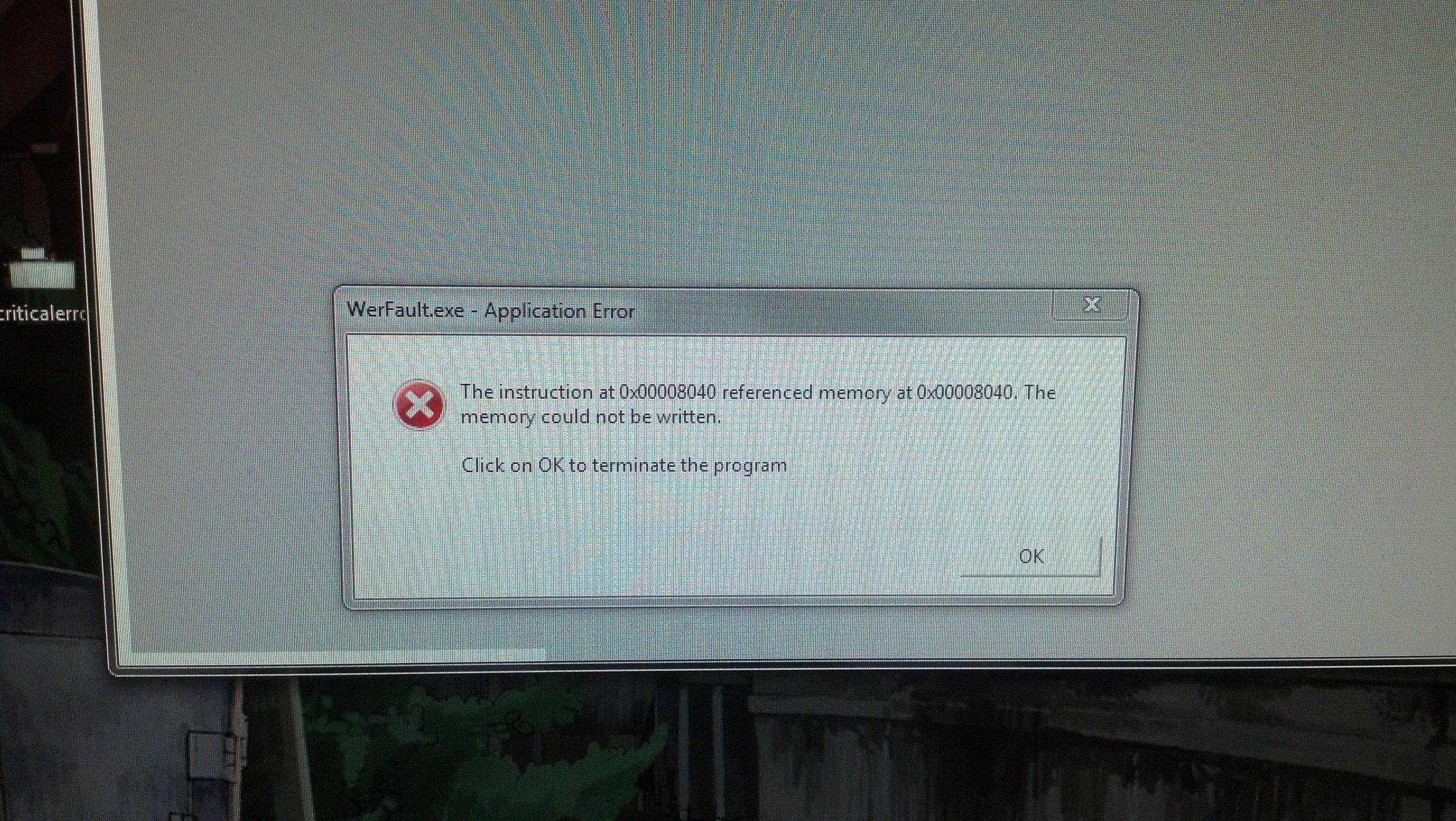
However, I did just have an interesting crash. Or crashes? I turned on my computer, and turned away for 30 seconds to do something real quick. My computer bluescreened for the first time before logging in, which is a first. Then, when I restarted it, I was getting strange errors when trying to load or exit programs, for example. Opening a windows update tab that appeared or trying to quit out of Skype:
k2qjls3.jpg

As always, dump below.

I might as well note my friend is highly pressuring me to reinstall Windows. He's sure I have driver issues.
 

My Computer

Computer type
PC/Desktop
Computer Manufacturer/Model Number
Custom
OS
Windows 7 Professional 64-bit SP1
CPU
Intel Core-i5 4670k @3.4gHz
Motherboard
Asrock Z87 Extreme3
Memory
8GB Crucial Ballistix Sport 1600mHz
Graphics Card(s)
Asus GTX760
Monitor(s) Displays
Asus VS248
Screen Resolution
1920x1080
Hard Drives
1TB Western Digital Blue
PSU
Corsair CX600
Case
Fractal Design Define R4
Cooling
Cooler Master Hyper 212 EVO
Keyboard
Gigabyte Aivia Osmium
Mouse
Alienware TactX Mouse (Let's not talk about that.)
Antivirus
Malwarebytes, Microsoft Security Essentials
Browser
Google Chrome
Your welcome.

Okay on the two sticks, the strangeness could be that crucial is in the business of selling ram and asrock sells mb's therefore crucial has more desire to test ram for various boards than asrock has to test its mb against various ram designs.

If you can't find different ram to test it may be pointless to continue, maybe a local shop could loan/rent you some.
Now how are you going to get a single stick to span both dimms? :p couldn't resist. I don't see the harm in running memtest on one stick at a time it depends if your machine will boot up or not on one stick. You might have to move the one stick to different slots, though I'd start with slot one first. Movem' around test all configurations.

You will have to create a matrix to cover all the combinations of ram to slots and if your board holds true to form it may require one stick to remain in slot 1 in order to boot, if that's the case leave stick a in slot one while you test stick b in the other three then just reverse the sticks and re-run the testing. At least try to run without a stick in slot 1 and see if it will boot if it does then you can go all over the place.

Your error is: Event ID 10 is logged in the Application log after you install Service Pack 1 for Windows 7 or Windows Server 2008 R2 with a possible fix-it.
This Vista version explains it better: Fix: "This device cannot start" Code 10 error in Device Manager in Windows read it, but don't run it use the one above for Win7.

More: Error codes in Device Manager in Windows | Error #10

Agreed; Follow through on Arc's suggestion and Golden's reinforcement of trying those nvidia drivers.

Crash on boot, couldn't reference memory? Could be the memory :rolleyes: make an effort to find different ones.
The WerFault error could be related to the nvidia drivers, keep trying different ones to see if the error replicates. I refer you to: http://www.sevenforums.com/software/242717-werfault-exe-error.html#post2028172

I don't see any .dmp attachment it may help to see what caused the WerFault error. :(

A question only you can answer; How knowledgeable is your friend, do you trust him or her? You may end up with new problems and have to start a new thread or you may not, at best it's a 50/50 chance.

If you think its drivers you could try this route: http://www.sevenforums.com/tutorials/43216-installing-updating-drivers-7-a.html
 

My Computer

Computer type
PC/Desktop
Computer Manufacturer/Model Number
Gateway DX4831-01e (Mid-Tower Desktop)
OS
Originally Win 7 Hm Prem x64 Ver 6.1.7600 Build 7601-SP1 | Upgraded to Windows 10 December 14, 2019
CPU
Intel i3 530 2.93GHz, 2933MHz 2 Cores 4 Logical Processors
Motherboard
Gateway H57M01 133 megahertz
Memory
6GB of 1,333MHz DDR3 SDRAM
Graphics Card(s)
32MB Intel Graphics Media Accelerator HD IGChip
Sound Card
Realtek High Definition Audio
Monitor(s) Displays
Gateway HX2000 20inch TFT active matrix TN
Screen Resolution
1600 x 900 x 59 hertz
Hard Drives
WDC WD10EADS-00M2B0 [HDD] (1000.20 GB) -- drive 0,
HL-DT-ST DVDRAM GH41N [CD-ROM dr]
Four card readers, and Four USB 2.0
PSU
300watts.
Case
Mid-Tower Desktop
Cooling
Stock from Gateway
Keyboard
Natural Ergonomic Keyboard 4000, see Other Info
Mouse
Orig. Gateway wore out now using Insignia USB wired optical
Internet Speed
Vz FIOS 10ms png 57.64Mbps down 65.53Mbps up Speedtest.org
Antivirus
Zamana Anti-logger with Anti-malware, MSE, Windows Firewall,
Browser
IE11.0.9600.19399-Upd ver11.0.135, Firefox 68.0.1 x64
Other Info
System Specs by Belarc.

BIOS: American Megatrends Inc. P01-A0 11/17/2009

Replaced the MS 'Natural' Standard PS/2 Enhanced 101-102 Keyboard with a new Natural Ergonomic Keyboard 4000 on August 1st 2014.

Canon Pixma MG3222 Printer.

Updated to IE11 on 12102015 | Fios Quantum Router g1100

Additional AV: SpywareBlaster, manual Mbam, SAS
..... I might as well note my friend is highly pressuring me to reinstall Windows. He's sure I have driver issues.

Hi, I'm just stopping in to amplify your quote above. It is sort of hidden below the screen shot.

Don't let my post distract you from following advice provided by other members, mine is a notation only.

Sometimes when battling an issue on a machine, you have to consider the time invested and the time to resolve. I've spent too much time on my own machines trying to find the one thing that will fix the issue. Eventually I start over with a Clean install - very basic, install my network drivers, and let Windows Update everything including most drivers in the optional update offers.

I don't change anything for about a week to make sure the base system works well. Then slowly I might start making changes one at a time to see how I can improve my system. If something breaks in the process, I have a good idea what broke it and can roll back the last thing changed.

I think your friend gives you some sound advice.

Good luck what ever you decide.

Bill
-
 

My Computer

Computer type
Laptop
Computer Manufacturer/Model Number
HP Pavilion dv6-6c10us
OS
x64 (6.3.9600) Win8.1 Pro & soon dual boot x64 (6.1.7601) Win7_SP1 HomePrem
CPU
AMD A6-3420M APU with Radeon(tm) HD Graphics
Motherboard
Hewlett-Packard 1805
Memory
6.00 GB
Graphics Card(s)
AMD Radeon(TM) HD 6520G
Sound Card
(1) AMD High Definition Audio Device (2) IDT High Definiti
Monitor(s) Displays
HP W2072a 20" LCD (1600 x 900) @ 60 Hz
Screen Resolution
1366 x 768 x 32 bits (4294967296 colors) @ 60 Hz
Hard Drives
ST640LM0 00 HM641JI SATA Disk Device
Keyboard
Logitech k520 wireless KB
Mouse
Logitech m320 wireless mouse (bundled with KB)
Internet Speed
15/5 | 54 MB Wireless 'n'
Antivirus
Realtime: Defender or Avast | On-demand: Malwarebytes, ESET
Browser
IE 11 on Win8, IE 10 on win 7
Other Info
Media: [Gimp, Audacity, VLC] || Comm: [WEmail 2012, Skype] || Productivity: [OpenOffice,| Textpad] || Utils: [Sysinternals, cCleaner, Speccy, Defraggler]
Good counterpoint Bill.
 

My Computer

Computer type
PC/Desktop
Computer Manufacturer/Model Number
Gateway DX4831-01e (Mid-Tower Desktop)
OS
Originally Win 7 Hm Prem x64 Ver 6.1.7600 Build 7601-SP1 | Upgraded to Windows 10 December 14, 2019
CPU
Intel i3 530 2.93GHz, 2933MHz 2 Cores 4 Logical Processors
Motherboard
Gateway H57M01 133 megahertz
Memory
6GB of 1,333MHz DDR3 SDRAM
Graphics Card(s)
32MB Intel Graphics Media Accelerator HD IGChip
Sound Card
Realtek High Definition Audio
Monitor(s) Displays
Gateway HX2000 20inch TFT active matrix TN
Screen Resolution
1600 x 900 x 59 hertz
Hard Drives
WDC WD10EADS-00M2B0 [HDD] (1000.20 GB) -- drive 0,
HL-DT-ST DVDRAM GH41N [CD-ROM dr]
Four card readers, and Four USB 2.0
PSU
300watts.
Case
Mid-Tower Desktop
Cooling
Stock from Gateway
Keyboard
Natural Ergonomic Keyboard 4000, see Other Info
Mouse
Orig. Gateway wore out now using Insignia USB wired optical
Internet Speed
Vz FIOS 10ms png 57.64Mbps down 65.53Mbps up Speedtest.org
Antivirus
Zamana Anti-logger with Anti-malware, MSE, Windows Firewall,
Browser
IE11.0.9600.19399-Upd ver11.0.135, Firefox 68.0.1 x64
Other Info
System Specs by Belarc.

BIOS: American Megatrends Inc. P01-A0 11/17/2009

Replaced the MS 'Natural' Standard PS/2 Enhanced 101-102 Keyboard with a new Natural Ergonomic Keyboard 4000 on August 1st 2014.

Canon Pixma MG3222 Printer.

Updated to IE11 on 12102015 | Fios Quantum Router g1100

Additional AV: SpywareBlaster, manual Mbam, SAS

Okay, today's report:

Booted up computer, BSOD'd while logging in. Then, restarted and got one of those "critical error" messages and restarts again. After I booted back up again, shortly after logging in, I got another BSOD.

So what I've one is use that Event ID10 fix you mentioned.

Going to try some new drivers tonight, and check with one stick of ram over the next few days, if it works.

If I can't get everything to settle down by Sunday or Monday, I'll attempt reinstalling.

Dumps in the downloads.
 

My Computer

Computer type
PC/Desktop
Computer Manufacturer/Model Number
Custom
OS
Windows 7 Professional 64-bit SP1
CPU
Intel Core-i5 4670k @3.4gHz
Motherboard
Asrock Z87 Extreme3
Memory
8GB Crucial Ballistix Sport 1600mHz
Graphics Card(s)
Asus GTX760
Monitor(s) Displays
Asus VS248
Screen Resolution
1920x1080
Hard Drives
1TB Western Digital Blue
PSU
Corsair CX600
Case
Fractal Design Define R4
Cooling
Cooler Master Hyper 212 EVO
Keyboard
Gigabyte Aivia Osmium
Mouse
Alienware TactX Mouse (Let's not talk about that.)
Antivirus
Malwarebytes, Microsoft Security Essentials
Browser
Google Chrome
So, I just reset the CMOS and got some new Nvidia drivers.

But quite frankly, there may have actually been a hardware issue at hand.

This is gonna sound stupid. So brace yourself. No, really. Brace.

When I opened up my computer to reset my CMOS, I thought the battery and jumper were located in a spot under the GPU. So when I went to lift up my 760, I discovered that it wasn't seated properly! The little PCIE clasp wasn't in all the way... So i reset the CMOS, properly reseated my GPU, and closed it all up. And no BSOD on startup...

I hope the entire PC-building community can pardon me for my sins. Beginner's mistake...?

So anyways, if I get any issues, I'll report straight back here. If not... well, there's your problem.
 

My Computer

Computer type
PC/Desktop
Computer Manufacturer/Model Number
Custom
OS
Windows 7 Professional 64-bit SP1
CPU
Intel Core-i5 4670k @3.4gHz
Motherboard
Asrock Z87 Extreme3
Memory
8GB Crucial Ballistix Sport 1600mHz
Graphics Card(s)
Asus GTX760
Monitor(s) Displays
Asus VS248
Screen Resolution
1920x1080
Hard Drives
1TB Western Digital Blue
PSU
Corsair CX600
Case
Fractal Design Define R4
Cooling
Cooler Master Hyper 212 EVO
Keyboard
Gigabyte Aivia Osmium
Mouse
Alienware TactX Mouse (Let's not talk about that.)
Antivirus
Malwarebytes, Microsoft Security Essentials
Browser
Google Chrome
Aww...Don't be so hard on yourself, just the other day I had to recheck my tool box three times before I actually saw the tool I was looking for. :(


Your .dmps point to Memory Management (0x1a) and, IRQL_NOT_LESS_OR_EQUAL (0xA)
With 0x1a, Argument 1:
Code:
*******************************************************************************
*                                                                             *
*                        Bugcheck Analysis                                    *
*                                                                             *
*******************************************************************************

MEMORY_MANAGEMENT (1a)
    # Any other values for parameter 1 must be individually examined.
Arguments:
[COLOR=Blue]Arg1: 0000000000041790[/COLOR], The subtype of the bugcheck.
Arg2: fffffa8004aeca10
Arg3: 000000000000ffff
Arg4: 0000000000000000
Refers to:
0x41790
A page table page has been corrupted. On a 64 bit version of Windows, parameter 2 contains the address of the PFN for the corrupted page table page. On a 32 bit version of Windows, parameter 2 contains a pointer to the number of used PTEs, and parameter 3 contains the number of used PTEs.
For 0xA:
Code:
*******************************************************************************
*                                                                             *
*                        Bugcheck Analysis                                    *
*                                                                             *
*******************************************************************************

IRQL_NOT_LESS_OR_EQUAL (a)
An attempt was made to access a pageable (or completely invalid) address at an
interrupt request level (IRQL) that is too high.  This is usually
caused by drivers using improper addresses.
If a kernel debugger is available get the stack backtrace.
Arguments:
[COLOR=Blue]Arg1: 0000000000000021[/COLOR], memory referenced
Arg2: 0000000000000002, IRQL
Arg3: 0000000000000001, bitfield :
    bit 0 : value 0 = read operation, 1 = write operation
    bit 3 : value 0 = not an execute operation, 1 = execute operation (only on chips which support this level of status)
Arg4: fffff80002cfb670, address which referenced memory
STOP 0x0000000A: IRQL_NOT_LESS_OR_EQUAL
Usual causes: Kernel mode driver, System Service, BIOS, Windows, Virus scanner, Backup tool, compatibility

Now that we have the technical explanation out of the way, and from your discovery it's easy to speculate that with the loose connection, when you started your machine the operating system (OS) was looking for a graphics card that it knew was there because it could see the card's drivers - think memory -, but now its not?!?

Your earlier blue screens were a symptom and grew worse until it affected the startup sequence causing the BSOD.

It sure would of been nice if you found that clasp issue and tested before you applied the code10 fix and reset the CMOS, but there's nothing in those two that will cause any harm.

Keep an eye on it and report back like you said, if your happy after a while please come back to mark your thread solved to help other members that may have a similar problem.
 

My Computer

Computer type
PC/Desktop
Computer Manufacturer/Model Number
Gateway DX4831-01e (Mid-Tower Desktop)
OS
Originally Win 7 Hm Prem x64 Ver 6.1.7600 Build 7601-SP1 | Upgraded to Windows 10 December 14, 2019
CPU
Intel i3 530 2.93GHz, 2933MHz 2 Cores 4 Logical Processors
Motherboard
Gateway H57M01 133 megahertz
Memory
6GB of 1,333MHz DDR3 SDRAM
Graphics Card(s)
32MB Intel Graphics Media Accelerator HD IGChip
Sound Card
Realtek High Definition Audio
Monitor(s) Displays
Gateway HX2000 20inch TFT active matrix TN
Screen Resolution
1600 x 900 x 59 hertz
Hard Drives
WDC WD10EADS-00M2B0 [HDD] (1000.20 GB) -- drive 0,
HL-DT-ST DVDRAM GH41N [CD-ROM dr]
Four card readers, and Four USB 2.0
PSU
300watts.
Case
Mid-Tower Desktop
Cooling
Stock from Gateway
Keyboard
Natural Ergonomic Keyboard 4000, see Other Info
Mouse
Orig. Gateway wore out now using Insignia USB wired optical
Internet Speed
Vz FIOS 10ms png 57.64Mbps down 65.53Mbps up Speedtest.org
Antivirus
Zamana Anti-logger with Anti-malware, MSE, Windows Firewall,
Browser
IE11.0.9600.19399-Upd ver11.0.135, Firefox 68.0.1 x64
Other Info
System Specs by Belarc.

BIOS: American Megatrends Inc. P01-A0 11/17/2009

Replaced the MS 'Natural' Standard PS/2 Enhanced 101-102 Keyboard with a new Natural Ergonomic Keyboard 4000 on August 1st 2014.

Canon Pixma MG3222 Printer.

Updated to IE11 on 12102015 | Fios Quantum Router g1100

Additional AV: SpywareBlaster, manual Mbam, SAS
Back
Top