vbcrypt trojan, can't boot windows 7 or linux

exeviss,

What program alerted you to having a vbcrypt Trojan?

Are you able to start the computer, and tap the F8 key until you get to the Advanced Boot Options menu?
 

My Computer

Computer type
PC/Desktop
Computer Manufacturer/Model Number
An ol' eMachines
OS
Windows 7 Home Premium
Internet Speed
Fine for me...I'm retired!
Were you able to scan for this virus without being able to boot into windows or ubuntu?
 

My Computer

Computer type
PC/Desktop
Computer Manufacturer/Model Number
custom built
OS
Windows 7 ultimate 64-bit
CPU
Intel I7 2600K 3.4ghz
Motherboard
Asus Evo P8P67
Memory
Corsair 16gb ddr3 1600mhz
Graphics Card(s)
Nvidia Geforce gt 430
Sound Card
Sound Blaster Titanium x-fi pci express
Monitor(s) Displays
Dell E198WFP
Hard Drives
1 western digital 2TB drive.
PSU
Antec 1200 watt
Case
Inwin Dragon Rider
Cooling
6 case supplied cooling fans
Keyboard
logitech mk700
Mouse
logitech m705
Internet Speed
25-50mbps download; 10mbps upload(i think)
Antivirus
avg free 2014
Browser
mozilla firefox
Other Info
Also have a pretty bad speaker setup which is a klipsch promedia 5.1 surround speaker setup with huge subwoofer and lg blu ray player/writer. Also a hp officejet pro 8600 plus wireless all in one and a logitech s7500 webcam.
in the othre thread:

Just windows in safe mode which gives me hope.
 

My Computer

Computer type
PC/Desktop
Computer Manufacturer/Model Number
An ol' eMachines
OS
Windows 7 Home Premium
Internet Speed
Fine for me...I'm retired!
I scanned for it from safe mode. Malwarebytes didn't find it but AVG did. Probably because I need to update the malwarebytes virus database. I can get to advanced boot options with F8 but running from the last known good configuration only returns the initial bsod instead of a black screen.
 

My Computer

Computer type
PC/Desktop
OS
Windows 7 Professional 64 bit
See if you can do the following:

[You may want to print these instructions so you can have access to them.
Also, you may want to read them once before you apply them.]
]
Please plug in a USB pen drive into a clean working computer.

Go to the Farbar Recovery Scan Tool Download
Farbar Recovery Scan Tool Download

Select the download that applies to your system: 64-bit
Save the program to the >> USB pen drive.
Remove USB pen drive when done.

Now, go to the >> problem << computer.
Plug in the USB pen drive which has FRST.

Start the computer, and tap the F8 key until you get to the Advanced Boot Options
Use the arrow keys to select the Repair your computer menu item

From there...
Select your language settings, and click: Next
Select your User account and click: OK (If you did not set a password, leave blank.)

On the System Recovery Options you get the following options:

Startup Repair
System Restore
Windows Complete PC Restore
Windows Memory Diagnostic Tool
Scan your computer's memory for errors
Command Prompt

Select: Command Prompt

In the Command Prompt window, at the blinking cursor type notepad and press: Enter
In Notepad, under the File menu select: Open
Double-click the Computer icon on the left.
Find the pen drive letter, remember what letter it is, click on it, and press: Open
Close out of Notepad.

Click the Command Prompt window
Type x:\frst64.exe, and press: Enter
Note: Replace the drive letter x with the drive letter of your pen drive!

FRST starts, and prepares to run. Follow the prompts.
Click Yes to the Disclaimer.

Press the Scan button.

The scan runs, and, the program saves the FRST.txt, on the pen drive.

When done, click the Command Prompt window, type exit, and press: Enter

Back at the System Recovery Options, press: Shutdown
Remove the USB pen drive.

Please plug the USB pen drive in the working computer, and please provide the FRST.txt in your reply.

 

My Computer

Computer type
PC/Desktop
Computer Manufacturer/Model Number
An ol' eMachines
OS
Windows 7 Home Premium
Internet Speed
Fine for me...I'm retired!
I'm about to get started with Farbar. I just wanted to mention before I forgot that my Ubuntu 14.04 is on an entirely different drive than windows and it got infected when windows did anyway. At least I assume it did since it won't boot. Is Ubuntu going to be a major problem to fix?

edit: FRST.txt added
 

Attachments

Last edited:

My Computer

Computer type
PC/Desktop
OS
Windows 7 Professional 64 bit
exeviss,

At a glance, the FRST report does not lead me to believe that there is any deep rooted malware in the system.

==================== Drives ================================
Drive c: () (Fixed) (Total:1863.01 GB) (Free:1013.48 GB) NTFS ==>[System with boot components (obtained from reading drive)]
Drive e: (KINGSTON) (Removable) (Total:1.86 GB) (Free:0.79 GB) FAT
Drive x: (Boot) (Fixed) (Total:0.03 GB) (Free:0.03 GB) NTFS

...my Ubuntu 14.04 is on an entirely different drive than windows
Was the drive containing Ubuntu not connected at the time you ran FRST?


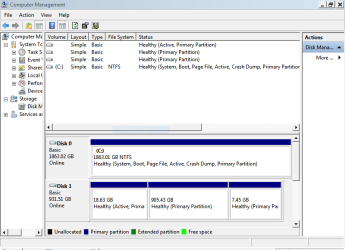
Please connect the Ubuntu drive, and, using the Snipping Tool, post an image of Disk Management.
Do so from Safe Mode if necessary.
http://www.sevenforums.com/tutorials/274797-disk-management-post-screen-capture-image.html

:ar: Maximize the Disk Management window so it fills your entire screen.:ar:

How to Use the Snipping Tool in Vista
(Also applies to Windows 7)
 

My Computer

Computer type
PC/Desktop
Computer Manufacturer/Model Number
An ol' eMachines
OS
Windows 7 Home Premium
Internet Speed
Fine for me...I'm retired!
I don't see the D drive there so it must not be included in the scan. It's in drive management though.
 

My Computer

Computer type
PC/Desktop
OS
Windows 7 Professional 64 bit
exeviss,

See if you can post an image of Disk Management as requested above.

Also, please download ListParts
Save to the Desktop
Double-click the downloaded file to run the program.
Click: Scan

:ar: When done, please post the Result.txt in your reply.


Thanks!
 

My Computer

Computer type
PC/Desktop
Computer Manufacturer/Model Number
An ol' eMachines
OS
Windows 7 Home Premium
Internet Speed
Fine for me...I'm retired!
Sorry I thought I posted this in my last comment.
 

Attachments

  • Capture.PNG
    Capture.PNG
    17.6 KB · Views: 1

My Computer

Computer type
PC/Desktop
OS
Windows 7 Professional 64 bit
Back
Top