Velociraptor

No, they are still around, maybe you have mentally blocked them out, so your eyes turn the other way.
 

My Computer

Computer Manufacturer/Model Number
DIY
OS
W7x64 Pro, SuSe 12.1/** W7 x64 Pro, XP MCE
CPU
Phenom II 1090T w/Noctua NH-D14 /**4400+ X2 w/CM Hyper TX 3
Motherboard
ASRock 890FX Deluxe 4/**A8N-SLI
Memory
2 x 2GB Patriot PGS34g1600LLKA/**4x1GB Corsair VS
Graphics Card(s)
EVGA GTX460 SC/**EVGA 8800GTS
Sound Card
Asus Xonar D2X/**Xonar D1
Monitor(s) Displays
Acer X233H, Dell E152FPc /**LG M237-WD
Screen Resolution
1920x1080 & 1024x768/**1980x1080
Hard Drives
WDC 2TB, 1.5TB, 1TB, 500GB,Seagate 500GB , Maxtor 80GB /**500GB Seagate & WDC 1TB Black
PSU
CM RS600 w/ APC BX1000G/**Antec 500 TP w/ APC BX1000
Case
HAF922/**Antec 1040IIB
Cooling
3x200mm, 1x140 and 1x120mm/**5x80mm fans
Keyboard
Logitech Media USB/**Saitek Eclipse
Mouse
Cordless Trackman Wheel/**Ditto
Internet Speed
3.3Mbps
Other Info
SB 560 5.1 w/ Sennheiser RS140/**Creative T20 speakers, Dvico FusionHDTV7 Gold RT, Cisco E3000, HP 5510V AIO, Linksys E3000, Belkin F5U237 hub and **F5D8055 adapter
(** = 2nd rig)
Yeah I actually called WD's tech supprt and was told that If I wanted an quieter drive I should have gotten a "Blue" :huh:

Anyways I love the blacks but I the the SATA 6gig ones are too loud.

Man where were you guys when I was asking this question here - http://www.sevenforums.com/hardware-devices/90141-sata-6-wd-caviar-black-1tb.html#post776931 :)
The drive that I just bought for RMAing the FAEXs is a WD20EARS, which is a green..not too clear on the difference between green and blue. But it is quiet and twice the size of the FAEX. While one of the FAEXs is internally mounted in my HTPC, the other two are in an external case, which sits directly ~ 2' from my ear, and is very disturbing, whether it is normal or not. Since these 2 drives are only being used to store video in, the EARS drive is quite adequate, so I will leave it in the external case. I haven't decided where to put the FAEX though.

Green - Power Savings - Select drives spin at 5400 RPM, 5400 to 7200 RPM
Blue - Quiet, good performance
Black - High performance
 

My Computer

Computer type
PC/Desktop
Computer Manufacturer/Model Number
Custom Build
OS
Windows 7 Home Premium 64 bit
CPU
Intel Core i7-4790
Motherboard
GA-Z87X-D3H
Memory
G.SKILL 8GB (2 x 4GB) DDR3 F3-10666CL9D-8GBNT
Graphics Card(s)
AMD Radeon R7 250
Sound Card
Realtek ALC892
Monitor(s) Displays
Samsung UN32EH5000, Dell 1703FPT
Screen Resolution
1920 x 1080, 1280 x 1024
Hard Drives
WD5003AZEX
WD10EZEX
Samsung HD103SJ
Samsung 128 GB 840 PRO
PSU
SeaSonic M12II SS-500GM
Case
Fractal Design Define R4
Cooling
Zalman CNPS9900ALED
Keyboard
Logitech K800
Mouse
Logitech M705
Internet Speed
16 Mbps
Antivirus
Avast
Browser
Firefox
Other Info
Bose Companion 2 Multimedia Speakers
Yeah I actually called WD's tech supprt and was told that If I wanted an quieter drive I should have gotten a "Blue" :huh:

Anyways I love the blacks but I the the SATA 6gig ones are too loud.

Man where were you guys when I was asking this question here - http://www.sevenforums.com/hardware-devices/90141-sata-6-wd-caviar-black-1tb.html#post776931 :)
The drive that I just bought for RMAing the FAEXs is a WD20EARS, which is a green..not too clear on the difference between green and blue. But it is quiet and twice the size of the FAEX. While one of the FAEXs is internally mounted in my HTPC, the other two are in an external case, which sits directly ~ 2' from my ear, and is very disturbing, whether it is normal or not. Since these 2 drives are only being used to store video in, the EARS drive is quite adequate, so I will leave it in the external case. I haven't decided where to put the FAEX though.

Yeah, I have that 2 TB green drive in an external enclosure and it is very quiet. Fast too. I have it hooked up eSATA and I get > 120 MB/s sequential read on the fast end of the platters, > 90 MB/s average seq read. It is as fast or faster than my 1Tb blacks. I did turn the spindown head parking off on the WD20EARS though.
 

My Computer

Computer type
PC/Desktop
Computer Manufacturer/Model Number
Home built (GeneO industries)/Model 4
OS
Windows 10 Pro. EFI boot partition, full EFI boot
CPU
i7 4770k 4.4GHz (44-44-43-43 turbo) @ 1.248V
Motherboard
ASUS Maximus VI Hero
Memory
16GB (8GBx2) @2200 MHz G.skill Sniper 10-11-10-30-1, 1.6V
Graphics Card(s)
MSI GTX 970 Gaming 4G
Sound Card
Onboard SupremeFX Audio
Monitor(s) Displays
NEC Spectraview 2490WUXi-SV
Screen Resolution
1920 x 1200
Hard Drives
Samsung 850 Pro 256GB (OS), Samsung 2x 128GB 840 Pro SSD in RAID0, 3x WD Blue 6Gb/s 1TB RAID0, WD 2TB Black external USB 3.0, 2TB WD20EARS Green external USB 3.0, 2x 500GB Seagate and 1 750 GB external USB, 1x 350GB external USB3
PSU
Seasonic X-850 (2012 KM3 model)
Case
Fractal Design Define R4
Cooling
NH-D14, NF-F12, NF-A15; NF-P14, NF-P12,NF-A14, S12A PWM
Keyboard
Cooler Master Storm Quickfire Rapid - Brown
Mouse
Logitech G602
Internet Speed
126.4 Mb/s down, 24.3 Mb/s up
Other Info
USB 3.0 x8 , SATA III x8, eSATA, USB 2.0 x6. Samsung DVD R/W drive.

WEI: CPU 7.8, Memory 7.9, Graphics 7.9, Disk 7.9

My Computer

Computer type
PC/Desktop
Computer Manufacturer/Model Number
Custom built by me.
OS
Windows 10 Pro
CPU
Intel Core i7-4770K (3.5Ghz)
Motherboard
Gigabyte G1 Sniper 5 (F10 Bios)
Memory
32 gig Corsair Dominator Platinum (4x8Gig)
Graphics Card(s)
Sapphire Tri-X R9 Fury
Sound Card
Soundblaster ZXR
Monitor(s) Displays
NEC PA242W 24" LCD Monitor
Screen Resolution
1920 x 1200
Hard Drives
Primary - Samsung 850 Pro (512gig), Samsung 840 Pro (256gig), 2TB WD Caviar Black.
PSU
EVGA Supernova 1000 G2
Case
Cooler Master HAF X
Cooling
Corsair H100i with Corsair Air Series SP120 Quiet Fans
Keyboard
Logitech Wireless Wave
Mouse
Logitech Performance MX
Internet Speed
High Speed Cable
Antivirus
Norton Security
Browser
IE11
Other Info
Memory Timings - 1866MHz @ 9-9-9-27-1T @ 1.5 volts
If you don't mind me asking, what is your concern about ssd's? I made the switch last summer and I hate to think of going back.
 

My Computer

Computer Manufacturer/Model Number
Samsung Chronos 7
OS
windows 7 Pro 64Bit
CPU
2.2 GHz Intel Core i7-2675QM
Memory
8GB
Graphics Card(s)
Intel HD Graphics 3000/Radeon HD 6490M
Sound Card
Realtek High Definition Audio
Monitor(s) Displays
Built in LCD and external Dell 22 inch LCD
Screen Resolution
1600x900
Hard Drives
1 TB HDD
Internet Speed
20 MBPS Down 1500 KBPS Up
If you don't mind me asking, what is your concern about ssd's? I made the switch last summer and I hate to think of going back.

Where's this coming from????
 

My Computer

Computer type
PC/Desktop
Computer Manufacturer/Model Number
Custom built by me.
OS
Windows 10 Pro
CPU
Intel Core i7-4770K (3.5Ghz)
Motherboard
Gigabyte G1 Sniper 5 (F10 Bios)
Memory
32 gig Corsair Dominator Platinum (4x8Gig)
Graphics Card(s)
Sapphire Tri-X R9 Fury
Sound Card
Soundblaster ZXR
Monitor(s) Displays
NEC PA242W 24" LCD Monitor
Screen Resolution
1920 x 1200
Hard Drives
Primary - Samsung 850 Pro (512gig), Samsung 840 Pro (256gig), 2TB WD Caviar Black.
PSU
EVGA Supernova 1000 G2
Case
Cooler Master HAF X
Cooling
Corsair H100i with Corsair Air Series SP120 Quiet Fans
Keyboard
Logitech Wireless Wave
Mouse
Logitech Performance MX
Internet Speed
High Speed Cable
Antivirus
Norton Security
Browser
IE11
Other Info
Memory Timings - 1866MHz @ 9-9-9-27-1T @ 1.5 volts
If you don't mind me asking, what is your concern about ssd's? I made the switch last summer and I hate to think of going back.

Where's this coming from????

The OP's post

"I have a few programs that could REALLY benefit from a faster drive, but I don't want to go with an SSD for several reasons."

I'm just curious of those reasons.
 

My Computer

Computer Manufacturer/Model Number
Samsung Chronos 7
OS
windows 7 Pro 64Bit
CPU
2.2 GHz Intel Core i7-2675QM
Memory
8GB
Graphics Card(s)
Intel HD Graphics 3000/Radeon HD 6490M
Sound Card
Realtek High Definition Audio
Monitor(s) Displays
Built in LCD and external Dell 22 inch LCD
Screen Resolution
1600x900
Hard Drives
1 TB HDD
Internet Speed
20 MBPS Down 1500 KBPS Up
Only he knows, but I can guess finances can play a role. Not everyone wants to spend money on an SSD drive, especially when you factor dollar per gigabyte.

Even though SSD prices are dropping they're still expensive compared to spinner drives with their massive storage space.

I know I waited till prices dropped enough for me before I got one. And for me it had to be at least a 120gig or I didn't want it. That's me.

Anyway I can understand why one would hold off.
 

My Computer

Computer type
PC/Desktop
Computer Manufacturer/Model Number
Custom built by me.
OS
Windows 10 Pro
CPU
Intel Core i7-4770K (3.5Ghz)
Motherboard
Gigabyte G1 Sniper 5 (F10 Bios)
Memory
32 gig Corsair Dominator Platinum (4x8Gig)
Graphics Card(s)
Sapphire Tri-X R9 Fury
Sound Card
Soundblaster ZXR
Monitor(s) Displays
NEC PA242W 24" LCD Monitor
Screen Resolution
1920 x 1200
Hard Drives
Primary - Samsung 850 Pro (512gig), Samsung 840 Pro (256gig), 2TB WD Caviar Black.
PSU
EVGA Supernova 1000 G2
Case
Cooler Master HAF X
Cooling
Corsair H100i with Corsair Air Series SP120 Quiet Fans
Keyboard
Logitech Wireless Wave
Mouse
Logitech Performance MX
Internet Speed
High Speed Cable
Antivirus
Norton Security
Browser
IE11
Other Info
Memory Timings - 1866MHz @ 9-9-9-27-1T @ 1.5 volts
I have three WD Black drives in two towers, including the one in my Sys Specs, and they aren't loud at all.
 

My Computer

OS
Windows 7 Ultimate x64 SP1
CPU
Intel Core i7-2600
Motherboard
Gigabyte GA-P67A-UD3P-B3
Memory
12 GB Patriot Extreme DDR3-1333
Graphics Card(s)
Nvidia GTX 470
Monitor(s) Displays
Dell UltraSharp 2209WA
Hard Drives
OCZ Agility3 240 GB, WD5001AALS, WD7501AALS
PSU
OCZ ModStream 700W
Case
CoolerMaster HAF 912 Advanced
Cooling
CoolerMaster Hyper 212 Plus
Perhaps your noise tolerance is lower than mine :D I even have soundproofing material in my case.
I think that you mean a higher tolerance for noise :). I'm very much for quiet machines. 2 of my builds at home use the Antec Sonata II case, known for it's silent performance. My primary machine that runs the WD Caviar Black, has an 80GB SSD (which is obviously silent), and I'm considering replacing my slightly older Nvidia 9800GTX+ with a Radeon 5850 mostly because it's much quieter. Perhaps I just don't hear the Caviar Black as it's near the bottom on my case and only sitting about 6 inches off the floor. I think that some of these drives are just noisier than others. I have heard some Caviar Blacks that are noticeably louder that mine.

I use caviar blue's at work. I have 7 of the 500GB's and 2 of the 1TB's. And I'd say they give me 98% of the performance on the black series. I opted for the black at home just for the longer warranty. Performance wise, it's pretty much a toss up.
 

My Computer

Computer Manufacturer/Model Number
Self-Built in July 2009
OS
Windows 7 Ultimate x64
CPU
Intel Q9550 2.83Ghz OC'd to 3.40Ghz
Motherboard
Gigabyte GA-EP45-UD3R rev. 1.1, F12 BIOS
Memory
8GB G.Skill PI DDR2-800, 4-4-4-12 timings
Graphics Card(s)
EVGA 1280MB Nvidia GeForce GTX570
Sound Card
Realtek ALC899A 8 channel onboard audio
Monitor(s) Displays
23" Acer x233H
Screen Resolution
1920x1080
Hard Drives
Intel X25-M 80GB Gen 2 SSD
Western Digital 1TB Caviar Black, 32MB cache. WD1001FALS
PSU
Corsair 620HX modular
Case
Antec P182
Cooling
stock
Keyboard
ABS M1 Mechanical
Mouse
Logitech G9 Laser Mouse
Internet Speed
15/2 cable modem
Other Info
Windows and Linux enthusiast. Logitech G35 Headset.
I have a few programs that could REALLY benefit from a faster drive, but I don't want to go with an SSD for several reasons. Currently I have a WD drive with 7200 RPM 16 MB cache. How much faster would this drive be?

Newegg.com - Western Digital VelociRaptor WD1500HLFS 150GB 10000 RPM 16MB Cache SATA 3.0Gb/s 3.5" Internal Hard Drive -Bare Drive

My belated 2¢:

Performance would depend on your application. The VelociRaptor would have less latency. A 10,000 RPM drive has a 3 ms average rotational latency. For 7200 RPM, it's 4.17 ms. (It's the time for the platter to make 1/2 turn.) The Velociraptor has a quicker mechanism to position its heads, so its seek time would be lower.

On the other hand, the Caviar Black drives have a much higher data density on their platters, so their sustained data read (or write) rates may be better than the Raptor. I suggest the 1.5TB Caviar Black:

Newegg.com - Western Digital Caviar Black WD1501FASS 1.5TB 7200 RPM 64MB Cache SATA 3.0Gb/s 3.5" Internal Hard Drive -Bare Drive

It's $10 cheaper at Newegg than the 150GB Raptor. I have one. I don't find it noisy.

Maybe you'd get some insight by checking the data base at www.storageview.com. A quick glance suggests that you'd be giving up little performance with a Caviar Black as compared to a VelociRaptor.

The WDC 10kRPM drives seem to be a unique technology, but SSDs seem to be what the world is moving to. There's a vast range in data rates (especially write rates) with them, but their 100 microsecond latencies make it hard for traditional drives to compete.
 

My Computer

Computer Manufacturer/Model Number
homegrown
OS
Windows 7 Pro X64 SP1
CPU
Intel Core I7-3930k
Motherboard
Asus P9X79 Pro
Memory
16 GB Gskill DDR3-2133
Graphics Card(s)
eVGA GTX680
Sound Card
Creative X-Fi Titanium
Monitor(s) Displays
As PA246Q
Screen Resolution
1920 X 1200
Hard Drives
Corsair Force GT, 120 GB
WDC 1.5TB Caviar Black
PSU
PCP&C Silencer 750 Crossfire
Case
Silverstone FT02
Cooling
Noctua NH-D14
Keyboard
cheap Logitech USB
Mouse
Microsoft Intellimouse Explorer (old optical) USB
Internet Speed
6Mb cable
Other Info
Pioneer BDR-205
Samsung SH-203B
Monsoon 5.1 speakers
On the other hand, the Caviar Black drives have a much higher data density on their platters, so their sustained data read (or write) rates may be better than the Raptor. I suggest the 1.5TB Caviar Black
Your comments, and remarks about it being application-dependent, all make perfect sense.

But for an OS C-drive application, I doubt that these "sustained data read/write" conditions occur very often. Use the drive as a \Recorded TV folder for WMC and the Ceton 4-tuner card supporting multiple extenders and HDTV's around the house, and I would vote for the drive with the largest cache and highest data rates. The Velociraptor only has 16MB cache.

I still love them for my OS drive.


Had an interesting incident over the weekend. One machine began to malfunction severely, freezing, locking up, even several BSOD (which I have NEVER seen in my 15 months experience with Win7 on two separate machines). Couldn't boot reliably, with indications that the 150GB boot SATA drive (i.e. this one that we're talking about) was failing... either that or maybe the particular SATA port on the motherboard was flaking out, or who knows what.

After hours of playing and coaxing, and even "rebuild MBR on the drive" (using my standalone Partition Wizard boot disk) which didn't fix anything, I was able to get it to come up long enough for me to actually copy the one crucial data partition on the drive to another drive where I had sufficient capacity to shrink one partition enough (making it "unallocated") so that I could use Partition Wizard to copy the crucial partition on the presumably failing boot drive to the "backup" copy location.

Having accomplished that, I was now able to delete everything on the maybe-failing drive, and then attempt a Win7 recovery from the system-image I'd last taken (which wasn't so long ago, and was perfectly fine as a starting point if I had to re-do recent work). Well this didn't go so well, with lots of failures again seemingly tied to hardware failing.

I even tried to reinstall Win7 on the drive, but the installation failed as well.. claiming it couldn't copy (or find?) all needed files. That couldn't be coming from the CD, so it must have been more hardware failures.

Anyway, eventually I managed to get the system image to recover successfully. In fact the drive now seemed to be working properly again. Just because I thought it was the drive itself that was failing, I placed my own new order for another one (on Amazon, as I recommended earlier, for $89). The order was placed Sunday night, confirmed and shipped Monday morning (regular USPS, expected 3-5 day arrival), and arrived this morning TUESDAY!!!

However yesterday, on Monday morning, I got another BSOD out of the blue! It was seemingly doing nothing, just sitting there, and all of a sudden DEATH! Again, more suggestion of a tempermental intermittent failure, with true fatal death soon to arrive.

I then decided just to look inside the case, not expecting to find anything unusual. After all, these parts just sit there screwed into cages and connected with power/data cables. They don't actually move around.

Nevertheless, I unplugged both the power and data cables, and then re-attached them, pushing them on firmly (just as they were originally). I also pushed down the other end of the cables into the SATA connector on the MOBO and the extension cable coming from the power supply. Just to be sure.

Then I re-booted.

Amazingly, it has been 100% perfect since Monday morning!!! I honestly don't think either of the cable connections was loose, but perhaps one may have been. How it got that way after so long of perfect operation, I have no idea. All I know is that ever since I removed and re-seated those two cable connections to the drive, it's been like a new drive. Perfect, once again. Not a hiccup since Monday.

So naturally, I now have a "spare" Velociraptor still in the unopened carton, which arrived just this morning from Amazon. I think I'll just keep it. The price is too good to have passed up anyway, even for just having it as a true "spare" (or maybe again the boot drive in some third new machine which might get created some day).

Very interesting. Would never have dreamed that either cable could possibly have worked its way loose just the tiniest amount, in order to result in the completely unpredictable and erratic behavior of the drive that I saw all weekend. From my perspective the cables are now re-attached exactly as they were before... but obviously not.

 

My Computer

Computer type
PC/Desktop
Computer Manufacturer/Model Number
Home-built, two systems (1) and (2)
OS
Windows 7 Pro x64 (1), Win7 Pro X64 (2)
CPU
i5-3350p 3.1Ghz/6MB-cache (1); E8400 3.0Ghz/6MB-cache (2)
Motherboard
ASUS P8Z77-V Pro (1); ASUS P5Q3 (2)
Memory
8GB PC3-12800 DDR3 (1); 4GB PC3-10600 DDR3 (2)
Graphics Card(s)
ATI HD7750 (1), (see TV cards); ATI R7 250 (2)
Sound Card
Realtek ALC892 HD Audio (1); Realtek ALC1200 HD Audio (2)
Monitor(s) Displays
Eizo HD2441W LCD, Eizo S2433W (1); Eizo 24" S2433W (2)
Screen Resolution
1920x1200, 1920x1200 (1); 1920x1200 (2)
Hard Drives
(1) 1TB SATA-II (7200RPM), 2x2TB SATA-III (7200RPM), 250GB SATA-III (10000RPM) for OS; 2x2TB external USB 3.0

(2) 320GB SATA-II (7200RPM), 750GB SATA-II (7200RPM), 150GB SATA-II (10000RPM) for OS; 2TB external USB 3.0
PSU
Nesteq ECS-6001 600W (1); Nesteq ECS-5001 500W (2)
Case
Acousti-Case 360 (1) and (2)
Cooling
Noctua NH-U12P SE2 for CPU, 2x120mm case fans (1) and (2)
Keyboard
IBM PS/2 (1) and (2)
Mouse
Logitech MX Revolution wireless (1); Microsoft wired (2)
Internet Speed
100mbps down / 10mbps up
Antivirus
Microsoft Security Essentials; Malwarebyte Anti-Malware Pro
Browser
Firefox
Other Info
Ceton InfiniTV 4-tuner cablecard-enabled TV card as well as Hauppauge HVR-2250 OTA/ATSC 2-tuner TV card in (1), running under Win7 WMC
A review from Silent PC reviews of the WDC Caviar Black 1TB 3Gb/s drive.

On the last page are sound clips of it, the raptor, and the blue. With and without Auto Acoustic Management set to silent.

Just about what I hear on the Black and Blue.

Caviar Black: WD's Performance 1TB HDD | silentpcreview.com
 

My Computer

Computer type
PC/Desktop
Computer Manufacturer/Model Number
Home built (GeneO industries)/Model 4
OS
Windows 10 Pro. EFI boot partition, full EFI boot
CPU
i7 4770k 4.4GHz (44-44-43-43 turbo) @ 1.248V
Motherboard
ASUS Maximus VI Hero
Memory
16GB (8GBx2) @2200 MHz G.skill Sniper 10-11-10-30-1, 1.6V
Graphics Card(s)
MSI GTX 970 Gaming 4G
Sound Card
Onboard SupremeFX Audio
Monitor(s) Displays
NEC Spectraview 2490WUXi-SV
Screen Resolution
1920 x 1200
Hard Drives
Samsung 850 Pro 256GB (OS), Samsung 2x 128GB 840 Pro SSD in RAID0, 3x WD Blue 6Gb/s 1TB RAID0, WD 2TB Black external USB 3.0, 2TB WD20EARS Green external USB 3.0, 2x 500GB Seagate and 1 750 GB external USB, 1x 350GB external USB3
PSU
Seasonic X-850 (2012 KM3 model)
Case
Fractal Design Define R4
Cooling
NH-D14, NF-F12, NF-A15; NF-P14, NF-P12,NF-A14, S12A PWM
Keyboard
Cooler Master Storm Quickfire Rapid - Brown
Mouse
Logitech G602
Internet Speed
126.4 Mb/s down, 24.3 Mb/s up
Other Info
USB 3.0 x8 , SATA III x8, eSATA, USB 2.0 x6. Samsung DVD R/W drive.

WEI: CPU 7.8, Memory 7.9, Graphics 7.9, Disk 7.9
So naturally, I now have a "spare" Velociraptor still in the unopened carton, which arrived just this morning from Amazon. I think I'll just keep it.

Very interesting. Would never have dreamed that either cable could possibly have worked its way loose just the tiniest amount, in order to result in the completely unpredictable and erratic behavior of the drive that I saw all weekend. From my perspective the cables are now re-attached exactly as they were before... but obviously not.
Post script...

I'm now of the opinion that it really wasn't the cable or connector. I'm now of the opinion that my drive was truly dying a slow death. I gave it a shot of adrenaline with the cable re-seating, but really the drive was doomed.

Yesterday it started acting up again, just as it had before. I decided enough was enough, and broke out the "spare" drive I'd purchased some weeks back but never installed at that time.

Fortunately, I had right-up-to-the minute "system image" backup, along with similar 100% current backups of the other partitions on that physical drive. I was able to swap the bum drive out in 30 minutes for the new replacement, re-boot and restore the "system image" in about 15 minutes, restore the other partitions in about 10 minutes, and inside of an hour total I was running rock-solid perfect again with a new WDC150 Velociraptor.

This drive is simply unbelievably quiet (at least in my Acousticase, which has two other hard drives in it along with super-silent front and rear 120mm case fans, a very large and silent Zalman cooler on the CPU, super-silent Nesteq power supply, and a fanless ATI HD4670 video card).

Love it (and Win7's "system image" functionality).
 

My Computer

Computer type
PC/Desktop
Computer Manufacturer/Model Number
Home-built, two systems (1) and (2)
OS
Windows 7 Pro x64 (1), Win7 Pro X64 (2)
CPU
i5-3350p 3.1Ghz/6MB-cache (1); E8400 3.0Ghz/6MB-cache (2)
Motherboard
ASUS P8Z77-V Pro (1); ASUS P5Q3 (2)
Memory
8GB PC3-12800 DDR3 (1); 4GB PC3-10600 DDR3 (2)
Graphics Card(s)
ATI HD7750 (1), (see TV cards); ATI R7 250 (2)
Sound Card
Realtek ALC892 HD Audio (1); Realtek ALC1200 HD Audio (2)
Monitor(s) Displays
Eizo HD2441W LCD, Eizo S2433W (1); Eizo 24" S2433W (2)
Screen Resolution
1920x1200, 1920x1200 (1); 1920x1200 (2)
Hard Drives
(1) 1TB SATA-II (7200RPM), 2x2TB SATA-III (7200RPM), 250GB SATA-III (10000RPM) for OS; 2x2TB external USB 3.0

(2) 320GB SATA-II (7200RPM), 750GB SATA-II (7200RPM), 150GB SATA-II (10000RPM) for OS; 2TB external USB 3.0
PSU
Nesteq ECS-6001 600W (1); Nesteq ECS-5001 500W (2)
Case
Acousti-Case 360 (1) and (2)
Cooling
Noctua NH-U12P SE2 for CPU, 2x120mm case fans (1) and (2)
Keyboard
IBM PS/2 (1) and (2)
Mouse
Logitech MX Revolution wireless (1); Microsoft wired (2)
Internet Speed
100mbps down / 10mbps up
Antivirus
Microsoft Security Essentials; Malwarebyte Anti-Malware Pro
Browser
Firefox
Other Info
Ceton InfiniTV 4-tuner cablecard-enabled TV card as well as Hauppauge HVR-2250 OTA/ATSC 2-tuner TV card in (1), running under Win7 WMC
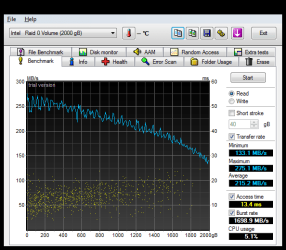
Id go with 2 1tb spinpoint f3's in raid0, costs less than that one WD velociraptor and has almost 7x the capacity! Here are my hddtune results, theyre faster than my 1st gen vertex 2:

29-March-2011_15-19.png
 

My Computer

OS
7 x64
I suspect the real issue here is IDE vs. RAID.

On my ASUS P5Q3 board, I have my SATA configuration as IDE. Each of SATA my drives is thus limited by UDMA5, aka ATA100. I get the same performance on my Supermicro C2SBX board.

No matter what the SATA drives are theoretically rated at speed-wise, if you run them as IDE drives then they're limited to ATA100 performance.
 

My Computer

Computer type
PC/Desktop
Computer Manufacturer/Model Number
Home-built, two systems (1) and (2)
OS
Windows 7 Pro x64 (1), Win7 Pro X64 (2)
CPU
i5-3350p 3.1Ghz/6MB-cache (1); E8400 3.0Ghz/6MB-cache (2)
Motherboard
ASUS P8Z77-V Pro (1); ASUS P5Q3 (2)
Memory
8GB PC3-12800 DDR3 (1); 4GB PC3-10600 DDR3 (2)
Graphics Card(s)
ATI HD7750 (1), (see TV cards); ATI R7 250 (2)
Sound Card
Realtek ALC892 HD Audio (1); Realtek ALC1200 HD Audio (2)
Monitor(s) Displays
Eizo HD2441W LCD, Eizo S2433W (1); Eizo 24" S2433W (2)
Screen Resolution
1920x1200, 1920x1200 (1); 1920x1200 (2)
Hard Drives
(1) 1TB SATA-II (7200RPM), 2x2TB SATA-III (7200RPM), 250GB SATA-III (10000RPM) for OS; 2x2TB external USB 3.0

(2) 320GB SATA-II (7200RPM), 750GB SATA-II (7200RPM), 150GB SATA-II (10000RPM) for OS; 2TB external USB 3.0
PSU
Nesteq ECS-6001 600W (1); Nesteq ECS-5001 500W (2)
Case
Acousti-Case 360 (1) and (2)
Cooling
Noctua NH-U12P SE2 for CPU, 2x120mm case fans (1) and (2)
Keyboard
IBM PS/2 (1) and (2)
Mouse
Logitech MX Revolution wireless (1); Microsoft wired (2)
Internet Speed
100mbps down / 10mbps up
Antivirus
Microsoft Security Essentials; Malwarebyte Anti-Malware Pro
Browser
Firefox
Other Info
Ceton InfiniTV 4-tuner cablecard-enabled TV card as well as Hauppauge HVR-2250 OTA/ATSC 2-tuner TV card in (1), running under Win7 WMC
Post post script...

I'm now of the opinion that it really wasn't the cable or connector. I'm now of the opinion that my drive was truly dying a slow death. I gave it a shot of adrenaline with the cable re-seating, but really the drive was doomed.

Yesterday it started acting up again, just as it had before. I decided enough was enough, and broke out the "spare" drive I'd purchased some weeks back but never installed at that time.
Grrr...

Tonight it acted up again, exactly as it had before! This is the brand new drive, installed just last week.

Same symptom... SATA port 4 (to which that drive is connected) suddenly disappeared from BIOS sensing. And none of my usual "coaxing" methods could bring it back.

I decided to move the cable to another SATA port (#2, which is right next to #4), just in case it really was a failing SATA connector on the motherboard.

Once I did that, sure enough the drive was now sensed again and I was back in business. Fingers crossed this is the final and permanent solution.


So, looks like I threw out what probably was a perfectly good Velociraptor last week, if it was the SATA port 4 connector all along that was the flaky component.

Oh well. Alls well that ends well. Fingers crossed.
 

My Computer

Computer type
PC/Desktop
Computer Manufacturer/Model Number
Home-built, two systems (1) and (2)
OS
Windows 7 Pro x64 (1), Win7 Pro X64 (2)
CPU
i5-3350p 3.1Ghz/6MB-cache (1); E8400 3.0Ghz/6MB-cache (2)
Motherboard
ASUS P8Z77-V Pro (1); ASUS P5Q3 (2)
Memory
8GB PC3-12800 DDR3 (1); 4GB PC3-10600 DDR3 (2)
Graphics Card(s)
ATI HD7750 (1), (see TV cards); ATI R7 250 (2)
Sound Card
Realtek ALC892 HD Audio (1); Realtek ALC1200 HD Audio (2)
Monitor(s) Displays
Eizo HD2441W LCD, Eizo S2433W (1); Eizo 24" S2433W (2)
Screen Resolution
1920x1200, 1920x1200 (1); 1920x1200 (2)
Hard Drives
(1) 1TB SATA-II (7200RPM), 2x2TB SATA-III (7200RPM), 250GB SATA-III (10000RPM) for OS; 2x2TB external USB 3.0

(2) 320GB SATA-II (7200RPM), 750GB SATA-II (7200RPM), 150GB SATA-II (10000RPM) for OS; 2TB external USB 3.0
PSU
Nesteq ECS-6001 600W (1); Nesteq ECS-5001 500W (2)
Case
Acousti-Case 360 (1) and (2)
Cooling
Noctua NH-U12P SE2 for CPU, 2x120mm case fans (1) and (2)
Keyboard
IBM PS/2 (1) and (2)
Mouse
Logitech MX Revolution wireless (1); Microsoft wired (2)
Internet Speed
100mbps down / 10mbps up
Antivirus
Microsoft Security Essentials; Malwarebyte Anti-Malware Pro
Browser
Firefox
Other Info
Ceton InfiniTV 4-tuner cablecard-enabled TV card as well as Hauppauge HVR-2250 OTA/ATSC 2-tuner TV card in (1), running under Win7 WMC
all I can say is I had 5 first gen raptors in a raid, they were nothing but trouble. 2 died within days of each other just on the wrong side of the warranty.
So far they're lifespan and failure rate have not impressed me. The speed difference wasn't super noticeable then I don't know if they've fixed that yet or not. I quit buying them.
 

My Computer

Computer Manufacturer/Model Number
Insane hobo technologies. ;-)
OS
Windows 7 x64
CPU
Intel i7 2600k
Motherboard
Asrock z68 extreme 4 gen 3
Memory
G.skill Ripjaw 16gigs @ 1866
Graphics Card(s)
Nvidia gtx580 (evga)
Sound Card
Integrated HD audio + hdmi
Monitor(s) Displays
24" ASUS widescreen + 42" insignia
Screen Resolution
1080p (1920x1080)
Hard Drives
128 Samsung 830
256 Samsung 840
3 x 1tb storage drive (various)
1 western digital 1tb (eSATA)
1 Seagate 1tb (eSATA)
PSU
1 kilowatt SLI/Crossfire rated Silverstone modular
Case
NZXT Phantom + additional 220 fan
Cooling
Zalmann
Keyboard
Microsoft wireless 3000 (v2)
Mouse
MS - wireless 5000 (bluetrack)
Internet Speed
depends on if you ask me or my provider.
Other Info
The above information is provided as is, and the author assumes no responsibility for issues it may cause with your sanity or fanboyism.
Just one more [hopefully] final postscript to this story.

Remarkably, the very same symptom started up again! Just spontaneously, having been running for several months with no problem!

At first, I tried to avoid HIBERNATE since I had previously seemed to have more success if I just let the machine run 24/7 (although I didn't want to), and didn't recycle the power supply. Unfortunately, this now trick seemed to be having no luck in overcoming the now constant problem.

Also, as usual, I went through the same assorted "kick the tires" tricks I'd been having succes with, such as moving the SATA cable to yet another motherboard connector (although I'd now run through all 5 which were theoretically available, since the sixth was already happily and successfully use for another SATA drive, and I didn't want to disturb it), pulling the power and SATA cable from the drive end, even changing to yet another SATA cable. Powering the machine down, powering it up, getting into the BIOS, getting out of the BIOS, etc. Everything I could think of to "wake up the drive", which was I was still convinced was perfectly fine.

But for some reason, with this particular episode I just couldn't coax it back to life. But I was not about to replace this drive again, as I'd rushed-to-judgement the last time and replaced my prior drive with this one.

Then, quite by accident, I was inside the case pulling some neighboring cables aside, to see if I could get access to the hardest-to-see #6 SATA connector on the mobo to try it out. And amazingly, as I was pulling the cables away, the OTHER END OF THE POWER ADAPTER CABLE simply swung free!

I am using a short maybe 3" MOLEX(M)-to-SATA(M) power adapter cable, to plug the MOLEX end into a spare MOLEX(F) connector on a cable coming out of my power supply and then connect the SATA end onto the drive. Well, apparently the MOLEX(F) connector and MOLEX(M) end were not a perfect fit. In fact, they were kind of loose. Normally these two connectors will "snap" together when you push them together firmly, to hold them locked securely. In this case not only were they not "snapping" coupled, but there didn't seem to be enough friction on the 4-pins to keep them really snuggly together, in order to make sure that all 4 pins were conducting properly.

Anyway, I kicked myself for not thinking of that all these past months of having the same problem. So this time I very carefully re-attached the two MOLEX connectors firmly and securely, re-routing it so that it was no longer located where it was, and in fact was buried nicely in a nest of other cables for physical support. I probably should have gone out and bought another adapter, but I was convinced this minor adjustment would do the trick.

Close everything up, re-boot... and VOILA!!! Perfect! Drive is now back to life!

What a dummy I am. I was only looking at the cable connectors going into the drive, and onto the motherboard, and not ever thinking about the other end of the power adapter cable that connected to the main MOLEX power supply cable.

Oh well. I truly hope this case is now closed permanently! And I still feel the Velociraptor is an excellent and almost silent drive, that I'm very happy with.
 

My Computer

Computer type
PC/Desktop
Computer Manufacturer/Model Number
Home-built, two systems (1) and (2)
OS
Windows 7 Pro x64 (1), Win7 Pro X64 (2)
CPU
i5-3350p 3.1Ghz/6MB-cache (1); E8400 3.0Ghz/6MB-cache (2)
Motherboard
ASUS P8Z77-V Pro (1); ASUS P5Q3 (2)
Memory
8GB PC3-12800 DDR3 (1); 4GB PC3-10600 DDR3 (2)
Graphics Card(s)
ATI HD7750 (1), (see TV cards); ATI R7 250 (2)
Sound Card
Realtek ALC892 HD Audio (1); Realtek ALC1200 HD Audio (2)
Monitor(s) Displays
Eizo HD2441W LCD, Eizo S2433W (1); Eizo 24" S2433W (2)
Screen Resolution
1920x1200, 1920x1200 (1); 1920x1200 (2)
Hard Drives
(1) 1TB SATA-II (7200RPM), 2x2TB SATA-III (7200RPM), 250GB SATA-III (10000RPM) for OS; 2x2TB external USB 3.0

(2) 320GB SATA-II (7200RPM), 750GB SATA-II (7200RPM), 150GB SATA-II (10000RPM) for OS; 2TB external USB 3.0
PSU
Nesteq ECS-6001 600W (1); Nesteq ECS-5001 500W (2)
Case
Acousti-Case 360 (1) and (2)
Cooling
Noctua NH-U12P SE2 for CPU, 2x120mm case fans (1) and (2)
Keyboard
IBM PS/2 (1) and (2)
Mouse
Logitech MX Revolution wireless (1); Microsoft wired (2)
Internet Speed
100mbps down / 10mbps up
Antivirus
Microsoft Security Essentials; Malwarebyte Anti-Malware Pro
Browser
Firefox
Other Info
Ceton InfiniTV 4-tuner cablecard-enabled TV card as well as Hauppauge HVR-2250 OTA/ATSC 2-tuner TV card in (1), running under Win7 WMC
Back
Top