
Solved Verizon Email mysteriously stopped working

Reference pages:

WRT54G Support page
User Manual (PDF)

Will need to know the hardware version (WRT54G ver. x.y) for any firmware updates
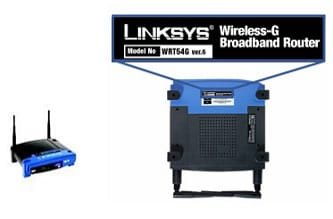
WRT54G_modelnumber.jpg
  1. Flip the device over.

  2. You should find the model number on the sticker underneath the device. Please see the example.

  3. Take note of the exact model number and version of your Linksys device.
    The serial number is located right underneath the model number.
    In this example, the model number of the device is WRT54G ver 6.

    NOTE: The images may vary depending on the exact model number of your Linksys Product.
    If there is no version number beside the model number it means that is version 1.

There are too many possible cable modems offered by Optimum - I'll wait until you post the exact model to provide links for that device. Note that the full model for that device is also needed - firmware is generally controlled by the ISP (Optimum), but a reference manual is always a good thing to have.

The odd thing about this issue is that it recently began. Barring any known configuration changes, that leaves Cablevision (DNS) or firmware changes to the network devices, possibly firewall rules. There's no rhyme or reason for a single site to be affected. For it to be even further narrowed down to secure pages is quite the puzzle.

Are you the only person with the authority to change the network configuration?

If the DNS change and power cycle do not resolve the issue, then you'll have to provide screen shots or text versions (if possible) of the network device configurations. This can wait, pending the results of any outstanding tests.

Bill
.
 

My Computer My Computer

At a glance

x64 (6.3.9600) Win8.1 Pro & soon dual boot x6...AMD A6-3420M APU with Radeon(tm) HD Graphics6.00 GBAMD Radeon(TM) HD 6520G
Computer type
Laptop
Computer Manufacturer/Model Number
HP Pavilion dv6-6c10us
OS
x64 (6.3.9600) Win8.1 Pro & soon dual boot x64 (6.1.7601) Win7_SP1 HomePrem
CPU
AMD A6-3420M APU with Radeon(tm) HD Graphics
Motherboard
Hewlett-Packard 1805
Memory
6.00 GB
Graphics Card(s)
AMD Radeon(TM) HD 6520G
Sound Card
(1) AMD High Definition Audio Device (2) IDT High Definiti
Monitor(s) Displays
HP W2072a 20" LCD (1600 x 900) @ 60 Hz
Screen Resolution
1366 x 768 x 32 bits (4294967296 colors) @ 60 Hz
Hard Drives
ST640LM0 00 HM641JI SATA Disk Device
Keyboard
Logitech k520 wireless KB
Mouse
Logitech m320 wireless mouse (bundled with KB)
Internet Speed
15/5 | 54 MB Wireless 'n'
Antivirus
Realtime: Defender or Avast | On-demand: Malwarebytes, ESET
Browser
IE 11 on Win8, IE 10 on win 7
Other Info
Media: [Gimp, Audacity, VLC] || Comm: [WEmail 2012, Skype] || Productivity: [OpenOffice,| Textpad] || Utils: [Sysinternals, cCleaner, Speccy, Defraggler]
Ok, so came in an connected computer directly to cable modem, bypassing router completely. Still had the problem. I then proceeded to reset the modem by holding the reset button for several seconds. Once it came back online, the problem was still not resolved.

I tried changing my DNS to Google as suggested but no change.

I assume we can rule out a router problem since it is not connected and the problem continues.

Cable modem model is:
Arris
model:TM804G
p/n TM04DHD804

Don't know how to access configuration page of modem like I do with the router (192.168.1.1)
edit:
nevermind, found out its 192.168.100.1

The odd thing about this issue is that it recently began. Barring any known configuration changes, that leaves Cablevision (DNS) or firmware changes to the network devices, possibly firewall rules. There's no rhyme or reason for a single site to be affected. For it to be even further narrowed down to secure pages is quite the puzzle.

I know its baffling. Verizon seems to be the only site (and Email) that doesn't seem to load. I don't want to start talking conspiracy theories, but Verizon is a direct competitor or Optimum in my area, and its extremely far fetched, but since nothing else seems to be a cause maybe Optimum is purposely blocking Verizon.

Are you the only person with the authority to change the network configuration?
Well we are a very small local business without any security protocol. Anyone here "can" change network settings, but everyone else here would have no clue on how to. As stated very early in this thread, there was suspicious activity on my computer and possible thought of a hacker attack. If it indeed was an intruder, then technically speaking, they would have access to network settings.
 

My Computer My Computer

At a glance

Windows 7 Home Premium 64 bitAMD Turion(tm) II Ultra Dual-Core Mobile M6004GB DIMM DDR-2AMD M880G with ATI Mobility Radeon HD 4200
Computer Manufacturer/Model Number
HP Pavilion dv7 notebook
OS
Windows 7 Home Premium 64 bit
CPU
AMD Turion(tm) II Ultra Dual-Core Mobile M600
Motherboard
Quanta 3638
Memory
4GB DIMM DDR-2
Graphics Card(s)
AMD M880G with ATI Mobility Radeon HD 4200
Screen Resolution
1600 x 900 x 32 bits (4294967296 colors) @ 60 Hz
Hard Drives
TOSHIBA MK5056GSY ATA Device
465.76GB
Internet Speed
Verizon Fios 20up/10down
I am stumped!

Arris TM804 User Guide (PDF)

Last ditch effort, wait until the evening so you don't disrupt the workday use of the network.

Power down the Arris and remove the AC jack
disconnect all cables
Wait 5-10 minutes
reinstall per the manual

Page 23 (install)
and pages 33-36 (TCP/IP setting)
View attachment TM804UG-pg23, pg33-36.pdf
  1. Connect one end of the coax cable to the cable outlet or splitter.
    Connect the other end to the Telephony Modem’s Cable connector (G).
    Tighten the connections by hand, then tighten an additional 1/8 turn with a wrench.

  2. Insert the plug from the power cord into the Power connector on the Telephony Modem (H) and insert the power cord into a convenient AC outlet.
    The Power light on the front of the Telephony Modem lights up, then flashes once
    (refer to the Indicator Lights table for your model). See Troubleshooting if the Power light does not turn on.


    Making Ethernet Connections
  3. Connect one end of the yellow Ethernet cable to the yellow port on the back of the Telephony Modem labeled Ethernet 10/100/1000 (F) and the other end to the Ethernet port on a computer, hub, or broadband router.
    :note: If you are connecting to a computer, use the Ethernet cable included in the Telephony Modem package.

    Making Telephone Connections
  4. Connect one end of the telephone cable to one of the grey telephone ports on the back of the Telephony Modem (A, B, C or D). Connect the other end to the telephone.
    :note: If you have a phone with two separate lines on a single RJ-14 cord, plug it into the port labeled Tel 1/2 or Tel3/4

I'd like to leave the Linksys router out of the equation for this test.

Connect a machine directly to the Arris cable modem via Ethernet.

Also, I want to make sure you set both the IPV4 and IPV6 DNS to the public Google DNS. I'm not sure what protocol Optimum is using, so it's easier to just set both. Sorry if I was ambiguous in my previous post.

If this fails, than all I can offer is - Call Optimum
explain that after detailed trouble shooting, the issue remains unresolved
everything has been reset to defaults (PC, Linksys router and Arris) and the DNS was set to the public Google DNS as a workaround test.
Arris was power cycled and reinstalled per the manual
The Arris battery has not been removed and replaced

This is a very narrow connectivity issue related solely to secure Verizon pages.​
 

My Computer My Computer

At a glance

x64 (6.3.9600) Win8.1 Pro & soon dual boot x6...AMD A6-3420M APU with Radeon(tm) HD Graphics6.00 GBAMD Radeon(TM) HD 6520G
Computer type
Laptop
Computer Manufacturer/Model Number
HP Pavilion dv6-6c10us
OS
x64 (6.3.9600) Win8.1 Pro & soon dual boot x64 (6.1.7601) Win7_SP1 HomePrem
CPU
AMD A6-3420M APU with Radeon(tm) HD Graphics
Motherboard
Hewlett-Packard 1805
Memory
6.00 GB
Graphics Card(s)
AMD Radeon(TM) HD 6520G
Sound Card
(1) AMD High Definition Audio Device (2) IDT High Definiti
Monitor(s) Displays
HP W2072a 20" LCD (1600 x 900) @ 60 Hz
Screen Resolution
1366 x 768 x 32 bits (4294967296 colors) @ 60 Hz
Hard Drives
ST640LM0 00 HM641JI SATA Disk Device
Keyboard
Logitech k520 wireless KB
Mouse
Logitech m320 wireless mouse (bundled with KB)
Internet Speed
15/5 | 54 MB Wireless 'n'
Antivirus
Realtime: Defender or Avast | On-demand: Malwarebytes, ESET
Browser
IE 11 on Win8, IE 10 on win 7
Other Info
Media: [Gimp, Audacity, VLC] || Comm: [WEmail 2012, Skype] || Productivity: [OpenOffice,| Textpad] || Utils: [Sysinternals, cCleaner, Speccy, Defraggler]
Thanks for all your help through this. Will try that later and if no success will call Optimum. At one point or another I was considering a reformat/reinstall of windows, but now I'm not even sure that will fix anything.

Hypothetically speaking, is it even possible to have a network virus, or a virus on a different machine that affects all computers in the network? Would it even be worth attempting all the suggested fixes on all other machines?
 

My Computer My Computer

At a glance

Windows 7 Home Premium 64 bitAMD Turion(tm) II Ultra Dual-Core Mobile M6004GB DIMM DDR-2AMD M880G with ATI Mobility Radeon HD 4200
Computer Manufacturer/Model Number
HP Pavilion dv7 notebook
OS
Windows 7 Home Premium 64 bit
CPU
AMD Turion(tm) II Ultra Dual-Core Mobile M600
Motherboard
Quanta 3638
Memory
4GB DIMM DDR-2
Graphics Card(s)
AMD M880G with ATI Mobility Radeon HD 4200
Screen Resolution
1600 x 900 x 32 bits (4294967296 colors) @ 60 Hz
Hard Drives
TOSHIBA MK5056GSY ATA Device
465.76GB
Internet Speed
Verizon Fios 20up/10down
I think your laptop test proved that it is a network configuration issue - probably on Optimum.

The acid test would be to take a work machine home (any laptops?) and see if it can get to Verizon.

I think network malware does exist, but rare - routers and cable modems are usually based on Linux or proprietary software. Power cycling would (should) eradicate any that might be present. It would be a poor piece of malware to only affect Verizon secure pages, but ...

More than likely, it's a firewall or NAT issue, or something on Optimum's side. It's so limited in scope that it would be easy to miss from a technical side - how many Optimum users try to get to Verizon secure pages?

A reinstall - don't bother. You've essentially looked in all of the places that might affect this.

And the other machines - also I wouldn't bother trying the fixes on them.

I'll always lean back on the Laptop that works on the home network, but not on the office network as a definitive argument.

Please post what Optimum tells you (or if the page and eMail mysteriously begin working again after your call ;)
I'm sure they will run you through most of the things you already did in this thread. Follow their instructions - it's their job and they need to know that you've done the tests they require. It will be easier and faster on the phone

To be fair ... it might be Verizon blocking Optimum. You could also call Verizon, but I'd start with Optimum.
 

My Computer My Computer

At a glance

x64 (6.3.9600) Win8.1 Pro & soon dual boot x6...AMD A6-3420M APU with Radeon(tm) HD Graphics6.00 GBAMD Radeon(TM) HD 6520G
Computer type
Laptop
Computer Manufacturer/Model Number
HP Pavilion dv6-6c10us
OS
x64 (6.3.9600) Win8.1 Pro & soon dual boot x64 (6.1.7601) Win7_SP1 HomePrem
CPU
AMD A6-3420M APU with Radeon(tm) HD Graphics
Motherboard
Hewlett-Packard 1805
Memory
6.00 GB
Graphics Card(s)
AMD Radeon(TM) HD 6520G
Sound Card
(1) AMD High Definition Audio Device (2) IDT High Definiti
Monitor(s) Displays
HP W2072a 20" LCD (1600 x 900) @ 60 Hz
Screen Resolution
1366 x 768 x 32 bits (4294967296 colors) @ 60 Hz
Hard Drives
ST640LM0 00 HM641JI SATA Disk Device
Keyboard
Logitech k520 wireless KB
Mouse
Logitech m320 wireless mouse (bundled with KB)
Internet Speed
15/5 | 54 MB Wireless 'n'
Antivirus
Realtime: Defender or Avast | On-demand: Malwarebytes, ESET
Browser
IE 11 on Win8, IE 10 on win 7
Other Info
Media: [Gimp, Audacity, VLC] || Comm: [WEmail 2012, Skype] || Productivity: [OpenOffice,| Textpad] || Utils: [Sysinternals, cCleaner, Speccy, Defraggler]
This is from post #17, Click on the orange dot to go back to it.
Still nothing... Actually I'm worse now. I ran several different Malware, Adware and junk removal tools, and now I cannot load the Verizon page at all. Verizon Wireless will open and any random other pages but Verizon.com/.net will not even load at all. its like something is blocking the Verizon domain specifically.

Bill, while you and Buratti were slugging it out with the troubleshooting today, something clicked in one of the posts about the relationship between Cablevision/Optimum and Vz, I believe it was this:
I know its baffling. Verizon seems to be the only site (and Email) that doesn't seem to load. I don't want to start talking conspiracy theories, but Verizon is a direct competitor or Optimum in my area, and its extremely far fetched, but since nothing else seems to be a cause maybe Optimum is purposely blocking Verizon.

Searching around I found that the two of them have had a troubled past. This may be a shot in the dark, but I ran across this from Vz, it's from 2009, but Vz is notorious for springing changes on its customers:
Your Attention Needed: Re-configure Your Email Settings to Send Email
If you are having trouble sending or receiving email using your email software (Windows Vista Mail, Outlook, or Outlook Express), you might try switching your outbound port to 465......

......Will outbound port 25 blocking apply to all Verizon broadband customers?
Outbound port 25 blocking will be applied to FIOS and High Speed Internet services that use dynamic IP addresses. If you subscribe to a static IP address service, you will not be affected.....

......Will I be impacted by port 25 blocking?
If you have a dynamic IP address and you use a third party email account to send email from a desktop client such as Outlook®, Outlook Express® or similar programs, you may be affected and should continue to read this notice. If you are using email provided as part of your Verizon service or a web-based email account from another provider, you will not be affected.

The instructions to change the ports are here from the source: https://www.verizon.com/Support/Res...t/email/setup+and+use/questionsone/124274.htm
Bill, I know you were asking Buratti to change the dynamic DNS to a static DNS, and this is talking about dynamic to static IP addresses.

Then there's this near the end:
I am using a third party email account. I also use a desktop client to manage my email. What must I do to continue using my third party service?
You have three options:

  1. Change your email client to send email using port 465. Click step-by-step instructions to change your port settings now.
  2. Use web based email services. Web based e-mail is unaffected by port 25 blocking. Check with your e-mail provider to see if web based access is available.
  3. Upgrade to a FIOS or High Speed Internet account with static IP addressing. Business customers may subscribe to static IP addressing.
Same source as above
There's so many caveats between Buratti's email setup and this, that's why it may be a shot in the dark.


What I've found for CableVision/Optimum
(CVO):
This is pretty old the latest OS, Windows 2000: CableVision/Optimum Online with a Linksys Router

This is the only info I could find using CVO links, I ran into a brick wall because I don't have a log-in account, heh, at least Vz will let you snoop around whether I'm logged-in or not. :p:
Optimum | Smart Router Manage Settings

How do I use Outlook with Cablevision Optimum Online e mail

This is a third-party email going through Vz and CVO, It calls for changing port 25 to 587 instead of Vz's 465: Problems Sending E-Mail Using Optimum Online or SMTP Settings for Optonline and other ISPs

This is really old: Cablevision blocking outgoing SMTP ports - what can I do? ? mozillaZine Forums


Buratti, there's something that still concerns me. In you original post you mentioned how you thought your work machine was hacked; Have you done any scans?

What type of anti-malware protocols do you have in place? Do you use Microsoft's or do you have third-party like Kaspersky, Eset, Malwarebytes, et al.?
 

My Computer My Computer

At a glance

Originally Win 7 Hm Prem x64 Ver 6.1.7600 Bui...Intel i3 530 2.93GHz, 2933MHz 2 Cores 4 Logic...6GB of 1,333MHz DDR3 SDRAM32MB Intel Graphics Media Accelerator HD IGChip
Computer type
PC/Desktop
Computer Manufacturer/Model Number
Gateway DX4831-01e (Mid-Tower Desktop)
OS
Originally Win 7 Hm Prem x64 Ver 6.1.7600 Build 7601-SP1 | Upgraded to Windows 10 December 14, 2019
CPU
Intel i3 530 2.93GHz, 2933MHz 2 Cores 4 Logical Processors
Motherboard
Gateway H57M01 133 megahertz
Memory
6GB of 1,333MHz DDR3 SDRAM
Graphics Card(s)
32MB Intel Graphics Media Accelerator HD IGChip
Sound Card
Realtek High Definition Audio
Monitor(s) Displays
Gateway HX2000 20inch TFT active matrix TN
Screen Resolution
1600 x 900 x 59 hertz
Hard Drives
WDC WD10EADS-00M2B0 [HDD] (1000.20 GB) -- drive 0,
HL-DT-ST DVDRAM GH41N [CD-ROM dr]
Four card readers, and Four USB 2.0
PSU
300watts.
Case
Mid-Tower Desktop
Cooling
Stock from Gateway
Keyboard
Natural Ergonomic Keyboard 4000, see Other Info
Mouse
Orig. Gateway wore out now using Insignia USB wired optical
Internet Speed
Vz FIOS 10ms png 57.64Mbps down 65.53Mbps up Speedtest.org
Antivirus
Zamana Anti-logger with Anti-malware, MSE, Windows Firewall,
Browser
IE11.0.9600.19399-Upd ver11.0.135, Firefox 68.0.1 x64
Other Info
System Specs by Belarc.

BIOS: American Megatrends Inc. P01-A0 11/17/2009

Replaced the MS 'Natural' Standard PS/2 Enhanced 101-102 Keyboard with a new Natural Ergonomic Keyboard 4000 on August 1st 2014.

Canon Pixma MG3222 Printer.

Updated to IE11 on 12102015 | Fios Quantum Router g1100

Additional AV: SpywareBlaster, manual Mbam, SAS
Thanks Steve, all good stuff.

I've kept the malware concern on the back burner mainly because a few trusted scanners (Mbam, AdwCleaner, TFC, and JRT) did their job and I'm fairly confident that the system Buratti is testing on is relatively clean of malware. That's not saying I wouldn't like to run a few other scans, but I lost track of a few things during the troubleshooting and forgot to revisit that course of action. Your post made me go over the thread again and I see that I also forgot to follow up on the SFC errors and a few other housekeeping chores.

Regardless of my follow up, subsequent testing bore out that it's not only an eMail issue. The best argument is that a laptop that works (can connect to secure Vze pages on the home network - cannot connect to them on the work network). This, to me anyway, is empirical evidence that the issue is not related to a machine configuration (DNS, Browser, eMail server ports, ipconfig)

The Buratti tracert could not get to Verizon.net octet address - odd because the browser can (through the DNS)
This was the last hop on Buratti's trace
so-2-1-0-0.DFW03-CORE-RTR1.verizon-gni.net [130.81.20.219]
This is the 1st Vze node in the route.

Both your and my own traces made it to the end address: 206.46.232.39
9 * * * Request timed out.
10 * * * Request timed out.
11 64 ms 70 ms 72 ms 206.46.228.129
12 102 ms 70 ms 68 ms 206.46.232.39

Trace complete.​

Anyway, I always welcome your input - it has kept me sane many times and I'm glad another pair of eyes are looking at the issue.

I'm going to leave it in Optimum's court (or Verizon's court) for the moment.

Bill
.
 

My Computer My Computer

At a glance

x64 (6.3.9600) Win8.1 Pro & soon dual boot x6...AMD A6-3420M APU with Radeon(tm) HD Graphics6.00 GBAMD Radeon(TM) HD 6520G
Computer type
Laptop
Computer Manufacturer/Model Number
HP Pavilion dv6-6c10us
OS
x64 (6.3.9600) Win8.1 Pro & soon dual boot x64 (6.1.7601) Win7_SP1 HomePrem
CPU
AMD A6-3420M APU with Radeon(tm) HD Graphics
Motherboard
Hewlett-Packard 1805
Memory
6.00 GB
Graphics Card(s)
AMD Radeon(TM) HD 6520G
Sound Card
(1) AMD High Definition Audio Device (2) IDT High Definiti
Monitor(s) Displays
HP W2072a 20" LCD (1600 x 900) @ 60 Hz
Screen Resolution
1366 x 768 x 32 bits (4294967296 colors) @ 60 Hz
Hard Drives
ST640LM0 00 HM641JI SATA Disk Device
Keyboard
Logitech k520 wireless KB
Mouse
Logitech m320 wireless mouse (bundled with KB)
Internet Speed
15/5 | 54 MB Wireless 'n'
Antivirus
Realtime: Defender or Avast | On-demand: Malwarebytes, ESET
Browser
IE 11 on Win8, IE 10 on win 7
Other Info
Media: [Gimp, Audacity, VLC] || Comm: [WEmail 2012, Skype] || Productivity: [OpenOffice,| Textpad] || Utils: [Sysinternals, cCleaner, Speccy, Defraggler]
Okay sounds good to me Bill, we'll have to wait to see what Buratti finds out from them.

Thank you for the kind words, and Rep!

Steve
 

My Computer My Computer

At a glance

Originally Win 7 Hm Prem x64 Ver 6.1.7600 Bui...Intel i3 530 2.93GHz, 2933MHz 2 Cores 4 Logic...6GB of 1,333MHz DDR3 SDRAM32MB Intel Graphics Media Accelerator HD IGChip
Computer type
PC/Desktop
Computer Manufacturer/Model Number
Gateway DX4831-01e (Mid-Tower Desktop)
OS
Originally Win 7 Hm Prem x64 Ver 6.1.7600 Build 7601-SP1 | Upgraded to Windows 10 December 14, 2019
CPU
Intel i3 530 2.93GHz, 2933MHz 2 Cores 4 Logical Processors
Motherboard
Gateway H57M01 133 megahertz
Memory
6GB of 1,333MHz DDR3 SDRAM
Graphics Card(s)
32MB Intel Graphics Media Accelerator HD IGChip
Sound Card
Realtek High Definition Audio
Monitor(s) Displays
Gateway HX2000 20inch TFT active matrix TN
Screen Resolution
1600 x 900 x 59 hertz
Hard Drives
WDC WD10EADS-00M2B0 [HDD] (1000.20 GB) -- drive 0,
HL-DT-ST DVDRAM GH41N [CD-ROM dr]
Four card readers, and Four USB 2.0
PSU
300watts.
Case
Mid-Tower Desktop
Cooling
Stock from Gateway
Keyboard
Natural Ergonomic Keyboard 4000, see Other Info
Mouse
Orig. Gateway wore out now using Insignia USB wired optical
Internet Speed
Vz FIOS 10ms png 57.64Mbps down 65.53Mbps up Speedtest.org
Antivirus
Zamana Anti-logger with Anti-malware, MSE, Windows Firewall,
Browser
IE11.0.9600.19399-Upd ver11.0.135, Firefox 68.0.1 x64
Other Info
System Specs by Belarc.

BIOS: American Megatrends Inc. P01-A0 11/17/2009

Replaced the MS 'Natural' Standard PS/2 Enhanced 101-102 Keyboard with a new Natural Ergonomic Keyboard 4000 on August 1st 2014.

Canon Pixma MG3222 Printer.

Updated to IE11 on 12102015 | Fios Quantum Router g1100

Additional AV: SpywareBlaster, manual Mbam, SAS
Hi guys for all of the help :)
I had a similar issue with at&t blocking access to HostMonster my domain name email service for office,
HostMonster confirmed at&t tagged them can't remember the reason but calling both eventually cleared the issue,

I also had HostMoster pop3'ing to a gmail address which was unaffected :confused:
Phone support with HostMoster really helped in figuring out the cause ;)
 

My Computer My Computer

At a glance

Win-7-Pro64bit 7-H-Prem-64biti7-5930K 2nd i9-9940x both water blocked VRM'...Trident-z 3200C14 2nd Trident-z 3600C16EVGA 1080ti ftw3 2nd Titan Xp both water blocked
Computer type
PC/Desktop
Computer Manufacturer/Model Number
Custom assembled by me :}
OS
Win-7-Pro64bit 7-H-Prem-64bit
CPU
i7-5930K 2nd i9-9940x both water blocked VRM's too
Motherboard
ASUS SABERTOOTH X99 2nd ASUS x299 Apex
Memory
Trident-z 3200C14 2nd Trident-z 3600C16
Graphics Card(s)
EVGA 1080ti ftw3 2nd Titan Xp both water blocked
Sound Card
Built-in Realtek
Monitor(s) Displays
1-AOC G2460PG 24"G-Sync 144Hz/ 2nd 1-ASUS VG248QE 24" 144Hz
Screen Resolution
1920 x 1080 144Hz
Hard Drives
2-Samsung M.2 Evo & Evo Plus
2-Samsung 850 EVO 500GB SSD's/ 3-2.5 W.D. Black 1tb-&3-1tb/3-3.5 WD Black 1tb hdd's
PSU
EVGA SuperNOVA 1000-P2 2nd 1200-P2
Case
2-Corsair Obsidian Series 450D Black ATX Mid Tower
Cooling
Custom water loops
Keyboard
Logitech G710+/ 2nd Logitech G910
Mouse
2-RedDragon M901 Perdition 16400 dpi Gaming mouse = wired
Internet Speed
Comcast Ping 19ms 89.31mbps download speed 6.12mbps upload
Antivirus
Malwarebytes Pro/ Superantispyware Pro
Browser
FireFox & Pale moon
Other Info
2nd ASUS X299 Apex/Intel i9-9940x with Custom water loop/7H-Prem-x64/Corsair 450D case/Ram Trident-z 3600C16 4x8gb / Samsung970Evo plus 500gb SSD/Dual ssd EZ swap evo/PSU EVGA SuperNova 1200w-P2 80+Platinum/GPU Titan Xp /8-ML-140 on push-pull on 2-280GTX rads
You're welcome Mike

Hi guys for all of the help :)
I had a similar issue with at&t blocking access to HostMonster my domain name email service for office,
HostMonster confirmed at&t tagged them can't remember the reason but calling both eventually cleared the issue,

I also had HostMoster pop3'ing to a gmail address which was unaffected :confused:
I've been poppin' an imapin'my Vz mail over to gmail for the last 4years, so far so good.
Phone support with HostMoster really helped in figuring out the cause ;)
Let's hope Buratti has the same fortune......I wonder though, if he got caught in Vz's six-strikes-you're-out terms of service, CVO is doing the same thing, but Buratti didn't mention if he received any warnings. Nor did he mention if he received any spam warnings, but that wouldn't be unusual for Vz to do that (not warn) their famous for that; CVO, I don't know?

   Note
Buratti, just thinking out loud, no offense meant.
 

My Computer My Computer

At a glance

Originally Win 7 Hm Prem x64 Ver 6.1.7600 Bui...Intel i3 530 2.93GHz, 2933MHz 2 Cores 4 Logic...6GB of 1,333MHz DDR3 SDRAM32MB Intel Graphics Media Accelerator HD IGChip
Computer type
PC/Desktop
Computer Manufacturer/Model Number
Gateway DX4831-01e (Mid-Tower Desktop)
OS
Originally Win 7 Hm Prem x64 Ver 6.1.7600 Build 7601-SP1 | Upgraded to Windows 10 December 14, 2019
CPU
Intel i3 530 2.93GHz, 2933MHz 2 Cores 4 Logical Processors
Motherboard
Gateway H57M01 133 megahertz
Memory
6GB of 1,333MHz DDR3 SDRAM
Graphics Card(s)
32MB Intel Graphics Media Accelerator HD IGChip
Sound Card
Realtek High Definition Audio
Monitor(s) Displays
Gateway HX2000 20inch TFT active matrix TN
Screen Resolution
1600 x 900 x 59 hertz
Hard Drives
WDC WD10EADS-00M2B0 [HDD] (1000.20 GB) -- drive 0,
HL-DT-ST DVDRAM GH41N [CD-ROM dr]
Four card readers, and Four USB 2.0
PSU
300watts.
Case
Mid-Tower Desktop
Cooling
Stock from Gateway
Keyboard
Natural Ergonomic Keyboard 4000, see Other Info
Mouse
Orig. Gateway wore out now using Insignia USB wired optical
Internet Speed
Vz FIOS 10ms png 57.64Mbps down 65.53Mbps up Speedtest.org
Antivirus
Zamana Anti-logger with Anti-malware, MSE, Windows Firewall,
Browser
IE11.0.9600.19399-Upd ver11.0.135, Firefox 68.0.1 x64
Other Info
System Specs by Belarc.

BIOS: American Megatrends Inc. P01-A0 11/17/2009

Replaced the MS 'Natural' Standard PS/2 Enhanced 101-102 Keyboard with a new Natural Ergonomic Keyboard 4000 on August 1st 2014.

Canon Pixma MG3222 Printer.

Updated to IE11 on 12102015 | Fios Quantum Router g1100

Additional AV: SpywareBlaster, manual Mbam, SAS
Anything to update Buratti?

Did the power cycle in post# 63 do any good?

Any word from our friends at the ISPs?

An inquiring mind wants to know :)
 

My Computer My Computer

At a glance

x64 (6.3.9600) Win8.1 Pro & soon dual boot x6...AMD A6-3420M APU with Radeon(tm) HD Graphics6.00 GBAMD Radeon(TM) HD 6520G
Computer type
Laptop
Computer Manufacturer/Model Number
HP Pavilion dv6-6c10us
OS
x64 (6.3.9600) Win8.1 Pro & soon dual boot x64 (6.1.7601) Win7_SP1 HomePrem
CPU
AMD A6-3420M APU with Radeon(tm) HD Graphics
Motherboard
Hewlett-Packard 1805
Memory
6.00 GB
Graphics Card(s)
AMD Radeon(TM) HD 6520G
Sound Card
(1) AMD High Definition Audio Device (2) IDT High Definiti
Monitor(s) Displays
HP W2072a 20" LCD (1600 x 900) @ 60 Hz
Screen Resolution
1366 x 768 x 32 bits (4294967296 colors) @ 60 Hz
Hard Drives
ST640LM0 00 HM641JI SATA Disk Device
Keyboard
Logitech k520 wireless KB
Mouse
Logitech m320 wireless mouse (bundled with KB)
Internet Speed
15/5 | 54 MB Wireless 'n'
Antivirus
Realtime: Defender or Avast | On-demand: Malwarebytes, ESET
Browser
IE 11 on Win8, IE 10 on win 7
Other Info
Media: [Gimp, Audacity, VLC] || Comm: [WEmail 2012, Skype] || Productivity: [OpenOffice,| Textpad] || Utils: [Sysinternals, cCleaner, Speccy, Defraggler]
Hey guys sorry for any delay... I just got off the phone with optimum today, and long story short they are blaming Verizon for this issue... The guy stated that personally he has heard of something similar to this in the past, and he found a Verizon forum stating the possible cause of the problem. As he described it (or as I understood it) was that Verizon made a security update of some kind in mid Sept. which blocked access to Verizon features/email/sites if accessed from other networks. My new problem is (for this particular link anyway) I am back to the problem of not being able to open the site altogether. The Verizon home page opens, but this link wont. I will have to wait till I get home to view it. Here it is for all you to view:

http://forums.verizon.com/t5/Verizon-net-Email/Email-Account-Password-Lockout/m-p/744863
I don't know if it lists a workaround for my problem or not since I cannot view it, but will read through it later at home.

I never heard anything about the "Six strikes and your out" rule nor do I know if I have violated any of them

As for changing from port 25 to 265... Good thinking , but I did already do that a long while back, and Verizon notified appropriately me when they changed that.
 

My Computer My Computer

At a glance

Windows 7 Home Premium 64 bitAMD Turion(tm) II Ultra Dual-Core Mobile M6004GB DIMM DDR-2AMD M880G with ATI Mobility Radeon HD 4200
Computer Manufacturer/Model Number
HP Pavilion dv7 notebook
OS
Windows 7 Home Premium 64 bit
CPU
AMD Turion(tm) II Ultra Dual-Core Mobile M600
Motherboard
Quanta 3638
Memory
4GB DIMM DDR-2
Graphics Card(s)
AMD M880G with ATI Mobility Radeon HD 4200
Screen Resolution
1600 x 900 x 32 bits (4294967296 colors) @ 60 Hz
Hard Drives
TOSHIBA MK5056GSY ATA Device
465.76GB
Internet Speed
Verizon Fios 20up/10down
Here it is if you can't get to it:

brittany_VZ
Administrator


Posts: 29
Registered: ‎08-26-2014

Email Account Password Lockout[ Edited ]
09-18-2014 12:53 PM - edited ‎09-18-2014 12:56 PM

Verizon works hard to protect our customers’ information and keep you aware of issues related to your account.

If you’re experiencing trouble accessing your Verizon Residential account, it may be because we recently identified unusual third-party activity related to some accounts and as a protective measure we temporarily disabled access to certain accounts.

We sincerely regret any inconvenience this may have caused you, but keeping your information safe is Verizon’s top priority.

Please note that your Verizon online account DOES NOT contain sensitive information such as full bank account numbers, credit card account numbers, or Social Security numbers. However, if you have a Verizon email account, an unauthorized third party may have had access to your emails and that’s why we took action.

If your Primary account is still disabled, you can re-activate it by doing the following:

  1. Visit “myverizon.com/entermypin.”
  2. Follow the instructions to create a new password. (Learn how to create a secure password.)
  3. If you need additional assistance, and for Subaccount assistance, please call 1-800-VERIZON (1-800-837-4966) to speak with a Verizon customer service representative.

We are notifying customers who must take action to re-activate their accounts.

As a reminder, Verizon recommends avoiding use of the same password on multiple websites, because if one of those websites is hacked your credentials can be used to login to other sites. Always create strong, unique passwords. Verizon allows its customers to use 6 to 20 case-sensitive alphanumeric characters; we recommend choosing a password that is difficult for others to guess by using a combination of letters and numbers; to always think twice before sharing your email address with others; and to be aware of spam or phishing emails. More information and online security tips may be found at the Verizon Customer Support site or on Verizon’s Security Alerts page.

Source: Email Account Password Lockout - Verizon Forums


I did see something similar to this earlier when I was searching for post #66, but failed to put 2+2 together:
OP:
I haven't been able to use Outlook on my work desktop to access my Verizon email since around Sept. 23 - my internet provider here is Time Warner Cable. No problems at home (FiOS) and on my iPhone. Settings are all the same so I know it's not a settings issue and I can access Verizon webmail no problem. I know others have had a similar issue but I can't find any solution. Any updates?

Source: Can't get Verizon email while connected to Time Warner - Verizon Forums
 

My Computer My Computer

At a glance

Originally Win 7 Hm Prem x64 Ver 6.1.7600 Bui...Intel i3 530 2.93GHz, 2933MHz 2 Cores 4 Logic...6GB of 1,333MHz DDR3 SDRAM32MB Intel Graphics Media Accelerator HD IGChip
Computer type
PC/Desktop
Computer Manufacturer/Model Number
Gateway DX4831-01e (Mid-Tower Desktop)
OS
Originally Win 7 Hm Prem x64 Ver 6.1.7600 Build 7601-SP1 | Upgraded to Windows 10 December 14, 2019
CPU
Intel i3 530 2.93GHz, 2933MHz 2 Cores 4 Logical Processors
Motherboard
Gateway H57M01 133 megahertz
Memory
6GB of 1,333MHz DDR3 SDRAM
Graphics Card(s)
32MB Intel Graphics Media Accelerator HD IGChip
Sound Card
Realtek High Definition Audio
Monitor(s) Displays
Gateway HX2000 20inch TFT active matrix TN
Screen Resolution
1600 x 900 x 59 hertz
Hard Drives
WDC WD10EADS-00M2B0 [HDD] (1000.20 GB) -- drive 0,
HL-DT-ST DVDRAM GH41N [CD-ROM dr]
Four card readers, and Four USB 2.0
PSU
300watts.
Case
Mid-Tower Desktop
Cooling
Stock from Gateway
Keyboard
Natural Ergonomic Keyboard 4000, see Other Info
Mouse
Orig. Gateway wore out now using Insignia USB wired optical
Internet Speed
Vz FIOS 10ms png 57.64Mbps down 65.53Mbps up Speedtest.org
Antivirus
Zamana Anti-logger with Anti-malware, MSE, Windows Firewall,
Browser
IE11.0.9600.19399-Upd ver11.0.135, Firefox 68.0.1 x64
Other Info
System Specs by Belarc.

BIOS: American Megatrends Inc. P01-A0 11/17/2009

Replaced the MS 'Natural' Standard PS/2 Enhanced 101-102 Keyboard with a new Natural Ergonomic Keyboard 4000 on August 1st 2014.

Canon Pixma MG3222 Printer.

Updated to IE11 on 12102015 | Fios Quantum Router g1100

Additional AV: SpywareBlaster, manual Mbam, SAS
I can get to the pages and I'm going through Comcast.

I don't have a Verizon eMail account or Outlook though, so that only shows that I can get to the secure pages.

Buratti, next step ... call Verizon.

Tell them that you need to access your business account at home and your home account at your business.
Tell them you don't care who's problem it is, Optimum or Verizon, you need it resolved.
Work with both providers, there's no reason for either to block access to your account from a different provider.
Tell tehm "There's always Comcast for both my home and my business.

Be nice, but be firm - they will help you ... it might take a while to get past the pointing fingers

One thing I've learned is that after you've called once or twice without resolution, the next time ask to speak with a supervisor. Some help centers will pass you up the line if you ask, others request that you call back and ask before the call begins.
There are a lot of people calling for help and only a few supervisors. Make reasonable requests giving them time to research the issue, a few hours is sufficient time to ping their modem, do a network trace, and or reset the network on your side.

Keep the thread up-to-date ... I'd like to know the resolution.

About the new 'issue' - can't connect to anything Vze

The link to the Vze forum is probably more password related than getting to the site.


The fact that the issue returned is disturbing
I'm bring out the big guns - a shotgun approach to malware remediation.

This is a good general guide with very good tools.
How to easily clean an infected computer (Malware Removal Guide)

Follow the instructions all the way, except Step 5: RogueKiller, through on one machine

If you post the logs here, I can look through them.

Skip Step 5: RogueKiller - why?

It is the only scanner in the guide that is NOT suggested as nearly as often by security experts as the other scanners.

To avoid having to chase down anything else, please skip the RogueKiller Step. There's more than enough firepower in the other scanners.

Vze and Net Neutrality: Verizon claims common carrier rules would require Web services to pay ISPs | Ars Technica

Just an interesting read I forgot about - the big service providers are trying to monetize the web even more (tiered rates).

I hope that Vze can throw a switch or reset a configuration (perhaps the IP address is in a list it shouldn't be - that does happen).

Bill
.
 

My Computer My Computer

At a glance

x64 (6.3.9600) Win8.1 Pro & soon dual boot x6...AMD A6-3420M APU with Radeon(tm) HD Graphics6.00 GBAMD Radeon(TM) HD 6520G
Computer type
Laptop
Computer Manufacturer/Model Number
HP Pavilion dv6-6c10us
OS
x64 (6.3.9600) Win8.1 Pro & soon dual boot x64 (6.1.7601) Win7_SP1 HomePrem
CPU
AMD A6-3420M APU with Radeon(tm) HD Graphics
Motherboard
Hewlett-Packard 1805
Memory
6.00 GB
Graphics Card(s)
AMD Radeon(TM) HD 6520G
Sound Card
(1) AMD High Definition Audio Device (2) IDT High Definiti
Monitor(s) Displays
HP W2072a 20" LCD (1600 x 900) @ 60 Hz
Screen Resolution
1366 x 768 x 32 bits (4294967296 colors) @ 60 Hz
Hard Drives
ST640LM0 00 HM641JI SATA Disk Device
Keyboard
Logitech k520 wireless KB
Mouse
Logitech m320 wireless mouse (bundled with KB)
Internet Speed
15/5 | 54 MB Wireless 'n'
Antivirus
Realtime: Defender or Avast | On-demand: Malwarebytes, ESET
Browser
IE 11 on Win8, IE 10 on win 7
Other Info
Media: [Gimp, Audacity, VLC] || Comm: [WEmail 2012, Skype] || Productivity: [OpenOffice,| Textpad] || Utils: [Sysinternals, cCleaner, Speccy, Defraggler]
I'm exhausted with this problem... Here's the latest update.. Haven't called Verizon yet, but maybe in a few days after I take a break. I don't really care much about fixing the website issue because its just that one site and I never "need" to log on any other time, however an update of what is happening is as follows:

Every "other" computer on my network can access the VZW website, but just cannot login (blank dropdown login menu).

My computer... I am back now to not being able to open any Verizon site.

One of the "other" computers has a wireless card and I was able to connect to a public Optimum wifi/hotspot signal. After connecting to this network (still Optimum) I can now access the Verizon login dropdown but Outlook email still wont connect.

The link that the Optimum guy gave me is more related to my account in general being locked, which is not the case here, so dead end there.
I already ran most of those tools early on in my troubleshooting, but maybe next week when I take a little break from this I will try again.

So, are we all at an agreement here that this is a Verizon issue and nothing to do with my network specifically nor Optimum directly??? The only problem is that why does my computer "lock out" ALL Verizon sites whereas other computers on the network only "lock out" secured Verizon sites???
 

My Computer My Computer

At a glance

Windows 7 Home Premium 64 bitAMD Turion(tm) II Ultra Dual-Core Mobile M6004GB DIMM DDR-2AMD M880G with ATI Mobility Radeon HD 4200
Computer Manufacturer/Model Number
HP Pavilion dv7 notebook
OS
Windows 7 Home Premium 64 bit
CPU
AMD Turion(tm) II Ultra Dual-Core Mobile M600
Motherboard
Quanta 3638
Memory
4GB DIMM DDR-2
Graphics Card(s)
AMD M880G with ATI Mobility Radeon HD 4200
Screen Resolution
1600 x 900 x 32 bits (4294967296 colors) @ 60 Hz
Hard Drives
TOSHIBA MK5056GSY ATA Device
465.76GB
Internet Speed
Verizon Fios 20up/10down
No response from - pop.verizon.net - or - smtp.verizon.net - - Verizon Forums

I have been dealing with this issue for the past 2 days. I have Verizon FiOS at work and TWC at home. I was able to remotely access my Verizon e-mail from home (TWC) until 10/07/14. Apparently, Verizon has restricted 3rd party ISPs from accessing their POP server. I can access my Verizon e-mail via my iPhone if I turn off wifi at home (via TWC) and use AT&T LTE to download my mail, but if my iPhone wifi is active, I cannot download my Verizon e-mail. If you happen to have Verizon at home and at work, you're fine. If you have Verizon at work and another ISP at home, then you are out of luck until they resolve their issue.
 

My Computer My Computer

At a glance

Windows 7 Home Premium 64-bitIntel i7-477016GBNvidia GTX460 4GB
Computer type
PC/Desktop
Computer Manufacturer/Model Number
Self-built
OS
Windows 7 Home Premium 64-bit
CPU
Intel i7-4770
Motherboard
ASRock Fatal1ty Z87 Killer
Memory
16GB
Graphics Card(s)
Nvidia GTX460 4GB
Hard Drives
Toshiba Q-series 512GB SSD
Antivirus
eSET
Browser
Chrome
Hi michec, welcome to 7F! :)

Thank you for taking the time to join SevenForums and sharing your experience.

No response from - pop.verizon.net - or - smtp.verizon.net - - Verizon Forums

I have been dealing with this issue for the past 2 days. I have Verizon FiOS at work and TWC at home. I was able to remotely access my Verizon e-mail from home (TWC) until 10/07/14. Apparently, Verizon has restricted 3rd party ISPs from accessing their POP server. I can access my Verizon e-mail via my iPhone if I turn off wifi at home (via TWC) and use AT&T LTE to download my mail, but if my iPhone wifi is active, I cannot download my Verizon e-mail. If you happen to have Verizon at home and at work, you're fine. If you have Verizon at work and another ISP at home, then you are out of luck until they resolve their issue.

From all the threads I've seen online and at Vz this problem started around the middle of September.

Whether or not Vz has been aggressively attacked, and for lack of a better term; To cut off your nose to spite your face, by locking down all outside accounts is sheer madness.
The Vz management mantra seems to be; "Just do it, we'll clean up the mess later", and in the mean time the "customer" suffers.
Anyone who has or had experience with Vz and their "customer service"? through any venue can see their (Vz's) affinity for passing the buck, and when the turmoil has finally been corrected they turn around and give themselves a "pat on the back".

"To big to fail?"
"The bigger they are, the harder they fall."

Maybe its time for Vz subscribers to contact their respective
Utility commissions or Attorney Generals Office.
I know I will if it hits me!

Okay, I'm done for now, I'll pick up my soapbox and go stand in the corner. :zip:

So, are we all at an agreement here that this is a Verizon issue and nothing to do with my network specifically nor Optimum directly??? The only problem is that why does my computer "lock out" ALL Verizon sites whereas other computers on the network only "lock out" secured Verizon sites???

Buratti,

michec's link was the other Vz thread that I saw, but couldn't track down. :o

I'm in agreement that this is a Vz issue, yeah, take a break, update your social life, show face to your family and friends.
What Vz has to do is figure out which switches they need to turn back on, but this isn't going away for awhile, their trying to figure out which switches to switch. :p
 

My Computer My Computer

At a glance

Originally Win 7 Hm Prem x64 Ver 6.1.7600 Bui...Intel i3 530 2.93GHz, 2933MHz 2 Cores 4 Logic...6GB of 1,333MHz DDR3 SDRAM32MB Intel Graphics Media Accelerator HD IGChip
Computer type
PC/Desktop
Computer Manufacturer/Model Number
Gateway DX4831-01e (Mid-Tower Desktop)
OS
Originally Win 7 Hm Prem x64 Ver 6.1.7600 Build 7601-SP1 | Upgraded to Windows 10 December 14, 2019
CPU
Intel i3 530 2.93GHz, 2933MHz 2 Cores 4 Logical Processors
Motherboard
Gateway H57M01 133 megahertz
Memory
6GB of 1,333MHz DDR3 SDRAM
Graphics Card(s)
32MB Intel Graphics Media Accelerator HD IGChip
Sound Card
Realtek High Definition Audio
Monitor(s) Displays
Gateway HX2000 20inch TFT active matrix TN
Screen Resolution
1600 x 900 x 59 hertz
Hard Drives
WDC WD10EADS-00M2B0 [HDD] (1000.20 GB) -- drive 0,
HL-DT-ST DVDRAM GH41N [CD-ROM dr]
Four card readers, and Four USB 2.0
PSU
300watts.
Case
Mid-Tower Desktop
Cooling
Stock from Gateway
Keyboard
Natural Ergonomic Keyboard 4000, see Other Info
Mouse
Orig. Gateway wore out now using Insignia USB wired optical
Internet Speed
Vz FIOS 10ms png 57.64Mbps down 65.53Mbps up Speedtest.org
Antivirus
Zamana Anti-logger with Anti-malware, MSE, Windows Firewall,
Browser
IE11.0.9600.19399-Upd ver11.0.135, Firefox 68.0.1 x64
Other Info
System Specs by Belarc.

BIOS: American Megatrends Inc. P01-A0 11/17/2009

Replaced the MS 'Natural' Standard PS/2 Enhanced 101-102 Keyboard with a new Natural Ergonomic Keyboard 4000 on August 1st 2014.

Canon Pixma MG3222 Printer.

Updated to IE11 on 12102015 | Fios Quantum Router g1100

Additional AV: SpywareBlaster, manual Mbam, SAS
I already ran most of those tools early on in my troubleshooting, but maybe next week when I take a little break from this I will try again.

So, are we all at an agreement here that this is a Verizon issue and nothing to do with my network specifically nor Optimum directly??? The only problem is that why does my computer "lock out" ALL Verizon sites whereas other computers on the network only "lock out" secured Verizon sites???

The malware guide was a hail Mary, just to be certain. The issue came, went away, came back - you tried a number of things and it's still an issue (can't connect to any Vze sites)

The guide gives you a good order to run the scanners. Just running the scanners in any order is often not as effective. Malware is slippery, so when(if) you do follow the guide - do it in one fell swoop. It can take a good number of hours (8-9) to run all of the scans, the longest is the last ESET online scanner. Most run in 30 minutes or less, but there are a bunch of them. Start one - go have a cup of coffee, start the next and have another cup of coffee. You'll be wide awake after the exercise :)

I think Vze is the most likely culprit - but it will take a call to determine that for certain.

Why only your machine? I'm not sure. I'll take a look back through the thread to see how it was previously resolved. There were a lot of things suggested and changes made. I don't think all of them need to be repeated, just the one or two that preceded the success.
Std troubleshooting would have these steps

Clean out the temporary folders /caches
Check your Proxy
test the page

Reset the network stack
test the page

Set static IP DNS addresses
Add the site to the secure site list
test the page

There isn't much else really - resetting the HW would also be std TS, but the other machines are fine - just one machine with the issue.

You did all of the above before - I just need a chance to review the thread.

Steve (Anak) said it perfectly - take a break from it.........
We'll be hanging around when you want to try and tackle it again. But Vze is the key at this point.
 

My Computer My Computer

At a glance

x64 (6.3.9600) Win8.1 Pro & soon dual boot x6...AMD A6-3420M APU with Radeon(tm) HD Graphics6.00 GBAMD Radeon(TM) HD 6520G
Computer type
Laptop
Computer Manufacturer/Model Number
HP Pavilion dv6-6c10us
OS
x64 (6.3.9600) Win8.1 Pro & soon dual boot x64 (6.1.7601) Win7_SP1 HomePrem
CPU
AMD A6-3420M APU with Radeon(tm) HD Graphics
Motherboard
Hewlett-Packard 1805
Memory
6.00 GB
Graphics Card(s)
AMD Radeon(TM) HD 6520G
Sound Card
(1) AMD High Definition Audio Device (2) IDT High Definiti
Monitor(s) Displays
HP W2072a 20" LCD (1600 x 900) @ 60 Hz
Screen Resolution
1366 x 768 x 32 bits (4294967296 colors) @ 60 Hz
Hard Drives
ST640LM0 00 HM641JI SATA Disk Device
Keyboard
Logitech k520 wireless KB
Mouse
Logitech m320 wireless mouse (bundled with KB)
Internet Speed
15/5 | 54 MB Wireless 'n'
Antivirus
Realtime: Defender or Avast | On-demand: Malwarebytes, ESET
Browser
IE 11 on Win8, IE 10 on win 7
Other Info
Media: [Gimp, Audacity, VLC] || Comm: [WEmail 2012, Skype] || Productivity: [OpenOffice,| Textpad] || Utils: [Sysinternals, cCleaner, Speccy, Defraggler]
Burratti,

I'm thinking out loud to help Bill. There are some questions included for you, but lets wait until he has a chance to review your thread and digest what I've noticed.
Your main concern now is making sure Vz is not blocking you. If you're not making any progress with the Vz rep tell that person you want your case elevated to another tier.

Oh, and I found this, fourth post down:
Steve of Baltimore, MD on Sept. 27, 2014;
Verizon has just initiated a two step Sign-in process to their web mail. No advance notice or warning. After getting into my email, I noticed about a dozen spam emails starting on Monday of this week. Normally I would see about 1 every 2 months or so. I also realized that several spams had made it through Verizon's spam filters this week (to be caught by my filters). This is a very rare occurrence. Looking at other Verizon addresses I have also showed a sudden increase in spam. Conclusion: Verizon has been hacked and has implemented a two step Sign-in process "to improve security" but has NOT reported they were hacked. I wonder how much private information was stolen?
Plus: Verizon To Pay $7.4 Million To Settle Consumer Privacy Investigation This went on from 2006 to 2013.

Makes a person wonder what's going on at Vz.


Bill, I got off topic a little bit in my last post, thanks for bringing me back on point. I started earlier in the thread, but Post #23 looks to be a good summation by Burratti.

Post #9
I do have more information though. If you view the Verizon page, next to the Sign in/Register dropdown I am having problems with, there is a link to switch to Spanish. if I click that, it obviously reloads the page in Spanish, but the dropdown is working correctly. if I switch back to English, it goes back to being blank.
Now why would changing the nationality allow that to happen? All in the HTML language I imagine.

I'd be interested in knowing if you (Buratti) signed-in on the Spanish page, if you reached your email, and if you did, try switching the nationality back to English, and see if it allows you to stay there and work your email.

Post #17
Still nothing... Actually I'm worse now. I ran several different Malware, Adware and junk removal tools, and now I cannot load the Verizon page at all. Verizon Wireless will open and any random other pages but Verizon.com/.net will not even load at all. its like something is blocking the Verizon domain specifically.
This would indicate a running of SFC /scannow. Bill, you asked for logs from these utilities and the .CBS logs in post #19 They would be helpful.

Buratti, even if the SFC scan says “No integrity violations” reboot and rerun it. At least twice more.
At the end of the Second run, “No integrity violations” reboot and rerun it for a third time, then reboot. Test the sign-in page.


What concerns me is Buratti running ComboFix, no telling what effect that had. I could try and go over the log starting at post#24, but I'd be unsure what I'm looking for. Maybe a repair of the OS? http://www.sevenforums.com/tutorials/3413-repair-install.html

Well, that's enough for now I'll be around later, I've got chores to do.
 

My Computer My Computer

At a glance

Originally Win 7 Hm Prem x64 Ver 6.1.7600 Bui...Intel i3 530 2.93GHz, 2933MHz 2 Cores 4 Logic...6GB of 1,333MHz DDR3 SDRAM32MB Intel Graphics Media Accelerator HD IGChip
Computer type
PC/Desktop
Computer Manufacturer/Model Number
Gateway DX4831-01e (Mid-Tower Desktop)
OS
Originally Win 7 Hm Prem x64 Ver 6.1.7600 Build 7601-SP1 | Upgraded to Windows 10 December 14, 2019
CPU
Intel i3 530 2.93GHz, 2933MHz 2 Cores 4 Logical Processors
Motherboard
Gateway H57M01 133 megahertz
Memory
6GB of 1,333MHz DDR3 SDRAM
Graphics Card(s)
32MB Intel Graphics Media Accelerator HD IGChip
Sound Card
Realtek High Definition Audio
Monitor(s) Displays
Gateway HX2000 20inch TFT active matrix TN
Screen Resolution
1600 x 900 x 59 hertz
Hard Drives
WDC WD10EADS-00M2B0 [HDD] (1000.20 GB) -- drive 0,
HL-DT-ST DVDRAM GH41N [CD-ROM dr]
Four card readers, and Four USB 2.0
PSU
300watts.
Case
Mid-Tower Desktop
Cooling
Stock from Gateway
Keyboard
Natural Ergonomic Keyboard 4000, see Other Info
Mouse
Orig. Gateway wore out now using Insignia USB wired optical
Internet Speed
Vz FIOS 10ms png 57.64Mbps down 65.53Mbps up Speedtest.org
Antivirus
Zamana Anti-logger with Anti-malware, MSE, Windows Firewall,
Browser
IE11.0.9600.19399-Upd ver11.0.135, Firefox 68.0.1 x64
Other Info
System Specs by Belarc.

BIOS: American Megatrends Inc. P01-A0 11/17/2009

Replaced the MS 'Natural' Standard PS/2 Enhanced 101-102 Keyboard with a new Natural Ergonomic Keyboard 4000 on August 1st 2014.

Canon Pixma MG3222 Printer.

Updated to IE11 on 12102015 | Fios Quantum Router g1100

Additional AV: SpywareBlaster, manual Mbam, SAS
isp blocking makes perfect sense :)
 

My Computer My Computer

At a glance

Win-7-Pro64bit 7-H-Prem-64biti7-5930K 2nd i9-9940x both water blocked VRM'...Trident-z 3200C14 2nd Trident-z 3600C16EVGA 1080ti ftw3 2nd Titan Xp both water blocked
Computer type
PC/Desktop
Computer Manufacturer/Model Number
Custom assembled by me :}
OS
Win-7-Pro64bit 7-H-Prem-64bit
CPU
i7-5930K 2nd i9-9940x both water blocked VRM's too
Motherboard
ASUS SABERTOOTH X99 2nd ASUS x299 Apex
Memory
Trident-z 3200C14 2nd Trident-z 3600C16
Graphics Card(s)
EVGA 1080ti ftw3 2nd Titan Xp both water blocked
Sound Card
Built-in Realtek
Monitor(s) Displays
1-AOC G2460PG 24"G-Sync 144Hz/ 2nd 1-ASUS VG248QE 24" 144Hz
Screen Resolution
1920 x 1080 144Hz
Hard Drives
2-Samsung M.2 Evo & Evo Plus
2-Samsung 850 EVO 500GB SSD's/ 3-2.5 W.D. Black 1tb-&3-1tb/3-3.5 WD Black 1tb hdd's
PSU
EVGA SuperNOVA 1000-P2 2nd 1200-P2
Case
2-Corsair Obsidian Series 450D Black ATX Mid Tower
Cooling
Custom water loops
Keyboard
Logitech G710+/ 2nd Logitech G910
Mouse
2-RedDragon M901 Perdition 16400 dpi Gaming mouse = wired
Internet Speed
Comcast Ping 19ms 89.31mbps download speed 6.12mbps upload
Antivirus
Malwarebytes Pro/ Superantispyware Pro
Browser
FireFox & Pale moon
Other Info
2nd ASUS X299 Apex/Intel i9-9940x with Custom water loop/7H-Prem-x64/Corsair 450D case/Ram Trident-z 3600C16 4x8gb / Samsung970Evo plus 500gb SSD/Dual ssd EZ swap evo/PSU EVGA SuperNova 1200w-P2 80+Platinum/GPU Titan Xp /8-ML-140 on push-pull on 2-280GTX rads
Back
Top