
Vertical Yellow Line Down the Screen

OtownCasper

New member
Local time
10:13 PM
Messages
4
Location
Ottawa, Canada
Hello fellow Windows 7 enthusiasts,

So I installed Windows 7 on my Toshiba Satellite P105-S6177 laptop a couple months ago and I love it, everything has been working great... up until now.

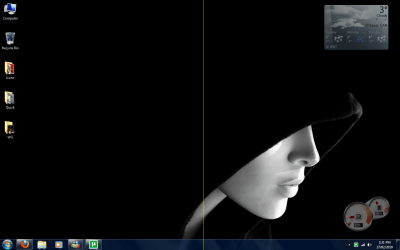
I have this vertical yellow line, 1 pixel wide, running from the top to the bottom of my screen, just to the right of the centerline. Here's an example of what it looks like:
Yellow Line.png

It started out flashing on and off periodically, and I noticed that it had something to do with the white balance of the screen. On my black background it was appearing a lot less often than with a white browser window open. Although now, the damn thing is stuck on all the time. It does not appear on my post screen or on the Windows 7 loading screens, or when Windows 7 is booted in Safe Mode.

Things I have tried so far:
Rolling back my graphics driver to a previous version - no effect
Updating my graphics driver to the newest version - no effect

Do you have any ideas on how I might fix this?
 

My Computer

Computer Manufacturer/Model Number
Toshiba Satellite P105-S6177
OS
Windows 7 Ultimate
CPU
Intel Centrino Duo T2250 2 x 1.73GHz
Memory
2 GB
Graphics Card(s)
Mobile Intel 945 Express Chipset Family
Sound Card
Conexant High Definition Audio
Monitor(s) Displays
17" Laptop Screen
Screen Resolution
1440 x 900
Hard Drives
120 GB
So nobody has any ideas of what might be causing this?
 

My Computer

Computer Manufacturer/Model Number
Toshiba Satellite P105-S6177
OS
Windows 7 Ultimate
CPU
Intel Centrino Duo T2250 2 x 1.73GHz
Memory
2 GB
Graphics Card(s)
Mobile Intel 945 Express Chipset Family
Sound Card
Conexant High Definition Audio
Monitor(s) Displays
17" Laptop Screen
Screen Resolution
1440 x 900
Hard Drives
120 GB
64 or 32 bit?
 

My Computer

Computer Manufacturer/Model Number
The Cloud Windfoot Omega Build. Codename: Outpost
OS
Windows 7 Pro 64bit
CPU
Amd 550BE unlocked to Quadcore 3.1GHZ
Motherboard
GA-770TA-UD3 Rev 1.0
Memory
4GB OCZ platinum 1333
Graphics Card(s)
ATI 3850 512MB Asus
Sound Card
creative Xfi music
Monitor(s) Displays
samsung syncmaster T220+ Dell P780
Screen Resolution
1680x1050, 1280x960
Hard Drives
WD 250GB
segate 500GB
PSU
Ultra 500 watt
Case
some random case
Cooling
Coolmaster TX3
Keyboard
Microsoft natural ergonomic 4000
Mouse
Logitech G9
Internet Speed
Teksavvy 5Mbps down 700Kbps up
Other Info
there is a 80mm(8cm) intake fan on the side of the case and a 120mm(12cm) fan as exaust
did u mind if that problem from software?? i guest that become from your LCD.
 

My Computer

Computer Manufacturer/Model Number
built up
OS
windows 7
CPU
Phenom II AMD Dragon 3.5Ghz
Memory
DDR3 4GB
Graphics Card(s)
ATI Radeon 512Mb
Monitor(s) Displays
HP L1506
Screen Resolution
1152 x 864
Hard Drives
WDC 1 TB SATA-II Green Power
Keyboard
HP wireless keyboard
Mouse
HP Optic
Internet Speed
1GB
From the brief search I've just done, you'll need to replace your screen I think.
 

My Computer

Computer Manufacturer/Model Number
Sony Vaio FZ21Z
OS
Windows 7 Ultimate x64 ®™
CPU
Intel Core 2 Duo (2.2 GHz)
Motherboard
Sony (Intel Chipset)
Memory
2x 2GB Corsair (667 MHz)
Graphics Card(s)
NVIDIA 8600M GS (256MB)
Sound Card
Sigmatel
Monitor(s) Displays
15.4" TFT X-Black
Screen Resolution
1280x800
Hard Drives
Western Digital 300GB Scorpio Black (7200rpm)
Mouse
Logitech Anywhere MX
Internet Speed
Sky 5MB
It looks like your laptop screen power line connecting a row of pixels is failing so only partial colors are showing up causing the yellow streak. I've seen them 1 pixel wide like yours in another toshiba laptop and i've also seen them 10 pixels wide in a Dell laptop. Usualy screen replacement is the only answer to fix it.
 

My Computer

OS
Windows 7 Home Premium (64-bit) SP1 RTM
CPU
Intel Core2Duo [email protected]
Motherboard
ASUS P5Q (BIOS 2208)
Memory
2x2Gb GEIL DDR2 800 4-4-4-12 @ 1.8v
Graphics Card(s)
ASUS HD4850 512Mb @700/1100
Sound Card
Realtek ALC1200 @ Intel 82801JB ICH10
Monitor(s) Displays
Samsung Syncmaster T220
Screen Resolution
1680x1050x32@60Hz
Hard Drives
Seagate ST3500410AS SATA300 500Gb
Hitachi HDS721032CLA362 SATA300 320Gb
PSU
Antec NeoPower 650W 3.3v@24A/5v@24A/12v@19A/12v@19A/12v@19A
Internet Speed
3Mbps
@Cloud8521 I'm using the 32 bit version of Windows 7 Ultimate.

Thanks for all the posts guys but it's just not the screen that's doing it, when I boot into Safe Mode the yellow line is not there. I think I'm going to try a fresh install if the OS and see if that sorts it out, I'll posts the result here once I've done that.
 

My Computer

Computer Manufacturer/Model Number
Toshiba Satellite P105-S6177
OS
Windows 7 Ultimate
CPU
Intel Centrino Duo T2250 2 x 1.73GHz
Memory
2 GB
Graphics Card(s)
Mobile Intel 945 Express Chipset Family
Sound Card
Conexant High Definition Audio
Monitor(s) Displays
17" Laptop Screen
Screen Resolution
1440 x 900
Hard Drives
120 GB
@Cloud8521 I'm using the 32 bit version of Windows 7 Ultimate.

Thanks for all the posts guys but it's just not the screen that's doing it, when I boot into Safe Mode the yellow line is not there. I think I'm going to try a fresh install if the OS and see if that sorts it out, I'll posts the result here once I've done that.

Before you do that, your GPU may be dying - is the underside of your laptop free from dust?
 

My Computer

Computer Manufacturer/Model Number
Sony Vaio Z46GDU
OS
Windows 7 Ultimate x86-64
CPU
[email protected] 1066MHz FSB
Motherboard
Sony branded
Memory
6GB DDR3 1066MHz
Graphics Card(s)
9300M GS 256MB Dedicated (Speed) + Intel4500MHD (Stamina)
Sound Card
Realtek HD Audio
Monitor(s) Displays
13.1' WXGA
Screen Resolution
1600x900
Hard Drives
320GB 7200RPM w/ 16MB cache
Internet Speed
1MB/s
Well the laptop has been to Afghanistan and back so I imagine there is a good amount of dust in there. I guess I could open up the case and blow it out with some canned oxygen, is this a good idea?

So you think the GPU could be causing this line? Is this something that is replaceable or will I have to spring for a new laptop?
 

My Computer

Computer Manufacturer/Model Number
Toshiba Satellite P105-S6177
OS
Windows 7 Ultimate
CPU
Intel Centrino Duo T2250 2 x 1.73GHz
Memory
2 GB
Graphics Card(s)
Mobile Intel 945 Express Chipset Family
Sound Card
Conexant High Definition Audio
Monitor(s) Displays
17" Laptop Screen
Screen Resolution
1440 x 900
Hard Drives
120 GB
Well the laptop has been to Afghanistan and back so I imagine there is a good amount of dust in there. I guess I could open up the case and blow it out with some canned oxygen, is this a good idea?

So you think the GPU could be causing this line? Is this something that is replaceable or will I have to spring for a new laptop?

Run FurMark -if your GPU can't stand it, it will show up. Take apart the case if you know what you are doing.
 

My Computer

Computer Manufacturer/Model Number
Sony Vaio Z46GDU
OS
Windows 7 Ultimate x86-64
CPU
[email protected] 1066MHz FSB
Motherboard
Sony branded
Memory
6GB DDR3 1066MHz
Graphics Card(s)
9300M GS 256MB Dedicated (Speed) + Intel4500MHD (Stamina)
Sound Card
Realtek HD Audio
Monitor(s) Displays
13.1' WXGA
Screen Resolution
1600x900
Hard Drives
320GB 7200RPM w/ 16MB cache
Internet Speed
1MB/s
I have the same problem with my PC, win7 ultimate. I had been using/trying AWC (wallpaper changer) and just installed Corel Draw so problem could be anything. However, background is black and vertical yellow line running down screen? Any help/advice appreciated....thanks!
 

My Computer

OS
Windows 7 Ultimate x32
Back
Top