Very high physical memory usage all the time

mopron

New member
Local time
8:23 AM
Messages
1
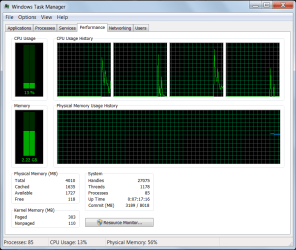
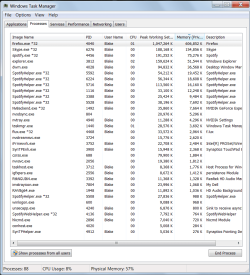
For the past month or so my computer has been using a ton of physical memory. It usually hovers around 60% and slows things down quite a bit.
 

Attachments

  • RESOURCEs1.png
    RESOURCEs1.png
    21 KB · Views: 2
  • RESOURCEs2.png
    RESOURCEs2.png
    42.1 KB · Views: 3

My Computer

Computer type
Laptop
Computer Manufacturer/Model Number
Dell
OS
Windows 7 64 bit
CPU
i5-2410M @ 2.3 GHz
Memory
4 gb
Browser
Firefox
Looks like Firefox is using a ton of resources.

Try doing some of the things listed in this tutorial and see if you can get it down:
https://support.mozilla.org/en-US/kb/firefox-uses-too-much-memory-ram

Also, are you using Spotify/Skype all the time? Figuring out what is up with Firefox and stopping Skype/Spotify if you don't need it would help.

You could also simply get more ram. Its not that expensive and its one of the best things you can do to speed up your PC, especially with your specific problem.
 

My Computer

Computer type
PC/Desktop
Computer Manufacturer/Model Number
Custom
OS
Dual Boot: Windows 8.1 & Server 2012r2 VMs: Kali Linux, Backbox, Matriux, Windows 8.1
CPU
A10 7700 Kavari SteamRoller
Motherboard
ASUS A88XM-PLUS (FM2+ )
Memory
8GB DDR3 SDRAM PC3-8500
Graphics Card(s)
1024MB ATI AMD Radeon R7 Graphics
Sound Card
Realtek High Definition Audio
Monitor(s) Displays
Samsung
Hard Drives
SSD Crucial 120gb
WD VelociRaptor 1tb
PSU
Rosewill Gaming 650w
Case
Rosewill Galaxy 2
Internet Speed
55/12
Antivirus
Malwarebytes, MSE, SAS
Browser
FireFox, Chrome
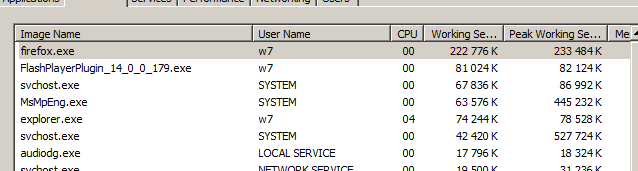
^^^ agree, unless you got an -immense- number of open tabs (or visiting some very special sites) FF should not use that much, check what's going on, eventually reinstall it.

Here's my quite normal FF behavior, 6 tabs incl. playing a youtube video.

Generally about memory, it's there to be used, even with those 88 processes you still have quite some memory available.

 

Attachments

  • ff.PNG
    ff.PNG
    5.5 KB · Views: 28

My Computer

Computer type
Laptop
Computer Manufacturer/Model Number
Dell \ Lenovo\ HP \ Toshiba
OS
W7, W8.1
Antivirus
MSE, Malwarebytes
Browser
FF
its good for RAM to be used and you may not know this but it you go on resource manager and memory you will se that not much is free 1~6mb free for me as the rest is used as inactive ram so say I have two users logged on to a pc that has say 1gb ram it cant store any users in the ram so is very sluggish at switching but say that same machine has 4gb ram both of them will be in ram so you can flick through them quickly
 

My Computer

Computer type
PC/Desktop
Computer Manufacturer/Model Number
Dell
OS
Win 7 X86 Professional
CPU
Core 2 Quad Q6600
Motherboard
Dell MOBO
Memory
2GB DDR2-800 800mhz
Graphics Card(s)
Geforce GT 610
Hard Drives
WD Velociraptor 300gb Quiet Seek Setting
Antivirus
AVG
Browser
Internet Explorer
Do you use a Nvidia Graphics card?
 

My Computer

Computer type
PC/Desktop
Computer Manufacturer/Model Number
HPE-350t w/ PSU & GPU upgrades
OS
Microsoft Windows 7 Home Premium 64-bit 7601 Multiprocessor Free Service Pack 1
CPU
Intel(R) Core(TM) i7 CPU 860 @ 2.80GHz
Motherboard
MSI 2A9C
Memory
8.00 GB
Graphics Card(s)
NVIDIA GeForce GTX 660
Sound Card
(1) NVIDIA High Definition Audio (2) USB Audio Device (3
Screen Resolution
1280 x 1024 x 32 bits (4294967296 colors) @ 60 Hz
Hard Drives
(1) WDC WD1001FAES-60Z2A0 (2) Generic- Compact Flash USB Device (3) Generic- MS/MS-Pro USB Device (4) Generic- SD/MMC USB Device (5) Generic- SM/xD-Picture USB Device (6) WDC WD64 00BEVT-22A0RT0 USB Device
Back
Top