
Solved Video Render iGPU vs GPU

YoYo155

Up The Thread
Guru
Gold Member
VIP
Local time
7:02 PM
Messages
3,047
Hi I have a small question regarding video rendering.

I have a 3570K with the iGPU currently disabled and a GTX460, my question is which should I use
for rendering videos? CUDA or iGPU?

Should meaning in terms of best performance = less time.

Thank you.
 

My Computer

Computer type
PC/Desktop
OS
Windows 10
CPU
Intel Core i5 3570K
Motherboard
Asus P8Z77V-PRO
Memory
16GB 1600Mhz G.Skill
Graphics Card(s)
Gigabyte GTX 970 G1-Gaming
PSU
Seasonic 1000W Platinum
Case
Fractal Design Define R4
Cooling
Noctua NH-D14
It rather depends on what you are rendering to! I would try both and see which one gives you the perfomance you are looking for. Personally I would always go with quality of the finishedfile, time to render would be of secondary importance to me! What Video Software are you using BTW?

Not sure what you are asking here:
Should meaning in terms of best performance = less time.
 

My Computer

Computer type
PC/Desktop
OS
Microsoft Windows 7 Home Premium 64-bit 7601 Multiprocessor Free Service Pack 1
CPU
Intel(R) Core(TM) i7-3770 CPU @ 3.40GHz
Motherboard
ASUSTeK COMPUTER INC. P8H77-M
Memory
8.00 GB
Graphics Card(s)
Intel(R) HD Graphics 4000
Sound Card
On Board
Monitor(s) Displays
Dell 24"
Screen Resolution
1920 x 1080
Hard Drives
(1) INTEL SSDSC2CT180A3 ATA Device (2) ST500DM002-1BD142 ATA Device (3) WDC WD3200AAKS-75L9A0 ATA Device (4) Generic- Compact Flash USB Device (5) Generic- MS/MS-Pro USB Device (6) Generic- SD/MMC USB Device (7) Generic- SM/xD-Picture USB
PSU
500w Corsair
Case
Cooler Master
Cooling
3 Fans
Keyboard
Logitech MK300
Mouse
Logitech WOM
Internet Speed
75Mb
Antivirus
Norton 360
Browser
Firefox, Opera, IE
It rather depends on what you are rendering to! I would try both and see which one gives you the perfomance you are looking for. Personally I would always go with quality of the finishedfile, time to render would be of secondary importance to me! What Video Software are you using BTW?

Not sure what you are asking here:
Should meaning in terms of best performance = less time.

Quality isn't affected by what chip i'm using to render it :geek: , it's the preset or the settings that count.
Sorry I meant what which will be faster in rendering :o

I'm using Premiere Pro.
 

My Computer

Computer type
PC/Desktop
OS
Windows 10
CPU
Intel Core i5 3570K
Motherboard
Asus P8Z77V-PRO
Memory
16GB 1600Mhz G.Skill
Graphics Card(s)
Gigabyte GTX 970 G1-Gaming
PSU
Seasonic 1000W Platinum
Case
Fractal Design Define R4
Cooling
Noctua NH-D14
Unless it's been added, Premiere Pro doesn't support intels Quicksync, so I'd stick with CUDA.


However you can always try both on an example project and time it yourself.
 

My Computer

Computer type
PC/Desktop
Computer Manufacturer/Model Number
Systems by SmartEyeball
OS
8 Pro x64
CPU
i7 3770K 4.6GHz
Motherboard
ASUS P8Z77 WS
Memory
16GB G.Skill Trident X 2666mhz
Graphics Card(s)
x2 EVGA 780 Ti Superclocked SLI
Sound Card
SB X-FI Surround 5.1 PRO USB / ATH-AD900 Headphones
Monitor(s) Displays
x3 Dell U2410 / 58" Samsung
Screen Resolution
5760*1200/ 1920*1200
Hard Drives
2x Intel 520 240GB (RAID 0) * 2x WD Caviar Blacks 2TB (RAID 0) * 2TB WD Caviar Black * Sony Optirac DVD
PSU
Silverstone Strider Evolution 1200W
Case
Thermaltake Level 10 GT Snow Edition
Cooling
Noctua NH-D14
Keyboard
Topre Realforce // Ducky Shine MX Black // Filco Ninja TKL
Mouse
Thermaltake Theron (Highly Recommended) + Razer Imperator
Antivirus
MSE
Browser
IE, FF, WaterFox
Other Info
GT Extreme V2 Sim Racing Cockpit + 40" LCD and K/B Mouse stand ▼
Fanatec CSR Elite Wheel + Clubsport V1 Pedals + CSR shifter/7G-H ▼Saitek X52 Pro ▼ TrackIR 5 Pro
Buttkicker v2 Seat Rumbler with Dedicated 5.1 and Sub Woofer attached to frame ▼
=
Bloody Big Grin
In this case I think the CPU would be faster ... try and tell us.
 

My Computer

Computer type
PC/Desktop
OS
Windows 10 x64
CPU
Intel i5-3570K
Motherboard
Asus Maximus V Gene
Memory
Crucial 16GB
Graphics Card(s)
nVidia Geforce 660 GTX
Sound Card
onboard
Monitor(s) Displays
NEC 2490WUXi2
Screen Resolution
1920x1200
Hard Drives
Crucial M4 256GB
PSU
Corsair 650TX
Case
Fractal Design - Define Mini
Keyboard
Filco Majestouch Tenkeyless Black MX
Mouse
Logitech MBJ58
Quality isn't affected by what chip i'm using to render it :geek: , it's the preset or the settings that count.
Sorry I meant what which will be faster in rendering :o

I'm using Premiere Pro.
As I said before try both and see which suits you. If you are rendering prior to making a DVD has Premier Pro got the otion command "Do not re render mpeg compliant files"? If so using that can drastically reduce rendering time and has the added bonus that as you probably know every time you render a file you loose some quality so not re rendering maintains quality!
 

My Computer

Computer type
PC/Desktop
OS
Microsoft Windows 7 Home Premium 64-bit 7601 Multiprocessor Free Service Pack 1
CPU
Intel(R) Core(TM) i7-3770 CPU @ 3.40GHz
Motherboard
ASUSTeK COMPUTER INC. P8H77-M
Memory
8.00 GB
Graphics Card(s)
Intel(R) HD Graphics 4000
Sound Card
On Board
Monitor(s) Displays
Dell 24"
Screen Resolution
1920 x 1080
Hard Drives
(1) INTEL SSDSC2CT180A3 ATA Device (2) ST500DM002-1BD142 ATA Device (3) WDC WD3200AAKS-75L9A0 ATA Device (4) Generic- Compact Flash USB Device (5) Generic- MS/MS-Pro USB Device (6) Generic- SD/MMC USB Device (7) Generic- SM/xD-Picture USB
PSU
500w Corsair
Case
Cooler Master
Cooling
3 Fans
Keyboard
Logitech MK300
Mouse
Logitech WOM
Internet Speed
75Mb
Antivirus
Norton 360
Browser
Firefox, Opera, IE
Quality isn't affected by what chip i'm using to render it :geek: , it's the preset or the settings that count.
Sorry I meant what which will be faster in rendering :o

I'm using Premiere Pro.
As I said before try both and see which suits you. If you are rendering prior to making a DVD has Premier Pro got the otion command "Do not re render mpeg compliant files"? If so using that can drastically reduce rendering time and has the added bonus that as you probably know every time you render a file you loose some quality so not re rendering maintains quality!

Neat I didn't know that!
Where is that option?

In this case I think the CPU would be faster ... try and tell us.

I will :cool:

Unless it's been added, Premiere Pro doesn't support intels Quicksync, so I'd stick with CUDA.


However you can always try both on an example project and time it yourself.

It doesn't?
 

My Computer

Computer type
PC/Desktop
OS
Windows 10
CPU
Intel Core i5 3570K
Motherboard
Asus P8Z77V-PRO
Memory
16GB 1600Mhz G.Skill
Graphics Card(s)
Gigabyte GTX 970 G1-Gaming
PSU
Seasonic 1000W Platinum
Case
Fractal Design Define R4
Cooling
Noctua NH-D14
As I said before try both and see which suits you. If you are rendering prior to making a DVD has Premier Pro got the otion command "Do not re render mpeg compliant files"? If so using that can drastically reduce rendering time and has the added bonus that as you probably know every time you render a file you loose some quality so not re rendering maintains quality!

Neat I didn't know that!
Where is that option?
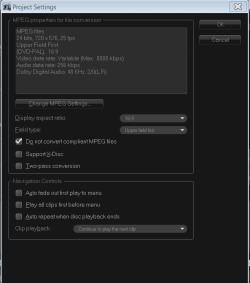
I don't use Premier Pro as the version I tried did not handle AVCHD that well so I found an alternative and what I think is a much more straight forward Video Editor. I can't help you finding the facility in PP but if it is any use at all here's a screenshot of the window where it is on my software:
Project Settings.PNG
 

My Computer

Computer type
PC/Desktop
OS
Microsoft Windows 7 Home Premium 64-bit 7601 Multiprocessor Free Service Pack 1
CPU
Intel(R) Core(TM) i7-3770 CPU @ 3.40GHz
Motherboard
ASUSTeK COMPUTER INC. P8H77-M
Memory
8.00 GB
Graphics Card(s)
Intel(R) HD Graphics 4000
Sound Card
On Board
Monitor(s) Displays
Dell 24"
Screen Resolution
1920 x 1080
Hard Drives
(1) INTEL SSDSC2CT180A3 ATA Device (2) ST500DM002-1BD142 ATA Device (3) WDC WD3200AAKS-75L9A0 ATA Device (4) Generic- Compact Flash USB Device (5) Generic- MS/MS-Pro USB Device (6) Generic- SD/MMC USB Device (7) Generic- SM/xD-Picture USB
PSU
500w Corsair
Case
Cooler Master
Cooling
3 Fans
Keyboard
Logitech MK300
Mouse
Logitech WOM
Internet Speed
75Mb
Antivirus
Norton 360
Browser
Firefox, Opera, IE
Oh man I totally forgot about updating this thread!
*hides*

So I with the hardware available to me the CPU was the winner!
although when looking at resources being used in procmon while rendering the GPU was also being
utilized even when the CPU was doing the heavy lifting.
 

My Computer

Computer type
PC/Desktop
OS
Windows 10
CPU
Intel Core i5 3570K
Motherboard
Asus P8Z77V-PRO
Memory
16GB 1600Mhz G.Skill
Graphics Card(s)
Gigabyte GTX 970 G1-Gaming
PSU
Seasonic 1000W Platinum
Case
Fractal Design Define R4
Cooling
Noctua NH-D14
Back
Top