View multiple Powerpoint Presentations at the same time

stlcraft

New member
Local time
10:08 PM
Messages
4
I have two Powerpoint presentations to open at the same time. I can only see one or the other, or if I have many open I can only see 1 at a time but in the taskbar at the bottom of the screen it shows the preview boxes with file names for all the Powerpoints. How can I see more than one Powerpoint presentation at a time. I think I may have had the same issue with Excel. Anyone have an idea how to break them apart. I tried holding down shift and clicking the icon, it does make a new Powerpoint but it's still only allowing me to view one at a time.

Thanks!
 

My Computer My Computer

At a glance

Windows 7, Vista Ultimate, Server 2008
OS
Windows 7, Vista Ultimate, Server 2008
So far the best solution to this is from another forum, but to me this is just a work around.


OK -- it can be done, but it's kludgy.

Kludge follows:

1) Create another Windows XP account to use.

2) Use the shell command RUNAS to run the other instance of PowerPoint under the other account.

Example: having created a special account "Dad", when logged in as "BW", and already running PowerPoint, use [Start] [Run...] CMD, and then enter a command similar to:

C:\> runas /user:dad "c:\program files\microsoft office\office11\POWERPNT.EXE"

Voila! Another instance of PowerPoint.

Pro: you get another instance of PowerPoint.

Con: it's running under the other account, so will save files to the My Documents folder, etc. of that other account. But that could be overcome by changing the MS Office folders locations of where the Dad account saves its files. You need never actually log in to Dad through the front end of Windows XP.

You can make a batch file with a shortcut if you like, so it's as easy as clicking an icon called "Second PowerPoint".

I haven't used this for lengthy periods of time, but essentially, you're doing what is done under Windows Server, etc. with the same version of MS Office. The two instances should be well enough behaved, but in good AskMeFi style, I must point out YMMV.
posted by blue_wardrobe at 4:19 PM on September 24, 2006 [4 favorites has favorites]
 

My Computer My Computer

At a glance

Windows 7, Vista Ultimate, Server 2008
OS
Windows 7, Vista Ultimate, Server 2008
if you want them simultaneously (as in side by side) can't help you.

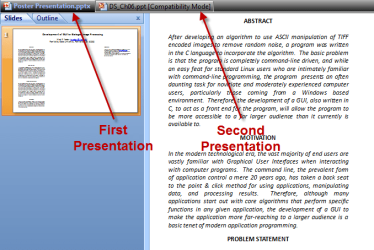
If, OTOH, you mean something like this:

PowerPoint OfficeTab.PNG

The a simple app called OfficeTab will help you out.

You can get the latest from MG: |MG| OfficeTab 1.22 Download
 

My Computers My Computers

  • At a glance

    Windows 11 21H2 Current buildAMD Ryzen 9 3950X4 * 32 GB - Corsair Vengeance 3600 MHzEVGA GeForce RTX 3080 Ti XC3 ULTRA GAMING (12...
    Computer type
    PC/Desktop
    Computer Manufacturer/Model Number
    The Beast Model A (homebrew)
    OS
    Windows 11 21H2 Current build
    CPU
    AMD Ryzen 9 3950X
    Motherboard
    MSI MEG X570 GODLIKE
    Memory
    4 * 32 GB - Corsair Vengeance 3600 MHz
    Graphics Card(s)
    EVGA GeForce RTX 3080 Ti XC3 ULTRA GAMING (12G-P5-3955-KR)
    Sound Card
    Realtek® ALC1220 Codec
    Monitor(s) Displays
    2x Eve Spectrum ES07D03 4K Gaming Monitor (Matte) | Eve Spec
    Screen Resolution
    3x 3840 x 2160
    Hard Drives
    3x Samsung 980 Pro NVMe PCIe 4 M.2 2 TB SSD (MZ-V8P2T0B/AM) } 3x Sabrent Rocket NVMe 4.0 1 TB SSD
    PSU
    PC Power & Cooling’s Silencer Series 1050 Watt, 80 Plus Plat
    Case
    Fractal Design Define 7 XL Dark ATX Full Tower Case
    Cooling
    SteelSeries Apex Pro Wired Gaming Keyboard
    Keyboard
    SteelSeries Apex Pro
    Mouse
    Logitech MX Master 3S | MX Master 3 for business
    Internet Speed
    AT&T LightSpeed Gigabit Duplex Ftth
    Antivirus
    Windows Defender + MB 3
    Browser
    Nightly (default) + Firefox (stable),Chrome, Edge
  • At a glance

    ChromeOS Flex Dev Channel (current)Intel(R) Core(TM) i5-6300U CPU @ 2.40GHz, 250...16 GBIntel(R) HD Graphics 520
    Computer type
    PC/Desktop
    System Manufacturer/Model Number
    Dell Latitude E5470
    OS
    ChromeOS Flex Dev Channel (current)
    CPU
    Intel(R) Core(TM) i5-6300U CPU @ 2.40GHz, 2501 Mhz, 2 Core(s), 4 Logical Processor(s)
    Motherboard
    Dell
    Memory
    16 GB
    Graphics Card(s)
    Intel(R) HD Graphics 520
    Sound Card
    Intel(R) HD Graphics 520 + RealTek Audio
    Monitor(s) Displays
    Dell laptop display 15"
    Screen Resolution
    1920 * 1080
    Hard Drives
    Toshiba 128GB M.2 22300 drive
    INTEL Cherryville 520 Series SSDSC2CW180A 180 GB SATA III SSD
    PSU
    Dell
    Case
    Dell
    Cooling
    Dell
    Keyboard
    Dell
    Mouse
    Logitech MX Master 3S (shared w. Sys 1) | Dell TouchPad
    Internet Speed
    AT&T LightSpeed Gigabit Duplex Ftth
I know on my dual monitor set up at work--and using XP as the OS there, I can get side by sides on excel by opening another instance of excel via the start button and then dragging it over to the 2d mon.

I will probably obtain a 2d mon for the home here in a few weeks---will be interested to play around with stuff and see what can be done..
 

My Computer My Computer

At a glance

windows 7 Professional 64 BitI7-3930G.Skill 4X 4 GB DR3 240 pin 16GB totalEVGA 670
Computer Manufacturer/Model Number
Custom build; parts from the Egg
OS
windows 7 Professional 64 Bit
CPU
I7-3930
Motherboard
Asus P9X79 PRO
Memory
G.Skill 4X 4 GB DR3 240 pin 16GB total
Graphics Card(s)
EVGA 670
Sound Card
Energy Take 5, Sennheiser HD 205 phones, X-FI
Monitor(s) Displays
Hanns G 21.5" HH221 and Samsung 19" 940BW and Hannspree
Screen Resolution
2X 1920X1080 and 1X 1440X900
Hard Drives
3-- internal 250 GB WD; 1-- internal 1 TB Samsung ---plus 3 WD external HDs (sizes vary to 1.5 TB); Crucial M4 128GB SSD, 1 Pioneer BDR-207 Bluray writer;
and 1--LG Lightscribe DVD drive
PSU
1000 Watt XFX Pro Series
Case
Thermaltake Chaser
Cooling
Corsair H80
Keyboard
Logitech Wireless and backlit
Mouse
Logitech Rollerball
Other Info
79 " long desk from Ikea. Sauder 71 inch long "speaker" shelf.

Optical and analog outs to a Yamaha RX-V 650 driving Energy Take 5.1 speaker system. Technics TT. Realistic mixer. Senns cans.
I have been using a dual monitor setup for a long time now (since ~03 or 04, can't remember) and it makes life that much easier.

Still, if the OP wants easy access to multiple presentations simultaneously, that may not happen, even with multiple copies running....

And for some reason it is pretty hard to get a second instance of Powerpoint to run on 7 - it just is. Hence the use of OfficeTab to show multiple presentations in a tab bar as opposed to in the taskbar....
 

My Computers My Computers

  • At a glance

    Windows 11 21H2 Current buildAMD Ryzen 9 3950X4 * 32 GB - Corsair Vengeance 3600 MHzEVGA GeForce RTX 3080 Ti XC3 ULTRA GAMING (12...
    Computer type
    PC/Desktop
    Computer Manufacturer/Model Number
    The Beast Model A (homebrew)
    OS
    Windows 11 21H2 Current build
    CPU
    AMD Ryzen 9 3950X
    Motherboard
    MSI MEG X570 GODLIKE
    Memory
    4 * 32 GB - Corsair Vengeance 3600 MHz
    Graphics Card(s)
    EVGA GeForce RTX 3080 Ti XC3 ULTRA GAMING (12G-P5-3955-KR)
    Sound Card
    Realtek® ALC1220 Codec
    Monitor(s) Displays
    2x Eve Spectrum ES07D03 4K Gaming Monitor (Matte) | Eve Spec
    Screen Resolution
    3x 3840 x 2160
    Hard Drives
    3x Samsung 980 Pro NVMe PCIe 4 M.2 2 TB SSD (MZ-V8P2T0B/AM) } 3x Sabrent Rocket NVMe 4.0 1 TB SSD
    PSU
    PC Power & Cooling’s Silencer Series 1050 Watt, 80 Plus Plat
    Case
    Fractal Design Define 7 XL Dark ATX Full Tower Case
    Cooling
    SteelSeries Apex Pro Wired Gaming Keyboard
    Keyboard
    SteelSeries Apex Pro
    Mouse
    Logitech MX Master 3S | MX Master 3 for business
    Internet Speed
    AT&T LightSpeed Gigabit Duplex Ftth
    Antivirus
    Windows Defender + MB 3
    Browser
    Nightly (default) + Firefox (stable),Chrome, Edge
  • At a glance

    ChromeOS Flex Dev Channel (current)Intel(R) Core(TM) i5-6300U CPU @ 2.40GHz, 250...16 GBIntel(R) HD Graphics 520
    Computer type
    PC/Desktop
    System Manufacturer/Model Number
    Dell Latitude E5470
    OS
    ChromeOS Flex Dev Channel (current)
    CPU
    Intel(R) Core(TM) i5-6300U CPU @ 2.40GHz, 2501 Mhz, 2 Core(s), 4 Logical Processor(s)
    Motherboard
    Dell
    Memory
    16 GB
    Graphics Card(s)
    Intel(R) HD Graphics 520
    Sound Card
    Intel(R) HD Graphics 520 + RealTek Audio
    Monitor(s) Displays
    Dell laptop display 15"
    Screen Resolution
    1920 * 1080
    Hard Drives
    Toshiba 128GB M.2 22300 drive
    INTEL Cherryville 520 Series SSDSC2CW180A 180 GB SATA III SSD
    PSU
    Dell
    Case
    Dell
    Cooling
    Dell
    Keyboard
    Dell
    Mouse
    Logitech MX Master 3S (shared w. Sys 1) | Dell TouchPad
    Internet Speed
    AT&T LightSpeed Gigabit Duplex Ftth
Another work-around that I have found useful: Print the presentation(s) as a .pdf and open them separately.
 

My Computer My Computer

At a glance

windows 7
OS
windows 7
The registry hack below should work for office 2007 with windows 7.
I changed registry entries for the key below by replacing "%1" with /dde for both 'default' and 'command' values enabled me to open two different instances

HKCL\PowerPoint.Show.12\shell\Open\command
 

My Computer My Computer

At a glance

win 7 64
OS
win 7 64
Back
Top