Solved Viewing the documents library displays my documents folder

jvfran

New member
Local time
1:25 PM
Messages
4
Ok, I need some help..

I know that the documents library is a "library" and when I save anything there it really saves the file to the default location(my documents).

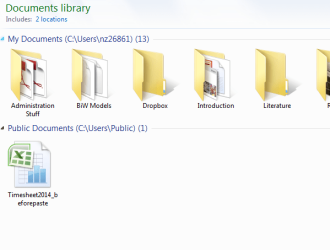
I teach a basic PC course usage course to seniors and some of the PCs are now listing the "My Documents" and the "Public" folders above their respective files when they click on "documents". In the past all the files have been there but never a separation by folder in the listing. There are 8 computers in the LAb and 4 show the "my Documents" and Public location in the listing....

How can I get this back to where they only see the whole list of files without the folder separation in the listing...

Thanks for any help, this is confusing them...

John
 

My Computer

Computer Manufacturer/Model Number
dell
OS
32 professional
CPU
intel core 2
Motherboard
dell
Memory
3GB

My Computer

Computer type
PC/Desktop
Computer Manufacturer/Model Number
Self built custom
OS
64-bit Windows 11 Pro for Workstations
CPU
Intel i7-8700K OC'd to 5 GHz
Motherboard
ASUS ROG Maximus XI Formula Z390
Memory
64 GB (4x16GB) G.SKILL TridentZ RGB DDR4 3600 MHz
Graphics Card(s)
ASUS ROG-STRIX-GTX1080TI-O11G-GAMING
Sound Card
Integrated
Monitor(s) Displays
2 x Samsung Odyssey G7 27"
Screen Resolution
2560x1440
Hard Drives
1TB Samsung 990 PRO M.2,
4TB Samsung 990 PRO PRO M.2,
TerraMaster F8 SSD Plus NAS
PSU
Seasonic Prime Titanium 850W
Case
Thermaltake Core P3
Cooling
Corsair Hydro H115i
Keyboard
Logitech wireless K800
Mouse
Logitech MX Master 4
Internet Speed
2 Gb/s Download and 100 Mb/s Upload
Antivirus
Malwarebyte Anti-Malware Premium
Browser
Google Chrome
Other Info
Logitech Z625 speaker system,
Logitech BRIO 4K Pro webcam,
HP Color LaserJet Pro MFP M477fdn,
APC SMART-UPS RT 1000 XL - SURT1000XLI,
Galaxy S23 Plus phone
Thanks for you reply, Shawn

The arrange by drop down does not have a clear changes option...tip says that means no changes have been made??

I have attached picture of documents view to see that will help...

Thanks

John
 

Attachments

  • doc lib.png
    doc lib.png
    137.5 KB · Views: 20

My Computer

Computer Manufacturer/Model Number
dell
OS
32 professional
CPU
intel core 2
Motherboard
dell
Memory
3GB
Hmm, ok. As a test change the "Arrange by" to something other than Folder, then back to Folder. If that doesn't help, then change the View -> Group by to something, then back to (none).
 

My Computer

Computer type
PC/Desktop
Computer Manufacturer/Model Number
Self built custom
OS
64-bit Windows 11 Pro for Workstations
CPU
Intel i7-8700K OC'd to 5 GHz
Motherboard
ASUS ROG Maximus XI Formula Z390
Memory
64 GB (4x16GB) G.SKILL TridentZ RGB DDR4 3600 MHz
Graphics Card(s)
ASUS ROG-STRIX-GTX1080TI-O11G-GAMING
Sound Card
Integrated
Monitor(s) Displays
2 x Samsung Odyssey G7 27"
Screen Resolution
2560x1440
Hard Drives
1TB Samsung 990 PRO M.2,
4TB Samsung 990 PRO PRO M.2,
TerraMaster F8 SSD Plus NAS
PSU
Seasonic Prime Titanium 850W
Case
Thermaltake Core P3
Cooling
Corsair Hydro H115i
Keyboard
Logitech wireless K800
Mouse
Logitech MX Master 4
Internet Speed
2 Gb/s Download and 100 Mb/s Upload
Antivirus
Malwarebyte Anti-Malware Premium
Browser
Google Chrome
Other Info
Logitech Z625 speaker system,
Logitech BRIO 4K Pro webcam,
HP Color LaserJet Pro MFP M477fdn,
APC SMART-UPS RT 1000 XL - SURT1000XLI,
Galaxy S23 Plus phone
Well I tried the change to "arrange by" same result, but never got the "clear changes" option on the drop down.
Changed the "view by" same result when back to folders, however I did get the "clear changes" option, cleared them and but ended up with the same problem of the location folders being listed above files..
Thanks,
John
 

Attachments

  • snip.png
    snip.png
    219.1 KB · Views: 9

My Computer

Computer Manufacturer/Model Number
dell
OS
32 professional
CPU
intel core 2
Motherboard
dell
Memory
3GB
Is Group by set to (none) or nothing checked?
 

My Computer

Computer type
PC/Desktop
Computer Manufacturer/Model Number
Self built custom
OS
64-bit Windows 11 Pro for Workstations
CPU
Intel i7-8700K OC'd to 5 GHz
Motherboard
ASUS ROG Maximus XI Formula Z390
Memory
64 GB (4x16GB) G.SKILL TridentZ RGB DDR4 3600 MHz
Graphics Card(s)
ASUS ROG-STRIX-GTX1080TI-O11G-GAMING
Sound Card
Integrated
Monitor(s) Displays
2 x Samsung Odyssey G7 27"
Screen Resolution
2560x1440
Hard Drives
1TB Samsung 990 PRO M.2,
4TB Samsung 990 PRO PRO M.2,
TerraMaster F8 SSD Plus NAS
PSU
Seasonic Prime Titanium 850W
Case
Thermaltake Core P3
Cooling
Corsair Hydro H115i
Keyboard
Logitech wireless K800
Mouse
Logitech MX Master 4
Internet Speed
2 Gb/s Download and 100 Mb/s Upload
Antivirus
Malwarebyte Anti-Malware Premium
Browser
Google Chrome
Other Info
Logitech Z625 speaker system,
Logitech BRIO 4K Pro webcam,
HP Color LaserJet Pro MFP M477fdn,
APC SMART-UPS RT 1000 XL - SURT1000XLI,
Galaxy S23 Plus phone
Shawn,
That was it,
I went into "group by" and while nothing was selected I clicked on "(none)"
It cleared the location entries and lists it by name now...
The strange thing is I can't get it back to listing it by location now..
But it's the way I need it,
so thanks for the help.
I will close this as solved..
John
 

My Computer

Computer Manufacturer/Model Number
dell
OS
32 professional
CPU
intel core 2
Motherboard
dell
Memory
3GB
You're most welcome John. I'm glad to hear that did it. :)

You should be able to get the locations back by using Group by -> Folder. You may need to click on More to add Folder first though.
 

My Computer

Computer type
PC/Desktop
Computer Manufacturer/Model Number
Self built custom
OS
64-bit Windows 11 Pro for Workstations
CPU
Intel i7-8700K OC'd to 5 GHz
Motherboard
ASUS ROG Maximus XI Formula Z390
Memory
64 GB (4x16GB) G.SKILL TridentZ RGB DDR4 3600 MHz
Graphics Card(s)
ASUS ROG-STRIX-GTX1080TI-O11G-GAMING
Sound Card
Integrated
Monitor(s) Displays
2 x Samsung Odyssey G7 27"
Screen Resolution
2560x1440
Hard Drives
1TB Samsung 990 PRO M.2,
4TB Samsung 990 PRO PRO M.2,
TerraMaster F8 SSD Plus NAS
PSU
Seasonic Prime Titanium 850W
Case
Thermaltake Core P3
Cooling
Corsair Hydro H115i
Keyboard
Logitech wireless K800
Mouse
Logitech MX Master 4
Internet Speed
2 Gb/s Download and 100 Mb/s Upload
Antivirus
Malwarebyte Anti-Malware Premium
Browser
Google Chrome
Other Info
Logitech Z625 speaker system,
Logitech BRIO 4K Pro webcam,
HP Color LaserJet Pro MFP M477fdn,
APC SMART-UPS RT 1000 XL - SURT1000XLI,
Galaxy S23 Plus phone
I know its a year since this thread is active but I like to as something regarding this group by option. Like @jvfran i also cleared the group by options to none. Now i want it back like the way it used to be. So i pick the group by 'folder' option.

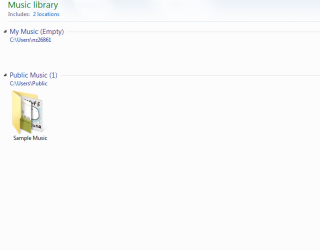
But it doesn't look as the one set by Windows 7 (the folder name and folder path is on two separate lines similar to the picture uploaded by @jvfran). Now after making the changes to 'group by folder', option the folder name and folder path are in one line. How do i get it to be in two separate lines again (like the Music Library picture attached below)
 

Attachments

  • Capture.PNG
    Capture.PNG
    27.9 KB · Views: 17
  • 2.PNG
    2.PNG
    62 KB · Views: 16

My Computer

OS
Windows 7 Ultimate x64 SP1
CPU
Q6600
Motherboard
P5N-D
Memory
8GB
Graphics Card(s)
NVidia GTX 285
Monitor(s) Displays
2x DELL 22'' + Samsung 46" UE46D6500
Keyboard
Logitech G15
Mouse
Razer Mamba 4G
Hello Nabilishes,

See if right clicking on an empty area in the library, and clicking on Arrange by and Clear changes may set it back for you. :)
 

My Computer

Computer type
PC/Desktop
Computer Manufacturer/Model Number
Self built custom
OS
64-bit Windows 11 Pro for Workstations
CPU
Intel i7-8700K OC'd to 5 GHz
Motherboard
ASUS ROG Maximus XI Formula Z390
Memory
64 GB (4x16GB) G.SKILL TridentZ RGB DDR4 3600 MHz
Graphics Card(s)
ASUS ROG-STRIX-GTX1080TI-O11G-GAMING
Sound Card
Integrated
Monitor(s) Displays
2 x Samsung Odyssey G7 27"
Screen Resolution
2560x1440
Hard Drives
1TB Samsung 990 PRO M.2,
4TB Samsung 990 PRO PRO M.2,
TerraMaster F8 SSD Plus NAS
PSU
Seasonic Prime Titanium 850W
Case
Thermaltake Core P3
Cooling
Corsair Hydro H115i
Keyboard
Logitech wireless K800
Mouse
Logitech MX Master 4
Internet Speed
2 Gb/s Download and 100 Mb/s Upload
Antivirus
Malwarebyte Anti-Malware Premium
Browser
Google Chrome
Other Info
Logitech Z625 speaker system,
Logitech BRIO 4K Pro webcam,
HP Color LaserJet Pro MFP M477fdn,
APC SMART-UPS RT 1000 XL - SURT1000XLI,
Galaxy S23 Plus phone
That didn't help either. Now all the documents from both My Documents and Public Documents are not separated by folders as shown in the first picture
 

My Computer

OS
Windows 7 Ultimate x64 SP1
CPU
Q6600
Motherboard
P5N-D
Memory
8GB
Graphics Card(s)
NVidia GTX 285
Monitor(s) Displays
2x DELL 22'' + Samsung 46" UE46D6500
Keyboard
Logitech G15
Mouse
Razer Mamba 4G
In that case, set this below, but the path is on the same line for me as well.

Sort by -> Name
Group by -> Folder
Arrange by -> Folder
 

My Computer

Computer type
PC/Desktop
Computer Manufacturer/Model Number
Self built custom
OS
64-bit Windows 11 Pro for Workstations
CPU
Intel i7-8700K OC'd to 5 GHz
Motherboard
ASUS ROG Maximus XI Formula Z390
Memory
64 GB (4x16GB) G.SKILL TridentZ RGB DDR4 3600 MHz
Graphics Card(s)
ASUS ROG-STRIX-GTX1080TI-O11G-GAMING
Sound Card
Integrated
Monitor(s) Displays
2 x Samsung Odyssey G7 27"
Screen Resolution
2560x1440
Hard Drives
1TB Samsung 990 PRO M.2,
4TB Samsung 990 PRO PRO M.2,
TerraMaster F8 SSD Plus NAS
PSU
Seasonic Prime Titanium 850W
Case
Thermaltake Core P3
Cooling
Corsair Hydro H115i
Keyboard
Logitech wireless K800
Mouse
Logitech MX Master 4
Internet Speed
2 Gb/s Download and 100 Mb/s Upload
Antivirus
Malwarebyte Anti-Malware Premium
Browser
Google Chrome
Other Info
Logitech Z625 speaker system,
Logitech BRIO 4K Pro webcam,
HP Color LaserJet Pro MFP M477fdn,
APC SMART-UPS RT 1000 XL - SURT1000XLI,
Galaxy S23 Plus phone
That was what I did in the beginning. I'm used to have them in two lines. Just the OCD me. :confused:

I pretty sure there is some options hidden somewhere to enable the grouping but i couldnt find it anywhere
 

My Computer

OS
Windows 7 Ultimate x64 SP1
CPU
Q6600
Motherboard
P5N-D
Memory
8GB
Graphics Card(s)
NVidia GTX 285
Monitor(s) Displays
2x DELL 22'' + Samsung 46" UE46D6500
Keyboard
Logitech G15
Mouse
Razer Mamba 4G
I'm not sure if an update may have changed this or not, but I can't get it on two lines like before either anymore.
 

My Computer

Computer type
PC/Desktop
Computer Manufacturer/Model Number
Self built custom
OS
64-bit Windows 11 Pro for Workstations
CPU
Intel i7-8700K OC'd to 5 GHz
Motherboard
ASUS ROG Maximus XI Formula Z390
Memory
64 GB (4x16GB) G.SKILL TridentZ RGB DDR4 3600 MHz
Graphics Card(s)
ASUS ROG-STRIX-GTX1080TI-O11G-GAMING
Sound Card
Integrated
Monitor(s) Displays
2 x Samsung Odyssey G7 27"
Screen Resolution
2560x1440
Hard Drives
1TB Samsung 990 PRO M.2,
4TB Samsung 990 PRO PRO M.2,
TerraMaster F8 SSD Plus NAS
PSU
Seasonic Prime Titanium 850W
Case
Thermaltake Core P3
Cooling
Corsair Hydro H115i
Keyboard
Logitech wireless K800
Mouse
Logitech MX Master 4
Internet Speed
2 Gb/s Download and 100 Mb/s Upload
Antivirus
Malwarebyte Anti-Malware Premium
Browser
Google Chrome
Other Info
Logitech Z625 speaker system,
Logitech BRIO 4K Pro webcam,
HP Color LaserJet Pro MFP M477fdn,
APC SMART-UPS RT 1000 XL - SURT1000XLI,
Galaxy S23 Plus phone
That is the problem i am having now. I have been searching high and low in the internet but to no avail.
 

My Computer

OS
Windows 7 Ultimate x64 SP1
CPU
Q6600
Motherboard
P5N-D
Memory
8GB
Graphics Card(s)
NVidia GTX 285
Monitor(s) Displays
2x DELL 22'' + Samsung 46" UE46D6500
Keyboard
Logitech G15
Mouse
Razer Mamba 4G
Back
Top