Virtual Box Help

funkyfin2000

New member
Local time
7:24 PM
Messages
7
Hi All,

Have installed Virtual Box on my windows 7 machine. All good and have attempted to install Windows 7 off my USB key drive that I used to install windows 7 with originally after doing the folllowing tutorial:

http://www.sevenforums.com/tutorials/2432-usb-windows-7-installation-key-drive-create.html

In Virtual Box you have to select FLOPPY as the bootable option as it doesn't have a USB option. This is fine but the screen just goes black when it tries to boot off the "floopy" or the usb key as such.

I presume because the usb key isn't bootable but I followed the instructions above to the letter and it worked for actually installing Windows 7 on my laptop!

Any help greatfully received!

Rich
 

My Computer

OS
Vista
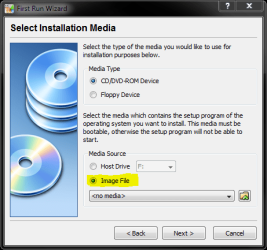
Google MagicISO, download and install it and mount ISO to a virtual DVD-drive. You can also mount the ISO-image directly choosing "Image File".
VirtualBox.PNG
 

My Computer

Computer type
Laptop
Computer Manufacturer/Model Number
HP ENVY 17-1150eg
OS
Windows 10 Pro x64 EN-GB
CPU
1.6 GHz Intel Core i7-720QM Processor
Memory
6 GB
Graphics Card(s)
ATI Mobility Radeon HD 5850 Graphics
Sound Card
Beats sound system with integrated subwoofer
Monitor(s) Displays
17" laptop display, 22" LED and 32" Full HD TV through HDMI
Screen Resolution
1600*900 (1), 1920*1080 (2&3)
Hard Drives
Internal: 2 x 500 GB SATA Hard Disk Drive 7200 rpm
External: 2TB for backups, 3TB USB3 network drive for media
Cooling
As Envy runs a bit warm, I have it on a Cooler Master pad
Keyboard
Logitech diNovo Media Desktop Laser (bluetooth)
Mouse
Logitech Performance Mouse MX
Internet Speed
50/10 Mbps VDSL
Antivirus
Windows Defender 4.3.9431.0
Browser
Maxthon 3.5.2., IE11
thanks dude,doesn't quite answer my question but I will make my operating systems in iso's and just load that way :D
 

My Computer

OS
Vista
thanks dude,doesn't quite answer my question but I will make my operating systems in iso's and just load that way :D
Yeah. Honestly I did not know a way to use USB installation in VirtualBox so my answer was rather a workaround than fix.

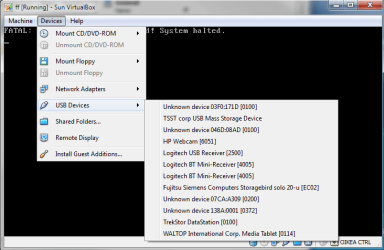
I don´t have any extra USB drives free to test this, but have you tried to start VirtualBox machine which you just created, and then from "Devices"-menu mount your USB drive? Just start it choosing for example Floppy-drive and clicking next, so you get empty screen telling "Fatal: no bootable medium found!" and then trying?
VirtualBox2.PNG

Don´t know, it could work?
 

My Computer

Computer type
Laptop
Computer Manufacturer/Model Number
HP ENVY 17-1150eg
OS
Windows 10 Pro x64 EN-GB
CPU
1.6 GHz Intel Core i7-720QM Processor
Memory
6 GB
Graphics Card(s)
ATI Mobility Radeon HD 5850 Graphics
Sound Card
Beats sound system with integrated subwoofer
Monitor(s) Displays
17" laptop display, 22" LED and 32" Full HD TV through HDMI
Screen Resolution
1600*900 (1), 1920*1080 (2&3)
Hard Drives
Internal: 2 x 500 GB SATA Hard Disk Drive 7200 rpm
External: 2TB for backups, 3TB USB3 network drive for media
Cooling
As Envy runs a bit warm, I have it on a Cooler Master pad
Keyboard
Logitech diNovo Media Desktop Laser (bluetooth)
Mouse
Logitech Performance Mouse MX
Internet Speed
50/10 Mbps VDSL
Antivirus
Windows Defender 4.3.9431.0
Browser
Maxthon 3.5.2., IE11
It won't work. Those usb drivers are part of the guest additions added to the OS after you install the OS.
 

My Computer

OS
7264x64/7260x86
Was thinking something like that. Sorry. I have Ubuntu and XP on VirtualBox, like it more than MS Virtual PC.
 
Last edited:

My Computer

Computer type
Laptop
Computer Manufacturer/Model Number
HP ENVY 17-1150eg
OS
Windows 10 Pro x64 EN-GB
CPU
1.6 GHz Intel Core i7-720QM Processor
Memory
6 GB
Graphics Card(s)
ATI Mobility Radeon HD 5850 Graphics
Sound Card
Beats sound system with integrated subwoofer
Monitor(s) Displays
17" laptop display, 22" LED and 32" Full HD TV through HDMI
Screen Resolution
1600*900 (1), 1920*1080 (2&3)
Hard Drives
Internal: 2 x 500 GB SATA Hard Disk Drive 7200 rpm
External: 2TB for backups, 3TB USB3 network drive for media
Cooling
As Envy runs a bit warm, I have it on a Cooler Master pad
Keyboard
Logitech diNovo Media Desktop Laser (bluetooth)
Mouse
Logitech Performance Mouse MX
Internet Speed
50/10 Mbps VDSL
Antivirus
Windows Defender 4.3.9431.0
Browser
Maxthon 3.5.2., IE11

My Computer

Computer Manufacturer/Model Number
Gateway GT5056
OS
XP_Pro, W7_7201, W7RC.vhd, SciLinux5.3, Fedora12, Fedora9_2x, OpenSolaris_09-06
CPU
AMD 64x2
Motherboard
Yes
Memory
1 gig
Graphics Card(s)
Dunno
Sound Card
Realtek something
Monitor(s) Displays
Samsung SyncMaster 940MW w/TV
Screen Resolution
1280x1024
Hard Drives
250 GB WD, USB Seagate Freedesk 1.5 T
Internet Speed
Cable modem
Other Info
1 + 1 = 10b,
7 + 7 = 16o,
a + b = 15h.
Virtual Box allows you to load the ISO directly into VBox to boot off of. This allows you to create all sorts of OSs for use.

See this mini tut I wrote.

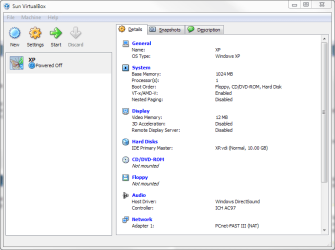
This is the main screen after setting up a new Virtual OS. On it, click the CD/DVD-ROM on the right.
VirtualBox Initial Setup.PNG

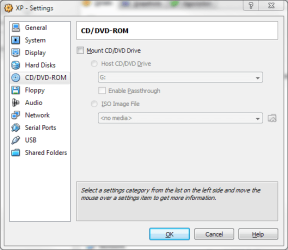
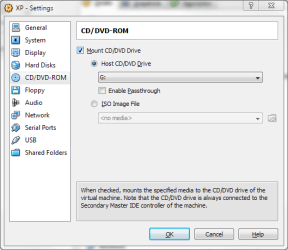
Now you get the OS settings tab for the virtual CD/DVD-ROM - note the info in italics at the bottom.
VirtualBox setup 1.PNG

Check to enable Mounting the CD/DVD Drive. Again, read the info in italics at the bottom.
VirtualBox Setup 2.PNG

If you hover over ISO Image File, the info at the bottom changes.
Virtualbox Setup 3.PNG

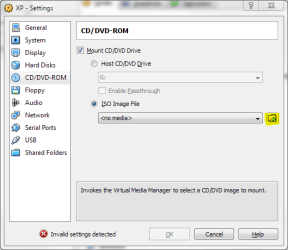
Select the radio button beside ISO Image File - again, note the bottom.
Virtualbox setup 4.PNG

If you now hover over the folder icon to the right of the drop-down menu, you can see the info at the bottom change again. Click on the folder icon.
Virtualbox Setup 5.PNG

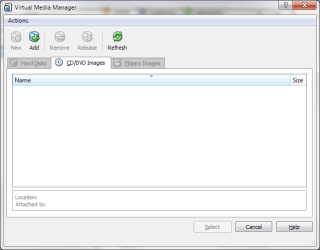
Now you get a new Virtual Media Manager window - here is where you need to add the ISO.
Virtualbox Setup 6.PNG

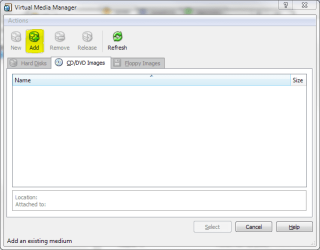
If you hover over the Add button, the text in the bottom of the window (status bar area) reflects the action that will be performed. Click add to add the location of your .ISO file.
Virtualbox setup 7.PNG

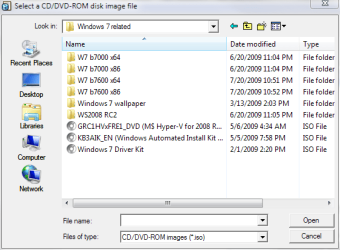
Next you'll get a standard Windows file selection dialog box. Pick the ISO on your computer that you want to use with this install.
Virtualbox setup 8.PNG

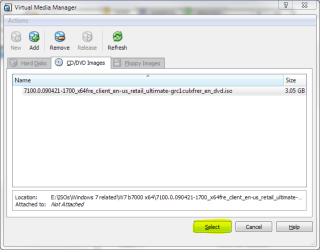
Now the .ISO is in the list. Click the Select button to continue.
VirtualBox setup 9.PNG

Now your .ISO file shows as ready to boot off of when you first run this machine.
Virtualbox setup 10.PNG

That's it. By default, the Virtual Machines created in VBox will automatically have DVD selected as one of the possible boot options available for use with the VM (Virtual Machine). There are also a lot more options three, so going back to that initial Setup screen (first picture) I suggest that you use set up all the options that you need - for example, I have my quad Core system allowing the VM to use 2 cores, 1 GB of RAM for XP and older OSs and 2 GB of RAM for Vista / 7, change the NIC to an Intel Pro 1000 MT Desktop, and max my Video RAM (to 128 MB) to get the best possible picture.

Note: The video still does not support Virtualization, so I cannot use one of my 2 dedicated graphics card (a pair of GTX 260s) for the VM - else I would be in heaven....

Of course, if you do not have the original ISO anymore, it is easy enough to make it from the DVD that you burned - Using another 3rd party tool (one of my personal favorite freeware tools) called ISO Recorder v3 you'll have no issues at all - install ISO Recorder v3.1 and you'll be able to make an .ISO out of your DVD file.

If you only have the USB key and no ISO file nor DVD, then you'll probably want to get a hold of the official ISO from wherever you got it before.
 

My Computers

System One System Two

  • Computer type
    PC/Desktop
    Computer Manufacturer/Model Number
    The Beast Model A (homebrew)
    OS
    Windows 11 21H2 Current build
    CPU
    AMD Ryzen 9 3950X
    Motherboard
    MSI MEG X570 GODLIKE
    Memory
    4 * 32 GB - Corsair Vengeance 3600 MHz
    Graphics Card(s)
    EVGA GeForce RTX 3080 Ti XC3 ULTRA GAMING (12G-P5-3955-KR)
    Sound Card
    Realtek® ALC1220 Codec
    Monitor(s) Displays
    2x Eve Spectrum ES07D03 4K Gaming Monitor (Matte) | Eve Spec
    Screen Resolution
    3x 3840 x 2160
    Hard Drives
    3x Samsung 980 Pro NVMe PCIe 4 M.2 2 TB SSD (MZ-V8P2T0B/AM) } 3x Sabrent Rocket NVMe 4.0 1 TB SSD
    PSU
    PC Power & Cooling’s Silencer Series 1050 Watt, 80 Plus Plat
    Case
    Fractal Design Define 7 XL Dark ATX Full Tower Case
    Cooling
    SteelSeries Apex Pro Wired Gaming Keyboard
    Keyboard
    SteelSeries Apex Pro
    Mouse
    Logitech MX Master 3S | MX Master 3 for business
    Internet Speed
    AT&T LightSpeed Gigabit Duplex Ftth
    Antivirus
    Windows Defender + MB 3
    Browser
    Nightly (default) + Firefox (stable),Chrome, Edge
  • Computer type
    PC/Desktop
    System Manufacturer/Model Number
    Dell Latitude E5470
    OS
    ChromeOS Flex Dev Channel (current)
    CPU
    Intel(R) Core(TM) i5-6300U CPU @ 2.40GHz, 2501 Mhz, 2 Core(s), 4 Logical Processor(s)
    Motherboard
    Dell
    Memory
    16 GB
    Graphics Card(s)
    Intel(R) HD Graphics 520
    Sound Card
    Intel(R) HD Graphics 520 + RealTek Audio
    Monitor(s) Displays
    Dell laptop display 15"
    Screen Resolution
    1920 * 1080
    Hard Drives
    Toshiba 128GB M.2 22300 drive
    INTEL Cherryville 520 Series SSDSC2CW180A 180 GB SATA III SSD
    PSU
    Dell
    Case
    Dell
    Cooling
    Dell
    Keyboard
    Dell
    Mouse
    Logitech MX Master 3S (shared w. Sys 1) | Dell TouchPad
    Internet Speed
    AT&T LightSpeed Gigabit Duplex Ftth
Who wants to help me install dos? I downloaded 6.22 and 6.0 off technet, but there's no floppy image to install 6.0. =/

My last resort is to mount the vhd into another virtual machine and move teh 6.0 files to there, but that's retarded.
 

My Computer

OS
7264x64/7260x86

My Computer

Computer Manufacturer/Model Number
me and myself
OS
vista x64/ win 7 x64
CPU
phenom 9950 BE
Motherboard
ASUS M2A-VM HDMI
Memory
8 gb
Graphics Card(s)
nvidia gts 250
Sound Card
realtek HD onboard
Monitor(s) Displays
dual hd 19" tft
Screen Resolution
1440x900
Hard Drives
2 x 500 gb WDC
1 x 500 gb Seagate
1 x 1000 gb Seagate
1 80 gb raptor
1 usb 160 gb
Cooling
standard issue
Keyboard
logitech g11
Mouse
usb wireless MS laser 6000
Internet Speed
18 mb (according to my provider :)

My Computer

Computer Manufacturer/Model Number
me and myself
OS
vista x64/ win 7 x64
CPU
phenom 9950 BE
Motherboard
ASUS M2A-VM HDMI
Memory
8 gb
Graphics Card(s)
nvidia gts 250
Sound Card
realtek HD onboard
Monitor(s) Displays
dual hd 19" tft
Screen Resolution
1440x900
Hard Drives
2 x 500 gb WDC
1 x 500 gb Seagate
1 x 1000 gb Seagate
1 80 gb raptor
1 usb 160 gb
Cooling
standard issue
Keyboard
logitech g11
Mouse
usb wireless MS laser 6000
Internet Speed
18 mb (according to my provider :)
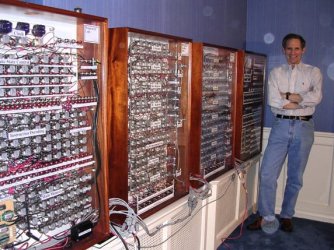
your mistaken sir. I know for a proven fact that you try to read my thoughts but i've fooled you. That's my kitchen blender

HAHAHAHA the joke's is on you, you CIA agent.
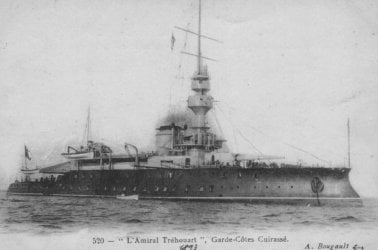
You are too smooth. I will make my way to the southern French shore one day. I look forward to meeting you. Just ignore the little black box.
 
You are too smooth. I will make my way to the southern French shore one day. I look forward to meeting you. Just ignore the little black box.

i'm ready for you:
 

Attachments

  • Amirtre1-Bougault.jpg
    Amirtre1-Bougault.jpg
    35.2 KB · Views: 12

My Computer

Computer Manufacturer/Model Number
me and myself
OS
vista x64/ win 7 x64
CPU
phenom 9950 BE
Motherboard
ASUS M2A-VM HDMI
Memory
8 gb
Graphics Card(s)
nvidia gts 250
Sound Card
realtek HD onboard
Monitor(s) Displays
dual hd 19" tft
Screen Resolution
1440x900
Hard Drives
2 x 500 gb WDC
1 x 500 gb Seagate
1 x 1000 gb Seagate
1 80 gb raptor
1 usb 160 gb
Cooling
standard issue
Keyboard
logitech g11
Mouse
usb wireless MS laser 6000
Internet Speed
18 mb (according to my provider :)
petrossa said:
I remember a Lonely Planet travel guide "Backpacking in the Netherlands", which stated in prologue "Holland is the only country in the world where a kid can have two mothers who both got their sex-change operation paid by the government". ;)

Petrossa, seriously, I love Holland. Have a lot of friends in Utrecht and Groeningen. Ik praat een beetje Nederlands ook. The above quote is not ment to insult or offend you.

Kari
 

My Computer

Computer type
Laptop
Computer Manufacturer/Model Number
HP ENVY 17-1150eg
OS
Windows 10 Pro x64 EN-GB
CPU
1.6 GHz Intel Core i7-720QM Processor
Memory
6 GB
Graphics Card(s)
ATI Mobility Radeon HD 5850 Graphics
Sound Card
Beats sound system with integrated subwoofer
Monitor(s) Displays
17" laptop display, 22" LED and 32" Full HD TV through HDMI
Screen Resolution
1600*900 (1), 1920*1080 (2&3)
Hard Drives
Internal: 2 x 500 GB SATA Hard Disk Drive 7200 rpm
External: 2TB for backups, 3TB USB3 network drive for media
Cooling
As Envy runs a bit warm, I have it on a Cooler Master pad
Keyboard
Logitech diNovo Media Desktop Laser (bluetooth)
Mouse
Logitech Performance Mouse MX
Internet Speed
50/10 Mbps VDSL
Antivirus
Windows Defender 4.3.9431.0
Browser
Maxthon 3.5.2., IE11
The DOS 6.0 should be bootable in and of itself - but if you're really looking for a quick way out involving no floppies....

install 6.22 twice (meaning two different VMs), then use the 6.0 disc to format one of the 6.22 VMs overwriting the system files and it will boot to 6.0.

Also, can we please keep the thread hijacks to a minimum, particularly when a user is asking for help?
 

My Computers

System One System Two

  • Computer type
    PC/Desktop
    Computer Manufacturer/Model Number
    The Beast Model A (homebrew)
    OS
    Windows 11 21H2 Current build
    CPU
    AMD Ryzen 9 3950X
    Motherboard
    MSI MEG X570 GODLIKE
    Memory
    4 * 32 GB - Corsair Vengeance 3600 MHz
    Graphics Card(s)
    EVGA GeForce RTX 3080 Ti XC3 ULTRA GAMING (12G-P5-3955-KR)
    Sound Card
    Realtek® ALC1220 Codec
    Monitor(s) Displays
    2x Eve Spectrum ES07D03 4K Gaming Monitor (Matte) | Eve Spec
    Screen Resolution
    3x 3840 x 2160
    Hard Drives
    3x Samsung 980 Pro NVMe PCIe 4 M.2 2 TB SSD (MZ-V8P2T0B/AM) } 3x Sabrent Rocket NVMe 4.0 1 TB SSD
    PSU
    PC Power & Cooling’s Silencer Series 1050 Watt, 80 Plus Plat
    Case
    Fractal Design Define 7 XL Dark ATX Full Tower Case
    Cooling
    SteelSeries Apex Pro Wired Gaming Keyboard
    Keyboard
    SteelSeries Apex Pro
    Mouse
    Logitech MX Master 3S | MX Master 3 for business
    Internet Speed
    AT&T LightSpeed Gigabit Duplex Ftth
    Antivirus
    Windows Defender + MB 3
    Browser
    Nightly (default) + Firefox (stable),Chrome, Edge
  • Computer type
    PC/Desktop
    System Manufacturer/Model Number
    Dell Latitude E5470
    OS
    ChromeOS Flex Dev Channel (current)
    CPU
    Intel(R) Core(TM) i5-6300U CPU @ 2.40GHz, 2501 Mhz, 2 Core(s), 4 Logical Processor(s)
    Motherboard
    Dell
    Memory
    16 GB
    Graphics Card(s)
    Intel(R) HD Graphics 520
    Sound Card
    Intel(R) HD Graphics 520 + RealTek Audio
    Monitor(s) Displays
    Dell laptop display 15"
    Screen Resolution
    1920 * 1080
    Hard Drives
    Toshiba 128GB M.2 22300 drive
    INTEL Cherryville 520 Series SSDSC2CW180A 180 GB SATA III SSD
    PSU
    Dell
    Case
    Dell
    Cooling
    Dell
    Keyboard
    Dell
    Mouse
    Logitech MX Master 3S (shared w. Sys 1) | Dell TouchPad
    Internet Speed
    AT&T LightSpeed Gigabit Duplex Ftth

My Computer

Computer Manufacturer/Model Number
me and myself
OS
vista x64/ win 7 x64
CPU
phenom 9950 BE
Motherboard
ASUS M2A-VM HDMI
Memory
8 gb
Graphics Card(s)
nvidia gts 250
Sound Card
realtek HD onboard
Monitor(s) Displays
dual hd 19" tft
Screen Resolution
1440x900
Hard Drives
2 x 500 gb WDC
1 x 500 gb Seagate
1 x 1000 gb Seagate
1 80 gb raptor
1 usb 160 gb
Cooling
standard issue
Keyboard
logitech g11
Mouse
usb wireless MS laser 6000
Internet Speed
18 mb (according to my provider :)
Your initial post was fine - it was relevant.

However, it detracts from the conversation when all of a sudden there are 4 posts or 4 pages of posts or whatever that are unrelated to the subject matter at hand. Hence my request.
 

My Computers

System One System Two

  • Computer type
    PC/Desktop
    Computer Manufacturer/Model Number
    The Beast Model A (homebrew)
    OS
    Windows 11 21H2 Current build
    CPU
    AMD Ryzen 9 3950X
    Motherboard
    MSI MEG X570 GODLIKE
    Memory
    4 * 32 GB - Corsair Vengeance 3600 MHz
    Graphics Card(s)
    EVGA GeForce RTX 3080 Ti XC3 ULTRA GAMING (12G-P5-3955-KR)
    Sound Card
    Realtek® ALC1220 Codec
    Monitor(s) Displays
    2x Eve Spectrum ES07D03 4K Gaming Monitor (Matte) | Eve Spec
    Screen Resolution
    3x 3840 x 2160
    Hard Drives
    3x Samsung 980 Pro NVMe PCIe 4 M.2 2 TB SSD (MZ-V8P2T0B/AM) } 3x Sabrent Rocket NVMe 4.0 1 TB SSD
    PSU
    PC Power & Cooling’s Silencer Series 1050 Watt, 80 Plus Plat
    Case
    Fractal Design Define 7 XL Dark ATX Full Tower Case
    Cooling
    SteelSeries Apex Pro Wired Gaming Keyboard
    Keyboard
    SteelSeries Apex Pro
    Mouse
    Logitech MX Master 3S | MX Master 3 for business
    Internet Speed
    AT&T LightSpeed Gigabit Duplex Ftth
    Antivirus
    Windows Defender + MB 3
    Browser
    Nightly (default) + Firefox (stable),Chrome, Edge
  • Computer type
    PC/Desktop
    System Manufacturer/Model Number
    Dell Latitude E5470
    OS
    ChromeOS Flex Dev Channel (current)
    CPU
    Intel(R) Core(TM) i5-6300U CPU @ 2.40GHz, 2501 Mhz, 2 Core(s), 4 Logical Processor(s)
    Motherboard
    Dell
    Memory
    16 GB
    Graphics Card(s)
    Intel(R) HD Graphics 520
    Sound Card
    Intel(R) HD Graphics 520 + RealTek Audio
    Monitor(s) Displays
    Dell laptop display 15"
    Screen Resolution
    1920 * 1080
    Hard Drives
    Toshiba 128GB M.2 22300 drive
    INTEL Cherryville 520 Series SSDSC2CW180A 180 GB SATA III SSD
    PSU
    Dell
    Case
    Dell
    Cooling
    Dell
    Keyboard
    Dell
    Mouse
    Logitech MX Master 3S (shared w. Sys 1) | Dell TouchPad
    Internet Speed
    AT&T LightSpeed Gigabit Duplex Ftth
Back
Top