Virtual Drive Problem

brato92

New member
Member
Local time
4:00 PM
Messages
76
Hi guys, i have a problem with my virtual drive: when i'm mounting an image with Daemon Tools (doesn't matter if it's 700mb, 4 or 8gb) my laptop begins to make a loud sound, like it's running a game at high resolution and can't handle it. I don't know what makes this sound (maybe the hard-disk), but i want to know, because even if i close the image or deactivate the virtual drive, the laptop keeps making this noisy sound. The only way to get it back to normal is to shut it down, wait a few seconds and then open again. My laptop specs are quite good: Sony Vaio VPCSE1E1E, 64-bit Windows 7 Home Premium SP1 with 4Gb RAM DDR3, Intel Core i5-2430M with 2,40Ghz, 5400 rpm HDD speed, and 1Gb RAM video card.


My Computer

Computer type
Laptop
Computer Manufacturer/Model Number
SONY VAIO
OS
Windows 7 Home Premium x64
CPU
Intel i5
Memory
4GB
Hard Drives
TOSHIBA 500GB
Antivirus
MSE
Browser
Mozilla Firefox
Hi :) .
It sounds (no pun intended) like the HDD could use some testing.

Testing the HDD:

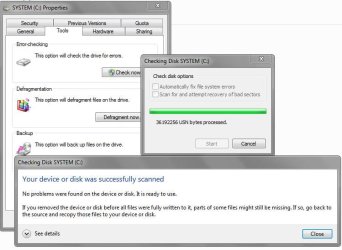
  1. Perform a Disk Check | http://www.sevenforums.com/tutorials/433-disk-check.html
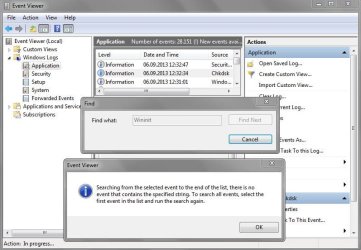
  2. Then Post the results following | THIS METHOD
  3. Download SeaTools for Windows if you don't want to use a CD to test the HDD you can use YUMI – Multiboot USB Creator to create a bootable USB (instructions are found at the bottom of both pages).
  4. If SeaTools for Windows is unable to recognize your HDD visit HDDdiag and follow the instructions.
Let us know.
 

My Computer

Computer type
PC/Desktop
OS
Windows 10
CPU
Intel Core i5 3570K
Motherboard
Asus P8Z77V-PRO
Memory
16GB 1600Mhz G.Skill
Graphics Card(s)
Gigabyte GTX 970 G1-Gaming
PSU
Seasonic 1000W Platinum
Case
Fractal Design Define R4
Cooling
Noctua NH-D14

My Computer

Computer type
PC/Desktop
Computer Manufacturer/Model Number
Own build (new) Desk1 / Asus ROG Win 7 / Desk2 1st build
OS
Desk1 7 Home Prem / Desk2 10 Pro / Main lap Asus ROG 10 Pro 2 laptop Toshiba 7 Pro Asus P2520 7 & 10
CPU
Desk1 i5 3750K / Laptop i7 GTX 860M / Desk2 i5 2500
Motherboard
Desk1 Asus P877-V / Desk2 Gigabyte H67 UD3H / Laptop ?
Memory
Desk1 8GB (1866) / Desk2 16GB (1333) / Laptop 8Gb DDR3
Graphics Card(s)
Desk 1& 2NVidia GTX 650 & Laptops on board Intel
Sound Card
Desk 1 & 2 -XONAR DG Realtek High Def audio Laptop
Monitor(s) Displays
Desk 1 Benq HD 2450 / Desk2 Philips 24" / Laptop 17.5"
Screen Resolution
1920x1080 D1 & D2 & Laptop 1
Hard Drives
Desk1 Samsung 120GB 830 SSD
Asus ROG 256GB 850 Pro SSD
Desk2 Samsung 840 256 SSD
Toshiba 120GB EVO
PSU
Desk 1 Corsair HX 1050/ Laptop ? / Desk 2 Corsair HX 650
Case
Desk 1 Cooler HAF XM ? Toshiba laptop / Desk2 Coolermaster
Cooling
Fans on all Desk1 -2 Desk2 - all Coolermasters 5 Laptop ?
Keyboard
Desk 1 MS Sidewinder X6 Desk 2 MS Sidewinder X 4
Mouse
Desk 1&2 - Gigabyte MS 900 gamer - laptop - Logitec wireless
Internet Speed
ADSL2+
Other Info
One other Desktop (tester) and spare Toshba laptop both with SSD's
Running Kaspersky 2016 ISS on all machines config'd identically
Logitec audio stereo systems on each machine (x3)
Canon MG5250MFC
Router/modem TP-Link running WPA2SK
Hy guys, i'll follow your steps and post the results. Regarding how old is my HDD, it was on this machine when i've bought it brand new (december 2011). I've had just one partition all this time (Local Disk C - capacity 445Gb).
 

My Computer

Computer type
Laptop
Computer Manufacturer/Model Number
SONY VAIO
OS
Windows 7 Home Premium x64
CPU
Intel i5
Memory
4GB
Hard Drives
TOSHIBA 500GB
Antivirus
MSE
Browser
Mozilla Firefox
Hy guys, i'll follow your steps and post the results. Regarding how old is my HDD, it was on this machine when i've bought it brand new (december 2011). I've had just one partition all this time (Local Disk C - capacity 445Gb).
Ok well it will be good to see what and how that drive is set up. I do however notice it is a Toshiba drive and personally I have had a lot of problems with that brand. But that is not to say your drive is bad.
I suppose if the worst came to the worst then you could clone it to a new drive and use it but only if the drive has gone south.
 

My Computer

Computer type
PC/Desktop
Computer Manufacturer/Model Number
Own build (new) Desk1 / Asus ROG Win 7 / Desk2 1st build
OS
Desk1 7 Home Prem / Desk2 10 Pro / Main lap Asus ROG 10 Pro 2 laptop Toshiba 7 Pro Asus P2520 7 & 10
CPU
Desk1 i5 3750K / Laptop i7 GTX 860M / Desk2 i5 2500
Motherboard
Desk1 Asus P877-V / Desk2 Gigabyte H67 UD3H / Laptop ?
Memory
Desk1 8GB (1866) / Desk2 16GB (1333) / Laptop 8Gb DDR3
Graphics Card(s)
Desk 1& 2NVidia GTX 650 & Laptops on board Intel
Sound Card
Desk 1 & 2 -XONAR DG Realtek High Def audio Laptop
Monitor(s) Displays
Desk 1 Benq HD 2450 / Desk2 Philips 24" / Laptop 17.5"
Screen Resolution
1920x1080 D1 & D2 & Laptop 1
Hard Drives
Desk1 Samsung 120GB 830 SSD
Asus ROG 256GB 850 Pro SSD
Desk2 Samsung 840 256 SSD
Toshiba 120GB EVO
PSU
Desk 1 Corsair HX 1050/ Laptop ? / Desk 2 Corsair HX 650
Case
Desk 1 Cooler HAF XM ? Toshiba laptop / Desk2 Coolermaster
Cooling
Fans on all Desk1 -2 Desk2 - all Coolermasters 5 Laptop ?
Keyboard
Desk 1 MS Sidewinder X6 Desk 2 MS Sidewinder X 4
Mouse
Desk 1&2 - Gigabyte MS 900 gamer - laptop - Logitec wireless
Internet Speed
ADSL2+
Other Info
One other Desktop (tester) and spare Toshba laptop both with SSD's
Running Kaspersky 2016 ISS on all machines config'd identically
Logitec audio stereo systems on each machine (x3)
Canon MG5250MFC
Router/modem TP-Link running WPA2SK
I've done YoYo155's steps 1 & 2. Here are the results:

Capture.JPG

View attachment check disk system log.txt

Capture2.JPG

Regarding step 3, since i haven't any CD to boot, what image should i use to make it bootable on my USB with YUMI ?
 
Last edited:

My Computer

Computer type
Laptop
Computer Manufacturer/Model Number
SONY VAIO
OS
Windows 7 Home Premium x64
CPU
Intel i5
Memory
4GB
Hard Drives
TOSHIBA 500GB
Antivirus
MSE
Browser
Mozilla Firefox
Yes you can always reformat the USB back.
Just keep in mind that making the USB bootable involves formatting it meaning all data currently stored on it
will be deleted permanently! make sure to copy any file you need prior to creating it.

Did you follow what ICit2lol suggested?
 

My Computer

Computer type
PC/Desktop
OS
Windows 10
CPU
Intel Core i5 3570K
Motherboard
Asus P8Z77V-PRO
Memory
16GB 1600Mhz G.Skill
Graphics Card(s)
Gigabyte GTX 970 G1-Gaming
PSU
Seasonic 1000W Platinum
Case
Fractal Design Define R4
Cooling
Noctua NH-D14

Hmm yep as YoYo says mate if you do that data will go.

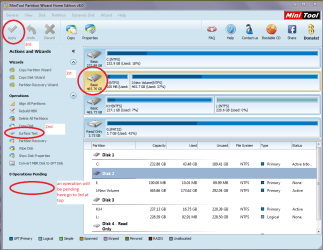
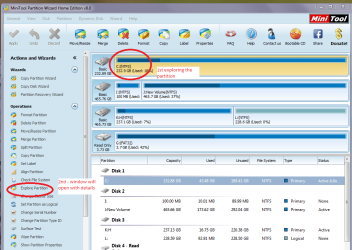
The Partition Wizard I referred to in addition to the physical surface testcan open up those files using the explore button to see what you have got but Iam guessing you know what you want.

Now to clone the drive you will need some sort of hook up device and I use aUSB to SATA gadget all the time.

So if you decide to clone to a new drive or even reinstall using thetutorial on that you will,need to get one of them. They are not expensive andalso if you decide to re install using the tutorial and your activation code asper that you will get rid of all the bloatware and then drag the data back formthe old drive via the gadget.

Sounds complicated but really isn't.

Have a lookat the tutorial and see what you think. http://www.sevenforums.com/tutorials/1649-clean-install-windows-7-a.html

Have included some pics of the test and the gadget it does come in differentforms depending on the barnd.

The clean install you will just need to install the new drive and boot fromthe media you make with that tutorial. The like I said copy the data from theold drive which would be out sdie the machine via thatgadget
 

Attachments

  • ADAPTOR.PNG
    ADAPTOR.PNG
    64 KB · Views: 3
  • MINI TOOL2.PNG
    MINI TOOL2.PNG
    51.6 KB · Views: 3
  • MINI TOOL4.PNG
    MINI TOOL4.PNG
    57.1 KB · Views: 2

My Computer

Computer type
PC/Desktop
Computer Manufacturer/Model Number
Own build (new) Desk1 / Asus ROG Win 7 / Desk2 1st build
OS
Desk1 7 Home Prem / Desk2 10 Pro / Main lap Asus ROG 10 Pro 2 laptop Toshiba 7 Pro Asus P2520 7 & 10
CPU
Desk1 i5 3750K / Laptop i7 GTX 860M / Desk2 i5 2500
Motherboard
Desk1 Asus P877-V / Desk2 Gigabyte H67 UD3H / Laptop ?
Memory
Desk1 8GB (1866) / Desk2 16GB (1333) / Laptop 8Gb DDR3
Graphics Card(s)
Desk 1& 2NVidia GTX 650 & Laptops on board Intel
Sound Card
Desk 1 & 2 -XONAR DG Realtek High Def audio Laptop
Monitor(s) Displays
Desk 1 Benq HD 2450 / Desk2 Philips 24" / Laptop 17.5"
Screen Resolution
1920x1080 D1 & D2 & Laptop 1
Hard Drives
Desk1 Samsung 120GB 830 SSD
Asus ROG 256GB 850 Pro SSD
Desk2 Samsung 840 256 SSD
Toshiba 120GB EVO
PSU
Desk 1 Corsair HX 1050/ Laptop ? / Desk 2 Corsair HX 650
Case
Desk 1 Cooler HAF XM ? Toshiba laptop / Desk2 Coolermaster
Cooling
Fans on all Desk1 -2 Desk2 - all Coolermasters 5 Laptop ?
Keyboard
Desk 1 MS Sidewinder X6 Desk 2 MS Sidewinder X 4
Mouse
Desk 1&2 - Gigabyte MS 900 gamer - laptop - Logitec wireless
Internet Speed
ADSL2+
Other Info
One other Desktop (tester) and spare Toshba laptop both with SSD's
Running Kaspersky 2016 ISS on all machines config'd identically
Logitec audio stereo systems on each machine (x3)
Canon MG5250MFC
Router/modem TP-Link running WPA2SK
ICit2lol you're right. I want to reinstall a new clean Windows, because this one came preinstalled with a lot of crap software from VAIO which i never use: it makes the system ran slower, btw when i'm opening it, it takes 3-4 minutes to load my desktop. I have a plan and i want your opinion: i've recently purchased a Windows 8 Professional 64-bit installation kit (with license) which i want to install: i also want to purchase a SSD drive (120 Gb) which i want to replace my Toshiba HDD. The only problem is i don't know what SSD is compatible with my laptop. I'm thinking this way my laptop will run a lot better, because i'll have the SSD and a new clean Windows installed without that crap soft from VAIO. Do you guys think it's a good idea ?

Regarding your Partition Wizard test, i don't have any of those gadgets right now. I will run Speccy and then YUMI. I'll post the results.

EDIT: Here are the results after i've ran Speccy: View attachment VAIO.txt
 

My Computer

Computer type
Laptop
Computer Manufacturer/Model Number
SONY VAIO
OS
Windows 7 Home Premium x64
CPU
Intel i5
Memory
4GB
Hard Drives
TOSHIBA 500GB
Antivirus
MSE
Browser
Mozilla Firefox
Brato to answer your questions.
Yes a SSD will be fine and any brand will be compatible I prefer the Samsung brand personally but if you want to ask in the forum then that is your choice. See your local supplier for them but this is the Samsung site and most prefer the 840 Pro but there is a model called the EVO out now which I do not know much about. My machines have got straight 840's in them and I cannot complain about them and they are a little less expensive than the Pro version but the choice is yours. http://www.samsung.com/au/consumer/pc-peripherals/solid-state-drive/
There is a good tutorial for setting the drive up but I believe now absolutely necessary as Windows will make that first 100MB partition. Personally I use it
http://www.sevenforums.com/tutorials/113967-ssd-alignment.html

Ina any case you will find the machine will fly with the SSD in it
If you are going to use the 8 then I am not sure of the optimizing stuff you can do like with 7 but join the 8 forum (same folks I am in there) and find out from there.
My 8 is an upgrade of the 7 and I use an app to give me the 7 style start up menu as I don't really like the 8 metro style but again the choice is yours.

Regarding the crapware well the clean install from the media you have bought will negate any of that it is on that other drive from the factory install so no problems there.

The Partition Wizard you can leave until you want it and I think you can even have it as a bootable stick drive should you ever need it.

Re the Speccy report the CPU is a little on the warm side mate unless the machine is running some scan or whatever and if it is at idle then it is warmer than I would like so have a look around for dust on the air intakes and shine a very bright light into the air intake and then look into the air outlet to see if there is any significant build up of crud in the small "radiator".

You can just blow it out with compressed air into the air intake making sure you insert a cable tie in the fan blades before you blow it out to stop the fan from spinning as the compressed air will make the fan spin much faster than designed to and could wreck the bearing.:)
 

My Computer

Computer type
PC/Desktop
Computer Manufacturer/Model Number
Own build (new) Desk1 / Asus ROG Win 7 / Desk2 1st build
OS
Desk1 7 Home Prem / Desk2 10 Pro / Main lap Asus ROG 10 Pro 2 laptop Toshiba 7 Pro Asus P2520 7 & 10
CPU
Desk1 i5 3750K / Laptop i7 GTX 860M / Desk2 i5 2500
Motherboard
Desk1 Asus P877-V / Desk2 Gigabyte H67 UD3H / Laptop ?
Memory
Desk1 8GB (1866) / Desk2 16GB (1333) / Laptop 8Gb DDR3
Graphics Card(s)
Desk 1& 2NVidia GTX 650 & Laptops on board Intel
Sound Card
Desk 1 & 2 -XONAR DG Realtek High Def audio Laptop
Monitor(s) Displays
Desk 1 Benq HD 2450 / Desk2 Philips 24" / Laptop 17.5"
Screen Resolution
1920x1080 D1 & D2 & Laptop 1
Hard Drives
Desk1 Samsung 120GB 830 SSD
Asus ROG 256GB 850 Pro SSD
Desk2 Samsung 840 256 SSD
Toshiba 120GB EVO
PSU
Desk 1 Corsair HX 1050/ Laptop ? / Desk 2 Corsair HX 650
Case
Desk 1 Cooler HAF XM ? Toshiba laptop / Desk2 Coolermaster
Cooling
Fans on all Desk1 -2 Desk2 - all Coolermasters 5 Laptop ?
Keyboard
Desk 1 MS Sidewinder X6 Desk 2 MS Sidewinder X 4
Mouse
Desk 1&2 - Gigabyte MS 900 gamer - laptop - Logitec wireless
Internet Speed
ADSL2+
Other Info
One other Desktop (tester) and spare Toshba laptop both with SSD's
Running Kaspersky 2016 ISS on all machines config'd identically
Logitec audio stereo systems on each machine (x3)
Canon MG5250MFC
Router/modem TP-Link running WPA2SK
So you think it's better to install Windows 7 on the SSD ? Neither i preffer the Metro interface on 8, but i've read on some forums that 8 runs a lil bit faster than 7 with the same applications installed (not counting start-up). I also keep in mind that 7 is compatible with most drivers and programs. The only problem is i have original 7 Home-Premium SP1 placed in this HDD (i think it's on a hidden partition which i cannot access normally), because i didn't got it on dvd when i bought the laptop. Is there any chance to transfer it to SSD, or to make the HDD portable so i can install it after i'll put the SSD on my laptop. Btw, i also want to buy a Samsung SSD (Samsung 840 Series, 2.5", 120Gb, SATA III), because this brand and Kingston are the only avaiable on my local store.
 

My Computer

Computer type
Laptop
Computer Manufacturer/Model Number
SONY VAIO
OS
Windows 7 Home Premium x64
CPU
Intel i5
Memory
4GB
Hard Drives
TOSHIBA 500GB
Antivirus
MSE
Browser
Mozilla Firefox
Personally brato I would go the 7 and upgrade if you want to mate. The 8 does run a bit faster for me like tis laptop I am on right now but again it is an upgrade not the full version 8 and I use an app called Stardock8 ($5) to give me the 7 start up menu. On the Sandy Bridge I use one called Classic Shell but again it was originally a 7 OS.

Now I think if you put on 7 with the SSD you will see a vast difference in the performance of the machine anyway and if you use this tutorial it will go even better.
http://www.sevenforums.com/tutorials/11728-optimize-windows-7-a.html

You can put 7 on the new SSD drive using the other tutorial I sent you just need to make an ISO disk or stick from the link and install using the activation code on the Microsoft sticker on the bottom of the machine. When you download the OS you just need to make sure you pick the correct version ie Home Premium and don't use nay that have an "N" alongside as that means the version does not come with Windows Media Player.
If you are not sure of just how to do that post a reply in the clean re install tutorial and Greg will only be too glad to walk you through or if he is not available then someone will http://www.sevenforums.com/tutorials/219487-clean-reinstall-factory-oem-windows-7-a.html

You could also funds allowing clone the new drive and install to another drive and upgrade that second drive. I did just that and keep the original 7 drive as a spare:)

Post back if anything is not clear:)
 

My Computer

Computer type
PC/Desktop
Computer Manufacturer/Model Number
Own build (new) Desk1 / Asus ROG Win 7 / Desk2 1st build
OS
Desk1 7 Home Prem / Desk2 10 Pro / Main lap Asus ROG 10 Pro 2 laptop Toshiba 7 Pro Asus P2520 7 & 10
CPU
Desk1 i5 3750K / Laptop i7 GTX 860M / Desk2 i5 2500
Motherboard
Desk1 Asus P877-V / Desk2 Gigabyte H67 UD3H / Laptop ?
Memory
Desk1 8GB (1866) / Desk2 16GB (1333) / Laptop 8Gb DDR3
Graphics Card(s)
Desk 1& 2NVidia GTX 650 & Laptops on board Intel
Sound Card
Desk 1 & 2 -XONAR DG Realtek High Def audio Laptop
Monitor(s) Displays
Desk 1 Benq HD 2450 / Desk2 Philips 24" / Laptop 17.5"
Screen Resolution
1920x1080 D1 & D2 & Laptop 1
Hard Drives
Desk1 Samsung 120GB 830 SSD
Asus ROG 256GB 850 Pro SSD
Desk2 Samsung 840 256 SSD
Toshiba 120GB EVO
PSU
Desk 1 Corsair HX 1050/ Laptop ? / Desk 2 Corsair HX 650
Case
Desk 1 Cooler HAF XM ? Toshiba laptop / Desk2 Coolermaster
Cooling
Fans on all Desk1 -2 Desk2 - all Coolermasters 5 Laptop ?
Keyboard
Desk 1 MS Sidewinder X6 Desk 2 MS Sidewinder X 4
Mouse
Desk 1&2 - Gigabyte MS 900 gamer - laptop - Logitec wireless
Internet Speed
ADSL2+
Other Info
One other Desktop (tester) and spare Toshba laptop both with SSD's
Running Kaspersky 2016 ISS on all machines config'd identically
Logitec audio stereo systems on each machine (x3)
Canon MG5250MFC
Router/modem TP-Link running WPA2SK
Thanks for your support folk, it's very clear for me now. When i'll buy the SSD, i'll keep in mind installing W7 like you said. The only question is, will be safe to install the SSD myself, or i must go to a computer service ?
 

My Computer

Computer type
Laptop
Computer Manufacturer/Model Number
SONY VAIO
OS
Windows 7 Home Premium x64
CPU
Intel i5
Memory
4GB
Hard Drives
TOSHIBA 500GB
Antivirus
MSE
Browser
Mozilla Firefox
Thanks for your support folk, it's very clear for me now. When i'll buy the SSD, i'll keep in mind installing W7 like you said. The only question is, will be safe to install the SSD myself, or i must go to a computer service ?
No Brato you can do it if you post back the exact Sony model number I can look up the directions for you or you can do that yourself.

Usually changing the hard drive is just a matter of removing the power and the battery unscrewing and removing a small lid / door on the bottom of the machine and sliding the old drive out and the new one in. Then just reverse the operation power up go into the BIOS set to boot from the optical drive flip in the Windows media and install - you just follow the prompts:)

Of course it depends on what media you intend to use - you can use an OEM version or use this http://www.sevenforums.com/tutorials/219487-clean-reinstall-factory-oem-windows-7-a.html#post1839164 it just needs the activation code from the sticker on the bottom of your machine. If you buy a separate OEM copy you just slip the disk in and go:)

NB An OEM is short for Original Equipment Manufacturer and is what the factories and anyone who builds a machine uses and is only usable on the machine it is installed on. (Factory ones ie Sony use a bulk version the one you would buy is an individual DVD) Now you would be eligible to use one in view that you have replaced the hard drive.

Post back if you have any concerns at all we are here to help you:)
 

My Computer

Computer type
PC/Desktop
Computer Manufacturer/Model Number
Own build (new) Desk1 / Asus ROG Win 7 / Desk2 1st build
OS
Desk1 7 Home Prem / Desk2 10 Pro / Main lap Asus ROG 10 Pro 2 laptop Toshiba 7 Pro Asus P2520 7 & 10
CPU
Desk1 i5 3750K / Laptop i7 GTX 860M / Desk2 i5 2500
Motherboard
Desk1 Asus P877-V / Desk2 Gigabyte H67 UD3H / Laptop ?
Memory
Desk1 8GB (1866) / Desk2 16GB (1333) / Laptop 8Gb DDR3
Graphics Card(s)
Desk 1& 2NVidia GTX 650 & Laptops on board Intel
Sound Card
Desk 1 & 2 -XONAR DG Realtek High Def audio Laptop
Monitor(s) Displays
Desk 1 Benq HD 2450 / Desk2 Philips 24" / Laptop 17.5"
Screen Resolution
1920x1080 D1 & D2 & Laptop 1
Hard Drives
Desk1 Samsung 120GB 830 SSD
Asus ROG 256GB 850 Pro SSD
Desk2 Samsung 840 256 SSD
Toshiba 120GB EVO
PSU
Desk 1 Corsair HX 1050/ Laptop ? / Desk 2 Corsair HX 650
Case
Desk 1 Cooler HAF XM ? Toshiba laptop / Desk2 Coolermaster
Cooling
Fans on all Desk1 -2 Desk2 - all Coolermasters 5 Laptop ?
Keyboard
Desk 1 MS Sidewinder X6 Desk 2 MS Sidewinder X 4
Mouse
Desk 1&2 - Gigabyte MS 900 gamer - laptop - Logitec wireless
Internet Speed
ADSL2+
Other Info
One other Desktop (tester) and spare Toshba laptop both with SSD's
Running Kaspersky 2016 ISS on all machines config'd identically
Logitec audio stereo systems on each machine (x3)
Canon MG5250MFC
Router/modem TP-Link running WPA2SK
My model is VAIO VPCSE1E1E. I'll appreciate if u can find the instructions for me regarding how to remove the HDD. Thanks man !
 

My Computer

Computer type
Laptop
Computer Manufacturer/Model Number
SONY VAIO
OS
Windows 7 Home Premium x64
CPU
Intel i5
Memory
4GB
Hard Drives
TOSHIBA 500GB
Antivirus
MSE
Browser
Mozilla Firefox
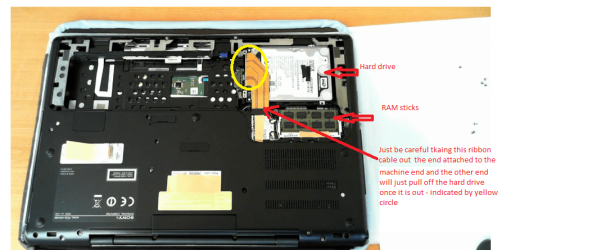
Sorry late reply Brato mate take a look at this video unfortunately no audio but just follow what the fellow is doing up to when he removes the hard drive - then stop - do the hard drive change over and just reverse the process. Your machine should look just like this if not very similar.

Sony Vaio SE disassembly - YouTube

Just keep in mind the ribbon cables are reasonably fragile and require gentle removal. Once out just unplug that cable to the original drive and attach the new one and like I said reverse the process in the video. (and see my pic)

A tip mate make sure the power supply is removed and the battery and I always place the machine on a large bath towel preferably - white - spread out in case you drop those small screws. The towel will stop them on the spot if you drop them on a hard surface the screws have a nasty habit of bouncing off the top onto the floor to be sometimes lost forever:(.
Also a good idea is to have a small pot to retain them and count them too.

If you have any concerns at all please post back and ask us.
 

Attachments

  • SONY SE.PNG
    SONY SE.PNG
    139.5 KB · Views: 4

My Computer

Computer type
PC/Desktop
Computer Manufacturer/Model Number
Own build (new) Desk1 / Asus ROG Win 7 / Desk2 1st build
OS
Desk1 7 Home Prem / Desk2 10 Pro / Main lap Asus ROG 10 Pro 2 laptop Toshiba 7 Pro Asus P2520 7 & 10
CPU
Desk1 i5 3750K / Laptop i7 GTX 860M / Desk2 i5 2500
Motherboard
Desk1 Asus P877-V / Desk2 Gigabyte H67 UD3H / Laptop ?
Memory
Desk1 8GB (1866) / Desk2 16GB (1333) / Laptop 8Gb DDR3
Graphics Card(s)
Desk 1& 2NVidia GTX 650 & Laptops on board Intel
Sound Card
Desk 1 & 2 -XONAR DG Realtek High Def audio Laptop
Monitor(s) Displays
Desk 1 Benq HD 2450 / Desk2 Philips 24" / Laptop 17.5"
Screen Resolution
1920x1080 D1 & D2 & Laptop 1
Hard Drives
Desk1 Samsung 120GB 830 SSD
Asus ROG 256GB 850 Pro SSD
Desk2 Samsung 840 256 SSD
Toshiba 120GB EVO
PSU
Desk 1 Corsair HX 1050/ Laptop ? / Desk 2 Corsair HX 650
Case
Desk 1 Cooler HAF XM ? Toshiba laptop / Desk2 Coolermaster
Cooling
Fans on all Desk1 -2 Desk2 - all Coolermasters 5 Laptop ?
Keyboard
Desk 1 MS Sidewinder X6 Desk 2 MS Sidewinder X 4
Mouse
Desk 1&2 - Gigabyte MS 900 gamer - laptop - Logitec wireless
Internet Speed
ADSL2+
Other Info
One other Desktop (tester) and spare Toshba laptop both with SSD's
Running Kaspersky 2016 ISS on all machines config'd identically
Logitec audio stereo systems on each machine (x3)
Canon MG5250MFC
Router/modem TP-Link running WPA2SK
The steps are easy enough. Thanks again man ! Just saved me from spending extra $$ for replacing the HDD in service. In 2-3 weeks i'll have the SSD. If anything is not clear, i'll inform you. Peace bro !
 

My Computer

Computer type
Laptop
Computer Manufacturer/Model Number
SONY VAIO
OS
Windows 7 Home Premium x64
CPU
Intel i5
Memory
4GB
Hard Drives
TOSHIBA 500GB
Antivirus
MSE
Browser
Mozilla Firefox
The steps are easy enough. Thanks again man ! Just saved me from spending extra $$ for replacing the HDD in service. In 2-3 weeks i'll have the SSD. If anything is not clear, i'll inform you. Peace bro !
No worries Brtao and like I said get stuck post back or PM me if you want:)
 

My Computer

Computer type
PC/Desktop
Computer Manufacturer/Model Number
Own build (new) Desk1 / Asus ROG Win 7 / Desk2 1st build
OS
Desk1 7 Home Prem / Desk2 10 Pro / Main lap Asus ROG 10 Pro 2 laptop Toshiba 7 Pro Asus P2520 7 & 10
CPU
Desk1 i5 3750K / Laptop i7 GTX 860M / Desk2 i5 2500
Motherboard
Desk1 Asus P877-V / Desk2 Gigabyte H67 UD3H / Laptop ?
Memory
Desk1 8GB (1866) / Desk2 16GB (1333) / Laptop 8Gb DDR3
Graphics Card(s)
Desk 1& 2NVidia GTX 650 & Laptops on board Intel
Sound Card
Desk 1 & 2 -XONAR DG Realtek High Def audio Laptop
Monitor(s) Displays
Desk 1 Benq HD 2450 / Desk2 Philips 24" / Laptop 17.5"
Screen Resolution
1920x1080 D1 & D2 & Laptop 1
Hard Drives
Desk1 Samsung 120GB 830 SSD
Asus ROG 256GB 850 Pro SSD
Desk2 Samsung 840 256 SSD
Toshiba 120GB EVO
PSU
Desk 1 Corsair HX 1050/ Laptop ? / Desk 2 Corsair HX 650
Case
Desk 1 Cooler HAF XM ? Toshiba laptop / Desk2 Coolermaster
Cooling
Fans on all Desk1 -2 Desk2 - all Coolermasters 5 Laptop ?
Keyboard
Desk 1 MS Sidewinder X6 Desk 2 MS Sidewinder X 4
Mouse
Desk 1&2 - Gigabyte MS 900 gamer - laptop - Logitec wireless
Internet Speed
ADSL2+
Other Info
One other Desktop (tester) and spare Toshba laptop both with SSD's
Running Kaspersky 2016 ISS on all machines config'd identically
Logitec audio stereo systems on each machine (x3)
Canon MG5250MFC
Router/modem TP-Link running WPA2SK
Hey, my SSD will be coming in the next 2-3 days. I have another problem now: my optic DVD drive can't read the Windows DVD (i think it's because it's dusty). The dvd is fine, because it works well on my another laptops. Do you know what i have to do to repair or clean my DVD drive ?
 

My Computer

Computer type
Laptop
Computer Manufacturer/Model Number
SONY VAIO
OS
Windows 7 Home Premium x64
CPU
Intel i5
Memory
4GB
Hard Drives
TOSHIBA 500GB
Antivirus
MSE
Browser
Mozilla Firefox
Brato just get a DVD /CD cleaner kit if that doesn't do the trick then replace the optical drive they are really quite cheap now.
 

My Computer

Computer type
PC/Desktop
Computer Manufacturer/Model Number
Own build (new) Desk1 / Asus ROG Win 7 / Desk2 1st build
OS
Desk1 7 Home Prem / Desk2 10 Pro / Main lap Asus ROG 10 Pro 2 laptop Toshiba 7 Pro Asus P2520 7 & 10
CPU
Desk1 i5 3750K / Laptop i7 GTX 860M / Desk2 i5 2500
Motherboard
Desk1 Asus P877-V / Desk2 Gigabyte H67 UD3H / Laptop ?
Memory
Desk1 8GB (1866) / Desk2 16GB (1333) / Laptop 8Gb DDR3
Graphics Card(s)
Desk 1& 2NVidia GTX 650 & Laptops on board Intel
Sound Card
Desk 1 & 2 -XONAR DG Realtek High Def audio Laptop
Monitor(s) Displays
Desk 1 Benq HD 2450 / Desk2 Philips 24" / Laptop 17.5"
Screen Resolution
1920x1080 D1 & D2 & Laptop 1
Hard Drives
Desk1 Samsung 120GB 830 SSD
Asus ROG 256GB 850 Pro SSD
Desk2 Samsung 840 256 SSD
Toshiba 120GB EVO
PSU
Desk 1 Corsair HX 1050/ Laptop ? / Desk 2 Corsair HX 650
Case
Desk 1 Cooler HAF XM ? Toshiba laptop / Desk2 Coolermaster
Cooling
Fans on all Desk1 -2 Desk2 - all Coolermasters 5 Laptop ?
Keyboard
Desk 1 MS Sidewinder X6 Desk 2 MS Sidewinder X 4
Mouse
Desk 1&2 - Gigabyte MS 900 gamer - laptop - Logitec wireless
Internet Speed
ADSL2+
Other Info
One other Desktop (tester) and spare Toshba laptop both with SSD's
Running Kaspersky 2016 ISS on all machines config'd identically
Logitec audio stereo systems on each machine (x3)
Canon MG5250MFC
Router/modem TP-Link running WPA2SK
Back
Top