Virtual Memory Issue

Oh sorry bout that Mr Grim I did install all the drivers for my MB...
 

My Computer

Computer Manufacturer/Model Number
Home Made
OS
windows 7 (7000) Ultimate / Vista Ultimate
CPU
Quad Core Q 6600
Motherboard
Intel DG33FBC
Memory
2 * 2 DDR II 667 MHZ
Graphics Card(s)
XFX GeForce 8500 GT 512 MB
Sound Card
On Board Realtek 5.1 High Def
Monitor(s) Displays
AOC 19" 917Wx
Screen Resolution
1140*900
Hard Drives
160GB
Case
Circle Premium Cabinet
Keyboard
Splash Resistance Enter
Mouse
Logitec
Hey Devil Jin...

Could you try assigning a drive letter to your hidden partition under disk management, and re-install Photoshop and let us know of what happens?

In Administrative Tools, Computer Management, Disk Management you will find a hidden partition of about 200 MB, or any size... Right Click it, Change drive letters and paths -> Add -> Select a drive letter.

Uninstall and re-install photoshop and let us know if you get the same error.

Sorry if I sound dumb but Iam unable to see any hidden partition is there a way to see it??
 

My Computer

Computer Manufacturer/Model Number
Home Made
OS
windows 7 (7000) Ultimate / Vista Ultimate
CPU
Quad Core Q 6600
Motherboard
Intel DG33FBC
Memory
2 * 2 DDR II 667 MHZ
Graphics Card(s)
XFX GeForce 8500 GT 512 MB
Sound Card
On Board Realtek 5.1 High Def
Monitor(s) Displays
AOC 19" 917Wx
Screen Resolution
1140*900
Hard Drives
160GB
Case
Circle Premium Cabinet
Keyboard
Splash Resistance Enter
Mouse
Logitec
If you have a dual boot with Vista you don't get the hidden 200mb boot partition, you only get that if that is your first OS you installed. In disk manager do you have two partitions one for Windows 7 and one for Vista? and both have letters assigned to them and you can access you Vista partition in explorer?
 

My Computer

Computer Manufacturer/Model Number
Home Brew
OS
Windows 7 Ultimate Vista Ultimate x64
CPU
Core 2 Duo E8500 3.16Ghz @ 3.8Ghz
Motherboard
eVGA 750i FTW
Memory
2x2Gigs Patriot PC2-6400 LL
Graphics Card(s)
Inno3D GeForce GTX260 216 SP
Monitor(s) Displays
ASUS VW222U 22" 2ms Response time
Screen Resolution
1680x1050
Hard Drives
SATA 150GB
SATA II 250GB
USB IDE 750GB Ext.
PSU
HYTEC 600W & Thermaltake 650W Toughpower Power Exp
Case
Thermaltake Armor LCS (Liquid Cooling System)
Cooling
Liquid Cooling System
Keyboard
Logitech G15 Gaming Keyboard
Mouse
Logitech G9 Gaming Mouse
Now I just have win 7 as my OS when I reinstalled win 7 took out vista was hoping it might solve the problem but its still there..
 

My Computer

Computer Manufacturer/Model Number
Home Made
OS
windows 7 (7000) Ultimate / Vista Ultimate
CPU
Quad Core Q 6600
Motherboard
Intel DG33FBC
Memory
2 * 2 DDR II 667 MHZ
Graphics Card(s)
XFX GeForce 8500 GT 512 MB
Sound Card
On Board Realtek 5.1 High Def
Monitor(s) Displays
AOC 19" 917Wx
Screen Resolution
1140*900
Hard Drives
160GB
Case
Circle Premium Cabinet
Keyboard
Splash Resistance Enter
Mouse
Logitec
So you formatted the HDD before you installed, in which case you should now have the extra 200mb partition that windows creates when installing.
 

My Computer

Computer Manufacturer/Model Number
Home Brew
OS
Windows 7 Ultimate Vista Ultimate x64
CPU
Core 2 Duo E8500 3.16Ghz @ 3.8Ghz
Motherboard
eVGA 750i FTW
Memory
2x2Gigs Patriot PC2-6400 LL
Graphics Card(s)
Inno3D GeForce GTX260 216 SP
Monitor(s) Displays
ASUS VW222U 22" 2ms Response time
Screen Resolution
1680x1050
Hard Drives
SATA 150GB
SATA II 250GB
USB IDE 750GB Ext.
PSU
HYTEC 600W & Thermaltake 650W Toughpower Power Exp
Case
Thermaltake Armor LCS (Liquid Cooling System)
Cooling
Liquid Cooling System
Keyboard
Logitech G15 Gaming Keyboard
Mouse
Logitech G9 Gaming Mouse
Yup But I can`t see it
 

My Computer

Computer Manufacturer/Model Number
Home Made
OS
windows 7 (7000) Ultimate / Vista Ultimate
CPU
Quad Core Q 6600
Motherboard
Intel DG33FBC
Memory
2 * 2 DDR II 667 MHZ
Graphics Card(s)
XFX GeForce 8500 GT 512 MB
Sound Card
On Board Realtek 5.1 High Def
Monitor(s) Displays
AOC 19" 917Wx
Screen Resolution
1140*900
Hard Drives
160GB
Case
Circle Premium Cabinet
Keyboard
Splash Resistance Enter
Mouse
Logitec
Can you post a screen shot off your Disk manager?
 

My Computer

Computer Manufacturer/Model Number
Home Brew
OS
Windows 7 Ultimate Vista Ultimate x64
CPU
Core 2 Duo E8500 3.16Ghz @ 3.8Ghz
Motherboard
eVGA 750i FTW
Memory
2x2Gigs Patriot PC2-6400 LL
Graphics Card(s)
Inno3D GeForce GTX260 216 SP
Monitor(s) Displays
ASUS VW222U 22" 2ms Response time
Screen Resolution
1680x1050
Hard Drives
SATA 150GB
SATA II 250GB
USB IDE 750GB Ext.
PSU
HYTEC 600W & Thermaltake 650W Toughpower Power Exp
Case
Thermaltake Armor LCS (Liquid Cooling System)
Cooling
Liquid Cooling System
Keyboard
Logitech G15 Gaming Keyboard
Mouse
Logitech G9 Gaming Mouse
Here You Go..

28wdmz7.jpg
 

My Computer

Computer Manufacturer/Model Number
Home Made
OS
windows 7 (7000) Ultimate / Vista Ultimate
CPU
Quad Core Q 6600
Motherboard
Intel DG33FBC
Memory
2 * 2 DDR II 667 MHZ
Graphics Card(s)
XFX GeForce 8500 GT 512 MB
Sound Card
On Board Realtek 5.1 High Def
Monitor(s) Displays
AOC 19" 917Wx
Screen Resolution
1140*900
Hard Drives
160GB
Case
Circle Premium Cabinet
Keyboard
Splash Resistance Enter
Mouse
Logitec
OK you are right, there wont be one because you have already partitioned the hard drive, you only have it if it's a clean install on a HDD with no partitions and no other OS's installed.
 

My Computer

Computer Manufacturer/Model Number
Home Brew
OS
Windows 7 Ultimate Vista Ultimate x64
CPU
Core 2 Duo E8500 3.16Ghz @ 3.8Ghz
Motherboard
eVGA 750i FTW
Memory
2x2Gigs Patriot PC2-6400 LL
Graphics Card(s)
Inno3D GeForce GTX260 216 SP
Monitor(s) Displays
ASUS VW222U 22" 2ms Response time
Screen Resolution
1680x1050
Hard Drives
SATA 150GB
SATA II 250GB
USB IDE 750GB Ext.
PSU
HYTEC 600W & Thermaltake 650W Toughpower Power Exp
Case
Thermaltake Armor LCS (Liquid Cooling System)
Cooling
Liquid Cooling System
Keyboard
Logitech G15 Gaming Keyboard
Mouse
Logitech G9 Gaming Mouse
So now what do I do?? Regarding the problem I mean..

Its still there.. :(
 

My Computer

Computer Manufacturer/Model Number
Home Made
OS
windows 7 (7000) Ultimate / Vista Ultimate
CPU
Quad Core Q 6600
Motherboard
Intel DG33FBC
Memory
2 * 2 DDR II 667 MHZ
Graphics Card(s)
XFX GeForce 8500 GT 512 MB
Sound Card
On Board Realtek 5.1 High Def
Monitor(s) Displays
AOC 19" 917Wx
Screen Resolution
1140*900
Hard Drives
160GB
Case
Circle Premium Cabinet
Keyboard
Splash Resistance Enter
Mouse
Logitec
Watermark

Hmm I did use orbit to remove waterwark and sendfeed back but I used it before also and didn`t face any problem photoshop was running before

What's wrong with the watermark and why is people like crazy trying to remove it?
 

My Computer

OS
Windows 7
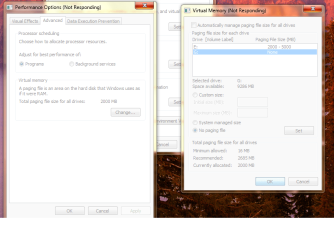
My just hanging, trying to change the virtual memory to different hard drive :(
 

Attachments

  • virtual_M.png
    virtual_M.png
    62.7 KB · Views: 57

My Computer

OS
windows 7
By the looks of it you have already set up your page file on your primary, so does that mean that you have not had this problem when you first installed Windows?
 

My Computer

Computer Manufacturer/Model Number
Home Brew
OS
Windows 7 Ultimate Vista Ultimate x64
CPU
Core 2 Duo E8500 3.16Ghz @ 3.8Ghz
Motherboard
eVGA 750i FTW
Memory
2x2Gigs Patriot PC2-6400 LL
Graphics Card(s)
Inno3D GeForce GTX260 216 SP
Monitor(s) Displays
ASUS VW222U 22" 2ms Response time
Screen Resolution
1680x1050
Hard Drives
SATA 150GB
SATA II 250GB
USB IDE 750GB Ext.
PSU
HYTEC 600W & Thermaltake 650W Toughpower Power Exp
Case
Thermaltake Armor LCS (Liquid Cooling System)
Cooling
Liquid Cooling System
Keyboard
Logitech G15 Gaming Keyboard
Mouse
Logitech G9 Gaming Mouse
virtual memory

Thanks for the reply.

No, it was ok, what I try is to use a separate drive for my virtual memory
 

My Computer

OS
windows 7
Hi,

I had/have the same problem where i try to set a custom paging file size and it ends up Not-responding.

So I started up in Safe-mode and i set the paging file without failure and it responded like normal and didn't freeze at all but when I started windows in normal mode and i went back into Vitual Memory area to see if it had set it, it had gone back done to 2000mb but when i open it it still has all the right sizes i set in safe-mode.
Also if i go to "dxdiag" it says that my paging file is 4062mb which is still 3gb shy of the right amount i had set it to in Safe-mode.

But yea... is it still set to tthe size i specified or did it revert back to 2000mb?

Thanks
 

My Computer

OS
Windows 7
Hi again,

I think I figured it out.

Start up in Safe-mode then disable the paging file for the MAIN Partition and then just set enough pagefile size with the rest of your partitions.

The reason for that is, it seems that if the main Partition(one with windows on it) has a paging file on it, then it causes that "Virtual Memory" window to stop responding.

Cause now, after i disabled it only on the main partition, i'm able to change the file size and apply it without it freezing.

So try it and let me know if it works or not, unless you'll already fixed it.


P.S. for some reason it doesn't read the entire amound of Pagefile size correctly, it does still come close to it, well actually it ended up being a bit more than what i told it to be, about 100mb more.

/Curmet
 

My Computer

OS
Windows 7
Back
Top