
VirtualBox XP - No bootable medium found running in Win7

Docfxit

New member
Power User
VIP
Local time
3:38 AM
Messages
118
I installed VirtualBox in Win7 to run one program that needs XP.

I'm getting an error when I start VirtualBox saying "Fatal: No bootable medium found!"

VirtualBoxSettings.jpg

I have tried a number of combinations of settings and I can't get rid of the error.

Running Win7 Pro sp1 32bit
Physical HD SSD
Physical memory usable 3.33gb

I have googled this error and tried all kinds of solutions. I can't get rid of the error.

Please give me some idea on how to fix it.

Thank you,

Docfxit
 

My Computer My Computer

Computer type
PC/Desktop
OS
Win 7 Ultimate x32, x64, Win 7 Pro x32, x64 Win 7 Home x64, XP Pro sp3
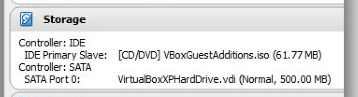
Your system can only find a non-bootable CD/DVD image (VirtualBox Guest Additions) and an empty VHD without OS:

2014-05-23_00h01_22.png

You need to mount the XP install media (ISO file or CD/DVD) to your virtual machine in order to boot from it and start installation.

See this tutorial (Part 1, Step 13) for how to tell VirtualBox how to find the install media: http://www.sevenforums.com/tutorial...ndows-7-virtual-machine-using-virtualbox.html. Tutorial is made to show how to install Linux in an older version of VirtualBox but the principle is the same.

Kari
 

My Computer My Computer

Computer type
Laptop
Computer Manufacturer/Model Number
HP ENVY 17-1150eg
OS
Windows 10 Pro x64 EN-GB
CPU
1.6 GHz Intel Core i7-720QM Processor
Memory
6 GB
Graphics Card(s)
ATI Mobility Radeon HD 5850 Graphics
Sound Card
Beats sound system with integrated subwoofer
Monitor(s) Displays
17" laptop display, 22" LED and 32" Full HD TV through HDMI
Screen Resolution
1600*900 (1), 1920*1080 (2&3)
Hard Drives
Internal: 2 x 500 GB SATA Hard Disk Drive 7200 rpm
External: 2TB for backups, 3TB USB3 network drive for media
Cooling
As Envy runs a bit warm, I have it on a Cooler Master pad
Keyboard
Logitech diNovo Media Desktop Laser (bluetooth)
Mouse
Logitech Performance Mouse MX
Internet Speed
50/10 Mbps VDSL
Antivirus
Windows Defender 4.3.9431.0
Browser
Maxthon 3.5.2., IE11
Thank you for the informative tutorial. I think I followed it correctly. I'm still getting the same error.

VirtualBoxSettings2.jpg


I hope you can figure out what I am doing wrong.

Thank you,

Docfxit
 

My Computer My Computer

Computer type
PC/Desktop
OS
Win 7 Ultimate x32, x64, Win 7 Pro x32, x64 Win 7 Home x64, XP Pro sp3
My Computer My Computer

Computer type
Laptop
Computer Manufacturer/Model Number
HP ENVY 17-1150eg
OS
Windows 10 Pro x64 EN-GB
CPU
1.6 GHz Intel Core i7-720QM Processor
Memory
6 GB
Graphics Card(s)
ATI Mobility Radeon HD 5850 Graphics
Sound Card
Beats sound system with integrated subwoofer
Monitor(s) Displays
17" laptop display, 22" LED and 32" Full HD TV through HDMI
Screen Resolution
1600*900 (1), 1920*1080 (2&3)
Hard Drives
Internal: 2 x 500 GB SATA Hard Disk Drive 7200 rpm
External: 2TB for backups, 3TB USB3 network drive for media
Cooling
As Envy runs a bit warm, I have it on a Cooler Master pad
Keyboard
Logitech diNovo Media Desktop Laser (bluetooth)
Mouse
Logitech Performance Mouse MX
Internet Speed
50/10 Mbps VDSL
Antivirus
Windows Defender 4.3.9431.0
Browser
Maxthon 3.5.2., IE11
For the next person that needs to enlarge the size of a virtual hard drive I created a bat file:
Please note: I had nothing in the hard drive. I have no idea if this would wipe out something if you have live information in it. Please make sure you have a backup of your data first.

----Start of bat file called VirtualBoxEnlargeHardDrive.bat
@Echo On
C:
CD\Programs\VirtualBox
VBoxManage modifyhd "C:\Users\Gary\VirtualBox VMs\VirtualBox\VirtualBoxXPHardDrive.vdi" --resize 3000
cmd
----End of bat file
NOTE: you need to modify the path, name of your .vdi and size to meet your needs.

I have increased the size of the hard drive. I have also tried a different XP ISO. I believe they are both bootable.
I'm still getting the same error.

VirtualBoxSettings3.jpg

Thank you,

Docfxit
 

My Computer My Computer

Computer type
PC/Desktop
OS
Win 7 Ultimate x32, x64, Win 7 Pro x32, x64 Win 7 Home x64, XP Pro sp3
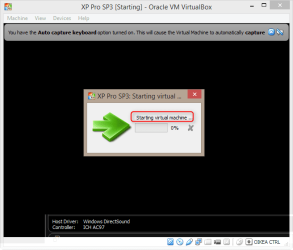
When your vm is started, can you see the Starting virtual machine message?

2014-05-23_02h12_20.png

If yes, what is the exact error message that follows now when you have a bootable install ISO on virtual CD/DVD drive?
 

My Computer My Computer

Computer type
Laptop
Computer Manufacturer/Model Number
HP ENVY 17-1150eg
OS
Windows 10 Pro x64 EN-GB
CPU
1.6 GHz Intel Core i7-720QM Processor
Memory
6 GB
Graphics Card(s)
ATI Mobility Radeon HD 5850 Graphics
Sound Card
Beats sound system with integrated subwoofer
Monitor(s) Displays
17" laptop display, 22" LED and 32" Full HD TV through HDMI
Screen Resolution
1600*900 (1), 1920*1080 (2&3)
Hard Drives
Internal: 2 x 500 GB SATA Hard Disk Drive 7200 rpm
External: 2TB for backups, 3TB USB3 network drive for media
Cooling
As Envy runs a bit warm, I have it on a Cooler Master pad
Keyboard
Logitech diNovo Media Desktop Laser (bluetooth)
Mouse
Logitech Performance Mouse MX
Internet Speed
50/10 Mbps VDSL
Antivirus
Windows Defender 4.3.9431.0
Browser
Maxthon 3.5.2., IE11
I tested both of the .ISO images I used with PowerISO to make sure they were bootable. It said they both were not bootable. I tried another XP image I have and it is bootable. It is starting the install. I will try to find a .ISO image with the latest MS updates included And a cut down version before I spend the time to install this one. I don't need most of the features in XP for this one program.

I'm very sorry I wasn't correct in knowing they weren't bootable.

Thank you very much for all your help.

Docfxit
 

My Computer My Computer

Computer type
PC/Desktop
OS
Win 7 Ultimate x32, x64, Win 7 Pro x32, x64 Win 7 Home x64, XP Pro sp3
Main thing is you got it running.
 

My Computer My Computer

Computer type
Laptop
Computer Manufacturer/Model Number
HP ENVY 17-1150eg
OS
Windows 10 Pro x64 EN-GB
CPU
1.6 GHz Intel Core i7-720QM Processor
Memory
6 GB
Graphics Card(s)
ATI Mobility Radeon HD 5850 Graphics
Sound Card
Beats sound system with integrated subwoofer
Monitor(s) Displays
17" laptop display, 22" LED and 32" Full HD TV through HDMI
Screen Resolution
1600*900 (1), 1920*1080 (2&3)
Hard Drives
Internal: 2 x 500 GB SATA Hard Disk Drive 7200 rpm
External: 2TB for backups, 3TB USB3 network drive for media
Cooling
As Envy runs a bit warm, I have it on a Cooler Master pad
Keyboard
Logitech diNovo Media Desktop Laser (bluetooth)
Mouse
Logitech Performance Mouse MX
Internet Speed
50/10 Mbps VDSL
Antivirus
Windows Defender 4.3.9431.0
Browser
Maxthon 3.5.2., IE11
Thanks to your help. :D
 

My Computer My Computer

Computer type
PC/Desktop
OS
Win 7 Ultimate x32, x64, Win 7 Pro x32, x64 Win 7 Home x64, XP Pro sp3
During the install of XP I'm getting a BOSD. Could that have anything to do with the VirtualBox?

XPInstall.jpg

Thank you,

Docfxit
 

My Computer My Computer

Computer type
PC/Desktop
OS
Win 7 Ultimate x32, x64, Win 7 Pro x32, x64 Win 7 Home x64, XP Pro sp3
I suspect that being also because of faulty install media but I do not know for sure.

How and where did you get your XP ISO files? As I understand you've had at least three different ones, two first did not even boot. This makes me suspect that you are using downloaded torrent or warez files, especially seeing that the names of the ISO files (in your screenshots visible) are not official, I mean those names are not used by Microsoft.

I recommend you to get a valid XP install media. Alternatively, if you have Windows 7 Professional or Ultimate (your specs show only Windows 7), there's a legal and valid way to get Windows XP: http://www.sevenforums.com/tutorials/8247-windows-xp-mode-install-setup.html

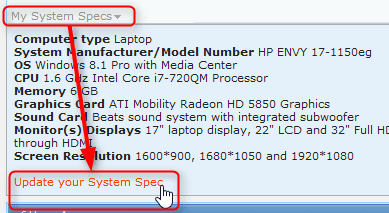
Please tell where and how you got the XP ISO files, also please update your system specs by clicking the link My System Specs at the bottom of all your own posts and then selecting Update your system specs:

2014-05-23_09h44_27.png
 

My Computer My Computer

Computer type
Laptop
Computer Manufacturer/Model Number
HP ENVY 17-1150eg
OS
Windows 10 Pro x64 EN-GB
CPU
1.6 GHz Intel Core i7-720QM Processor
Memory
6 GB
Graphics Card(s)
ATI Mobility Radeon HD 5850 Graphics
Sound Card
Beats sound system with integrated subwoofer
Monitor(s) Displays
17" laptop display, 22" LED and 32" Full HD TV through HDMI
Screen Resolution
1600*900 (1), 1920*1080 (2&3)
Hard Drives
Internal: 2 x 500 GB SATA Hard Disk Drive 7200 rpm
External: 2TB for backups, 3TB USB3 network drive for media
Cooling
As Envy runs a bit warm, I have it on a Cooler Master pad
Keyboard
Logitech diNovo Media Desktop Laser (bluetooth)
Mouse
Logitech Performance Mouse MX
Internet Speed
50/10 Mbps VDSL
Antivirus
Windows Defender 4.3.9431.0
Browser
Maxthon 3.5.2., IE11
Hi Kari,

You are correct. I have a valid XP retail CD. It doesn't include the latest updates. I have a valid Key that I plan on using. I did download those versions so I don't have to apply so many updates. I also have XP installed on one of my machines. If you know how I can save that copy to an ISO that would be great. Although that copy has a lot of programs installed that I don't need for this application. I need a very minimal install for this one program. I don't need networking or most features that come with XP.
I have the published XP mode virtual install on one machine. I found it difficult to share links and files. That's why I wanted to give VirtualBox a try.

Thank you for helping,

Docfxit
 

My Computer My Computer

Computer type
PC/Desktop
OS
Win 7 Ultimate x32, x64, Win 7 Pro x32, x64 Win 7 Home x64, XP Pro sp3
Disk2VHD is a tool that creates a VHD of your physical Windows installation. See more here: Disk2vhd

The VHD (virtual hard disk) images created with Disk2VHD are intended to be run on Windows Virtual PC. Personally I have never tested them on any other virtualization program like for instance your VirtualBox but it might work as VirtualBox can use VHD file type.

If you decide to try Windows Virtual PC, see this tutorial for instructions on how to install it: http://www.sevenforums.com/tutorials/8247-windows-xp-mode-install-setup.html. Notice that the tutorial also shows how to install Windows XP Mode which requires Windows 7 Pro or Ultimate; Virtual PC without XP Mode can be used on any edition of Windows 7, if you want just that see tutorial step 4.

When you have installed Windows Virtual PC, see this tutorial to learn how to create a new virtual machine with your Disk2VHD converted VHD file: http://www.sevenforums.com/tutorials/8254-windows-virtual-pc-create-virtual-machine.html

Kari
 

My Computer My Computer

Computer type
Laptop
Computer Manufacturer/Model Number
HP ENVY 17-1150eg
OS
Windows 10 Pro x64 EN-GB
CPU
1.6 GHz Intel Core i7-720QM Processor
Memory
6 GB
Graphics Card(s)
ATI Mobility Radeon HD 5850 Graphics
Sound Card
Beats sound system with integrated subwoofer
Monitor(s) Displays
17" laptop display, 22" LED and 32" Full HD TV through HDMI
Screen Resolution
1600*900 (1), 1920*1080 (2&3)
Hard Drives
Internal: 2 x 500 GB SATA Hard Disk Drive 7200 rpm
External: 2TB for backups, 3TB USB3 network drive for media
Cooling
As Envy runs a bit warm, I have it on a Cooler Master pad
Keyboard
Logitech diNovo Media Desktop Laser (bluetooth)
Mouse
Logitech Performance Mouse MX
Internet Speed
50/10 Mbps VDSL
Antivirus
Windows Defender 4.3.9431.0
Browser
Maxthon 3.5.2., IE11
I tried Disk2vhd on one of my XP installs. The space required to create the file is 114.71GB. I don't have that much space available on that machine. The last ISO I use is 733MB. Much easier to handle. Although the one I have installed would save a lot of time because it has all my utility programs, antivirus and firewall programs installed.

It's a thought.

Docfxit
 

My Computer My Computer

Computer type
PC/Desktop
OS
Win 7 Ultimate x32, x64, Win 7 Pro x32, x64 Win 7 Home x64, XP Pro sp3
A couple of things:

Regarding the ISO I used "Ultra ISO" to create an ISO from my Installation disk. You can download the trial version, create your ISO, then uninstall it if you don't want to buy it.

Regarding installation: in your virtual machine settings make sure to disable VT-X and AMD-V before installation (System > Acceleration). You can re-enable these after the installation.

See if either of those helps.
 

My Computer My Computer

Computer type
PC/Desktop
Computer Manufacturer/Model Number
Home Built - Jan 2013
OS
Windows 7 64 Bit Home Premium SP1
CPU
i7-3820
Motherboard
Asus P9X79-PRO - Bios 4608
Memory
GSkill F3-14900CL9Q - 16GB
Graphics Card(s)
EVGA GeForce GTX660 - Driver 352.86
Sound Card
On board Realtek ALC898
Monitor(s) Displays
Acer S271HL
Screen Resolution
1920 x 1080
Hard Drives
#1- Samsung 840 Pro Series
#2- Western Digital WD1002FAEX Sata3 Black
#3- Western Digital WD1002FAEX Sata3 Black
PSU
Corsair CMPSU-850TX-V2 - 850 watt (by Seasonic)
Case
Corsair Obsidian 550D
Cooling
Standard 3 120mm case fans, Cooler Master Hyper 212 EVO
Keyboard
MS KC-0405
Mouse
Intellimouse 5-button
Internet Speed
56 Mbits/Sec (on a good day)
Antivirus
Avast & Malwarebytes
Browser
Firefox
Other Info
Asus DVD - DRW-24B1ST 24X
During the install of XP I'm getting a BOSD. Could that have anything to do with the VirtualBox?

XPInstall.jpg

Thank you,

Docfxit
The Host is BSODing during the installation of the guest? If so, we need to some more info to comment on it.

Click on the button below ....


It will download the DM log collector. Right click on the application and run as administrator. It will generate a .zip file on your desktop. Upload the .zip.
http://www.sevenforums.com/tutorials/9733-screenshots-files-upload-post-seven-forums.html
 

My Computer My Computer

Computer type
PC/Desktop
Computer Manufacturer/Model Number
Self Assembled
OS
Microsoft Windows 10 Pro Insider Preview 64-bit
CPU
Intel(R) Core(TM) i3-4130 CPU @ 3.40GHz
Motherboard
Gigabyte Technology Co., Ltd. B85M-D3H
Memory
Corsair Vengence 4GB x2 (8.00GB Dual-Channel DDR3 @ 798MHz)
Graphics Card(s)
2047MB GeForce GTS 450 (ZOTAC International)
Sound Card
Onboard (Realtek High Definition Audio)
Monitor(s) Displays
LG Flatron E2040T
Screen Resolution
1600x900
Hard Drives
Western Digital 1 TB
Seagate 500 GB
PSU
Corsair VS550
Case
Cooler Master K380
Cooling
Cooler Master Seidon 120V Plus
Keyboard
Logitech MK260r
Mouse
Logitech MK260r
Internet Speed
PMPL Broadband
Antivirus
Windows Defender + MBAM
Browser
Firefox
Other Info
Dell Studio 15" Laptop
I have run and attached the file.

Thank you for looking at it for me.

Docfxit
 

My Computer My Computer

Computer type
PC/Desktop
OS
Win 7 Ultimate x32, x64, Win 7 Pro x32, x64 Win 7 Home x64, XP Pro sp3
There is no crash dump in the zip you attached.

But that is not a big deal, as a stop 0xF4 is a storage related issue. And, in the present situation it is all possible to have a stop 0xF4. Because, the storage space is too low to perform any further operation.

ITEM | VALUE
Drive | C:
Size | 42.24 GB (45,354,053,632 bytes)
Free Space | 3.51 GB (3,766,833,152 bytes)
ITEM | VALUE
Drive | D:
Size | 179.17 GB (192,381,071,360 bytes)
Free Space | 5.80 GB (6,225,567,744 bytes)
ITEM | VALUE
Drive | E:
Size | 931.51 GB (1,000,202,240,000 bytes)
Free Space | 1.34 GB (1,442,295,808 bytes)

You have assigned a very little space of your 240 GB Intel SSD for the C partition. Even if you install a virtual XP, you need to allot the actual space in the disk. But there is not the space. Neither in the SSD nor in the WD 1 TB HDD.

So stop 0xF4 BSOD is most possible.

There is a guide to salvage some disk space. http://www.sevenforums.com/tutorials/129976-hard-disk-space-free-up-recover.html .... you may follow it.

In your C drive, you have to provide the space for the actual size of the virtual disk plus at least 10% free disk space for smooth operation.
 

My Computer My Computer

Computer type
PC/Desktop
Computer Manufacturer/Model Number
Self Assembled
OS
Microsoft Windows 10 Pro Insider Preview 64-bit
CPU
Intel(R) Core(TM) i3-4130 CPU @ 3.40GHz
Motherboard
Gigabyte Technology Co., Ltd. B85M-D3H
Memory
Corsair Vengence 4GB x2 (8.00GB Dual-Channel DDR3 @ 798MHz)
Graphics Card(s)
2047MB GeForce GTS 450 (ZOTAC International)
Sound Card
Onboard (Realtek High Definition Audio)
Monitor(s) Displays
LG Flatron E2040T
Screen Resolution
1600x900
Hard Drives
Western Digital 1 TB
Seagate 500 GB
PSU
Corsair VS550
Case
Cooler Master K380
Cooling
Cooler Master Seidon 120V Plus
Keyboard
Logitech MK260r
Mouse
Logitech MK260r
Internet Speed
PMPL Broadband
Antivirus
Windows Defender + MBAM
Browser
Firefox
Other Info
Dell Studio 15" Laptop
That's really great to know. I'm excited this may work.

I'll start working on the space right now.

How much space do you think I need?

Thanks,

Docfxit
 

My Computer My Computer

Computer type
PC/Desktop
OS
Win 7 Ultimate x32, x64, Win 7 Pro x32, x64 Win 7 Home x64, XP Pro sp3
For a XP installation (with bare minimum necessary programs), I think at lease 20 GB space will be required.

The best would be, you back up your data externally. Either in a big removable storage, or the modern concept is to store data with cloud storage, like https://onedrive.live.com/about/en-us/.

Then format the entire SSD, do a clean install and allot it for C in full. The 42 GB is very minimum. :(

Also, make it sure that the SSD is running with the latest firmware.
How to Upgrade Intel SSD Firmware | StorageReview.com - Storage Reviews
 

My Computer My Computer

Computer type
PC/Desktop
Computer Manufacturer/Model Number
Self Assembled
OS
Microsoft Windows 10 Pro Insider Preview 64-bit
CPU
Intel(R) Core(TM) i3-4130 CPU @ 3.40GHz
Motherboard
Gigabyte Technology Co., Ltd. B85M-D3H
Memory
Corsair Vengence 4GB x2 (8.00GB Dual-Channel DDR3 @ 798MHz)
Graphics Card(s)
2047MB GeForce GTS 450 (ZOTAC International)
Sound Card
Onboard (Realtek High Definition Audio)
Monitor(s) Displays
LG Flatron E2040T
Screen Resolution
1600x900
Hard Drives
Western Digital 1 TB
Seagate 500 GB
PSU
Corsair VS550
Case
Cooler Master K380
Cooling
Cooler Master Seidon 120V Plus
Keyboard
Logitech MK260r
Mouse
Logitech MK260r
Internet Speed
PMPL Broadband
Antivirus
Windows Defender + MBAM
Browser
Firefox
Other Info
Dell Studio 15" Laptop
Back
Top