Solved VISTA install on "real" SATA?? How?

zapp22

New member
Power User
VIP
Local time
4:05 AM
Messages
730
Location
Tejas, northern Mexico
anyone know how to install VISTA with the HD set to full SATA mode?
I didn't succeed, had to invoke ATA mode instead.
:(
how lame....
 

My Computer My Computer

At a glance

Windows XP Pro SP3, Windows 7 Pro 32-bit, Win...Pentium 4 3.2GHz, Pentium 4 3.4GHz 64bit, Atom,4GB matched, 1GB, 2.5GB, 4.0 GBGeforce 8400 GS and others
Computer Manufacturer/Model Number
HP DC7600, HP DC7600[2], HP DC7100, Samsung NC10
OS
Windows XP Pro SP3, Windows 7 Pro 32-bit, Windows 7 Ultimate 64bit, Windows XP Home SP3
CPU
Pentium 4 3.2GHz, Pentium 4 3.4GHz 64bit, Atom,
Motherboard
Dunno
Memory
4GB matched, 1GB, 2.5GB, 4.0 GB
Graphics Card(s)
Geforce 8400 GS and others
Sound Card
RealteK ALC260 and others
Monitor(s) Displays
Asus HD
Screen Resolution
1920x1080
Hard Drives
WD Caviar 640gb SATA
Cooling
We Be Cool
Hi zapp22. :)
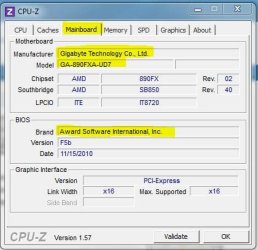
Not knowing the model of your motherboard ... Anyway, just change a setting in the BIOS. In order that I be accurate in the guidelines, please download and run cpu-z. On the mainboard tab you have the model of your motherboard. See below and post back.
 

Attachments

  • Capturar.JPG
    Capturar.JPG
    36.8 KB · Views: 1

My Computer My Computer

At a glance

Windows 7 Ultimate x64 SP1AMD PHENOM II X6 1090T 3.2GHz8GB G.SKILL RIPJAWS - F3-10666CL7DSAPPHIRE ATI RADEON HD 5870 VAPOR X OC
Computer Manufacturer/Model Number
WALLONN7 / LIN BLACK SERIES II
OS
Windows 7 Ultimate x64 SP1
CPU
AMD PHENOM II X6 1090T 3.2GHz
Motherboard
GIGABYTE GA-890FXA-UD7
Memory
8GB G.SKILL RIPJAWS - F3-10666CL7D
Graphics Card(s)
SAPPHIRE ATI RADEON HD 5870 VAPOR X OC
Sound Card
REALTEK DOLBY HOME THEATER
Monitor(s) Displays
LED LG W2486L
Screen Resolution
1080p
Hard Drives
SEAGATE 1TB -ST31000528AS - AHCI MODE - AS SATA
PSU
ZALMAN ZM1000-HP 1000W
Case
THERMALTAKE XASER VI VG4000SWA
Cooling
140MM x3 / 120MM x1 AIR COOLING - THERMALTAKE
Keyboard
MICROSOFT DIGITAL MEDIA KEYBOARD 3000 - USB
Mouse
MICROSOFT BASIC OPTICAL MOUSE 2.0 - USB
Internet Speed
600KBPS
Other Info
MICROSOFT XBOX 360 CONTROLLER
Dell Inc. OptiPlex 755
System Service Tag: 66ZGTH1 (support for this PC)
Chassis Serial Number: 66ZGTH1
Enclosure Type: Space-saving
Processor a Main Circuit Board b
2.40 gigahertz Intel Pentium Dual
64 kilobyte primary memory cache
1024 kilobyte secondary memory cache
64-bit ready
Multi-core (2 total)
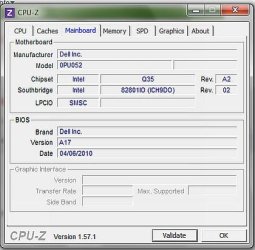
Not hyper-threaded Board: Dell Inc. 0PU052
Serial Number: ..CN744318A609BD.
Bus Clock: 800 megahertz
BIOS: Dell Inc. A17 04/06/2010


But that's not what I want. Already did that. Running in ATA emulation mode is a waste of a good system imo.

how 'bout I install a SATA driver at the time of vista install? willthat work, and where do I get the right/best SATA driver


Hi zapp22. :)
Not knowing the model of your motherboard ... Anyway, just change a setting in the BIOS. In order that I be accurate in the guidelines, please download and run cpu-z. On the mainboard tab you have the model of your motherboard. See below and post back.
 

My Computer My Computer

At a glance

Windows XP Pro SP3, Windows 7 Pro 32-bit, Win...Pentium 4 3.2GHz, Pentium 4 3.4GHz 64bit, Atom,4GB matched, 1GB, 2.5GB, 4.0 GBGeforce 8400 GS and others
Computer Manufacturer/Model Number
HP DC7600, HP DC7600[2], HP DC7100, Samsung NC10
OS
Windows XP Pro SP3, Windows 7 Pro 32-bit, Windows 7 Ultimate 64bit, Windows XP Home SP3
CPU
Pentium 4 3.2GHz, Pentium 4 3.4GHz 64bit, Atom,
Motherboard
Dunno
Memory
4GB matched, 1GB, 2.5GB, 4.0 GB
Graphics Card(s)
Geforce 8400 GS and others
Sound Card
RealteK ALC260 and others
Monitor(s) Displays
Asus HD
Screen Resolution
1920x1080
Hard Drives
WD Caviar 640gb SATA
Cooling
We Be Cool
bueno!
I hope vista install is smart enough to see my usb stick
here we go

the odd thing: i searched this problem and read lots of posts. the common issue had symptom that the drive/volume was invisible. in my case, the volume pops up,but vista sees it as non-usable.
at any rate, I'll load the driver at that point and see if it changes its mind
the install went fine in ATA mode... but I need to do it the right way.
thx


My Computer My Computer

At a glance

Windows XP Pro SP3, Windows 7 Pro 32-bit, Win...Pentium 4 3.2GHz, Pentium 4 3.4GHz 64bit, Atom,4GB matched, 1GB, 2.5GB, 4.0 GBGeforce 8400 GS and others
Computer Manufacturer/Model Number
HP DC7600, HP DC7600[2], HP DC7100, Samsung NC10
OS
Windows XP Pro SP3, Windows 7 Pro 32-bit, Windows 7 Ultimate 64bit, Windows XP Home SP3
CPU
Pentium 4 3.2GHz, Pentium 4 3.4GHz 64bit, Atom,
Motherboard
Dunno
Memory
4GB matched, 1GB, 2.5GB, 4.0 GB
Graphics Card(s)
Geforce 8400 GS and others
Sound Card
RealteK ALC260 and others
Monitor(s) Displays
Asus HD
Screen Resolution
1920x1080
Hard Drives
WD Caviar 640gb SATA
Cooling
We Be Cool
i pulled a "intel matrix storage" 'driver' from the dell site. i hope this is the correct one
 

My Computer My Computer

At a glance

Windows XP Pro SP3, Windows 7 Pro 32-bit, Win...Pentium 4 3.2GHz, Pentium 4 3.4GHz 64bit, Atom,4GB matched, 1GB, 2.5GB, 4.0 GBGeforce 8400 GS and others
Computer Manufacturer/Model Number
HP DC7600, HP DC7600[2], HP DC7100, Samsung NC10
OS
Windows XP Pro SP3, Windows 7 Pro 32-bit, Windows 7 Ultimate 64bit, Windows XP Home SP3
CPU
Pentium 4 3.2GHz, Pentium 4 3.4GHz 64bit, Atom,
Motherboard
Dunno
Memory
4GB matched, 1GB, 2.5GB, 4.0 GB
Graphics Card(s)
Geforce 8400 GS and others
Sound Card
RealteK ALC260 and others
Monitor(s) Displays
Asus HD
Screen Resolution
1920x1080
Hard Drives
WD Caviar 640gb SATA
Cooling
We Be Cool
bueno!
I hope vista install is smart enough to see my usb stick
here we go

the odd thing: i searched this problem and read lots of posts. the common issue had symptom that the drive/volume was invisible. in my case, the volume pops up,but vista sees it as non-usable.
at any rate, I'll load the driver at that point and see if it changes its mind
the install went fine in ATA mode... but I need to do it the right way.
thx


No drivers need.

Try a full clean & full format in command prompt.
http://www.sevenforums.com/tutorials/91339-ssd-hdd-optimize-windows-reinstallation.html
 

My Computer My Computer

At a glance

ME/XP/Vista/Win7
OS
ME/XP/Vista/Win7
how 'bout I install a SATA driver at the time of vista install? willthat work, and where do I get the right/best SATA driver

Well, so I asked you to post the model of your motherboard ...
 

My Computer My Computer

At a glance

Windows 7 Ultimate x64 SP1AMD PHENOM II X6 1090T 3.2GHz8GB G.SKILL RIPJAWS - F3-10666CL7DSAPPHIRE ATI RADEON HD 5870 VAPOR X OC
Computer Manufacturer/Model Number
WALLONN7 / LIN BLACK SERIES II
OS
Windows 7 Ultimate x64 SP1
CPU
AMD PHENOM II X6 1090T 3.2GHz
Motherboard
GIGABYTE GA-890FXA-UD7
Memory
8GB G.SKILL RIPJAWS - F3-10666CL7D
Graphics Card(s)
SAPPHIRE ATI RADEON HD 5870 VAPOR X OC
Sound Card
REALTEK DOLBY HOME THEATER
Monitor(s) Displays
LED LG W2486L
Screen Resolution
1080p
Hard Drives
SEAGATE 1TB -ST31000528AS - AHCI MODE - AS SATA
PSU
ZALMAN ZM1000-HP 1000W
Case
THERMALTAKE XASER VI VG4000SWA
Cooling
140MM x3 / 120MM x1 AIR COOLING - THERMALTAKE
Keyboard
MICROSOFT DIGITAL MEDIA KEYBOARD 3000 - USB
Mouse
MICROSOFT BASIC OPTICAL MOUSE 2.0 - USB
Internet Speed
600KBPS
Other Info
MICROSOFT XBOX 360 CONTROLLER
FAIL!

well, pulled the "right one", by Service Tag, from the Dell support site.
Loaded driver at the required point, VISTA picked up the driver, no problems, went back to the Volume select screen, same error. "unable to find volume suitable...." blah blah. :cry:
 

My Computer My Computer

At a glance

Windows XP Pro SP3, Windows 7 Pro 32-bit, Win...Pentium 4 3.2GHz, Pentium 4 3.4GHz 64bit, Atom,4GB matched, 1GB, 2.5GB, 4.0 GBGeforce 8400 GS and others
Computer Manufacturer/Model Number
HP DC7600, HP DC7600[2], HP DC7100, Samsung NC10
OS
Windows XP Pro SP3, Windows 7 Pro 32-bit, Windows 7 Ultimate 64bit, Windows XP Home SP3
CPU
Pentium 4 3.2GHz, Pentium 4 3.4GHz 64bit, Atom,
Motherboard
Dunno
Memory
4GB matched, 1GB, 2.5GB, 4.0 GB
Graphics Card(s)
Geforce 8400 GS and others
Sound Card
RealteK ALC260 and others
Monitor(s) Displays
Asus HD
Screen Resolution
1920x1080
Hard Drives
WD Caviar 640gb SATA
Cooling
We Be Cool
mainboard per cpu/z
as per belarc
attached

Hi zapp22. :)
Not knowing the model of your motherboard ... Anyway, just change a setting in the BIOS. In order that I be accurate in the guidelines, please download and run cpu-z. On the mainboard tab you have the model of your motherboard. See below and post back.
 

Attachments

  • mainboard.jpg
    mainboard.jpg
    29.5 KB · Views: 3

My Computer My Computer

At a glance

Windows XP Pro SP3, Windows 7 Pro 32-bit, Win...Pentium 4 3.2GHz, Pentium 4 3.4GHz 64bit, Atom,4GB matched, 1GB, 2.5GB, 4.0 GBGeforce 8400 GS and others
Computer Manufacturer/Model Number
HP DC7600, HP DC7600[2], HP DC7100, Samsung NC10
OS
Windows XP Pro SP3, Windows 7 Pro 32-bit, Windows 7 Ultimate 64bit, Windows XP Home SP3
CPU
Pentium 4 3.2GHz, Pentium 4 3.4GHz 64bit, Atom,
Motherboard
Dunno
Memory
4GB matched, 1GB, 2.5GB, 4.0 GB
Graphics Card(s)
Geforce 8400 GS and others
Sound Card
RealteK ALC260 and others
Monitor(s) Displays
Asus HD
Screen Resolution
1920x1080
Hard Drives
WD Caviar 640gb SATA
Cooling
We Be Cool
ah... will this work? install vista as 'aha' mode. boot it up and run, go to device manager, update sata driver with the intel provided one, reboot to bios, switch sata mode, go.
????
 

My Computer My Computer

At a glance

Windows XP Pro SP3, Windows 7 Pro 32-bit, Win...Pentium 4 3.2GHz, Pentium 4 3.4GHz 64bit, Atom,4GB matched, 1GB, 2.5GB, 4.0 GBGeforce 8400 GS and others
Computer Manufacturer/Model Number
HP DC7600, HP DC7600[2], HP DC7100, Samsung NC10
OS
Windows XP Pro SP3, Windows 7 Pro 32-bit, Windows 7 Ultimate 64bit, Windows XP Home SP3
CPU
Pentium 4 3.2GHz, Pentium 4 3.4GHz 64bit, Atom,
Motherboard
Dunno
Memory
4GB matched, 1GB, 2.5GB, 4.0 GB
Graphics Card(s)
Geforce 8400 GS and others
Sound Card
RealteK ALC260 and others
Monitor(s) Displays
Asus HD
Screen Resolution
1920x1080
Hard Drives
WD Caviar 640gb SATA
Cooling
We Be Cool
bueno!
I hope vista install is smart enough to see my usb stick
here we go

the odd thing: i searched this problem and read lots of posts. the common issue had symptom that the drive/volume was invisible. in my case, the volume pops up,but vista sees it as non-usable.
at any rate, I'll load the driver at that point and see if it changes its mind
the install went fine in ATA mode... but I need to do it the right way.
thx


No drivers need.

Try a full clean & full format in command prompt.
:ar: http://www.sevenforums.com/tutorials/91339-ssd-hdd-optimize-windows-reinstallation.html

ah... will this work? install vista as 'aha' mode. boot it up and run, go to device manager, update sata driver with the intel provided one, reboot to bios, switch sata mode, go.
????

Follow theog guidelines link above.
 

My Computer My Computer

At a glance

Windows 7 Ultimate x64 SP1AMD PHENOM II X6 1090T 3.2GHz8GB G.SKILL RIPJAWS - F3-10666CL7DSAPPHIRE ATI RADEON HD 5870 VAPOR X OC
Computer Manufacturer/Model Number
WALLONN7 / LIN BLACK SERIES II
OS
Windows 7 Ultimate x64 SP1
CPU
AMD PHENOM II X6 1090T 3.2GHz
Motherboard
GIGABYTE GA-890FXA-UD7
Memory
8GB G.SKILL RIPJAWS - F3-10666CL7D
Graphics Card(s)
SAPPHIRE ATI RADEON HD 5870 VAPOR X OC
Sound Card
REALTEK DOLBY HOME THEATER
Monitor(s) Displays
LED LG W2486L
Screen Resolution
1080p
Hard Drives
SEAGATE 1TB -ST31000528AS - AHCI MODE - AS SATA
PSU
ZALMAN ZM1000-HP 1000W
Case
THERMALTAKE XASER VI VG4000SWA
Cooling
140MM x3 / 120MM x1 AIR COOLING - THERMALTAKE
Keyboard
MICROSOFT DIGITAL MEDIA KEYBOARD 3000 - USB
Mouse
MICROSOFT BASIC OPTICAL MOUSE 2.0 - USB
Internet Speed
600KBPS
Other Info
MICROSOFT XBOX 360 CONTROLLER

My Computer My Computer

At a glance

Windows XP Pro SP3, Windows 7 Pro 32-bit, Win...Pentium 4 3.2GHz, Pentium 4 3.4GHz 64bit, Atom,4GB matched, 1GB, 2.5GB, 4.0 GBGeforce 8400 GS and others
Computer Manufacturer/Model Number
HP DC7600, HP DC7600[2], HP DC7100, Samsung NC10
OS
Windows XP Pro SP3, Windows 7 Pro 32-bit, Windows 7 Ultimate 64bit, Windows XP Home SP3
CPU
Pentium 4 3.2GHz, Pentium 4 3.4GHz 64bit, Atom,
Motherboard
Dunno
Memory
4GB matched, 1GB, 2.5GB, 4.0 GB
Graphics Card(s)
Geforce 8400 GS and others
Sound Card
RealteK ALC260 and others
Monitor(s) Displays
Asus HD
Screen Resolution
1920x1080
Hard Drives
WD Caviar 640gb SATA
Cooling
We Be Cool
Its a controller issue not a drive issue.
messing with a new clean good drive is irrelevant to this issue.

The fix is a registry mod to invoke the AHCI mode driver.
This afflicts both Vista and Win 7 systems.

see: Error message when you start a Windows 7 or Windows Vista-based computer after you change the SATA mode of the boot drive: "STOP 0x0000007B INACCESSABLE_BOOT_DEVICE"

score one for Team MS.

I never had this problem ... I think I'm lucky! :D Anyway, it was - and it is - important that you shared this information with us. ;) But your problem was solved or not?
... If so, please click on the triangle at the top right of this post and report it as solved. :)
 

My Computer My Computer

At a glance

Windows 7 Ultimate x64 SP1AMD PHENOM II X6 1090T 3.2GHz8GB G.SKILL RIPJAWS - F3-10666CL7DSAPPHIRE ATI RADEON HD 5870 VAPOR X OC
Computer Manufacturer/Model Number
WALLONN7 / LIN BLACK SERIES II
OS
Windows 7 Ultimate x64 SP1
CPU
AMD PHENOM II X6 1090T 3.2GHz
Motherboard
GIGABYTE GA-890FXA-UD7
Memory
8GB G.SKILL RIPJAWS - F3-10666CL7D
Graphics Card(s)
SAPPHIRE ATI RADEON HD 5870 VAPOR X OC
Sound Card
REALTEK DOLBY HOME THEATER
Monitor(s) Displays
LED LG W2486L
Screen Resolution
1080p
Hard Drives
SEAGATE 1TB -ST31000528AS - AHCI MODE - AS SATA
PSU
ZALMAN ZM1000-HP 1000W
Case
THERMALTAKE XASER VI VG4000SWA
Cooling
140MM x3 / 120MM x1 AIR COOLING - THERMALTAKE
Keyboard
MICROSOFT DIGITAL MEDIA KEYBOARD 3000 - USB
Mouse
MICROSOFT BASIC OPTICAL MOUSE 2.0 - USB
Internet Speed
600KBPS
Other Info
MICROSOFT XBOX 360 CONTROLLER
yep... quite a few controllers do not offer the AHCI mode, even on fairly recent vintage, and its not a given that the system maker [dell/hp/etc] accomodate the mode with appropriate BIOS integration [my daily driver HP DC7600 does not, for instance].
But if the controller has the enhancements, and if there is a well-written driver for it, and if the OEM supports in BIOS [all are the case with the Optiplex 755 in my lab], Win7/Vista apparently are incapable of permitting the original installation to 'default' to that mode.
Thus the registry hack.... err... modification.

yep solved, marked.
 

My Computer My Computer

At a glance

Windows XP Pro SP3, Windows 7 Pro 32-bit, Win...Pentium 4 3.2GHz, Pentium 4 3.4GHz 64bit, Atom,4GB matched, 1GB, 2.5GB, 4.0 GBGeforce 8400 GS and others
Computer Manufacturer/Model Number
HP DC7600, HP DC7600[2], HP DC7100, Samsung NC10
OS
Windows XP Pro SP3, Windows 7 Pro 32-bit, Windows 7 Ultimate 64bit, Windows XP Home SP3
CPU
Pentium 4 3.2GHz, Pentium 4 3.4GHz 64bit, Atom,
Motherboard
Dunno
Memory
4GB matched, 1GB, 2.5GB, 4.0 GB
Graphics Card(s)
Geforce 8400 GS and others
Sound Card
RealteK ALC260 and others
Monitor(s) Displays
Asus HD
Screen Resolution
1920x1080
Hard Drives
WD Caviar 640gb SATA
Cooling
We Be Cool
Back
Top