Vista Windows Sidebar - Reinstate on Windows 7

Sidebar - Vista Sidebar on Windows 7

How to Reinstate the Vista Sidebar on Windows 7

   Information
This will show you how to reinstate the Vista Windows Sidebar on Windows 7.


METHOD ONE

Reinstate Vista Windows Sidebar on Windows 7

1. First Close all running Gadgets and Check Task Manager to Make sure it is not running and then go to C:\Program Files\Windows Sidebar. 2008-11-18_202259.jpg
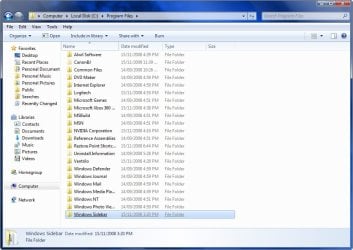
2. Download the Take Ownership shortcut to add it to the right click context menu by going here http://www.sevenforums.com/tutorials/1911-take-ownership-shortcut.html

3. Right click on the Sidebar folder and select Take Ownership

4. Rename the Original Folder to Windows Sidebar (2)

5. Go to the Windows Sidebar Programs folder in Vista and copy it.

6. Now just paste the Vista folder in the Programs folder on your Windows 7 partition.

7. Right Click on the screen and select Gadgets and now you should have the Vista sidebar. Vista Sidebar .jpg
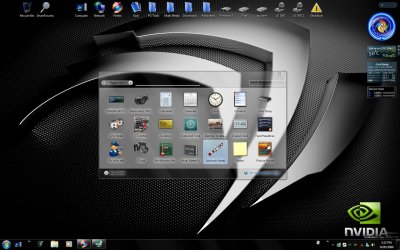
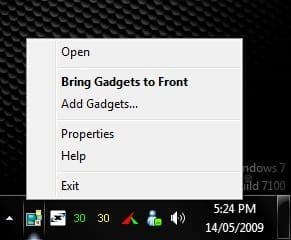
8. To close the sidebar just go to the icon in the system tray, right click and select exit. Close Sidebar.jpg


METHOD TWO

Reinstate Vista Windows Sidebar on Windows 7

1. First Close all running Gadgets and Check Task Manager to Make sure it is not running and then go to C:\Program Files\Windows Sidebar. 2008-11-18_202259.jpg
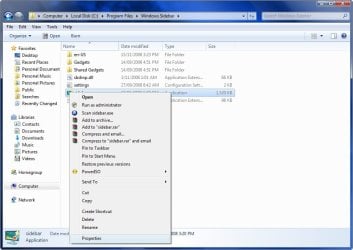
2. Right click on a file and select Properties. 2008-11-18_202335.jpg
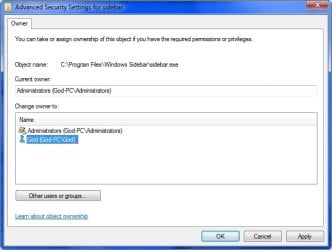
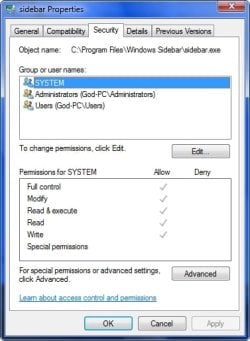
3. Go to the Security Tab and click on Advanced. 2008-11-18_202357.jpg
4. Go to the Owner Tab and select Edit. 2008-11-18_202425.jpg
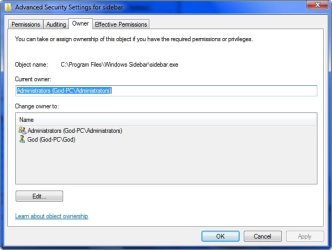
5. Select your user name and hit OK. 2008-11-18_202458.jpg
6. Go back to step 3 now and instead of Advanced select Edit.

7. Select your user name and tick the box with Full control and hit OK. 2008-11-18_204230.jpg
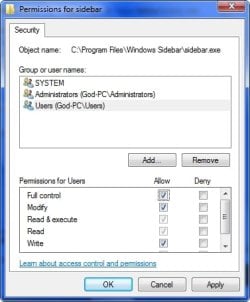
  • OK now you have done that for every file in the Windows sidebar folder except the Gadgets Folder, you can now delete or replace the files.
8. Copy the Windows Sidebar Folder and Paste it somewhere for a backup if you want to Revert your changes.

9. Go to the Sidebar Folder in Vista and copy all the files except the Gadgets Folder and Paste it in the Windows 7 Sidebar folder and overwrite the existing files and folders.

10. Right Click on the screen and select Gadgets and now you should have the Vista sidebar.


STEP TWO

Add Vista Sidebar Gadgets to Windows 7


   Note
This is an optional extra for getting all of your Gadgets from Vista to use in Windows 7
1. First close your sidebar and check Task Manager to make sure it is not running.

2. Go to folder options and select Show Hidden Files.

3. Now go to your Vista Drive and go to folder Users\your user name\AppData\Local\Microsoft\Windows Sidebar\Gadgets and copy all of the folders in that folder. 2008-11-18_213546.jpg
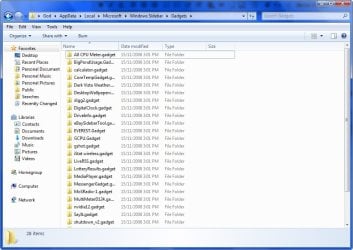
4. Now go to the same folder on your Windows 7 drive and Paste the files in that folder.

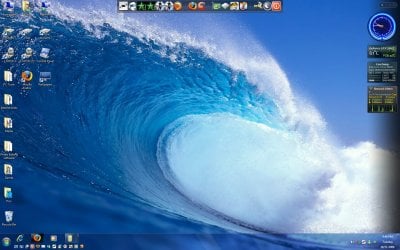
5. Start your sidebar again by Right Clicking on the Desktop and selecting Gadgets and now you should have all the gadgets you were using on Vista, Enjoy! 2008-11-18_214623.jpg


STEP THREE

Add NEW Gadgets to the Vista Sidebar


There is a problem installing new gadgets when using the Vista sidebar and you will need to follow this workaround to be able.

1. Download new Gadget

2. Download 7-Zip and install

3. Right click on the Gadget.exe and go to the 7-Zip tab and Extract Files. 2009-05-29_041521.jpg
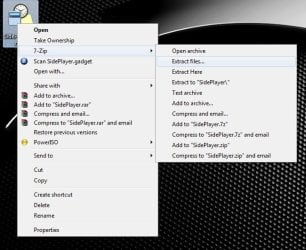
4. Now you have the folder on your desktop you will need to add .Gadget to the folder name and move it to the Gadgets folder as mentioned in Step Two.


TO UNDO CHANGES FOLLOW THESE INSTRUCTIONS

1. Opening the Start Menu and then type: cmd and Open as Administrator

2. Type: sfc /scannow

3. Let it complete and restart and all changes will undone.

For more information on scf /scannow look here.

 
Last edited by a moderator:
It would work IF

If i hade the ultimate sidebar for vista i then might could make it work But what if i dont have the vista folder to put in my windows seven?Any help would be apprechated
 

My Computer My Computer

At a glance

windows 7
OS
windows 7
I'm doing this in my new RTM Win 7 x64 and can activate the sidebar from a shortcut but right-clicking the desktop and selecting Gadgets merely starts the gadgets and not the sidebar. I seem to have missed something here.

Addendum: I later realised that I had to do the procedure on the Program Files folder item, NOT the Program Files (x86) one...DOH!
 
Last edited:

My Computer My Computer

At a glance

Win 7 Ult SP1/Win 10 Pro (all x64)Intel® Core™ i7-975 Extreme O/C to 4.02 GHz, ...24GB Corsair Vengeance DDR3 SDRAM at 1600MHz ...1792 MB NVIDIA® GeForce® GTX 295 Dual Core
Computer type
PC/Desktop
Computer Manufacturer/Model Number
Alienware® ALX X58
OS
Win 7 Ult SP1/Win 10 Pro (all x64)
CPU
Intel® Core™ i7-975 Extreme O/C to 4.02 GHz, 8MB Cache
Motherboard
Asus® P6T Deluxe V2 X58 LGA1366
Memory
24GB Corsair Vengeance DDR3 SDRAM at 1600MHz - 6 x 4096MB
Graphics Card(s)
1792 MB NVIDIA® GeForce® GTX 295 Dual Core
Sound Card
Onboard Soundmax® High-Definition 7.1 Performance Audio
Monitor(s) Displays
Samsung XL2370 LED backlit 23" W/S 2ms response time
Screen Resolution
1920 X 1080
Hard Drives
2 x 500gb SATA II
1 x 1TB SATA II
1 external eSATA LaCie 3TB
(Non-RAID)
PSU
Alienware® 1200 Watt Multi-GPU
Case
Alienware® P2 ALX Chassis with AlienIce™ 3.0 Video Cooling
Cooling
Alienware® High-Perf. Liquid Cooling + Acoustic Dampening
Keyboard
Microsoft® Wireless Entertainment 8000 + Logitech® G15 Wired
Mouse
Microsoft® Wireless Laser 8000 + Logitech® G9 Wired
Internet Speed
1Gb/s
Antivirus
McAfee LiveSafe
Browser
Firefox - latest
Other Info
Using non-RAID on purpose as I find RAID to be too temperamental.
Now set to AHCI
no help

i stiil never had the sidebar to begin with just doing onership on the sidebar gadget folder doent help what so ever. my thoughts are if you never had a sidebar you wont get one unless the xp hack will work on 7?

:cry:
 

My Computer My Computer

At a glance

windows 7
OS
windows 7
It has absolutely nothing to do with XP. Read the tutorial again.
 

My Computer My Computer

At a glance

Win 7 Ult SP1/Win 10 Pro (all x64)Intel® Core™ i7-975 Extreme O/C to 4.02 GHz, ...24GB Corsair Vengeance DDR3 SDRAM at 1600MHz ...1792 MB NVIDIA® GeForce® GTX 295 Dual Core
Computer type
PC/Desktop
Computer Manufacturer/Model Number
Alienware® ALX X58
OS
Win 7 Ult SP1/Win 10 Pro (all x64)
CPU
Intel® Core™ i7-975 Extreme O/C to 4.02 GHz, 8MB Cache
Motherboard
Asus® P6T Deluxe V2 X58 LGA1366
Memory
24GB Corsair Vengeance DDR3 SDRAM at 1600MHz - 6 x 4096MB
Graphics Card(s)
1792 MB NVIDIA® GeForce® GTX 295 Dual Core
Sound Card
Onboard Soundmax® High-Definition 7.1 Performance Audio
Monitor(s) Displays
Samsung XL2370 LED backlit 23" W/S 2ms response time
Screen Resolution
1920 X 1080
Hard Drives
2 x 500gb SATA II
1 x 1TB SATA II
1 external eSATA LaCie 3TB
(Non-RAID)
PSU
Alienware® 1200 Watt Multi-GPU
Case
Alienware® P2 ALX Chassis with AlienIce™ 3.0 Video Cooling
Cooling
Alienware® High-Perf. Liquid Cooling + Acoustic Dampening
Keyboard
Microsoft® Wireless Entertainment 8000 + Logitech® G15 Wired
Mouse
Microsoft® Wireless Laser 8000 + Logitech® G9 Wired
Internet Speed
1Gb/s
Antivirus
McAfee LiveSafe
Browser
Firefox - latest
Other Info
Using non-RAID on purpose as I find RAID to be too temperamental.
Now set to AHCI
Another awesome tutorial that made me do my happy dance. :) Thanks.
 

My Computer My Computer

At a glance

Windows 7 Ultimate x64 SP1AMD Phenom II X4, 945, Quad Core, 3.0 GHz8GB G.Skill PI Black PC2 6400 * 4-4-4-12 @1.9vNVIDIA 512MB 9600GT
Computer Manufacturer/Model Number
"WartHog Wonder"
OS
Windows 7 Ultimate x64 SP1
CPU
AMD Phenom II X4, 945, Quad Core, 3.0 GHz
Motherboard
Gigabyte MA785GM-US2H
Memory
8GB G.Skill PI Black PC2 6400 * 4-4-4-12 @1.9v
Graphics Card(s)
NVIDIA 512MB 9600GT
Sound Card
Realtek ALC889A Chipset (onboard)
Monitor(s) Displays
2 x 22" Hans-G LCD
Screen Resolution
1680x1050
Hard Drives
650GB 7200RPM WD Caviar Black
PSU
OCZ 700w GameXstream
Case
Cooler Master CM 690 Midtower
Cooling
Xigmatek Gaia SD1283 CPU Cooler, Assorted 120mm case fans
Keyboard
Dell SK-8115
Mouse
Microsoft Comfort Optical Mouse 3000
Other Info
Liteon iHAS 424-98B 24x DVD/CD Writer
Brilliant Grim, great tutorial.
I've been having the same problem as ciad602. Fly-out menus don't work at all. Everything else works perfectly fine. If anyone finds a solution to the problem please leave a reply.
Thanks again Grim! :D
 

My Computer My Computer

At a glance

Windows 7
Computer Manufacturer/Model Number
Dell D420
OS
Windows 7
Sorry for sounding thick but how do you copy your side bar folder from Vista when you dont have Vista installed?!

Do you have to d/l Vista sidebar (if you can d/l it...) and install it and then copy the files?
 

My Computer My Computer

At a glance

Windows 7 Pro x64
Computer Manufacturer/Model Number
HP HDX9430 laptop
OS
Windows 7 Pro x64
Well someone very kindly sent me the relevant files and i now have the Vista sidebar in W7...thanks, great tutorial. :)
 

My Computer My Computer

At a glance

Windows 7 Pro x64
Computer Manufacturer/Model Number
HP HDX9430 laptop
OS
Windows 7 Pro x64
Works like a charm. In addition I suggest to put the newly aquired sidebar .exe into the startup folder. Else you have to start the sidebar gadgets manually each time.
 

My Computer My Computer

At a glance

Vista, Windows7, Mint Mate, Zorin, Windows 8from 1.6GHz Duo to i7
Computer Manufacturer/Model Number
HP, Dell, Gateway, Toshiba - 4 laptops and 2 desktops
OS
Vista, Windows7, Mint Mate, Zorin, Windows 8
CPU
from 1.6GHz Duo to i7
Monitor(s) Displays
2x HP w2207
Hard Drives
5x HDD, 7x SSD, 12x Externals
Keyboard
with trackball - no mices
Mouse
Trackball mice
Internet Speed
DSL 6000
Works like a charm. In addition I suggest to put the newly aquired sidebar .exe into the startup folder. Else you have to start the sidebar gadgets manually each time.


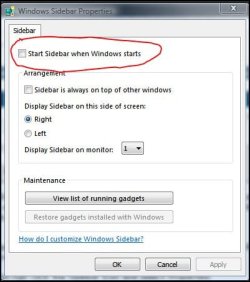
If you've set it up correctly it should be an option just like in Vista where you can tell it to start with Windows or not, whatever you want.

With Sidebar open right click the taskbar icon and select Properties.
 

Attachments

  • Capture.JPG
    Capture.JPG
    32.6 KB · Views: 172

My Computer My Computer

At a glance

Win 7 Ult SP1/Win 10 Pro (all x64)Intel® Core™ i7-975 Extreme O/C to 4.02 GHz, ...24GB Corsair Vengeance DDR3 SDRAM at 1600MHz ...1792 MB NVIDIA® GeForce® GTX 295 Dual Core
Computer type
PC/Desktop
Computer Manufacturer/Model Number
Alienware® ALX X58
OS
Win 7 Ult SP1/Win 10 Pro (all x64)
CPU
Intel® Core™ i7-975 Extreme O/C to 4.02 GHz, 8MB Cache
Motherboard
Asus® P6T Deluxe V2 X58 LGA1366
Memory
24GB Corsair Vengeance DDR3 SDRAM at 1600MHz - 6 x 4096MB
Graphics Card(s)
1792 MB NVIDIA® GeForce® GTX 295 Dual Core
Sound Card
Onboard Soundmax® High-Definition 7.1 Performance Audio
Monitor(s) Displays
Samsung XL2370 LED backlit 23" W/S 2ms response time
Screen Resolution
1920 X 1080
Hard Drives
2 x 500gb SATA II
1 x 1TB SATA II
1 external eSATA LaCie 3TB
(Non-RAID)
PSU
Alienware® 1200 Watt Multi-GPU
Case
Alienware® P2 ALX Chassis with AlienIce™ 3.0 Video Cooling
Cooling
Alienware® High-Perf. Liquid Cooling + Acoustic Dampening
Keyboard
Microsoft® Wireless Entertainment 8000 + Logitech® G15 Wired
Mouse
Microsoft® Wireless Laser 8000 + Logitech® G9 Wired
Internet Speed
1Gb/s
Antivirus
McAfee LiveSafe
Browser
Firefox - latest
Other Info
Using non-RAID on purpose as I find RAID to be too temperamental.
Now set to AHCI
Works like a charm. In addition I suggest to put the newly aquired sidebar .exe into the startup folder. Else you have to start the sidebar gadgets manually each time.


If you've set it up correctly it should be an option just like in Vista where you can tell it to start with Windows or not, whatever you want.

With Sidebar open right click the taskbar icon and select Properties.


Of course. I just have this habit of using the startup folder. Then I don`t have to crawl all over the system to see where to put the checkmarks. It is just a more generic way - I think.
 

My Computer My Computer

At a glance

Vista, Windows7, Mint Mate, Zorin, Windows 8from 1.6GHz Duo to i7
Computer Manufacturer/Model Number
HP, Dell, Gateway, Toshiba - 4 laptops and 2 desktops
OS
Vista, Windows7, Mint Mate, Zorin, Windows 8
CPU
from 1.6GHz Duo to i7
Monitor(s) Displays
2x HP w2207
Hard Drives
5x HDD, 7x SSD, 12x Externals
Keyboard
with trackball - no mices
Mouse
Trackball mice
Internet Speed
DSL 6000
Force of habit...I know...!;)
 

My Computer My Computer

At a glance

Win 7 Ult SP1/Win 10 Pro (all x64)Intel® Core™ i7-975 Extreme O/C to 4.02 GHz, ...24GB Corsair Vengeance DDR3 SDRAM at 1600MHz ...1792 MB NVIDIA® GeForce® GTX 295 Dual Core
Computer type
PC/Desktop
Computer Manufacturer/Model Number
Alienware® ALX X58
OS
Win 7 Ult SP1/Win 10 Pro (all x64)
CPU
Intel® Core™ i7-975 Extreme O/C to 4.02 GHz, 8MB Cache
Motherboard
Asus® P6T Deluxe V2 X58 LGA1366
Memory
24GB Corsair Vengeance DDR3 SDRAM at 1600MHz - 6 x 4096MB
Graphics Card(s)
1792 MB NVIDIA® GeForce® GTX 295 Dual Core
Sound Card
Onboard Soundmax® High-Definition 7.1 Performance Audio
Monitor(s) Displays
Samsung XL2370 LED backlit 23" W/S 2ms response time
Screen Resolution
1920 X 1080
Hard Drives
2 x 500gb SATA II
1 x 1TB SATA II
1 external eSATA LaCie 3TB
(Non-RAID)
PSU
Alienware® 1200 Watt Multi-GPU
Case
Alienware® P2 ALX Chassis with AlienIce™ 3.0 Video Cooling
Cooling
Alienware® High-Perf. Liquid Cooling + Acoustic Dampening
Keyboard
Microsoft® Wireless Entertainment 8000 + Logitech® G15 Wired
Mouse
Microsoft® Wireless Laser 8000 + Logitech® G9 Wired
Internet Speed
1Gb/s
Antivirus
McAfee LiveSafe
Browser
Firefox - latest
Other Info
Using non-RAID on purpose as I find RAID to be too temperamental.
Now set to AHCI
I did this on my previous install of Win7 no problem. However I cant delete the entire folder this time around. It seems windows has hold of a few files and says there in use. I dont see anything in task manager related to sidebar or gadgets. I have ownership of all files and folders.

I even tried in safe mode and had no luck.

Any ideas what process to look for?

EDIT: Ok so i tried safe mode again and was able to delete both the win sidebar folder in program files x86 and program files. I then tried copying over my Windows sidebar folders from my old install but only gadgets work. No sidebar.
 
Last edited:

My Computer My Computer

At a glance

Windows 7 Ultimate x64 RTMIntel Core i7 8602x2GB G.Skill RipjawsSapphire Raedon HD 4890
OS
Windows 7 Ultimate x64 RTM
CPU
Intel Core i7 860
Motherboard
MSI P55-GD64
Memory
2x2GB G.Skill Ripjaws
Graphics Card(s)
Sapphire Raedon HD 4890
Monitor(s) Displays
Dell 2208 WFP
Screen Resolution
1680x1050
Hard Drives
2x80 GB Intel X25M G2 SSDs RAID0
1x1 TB WD Caviar Black
1x1 TB WD Caviar Green
1x2 TB Caviar Black
1x2 TB Caviar Green
PSU
Corsair HX520
Case
Thermaltake Mozart TX
Keyboard
Saitek Cyborg
Mouse
Razer Copperhead
Internet Speed
6 Mb/s
You were not supposed to delete the Sidebar folder in program files - just rename it. You should end up with Windows Sidebar (2) from Win7 and Windows Sidebar from Vista.
 

My Computer My Computer

At a glance

Vista, Windows7, Mint Mate, Zorin, Windows 8from 1.6GHz Duo to i7
Computer Manufacturer/Model Number
HP, Dell, Gateway, Toshiba - 4 laptops and 2 desktops
OS
Vista, Windows7, Mint Mate, Zorin, Windows 8
CPU
from 1.6GHz Duo to i7
Monitor(s) Displays
2x HP w2207
Hard Drives
5x HDD, 7x SSD, 12x Externals
Keyboard
with trackball - no mices
Mouse
Trackball mice
Internet Speed
DSL 6000
What difference does it make since windows no longer reads the original files? Anyways I got it working myself. Thanks anyways.
 

My Computer My Computer

At a glance

Windows 7 Ultimate x64 RTMIntel Core i7 8602x2GB G.Skill RipjawsSapphire Raedon HD 4890
OS
Windows 7 Ultimate x64 RTM
CPU
Intel Core i7 860
Motherboard
MSI P55-GD64
Memory
2x2GB G.Skill Ripjaws
Graphics Card(s)
Sapphire Raedon HD 4890
Monitor(s) Displays
Dell 2208 WFP
Screen Resolution
1680x1050
Hard Drives
2x80 GB Intel X25M G2 SSDs RAID0
1x1 TB WD Caviar Black
1x1 TB WD Caviar Green
1x2 TB Caviar Black
1x2 TB Caviar Green
PSU
Corsair HX520
Case
Thermaltake Mozart TX
Keyboard
Saitek Cyborg
Mouse
Razer Copperhead
Internet Speed
6 Mb/s
Good, even the hard way sometimes works - LOL.
 

My Computer My Computer

At a glance

Vista, Windows7, Mint Mate, Zorin, Windows 8from 1.6GHz Duo to i7
Computer Manufacturer/Model Number
HP, Dell, Gateway, Toshiba - 4 laptops and 2 desktops
OS
Vista, Windows7, Mint Mate, Zorin, Windows 8
CPU
from 1.6GHz Duo to i7
Monitor(s) Displays
2x HP w2207
Hard Drives
5x HDD, 7x SSD, 12x Externals
Keyboard
with trackball - no mices
Mouse
Trackball mice
Internet Speed
DSL 6000
Help!

Hello! I'm a bit of a newbie here....
I was going along well with trying to get my old Vista sidebar back, but didn't understand your directions for steps 8 and 9. Can you please help with some screen shots or something for the less savvy users like me? :confused: I'm not sure where the Vista folders are...

Thanks in advance!!!
 

My Computer My Computer

At a glance

Windows 7
OS
Windows 7
Hmm, suggest you use Method1 - there is no step9 and step8 is only for closing the sidebar. You can also right click on the sidebar itself and close it. Then when you want get it back up, just click on the icon in the tasktray.
But if that was not what you were looking for, plse post back. Method1 is really easy and should be no problem at all - but if there are steps you dont understand, I'll be glad to make pictures.
And tell me how far you got without problems.
 

My Computer My Computer

At a glance

Vista, Windows7, Mint Mate, Zorin, Windows 8from 1.6GHz Duo to i7
Computer Manufacturer/Model Number
HP, Dell, Gateway, Toshiba - 4 laptops and 2 desktops
OS
Vista, Windows7, Mint Mate, Zorin, Windows 8
CPU
from 1.6GHz Duo to i7
Monitor(s) Displays
2x HP w2207
Hard Drives
5x HDD, 7x SSD, 12x Externals
Keyboard
with trackball - no mices
Mouse
Trackball mice
Internet Speed
DSL 6000
Thank you!

Thanks for your reply--will try method one and see how it goes....

I was confused about the folders in the method two.
 

My Computer My Computer

At a glance

Windows 7
OS
Windows 7
Ok...here's my problem

I figured out why I didn't use method one:

5. Go to the Windows Sidebar Programs folder in Vista and copy it.

6. Now just paste the Vista folder in the Programs folder on your Windows 7 partition.

What exactly is meant by the sidebar programs folder in vista vs the programs folder on my windows 7 partition??? This is what confused me and why I tried to use method two.
 

My Computer My Computer

At a glance

Windows 7
OS
Windows 7
Back
Top