Vista Windows Sidebar - Reinstate on Windows 7

Sidebar - Vista Sidebar on Windows 7

How to Reinstate the Vista Sidebar on Windows 7

   Information
This will show you how to reinstate the Vista Windows Sidebar on Windows 7.


METHOD ONE

Reinstate Vista Windows Sidebar on Windows 7

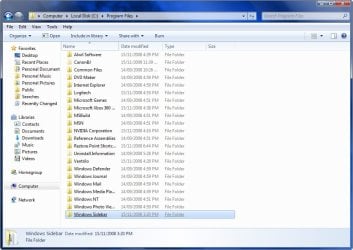
1. First Close all running Gadgets and Check Task Manager to Make sure it is not running and then go to C:\Program Files\Windows Sidebar. 2008-11-18_202259.jpg
2. Download the Take Ownership shortcut to add it to the right click context menu by going here http://www.sevenforums.com/tutorials/1911-take-ownership-shortcut.html

3. Right click on the Sidebar folder and select Take Ownership

4. Rename the Original Folder to Windows Sidebar (2)

5. Go to the Windows Sidebar Programs folder in Vista and copy it.

6. Now just paste the Vista folder in the Programs folder on your Windows 7 partition.

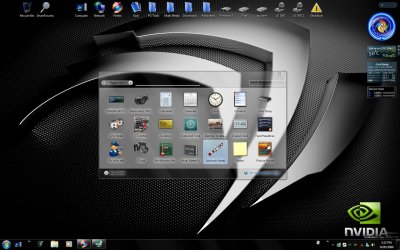
7. Right Click on the screen and select Gadgets and now you should have the Vista sidebar. Vista Sidebar .jpg
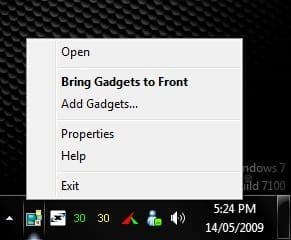
8. To close the sidebar just go to the icon in the system tray, right click and select exit. Close Sidebar.jpg


METHOD TWO

Reinstate Vista Windows Sidebar on Windows 7

1. First Close all running Gadgets and Check Task Manager to Make sure it is not running and then go to C:\Program Files\Windows Sidebar. 2008-11-18_202259.jpg
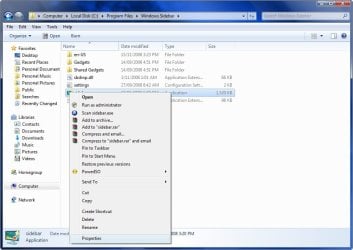
2. Right click on a file and select Properties. 2008-11-18_202335.jpg
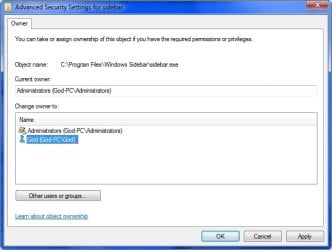
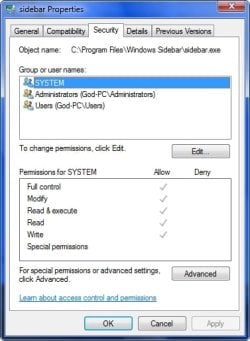
3. Go to the Security Tab and click on Advanced. 2008-11-18_202357.jpg
4. Go to the Owner Tab and select Edit. 2008-11-18_202425.jpg
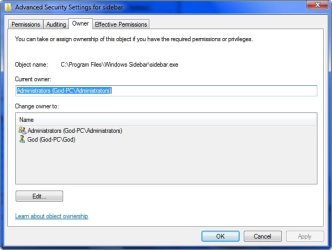
5. Select your user name and hit OK. 2008-11-18_202458.jpg
6. Go back to step 3 now and instead of Advanced select Edit.

7. Select your user name and tick the box with Full control and hit OK. 2008-11-18_204230.jpg
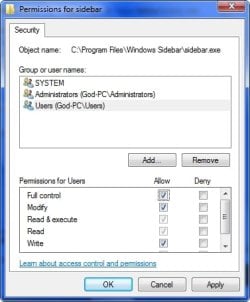
  • OK now you have done that for every file in the Windows sidebar folder except the Gadgets Folder, you can now delete or replace the files.
8. Copy the Windows Sidebar Folder and Paste it somewhere for a backup if you want to Revert your changes.

9. Go to the Sidebar Folder in Vista and copy all the files except the Gadgets Folder and Paste it in the Windows 7 Sidebar folder and overwrite the existing files and folders.

10. Right Click on the screen and select Gadgets and now you should have the Vista sidebar.


STEP TWO

Add Vista Sidebar Gadgets to Windows 7


   Note
This is an optional extra for getting all of your Gadgets from Vista to use in Windows 7
1. First close your sidebar and check Task Manager to make sure it is not running.

2. Go to folder options and select Show Hidden Files.

3. Now go to your Vista Drive and go to folder Users\your user name\AppData\Local\Microsoft\Windows Sidebar\Gadgets and copy all of the folders in that folder. 2008-11-18_213546.jpg
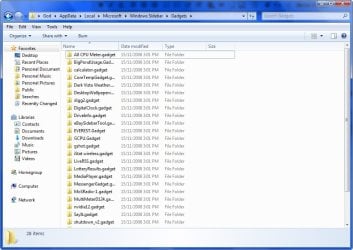
4. Now go to the same folder on your Windows 7 drive and Paste the files in that folder.

5. Start your sidebar again by Right Clicking on the Desktop and selecting Gadgets and now you should have all the gadgets you were using on Vista, Enjoy! 2008-11-18_214623.jpg
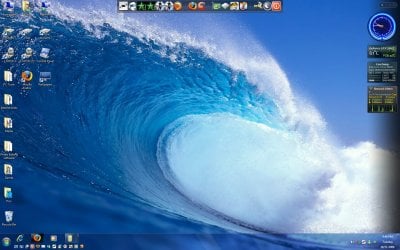


STEP THREE

Add NEW Gadgets to the Vista Sidebar


There is a problem installing new gadgets when using the Vista sidebar and you will need to follow this workaround to be able.

1. Download new Gadget

2. Download 7-Zip and install

3. Right click on the Gadget.exe and go to the 7-Zip tab and Extract Files. 2009-05-29_041521.jpg
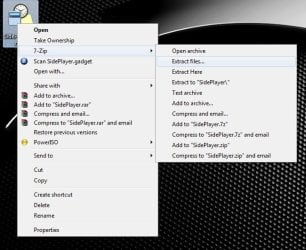
4. Now you have the folder on your desktop you will need to add .Gadget to the folder name and move it to the Gadgets folder as mentioned in Step Two.


TO UNDO CHANGES FOLLOW THESE INSTRUCTIONS

1. Opening the Start Menu and then type: cmd and Open as Administrator

2. Type: sfc /scannow

3. Let it complete and restart and all changes will undone.

For more information on scf /scannow look here.

 
Last edited by a moderator:
Hi,
You guys can also try this gadget 7 Sidebar. You can install it like any other gadget and it creates a sidebar like the one in vista (even with some new features).
No need to change any systemfiles ;)

Ciao
 

My Computer My Computer

At a glance

Windows 7
OS
Windows 7
Thank you! The 7 Sidebar Gadet is exactly what I wanted/needed. I can still install gadets easily, no disabling UAC, none of that. I *could have* do the other method, but I no longer even have my windows vista disks, nor an old install to copy files from. Thanks for letting us know of this alternative.
 

My Computer My Computer

At a glance

Windows 7 Ultimate x64Athlon II 4404GB G-SKILL DDR3Radeon HD 6850
Computer Manufacturer/Model Number
Homebuilt
OS
Windows 7 Ultimate x64
CPU
Athlon II 440
Motherboard
MSI 880GMA
Memory
4GB G-SKILL DDR3
Graphics Card(s)
Radeon HD 6850
Sound Card
Onboard
Monitor(s) Displays
Acer P224w LCD
Screen Resolution
1680x1200
Hard Drives
Too many to shake a usb stick at.
PSU
OCZ ModXTream Pro 600
Case
Ultra Aluminus
Cooling
Stock AMD
Keyboard
Logitech S510
Mouse
Logitech MX610
Thank you! The 7 Sidebar Gadet is exactly what I wanted/needed. I can still install gadets easily, no disabling UAC, none of that. I *could have* do the other method, but I no longer even have my windows vista disks, nor an old install to copy files from. Thanks for letting us know of this alternative.

I had uploaded a copy of my Vista sidebar folder to Skydrive. If you want to use it, you can download it from here.
 

My Computer My Computer

At a glance

Vista, Windows7, Mint Mate, Zorin, Windows 8from 1.6GHz Duo to i7
Computer Manufacturer/Model Number
HP, Dell, Gateway, Toshiba - 4 laptops and 2 desktops
OS
Vista, Windows7, Mint Mate, Zorin, Windows 8
CPU
from 1.6GHz Duo to i7
Monitor(s) Displays
2x HP w2207
Hard Drives
5x HDD, 7x SSD, 12x Externals
Keyboard
with trackball - no mices
Mouse
Trackball mice
Internet Speed
DSL 6000
Hi,
You guys can also try this gadget 7 Sidebar. You can install it like any other gadget and it creates a sidebar like the one in vista (even with some new features).
No need to change any systemfiles ;)

Ciao
Helmut4242 big thanks for your sweet little tool - it simply made my day!!
It does exactly (!) what i want and what i have 'missed' in Win 7 - your sidebar brings back the border / dock also for apllications like firefox :). So if i am maximizing my browser it will 'dock' to the left border of the sidebar, just like in Vista. I love it - it is so cool. I don't like the Win 7 default one, because i can't devide my desktop exactly. Yours is excellent! Thanks bud!
 

My Computer My Computer

At a glance

Windows 7
OS
Windows 7
thank you very much! thanks to step 2 i got the Vista CPU meter back, as i dont like the way the windows 7 one jumps about!
 

My Computer My Computer

At a glance

Windows 10 Pro x64Intel Core i5 7400 @ 3.00GHz8GB 2133Mhz DDR4 (OEM supplied)Gygabyte Windforce GTX 1050Ti (Factory Overcl...
Computer type
PC/Desktop
Computer Manufacturer/Model Number
Medion Erazer (note to self: insert model number) - with custom additions
OS
Windows 10 Pro x64
CPU
Intel Core i5 7400 @ 3.00GHz
Motherboard
OEM supllied with PC
Memory
8GB 2133Mhz DDR4 (OEM supplied)
Graphics Card(s)
Gygabyte Windforce GTX 1050Ti (Factory Overclocked)
Sound Card
Realtek
Monitor(s) Displays
Acer Al1980 + HKC
Screen Resolution
1360*768(HKC) / 1280*1024(Acer)
Hard Drives
1TB Toshiba
1TB WD Caviar Green
120GB Samsung Evo 840
PSU
OEM supplied (no power rating on case)
Case
OEM Supplied
Cooling
Stock
Keyboard
Logitech Wireless
Mouse
Logitect Wireless
Internet Speed
40Mb/s Down 10Mb/s Up
Antivirus
Defender
Browser
Firefox
Hi,
You guys can also try this gadget 7 Sidebar. You can install it like any other gadget and it creates a sidebar like the one in vista (even with some new features).
No need to change any systemfiles ;)

Ciao

What a fantastic, elegant solution!

Having just completed the upgrade of my laptop from Vista to Win7 yesterday (what a pain, but that's another story) I was dismayed to find that the only thing I liked about Vista had been crippled in the new OS.

I found this thread via a Google search and was about to perform the recommended changes to get my old sidebar back (I still have another donor computer running Vista). Fortunately for me, I decided to read the entire thread first and at the top of the last page I found this solution!

I really like the additional features, like my browser window leaving the sidebar uncovered and the ability to use the sidebar as a window manager. This is what the Windows 7 sidebar should have been instead of the crippled version of the Vista sidebar they gave us.

Thank you, thank you, thank you for posting this here! :D
Moderators, you should make this another option on the first post of this thread. :thumbsup:
One question though... why isn't this gadget available through the Windows gadget gallery?
 

My Computer My Computer

At a glance

Windows 7 32bitIntel Pentium Dual CPU T2390 @ 1.86 GHz3GBIntel Mobile 965 Express Chipset
Computer Manufacturer/Model Number
Compaq Presario C760T (Laptop)
OS
Windows 7 32bit
CPU
Intel Pentium Dual CPU T2390 @ 1.86 GHz
Memory
3GB
Graphics Card(s)
Intel Mobile 965 Express Chipset
Hard Drives
Seagate Momentus 320GB (ST9320421AS)
The thing I can't figure out is why this works on my laptop, but when I try it on my desktop, it ends up saying that "Settings.ini is being used by another process". I have tried looking for the handle in process explorer but it doesn't show anything. Also, although it does work on my laptop, if I try to add any new gadgets, I have to revert to the Windows 7 sidebar to add them, then I can switch back to the Vista version of the sidebar.
 

My Computer My Computer

At a glance

DT and LT: Windows 7 and Fedora 14DT: Intel QX9770, LT: Intel P8600DT: 8GB OCZ DDR3 PC3-10666 Gold Edition LT: 4...DT: BFG Geforce GTX 295 (B), LT: NVidia Gefor...
Computer Manufacturer/Model Number
Custom Desktop, Dell Studio XPS 1340 laptop
OS
DT and LT: Windows 7 and Fedora 14
CPU
DT: Intel QX9770, LT: Intel P8600
Motherboard
DT: Intel DX48BT2
Memory
DT: 8GB OCZ DDR3 PC3-10666 Gold Edition LT: 4GB DDR3-1066
Graphics Card(s)
DT: BFG Geforce GTX 295 (B), LT: NVidia Geforce 9400M G
Sound Card
DT: Integrated LT: Integrated
Monitor(s) Displays
DT: Acer 23 inch 1920x1080 monitors, LT: 13 inch
Screen Resolution
DT: 3840x1080 LT: 1280x800
Hard Drives
DT: Samsung SpinPoint 1TB HD103UJ 7200RPM HDD+Fantom Drives 2TB 7200rpm External+OCZ Vertex Series 30GB SSD (boot)
LT: Seagate Momentus 7200RPM 320GB 2.5'' HDD
PSU
DT: Rosewill Bronze Series 1000W LT: 6 cell 62837mWh Li-ion
Case
DT:Thermaltake Armor Series LCS, LT:Dell Black Studio XPS 13
Cooling
DT: Custom watercooling setup
Keyboard
DT: Kengsinton PC/Mac LT: Integrated backlit keyboard
Mouse
DT: Logitech USB Optical Mouse LT: Integrated Track Pad
Internet Speed
380KB/s download on a good day...
Other Info
DT: CD/DVDRW Drive: Hp dvd1140, Multifunction front panel w/ 4 USB ports (2 Powered with 5V and 12V), Powered External SATA, 25-in-1 card reader, and audio ports

LT: Integrated Webcam with Microphone array, 8-in-1 card reader
Hi,
You guys can also try this gadget 7 Sidebar. You can install it like any other gadget and it creates a sidebar like the one in vista (even with some new features).
No need to change any systemfiles ;)

Ciao

What a fantastic, elegant solution!
...
One question though... why isn't this gadget available through the Windows gadget gallery?

I signed up just to praise this sidebar as well. It's sooo good, just like eegor said, it's what the Vista sidebar should have been.

I'd also wondered why it wasn't listed in the gadget gallery. I know that the creator of this gadget must live in Germany or Austria, because some of the outgoing links on that site land on german sites.

He also has a "Clipboarder" gadget that manages your clipboard items in the most elegant manner. I highly recommend trying it out too. This guy is a very talented programmer.
 

My Computer My Computer

At a glance

Windows 7 Ultimate x64Core i7 720QM4085 MB DDR3nVidia GTX 260M 1024 MB
Computer Manufacturer/Model Number
ASUS G51J-A1 laptop
OS
Windows 7 Ultimate x64
CPU
Core i7 720QM
Memory
4085 MB DDR3
Graphics Card(s)
nVidia GTX 260M 1024 MB
Screen Resolution
1920x1080
Hard Drives
2x320 GB, 7200 RPM, SATA-II
Mouse
Razer Copperhead gaming mouse
I think I know what to do, but I need to get the Vista sidebar. Is there a place on the web that might have it??

I uploaded my Vista sidebar folder for you (see link below). Just download it and unzip the .zip folder and you find the folder that you need to drag into the Win7 Program files. Make sure you first renamed the one that is in your Win7 program files folder now.

Windows Sidebar.zip - Windows Live
:D

MANY MANY thanks for that Folder.. I have been at wit's end to get that sidebar back on my W7OS . There is a Sidebar gadget available also, but it consumes significant amounts of CPU constantly, slowing down my system and battery life,

The Original Vista Sidebar is perfect.. thanks..
 

My Computer My Computer

At a glance

W7 HP 32bit1.5Gig
OS
W7 HP 32bit
Memory
1.5Gig
Monitor(s) Displays
16" LCD
Hard Drives
250Gb Sat
Paul, you are welcome. I am glad it was helpful for you.
 

My Computer My Computer

At a glance

Vista, Windows7, Mint Mate, Zorin, Windows 8from 1.6GHz Duo to i7
Computer Manufacturer/Model Number
HP, Dell, Gateway, Toshiba - 4 laptops and 2 desktops
OS
Vista, Windows7, Mint Mate, Zorin, Windows 8
CPU
from 1.6GHz Duo to i7
Monitor(s) Displays
2x HP w2207
Hard Drives
5x HDD, 7x SSD, 12x Externals
Keyboard
with trackball - no mices
Mouse
Trackball mice
Internet Speed
DSL 6000
Hi,
thanks for all the praise of my gadget ;)

I acutally put it in the gallery here. But mastofdom is guessing right, I'm german and Microsoft seems to seperate the website for different countries.. (although I made a special entry for the english version)

@Paul Grenfell
Yes sorry. Version 1.40 had a bug that caused to occupy one processor when selecting a special skin. Version 1.50 fixes that and also adds some new features. Download here

Ciao
Helmut
 

My Computer My Computer

At a glance

Windows 7
OS
Windows 7
Hi,

This is a great hack as I love the Vista sidebar! Are there any fixes for the problem with the flyout menus not working? I would love to have that piece of functionality back.

Thanks in advance!
Klem
 

My Computer My Computer

At a glance

Win7, WinXP, OpenSuse
OS
Win7, WinXP, OpenSuse
Hello Mark,
Greetings from Sunny Sarasota Florida. Your 2008 Article on how to reinstate the Vista Side bar on Windows 7 was absolutely fantastic. It was clearly written with easy to understand steeps and great screen shots. Heck, even I got it working on my first try. Your procedure worked perfectly on three of my computers all running Win 7 Pro 64 bit.
My sidebar holds only a few simple gadgets but I have been unable to find exact Win 7 replacements. I really like the Vista sidebar concept over the Win 7 alternative. Over time, I have grown accustomed and reliant on the sidebar display for quick updated information as I work. The gadgets themselves are simple, (date, weather, time, status, shutdown/restart/hibernate etc.). They are always on top and large enough for even us older guys to see.
Then came the SP1 update earlier this week and the once loved sidebar is gone. Only a few of the gadgets are displayed. They are considerably smaller and do not auto adjust for size nor placement. The ones that are displayed appear graphically truncated either on the top or bottom and the Windows Sidebar icon in the notification area of the taskbar is missing. Restore points are a wonderful thing to get your box back to the last know good condition. My beloved sidebar is back to normal but without SP1.
Just wondering if you experienced similar issues and had any thoughts or suggestions. Do you think the Vista sidebar can return to a Win7 SP1 machine?
Thanks again for a wonderful article.
Al
 

My Computer My Computer

At a glance

Win 7 pro 64 bit
OS
Win 7 pro 64 bit
Captian Al,
Just do the same thing again after SP1
If you have lost the file , just Copy the one you have before SP1 and replace after SP1
 

My Computer My Computer

At a glance

W7 HP 32bit1.5Gig
OS
W7 HP 32bit
Memory
1.5Gig
Monitor(s) Displays
16" LCD
Hard Drives
250Gb Sat
That was the first thing I tried

Thanks Paul, but that was the first thing I tried.

I first tried a folder recovery manuver to both folders that must be modified from my last backup set. When that failed to work, I tried a copy/paste manuver using files from one of my other two Win-7 Pro 64 bit computers that were still working fine and without SP1 update. Both attempts ended with the same failed result.

Of special note was that I could not paste the sidebar.exe and the wlsrv.dll file because both files were in use. Without the gadgets icon in the notification tray, I was unable to shutdown the sidebar. Also right clicking inn the sidebar area did not bring up the usual sidebar dialog menu. Right clicking on the desktop brought up the Gadgets choice but that only allows one to add gadgets, not stop the sidebar.


I wonder if the above 2 files are in fact different. If they were, I could explore other options to stop the sidebar / Gadgets so I could copy those files over.

Regards, and thanks for the speedy response.

Al
 

My Computer My Computer

At a glance

Win 7 pro 64 bit
OS
Win 7 pro 64 bit
Replace the whole Windows Sidebar folder at C/Programs/Windows Sidebar with the pre SP1 copy and then restart the Computer..
It wont kick in until reboot..
Paul
 

My Computer My Computer

At a glance

W7 HP 32bit1.5Gig
OS
W7 HP 32bit
Memory
1.5Gig
Monitor(s) Displays
16" LCD
Hard Drives
250Gb Sat
The link is dead to download the reg file for "enabling the Sidebar with UAC off".
Thanks for this tut...
 

My Computer My Computer

At a glance

Seven Ultimate x64, Vista HP x64
OS
Seven Ultimate x64, Vista HP x64
Hello AJ,

It has been removed since there's no need for the REG file since it is not needed in Builds 7048 and newer of Windows 7. Sorry. :(
 

My Computer My Computer

At a glance

64-bit Windows 11 Pro for WorkstationsIntel i7-8700K OC'd to 5 GHz64 GB (4x16GB) G.SKILL TridentZ RGB DDR4 3600...ASUS ROG-STRIX-GTX1080TI-O11G-GAMING
Computer type
PC/Desktop
Computer Manufacturer/Model Number
Self built custom
OS
64-bit Windows 11 Pro for Workstations
CPU
Intel i7-8700K OC'd to 5 GHz
Motherboard
ASUS ROG Maximus XI Formula Z390
Memory
64 GB (4x16GB) G.SKILL TridentZ RGB DDR4 3600 MHz
Graphics Card(s)
ASUS ROG-STRIX-GTX1080TI-O11G-GAMING
Sound Card
Integrated
Monitor(s) Displays
2 x Samsung Odyssey G7 27"
Screen Resolution
2560x1440
Hard Drives
1TB Samsung 990 PRO M.2,
4TB Samsung 990 PRO PRO M.2,
TerraMaster F8 SSD Plus NAS
PSU
Seasonic Prime Titanium 850W
Case
Thermaltake Core P3
Cooling
Corsair Hydro H115i
Keyboard
Logitech wireless K800
Mouse
Logitech MX Master 4
Internet Speed
2 Gb/s Download and 100 Mb/s Upload
Antivirus
Malwarebyte Anti-Malware Premium
Browser
Google Chrome
Other Info
Logitech Z625 speaker system,
Logitech BRIO 4K Pro webcam,
HP Color LaserJet Pro MFP M477fdn,
APC SMART-UPS RT 1000 XL - SURT1000XLI,
Galaxy S23 Plus phone
Thanks for the quick reply Brink...

Makes sence about the newer releases.. One more question if I may?

I have a 64 bit system for both Vista & Seven and I'm not clear if I just need to stick with just the "Program Files" folder only, or is it necessary to also copy the "Windows Sidebar" folder from the "Program Files (x86)", from Vista into the respective folder in Seven??

Thanks in advance..
 

My Computer My Computer

At a glance

Seven Ultimate x64, Vista HP x64
OS
Seven Ultimate x64, Vista HP x64
Back
Top