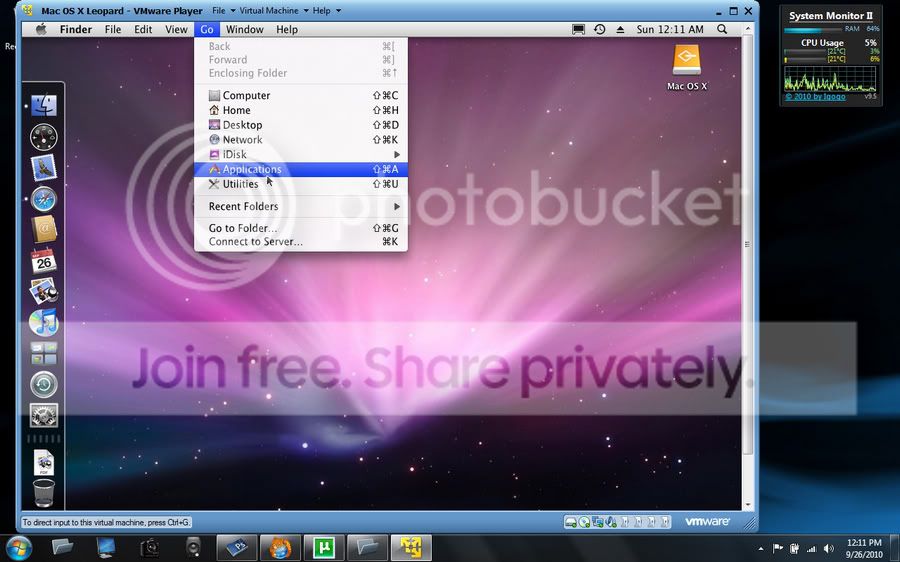
Vm player (really bad peformance)

bzglevin

New member
Local time
9:49 AM
Messages
2
Hi all

This is my first post so bear with me

My problem is that I have vmplayer 3.11 running Mac OS X v10.5 Leopard
and its got really bad performance my OS only uses 800 MB of my memory its really annoying can you please give me some tips/ideas btw I have oracle virtual box with windows 95/2000/xp/7 enterprise that has no performance issues oh and I DONT have virtulization in the bios Thanks.


EDIT!:I have dual-booted windows 7 and Snow Leopard and it has good peformance!
 
Last edited:

My Computer

Computer Manufacturer/Model Number
Compaq Presario CQ61-327TU
OS
Windows 7 Professional X64
CPU
Intel Pentium T4400 @2.2 ghz
Motherboard
HP 3069
Memory
3.0 Gb Dual-Channel DDR2 @ 332 mhz
Graphics Card(s)
Mobile Intel 4 Series Express Chipset Family @ 1366x768
Sound Card
IDT High Definition Audio Codec
Monitor(s) Displays
Phillips 107s
Hard Drives
320Gb Seagate ST9320423AS ATA Device
Cooling
Internal Laptop Fan

My Computer

Computer type
PC/Desktop
Computer Manufacturer/Model Number
Airbot 2.0
OS
Windows 7 Ultimate x64 SP1
CPU
Core i7 920 (D0) @ 4Ghz, *26c idle *65c full load on air
Motherboard
Asus P6X58D Premium - Sata 6Gb/s - USB 3.0
Memory
12GB DDR3 Corsair Dominator -CMD12GX3M6A1600C8 at 1600MHz
Graphics Card(s)
Zotac Geforce GTX 770
Sound Card
ASUS Xonar D2X
Monitor(s) Displays
1 LG 24" Flatron W2453V-PF 1 Samsung 24" P2450H both 2ms RT
Screen Resolution
1920x1080@60hz
Hard Drives
1 Samsung 250GB 840 Evo SSD
1 OCZ Vertex2 180GB SSD
1 TB Samsung Spinpoint F1 7200RPM 32MB cache
2 500GB WD Caviar Blacks 7200RPM 32MB cache (WD5001AALS)

Pioneer DVD Burner DVR-S18M
PSU
Corsair HX1000W
Case
Cooler Master HAF 932
Cooling
Case Fans *3 230mm, *1 140mm/CPU - *Tuniq Tower 120 Extreme
Keyboard
Logitech Wireless MK700
Mouse
Logitech Wireless MK700
Internet Speed
DL 15 Mbps UL 0.98 Mbps
Antivirus
None
Browser
Firefox Nightly
Other Info
Processor-7.7 *RAM- 7.9 *Graphics-7.9 *Gaming Graphics- 7.9 *SSD- 7.8 W.E.I final score= 7.7
*Phone- LG Nexus 5
Hi all

This is my first post so bear with me

My problem is that I have vmplayer 3.11 running Mac OS X v10.5 Leopard
and its got really bad performance my OS only uses 800 MB of my memory its really annoying can you please give me some tips/ideas btw I have oracle virtual box with windows 95/2000/xp/7 enterprise that has no performance issues oh and I DONT have virtulization in the bios Thanks.

Hi there
How did you get Mac OS X V 10.5 Leopard to run on vmware player in the first place.

I assume the Host OS is Windows.

Apart from the "copyright issues" any tips on to how you got a bootable OS X to work as a Virtual Machine or have I misunderstood something.

Cheers
jimbo
 

My Computer

Computer type
PC/Desktop
Computer Manufacturer/Model Number
Custom built, several laptops HP/ASUS
OS
Linux CENTOS 7 / various Windows OS'es and servers
CPU
Intel i7 Intel i5
Memory
8GB, 16GB
Graphics Card(s)
On Motherboard
Sound Card
Realtek HD audio
Monitor(s) Displays
Apple Cinema display, Samsung LCD
Screen Resolution
1920 X 1080
Hard Drives
4 X 1TB SATA
Mouse
Toshiba wireless laser
Internet Speed
> 20MB up
Hackintosh... VMWare Player with Leopard 10.5 worked for me (as I do not have VT-x).
VMplayer_Leopard-1.jpg
 

My Computer

Computer Manufacturer/Model Number
Acer Aspire 4730Z
OS
Windows 7 Ultimate
CPU
Intel Pentium Dual CPU T3400 @ 2.16GHz
Motherboard
Acer Aspire 4730Z V1.22 GL40
Memory
4.0GB Dual-Channel DDR2 @ 332MHz
Graphics Card(s)
Mobile Intel(R) 4 Series Express Chipset Family 1309 MB
Sound Card
Realtek High Definition Audio
Monitor(s) Displays
AOC 2795V
Screen Resolution
1920 x 1080
Hard Drives
500GB Hitachi HTS545050B9A300 ATA Travelstar
Hi there
I'm afraid that you wont be able to get much help here on running "dubious Software" or unsupported Software.

You would be better to see if anybody on the Hackingtosh Forum can help you.

You could try running Virtual Box and see if it works better but running OS X in a VM on Windows is a highly dubious exercise in its own right anyway.

Ensure always that any Virtual machine you run has plenty of RAM -- this is usually the bottleneck with Virtual Machines not really CPU power. You also need decently performing Disks too.

Cheers
jimbo
 

My Computer

Computer type
PC/Desktop
Computer Manufacturer/Model Number
Custom built, several laptops HP/ASUS
OS
Linux CENTOS 7 / various Windows OS'es and servers
CPU
Intel i7 Intel i5
Memory
8GB, 16GB
Graphics Card(s)
On Motherboard
Sound Card
Realtek HD audio
Monitor(s) Displays
Apple Cinema display, Samsung LCD
Screen Resolution
1920 X 1080
Hard Drives
4 X 1TB SATA
Mouse
Toshiba wireless laser
Internet Speed
> 20MB up
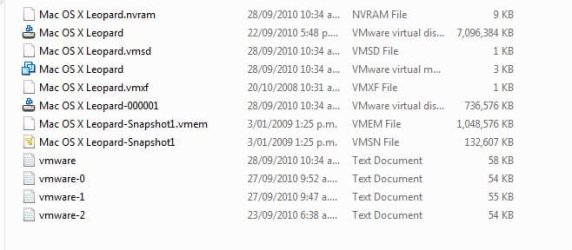
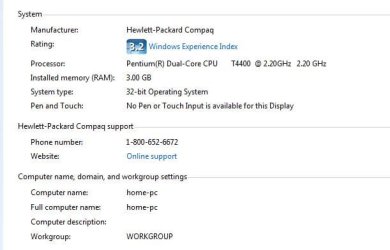
Hi guys sorry I should have added this info in: I have already tried osx in virtual box I converted it to a vhd. As for dick jaggers post i have the same torrent download also I only have 3gb of ram so the max is 1500mb. I gave osx about 1400 mb of my ram and yes my host os is windows 7 I just don't understand why osx is so slow when 95/xp/ubuntu/etc run so smooth.
If you can think of a way to help me that would be great:party:
Thanks
 

Attachments

  • Picture of my osx files.JPG
    Picture of my osx files.JPG
    35 KB · Views: 16
  • my basic windows settings.JPG
    my basic windows settings.JPG
    30.4 KB · Views: 17

My Computer

Computer Manufacturer/Model Number
Compaq Presario CQ61-327TU
OS
Windows 7 Professional X64
CPU
Intel Pentium T4400 @2.2 ghz
Motherboard
HP 3069
Memory
3.0 Gb Dual-Channel DDR2 @ 332 mhz
Graphics Card(s)
Mobile Intel 4 Series Express Chipset Family @ 1366x768
Sound Card
IDT High Definition Audio Codec
Monitor(s) Displays
Phillips 107s
Hard Drives
320Gb Seagate ST9320423AS ATA Device
Cooling
Internal Laptop Fan
I've never experienced OSX in a virtual environment that gets any level of good performance.
 

My Computer

Computer Manufacturer/Model Number
Self-Built in July 2009
OS
Windows 7 Ultimate x64
CPU
Intel Q9550 2.83Ghz OC'd to 3.40Ghz
Motherboard
Gigabyte GA-EP45-UD3R rev. 1.1, F12 BIOS
Memory
8GB G.Skill PI DDR2-800, 4-4-4-12 timings
Graphics Card(s)
EVGA 1280MB Nvidia GeForce GTX570
Sound Card
Realtek ALC899A 8 channel onboard audio
Monitor(s) Displays
23" Acer x233H
Screen Resolution
1920x1080
Hard Drives
Intel X25-M 80GB Gen 2 SSD
Western Digital 1TB Caviar Black, 32MB cache. WD1001FALS
PSU
Corsair 620HX modular
Case
Antec P182
Cooling
stock
Keyboard
ABS M1 Mechanical
Mouse
Logitech G9 Laser Mouse
Internet Speed
15/2 cable modem
Other Info
Windows and Linux enthusiast. Logitech G35 Headset.
Hi there
Ubuntu / Windows are known OS'es and one can do all sorts of things to make them run really slickly -- but the internal workings of OS -X are proprietary so how the virtual algorithms work I have no idea.

It might be that for every Virtual OS-X instruction 74 Windows instructions might need to be issued -- can't say as I have no idea.

If Pparks1 who is usually pretty good on his vm posts states he's never seen a decently performing installation of OS-X running in a Virtual machine then I think that's that.

Cheers
jimbo
 

My Computer

Computer type
PC/Desktop
Computer Manufacturer/Model Number
Custom built, several laptops HP/ASUS
OS
Linux CENTOS 7 / various Windows OS'es and servers
CPU
Intel i7 Intel i5
Memory
8GB, 16GB
Graphics Card(s)
On Motherboard
Sound Card
Realtek HD audio
Monitor(s) Displays
Apple Cinema display, Samsung LCD
Screen Resolution
1920 X 1080
Hard Drives
4 X 1TB SATA
Mouse
Toshiba wireless laser
Internet Speed
> 20MB up
Back
Top