Volume Disk not showing in disk managment.

MirzaAsad

New member
Member
Local time
8:32 AM
Messages
25
Location
Islamabad
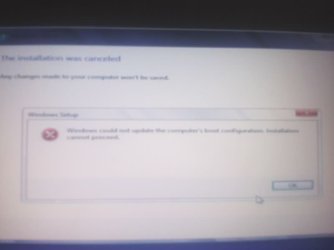
I was trying to dual boot win 8 and win7(was already installed) on my laptop.During installation win8 was giving an error,that win could not update the computer's boot configuration.(See attached pic )
I googled this error and came across this post.

Boot from 7 or 8 DVD and goto Repair console > Command Prompt (Hit enter after each line)

---
diskpart
list disk
select volume x (x = being the volume number of your HDD)
clean
create partition primary
active
format fs=ntfs quick
assign
exit


Reboot and try setup again (I use this for USB drives, but they are not partitioned, I imagine this will kill all partitions on the disk and create just one new one)

After doing all this I was able to install window 8 but my 2 hard disk partition are not showing.My total hard disk is of 300 GB,but now only a single partition of 149 GB is showing.The remaining hard is not visible anywhere,not in disk management, and not even in ease-us disk partition.
 

Attachments
  • 2vc6r8j.jpg
    2vc6r8j.jpg
    11.8 KB · Views: 6

My Computer My Computer

Computer Manufacturer/Model Number
ACER Vpro 3900
OS
Windows 7 Ultimate x32
CPU
Core 2 Duo
Motherboard
Veriton 3900pro
Memory
4GB
Graphics Card(s)
Intel(R) GMA 3000(Intel(R) Q965/Q963 Express Chipset Family)
Sound Card
High Definition Audio Device
Monitor(s) Displays
LCD
Screen Resolution
1024 X 768
Hard Drives
Seagate ST3500418AS ATA Device 500gig hard drive
Internet Speed
4MB
What does diskpart show you from an Elevated Command Prompt? For instance, mine shows:

C:\Windows\system32>diskpart

Microsoft DiskPart version 6.2.9200

Copyright (C) 1999-2012 Microsoft Corporation.
On computer: DESKTOP

DISKPART> list volume

Volume ### Ltr Label Fs Type Size Status Info
---------- --- ----------- ----- ---------- ------- --------- --------
Volume 0 K DVD-ROM 0 B No Media
Volume 1 D D370_D NTFS Partition 78 GB Healthy System
Volume 2 E D370_E NTFS Partition 191 GB Healthy
Volume 3 F D370_F NTFS Partition 9 GB Healthy
Volume 4 C Win_8 NTFS Partition 119 GB Healthy Boot
Volume 5 G D370_G NTFS Partition 698 GB Healthy
Volume 6 H D370_H NTFS Partition 542 GB Healthy
Volume 7 I Win_7 NTFS Partition 78 GB Healthy
Volume 8 L Removable 0 B No Media

DISKPART> exit

Leaving DiskPart...
 

My Computer My Computer

Computer type
PC/Desktop
Computer Manufacturer/Model Number
Lenovo IdeaCenter 450
OS
Windows 10 Pro X64
CPU
Intel Quad Core i7-4770 @ 3.4Ghz
Memory
16.0GB PC3-12800 DDR3 SDRAM 1600 MHz
Graphics Card(s)
Intel Integrated HD Graphics
Sound Card
Realtek HD Audio
Monitor(s) Displays
HP 22" LCD
Screen Resolution
1680 x 1050
Hard Drives
250GB Samsung EVO SATA-3 SSD
2TB Seagate ST2000DM001 SATA-2
1.5TB Seagate ST3150041AS SATA
Keyboard
Dell USB
Mouse
Lenovo USB
Internet Speed
Cable via Road Runner 3MB Upload, 30MB Download
Antivirus
Windows Defender, MBAM Pro, MBAE
Browser
Seamonkey
Other Info
UEFI/GPT
PLDS DVD-RW DH16AERSH
My result:

C:\Windows\system32>diskpart
Microsoft DiskPart version 6.2.9200
Copyright (C) 1999-2012 Microsoft Corporation.
On computer: DESKTOP

DISKPART> list volume

Volume ### Ltr Label Fs Type Size Status Info
---------- --- ----------- ----- ---------- ------- --------- --------
Volume 0 D DVD-ROM 0 B No Media
Volume 1 C NTFS Partition 149 GB Healthy System

As my total hard is 300 GB but it shows 149 GB only.My question is where is the rest of my hard. It is not in disk managment and even easeus partrtion is not showing anything.And all this happened after using the commands I mnetioned in my previous post.
 

My Computer My Computer

Computer Manufacturer/Model Number
ACER Vpro 3900
OS
Windows 7 Ultimate x32
CPU
Core 2 Duo
Motherboard
Veriton 3900pro
Memory
4GB
Graphics Card(s)
Intel(R) GMA 3000(Intel(R) Q965/Q963 Express Chipset Family)
Sound Card
High Definition Audio Device
Monitor(s) Displays
LCD
Screen Resolution
1024 X 768
Hard Drives
Seagate ST3500418AS ATA Device 500gig hard drive
Internet Speed
4MB
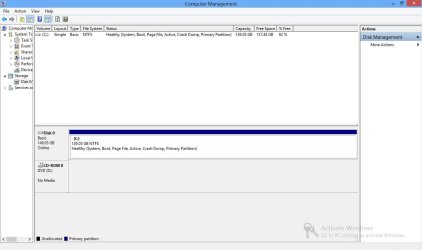
Since you say you were able to install Win8 please post back a Disk Mgmt screenshot: http://www.sevenforums.com/tutorial...nt-post-screen-capture-image.html#post2261610. While there see if you can create a new Partition or Volume - Create New

If for some reason you can't boot Win8, boot into free Partition Wizard
bootable CD to post back a clear camera snap of the maximized drive map and listings. See if you can create a new Primary partition in the empty space. Partition Wizard Create Partition Video Help
 
Capture.JPG
Since you say you were able to install Win8 please post back a Disk Mgmt screenshot: http://www.sevenforums.com/tutorial...nt-post-screen-capture-image.html#post2261610. While there see if you can create a new Partition or Volume - Create New

If for some reason you can't boot Win8, boot into free Partition Wizard
bootable CD to post back a clear camera snap of the maximized drive map and listings. See if you can create a new Primary partition in the empty space. Partition Wizard Create Partition Video Help


Hey I did exactly as you said,and I have attached the captured image.
I can create new volume if I shrink the current one which is only 149 GB but my total hard is of 300 GB.My question is why my laptop is showing only 149 GB and where is the rest of my hard.
 

My Computer My Computer

Computer Manufacturer/Model Number
ACER Vpro 3900
OS
Windows 7 Ultimate x32
CPU
Core 2 Duo
Motherboard
Veriton 3900pro
Memory
4GB
Graphics Card(s)
Intel(R) GMA 3000(Intel(R) Q965/Q963 Express Chipset Family)
Sound Card
High Definition Audio Device
Monitor(s) Displays
LCD
Screen Resolution
1024 X 768
Hard Drives
Seagate ST3500418AS ATA Device 500gig hard drive
Internet Speed
4MB
Your hard drive is not 300 GB, as mentioned you have 2 drives. Can you confirm this ?

Diskpart only shows the 1 drive. You probably only have 1 hard drive ( 149 GB )

If the other hard drive is not showing in the bios, it may have been knocked loose, or worse.
 

My Computer My Computer

Computer type
PC/Desktop
Computer Manufacturer/Model Number
Skylake Special #666
OS
Windows 10 Pro x64
CPU
Intel Core i7 6700K
Motherboard
Asus Sabertooth Z170 Mark 1
Memory
GSkill TridentZ RGB 16GB 3600 16-16-16-36
Graphics Card(s)
EVGA GTX 980 Ti SC x2
Sound Card
Realtek High Definition
Monitor(s) Displays
AOC G2460PG
Screen Resolution
1920 x 1080 144Hz
Hard Drives
Samsung 860 Pro 256GB, Seagate Barracuda 4TB x2
PSU
EVGA 1000 P2, EVGA White Custom Braided Cables
Case
Corsair Vengeance C70 Gunmetal Black
Cooling
Corsair H100i v2, Corsair ML120 x2, Thermal Grizzly Kryonaut
Keyboard
Logitech G910 Orion Spectrum
Mouse
Logitech G700s
Internet Speed
Verizon Fios Quantum Gateway 75/75
Antivirus
Windows Defender, Malwarebytes Free 3.8.3
Browser
Chrome
Other Info
Corsair SP120 x4, LG Blu-ray Drive, Durabrand HT-395 100 Watt Dolby Digital Amp, Corsair H2100 Wireless 7.1 Headset
Back
Top