Maybe someone can straighten me out. I had a printer that didn't work with Win 7. I loaded win6.1-KB958559-X64.msu and VirtualWindowsXP.msi. After some difficulty it seems the load is correct. I then loaded the software for Lexmark 4800 series all in one. The software package faulted on numerous installs but the drivers got installed. No big thing I don't need the pokey bait software interface. The scanner, the printer, the card readers work in VDXP. When I release them and go to Win 7 the scanner and card reader are still functioning but the printer stops printing. You can send a document to print and it enters the Que but it ends there. I probably have something set wrong. But I have run out of ideas. Meanwhile there is a doc stuck in the que that I can't get deleted.
Win 7 RTM
My Computer
Computer Manufacturer/Model Number
BGC (Bob's Garage Crew)
OS
win 7 X64 Ultimate SP1
CPU
I3770K
Motherboard
Asus P8Z77-V Deluxe
Memory
G Skill F3-14900CL9-4GBXL x 4
Graphics Card(s)
NVIDIA GeForce GTX670 + Intel 4000
Sound Card
Realtek HD 5.1 (MOB)
Monitor(s) Displays
Asus VW224T (1)
Screen Resolution
1920 x 1080
Hard Drives
SATA Corsair Force GT 2.5" 180GB (System) Sata 3
OCZ Vertex3 120GB
OCZ Vertex 2 120GB 2.5" SATA II
ST31000524AS 1000.2GB
WD15EARS (External)
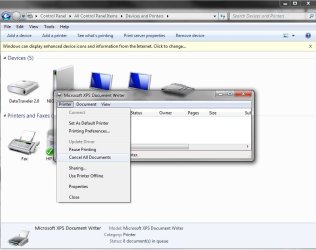
While you are in the XP mode hopefully the RC not beta version of that you can still right click on the XPS icon seen in the control panel and cancel all documents. Surprizingly while the image here is from 7 the exact same small popup window appears when right clicking on the Microsoft XPS printer icon to see what's printing.
W7 Ultimate x64/W10 Pro x64/W11 Pro Triple Boot - Main PC W7 Remote PC Micro ATX W7 Pro x64/W11 Pro
CPU
AMD Phenom II X4 975 Deneb 3.6ghz - 965 2nd remote pc
Motherboard
Gigabyte GA-790XTA-UD4-Gigabyte GA-880GM-D2H remote pc
Memory
Kingston Hyper X DDR3 1600 1.5v 16gb - Hyper X Fury 8gb 2nd
Graphics Card(s)
MSI HD Radeon 5750 1gb - MSI HD Radeon 6450 on mini tower
Sound Card
Creative Labs X-Fi Xtreme Audio P - Realtek onooard 2nd case
Monitor(s) Displays
ASUS VW199T-P 19" HP 2082a Main-HP 2082a 20" remote pc
Screen Resolution
Asus 1440x900 - HP 1600x900
Hard Drives
WD Black 1TB HD per OS W7, W10, and pending W11 presently on 500gb OS Drive - Pending Triple 1TB HDs for Spanned Storage/backup volume
Single 2TB external USB enclosure, single 1TB System 7 Host/Boot drive, Pending 8TB external HD for system image b
PSU
Corsair 750TX - primary / Corsair CX600 - second
Case
Antec 900-2 - SSD compatible / NZXT Vulcan mini tower