
Solved W10 Pro to W10 Pro Installation / Upgrade?

Mike Lynch

New member
Pro User
VIP
Local time
10:18 PM
Messages
958
Location
Clearwater Florida
I have a W-10 Pro 64 PC that has POS Software on it and has some type of infection. Please let's not get into it right now.
The supplier of the POS Software only provides a Version that runs under W-10 Pro.
Is there a way for me to find the W-10 Pro License on this System and somehow download a free copy of W-10 Pro and apply the license to it.
I will disconnect the Hard Drive with the W-10 Pro "infected" info on it and replace it with a new Drive.
With a fresh copy of W-10 Pro on a new Drive, the POS Supplier will rebuild their Software on it.
Can / will any member help me through this?
Thanks in advance.

Mike Lynch
 
Last edited:

My Computer My Computer

At a glance

Microsoft Windows 7 Professional 64-bit 7601 ...Intel(R) Core(TM) i7-3770 CPU @ 3.40GHz8.00 GBIntel(R) HD Graphics 4000
Computer type
PC/Desktop
Computer Manufacturer/Model Number
Two HP Desktops. One in the Laundry Room / Bed Room.
OS
Microsoft Windows 7 Professional 64-bit 7601 Multiprocessor Free Service Pack 1
CPU
Intel(R) Core(TM) i7-3770 CPU @ 3.40GHz
Motherboard
Hewlett-Packard 3396
Memory
8.00 GB
Graphics Card(s)
Intel(R) HD Graphics 4000
Sound Card
(1) Realtek High Definition Audio (2) Intel(R) Display Aud
Monitor(s) Displays
Hanns-G
Screen Resolution
1440 x 900 x 32 bits (4294967296 colors) @ 59 Hz
Hard Drives
(1) ATA WDC WD40EZRX-00S SCSI Disk Device (2) HP Officejet Pro 86 USB Device (3) WD My Book 1230 USB Device
PSU
Whatever came with the CMT.
Case
HP CMT Black.
Cooling
Whatever came with the CMT.
Keyboard
Logitech K740.
Mouse
Microsoft Optical Mouse 1000.
Internet Speed
Spectrum 25Mbs.
Antivirus
WebRoot, Microsoft Security Essentials.
Browser
EDGE
Other Info
HP Officejet Pro 8600 Plus.
WD MyBook 4TB.
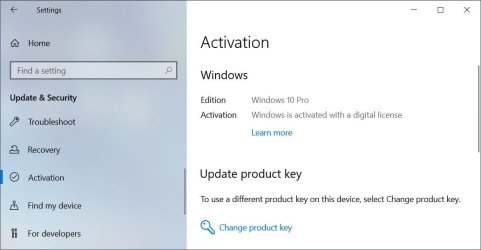
First make sure that Window 10 Pro is activated with a Digital License. If it is then you can reinstall Window 10 Pro without worrying about its product key. Once you install Windows 10 Pro again just select you don't have a product key. When it goes to activate Windows 10 it should activate automatically.

Windows 10 Activation.jpg

Get a 8GB or larger USB flash drive. You will be overwriting everything on it so make sure there is nothing on it that is important.

Plug the flash drive into a USB port on your computer.

Go to this website: Download Windows 10

Scroll down to: Create Windows 10 installation media

Select Download Now.

Run: MediaCreationTool_22H2.exe

Select: Create installation media (USB flash drive, DVD, or ISO file) for another PC.

The USB flash drive is the default so you can keep clicking Next until it starts to create the Window 10 setup flash drive.
 

My Computers My Computers

  • At a glance

    Windows 7 Home Premium 64-bitsAMD FX-8350GSKILL Ripjaw-X PC3 12800 8GB (2x4GB)ASUS ROG STRIX GTX 1060 6GB
    Computer type
    PC/Desktop
    Computer Manufacturer/Model Number
    Custom build
    OS
    Windows 7 Home Premium 64-bits
    CPU
    AMD FX-8350
    Motherboard
    Gigabyte GA-990FXA-UD3 (AM3+)
    Memory
    GSKILL Ripjaw-X PC3 12800 8GB (2x4GB)
    Graphics Card(s)
    ASUS ROG STRIX GTX 1060 6GB
    Sound Card
    Integrated
    Monitor(s) Displays
    Asus VE228H (21.5-in)
    Screen Resolution
    1920x1080 60Hz
    Hard Drives
    SAMSUNG 870 EVO 2.5 Inch SATA SSD (1TB)
    SAMSUNG 870 EVO 2.5 Inch SATA SSD (1TB)
    SAMSUNG 870 EVO 2.5 Inch SATA SSD (1TB)
    PSU
    Corsair RM750x (750 watts)
    Case
    Corsair Carbide Series 200R
    Cooling
    Corsair Hydro Series H60 (CWCH60)
    Keyboard
    Logitech Elite
    Mouse
    Logitech M510 Wireless Mouse
    Internet Speed
    Comcast Gigabit Extra (1200Mbps down / 35Mbps up)
    Antivirus
    Malwarebytes
    Browser
    Firefox, Edge, Chrome
    Other Info
    ASUS DRW-24B1ST DVD-RW (24X) optical drive
    Seagate Expansion Desk (5TB) external SATA/USB HDD
    Comcast XB8 Internet Gateway
  • At a glance

    Windows 7 Pro (64-bit)AMD Phenom II 960T X4Corsair XMS2 DDR2-800 8GB (4x2GB)ASUS ENGTX560 DCII OC/2DI/1GD5 1GB
    Computer type
    PC/Desktop
    System Manufacturer/Model Number
    Custom
    OS
    Windows 7 Pro (64-bit)
    CPU
    AMD Phenom II 960T X4
    Motherboard
    ASUS M4N82 Deluxe
    Memory
    Corsair XMS2 DDR2-800 8GB (4x2GB)
    Graphics Card(s)
    ASUS ENGTX560 DCII OC/2DI/1GD5 1GB
    Monitor(s) Displays
    Samsung 930B 19-inch LCD
    Screen Resolution
    1280x1024
    Hard Drives
    Samsung SSD 870 EVO 1000 GB (Windows 10)
    Seagate ST1000DM003 1000 GB (Windows 7)
    PSU
    Antec TruePower (new) TP-650
    Case
    Antec Three Hundred
    Cooling
    AMD stock cooler from FX8350
    Mouse
    Logitech M100
    Internet Speed
    Xfinity Gigabit Extra 1200/35 Mbps
Is there a way for me to find the W-10 Pro License on this System and somehow download a free copy of W-10 Pro and apply the license to it.
As MisterEd says, you don't need to find a key once the PC has a digital licence. Activation in W10 works quite differently from W7. When W10 has been activated on a PC a digital licence is stored on the Microsoft activation servers and linked to the hardware ID of the PC. You can clean install W10 without providing a key, as soon as it can contact the activation servers it will activate from the existing digital licence.

Downloading W10 direct from Microsoft has changed too. It's freely downloadable and you won't be asked to provide a key to get it (as you were for W7). Make an install USB using Option One here:

Create Bootable USB Flash Drive to Install Windows 10 | Tutorials
 
Last edited:

My Computers My Computers

  • At a glance

    Windows 7 Home Premium x64AMD V1204GB
    Computer type
    Laptop
    Computer Manufacturer/Model Number
    Toshiba satellite C650D
    OS
    Windows 7 Home Premium x64
    CPU
    AMD V120
    Memory
    4GB
    Internet Speed
    150 Mbps
    Antivirus
    MSE
    Browser
    IE11, Edge, Firefox
    Other Info
    I also have W7 Pro on my System Two, and several W7 Hyper-V VMs. My other machines run Windows 10/11. Their specs are in my Ten Forums & Eleven Forum profiles.
  • At a glance

    Windows 7 Pro x64Intel i5-3320M8 GB
    Computer type
    Laptop
    System Manufacturer/Model Number
    Lenovo Thinkpad T430
    OS
    Windows 7 Pro x64
    CPU
    Intel i5-3320M
    Memory
    8 GB
    Hard Drives
    250GB Samsung SSD 860 EVO
    Antivirus
    MSE
Question:

The POS PC has been in existence for about three years or more.
Would Digital Versions have been around that long?
If not, do I have another path to moving the License?

ALSO

With the License being tied to the PC's Hardware ID, does this cause a problem when migrating to a new machine (hardware)?

Best regards,

Mike
 

My Computer My Computer

At a glance

Microsoft Windows 7 Professional 64-bit 7601 ...Intel(R) Core(TM) i7-3770 CPU @ 3.40GHz8.00 GBIntel(R) HD Graphics 4000
Computer type
PC/Desktop
Computer Manufacturer/Model Number
Two HP Desktops. One in the Laundry Room / Bed Room.
OS
Microsoft Windows 7 Professional 64-bit 7601 Multiprocessor Free Service Pack 1
CPU
Intel(R) Core(TM) i7-3770 CPU @ 3.40GHz
Motherboard
Hewlett-Packard 3396
Memory
8.00 GB
Graphics Card(s)
Intel(R) HD Graphics 4000
Sound Card
(1) Realtek High Definition Audio (2) Intel(R) Display Aud
Monitor(s) Displays
Hanns-G
Screen Resolution
1440 x 900 x 32 bits (4294967296 colors) @ 59 Hz
Hard Drives
(1) ATA WDC WD40EZRX-00S SCSI Disk Device (2) HP Officejet Pro 86 USB Device (3) WD My Book 1230 USB Device
PSU
Whatever came with the CMT.
Case
HP CMT Black.
Cooling
Whatever came with the CMT.
Keyboard
Logitech K740.
Mouse
Microsoft Optical Mouse 1000.
Internet Speed
Spectrum 25Mbs.
Antivirus
WebRoot, Microsoft Security Essentials.
Browser
EDGE
Other Info
HP Officejet Pro 8600 Plus.
WD MyBook 4TB.
If its a new pc then its likely you need to buy windows
 

My Computer My Computer

At a glance

win 8 32 bit
Computer type
PC/Desktop
OS
win 8 32 bit
Question:

The POS PC has been in existence for about three years or more.
Would Digital Versions have been around that long?
If not, do I have another path to moving the License?

ALSO

With the License being tied to the PC's Hardware ID, does this cause a problem when migrating to a new machine (hardware)?

Best regards,

Mike
The digital licence was introduced with the launch of Windows 10 in 2015. It has not change with the launch of Windows 11, the digital licence is valid for both.

the EULA permits a W10 Retail key to be moved to another machine, provided you remove Windows from the first machine. I understand you can use a Retail key to activate a replacement machine about 3 times before you'll be asked to use telephone activation. Then you'll need to confirm to MS that you are no longer using it on any other PC before they will activate it for you.

An OEM key is tied to the first machine it was installed on, if you try to use it again on another PC you'll be blocked.

A digital licence for W10/11, however obtained, can be moved to a new machine after a major hardware change (this could be anything from changing the motherboard up to moving the OS to a completely new replacement machine as I had to do). To do this you need to first have signed into the original machine with your Microsoft account. On the new machine you run the Activation Troubleshooter, tell it you have changed hardware, then it asks you to sign in to your MS account and select the original PC that had the digital licence. It will then activate the new machine.

Use Activation Troubleshooter in Windows 10 | Tutorials
 

My Computers My Computers

  • At a glance

    Windows 7 Home Premium x64AMD V1204GB
    Computer type
    Laptop
    Computer Manufacturer/Model Number
    Toshiba satellite C650D
    OS
    Windows 7 Home Premium x64
    CPU
    AMD V120
    Memory
    4GB
    Internet Speed
    150 Mbps
    Antivirus
    MSE
    Browser
    IE11, Edge, Firefox
    Other Info
    I also have W7 Pro on my System Two, and several W7 Hyper-V VMs. My other machines run Windows 10/11. Their specs are in my Ten Forums & Eleven Forum profiles.
  • At a glance

    Windows 7 Pro x64Intel i5-3320M8 GB
    Computer type
    Laptop
    System Manufacturer/Model Number
    Lenovo Thinkpad T430
    OS
    Windows 7 Pro x64
    CPU
    Intel i5-3320M
    Memory
    8 GB
    Hard Drives
    250GB Samsung SSD 860 EVO
    Antivirus
    MSE
Back
Top