W7 doesn't successfully cold boot?

glennc

New member
Power User
VIP
Local time
2:46 PM
Messages
1,024
For the second morning in a row, when I power up the computer, it appears to work correctly until after the Ctrl/Alt/Del prompt, then it just shows the background with no Accounts to log into. It reguires a reset and then it comes up to the safe mode.....Normal Windows. I hit Normal Windows and it now boots up correctly. All yesterday it continued to boot successfully from restart and shutdown and hit the button.
Does this ring any bells for anyone?
Glenn
 

My Computer

Computer type
PC/Desktop
Computer Manufacturer/Model Number
Self-Built
OS
Windows 7 Ultimate
CPU
AMD Phenom-II X4 965
Motherboard
Gigabyte GA-MA785GM-US2H
Memory
8192 MB DDR2-SDRAM
Graphics Card(s)
ATI Radeon HD 4200
Sound Card
ATI Radeon HD 4200 High Definition Audo
Monitor(s) Displays
LG Electronics W1943
Screen Resolution
1360 X 768
Hard Drives
C: 500 GB Caviar Black SATA
E: 500 GB Caviar Black SATA
PSU
Ultra LSP 750
Case
Ultra XBlaster
Cooling
2 Fans, CPU Fan, PS Fan
Keyboard
Acer
Mouse
Logitech
Internet Speed
6 MB
Is it possible the page file is on the Caviar Green drive? I'm thinking maybe it gets fouled up if it can't access the page file immediately. But that's just a shot in the dark.
 

My Computer

Computer Manufacturer/Model Number
HP Media Center
OS
Windows 7 32 bit
CPU
AMD 5200+ dual core
Memory
2 GB
Graphics Card(s)
NVidia GeForce 6150SE 128 MB
Monitor(s) Displays
CRT
Screen Resolution
1280x1024
Hard Drives
500 GB Sata internal :

SIIG USB 3.0 docking stations w/WD Caviar Black 6 Gb/s drives
Keyboard
PS/2
Mouse
PS/2 Wheel Mouse
Other Info
SIIG USB 3.0 PCIexpress card.
Is it possible the page file is on the Caviar Green drive? I'm thinking maybe it gets fouled up if it can't access the page file immediately. But that's just a shot in the dark.

Hello MilesAhead,
It is on a Caviar black. What could be done to correct this? I've read something about speeding up a system by putting the page file on a separate drive? Again it only happens once in the morning. It has done this quite a bit previously but I've always attributed it to something else.
How might I troubleshoot this and thanks so much for your suggestion!!!
Glenn
 

My Computer

Computer type
PC/Desktop
Computer Manufacturer/Model Number
Self-Built
OS
Windows 7 Ultimate
CPU
AMD Phenom-II X4 965
Motherboard
Gigabyte GA-MA785GM-US2H
Memory
8192 MB DDR2-SDRAM
Graphics Card(s)
ATI Radeon HD 4200
Sound Card
ATI Radeon HD 4200 High Definition Audo
Monitor(s) Displays
LG Electronics W1943
Screen Resolution
1360 X 768
Hard Drives
C: 500 GB Caviar Black SATA
E: 500 GB Caviar Black SATA
PSU
Ultra LSP 750
Case
Ultra XBlaster
Cooling
2 Fans, CPU Fan, PS Fan
Keyboard
Acer
Mouse
Logitech
Internet Speed
6 MB

Hello Greg,
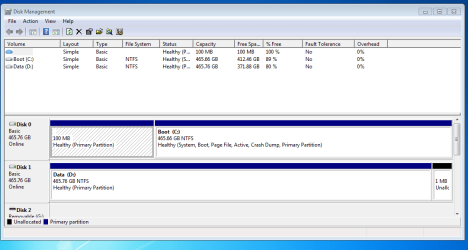
I have never moved the page file off of the Boot drive, my second drive is slower, but thanks. Below is the image of the way it is now!

Capture1.PNG

I previously had a failure to boot a month or so ago and had to use IIRC bootrec to get it back. There was no entry in the msconfig boot tab or the computer. Somehow I got it back. Haven't looked at the disks since then and found that the boot and sys had moved off the 100 MB System Reserved partition.
Thanks for taking a look!!
Glenn
 

My Computer

Computer type
PC/Desktop
Computer Manufacturer/Model Number
Self-Built
OS
Windows 7 Ultimate
CPU
AMD Phenom-II X4 965
Motherboard
Gigabyte GA-MA785GM-US2H
Memory
8192 MB DDR2-SDRAM
Graphics Card(s)
ATI Radeon HD 4200
Sound Card
ATI Radeon HD 4200 High Definition Audo
Monitor(s) Displays
LG Electronics W1943
Screen Resolution
1360 X 768
Hard Drives
C: 500 GB Caviar Black SATA
E: 500 GB Caviar Black SATA
PSU
Ultra LSP 750
Case
Ultra XBlaster
Cooling
2 Fans, CPU Fan, PS Fan
Keyboard
Acer
Mouse
Logitech
Internet Speed
6 MB
Glenn,
In one of your other recent threads you said it might be time for a re-install...
http://www.sevenforums.com/general-...me-info-volume-x-cant-read-3.html#post2538575

If you are having so many problems, why not re-install and start with a clean system?
There are many SF Tutorials and experts that can help you with this.

If I had several problems I would:
- Clean Install Win 7
- Install Security programs
- Install all Windows Updates
- Create a System Backup Image

Then, I would start installing programs, configuring, tweaking, playing, etc.
If something goes wrong - I restore from the clean System Backup Image.
:) :p
 

My Computer

Computer type
PC/Desktop
Computer Manufacturer/Model Number
home built
OS
Multi-Boot W7_Pro_x64 W8.1_Pro_x64 W10_Pro_x64 +Linux_VMs +Chromium_VM
CPU
AMD Athlon II x4 620
Motherboard
Gigabyte GA-MA785G-UD3H
Memory
6GB GSkill DDR2 800
Graphics Card(s)
AMD 4670 GPU + AMD 4200 IGP
Sound Card
on board Realtek ALC889A
Monitor(s) Displays
RCA 40" LCD TV, Insignia 32" LCD TV, HP 15" LCD monitor
Screen Resolution
1680 x 1050
Hard Drives
OCZ Vertex 3 120GB,
Samsung F3 1TB (3),
Several others - WD, Seagate, Hitachi, ...
PSU
Corsair 500 W
Case
Rosewill mid tower
Cooling
CM 90mm rifle
Keyboard
Gyration wireless, Logitech wireless, Dell USB wired
Mouse
Gyration wireless, Logitech wireless, V7 USB wired
Internet Speed
Spectrum - 100Mbps D / 10Mbps U
Antivirus
Avast, MBAM3, EMET, WinPatrol
Browser
Pale Moon, Firefox, IE
Other Info
2 multi-boot PC's
Mainly HTPC/Office/Gen purpose (no gaming).
Trendnet USB KVM.
LG DVD burner/Blue Ray Player.
Tray system for removable SATA backup drives.

Not currently OCd, under-volted.
I use Hybrid sleep, rarely re-boot or shutdown.

Hauppauge HD-PVR, Avermedia PCIe TV Tuner, Hauppauge PCI TV Tuner.
Glenn,
In one of your other recent threads you said it might be time for a re-install...
http://www.sevenforums.com/general-...me-info-volume-x-cant-read-3.html#post2538575

If you are having so many problems, why not re-install and start with a clean system?
There are many SF Tutorials and experts that can help you with this.

If I had several problems I would:
- Clean Install Win 7
- Install Security programs
- Install all Windows Updates
- Create a System Backup Image

Then, I would start installing programs, configuring, tweaking, playing, etc.
If something goes wrong - I restore from the clean System Backup Image.
:) :p


Howdy DavidW7ncus,
Thank you for time and info. Being troubled by several issues, that will be the ultimate save. As of now, I am running pretty well. Got my start time from 90 to 63 seconds. Except for this issue, all booting and restarts have been working fine. I feel I may be almost to the point of making a system image as the errors I am having are not keeping the system down and I have been told here that it is not necessary. Just looking about my previous booting issues.
As of now, well yesterday the cold boot has come up. I have had the problem in the past. I am unsure if this is a software or possibly a hardware issue. Need to discern that, I think before that effort. Now Defraggler, Disk Management software and WD Test disk say the drive is okay. So I am hoping this forum's experts can give some insight.
Glenn
 

My Computer

Computer type
PC/Desktop
Computer Manufacturer/Model Number
Self-Built
OS
Windows 7 Ultimate
CPU
AMD Phenom-II X4 965
Motherboard
Gigabyte GA-MA785GM-US2H
Memory
8192 MB DDR2-SDRAM
Graphics Card(s)
ATI Radeon HD 4200
Sound Card
ATI Radeon HD 4200 High Definition Audo
Monitor(s) Displays
LG Electronics W1943
Screen Resolution
1360 X 768
Hard Drives
C: 500 GB Caviar Black SATA
E: 500 GB Caviar Black SATA
PSU
Ultra LSP 750
Case
Ultra XBlaster
Cooling
2 Fans, CPU Fan, PS Fan
Keyboard
Acer
Mouse
Logitech
Internet Speed
6 MB
Are you running an AV "shield?" If so, try turning it off and see if the weird boots go away.
 

My Computer

Computer Manufacturer/Model Number
HP Media Center
OS
Windows 7 32 bit
CPU
AMD 5200+ dual core
Memory
2 GB
Graphics Card(s)
NVidia GeForce 6150SE 128 MB
Monitor(s) Displays
CRT
Screen Resolution
1280x1024
Hard Drives
500 GB Sata internal :

SIIG USB 3.0 docking stations w/WD Caviar Black 6 Gb/s drives
Keyboard
PS/2
Mouse
PS/2 Wheel Mouse
Other Info
SIIG USB 3.0 PCIexpress card.
The System Reserved is useless now since the Repairs wrote the System boot files to C.

If you do reinstall I suggest you stick closely to the steps in Clean Reinstall OEM.

But first test the HD and RAM from Troubleshoot Win7. Completing the other steps may isolate the problem, too.

Delete all partitions during the booted install, once you get online run all rounds of important and optional Windows Updates to completion with reboots. Stop to check performance between each round.

Then take time installing programs and settings changes to check performance between each. This may help pinpoint an Update, program or setting causing the issue.
 
Can you download speccy or ccleaner and upload a log of your startup programs? Or take a screenshot of msconfig?
 

My Computer

Computer type
PC/Desktop
Computer Manufacturer/Model Number
Custom Built
OS
Windows 10 Pro
CPU
AMD Ryzen 5 2400G Processor with Radeon RX Vega 11 Graphics
Motherboard
ASRock X470 Master SLI/AC AM4 AMD Promontory X470 SATA 6Gb/s
Memory
G.SKILL Ripjaws V Series 16GB (2 x 8GB) 288-Pin DDR4 SDRAM D
Graphics Card(s)
2047MB NVIDIA GeForce GTX 1060 6GB (EVGA)
Sound Card
Motherboard Built in
Monitor(s) Displays
Acer R240HY bidx 23.8-Inch IPS HDMI DVI VGA (1920 x 1080) Wi
Screen Resolution
1920 x 1080
Hard Drives
1TB Sandisk SSD PLUS (Main drive)
500 GB Seagate 7200 RPM (Games)
500 GB Western Digital 7200 RPM (Virtual Machines)
PSU
CORSAIR TX Series TX650M 650W 80+ Gold Modular Power Supply
Case
CORSAIR CARBIDE SPEC-02 Mid-Tower Gaming Case, Red LED Fan
Cooling
220mm, two 120mm, and four 60mm fans
Keyboard
Wired Dell keyboard
Mouse
Wireless Logitech mouse
Internet Speed
250mb down, 30mb up
Antivirus
Panda Cloud Antivirus
Browser
Chrome-ish x64
Other Info
Your awesome for reading this.
Are you running an AV "shield?" If so, try turning it off and see if the weird boots go away.

Just shut it down for a while and cold booted to see the fault and it started up fine. If it fails again I'll try turning off the AV,
Thanks
Glenn
 

My Computer

Computer type
PC/Desktop
Computer Manufacturer/Model Number
Self-Built
OS
Windows 7 Ultimate
CPU
AMD Phenom-II X4 965
Motherboard
Gigabyte GA-MA785GM-US2H
Memory
8192 MB DDR2-SDRAM
Graphics Card(s)
ATI Radeon HD 4200
Sound Card
ATI Radeon HD 4200 High Definition Audo
Monitor(s) Displays
LG Electronics W1943
Screen Resolution
1360 X 768
Hard Drives
C: 500 GB Caviar Black SATA
E: 500 GB Caviar Black SATA
PSU
Ultra LSP 750
Case
Ultra XBlaster
Cooling
2 Fans, CPU Fan, PS Fan
Keyboard
Acer
Mouse
Logitech
Internet Speed
6 MB
The System Reserved is useless now since the Repairs wrote the System boot files to C.

If you do reinstall I suggest you stick closely to the steps in Clean Reinstall OEM.

But first test the HD and RAM from Troubleshoot Win7. Completing the other steps may isolate the problem, too.

Delete all partitions during the booted install, once you get online run all rounds of important and optional Windows Updates to completion with reboots. Stop to check performance between each round.

Then take time installing programs and settings changes to check performance between each. This may help pinpoint an Update, program or setting causing the issue.

Hello Greg,
I am trying to avoid it if I can. But if this continues I will follow the instruction for clean reinstall word for word, exactly. Will certainly do the tests!!!!. The disk is my original install WD Black Caviar. Since the System Reserved is toast although it still does the F8 Repair and boots. Can I add it to the main drive?
What about putting in an SSD and installing on that. Would that give me a significant speed upgrade? This is a AM2+ board so they are not making anything for it anymore and I can't afford a new board, processor, ddr3 and whatever else. Mille Grazie!
Glenn
 
Last edited:

My Computer

Computer type
PC/Desktop
Computer Manufacturer/Model Number
Self-Built
OS
Windows 7 Ultimate
CPU
AMD Phenom-II X4 965
Motherboard
Gigabyte GA-MA785GM-US2H
Memory
8192 MB DDR2-SDRAM
Graphics Card(s)
ATI Radeon HD 4200
Sound Card
ATI Radeon HD 4200 High Definition Audo
Monitor(s) Displays
LG Electronics W1943
Screen Resolution
1360 X 768
Hard Drives
C: 500 GB Caviar Black SATA
E: 500 GB Caviar Black SATA
PSU
Ultra LSP 750
Case
Ultra XBlaster
Cooling
2 Fans, CPU Fan, PS Fan
Keyboard
Acer
Mouse
Logitech
Internet Speed
6 MB
Yes Glenn the best upgrade you can do is an SSD.

Plug only it into the HD to do the reinstall.
 
Yes Glenn the best upgrade you can do is an SSD.

Plug only it into the HD to do the reinstall.

Oh if I go that route, I have a lot of reading and understanding to do first. I found that I might have a problem with my atipcie.sys file. Mentioned in another thread, preliminary internet indications seem to rival my problems.
What size SSD and brand?
Thanks
Glenn
 

My Computer

Computer type
PC/Desktop
Computer Manufacturer/Model Number
Self-Built
OS
Windows 7 Ultimate
CPU
AMD Phenom-II X4 965
Motherboard
Gigabyte GA-MA785GM-US2H
Memory
8192 MB DDR2-SDRAM
Graphics Card(s)
ATI Radeon HD 4200
Sound Card
ATI Radeon HD 4200 High Definition Audo
Monitor(s) Displays
LG Electronics W1943
Screen Resolution
1360 X 768
Hard Drives
C: 500 GB Caviar Black SATA
E: 500 GB Caviar Black SATA
PSU
Ultra LSP 750
Case
Ultra XBlaster
Cooling
2 Fans, CPU Fan, PS Fan
Keyboard
Acer
Mouse
Logitech
Internet Speed
6 MB
Hi Glenn.

Given the other issues you were having with the Bltlocker error, I would also recommend a clean install. An SSD will significantly speed up the system : minimum size = 60GB, but I recommend a 128GB or larger if you have lots of other software to install. The Samsung 840 SSD is very good.

Note : when you reinstall, disconnect/unplug all other HDD's until installation is complete.
 

My Computer

Computer type
PC/Desktop
Computer Manufacturer/Model Number
Golden Mk. I.4
OS
Windows 10 Pro x64 ; Xubuntu x64
CPU
Intel i7 860 @ 2.80 GHz O/C'ed to 4.0GHz
Motherboard
Gigabyte P55A-UD3R Rev.1. Award BIOS F13
Memory
16GB Corsair Vengance DDR3 @ 661 MHz Dual Channel (9-9-9-24)
Graphics Card(s)
EVGA NVidia GTX 560 1024MB
Sound Card
Realtek Integrated
Monitor(s) Displays
Dual Samsung SyncMaster 2494HS
Screen Resolution
1920*1080 and 1920*1080
Hard Drives
1*Samsung 840 EVO 120GB SSD;
1*OCZ Vertex 2 60GB SSD;
2*Samsung F3 SpinPoint 1TB in RAID0;
1*Samsung F1 SpinPoint 1TB;
2*Western Digital 1TB External USB 3.0
1*Western Digital 500GB External USB 3.0
1*Seagate 500GB External USB 2.0
PSU
Thermaltake ToughPower QFan 750W
Case
Thermaltake Element S VK60001W2Z
Cooling
Corsair H60 Water Cooling, 2*230mm and 2*80mm case fans
Keyboard
Logitech G110
Mouse
Logitech MX518
Hi Glenn.

Given the other issues you were having with the Bltlocker error, I would also recommend a clean install. An SSD will significantly speed up the system : minimum size = 60GB, but I recommend a 128GB or larger if you have lots of other software to install. The Samsung 840 SSD is very good.

Note : when you reinstall, disconnect/unplug all other HDD's until installation is complete.

Hello Golden,
So 128 GB is good, thanks. I have no idea of the concept of installation, placement of data and executables or anything. So I will certainly have to learn. Thanks for your help and advice!
Glenn
 

My Computer

Computer type
PC/Desktop
Computer Manufacturer/Model Number
Self-Built
OS
Windows 7 Ultimate
CPU
AMD Phenom-II X4 965
Motherboard
Gigabyte GA-MA785GM-US2H
Memory
8192 MB DDR2-SDRAM
Graphics Card(s)
ATI Radeon HD 4200
Sound Card
ATI Radeon HD 4200 High Definition Audo
Monitor(s) Displays
LG Electronics W1943
Screen Resolution
1360 X 768
Hard Drives
C: 500 GB Caviar Black SATA
E: 500 GB Caviar Black SATA
PSU
Ultra LSP 750
Case
Ultra XBlaster
Cooling
2 Fans, CPU Fan, PS Fan
Keyboard
Acer
Mouse
Logitech
Internet Speed
6 MB
Just insert the SSD, unplug all other HDD's, external HDD's, and install as you normally would. Same goes for other software such as MSOffice etc.
 

My Computer

Computer type
PC/Desktop
Computer Manufacturer/Model Number
Golden Mk. I.4
OS
Windows 10 Pro x64 ; Xubuntu x64
CPU
Intel i7 860 @ 2.80 GHz O/C'ed to 4.0GHz
Motherboard
Gigabyte P55A-UD3R Rev.1. Award BIOS F13
Memory
16GB Corsair Vengance DDR3 @ 661 MHz Dual Channel (9-9-9-24)
Graphics Card(s)
EVGA NVidia GTX 560 1024MB
Sound Card
Realtek Integrated
Monitor(s) Displays
Dual Samsung SyncMaster 2494HS
Screen Resolution
1920*1080 and 1920*1080
Hard Drives
1*Samsung 840 EVO 120GB SSD;
1*OCZ Vertex 2 60GB SSD;
2*Samsung F3 SpinPoint 1TB in RAID0;
1*Samsung F1 SpinPoint 1TB;
2*Western Digital 1TB External USB 3.0
1*Western Digital 500GB External USB 3.0
1*Seagate 500GB External USB 2.0
PSU
Thermaltake ToughPower QFan 750W
Case
Thermaltake Element S VK60001W2Z
Cooling
Corsair H60 Water Cooling, 2*230mm and 2*80mm case fans
Keyboard
Logitech G110
Mouse
Logitech MX518

My Computer

Computer type
PC/Desktop
Computer Manufacturer/Model Number
Self-Built
OS
Windows 7 Ultimate
CPU
AMD Phenom-II X4 965
Motherboard
Gigabyte GA-MA785GM-US2H
Memory
8192 MB DDR2-SDRAM
Graphics Card(s)
ATI Radeon HD 4200
Sound Card
ATI Radeon HD 4200 High Definition Audo
Monitor(s) Displays
LG Electronics W1943
Screen Resolution
1360 X 768
Hard Drives
C: 500 GB Caviar Black SATA
E: 500 GB Caviar Black SATA
PSU
Ultra LSP 750
Case
Ultra XBlaster
Cooling
2 Fans, CPU Fan, PS Fan
Keyboard
Acer
Mouse
Logitech
Internet Speed
6 MB
Today, like clockwork, it failed after the CTRL/ALT/Del prompt on booting. I noticed that the drive light stopped just after the prompt came on. No sounds of startup. Just as normally I hit the reset button and it came back up into safe mode menu and I just hit start Windows normally and it booted fine. Just like the last two days. This problem has not happened again all during the day.
Is there anything that would cause this specific issue that you can think of! I am afraid that it might be hardware.
Glenn
 

My Computer

Computer type
PC/Desktop
Computer Manufacturer/Model Number
Self-Built
OS
Windows 7 Ultimate
CPU
AMD Phenom-II X4 965
Motherboard
Gigabyte GA-MA785GM-US2H
Memory
8192 MB DDR2-SDRAM
Graphics Card(s)
ATI Radeon HD 4200
Sound Card
ATI Radeon HD 4200 High Definition Audo
Monitor(s) Displays
LG Electronics W1943
Screen Resolution
1360 X 768
Hard Drives
C: 500 GB Caviar Black SATA
E: 500 GB Caviar Black SATA
PSU
Ultra LSP 750
Case
Ultra XBlaster
Cooling
2 Fans, CPU Fan, PS Fan
Keyboard
Acer
Mouse
Logitech
Internet Speed
6 MB
Back
Top