Solved w7 install updates failed

svenman

New member
Local time
7:59 AM
Messages
5
hi i have re installed w7 from dvd auto updates are not working so i tried
simplex update it said service pack 1 is required for update pack
cheers
 

My Computers

System One System Two

  • Computer type
    PC/Desktop
    Computer Manufacturer/Model Number
    unknown
    OS
    OS Version: Microsoft Windows 7 Home Premium, 64 bit, Build 7600, Installed 20231110135939.000000+66
    CPU
    AMD Phenom(tm) II X4 840
    Motherboard
    GA-MA78LMT-S2
    Memory
    2gb
    Graphics Card(s)
    AMD 760G
    Hard Drives
    465 GB
    Antivirus
    none
    Browser
    firefox
  • Computer type
    PC/Desktop
One way is put the service pack next to the simplix updatepack7r2

a better way is to download installtion media which already has sp1 included.

are you sure it is wise to run 64 bit windows with only 2gb ram?
 

My Computers

System One System Two

  • Computer type
    PC/Desktop
    OS
    7 X64
    CPU
    i5 8400
    Motherboard
    gigabyte b365m ds3h
    Memory
    2x8gb 3200mhz
    Hard Drives
    various
    PSU
    pure power 11 400w cm
    Case
    Coolermaster
    Cooling
    cryorig m9i
  • Computer type
    PC/Desktop
    OS
    7x64
    CPU
    g5400
    Motherboard
    ga b365m ds3h
    Memory
    8gb ddr4 2400
    PSU
    xfx pro 450w
hi i have re installed w7 from dvd auto updates are not working so i tried
simplex update it said service pack 1 is required for update pack
cheers
I don't understand your point. At the Major Geeks website for Simplix it clearly says. "This update pack allows you to update Windows 7 SP1 (x86 x64) and Server 2008 R2 SP1 live operating systems and integrate the updates in the distribution (Install.wim)."

Why don't you just download SP1 and install it? When you are done run Simplix.

Windows 7 Service Pack 1 32-Bit Multi-Language

Windows 7 Service Pack 1 64-Bit Multi-Language

Simplix UpdatePack 7 23.11.15

- - - Updated - - -

are you sure it is wise to run 64 bit windows with only 2gb ram?
I agree. With Windows 7 64-bit the OP needs at least 4GB of RAM with 8GB being even better.

I have a couple computers of similar age (2009 & 2011). They both have 8GB RAM. They run great with Windows 7 64-bit.
 

My Computers

System One System Two

  • Computer type
    PC/Desktop
    Computer Manufacturer/Model Number
    Custom build
    OS
    Windows 7 Home Premium 64-bits
    CPU
    AMD FX-8350
    Motherboard
    Gigabyte GA-990FXA-UD3 (AM3+)
    Memory
    GSKILL Ripjaw-X PC3 12800 8GB (2x4GB)
    Graphics Card(s)
    ASUS ROG STRIX GTX 1060 6GB
    Sound Card
    Integrated
    Monitor(s) Displays
    Asus VE228H (21.5-in)
    Screen Resolution
    1920x1080 60Hz
    Hard Drives
    SAMSUNG 870 EVO 2.5 Inch SATA SSD (1TB)
    SAMSUNG 870 EVO 2.5 Inch SATA SSD (1TB)
    SAMSUNG 870 EVO 2.5 Inch SATA SSD (1TB)
    PSU
    Corsair RM750x (750 watts)
    Case
    Corsair Carbide Series 200R
    Cooling
    Corsair Hydro Series H60 (CWCH60)
    Keyboard
    Logitech Elite
    Mouse
    Logitech M510 Wireless Mouse
    Internet Speed
    Comcast Gigabit Extra (1200Mbps down / 35Mbps up)
    Antivirus
    Malwarebytes
    Browser
    Firefox, Edge, Chrome
    Other Info
    ASUS DRW-24B1ST DVD-RW (24X) optical drive
    Seagate Expansion Desk (5TB) external SATA/USB HDD
    Comcast XB8 Internet Gateway
  • Computer type
    PC/Desktop
    System Manufacturer/Model Number
    Custom
    OS
    Windows 7 Pro (64-bit)
    CPU
    AMD Phenom II 960T X4
    Motherboard
    ASUS M4N82 Deluxe
    Memory
    Corsair XMS2 DDR2-800 8GB (4x2GB)
    Graphics Card(s)
    ASUS ENGTX560 DCII OC/2DI/1GD5 1GB
    Monitor(s) Displays
    Samsung 930B 19-inch LCD
    Screen Resolution
    1280x1024
    Hard Drives
    Samsung SSD 870 EVO 1000 GB (Windows 10)
    Seagate ST1000DM003 1000 GB (Windows 7)
    PSU
    Antec TruePower (new) TP-650
    Case
    Antec Three Hundred
    Cooling
    AMD stock cooler from FX8350
    Mouse
    Logitech M100
    Internet Speed
    Xfinity Gigabit Extra 1200/35 Mbps
hi i have installed sp1 pack & simplex do i need to install a chipset driver
i bought my w7 computer in 2011 it came with 2gb it was different then
cheers
 

My Computers

System One System Two

  • Computer type
    PC/Desktop
    Computer Manufacturer/Model Number
    unknown
    OS
    OS Version: Microsoft Windows 7 Home Premium, 64 bit, Build 7600, Installed 20231110135939.000000+66
    CPU
    AMD Phenom(tm) II X4 840
    Motherboard
    GA-MA78LMT-S2
    Memory
    2gb
    Graphics Card(s)
    AMD 760G
    Hard Drives
    465 GB
    Antivirus
    none
    Browser
    firefox
  • Computer type
    PC/Desktop

My Computers

System One System Two

  • Computer type
    PC/Desktop
    OS
    7 X64
    CPU
    i5 8400
    Motherboard
    gigabyte b365m ds3h
    Memory
    2x8gb 3200mhz
    Hard Drives
    various
    PSU
    pure power 11 400w cm
    Case
    Coolermaster
    Cooling
    cryorig m9i
  • Computer type
    PC/Desktop
    OS
    7x64
    CPU
    g5400
    Motherboard
    ga b365m ds3h
    Memory
    8gb ddr4 2400
    PSU
    xfx pro 450w
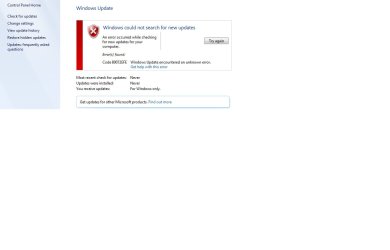
check for updates still failing

hi i still cannot check for updates it says never see attachment
i changed settings to but let me choose whether to to download & install
antivirus is clear i have activated windows installed chipset
everything seems to work
i have installed simplex updates & sp1 service pack also net framework 4.8
these are the installed updates installed see attached
 

Attachments

  • check updates error.jpg
    check updates error.jpg
    73.5 KB · Views: 1
  • installed updates.jpg
    installed updates.jpg
    57.5 KB · Views: 0

My Computers

System One System Two

  • Computer type
    PC/Desktop
    Computer Manufacturer/Model Number
    unknown
    OS
    OS Version: Microsoft Windows 7 Home Premium, 64 bit, Build 7600, Installed 20231110135939.000000+66
    CPU
    AMD Phenom(tm) II X4 840
    Motherboard
    GA-MA78LMT-S2
    Memory
    2gb
    Graphics Card(s)
    AMD 760G
    Hard Drives
    465 GB
    Antivirus
    none
    Browser
    firefox
  • Computer type
    PC/Desktop
Install KB3138612 to fix the error and KB4490628 to prevent subsequent installation failures. Automatic selfupdate of the Update Agent has been discontinued as of January 2021, and the March 2019 Servicing Stack Update is a hard thing to be offered ever since August 2019.
 

My Computer

Computer type
PC/Desktop
OS
Windows 7 Home Premium
Are you saying you can't manually select Check for updates? If so it then gives an error?

Update1.jpg

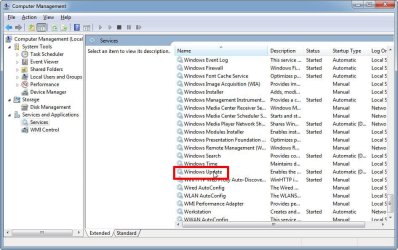
Sometimes when it gets an error I stop and restart the Windows Update service. After I do that I try to search for updates again. Many times this fixes the update problem. To do this then:

I first locate the Windows Update service and right-click on it. I then select Properties.

Update2.jpg

I then select Stop. When that is done I select Start. After it starts I select OK and then exits all the dialogs.

Update3.jpg
 

My Computers

System One System Two

  • Computer type
    PC/Desktop
    Computer Manufacturer/Model Number
    Custom build
    OS
    Windows 7 Home Premium 64-bits
    CPU
    AMD FX-8350
    Motherboard
    Gigabyte GA-990FXA-UD3 (AM3+)
    Memory
    GSKILL Ripjaw-X PC3 12800 8GB (2x4GB)
    Graphics Card(s)
    ASUS ROG STRIX GTX 1060 6GB
    Sound Card
    Integrated
    Monitor(s) Displays
    Asus VE228H (21.5-in)
    Screen Resolution
    1920x1080 60Hz
    Hard Drives
    SAMSUNG 870 EVO 2.5 Inch SATA SSD (1TB)
    SAMSUNG 870 EVO 2.5 Inch SATA SSD (1TB)
    SAMSUNG 870 EVO 2.5 Inch SATA SSD (1TB)
    PSU
    Corsair RM750x (750 watts)
    Case
    Corsair Carbide Series 200R
    Cooling
    Corsair Hydro Series H60 (CWCH60)
    Keyboard
    Logitech Elite
    Mouse
    Logitech M510 Wireless Mouse
    Internet Speed
    Comcast Gigabit Extra (1200Mbps down / 35Mbps up)
    Antivirus
    Malwarebytes
    Browser
    Firefox, Edge, Chrome
    Other Info
    ASUS DRW-24B1ST DVD-RW (24X) optical drive
    Seagate Expansion Desk (5TB) external SATA/USB HDD
    Comcast XB8 Internet Gateway
  • Computer type
    PC/Desktop
    System Manufacturer/Model Number
    Custom
    OS
    Windows 7 Pro (64-bit)
    CPU
    AMD Phenom II 960T X4
    Motherboard
    ASUS M4N82 Deluxe
    Memory
    Corsair XMS2 DDR2-800 8GB (4x2GB)
    Graphics Card(s)
    ASUS ENGTX560 DCII OC/2DI/1GD5 1GB
    Monitor(s) Displays
    Samsung 930B 19-inch LCD
    Screen Resolution
    1280x1024
    Hard Drives
    Samsung SSD 870 EVO 1000 GB (Windows 10)
    Seagate ST1000DM003 1000 GB (Windows 7)
    PSU
    Antec TruePower (new) TP-650
    Case
    Antec Three Hundred
    Cooling
    AMD stock cooler from FX8350
    Mouse
    Logitech M100
    Internet Speed
    Xfinity Gigabit Extra 1200/35 Mbps
Code 80072EFE has been default Windows Update response after reinstalling since January 2021. It cannot be fixed other than by manually installing a more recent version of the Windows Update Client.
 

My Computer

Computer type
PC/Desktop
OS
Windows 7 Home Premium
hi i can manually install updates
how do i install windows update client & do i need to install suggested manual updates kb 3138612 4490628
cheers
 

My Computers

System One System Two

  • Computer type
    PC/Desktop
    Computer Manufacturer/Model Number
    unknown
    OS
    OS Version: Microsoft Windows 7 Home Premium, 64 bit, Build 7600, Installed 20231110135939.000000+66
    CPU
    AMD Phenom(tm) II X4 840
    Motherboard
    GA-MA78LMT-S2
    Memory
    2gb
    Graphics Card(s)
    AMD 760G
    Hard Drives
    465 GB
    Antivirus
    none
    Browser
    firefox
  • Computer type
    PC/Desktop
Code 80072EFE has been default Windows Update response after reinstalling since January 2021. It cannot be fixed other than by manually installing a more recent version of the Windows Update Client.
Is that an error for automatic updates? With the error can you still manually search for updates?

I bought a key for Windows 7 Pro last fall and used it when I installed Windows 7 a year ago. I currently have no problems with Windows update. Note I did install SP1 and Simplix.
 

My Computers

System One System Two

  • Computer type
    PC/Desktop
    Computer Manufacturer/Model Number
    Custom build
    OS
    Windows 7 Home Premium 64-bits
    CPU
    AMD FX-8350
    Motherboard
    Gigabyte GA-990FXA-UD3 (AM3+)
    Memory
    GSKILL Ripjaw-X PC3 12800 8GB (2x4GB)
    Graphics Card(s)
    ASUS ROG STRIX GTX 1060 6GB
    Sound Card
    Integrated
    Monitor(s) Displays
    Asus VE228H (21.5-in)
    Screen Resolution
    1920x1080 60Hz
    Hard Drives
    SAMSUNG 870 EVO 2.5 Inch SATA SSD (1TB)
    SAMSUNG 870 EVO 2.5 Inch SATA SSD (1TB)
    SAMSUNG 870 EVO 2.5 Inch SATA SSD (1TB)
    PSU
    Corsair RM750x (750 watts)
    Case
    Corsair Carbide Series 200R
    Cooling
    Corsair Hydro Series H60 (CWCH60)
    Keyboard
    Logitech Elite
    Mouse
    Logitech M510 Wireless Mouse
    Internet Speed
    Comcast Gigabit Extra (1200Mbps down / 35Mbps up)
    Antivirus
    Malwarebytes
    Browser
    Firefox, Edge, Chrome
    Other Info
    ASUS DRW-24B1ST DVD-RW (24X) optical drive
    Seagate Expansion Desk (5TB) external SATA/USB HDD
    Comcast XB8 Internet Gateway
  • Computer type
    PC/Desktop
    System Manufacturer/Model Number
    Custom
    OS
    Windows 7 Pro (64-bit)
    CPU
    AMD Phenom II 960T X4
    Motherboard
    ASUS M4N82 Deluxe
    Memory
    Corsair XMS2 DDR2-800 8GB (4x2GB)
    Graphics Card(s)
    ASUS ENGTX560 DCII OC/2DI/1GD5 1GB
    Monitor(s) Displays
    Samsung 930B 19-inch LCD
    Screen Resolution
    1280x1024
    Hard Drives
    Samsung SSD 870 EVO 1000 GB (Windows 10)
    Seagate ST1000DM003 1000 GB (Windows 7)
    PSU
    Antec TruePower (new) TP-650
    Case
    Antec Three Hundred
    Cooling
    AMD stock cooler from FX8350
    Mouse
    Logitech M100
    Internet Speed
    Xfinity Gigabit Extra 1200/35 Mbps
hi cheers for your great site & all who helped
checking updates is now working after the manual updates
i did not need to install update client
but i did have to run trouble shooter
cheers
 

My Computers

System One System Two

  • Computer type
    PC/Desktop
    Computer Manufacturer/Model Number
    unknown
    OS
    OS Version: Microsoft Windows 7 Home Premium, 64 bit, Build 7600, Installed 20231110135939.000000+66
    CPU
    AMD Phenom(tm) II X4 840
    Motherboard
    GA-MA78LMT-S2
    Memory
    2gb
    Graphics Card(s)
    AMD 760G
    Hard Drives
    465 GB
    Antivirus
    none
    Browser
    firefox
  • Computer type
    PC/Desktop
hi cheers for your great site & all who helped
checking updates is now working after the manual updates
i did not need to install update client
but i did have to run trouble shooter
cheers
Good to see its working now. It shouldn't need to be that hard. However, as long as Microsoft keeps the Windows 7 update servers up someone will figure out way to get the updates.
 

My Computers

System One System Two

  • Computer type
    PC/Desktop
    Computer Manufacturer/Model Number
    Custom build
    OS
    Windows 7 Home Premium 64-bits
    CPU
    AMD FX-8350
    Motherboard
    Gigabyte GA-990FXA-UD3 (AM3+)
    Memory
    GSKILL Ripjaw-X PC3 12800 8GB (2x4GB)
    Graphics Card(s)
    ASUS ROG STRIX GTX 1060 6GB
    Sound Card
    Integrated
    Monitor(s) Displays
    Asus VE228H (21.5-in)
    Screen Resolution
    1920x1080 60Hz
    Hard Drives
    SAMSUNG 870 EVO 2.5 Inch SATA SSD (1TB)
    SAMSUNG 870 EVO 2.5 Inch SATA SSD (1TB)
    SAMSUNG 870 EVO 2.5 Inch SATA SSD (1TB)
    PSU
    Corsair RM750x (750 watts)
    Case
    Corsair Carbide Series 200R
    Cooling
    Corsair Hydro Series H60 (CWCH60)
    Keyboard
    Logitech Elite
    Mouse
    Logitech M510 Wireless Mouse
    Internet Speed
    Comcast Gigabit Extra (1200Mbps down / 35Mbps up)
    Antivirus
    Malwarebytes
    Browser
    Firefox, Edge, Chrome
    Other Info
    ASUS DRW-24B1ST DVD-RW (24X) optical drive
    Seagate Expansion Desk (5TB) external SATA/USB HDD
    Comcast XB8 Internet Gateway
  • Computer type
    PC/Desktop
    System Manufacturer/Model Number
    Custom
    OS
    Windows 7 Pro (64-bit)
    CPU
    AMD Phenom II 960T X4
    Motherboard
    ASUS M4N82 Deluxe
    Memory
    Corsair XMS2 DDR2-800 8GB (4x2GB)
    Graphics Card(s)
    ASUS ENGTX560 DCII OC/2DI/1GD5 1GB
    Monitor(s) Displays
    Samsung 930B 19-inch LCD
    Screen Resolution
    1280x1024
    Hard Drives
    Samsung SSD 870 EVO 1000 GB (Windows 10)
    Seagate ST1000DM003 1000 GB (Windows 7)
    PSU
    Antec TruePower (new) TP-650
    Case
    Antec Three Hundred
    Cooling
    AMD stock cooler from FX8350
    Mouse
    Logitech M100
    Internet Speed
    Xfinity Gigabit Extra 1200/35 Mbps
Back
Top