Wallcovering-->screensaver?

markg2

New member
Member
VIP
Local time
8:17 AM
Messages
477
On the personalization page I have several images that I've downloaded for use as wallpaper. On that same page is a cryptic MS remark as to how clever they are about making these 'themes' easily used between wallpaper and screen-saver.

That said, I am baffled (not seeing any clear instruction) how one then tells an image that it wants to be used as a screen saver?

Mark
 

My Computer

Computer type
PC/Desktop
OS
Windows 7 & Windows 10
Hi Mark,

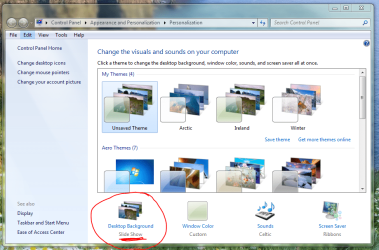
Are they perhaps referring to the ability to use the slideshow option to cycle through the various wallpapers?

Regards,
Golden
 

Attachments

  • Capture.PNG
    Capture.PNG
    102.7 KB · Views: 15

My Computer

Computer type
PC/Desktop
Computer Manufacturer/Model Number
Golden Mk. I.4
OS
Windows 10 Pro x64 ; Xubuntu x64
CPU
Intel i7 860 @ 2.80 GHz O/C'ed to 4.0GHz
Motherboard
Gigabyte P55A-UD3R Rev.1. Award BIOS F13
Memory
16GB Corsair Vengance DDR3 @ 661 MHz Dual Channel (9-9-9-24)
Graphics Card(s)
EVGA NVidia GTX 560 1024MB
Sound Card
Realtek Integrated
Monitor(s) Displays
Dual Samsung SyncMaster 2494HS
Screen Resolution
1920*1080 and 1920*1080
Hard Drives
1*Samsung 840 EVO 120GB SSD;
1*OCZ Vertex 2 60GB SSD;
2*Samsung F3 SpinPoint 1TB in RAID0;
1*Samsung F1 SpinPoint 1TB;
2*Western Digital 1TB External USB 3.0
1*Western Digital 500GB External USB 3.0
1*Seagate 500GB External USB 2.0
PSU
Thermaltake ToughPower QFan 750W
Case
Thermaltake Element S VK60001W2Z
Cooling
Corsair H60 Water Cooling, 2*230mm and 2*80mm case fans
Keyboard
Logitech G110
Mouse
Logitech MX518
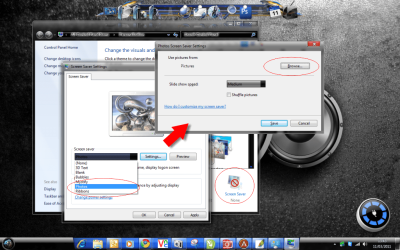
You can do it like this pal ;)
 

Attachments

  • screensaver photos.png
    screensaver photos.png
    262.6 KB · Views: 50

My Computer

Computer type
PC/Desktop
Computer Manufacturer/Model Number
Self Built
OS
Windows 7 Ultimate 64bit
CPU
AMD Phenom Quad core 9950 black edition
Motherboard
Gigabyte
Memory
16Gb
Graphics Card(s)
2x XFX Radeon 5850
Sound Card
PCI Express X-Fi Titanium / Logitech G35
Monitor(s) Displays
2x HP 2410i
Screen Resolution
1920x1080
Hard Drives
2x 500Gb Seagate
1x 300Gb Seagate
1x 1Tb Seagate
2x 1Tb Hitatchi
PSU
Jean Tech Storm 700W
Case
Cooler Master COSMOS S
Cooling
Akasa Evo Blue Pro
Keyboard
Logitech G15
Mouse
Mad Catz M.M.O. 7
Internet Speed
12mb
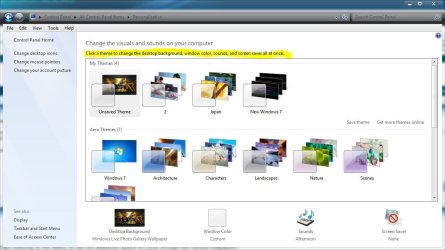
No--look at the sentence at the top. It infers that clicking on an image somehow magically makes creating a screen-saver from same with ease. Plus, at the bottom right (opposite the image you marked) is an icon for screen-saver that again doesn't seem to be helpful--or maybe I've just got to dumb spot for this thing ;-)!

Mark
 

My Computer

Computer type
PC/Desktop
OS
Windows 7 & Windows 10
Expanded, I cannot read the dialogue box from PooMan's direction but I tried that yesterday and here's how I got nowhere.

The 'named' images in the wall covering personalization page referred to earlier do not show up on the drop down window of SS names. There's an option that I think was some sort of Gallery and that didn't list my image names either. If there were a selection that simply linked to the images that appear as thumbnails on the wall covering personalization page all would be well (and intuitive).
 

My Computer

Computer type
PC/Desktop
OS
Windows 7 & Windows 10
Is this the sentence, I highlighted in this screenshot, that you are referring to?
 

Attachments

  • Capture.JPG
    Capture.JPG
    84.8 KB · Views: 22

My Computer

Computer type
PC/Desktop
Computer Manufacturer/Model Number
Self Built
OS
Win 10 Pro x64
CPU
Intel I5-2500K @3.3GHz
Motherboard
Asrock P67 Extreme4
Memory
16GB G.Skill Ripjaws X (4x4GB)
Graphics Card(s)
EVGA GeForce 750 Ti SC 2GB
Sound Card
ASUS Xonar DG 5.1 Channels 24-bit 96KHz PCI Interface Sound
Monitor(s) Displays
auria eq2367
Screen Resolution
1920 x 1080
Hard Drives
250GB Samsung 850 EVO SSD
1TB WD Blue
1TB Hitachi
PSU
SeaSonic X 650W 80 Plus Gold
Case
Corsair Obsidian 750D
Cooling
Corsair H60, Three 140mm case fans
Keyboard
Logitech Wireless Keyboard K520
Mouse
Logitech Wireless Mouse M310
Internet Speed
Wave Broadband ~ 100 dn 5 up
Antivirus
Windows Defender, Malwarebytes Premium
Browser
Edge, IE11, Chrome
Other Info
Laptop specs: HP g7-1365dx /
CPU: AMD A6-3420M APU with Radeon(tm) HD Graphics /
RAM: Crucial 8Gb (2x4Gb) /
SSD: Crucial M4-CT128M4SSD2 ATA Device/ FW 000F /
GFX: AMD Radeon HD 6520G /
OS: Windows 10 Pro x64
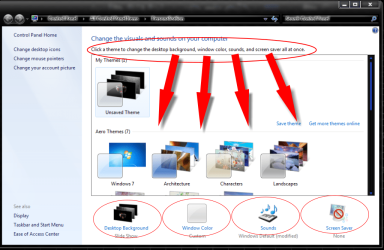
Hiya pal. Are you talking about the circled bit at the top of the below pic. (click on the image to view full screen)

If you are then all it says that you can adjust all of the mentioned options from one place. All the relative options are available at the bottom of the window (circled). I know what they say isn't very clear but I think this is what they are on about ;)

*edit oops soz you posted some more stuff while I was replying :(
 

Attachments

  • screensaver photos II.png
    screensaver photos II.png
    99.6 KB · Views: 11
Last edited:

My Computer

Computer type
PC/Desktop
Computer Manufacturer/Model Number
Self Built
OS
Windows 7 Ultimate 64bit
CPU
AMD Phenom Quad core 9950 black edition
Motherboard
Gigabyte
Memory
16Gb
Graphics Card(s)
2x XFX Radeon 5850
Sound Card
PCI Express X-Fi Titanium / Logitech G35
Monitor(s) Displays
2x HP 2410i
Screen Resolution
1920x1080
Hard Drives
2x 500Gb Seagate
1x 300Gb Seagate
1x 1Tb Seagate
2x 1Tb Hitatchi
PSU
Jean Tech Storm 700W
Case
Cooler Master COSMOS S
Cooling
Akasa Evo Blue Pro
Keyboard
Logitech G15
Mouse
Mad Catz M.M.O. 7
Internet Speed
12mb
To simplify--

From the Screen Saver Settings dialogue, Screen Saver tab... how do I find--load those images that I've saved from the internet as wallpaper (not screen saver) and use them (if possible) as a screen saver?

Mark

P.S.

1. Is there a functional difference between a downloaded screen saver vs wallpaper image that disallows the two images being interchanged for use?

2. If I knew what directory 7 uses to place screensavers in can I just find an image I like, stick it in that dir and then load it somehow?
 

My Computer

Computer type
PC/Desktop
OS
Windows 7 & Windows 10
Take the wallpaper(from the internet) and name it and save it.
Go to you download section and look for that wallpaper. Then right click that image and "set as desktop background."
 

My Computer

Computer Manufacturer/Model Number
HP M9077c
OS
Windows 7 Home Premium 64bit
CPU
Intel(R)Core(TM)2 quad [email protected] 2.39GHz
Motherboard
ASUSeK
Memory
6GB DDR2 6400
Graphics Card(s)
GeForce 8500/512MB
Sound Card
Realtek High Def Audio
Monitor(s) Displays
HP w2408 LCD 24" widescreen
Screen Resolution
1920x1200
Cooling
6 pack of Bud
Keyboard
MS wireless Inteli
Mouse
MS wireless Inteli
You can do it like this pal ;)

To simplify--

From the Screen Saver Settings dialogue, Screen Saver tab... how do I find--load those images that I've saved from the internet as wallpaper (not screen saver) and use them (if possible) as a screen saver?

Mark

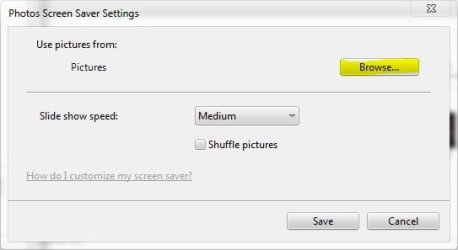
Just like PooManUK posted above, just select them from the browse button, do you have them in a folder? That will make it easier.
 

Attachments

  • Capture.JPG
    Capture.JPG
    19.1 KB · Views: 5

My Computer

Computer type
PC/Desktop
Computer Manufacturer/Model Number
Self Built
OS
Win 10 Pro x64
CPU
Intel I5-2500K @3.3GHz
Motherboard
Asrock P67 Extreme4
Memory
16GB G.Skill Ripjaws X (4x4GB)
Graphics Card(s)
EVGA GeForce 750 Ti SC 2GB
Sound Card
ASUS Xonar DG 5.1 Channels 24-bit 96KHz PCI Interface Sound
Monitor(s) Displays
auria eq2367
Screen Resolution
1920 x 1080
Hard Drives
250GB Samsung 850 EVO SSD
1TB WD Blue
1TB Hitachi
PSU
SeaSonic X 650W 80 Plus Gold
Case
Corsair Obsidian 750D
Cooling
Corsair H60, Three 140mm case fans
Keyboard
Logitech Wireless Keyboard K520
Mouse
Logitech Wireless Mouse M310
Internet Speed
Wave Broadband ~ 100 dn 5 up
Antivirus
Windows Defender, Malwarebytes Premium
Browser
Edge, IE11, Chrome
Other Info
Laptop specs: HP g7-1365dx /
CPU: AMD A6-3420M APU with Radeon(tm) HD Graphics /
RAM: Crucial 8Gb (2x4Gb) /
SSD: Crucial M4-CT128M4SSD2 ATA Device/ FW 000F /
GFX: AMD Radeon HD 6520G /
OS: Windows 10 Pro x64
We crossed in the mail with my edit.

Please take another look at the message you replied to since I edited it with a P.S. I now understand the selection/browse window. Just need my 2 p.s. questions answered.

Thanks,

Mark
 

My Computer

Computer type
PC/Desktop
OS
Windows 7 & Windows 10
To simplify--

From the Screen Saver Settings dialogue, Screen Saver tab... how do I find--load those images that I've saved from the internet as wallpaper (not screen saver) and use them (if possible) as a screen saver?

Mark

P.S.

1. Is there a functional difference between a downloaded screen saver vs wallpaper image that disallows the two images being interchanged for use?

2. If I knew what directory 7 uses to place screensavers in can I just find an image I like, stick it in that dir and then load it somehow?

1. A downloaded screensaver is usually a moving image or video, a wallpaper image is a still image so you would need more than one to actually make it a screensaver, although it is really just a slideshow of pictures.

That's about as much as I can explain it, others can probably explain it better.

2. This might explain a little bit, but a downloaded one will most likely create it's own directory. http://www.sevenforums.com/tutorials/2109-screen-saver-change.html


Personally, since windows 7 has a slideshow feature for desktop backgrounds or wallpapers, I don't have a use for screensavers myself.

Not sure if that's enough for you, maybe someone else can offer more help.
 

My Computer

Computer type
PC/Desktop
Computer Manufacturer/Model Number
Self Built
OS
Win 10 Pro x64
CPU
Intel I5-2500K @3.3GHz
Motherboard
Asrock P67 Extreme4
Memory
16GB G.Skill Ripjaws X (4x4GB)
Graphics Card(s)
EVGA GeForce 750 Ti SC 2GB
Sound Card
ASUS Xonar DG 5.1 Channels 24-bit 96KHz PCI Interface Sound
Monitor(s) Displays
auria eq2367
Screen Resolution
1920 x 1080
Hard Drives
250GB Samsung 850 EVO SSD
1TB WD Blue
1TB Hitachi
PSU
SeaSonic X 650W 80 Plus Gold
Case
Corsair Obsidian 750D
Cooling
Corsair H60, Three 140mm case fans
Keyboard
Logitech Wireless Keyboard K520
Mouse
Logitech Wireless Mouse M310
Internet Speed
Wave Broadband ~ 100 dn 5 up
Antivirus
Windows Defender, Malwarebytes Premium
Browser
Edge, IE11, Chrome
Other Info
Laptop specs: HP g7-1365dx /
CPU: AMD A6-3420M APU with Radeon(tm) HD Graphics /
RAM: Crucial 8Gb (2x4Gb) /
SSD: Crucial M4-CT128M4SSD2 ATA Device/ FW 000F /
GFX: AMD Radeon HD 6520G /
OS: Windows 10 Pro x64
Use Desktop Backgrounds on the Personalize page instead of obsolete Screen Savers which aren't needed with flat screen monitors.

Here are 120 national edition official Win7 backgrounds which are some of the most spectactular scenic pictures ever taken: 120 Original Windows 7 High Resolution Scenery Regional Wallpapers Free Download » My Digital Life

Download to My Pictures, browse from Personalize>Desktop Backgrounds to the file, Select All, and set as a slideshow at 30 minutes. You'll have a different scene each time you start the computer.

Or use your own pictures. I just used these as models since there are few more spectacular pictures for this purpose in existence.
 
Use Desktop Backgrounds on the Personalize page instead of obsolete Screen Savers which aren't needed with flat screen monitors.

Here are 120 national edition official Win7 backgrounds which are some of the most spectactular scenic pictures ever taken: 120 Original Windows 7 High Resolution Scenery Regional Wallpapers Free Download » My Digital Life

Download to My Pictures, browse from Personalize>Desktop Backgrounds to the file, Select All, and set as a slideshow at 30 minutes. You'll have a different scene each time you start the computer.

Or use your own pictures. I just used these as models since there are few more spectacular pictures for this purpose in existence.

Thanks for the beautiful screen saver downloads, Greg, and you're right, you definitely can use your own pictures. I do it all the time --- in fact you can use any photo or image on your system as either a screen saver or desktop background.

By the way, screen savers may no longer be needed as a 'protection' --- but many (most) people just like to have something attractive on their screen when the screen is idle. So nowadays, screen savers are desired for aesthetic purposes.
 

My Computer

Computer Manufacturer/Model Number
HP Pavillion dv5t (generation 1)
OS
Vista 64 bit and 32 bit (SP2)
CPU
Intel(R) Core(TM)2 Duo Processor T9400 (2.53 GHz
Memory
4GB DDR2 System Memory (2 Dimm)
Graphics Card(s)
512 MB NVIDIA GeForce 9600M GT
Monitor(s) Displays
15.4" diagonal WSXGA+ High-Definition HP BrightView Widescre
Screen Resolution
1680 x 1050
Hard Drives
320GB 5400RPM SATA Hard Drive with HP ProtectSmart Hard Drive Protection
Keyboard
Built-in HP
Mouse
Built in - Synaptics TouchPad V6.5 on PS/2 Port
Internet Speed
Max
Other Info
~ Intel Next-Gen Wireless-N Mini-card w/Bluetooth ~ Blu-Ray ROM DVD+/-R/RW ~ Integ. HDTV Hybrid Tuner ~ 12 Cell Battery ~ MS Office (Home Premium) 2007 ~
So to be sure I've got this--

If all I want is a static image as a screen saver (vs background since I set the screen to go dark after n minutes and only a screen saver will appear under that condition) I can move an image file to \windows32 and then that image will appear in the screen saver drop down listing choice and I can load that image and the image will run as a screen saver and the image (vs an .scr file) will not cause the machine any problems?

Mark
 

My Computer

Computer type
PC/Desktop
OS
Windows 7 & Windows 10
So to be sure I've got this--

If all I want is a static image as a screen saver (vs background since I set the screen to go dark after n minutes and only a screen saver will appear under that condition) I can move an image file to \windows32 and then that image will appear in the screen saver drop down listing choice and I can load that image and the image will run as a screen saver and the image (vs an .scr file) will not cause the machine any problems?

Mark

Just curious, why a single image?

Putting an image in windows32 will not run as a screensaver.

If all you want is a static image as a screensaver, just put that image in a folder in your pictures folder, then select photos from the type of screensaver you want, click settings, click browse to navigate to the folder you just made, OK or apply your way out.

I just did the above steps to use a static image as a screensaver and it works.
 

My Computer

Computer type
PC/Desktop
Computer Manufacturer/Model Number
Self Built
OS
Win 10 Pro x64
CPU
Intel I5-2500K @3.3GHz
Motherboard
Asrock P67 Extreme4
Memory
16GB G.Skill Ripjaws X (4x4GB)
Graphics Card(s)
EVGA GeForce 750 Ti SC 2GB
Sound Card
ASUS Xonar DG 5.1 Channels 24-bit 96KHz PCI Interface Sound
Monitor(s) Displays
auria eq2367
Screen Resolution
1920 x 1080
Hard Drives
250GB Samsung 850 EVO SSD
1TB WD Blue
1TB Hitachi
PSU
SeaSonic X 650W 80 Plus Gold
Case
Corsair Obsidian 750D
Cooling
Corsair H60, Three 140mm case fans
Keyboard
Logitech Wireless Keyboard K520
Mouse
Logitech Wireless Mouse M310
Internet Speed
Wave Broadband ~ 100 dn 5 up
Antivirus
Windows Defender, Malwarebytes Premium
Browser
Edge, IE11, Chrome
Other Info
Laptop specs: HP g7-1365dx /
CPU: AMD A6-3420M APU with Radeon(tm) HD Graphics /
RAM: Crucial 8Gb (2x4Gb) /
SSD: Crucial M4-CT128M4SSD2 ATA Device/ FW 000F /
GFX: AMD Radeon HD 6520G /
OS: Windows 10 Pro x64
I may choose a dynamic screen saver later on but this entire thread started because I had downloaded this great fish for my desktop background and later thought it would be nice if the fish were present all the time ;-)

Speaking of which, if the OS shows same under Themes and background/wall covering, in what directory would I find the image?

Thanks,

Mark
 

My Computer

Computer type
PC/Desktop
OS
Windows 7 & Windows 10
I may choose a dynamic screen saver later on but this entire thread started because I had downloaded this great fish for my desktop background and later thought it would be nice if the fish were present all the time ;-)

Speaking of which, if the OS shows same under Themes and background/wall covering, in what directory would I find the image?

Thanks,

Mark

Have a look here,

C:\Users\[username]\AppData\Roaming\Microsoft\Windows\Themes\TranscodedWallpaper.jpg

AppData is a hidden folder by default, this will help,

http://www.sevenforums.com/tutorials/394-hidden-files-folders-show-hide.html
 

My Computer

Computer type
PC/Desktop
Computer Manufacturer/Model Number
Self Built
OS
Win 10 Pro x64
CPU
Intel I5-2500K @3.3GHz
Motherboard
Asrock P67 Extreme4
Memory
16GB G.Skill Ripjaws X (4x4GB)
Graphics Card(s)
EVGA GeForce 750 Ti SC 2GB
Sound Card
ASUS Xonar DG 5.1 Channels 24-bit 96KHz PCI Interface Sound
Monitor(s) Displays
auria eq2367
Screen Resolution
1920 x 1080
Hard Drives
250GB Samsung 850 EVO SSD
1TB WD Blue
1TB Hitachi
PSU
SeaSonic X 650W 80 Plus Gold
Case
Corsair Obsidian 750D
Cooling
Corsair H60, Three 140mm case fans
Keyboard
Logitech Wireless Keyboard K520
Mouse
Logitech Wireless Mouse M310
Internet Speed
Wave Broadband ~ 100 dn 5 up
Antivirus
Windows Defender, Malwarebytes Premium
Browser
Edge, IE11, Chrome
Other Info
Laptop specs: HP g7-1365dx /
CPU: AMD A6-3420M APU with Radeon(tm) HD Graphics /
RAM: Crucial 8Gb (2x4Gb) /
SSD: Crucial M4-CT128M4SSD2 ATA Device/ FW 000F /
GFX: AMD Radeon HD 6520G /
OS: Windows 10 Pro x64
Very weird condition.

TranscodedWallpaper.jpg
TranscodedWallpaper.jpg is an image of CrabNebula which 'used' to be the wallpaper. Control panel in the box for Themes has 5 named: CrabNebula (which is actually my fish and not the nebula), 2 Lenovo's that are black, MandarinFish (which is correctly named and is again my fish) and NASA spacescapes (which are as advertised).

How do I correct the OS' understanding of this thing?
 

My Computer

Computer type
PC/Desktop
OS
Windows 7 & Windows 10
You can put your wallpaper pictures in the folder of your choice, anywhere on your PC.

Mine are in D:\pictures\wallpaper

You don't have to use "themes" at all.

Just open the "desktop background" icon at the bottom of the "personalize" page.

A dialog will open.

Navigate to whatever folder you chose to hold the wallpaper.

Thumbnails of each pic should appear.

Put a checkmark beside the ones you actually want to use.

Set up a rotation schedule---I use every 3 hours.

Choose a "picture position" from the dropdown. Which choice you should make will vary depending on your screen resolution and the actual size in pixels of your pictures.

You can use jpegs, tiffs, whatever.

Aside from that, you can manually force any pic anywhere to become wallpaper through a right click and "set as desktop background". It will override the choice set by the rotating schedule.
 

My Computer

Computer type
PC/Desktop
Computer Manufacturer/Model Number
Ignatz Special; 4 speed manual gearbox; factory air conditioning; one of one
OS
Windows 7 Home Premium SP1, 64-bit
CPU
Intel Skylake i5-6600K, not overclocked
Motherboard
AsRock Z170M Extreme 4, micro ATX
Memory
8 GB HyperX DDR4-2666 (2 x 4 GB)
Graphics Card(s)
none; graphics are integrated on CPU
Sound Card
onboard: Realtek ALC1150; external: USB Behringer UF0-202
Monitor(s) Displays
Dell S2340M 23 inch IPS
Screen Resolution
1600 x 900
Hard Drives
System: Crucial MX100 series SSD, 128 GB;
Data: Samsung Spinpoint 103SJ, 1 TB;
Backup: WD Caviar Green WD30EZRX-00D8PB0, 3 TB
PSU
Rosewill SilentNight 500 watt fanless, semi-modular
Case
Antec Solo II
Cooling
Noctua NH-U12S; Noctua F12 intake, Noctua S12A exhaust
Keyboard
Microsoft 200 6JH-00001 USB
Mouse
Dell or Microsoft optical wired; USB
Antivirus
Microsoft Security Essentials and Malwarebytes Premium
Browser
Pale Moon
Other Info
All fans PWM; speeds at idle: CPU circa 500 rpm; intake circa 600 rpm; exhaust circa 600 rpm; CPU temps 27 idle and 47 C load in a warm room (27 C/81 F) when running Intel Extreme Tuning Utility stress test.
Back
Top