Solved Want to move Boot partition to the beginning of the drive

Nolly

New member
Local time
2:14 AM
Messages
9
Location
Hampshire
I had a disaster with my Laptop and to cut a long story short, I installed windows 7 Home Premium 64 bit.
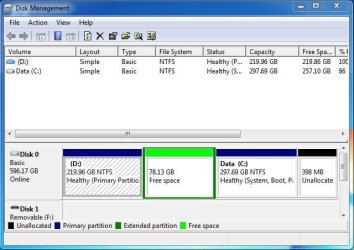
There was a recovery partition (D drive) which I forgot about. This was at the beginning of the drive. I have deleted this partition and I now have the following:

219.96 GB 78.13 GB 297.69 GB 398 MB
Unallocated Free space Boot (NTFS) Unallocated

This is as viewed from Disk Management. The 219.96 GB unallocated was the old D partition. I am assuming
that this space is at the beginning of the drive. I would like to move the Boot partition to the beginning of the drive. Cannot see how to do that.

Any help would be appreciated.
 

My Computer My Computer

At a glance

Windows 7 Home Premium 64 bit4 GB
Computer type
Laptop
Computer Manufacturer/Model Number
Toshiba C660-1D7
OS
Windows 7 Home Premium 64 bit
Memory
4 GB
Browser
Mozilla Firefox
Post a shot of Disk Management.

I would just reinstall Windows ;)

219 GB is way too big for a Recovery partition.
 

My Computer My Computer

At a glance

Windows 10 Pro x64Intel Core i7 6700KGSkill TridentZ RGB 16GB 3600 16-16-16-36EVGA GTX 980 Ti SC x2
Computer type
PC/Desktop
Computer Manufacturer/Model Number
Skylake Special #666
OS
Windows 10 Pro x64
CPU
Intel Core i7 6700K
Motherboard
Asus Sabertooth Z170 Mark 1
Memory
GSkill TridentZ RGB 16GB 3600 16-16-16-36
Graphics Card(s)
EVGA GTX 980 Ti SC x2
Sound Card
Realtek High Definition
Monitor(s) Displays
AOC G2460PG
Screen Resolution
1920 x 1080 144Hz
Hard Drives
Samsung 860 Pro 256GB, Seagate Barracuda 4TB x2
PSU
EVGA 1000 P2, EVGA White Custom Braided Cables
Case
Corsair Vengeance C70 Gunmetal Black
Cooling
Corsair H100i v2, Corsair ML120 x2, Thermal Grizzly Kryonaut
Keyboard
Logitech G910 Orion Spectrum
Mouse
Logitech G700s
Internet Speed
Verizon Fios Quantum Gateway 75/75
Antivirus
Windows Defender, Malwarebytes Free 3.8.3
Browser
Chrome
Other Info
Corsair SP120 x4, LG Blu-ray Drive, Durabrand HT-395 100 Watt Dolby Digital Amp, Corsair H2100 Wireless 7.1 Headset
Post a shot of Disk Management.

I would just reinstall Windows ;)

219 GB is way too big for a Recovery partition.

Thanks for your reply.

I will see if I can work out with what is installed so far, how to create a screenshot.

I have spent the last 3 days installing Windows and gathering the various drivers via my Desktop, copying them to a Flash Drive and then transferring them to this Laptop. Did not get the correct Drivers first time.

So why would I have to jump through hoops:(

This Laptop has a 640 GB Hard Disk Drive and was purchased new a number of years ago. The drive was partitioned by the manufacturer into two equal partitions. In the first partition (C) was a cut down version of Windows 7. In the other partition (D) was the recovery software which would put the C: partition back to what it was when purchased. There was an option to a free upgrade to Windows 7 Home Premium which I opted for.

There was no CD/DVD sold with this Laptop.
 

My Computer My Computer

At a glance

Windows 7 Home Premium 64 bit4 GB
Computer type
Laptop
Computer Manufacturer/Model Number
Toshiba C660-1D7
OS
Windows 7 Home Premium 64 bit
Memory
4 GB
Browser
Mozilla Firefox
Screenshot

Theog, thanks for your reply.

OK, here is a screenshot of Disk Management for you and AddRAM to peruse. Please note that since my first post I have created a partition where D was and formatted it. So, we have a D partition as before but now it is empty.
 

Attachments

  • Disk Management.JPG
    Disk Management.JPG
    50.4 KB · Views: 29

My Computer My Computer

At a glance

Windows 7 Home Premium 64 bit4 GB
Computer type
Laptop
Computer Manufacturer/Model Number
Toshiba C660-1D7
OS
Windows 7 Home Premium 64 bit
Memory
4 GB
Browser
Mozilla Firefox
Why 398MB unallocated? Is something shown to the left side? (next time show a largeer screenshot with more informstion).
What's on the 219GB partition? No signs seen yet of any recovery partition.
 

My Computer My Computer

At a glance

Microsoft Windows 7 Home Premium 64-bits 7601...Intel(R) Core(TM) i3 CPU M 370 @ 2.40GHz4,00 GBATI Mobility Radeon HD 5400 Series
Computer type
Laptop
Computer Manufacturer/Model Number
ACER ASPIRE 5742G
OS
Microsoft Windows 7 Home Premium 64-bits 7601 Multiprocessor Free Service Pack 1
CPU
Intel(R) Core(TM) i3 CPU M 370 @ 2.40GHz
Motherboard
Acer Aspire 5742G
Memory
4,00 GB
Graphics Card(s)
ATI Mobility Radeon HD 5400 Series
Sound Card
(1) AMD High Definition Audio Device (2) Realtek High Defi
Screen Resolution
1366 x 768 x 32 bits (4294967296 colors) @ 60 Hz
Hard Drives
WDC WD5000BEVT-22ZAT0
You should have deleted all partitions during the booted install, after backing up your data. You installed over the D:Data partition so you wiped out your data anyway if it wasn't backed up.

So I would start over and this time do it correctly following http://www.sevenforums.com/tutorials/219487-clean-reinstall-factory-oem-windows-7-a.html#post1839164.

Pay close attention to how drivers are handled in Win7 as they are not handled like you are doing now. This is not XP. This is a driver-complete OS. The instructions about drivers are printed in red so you cannot miss them.
 
You should have deleted all partitions during the booted install, after backing up your data. You installed over the D:Data partition so you wiped out your data anyway if it wasn't backed up.

So I would start over and this time do it correctly following http://www.sevenforums.com/tutorials/219487-clean-reinstall-factory-oem-windows-7-a.html#post1839164.

Pay close attention to how drivers are handled in Win7 as they are not handled like you are doing now. This is not XP. This is a driver-complete OS. The instructions about drivers are printed in red so you cannot miss them.
Disk C is boot/system so active. D isn't touched at all in the install process. Please explain what you mean Greg.
 

My Computer My Computer

At a glance

Microsoft Windows 7 Home Premium 64-bits 7601...Intel(R) Core(TM) i3 CPU M 370 @ 2.40GHz4,00 GBATI Mobility Radeon HD 5400 Series
Computer type
Laptop
Computer Manufacturer/Model Number
ACER ASPIRE 5742G
OS
Microsoft Windows 7 Home Premium 64-bits 7601 Multiprocessor Free Service Pack 1
CPU
Intel(R) Core(TM) i3 CPU M 370 @ 2.40GHz
Motherboard
Acer Aspire 5742G
Memory
4,00 GB
Graphics Card(s)
ATI Mobility Radeon HD 5400 Series
Sound Card
(1) AMD High Definition Audio Device (2) Realtek High Defi
Screen Resolution
1366 x 768 x 32 bits (4294967296 colors) @ 60 Hz
Hard Drives
WDC WD5000BEVT-22ZAT0
I meant that the partition labeled Data was formerly D and was carelessly installed upon and now therefore C. Apparently OP didn't even look at which partition was selected to install upon which should be the farthest left partition unless there is a small boot partition created first. It's also always best to delete all partitions to get the cleanest install.

If he's really attached to the install he did then he can boot free Partition Wizard boot CD to delete the first partition, then rightclick on new C to Resize, drag the left border all the way to the left, then drag the right border to where he wants it to save space for a storage partition, create and format it using same disk.
Partition Wizard Move/Resize Partition Video Help.
Partition Wizard Create Partition - Video Help
 
Hindsight is a wonderful thing:rolleyes:

I did not overwrite the Recovery partition. When I installed a fresh copy of Windows, I could see the Recovery partition and the files in it. That said, it was a waste of space (literally) as it would have taken me back to the state as if I had just purchased the Laptop. That is if I could get to it. The disaster I had preventing me booting the system or doing anything else.

What I should have done is to have reformatted the drive, created a partition and then reinstalled windows.

Having spent days to get a working system without CD/DVD with a complete set of drivers, I do not want to start again. I am completely up to date with all the Windows Updates.

I think the point of the question has been missed. Can I safely move the current C partition to the beginning of the drive?

I have a bigger screenshot of the Disk Management screen but it is not going to give you any further useful information.

Thanks for your response.
 

My Computer My Computer

At a glance

Windows 7 Home Premium 64 bit4 GB
Computer type
Laptop
Computer Manufacturer/Model Number
Toshiba C660-1D7
OS
Windows 7 Home Premium 64 bit
Memory
4 GB
Browser
Mozilla Firefox
I didn't say you overwrote the Recovery Partition. You overwrote the Data partition which is why it is still labeled Data even though the new install took the C letter for it.

I just explained above how to retain the install you did. So I didn't miss the point at all, did I? You have the steps that just saved you $150 at a shop. Ask back any questions to get them done correctly. They must be followed precisely which is why a video is provided for each step.

You're welcome.
 
D is totally frees space isn't it? If so delete that partition with Parition Wizard. Delete the 78.13GB parition as well (it's not formatted btw). After that you only have C and system is still bootable.

After that you can extend C on the left size and/or right side. So you can make it larger or smaller. You even can change the position on disk.

How to Delete Partition with partition manager? Partition Wizard Help
How to resize Partition for Windows Server 2000/2003/2008 or Windows XP/7/Vista with partition magic manager software? Move/Resize Partition Help.

Free Partition Wizard Free download Magic Partition Manager Software, partition magic alternative, free partition magic, partition magic Windows 7 and server partition software - Partition Wizard Online
 

My Computer My Computer

At a glance

Microsoft Windows 7 Home Premium 64-bits 7601...Intel(R) Core(TM) i3 CPU M 370 @ 2.40GHz4,00 GBATI Mobility Radeon HD 5400 Series
Computer type
Laptop
Computer Manufacturer/Model Number
ACER ASPIRE 5742G
OS
Microsoft Windows 7 Home Premium 64-bits 7601 Multiprocessor Free Service Pack 1
CPU
Intel(R) Core(TM) i3 CPU M 370 @ 2.40GHz
Motherboard
Acer Aspire 5742G
Memory
4,00 GB
Graphics Card(s)
ATI Mobility Radeon HD 5400 Series
Sound Card
(1) AMD High Definition Audio Device (2) Realtek High Defi
Screen Resolution
1366 x 768 x 32 bits (4294967296 colors) @ 60 Hz
Hard Drives
WDC WD5000BEVT-22ZAT0
gregrocker, I joined this Forum to ask for help and a number of members have responded. It was never my intention to insult anyone's intelligence. So, it looks like my analysis was wrong and for that I apologise:o

Thank you once again.
 

My Computer My Computer

At a glance

Windows 7 Home Premium 64 bit4 GB
Computer type
Laptop
Computer Manufacturer/Model Number
Toshiba C660-1D7
OS
Windows 7 Home Premium 64 bit
Memory
4 GB
Browser
Mozilla Firefox
Success

Kaktussoft, If I had followed gregrocker's advice, I would have no doubt resolved the issue that I was trying to fix. It would be defensive of me to go into the reasons why I did not and today is another day.

Looked at you advice and did the following.

a) Deleted the D partition
b) Rebooted:)
c) Moved/Resized Disk - Beginning of drive/half of available
d) Rebooted:)
e) Set Label of C partition to Win 7 (Was Data)
f) Rebooted:)

Thank you hero.

What a fantastic Partition Tool and free as well:)

Reminds me of the days of Partition Magix which I used with Win98 & XP.
 

My Computer My Computer

At a glance

Windows 7 Home Premium 64 bit4 GB
Computer type
Laptop
Computer Manufacturer/Model Number
Toshiba C660-1D7
OS
Windows 7 Home Premium 64 bit
Memory
4 GB
Browser
Mozilla Firefox
Those are the steps and tool I gave you yesterday.

Please post back another screenshot of Disk Mgmt so we can check it over, as about half the times we ask there are problems.
 
You could have deleted the first and second partitions, then just copied your windows partition into the unallocated space. PW will be fine for that and several other partition tools. Either way, same result in the end.
 

My Computers My Computers

  • At a glance

    7 X64i5 84002x8gb 3200mhz
    Computer type
    PC/Desktop
    OS
    7 X64
    CPU
    i5 8400
    Motherboard
    gigabyte b365m ds3h
    Memory
    2x8gb 3200mhz
    Hard Drives
    various
    PSU
    pure power 11 400w cm
    Case
    Coolermaster
    Cooling
    cryorig m9i
  • At a glance

    7x64g54008gb ddr4 2400
    Computer type
    PC/Desktop
    OS
    7x64
    CPU
    g5400
    Motherboard
    ga b365m ds3h
    Memory
    8gb ddr4 2400
    PSU
    xfx pro 450w
View of Hard Drive using PW

OK, I am attaching a screenshot of what my Hard Drive looks like now when viewed with PW.
 

Attachments

  • PW.JPG
    PW.JPG
    32.1 KB · Views: 2

My Computer My Computer

At a glance

Windows 7 Home Premium 64 bit4 GB
Computer type
Laptop
Computer Manufacturer/Model Number
Toshiba C660-1D7
OS
Windows 7 Home Premium 64 bit
Memory
4 GB
Browser
Mozilla Firefox
300 gb is wasted Unallocated space you can extend C into using Disk Mgmt or create a storage partition there

Many users wanting a smaller C backup image move their User folders to a separate data partition. This way if win7 becomes irreparable one can recover C using backup image and the data is safe and current in its own partition. This is detailed in reinstall tutorial below.
 
Points understood

Thanks for the link to your article. I have read some of it and will look at it further when I have time.

Your points are understood and I will keep them in mind.

That said, I am happy with the point I am at. The near 300 GB of unallocated space will be used in the future but I have not made up my mind exactly how. I am sure the Laptop is faster since I installed Windows 7.

The way Toshiba partitioned the drive was bad. Why have almost 300 GB (half the space) dedicated to a recovery partition!

Having now solved the issue I am happy that this topic can be marked as solved. Do I mark it as solved or is someone else responsible for doing that?
 

My Computer My Computer

At a glance

Windows 7 Home Premium 64 bit4 GB
Computer type
Laptop
Computer Manufacturer/Model Number
Toshiba C660-1D7
OS
Windows 7 Home Premium 64 bit
Memory
4 GB
Browser
Mozilla Firefox
As explained earlier that was not a Recov partition but your Data partition. I just explained in my last post why this config is popular now that backup imaging is being used widely by consumers.
 
Back
Top