
I had a disaster with my Laptop and to cut a long story short, I installed windows 7 Home Premium 64 bit.
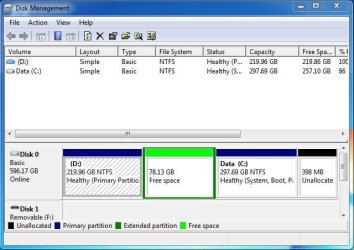
There was a recovery partition (D drive) which I forgot about. This was at the beginning of the drive. I have deleted this partition and I now have the following:
219.96 GB 78.13 GB 297.69 GB 398 MB
Unallocated Free space Boot (NTFS) Unallocated
This is as viewed from Disk Management. The 219.96 GB unallocated was the old D partition. I am assuming
that this space is at the beginning of the drive. I would like to move the Boot partition to the beginning of the drive. Cannot see how to do that.
Any help would be appreciated.
There was a recovery partition (D drive) which I forgot about. This was at the beginning of the drive. I have deleted this partition and I now have the following:
219.96 GB 78.13 GB 297.69 GB 398 MB
Unallocated Free space Boot (NTFS) Unallocated
This is as viewed from Disk Management. The 219.96 GB unallocated was the old D partition. I am assuming
that this space is at the beginning of the drive. I would like to move the Boot partition to the beginning of the drive. Cannot see how to do that.
Any help would be appreciated.
My Computer
At a glance
Windows 7 Home Premium 64 bit4 GB
- Computer type
- Laptop
- Computer Manufacturer/Model Number
- Toshiba C660-1D7
- OS
- Windows 7 Home Premium 64 bit
- Memory
- 4 GB
- Browser
- Mozilla Firefox



 ata partition so you wiped out your data anyway if it wasn't backed up.





