Hi everyone. This Is my attempt at making a water cooling guide for beginners. THIS WILL BE BASIC.
Firstly, why water cool?
Well, you get cooling performance that no air cooler can give you, secondly using water cooling opens a new world to over clocking, and it is safe if you follow some basic rules.
What you need:
Pump- The is the heart of your water cooling setup, obviously it pushes the liquid via the tubes to the necessary components. But what is important,is that you get different strengths, the 2 most common are Swiftech mcp355 MCP355 - Rouchon Industries Inc., dba Swiftech - PC Liquid Cooling Systems CPU Cooler VGA Water Block Heatsink Pump Radiator Heat Exchanger Kit This pump is considered to be the most versatile,mainly because it is small enough to fit in any chassis, and it can move liquid easily. The other one,and my personal favorite is the Swiftech mcp655: MCP655 - Rouchon Industries Inc., dba Swiftech - PC Liquid Cooling Systems CPU Cooler VGA Water Block Heatsink Pump Radiator Heat Exchanger Kit This one is awesome, its very popular and can move liquid like there's no tomorrow! There are various other types and brands, but the 655 or 355 series are the best and mostly used.Please take note,that if you run your pump dry for even a second it will burn out. Another important hint here is when you finshed the loop,and you added the liquid, remember that the asoon as you start the pump it will drain the liquid very fast,and if you are not quick enough to add more while the pump is running,or you miss calculated how much liquid is needed,your pump will drain all the liquid before the liquid reaches the pump again,so it will run dry,and be useless after that. Make sure you take the length of tubing,size of reservoir in account.
Reservoir- This is where all the liquid is stored,and also the only place you fill the loop from. Again you get different types, most people tend to go with the cylinders from EKWB, I personally use them,because of the look,and they offer various sizes,and most importantly,they are super easy to install and connect.: EK-Multioption reservoir 250 - Reservoirs - Reservoirs & Accessories THEN you can always go for a bay drive reservoir, these fit into any 5.25 drive bay, and is nice and neatly out of the way:http://www.ekwb.com/shop/reservoirs-and-acc/bay-res/ek-bay-spin-reservoir-acetal.html Take note,they are harder to fill then normal cylinder reservoirs,and don't offer as many liquid holding per icc as a cylinder(size of the amount of liquid in it). And then,this part is a must if you plan to make life easier,get a pump top! This is a little add on to your pump that allows you to use whatever fittings you want! This means if you plan on getting a MCP355,and it only supports 3/8" barb fittings,you can now with a pump top use 1/2" or any size you prefer. It also allows you to use your custom compression fittings for a tighter seel, so its a win win. : MCP35X Housing - Rouchon Industries Inc., dba Swiftech - PC Liquid Cooling Systems CPU Cooler VGA Water Block Heatsink Pump Radiator Heat Exchanger Kit they come in different colors,shapes and uses, so pick the one for your pump, and enjoy! Take note, that reservoirs connected to pump tops,require only one exit,so by doing this you save allot on barbs,cause you need only 2 for in and out, and you can make it compression fittings for safety and looks.
Tubing- Pretty much self explained, it caries the liquid. Most used sizes are 1/2" ID x 3/4'' OD, ID=Inner diameter and OD=outer diameter. Make sure this matches the OD of your fittings. You can however get a smaller 7/16 ID tubing,and fit it on a 1/2'' barb,this will create a tighter seal, but you cant use compression fittings then. Also you can get anti-kink coils, these are spring like raps around your tubing,that prevent kinking. IMO I don't use them,they are not nice to look ate,and if I have a tight bend that may kink my tubing, I will use 45 degree barbs or maybe even 90degree barbs. Or as I have used in my rig,two 45 degree fittings as one,so it makes a 90 degree bend,but is ALLOT less restrictive then the normal 90 degree fittings, to be honest,using two 45 degree fittings is maybe more expensive,but works allot better.
Fittings- You get barbs and compressions, a barb is just a smooth little "holder" for the tubing,the tubing slides over it,you don't have to,but it is seriously recommended to use hose clamps with these barbs, it just gives you peace of mind that it wont leak. A much better option is compression fitting, they pre-seel the tubing in the manner that it has a built in hose clamp, so you are protected. And they tend to "finish" a liquid loop/ These are a personal recommendation,I use them in my loop,and they come in ALLOT of colors..: Monsoon Free Center Compression Fitting - 1/2"ID x 3/4"OD - Single Black Chrome (FCC-1234-1P-BC) - FrozenCPU.com .You can get bitpower fittings that costs more then the rest,but is well worth it, or go for some cheaper ones like coolance or EKWB, they all work fine, and if you plan on using some color scheme,then plan the fittings accordingly, ie: Chrome fittings go very well with white or black tubing, black fittings gives you a great contrast on white tubing, but using black fittings on black tubing wont show,so if you don't want people to see your nice tubing and fittings do this, otherwise make some color contrasts and make your rig stand out and enjoy it while doing it.
Blocks- This is the core of water cooling, you can get blocks for cpu,memory,graphics cards,motherboard blocks and so on. But the most used blocks are for the cpu, the base is used the same way as with a air cooled cooler, and consists of a (mostly copper) flat surface that connects with the cpu,the top of the block will have to 3/4" barb holes, and will be IN and OUT ports, so just apply some thermal paste on the copper base,screw in the cpu block and connect your tubing and barbs in the appropriate holes, each block is different,so consult the manual for IN and OUT ports. You also get gpu blocks,these are a litle tricky to install,cause you need to strip your gpu down to the base,and remove the old cooler. Please note this VOIDS the warranty! An alternative would be to get a pre-aplied block, EVGA has some hydro copper blocks,that are gpu's with the appropriate water blocks pre applied, this is allot easier,and from personal experience safer. You still have a 5 year warranty on them. Just dont try tu test them without liquid in the loops, they have not air cooling,so they rely on the liquid! You can if you want,get water blocks for the ram too,but cooling this will only be for looks,as it is a waste imo. Then also remember,always apply fresh thermal paste first,and just a thin layer,don't smudge it. Also the material used is important, some gpu blocks are copper only, and in some cases when using certain types of coolant with added chemicalsmthe copper will start to disilate and loose allot of cooling potential,and in worse cases even damidge your motherboard or other hard ware. Nickel plated blocks were designed to stop "corrosion" from happening, but in some cases the nickel plating can flake off, this has only happened with Koolance's gpu blocks recently,but news is they refunded them all,called the blocks back,and the new ones are said to be ok. Some blocks have arcylite tops,which look awesome as you can see liquid in them,so adding some red/blue dye,will make for a great looking rig,but these arcylite blocks are easy to crack,so don't apply too much pressure when installing fittings.
Radiator- This explains it self, and can be small i.e 1x120,or even big as the 5x140. This means it's a radiator that supports five 140mm fans! The only thing to note hear is the fin count, the more fins,the faster fans are needed,the less fins,the slower and more silent fans. To get the fin count,check the details of the rad, it would say 30fpi,or 12fpi and so on. Also, some rads have fittings only on the one side,more expensive ones give you the option of fittings on both sides,so it makes for easier placement. Just have a look at the rad you want's website,and make sure the barb locations on it is correct for your needs,and remember the fpi. Secondly, if possible to position the rad as close to the reservoir as possible,the only reason for this is that the tube length can be nice and short,and the liquid doesn't have to travel to far to get cold.
Fans- Also self explained,get fans of your choice, just get the appropriate speeds, i.e 1800rpms will be better for a 30fpi rad. And a 800rpm fan will be better for a 15fpi rad. I use gentle typhoons, they are noted to be best for rads, and remember that some fans may be super effective in an air cooled case,but wont work on rads, air flow isnt important,but pressure is,cause it needs to push/pull air via the rad fins, so make sure you choose the fans correctly,and don't use fans with slimline design, chances are very good that you will mess up with the screw and puncture a hole inside the rad. Just get your standard thick fans.What is very useful is a fan controller,this allows you to neatly control all the fans from on spot, and you can do this from out side the chassis. A fan controller is recommended.
Liquid- The cheapest is distilled water, all you need is a bottle of it and a silver kill coil to eliminate algae. But you can add die's for color, but this has a high chance of clogging up the blocks. But some liquid offers great features,like non conductive and non algae,these are more expensive,but can be used if you choose it. Bust seriously,just get some distilled water,and a kill coil,this is very cheap, and you can add your own dye to give it color. I have test some dyes from Mayem, and they are brilliant, if you spend a little cash and allot of time,you can create some very unique colors for the build, also if you plan on getting dyes,get clear tubing for obvious reasons. But if you plan on keeping one color scheme for life,rather use clear distilled water and pic the colored tubing you want, so it will last longer.
Some things to note:
Water cooling requires allot of time and planning, draw a loop out on paper first,and see where you will need fittings,maybe a 45degree turn fittings, and so on.
*I planned on making a dual loop and bought all I needed to do it, but after assembly I changed into a single loop,with a strong pump,it looks allot cleaner and neater now, so expect to change your design allot.
*Plan accordingly, don't buy separate stop fittings if you can get a reservoir with them included, you will only waste money
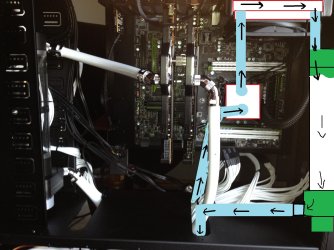
*The best order for a single loop is: Reservoir,Pump,Radiator, CPU Water block,Reservoir. Or even Reservoir,Pump,radiator,CPU Water block and the a separate *Radiatror2 for extra cooling,Reservoir. You will see that the Reservoir is always before the pump,and Always above it!!
*The general rule is. 1 rad for 1 block. With the new GPU's and CPU's you can make it 2 rad on block, this means a rad that supports 2x120mm fans next to each other,and some support an additional 2 at the back. But basic terms are a dual rad. If your chassis can fit bigger,then go bigger!
*And always leak test your loop before using it, you can do this by plugging only the pump in a separate psu,and jump starting the psu,by connecting a paperclip to green and second black wires. Search Google for more info on this. And rap all the connections of your loop in paper towels,this way you can see a leak easier. And let it leak test for at least 24hours. After a safe test,plug in all the components and let her run.
*Remember that its better to have left over,then having to need more, ie: when cutting your tubing, rather make it a bit longer,then having it be to short. Or when buying fittings, if you planned it out and need 10 fittings, buy 12, you will be glad later on, sometimes you buy stuff and end up not needing them, I personally have 10 feet of tubing left,6 fittings,3 reservoirs and a 240 rad,all these were in a plan to wc,but as you build your rig,you see new ways of doing it, so you make changes, so don't worry about buying more then you need, it happens
Hope you all enjoyed this short and BASIC guide, if you have questions leave a comment, and I will try to answer as best I can. Thanx for reading.
Ps: here is a link to my build,please feal free to ask any questions. Thank you
http://www.sevenforums.com/overclocking-case-mods/244466-tj-11-build.html#post2036371
Firstly, why water cool?
Well, you get cooling performance that no air cooler can give you, secondly using water cooling opens a new world to over clocking, and it is safe if you follow some basic rules.
What you need:
Pump- The is the heart of your water cooling setup, obviously it pushes the liquid via the tubes to the necessary components. But what is important,is that you get different strengths, the 2 most common are Swiftech mcp355 MCP355 - Rouchon Industries Inc., dba Swiftech - PC Liquid Cooling Systems CPU Cooler VGA Water Block Heatsink Pump Radiator Heat Exchanger Kit This pump is considered to be the most versatile,mainly because it is small enough to fit in any chassis, and it can move liquid easily. The other one,and my personal favorite is the Swiftech mcp655: MCP655 - Rouchon Industries Inc., dba Swiftech - PC Liquid Cooling Systems CPU Cooler VGA Water Block Heatsink Pump Radiator Heat Exchanger Kit This one is awesome, its very popular and can move liquid like there's no tomorrow! There are various other types and brands, but the 655 or 355 series are the best and mostly used.Please take note,that if you run your pump dry for even a second it will burn out. Another important hint here is when you finshed the loop,and you added the liquid, remember that the asoon as you start the pump it will drain the liquid very fast,and if you are not quick enough to add more while the pump is running,or you miss calculated how much liquid is needed,your pump will drain all the liquid before the liquid reaches the pump again,so it will run dry,and be useless after that. Make sure you take the length of tubing,size of reservoir in account.
Reservoir- This is where all the liquid is stored,and also the only place you fill the loop from. Again you get different types, most people tend to go with the cylinders from EKWB, I personally use them,because of the look,and they offer various sizes,and most importantly,they are super easy to install and connect.: EK-Multioption reservoir 250 - Reservoirs - Reservoirs & Accessories THEN you can always go for a bay drive reservoir, these fit into any 5.25 drive bay, and is nice and neatly out of the way:http://www.ekwb.com/shop/reservoirs-and-acc/bay-res/ek-bay-spin-reservoir-acetal.html Take note,they are harder to fill then normal cylinder reservoirs,and don't offer as many liquid holding per icc as a cylinder(size of the amount of liquid in it). And then,this part is a must if you plan to make life easier,get a pump top! This is a little add on to your pump that allows you to use whatever fittings you want! This means if you plan on getting a MCP355,and it only supports 3/8" barb fittings,you can now with a pump top use 1/2" or any size you prefer. It also allows you to use your custom compression fittings for a tighter seel, so its a win win. : MCP35X Housing - Rouchon Industries Inc., dba Swiftech - PC Liquid Cooling Systems CPU Cooler VGA Water Block Heatsink Pump Radiator Heat Exchanger Kit they come in different colors,shapes and uses, so pick the one for your pump, and enjoy! Take note, that reservoirs connected to pump tops,require only one exit,so by doing this you save allot on barbs,cause you need only 2 for in and out, and you can make it compression fittings for safety and looks.
Tubing- Pretty much self explained, it caries the liquid. Most used sizes are 1/2" ID x 3/4'' OD, ID=Inner diameter and OD=outer diameter. Make sure this matches the OD of your fittings. You can however get a smaller 7/16 ID tubing,and fit it on a 1/2'' barb,this will create a tighter seal, but you cant use compression fittings then. Also you can get anti-kink coils, these are spring like raps around your tubing,that prevent kinking. IMO I don't use them,they are not nice to look ate,and if I have a tight bend that may kink my tubing, I will use 45 degree barbs or maybe even 90degree barbs. Or as I have used in my rig,two 45 degree fittings as one,so it makes a 90 degree bend,but is ALLOT less restrictive then the normal 90 degree fittings, to be honest,using two 45 degree fittings is maybe more expensive,but works allot better.
Fittings- You get barbs and compressions, a barb is just a smooth little "holder" for the tubing,the tubing slides over it,you don't have to,but it is seriously recommended to use hose clamps with these barbs, it just gives you peace of mind that it wont leak. A much better option is compression fitting, they pre-seel the tubing in the manner that it has a built in hose clamp, so you are protected. And they tend to "finish" a liquid loop/ These are a personal recommendation,I use them in my loop,and they come in ALLOT of colors..: Monsoon Free Center Compression Fitting - 1/2"ID x 3/4"OD - Single Black Chrome (FCC-1234-1P-BC) - FrozenCPU.com .You can get bitpower fittings that costs more then the rest,but is well worth it, or go for some cheaper ones like coolance or EKWB, they all work fine, and if you plan on using some color scheme,then plan the fittings accordingly, ie: Chrome fittings go very well with white or black tubing, black fittings gives you a great contrast on white tubing, but using black fittings on black tubing wont show,so if you don't want people to see your nice tubing and fittings do this, otherwise make some color contrasts and make your rig stand out and enjoy it while doing it.
Blocks- This is the core of water cooling, you can get blocks for cpu,memory,graphics cards,motherboard blocks and so on. But the most used blocks are for the cpu, the base is used the same way as with a air cooled cooler, and consists of a (mostly copper) flat surface that connects with the cpu,the top of the block will have to 3/4" barb holes, and will be IN and OUT ports, so just apply some thermal paste on the copper base,screw in the cpu block and connect your tubing and barbs in the appropriate holes, each block is different,so consult the manual for IN and OUT ports. You also get gpu blocks,these are a litle tricky to install,cause you need to strip your gpu down to the base,and remove the old cooler. Please note this VOIDS the warranty! An alternative would be to get a pre-aplied block, EVGA has some hydro copper blocks,that are gpu's with the appropriate water blocks pre applied, this is allot easier,and from personal experience safer. You still have a 5 year warranty on them. Just dont try tu test them without liquid in the loops, they have not air cooling,so they rely on the liquid! You can if you want,get water blocks for the ram too,but cooling this will only be for looks,as it is a waste imo. Then also remember,always apply fresh thermal paste first,and just a thin layer,don't smudge it. Also the material used is important, some gpu blocks are copper only, and in some cases when using certain types of coolant with added chemicalsmthe copper will start to disilate and loose allot of cooling potential,and in worse cases even damidge your motherboard or other hard ware. Nickel plated blocks were designed to stop "corrosion" from happening, but in some cases the nickel plating can flake off, this has only happened with Koolance's gpu blocks recently,but news is they refunded them all,called the blocks back,and the new ones are said to be ok. Some blocks have arcylite tops,which look awesome as you can see liquid in them,so adding some red/blue dye,will make for a great looking rig,but these arcylite blocks are easy to crack,so don't apply too much pressure when installing fittings.
Radiator- This explains it self, and can be small i.e 1x120,or even big as the 5x140. This means it's a radiator that supports five 140mm fans! The only thing to note hear is the fin count, the more fins,the faster fans are needed,the less fins,the slower and more silent fans. To get the fin count,check the details of the rad, it would say 30fpi,or 12fpi and so on. Also, some rads have fittings only on the one side,more expensive ones give you the option of fittings on both sides,so it makes for easier placement. Just have a look at the rad you want's website,and make sure the barb locations on it is correct for your needs,and remember the fpi. Secondly, if possible to position the rad as close to the reservoir as possible,the only reason for this is that the tube length can be nice and short,and the liquid doesn't have to travel to far to get cold.
Fans- Also self explained,get fans of your choice, just get the appropriate speeds, i.e 1800rpms will be better for a 30fpi rad. And a 800rpm fan will be better for a 15fpi rad. I use gentle typhoons, they are noted to be best for rads, and remember that some fans may be super effective in an air cooled case,but wont work on rads, air flow isnt important,but pressure is,cause it needs to push/pull air via the rad fins, so make sure you choose the fans correctly,and don't use fans with slimline design, chances are very good that you will mess up with the screw and puncture a hole inside the rad. Just get your standard thick fans.What is very useful is a fan controller,this allows you to neatly control all the fans from on spot, and you can do this from out side the chassis. A fan controller is recommended.
Liquid- The cheapest is distilled water, all you need is a bottle of it and a silver kill coil to eliminate algae. But you can add die's for color, but this has a high chance of clogging up the blocks. But some liquid offers great features,like non conductive and non algae,these are more expensive,but can be used if you choose it. Bust seriously,just get some distilled water,and a kill coil,this is very cheap, and you can add your own dye to give it color. I have test some dyes from Mayem, and they are brilliant, if you spend a little cash and allot of time,you can create some very unique colors for the build, also if you plan on getting dyes,get clear tubing for obvious reasons. But if you plan on keeping one color scheme for life,rather use clear distilled water and pic the colored tubing you want, so it will last longer.
Some things to note:
Water cooling requires allot of time and planning, draw a loop out on paper first,and see where you will need fittings,maybe a 45degree turn fittings, and so on.
*I planned on making a dual loop and bought all I needed to do it, but after assembly I changed into a single loop,with a strong pump,it looks allot cleaner and neater now, so expect to change your design allot.
*Plan accordingly, don't buy separate stop fittings if you can get a reservoir with them included, you will only waste money
*The best order for a single loop is: Reservoir,Pump,Radiator, CPU Water block,Reservoir. Or even Reservoir,Pump,radiator,CPU Water block and the a separate *Radiatror2 for extra cooling,Reservoir. You will see that the Reservoir is always before the pump,and Always above it!!
*The general rule is. 1 rad for 1 block. With the new GPU's and CPU's you can make it 2 rad on block, this means a rad that supports 2x120mm fans next to each other,and some support an additional 2 at the back. But basic terms are a dual rad. If your chassis can fit bigger,then go bigger!
*And always leak test your loop before using it, you can do this by plugging only the pump in a separate psu,and jump starting the psu,by connecting a paperclip to green and second black wires. Search Google for more info on this. And rap all the connections of your loop in paper towels,this way you can see a leak easier. And let it leak test for at least 24hours. After a safe test,plug in all the components and let her run.
*Remember that its better to have left over,then having to need more, ie: when cutting your tubing, rather make it a bit longer,then having it be to short. Or when buying fittings, if you planned it out and need 10 fittings, buy 12, you will be glad later on, sometimes you buy stuff and end up not needing them, I personally have 10 feet of tubing left,6 fittings,3 reservoirs and a 240 rad,all these were in a plan to wc,but as you build your rig,you see new ways of doing it, so you make changes, so don't worry about buying more then you need, it happens
Hope you all enjoyed this short and BASIC guide, if you have questions leave a comment, and I will try to answer as best I can. Thanx for reading.
Ps: here is a link to my build,please feal free to ask any questions. Thank you
http://www.sevenforums.com/overclocking-case-mods/244466-tj-11-build.html#post2036371
Last edited:
My Computer
At a glance
64bit Windows 10Intel i964g-8x8gig DDR4 3600Asus ROg Strix 1080ti
- Computer type
- PC/Desktop
- Computer Manufacturer/Model Number
- Custom built
- OS
- 64bit Windows 10
- CPU
- Intel i9
- Motherboard
- MSI X299 Carbon pro
- Memory
- 64g-8x8gig DDR4 3600
- Graphics Card(s)
- Asus ROg Strix 1080ti
- Monitor(s) Displays
- Samsung 49" Odyssey g9
- Screen Resolution
- 5210x1440
- Hard Drives
- 1 x 512GB m.2 OS Drive
2 x 512gb ssd
1 x 2tb
4x 1TB's
- PSU
- Corsair AX1200w
- Case
- Silverstone TJ11 B-W
- Cooling
- AIC
- Keyboard
- Asus Rog Claymore 2
- Mouse
- Asus Rog Apatha
- Internet Speed
- 1gb Fibre


 I just clicked on it when I saw it, lol