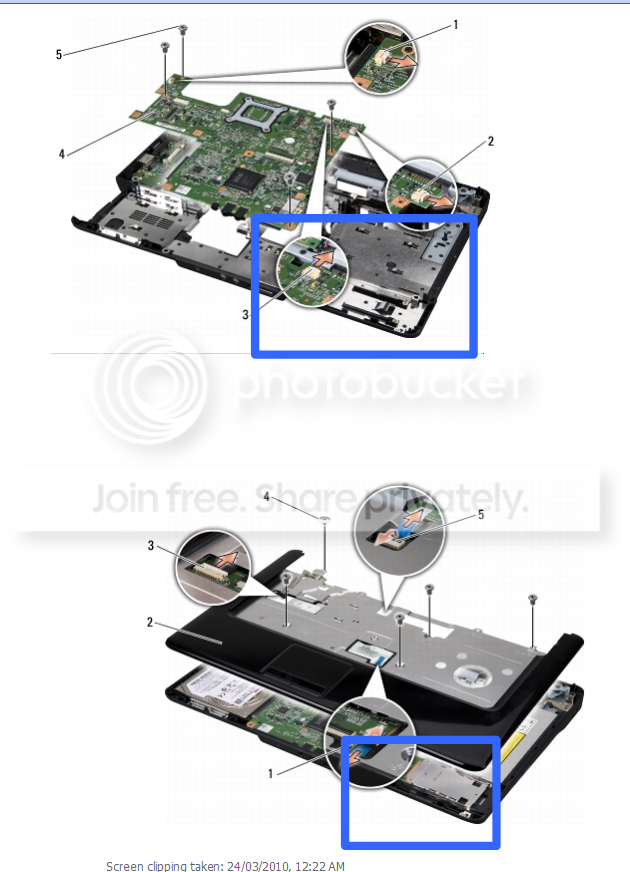
water dell laptop

vicvic

New member
Power User
Local time
7:32 PM
Messages
155
Hi guys

at a friends place. A couple of weeks ago she spilt tea on her dell laptop it is a inspiron 1545. She silly rang dell straight after and so her warranty won't cover it.

Any ideas of what it could be. The water hit the front of the laptop on the right hand side near the touch pad. ( why dell doesn't have plastic over there motherboard like other companies is beyond me)

When it is turned on the bios doesn't come up but the fans are spinning. The hard drive is ok as i have checked it in my machine start straight up into windows. No light or flickers to the monitor. I tried it with a monitor- still nothing but i will check again when i get home.


Any ideas on what it could be or what could be done would be great.

Could we just replace the board. If so which board.

thanks in advance
 

My Computer

Computer Manufacturer/Model Number
Hp DVD6 1242tx
OS
windows 7 Home premium 32 bit
CPU
intel core 2 duo cpu t6500 @ 2.10 ghz 2095 mhz
Memory
4
Graphics Card(s)
Ati mobility radeon hd 4530
Was it on at the time.
You really need to take it apart so that it can dry out properly
if all else fails see if it's worth claiming on home insurance
some now offer free accidental damage cover
 

My Computer

OS
Win 7
Hi mikethomas

it was on at the time - according to her it was on for 5 mins before it died

I took it apart over a week ago.

thanks for the advice she doesn't have home insurance.

She also didn't know what to do .... ( i am home now) she tried to power on the machine for the next 24 hours until i got to it to take it apart (over 7 days ago) - she didn't listen to me when i said don't touch it - no power.

just after a what you think might be the problem.


i just try to turn it on with my monitor - no go fans spin - no bios no beeps - ( i think it is funny in away her 2 months old computer paper weight)

love any ideas
 

My Computer

Computer Manufacturer/Model Number
Hp DVD6 1242tx
OS
windows 7 Home premium 32 bit
CPU
intel core 2 duo cpu t6500 @ 2.10 ghz 2095 mhz
Memory
4
Graphics Card(s)
Ati mobility radeon hd 4530
Sounds like the water may have fried the circuits if it's a hot drink sugar ect
what you need to do is to clean up the circuit boards with a rubber ended
pencil as Ive fixed water logged mobile phones this way.
Another thing before you attempt that is to find out weather or not
lAptops have CMOS batteries which power the mother board
that could be all it is and you can pick one up very cheap
 

My Computer

OS
Win 7
Ok mikethomas thank you so much

could you give me some more details on the rubber thing - i have read that some people have washed the whole board before

will look into if it is the cmos battery

just a little help for every one here is


this is a picture for where i think she spilt the water. - noted by the blue rectangles but they should be a little bigger. Water (tea) could have gone down the hole where the mouse pad connects - but the big black square would be the cpu or something important due to size.:huh:">

thanks so much for your help
 

My Computer

Computer Manufacturer/Model Number
Hp DVD6 1242tx
OS
windows 7 Home premium 32 bit
CPU
intel core 2 duo cpu t6500 @ 2.10 ghz 2095 mhz
Memory
4
Graphics Card(s)
Ati mobility radeon hd 4530
its working

very strange how these things work. Couldn't get some of the screws from the motherboard out so - i decided for fire it up with no hard drive and once ram. Bios came straight up

she has lost her mouse pad but everything seems to be working fine

off to return it to her
 

My Computer

Computer Manufacturer/Model Number
Hp DVD6 1242tx
OS
windows 7 Home premium 32 bit
CPU
intel core 2 duo cpu t6500 @ 2.10 ghz 2095 mhz
Memory
4
Graphics Card(s)
Ati mobility radeon hd 4530
why dell doesn't have plastic over there motherboard like other companies is beyond me
Because notebooks are inherently lousy at keeping the internals cool so many "breath" through the keyboard. Putting a water proof cover over the keyboard is like laying a blanket over the top - not a good idea. Some notebooks are designed to "resist" spills, but not all.

Sadly, when folks spill liquids on electronics, their first instinct is to fire it up and see if it still works when their first instinct should be to yank out the batteries and power cords, turn everything upside down, and leave it for a couple week in a warm, dry location.
 

My Computer

Computer Manufacturer/Model Number
BrightWorks Systems B4
OS
Windows 7 Profession 64-bit
CPU
Intel Core i7-860 Quad
Motherboard
Gigabyte P55-UD4P
Memory
Mushkin 4x2Gb PC12800
Graphics Card(s)
Gigabyte GTX260 896Mb
Sound Card
Integrated 7.1 HD Dolby
Monitor(s) Displays
2 Samsung 2220wm-HAS 22"
Screen Resolution
1680 x 1050 | 1680 x 1050
Hard Drives
WD HE 1Tb
PSU
Corsair TX-750W
Case
Ultra M998
Cooling
OEM
Keyboard
MS Wireless Comfort 5000
Mouse
MS Wireless 5000
Internet Speed
Cable and pretty darn fast
Back
Top