WD 1TB not recognized

Martin

New member
Power User
Local time
10:04 PM
Messages
243
Location
Yuma, AZ
Hi people, Im new here, I've been registered for weeks, only reading your great forum, solving problems I had before and so on... But now I have one that I have not seen an answer or a similar problem. Here I go:

I had been using my WD 1TB external Hard Drive for days, since build 7000 with no problems, have seen many others builds leaked with no planning on updating my current version, until I have read such of good comments on build 7057 which I have install, after installing 7068 as having bsod every time I tried to install my HD.

As far as it goes 7057 and my HD were working good for a day, now the hard drive is not detected, I use to connect it via Firewire!, tried with a USB port with no luck, only windows trying to install "unidentifed device".

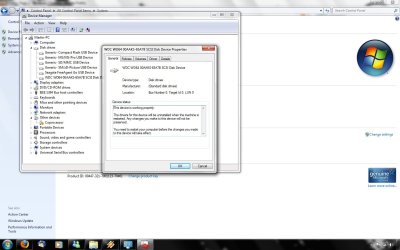
Device manager shows the hard drive working good.

any ideas??

system specification: 7057 x64
Phenom 9550 2.2ghz
ram: 4x2GB Patriot viper 800mhz
 

Attachments
  • wd1tb.jpg
    wd1tb.jpg
    107 KB · Views: 1,491

My Computer

Computer Manufacturer/Model Number
HP a6720f
OS
7 Ultimate x64 RTM 7600.16385
CPU
AMD Phenom 9550 @ 2.20ghz
Motherboard
Asus M2N78-LA
Memory
4x2GB DDR2 Patriot Viper 800mhz
Graphics Card(s)
GeForce 9400 GT 512MB
Sound Card
Onboard Realtek Hi-Definition ALC 888S chipset
Monitor(s) Displays
Samsung P2370HD 23" 1080P HDTV
Screen Resolution
1920x1080
Hard Drives
Western Digital 640GB; Samsung 1 TB; WD 500GB; Seagate Portable 250gb;
Keyboard
Logitech LX310 Wireless Internet Keyboard
Mouse
Logitech LX310 Wireless Laser Mouse
Internet Speed
7Mbps/384Kbps
hmmm, does it show that in your dev manager everytime you connect it?

in the policies tab have you got it set to optimized for quick (safe) removal?

maybe try selecting update driver and using windows update to find the driver?

and go into admin tools, computer management, storage, disk management, and try changing its drive letter when its connected.

i use a 16gb micro sd reader and have never had problems on 7057. it could be the controller for the external drive as the convert the sata to a usb interface.

but like you said its strange how its just started it. can you recall the last thing you did with it b4 it started this?

also maybe back everything up on to another system and format the drive?

hope something helps, good luck!

Rick.
 

My Computer

Computer Manufacturer/Model Number
Mad Customs #4
OS
Windows 7 7600 x64 (16385) Ultimate,Windows Vista x64 Ultimate
CPU
Intel Quad core Q9550 [email protected](AS5 lapped)(1845FSB)
Motherboard
EVGA 790i FTW DIGITAL PWM (AS5 re-pasted)
Memory
2gbx4 GSkill1600MHz9/9/9/24/2T-1.8v@1677MHz9/9/9/18/1T-1.8v
Graphics Card(s)
x2 Leadtek 9800GX2 Quad SLI(re-pasted/no cases)755/1120/1820
Sound Card
Crapative XF-i Plat
Monitor(s) Displays
Chimei22"ws(DVI)/LG32"LCD(HDMI)/Samsung 40"LCD(HDMI)
Screen Resolution
1680x1050/1360x768/1920x1080 (1080P)
Hard Drives
Seagate 1TB "40NS" 32mb sata2, Hitachi 500gb 16mb sata2 (backup storage), Sandisk 16gb micro SD (mobile storage)
PSU
Zalman 850-HP 850watt x6 12v@18A
Case
Tiled floor (nice and cold-usually 18c idle)
Cooling
fan forced 120 Xtreme (lapped)with push/pull setup
Keyboard
Logitech Di Novo Edge
Mouse
MX 1100
Internet Speed
Bigpond 17mbit/s cable=Max witnessed 2.5Mbyte/s down 30kb up
Other Info
Enzotech SLF-1+Enzotech CNB-EVGAi chipset coolers/Sunbeamtech Rheobus Extreme 30 Watt x 6 channel fan controller/Zalman ZM-MFC2 fan controller-Watt meter/Logitech G25 Racing Wheel/Logitech cordless number pad/OCZ NIA//HTPC:7600 x64/[email protected]/2x2Gb ST Proj.X DDR3 1800 9-9-9-24/Nvidia 8400GS 512Mb/Asus HDAV1.3 Delux(changed OPAmps to OPA627)/250Gb 16Mb 7200/480W PSU/Custom made cardboard box!!
I believe it's a 7057 USB/FW drivers issue...

I have a similar problem on 2 of my computers with build 7057, after I upgraded from 7000 to 7057. USB and external devices lost their connection and weren't recognized anymore. I had to manually uninstall the device under device manager, reinstall and submit driver location again.

Doing a clean install of 7057 didn't solve the problem, so since I've used all the leaked builds so far, I have come up with the conclusion that 7057 is the culprit.

I'm installing 7068 on my computers now, I'll let you know if the problem persisted.
 

My Computer

Computer Manufacturer/Model Number
ENIAC
OS
Windows 7 RC 7100 32bit/64bit
CPU
Intel Core2Duo E4500 2.20 GHz
Motherboard
ASUS P5LD2-X/1333
Memory
2x1GB Kinsgston DDR2 800MHz
Graphics Card(s)
Nvidia 8500GT
Sound Card
Onboard High Definition Audio Device
Monitor(s) Displays
Sony Bravia 42"
Case
LINKW 2222
Cooling
Standard Intel
Keyboard
Some cheap one
Mouse
Microsoft Intellimouse something
Internet Speed
24MBps ADSL
Hey you guy, thanks for replied.

bloke: Yes everytime I connect the hard drive shows up in the device manager, even tough if its not connected.

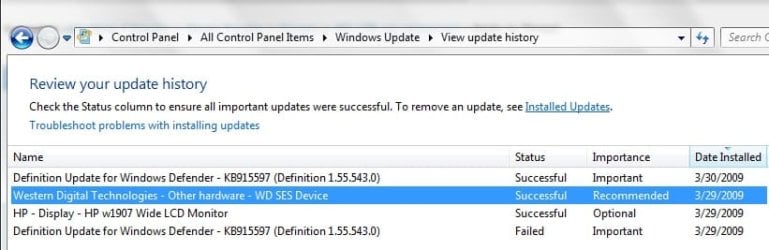
limneos: I would try that, I have unistalled the driver twice, and connect it for reinstallation with no luck. I agree with you, would be a driver related problem on 7057, yesterday it downloaded "an update" for this device.

I have also a Seagate 120 external hard drive with only usb interface, which has no problems. Only this device stop working suddenly.

I will try to boot with Ubuntu Live Cd to see if its recognized, just to verify is not a hard drive issue:confused:
 

Attachments

  • wdupdate.jpg
    wdupdate.jpg
    36.1 KB · Views: 433

My Computer

Computer Manufacturer/Model Number
HP a6720f
OS
7 Ultimate x64 RTM 7600.16385
CPU
AMD Phenom 9550 @ 2.20ghz
Motherboard
Asus M2N78-LA
Memory
4x2GB DDR2 Patriot Viper 800mhz
Graphics Card(s)
GeForce 9400 GT 512MB
Sound Card
Onboard Realtek Hi-Definition ALC 888S chipset
Monitor(s) Displays
Samsung P2370HD 23" 1080P HDTV
Screen Resolution
1920x1080
Hard Drives
Western Digital 640GB; Samsung 1 TB; WD 500GB; Seagate Portable 250gb;
Keyboard
Logitech LX310 Wireless Internet Keyboard
Mouse
Logitech LX310 Wireless Laser Mouse
Internet Speed
7Mbps/384Kbps
i saw that same message yesterday with a friend trying to update his video drivers on a laptop running 7068
 

My Computer

Computer Manufacturer/Model Number
TripOG - Kwamathon
OS
windows 7 X64
CPU
amd phenom II x4 940
Motherboard
GIGABYTE GA-MA790GP-UD4H
Memory
8GB
Graphics Card(s)
integrated radeon hd3300
Sound Card
Realtek ALC889A
Monitor(s) Displays
ASUS VH222H
Screen Resolution
1920 x 1080
Hard Drives
PQI DK9320GD3R000A03
Internet Speed
30Mbps down / 2Mbps up
Problem solved, I have installed "WD Drive Manager (PC)" , still no luck with firewire, but at least is detected using USB!
 

My Computer

Computer Manufacturer/Model Number
HP a6720f
OS
7 Ultimate x64 RTM 7600.16385
CPU
AMD Phenom 9550 @ 2.20ghz
Motherboard
Asus M2N78-LA
Memory
4x2GB DDR2 Patriot Viper 800mhz
Graphics Card(s)
GeForce 9400 GT 512MB
Sound Card
Onboard Realtek Hi-Definition ALC 888S chipset
Monitor(s) Displays
Samsung P2370HD 23" 1080P HDTV
Screen Resolution
1920x1080
Hard Drives
Western Digital 640GB; Samsung 1 TB; WD 500GB; Seagate Portable 250gb;
Keyboard
Logitech LX310 Wireless Internet Keyboard
Mouse
Logitech LX310 Wireless Laser Mouse
Internet Speed
7Mbps/384Kbps
Problem solved, I have installed "WD Drive Manager (PC)" , still no luck with firewire, but at least is detected using USB!

good to see you fixed part of the issue, 7057 might have an issue with firewire connections. ive never used 1394 connections myself cos i dont have anything that uses them.

so the way you fixed it was you installed the OEM drivers you got with the drive, or was it from their website?
just make it clear so if others have had issues as well.
did you have to use compatibiliuty mode with anything?

dont forget to select " report post" at the top and ask the forum moderator to mark the thread as 'solved' if you think all is good. it just makes it easier for others if they have a similar problem they can see that you have found a solution to fix it and could work for them.

:DRick.
 

My Computer

Computer Manufacturer/Model Number
Mad Customs #4
OS
Windows 7 7600 x64 (16385) Ultimate,Windows Vista x64 Ultimate
CPU
Intel Quad core Q9550 [email protected](AS5 lapped)(1845FSB)
Motherboard
EVGA 790i FTW DIGITAL PWM (AS5 re-pasted)
Memory
2gbx4 GSkill1600MHz9/9/9/24/2T-1.8v@1677MHz9/9/9/18/1T-1.8v
Graphics Card(s)
x2 Leadtek 9800GX2 Quad SLI(re-pasted/no cases)755/1120/1820
Sound Card
Crapative XF-i Plat
Monitor(s) Displays
Chimei22"ws(DVI)/LG32"LCD(HDMI)/Samsung 40"LCD(HDMI)
Screen Resolution
1680x1050/1360x768/1920x1080 (1080P)
Hard Drives
Seagate 1TB "40NS" 32mb sata2, Hitachi 500gb 16mb sata2 (backup storage), Sandisk 16gb micro SD (mobile storage)
PSU
Zalman 850-HP 850watt x6 12v@18A
Case
Tiled floor (nice and cold-usually 18c idle)
Cooling
fan forced 120 Xtreme (lapped)with push/pull setup
Keyboard
Logitech Di Novo Edge
Mouse
MX 1100
Internet Speed
Bigpond 17mbit/s cable=Max witnessed 2.5Mbyte/s down 30kb up
Other Info
Enzotech SLF-1+Enzotech CNB-EVGAi chipset coolers/Sunbeamtech Rheobus Extreme 30 Watt x 6 channel fan controller/Zalman ZM-MFC2 fan controller-Watt meter/Logitech G25 Racing Wheel/Logitech cordless number pad/OCZ NIA//HTPC:7600 x64/[email protected]/2x2Gb ST Proj.X DDR3 1800 9-9-9-24/Nvidia 8400GS 512Mb/Asus HDAV1.3 Delux(changed OPAmps to OPA627)/250Gb 16Mb 7200/480W PSU/Custom made cardboard box!!
Yes, I have download the OEM drivers from the wdc.com website, unistalling the current firewire driver, next step after the WD driver manager was installed is reboot pc, after rebooting connect the usb cable and there you go, now is recognized as everything for now working smoothly

thank you guys for your help!
 

My Computer

Computer Manufacturer/Model Number
HP a6720f
OS
7 Ultimate x64 RTM 7600.16385
CPU
AMD Phenom 9550 @ 2.20ghz
Motherboard
Asus M2N78-LA
Memory
4x2GB DDR2 Patriot Viper 800mhz
Graphics Card(s)
GeForce 9400 GT 512MB
Sound Card
Onboard Realtek Hi-Definition ALC 888S chipset
Monitor(s) Displays
Samsung P2370HD 23" 1080P HDTV
Screen Resolution
1920x1080
Hard Drives
Western Digital 640GB; Samsung 1 TB; WD 500GB; Seagate Portable 250gb;
Keyboard
Logitech LX310 Wireless Internet Keyboard
Mouse
Logitech LX310 Wireless Laser Mouse
Internet Speed
7Mbps/384Kbps
Martin
Where exactly did you find OEM drivers on wdc.com? I have a WD Studio 1TB and a WD Studio II 2TB, both formatted NTFS for use on PC. I couldn't make W7 x64 see either of
them, though they're visible in my XP machine.

When I looked on the WD site, all I could find was a statement that "There are no downloadable USB, Firewire, or eSATA drivers available on our Downloads page. WD external drives use the resident USB and Firewire drivers in Windows 2000 SP4, XP SP2, Vista, and Mac 10.4.8 or higher".

I hunted for solutions on the web, and the one that seems to work for me is to plug the drives directly into the mains - not into an extension bar, not into a 3-way adapter. It's maddening, because I don't have 2 free sockets within reach of my computer, so everything else is stacked up on power bars - but at least I can use the drives.

Mary
 

My Computer

Computer Manufacturer/Model Number
self-built
OS
Windows 7x64 + XP Mode
CPU
i7-740
Motherboard
Asus P6T Deluxe
Memory
12 GB DDR3
Graphics Card(s)
Sapphire Radeon HD 4870
Sound Card
on board
Monitor(s) Displays
Eizo 30" CG301; Dell 20" 2007FP,
Screen Resolution
Eizo: 2560x1600; Dell: 1600x1024
Hard Drives
3 x WD Velociraptors, 320 GB
2 x Seagate Barracuda 1.5 GB
PSU
Zalman ZM850
Case
Coolermaster ATCS 840
Cooling
Swiftech H20-220 watercooling kit
Keyboard
Logitech G11
Mouse
Logitech cordless
Internet Speed
slow broadband
Sorry Mary it has been long time since i've visited the forum, you still need help with this??

sorry!
 

My Computer

Computer Manufacturer/Model Number
HP a6720f
OS
7 Ultimate x64 RTM 7600.16385
CPU
AMD Phenom 9550 @ 2.20ghz
Motherboard
Asus M2N78-LA
Memory
4x2GB DDR2 Patriot Viper 800mhz
Graphics Card(s)
GeForce 9400 GT 512MB
Sound Card
Onboard Realtek Hi-Definition ALC 888S chipset
Monitor(s) Displays
Samsung P2370HD 23" 1080P HDTV
Screen Resolution
1920x1080
Hard Drives
Western Digital 640GB; Samsung 1 TB; WD 500GB; Seagate Portable 250gb;
Keyboard
Logitech LX310 Wireless Internet Keyboard
Mouse
Logitech LX310 Wireless Laser Mouse
Internet Speed
7Mbps/384Kbps
Heres the Studio II 2 TB Driver manager for windows And Here the Studio 1 TB

Hope it works for you!

sorry again for not responding before!
 

My Computer

Computer Manufacturer/Model Number
HP a6720f
OS
7 Ultimate x64 RTM 7600.16385
CPU
AMD Phenom 9550 @ 2.20ghz
Motherboard
Asus M2N78-LA
Memory
4x2GB DDR2 Patriot Viper 800mhz
Graphics Card(s)
GeForce 9400 GT 512MB
Sound Card
Onboard Realtek Hi-Definition ALC 888S chipset
Monitor(s) Displays
Samsung P2370HD 23" 1080P HDTV
Screen Resolution
1920x1080
Hard Drives
Western Digital 640GB; Samsung 1 TB; WD 500GB; Seagate Portable 250gb;
Keyboard
Logitech LX310 Wireless Internet Keyboard
Mouse
Logitech LX310 Wireless Laser Mouse
Internet Speed
7Mbps/384Kbps
Back
Top