WD External Hard Drive Not Showing on My PC

If it has been wiped out there is no way to get it back.

Run Partition Recovery Wizard as asked and check if any partitions are found. If found double click on the partitions and check whether your files and folders are seen. Simply asking questions will not bring back your data. Anybody who had access to your drive could have wiped it.

If no data is seen one final attempt. Download the trial version of Getdataback Pro and scan your external drive, Choose level 4 scan. If it shows your data , you can check the integrity and if you are satisfied buy it to copy the data. If it does not show your data, that is the end of the story.

Data Recovery Software Products - Runtime Software Products

Alright, I am about to Run the software again .. It takes about 10 hours approx..
I will paste the screen shot after the results are shown...

Then, tell me how to proceed from their...
 

My Computer My Computer

At a glance

Windows 7 Home Premium 64bit
Computer type
Laptop
Computer Manufacturer/Model Number
Toshiba
OS
Windows 7 Home Premium 64bit
Hard Drives
Hitachi
I have nothing more to tell you

If Partition Recovery Wizard does not find your partition and you cannot see your folders, run Getdataback level 4 scan. If it does not show your folders and files, seek professional data recovery. Check Western Digital website for WD Data recovery partners.

If you ask a hundred times, I will repeat the same answer 100 times, because nothing more can be done and no Do it yourself data recovery is possible.
 

My Computer My Computer

At a glance

Windows 7 Home Premium 32 bit
OS
Windows 7 Home Premium 32 bit
I have nothing more to tell you

If Partition Recovery Wizard does not find your partition and you cannot see your folders, run Getdataback level 4 scan. If it does not show your folders and files, seek professional data recovery. Check Western Digital website for WD Data recovery partners.

If you ask a hundred times, I will repeat the same answer 100 times, because nothing more can be done and no Do it yourself data recovery is possible.

1) I am running the scan now...it is running... I will let you know about its update at the end..

2) You mentioned that Getdataback level 4 scan, Can I just know how is it different from the current Partition Recovery Wizard ..? Are it's results more reliable..?

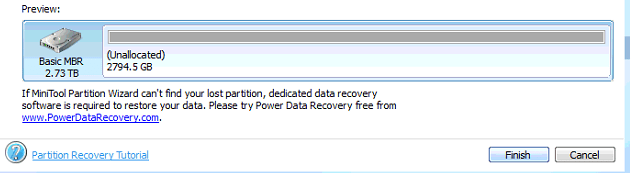
3) Also, their is a message underneath the Window of Partition Recovery Wizard which reads as such in the snapshot below.. How is this one also different from the Getdataback level 4 scan

powerdata recovery.png


Can you answer these as well.. Just little more enthusiastic about it..
 

My Computer My Computer

At a glance

Windows 7 Home Premium 64bit
Computer type
Laptop
Computer Manufacturer/Model Number
Toshiba
OS
Windows 7 Home Premium 64bit
Hard Drives
Hitachi
Yes, if Partition Recovery Wizard is not finding the start point of any partition ( where a specific and identifiable boot record is written at its start sector when formatted ) then we use a dedicated data recovery program. Such a data recovery program does not look for the partition start point, but looks to see any data, and tries to retrieve such data. Getdataback is a dedicated data recovery program.

In your case there is a strong possibility of an outsider getting access to your drive . He could have wiped your drive clean. If Getdataback does not see any data it is confirmed that all your data has been wiped.
 

My Computer My Computer

At a glance

Windows 7 Home Premium 32 bit
OS
Windows 7 Home Premium 32 bit
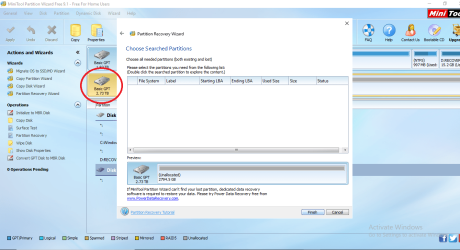
After long hours of the Full Scan, this is the screen which showed up at the end..

GPT results wizard.png

That is really Sad to me...!!!

It says below to go for power data recovery, what do you say now..? with what should I proceed now..
 

My Computer My Computer

At a glance

Windows 7 Home Premium 64bit
Computer type
Laptop
Computer Manufacturer/Model Number
Toshiba
OS
Windows 7 Home Premium 64bit
Hard Drives
Hitachi
I have already told you should download Getdataback trial version and run Level four scan to check whether it sees any files and folders.

Please read all the documentation on the website on how to run it. Since the program does not write anything to the drives, you can afford to make any number of mistakes while obtaining a grip on how to use it. You can also try it on your system drive without any fear.

Getdataback and active @ file recovery are the ones we recommend in this forum.

As I had already told if Getdataback does not see your folders and files , that is the end.

You are free to contact WD datarecovery Partners for your region for professional data recovery. Telephonic consultation is free. Data recovery charges will be heavy if they undertake data recovery. They will tell you the terms and conditions during the telephonic consultation.

With this, I close my participation on this thread.
 

My Computer My Computer

At a glance

Windows 7 Home Premium 32 bit
OS
Windows 7 Home Premium 32 bit
I have already told you should download Getdataback trial version and run Level four scan to check whether it sees any files and folders.

Please read all the documentation on the website on how to run it. Since the program does not write anything to the drives, you can afford to make any number of mistakes while obtaining a grip on how to use it. You can also try it on your system drive without any fear.

Getdataback and active @ file recovery are the ones we recommend in this forum.

As I had already told if Getdataback does not see your folders and files , that is the end.

You are free to contact WD datarecovery Partners for your region for professional data recovery. Telephonic consultation is free. Data recovery charges will be heavy if they undertake data recovery. They will tell you the terms and conditions during the telephonic consultation.

With this, I close my participation on this thread.

1) No, please don't close your participation in this thread yet..

You have helped up to this point.. So, do it further as well; till I complete all the tasks forth told me over here..

2) I will Run the Get back data recovery as well..
For that , can You please guide me on how to proceed with the steps as you showed me in the partition wizard earlier.

3) Plus , you mentioned that their is active data recovery also.. Shall I try even on that after the Getback data recovery one..

4) Later, If their is still not any results I will go with the WD Consultation then, And explain over here with what they tell me to do so.. And again for that your advice would be appreciated again..

Regards
 

My Computer My Computer

At a glance

Windows 7 Home Premium 64bit
Computer type
Laptop
Computer Manufacturer/Model Number
Toshiba
OS
Windows 7 Home Premium 64bit
Hard Drives
Hitachi
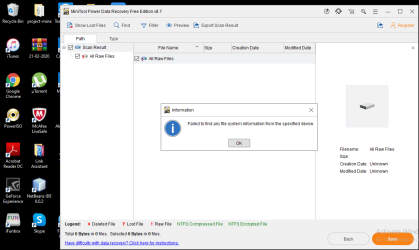
1) These are the results I got from the Power Data recovery Program..

Power data recovery results.png

2) Now, I am going for the Main one " Getdataback" .. But, I cannot find out how to choose Level 4 in it..?
 

My Computer My Computer

At a glance

Windows 7 Home Premium 64bit
Computer type
Laptop
Computer Manufacturer/Model Number
Toshiba
OS
Windows 7 Home Premium 64bit
Hard Drives
Hitachi
I ran Getpower data recovery and it showed three stars at the bottom left... I did not get anywhere how to turn it into 4 stars... that is why I asked earlier too, they way to do it...

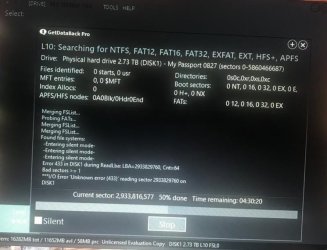
But at 50%, it wont't move ahead and on the screen even shows 1 bad sector..
what do you suggest on this...

WhatsApp Image 2020-04-14 at 12.05.43 PM.jpg

hoping for your cooperation from here on wards as well..
 

My Computer My Computer

At a glance

Windows 7 Home Premium 64bit
Computer type
Laptop
Computer Manufacturer/Model Number
Toshiba
OS
Windows 7 Home Premium 64bit
Hard Drives
Hitachi
If Getdataback does not complete the scan, nothing can be done.

Seek professional Data recovery as stated earlier. Contact WD Data recovery partners for your region and talk to them presenting your case.
 

My Computer My Computer

At a glance

Windows 7 Home Premium 32 bit
OS
Windows 7 Home Premium 32 bit
If Getdataback does not complete the scan, nothing can be done.

Seek professional Data recovery as stated earlier. Contact WD Data recovery partners for your region and talk to them presenting your case.

What does that error mean which came onto the screen..?

and secondly can you give me the link for the WD data recovery partners, which can guide me to the end
 

My Computer My Computer

At a glance

Windows 7 Home Premium 64bit
Computer type
Laptop
Computer Manufacturer/Model Number
Toshiba
OS
Windows 7 Home Premium 64bit
Hard Drives
Hitachi
I do not know what that error means but what matters is it could not see your data.

You could have made a google search and found the WD Data recovery partners just like I did.

Data Recovery | WD Support
 

My Computer My Computer

At a glance

Windows 7 Home Premium 32 bit
OS
Windows 7 Home Premium 32 bit
I do not know what that error means but what matters is it could not see your data.

You could have made a google search and found the WD Data recovery partners just like I did.

Data Recovery | WD Support

My country is not listed anywhere their.. what must I do then..?
 

My Computer My Computer

At a glance

Windows 7 Home Premium 64bit
Computer type
Laptop
Computer Manufacturer/Model Number
Toshiba
OS
Windows 7 Home Premium 64bit
Hard Drives
Hitachi

My Computer My Computer

At a glance

Windows 7 Home Premium 64bit
Computer type
Laptop
Computer Manufacturer/Model Number
Toshiba
OS
Windows 7 Home Premium 64bit
Hard Drives
Hitachi

My Computer My Computer

At a glance

Windows 7 Home Premium 32 bit
OS
Windows 7 Home Premium 32 bit
I find test disk to be a lot of CMND line work! And TechnoMage2016 I have heard that seagate is crap and WD is the only way to go! a lot of confusion there!
 

My Computer My Computer

At a glance

Windows 10 pro 64biti5 ivy bridge2x4gb ddr3Nivida GeForce
Computer type
PC/Desktop
Computer Manufacturer/Model Number
Custom Build
OS
Windows 10 pro 64bit
CPU
i5 ivy bridge
Memory
2x4gb ddr3
Graphics Card(s)
Nivida GeForce
Hard Drives
WD Blue 500gb
Antivirus
Windows defender
Browser
Google chrome
I find test disk to be a lot of CMND line work! And TechnoMage2016 I have heard that seagate is crap and WD is the only way to go! a lot of confusion there!

What does that suppose to mean..?
that I works for WD but does not work for seagate
 

My Computer My Computer

At a glance

Windows 7 Home Premium 64bit
Computer type
Laptop
Computer Manufacturer/Model Number
Toshiba
OS
Windows 7 Home Premium 64bit
Hard Drives
Hitachi
You may contact any WD Data Recovery Partner listed in a country nearest to you.


You may try whatever you may want to and you may also raise any queries on it in the TestDisk Forum. cgsecurity.org - TestDisk & PhotoRec forum in English


1) Test Disk is a little CMD based and I cannot run it properly.. Can you guide on it..

and

2) When I cancel the error messages in the Getdatarecovery at the end It shows up message like this..

error.png
 

My Computer My Computer

At a glance

Windows 7 Home Premium 64bit
Computer type
Laptop
Computer Manufacturer/Model Number
Toshiba
OS
Windows 7 Home Premium 64bit
Hard Drives
Hitachi
And I repeat no do-it-yourself data recovery is possible in your case. You are only wasting your time.

Seek professional data recovery. You may contact any WD Data Recovery Partner listed in a country nearest to you.
 

My Computer My Computer

At a glance

Windows 7 Home Premium 32 bit
OS
Windows 7 Home Premium 32 bit
Professional data recovery: $2000 a hard drive crazy.
 

My Computer My Computer

At a glance

Windows 10 pro 64biti5 ivy bridge2x4gb ddr3Nivida GeForce
Computer type
PC/Desktop
Computer Manufacturer/Model Number
Custom Build
OS
Windows 10 pro 64bit
CPU
i5 ivy bridge
Memory
2x4gb ddr3
Graphics Card(s)
Nivida GeForce
Hard Drives
WD Blue 500gb
Antivirus
Windows defender
Browser
Google chrome
Back
Top