WD GPT 4TB internal HDD turns into RAW after 2.27 TB storage

help m

New member
Local time
3:30 PM
Messages
9
i have a 4TB WD internal HDD that was working fine.

after story (below if you need), i formatted the HDD as GPT using disk management.
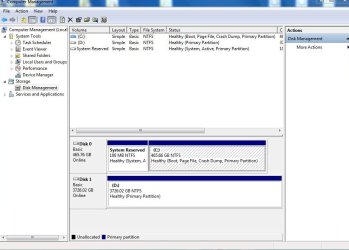
coping the data to HDD & after reaching 2.27 TB of storage the copying speed slows down to a almost a halt & it gives 'not accessible'. after restarting the PC it becomes RAW (shows 3726.02 GB RAW healthy primary partition in disk management)

it seems that i have a damaged GPT table or a damaged HDD circuit !? how can i determine that?

professionals please help :(

spec's:
windows 7 ultimate x64, SP1 [6.1 Build 7601]
WDC WD40EZRX-00SPEB0 (this is the problem)
Motherboard:
intel DH67BL (LGA1155)
more info in 'speccy' generated file (attached)

Notable issues:
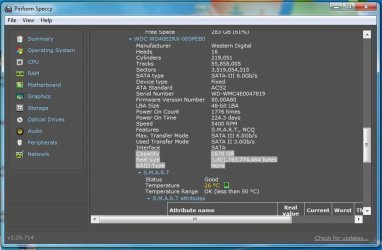
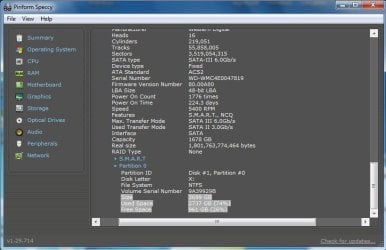
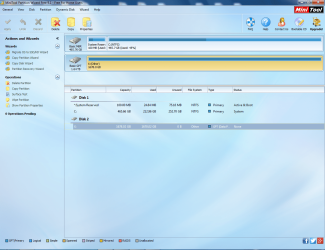
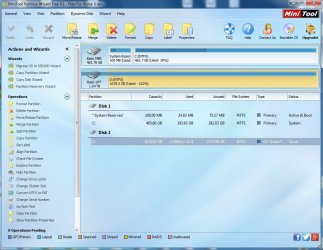
1- before formatting HDD 'speccy' showing discrepancy between size & capacity pictures 1&2 attached (capacity 1678 GB & size 3699 GB).
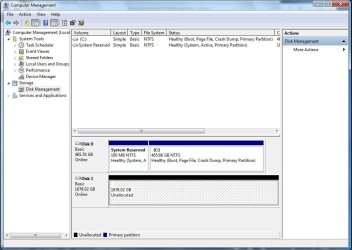
2- strangely after formatting, HDD showing only 1678 GB of space in Disk management (pic3) & i had to format it (GPT using disk management) then use a win7 CD to format it again & restore the entire space.
3- after that whether i format it again from disk management or not it shows the full space (pic4) & it works fine until reaching 2.27 TB of storage!
4- minitool shows 1678.02 GB capacity, -2.19887e+12B used! & 3725.88 unused. then after 2.27 TB storage it shows 1678.02 GB capacity, 1678.02 used & 0 unused (pic's 5&6).
5- all files were opening fine before 2.27 TB was copied to HDD.

i tried many things:
1- CrystalDiskInfo 7.0.0 (attached)
2- complete surface test with minitool
3- changed SATA cable
4- formatted the HDD several times & using several methods:
* completely wiped the data from the HDD using CCleaner.
* used 'write zeros' in 'WD data lifeguard diagnostics (win version)' but after that HDD became 1678.02 GB & i had to format again using Win7 disk.
4- also used 'check disk' within windows (before it became un-accessible) & no bad sectors
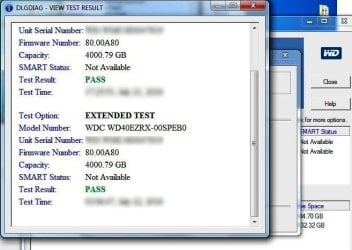
5- performed both quick test & 'complete test' in 'WD data lifeguard diagnostics' with HDD passing both (before, also after writing data to HDD & after it became un-accessible).
6- even scanned the HDD for viruses after formatting.
7- i copied data several times to HDD & every time it did the same thing


story (if needed):
in short: i restarted the PC several times since i was unable to see the display on the screen.

i did a very dumb mistake by switching the bios setting of graphics card to 'on board only' after suffering from some problems with external graphics card but i forgot to remove the cable from the external graphics card & install it to the on board one!

i removed the battery from the mother board (MoBo) & used the jumper before i finally realized the mistake! (i made sure zero power was in the MoBo before doing that & i made sure all settings were back to default)
after running the PC it ran 'check disk' & after finishing PC started fine until i tried to run some files on the storage 4 TB HDD. all xps, excel, word files...etc were corrupted but most video files were running fine. after getting fed up with trying to restore the data i formatted the HDD.

i need to use the full capacity of HDD without it becoming un-accessible & causing major data loss please help :(
 

Attachments

  • 1 CrystalDiskInfo.txt
    1 CrystalDiskInfo.txt
    7.6 KB · Views: 1
  • 1 speccy 11-09-2016-post.txt
    1 speccy 11-09-2016-post.txt
    17 KB · Views: 0
  • 1- speccy (before formatting) showing descripancy btw capacity & space! 1.jpg
    1- speccy (before formatting) showing descripancy btw capacity & space! 1.jpg
    51.7 KB · Views: 0
  • 2- speccy (before formatting) showing descripancy btw capacity & space! 2.jpg
    2- speccy (before formatting) showing descripancy btw capacity & space! 2.jpg
    50.2 KB · Views: 0
  • 3- 1677.9 GB disk management(should atleast show the remaining space in HDD!).jpg
    3- 1677.9 GB disk management(should atleast show the remaining space in HDD!).jpg
    72.7 KB · Views: 0
  • 7- WD digital data life guard tests.jpg
    7- WD digital data life guard tests.jpg
    43.7 KB · Views: 26
  • 6- minitool showing 1678.02 GB capacity, 1678.02 used & 0 unused after2.27TB storage.png
    6- minitool showing 1678.02 GB capacity, 1678.02 used & 0 unused after2.27TB storage.png
    297.4 KB · Views: 1
  • 5- minitool showing 1678.02 GB capacity, -2.19887e+12B used & 3725.88 unused.jpg
    5- minitool showing 1678.02 GB capacity, -2.19887e+12B used & 3725.88 unused.jpg
    97 KB · Views: 1
  • 4- 3726.02 GB after using win 7 CD.jpg
    4- 3726.02 GB after using win 7 CD.jpg
    66.3 KB · Views: 0

My Computer My Computer

At a glance

Windows 7 Ultimate x64
Computer type
PC/Desktop
OS
Windows 7 Ultimate x64
Once again same story.
Your BIOS is set as Legacy and you have installed Win 7 as Legacy.
On a Legacy BIOS you can only access 2.2T.
You have two choices:
(- Set your BIOS to UEFI, Set secure boot to disabled, and reinstall Win 7 by booting your Win 7 installation disk as UEFI. Go advanced, clean all partitions and create new. It will reformat drive C as GPT and create 3 partitions: 100M UEFI Fat32, 120M MS reserved RAW and a large NTFS partition to install Win 7. I recommend this procedure. Just seen the MB manual and it isn't a UEFI BIOS, so this option doesn't apply to your MB)

- Install a workaround software to use your GPT disk. You will find the workaround software at the disk manufacture site.

From Seagate Support: For Disk Drives Beyond 2.2 TeraBytes (TB) and 4K Advanced Format Sectors
Windows operating systems that boot from an MBR are therefore limited to 2.2TB per MBR. A 3TB disk drive in a legacy BIOS and Window system will need a DiscWizard device driver to access the full capacity of a 3TB disk drive. Two partitions will be necessary because of the MBR limitation. The device driver mounts the capacity above 2.2TB with another MBR which looks to the system as a second virtual “physical” device.

Did you try Windows disk manager to erase all disk and create new?
How to partition and format a WD drive on Windows and Mac OSX | WD Support
 
Last edited:

My Computers My Computers

  • At a glance

    Windows 7 HP 64i5 6600K - 800MHz to 4200MHz4+4G GSkill DDR4 3000IG - Intel 530
    Computer type
    PC/Desktop
    Computer Manufacturer/Model Number
    custom build
    OS
    Windows 7 HP 64
    CPU
    i5 6600K - 800MHz to 4200MHz
    Motherboard
    GA-Z170-HD3P
    Memory
    4+4G GSkill DDR4 3000
    Graphics Card(s)
    IG - Intel 530
    Monitor(s) Displays
    Samsung 226BW
    Screen Resolution
    1680x1050
    Hard Drives
    (1) -1 SM951 – 128GB M.2 AHCI PCIe SSD drive for Windows 7 and Lubuntu
    (2) -1 WD SATA 3 - 1T for Data
    (3) -1 WD SATA 3 - 1T for backup
    PSU
    Thermaltake 450W TR2 gold
    Keyboard
    Old and good Chicony mechanical keyboard
    Mouse
    Logitech mX performance - 9 buttons (had to disable some)
    Internet Speed
    500Mb/s
    Browser
    Firefox 64
    Other Info
    TinyWall firewall
  • At a glance

    Windows 7 Proi7-4500U 800MHz to 3.0GHz(4+4)G DDR3 1600IG intel 4400 + NVIDIA GeForce GT 745M
    Computer type
    Laptop
    System Manufacturer/Model Number
    Asus Q550LF
    OS
    Windows 7 Pro
    CPU
    i7-4500U 800MHz to 3.0GHz
    Motherboard
    Asus Q550LF
    Memory
    (4+4)G DDR3 1600
    Graphics Card(s)
    IG intel 4400 + NVIDIA GeForce GT 745M
    Sound Card
    Realtek
    Monitor(s) Displays
    LG Display LP156WF4-SPH1
    Screen Resolution
    1920 x 1080
    Hard Drives
    BX500 120G SSD for Windows and programs +
    1T HDD for data
    Internet Speed
    500 Mb/s
    Browser
    Firefox
    Other Info
    TinyWall firewall
The following information would be pertinent.

1. Is it a OEM PC or custom-built one?

2.If OEM, exact manufacturer and Model Number.

3. If custom-built when was it built?

4. If it is a custom-built one what is the motherboard? Old motherboard controllers have a 2TB limitation. Newer motherboards not.

5. Whether custom-built or OEM, does your PC has UEFI or normal standard Bios?
(Megahertz07 may please note: DavidE in another thread has confirmed that he has his UEFI in Legacy mode + MBR boot drive and has no problem with accessing his 3TB GPT internal drive,)

6. Does your PC run IRST driver? If so what version? Older versions limit access to 2TB.

7. I have seen such a wrap-around also occurring when one uses a >2TB on incompatible docks. Just to clear this, confirm that your WD internal drive is indeed connected directly to the SATA port of the motherboard and not placed inside a dock.

Please answer the queries point by point in the same order.

EDIT: Why did you erase the Test Time in your last screenshot? Is it a secret? :)
 
Last edited:

My Computer My Computer

At a glance

Windows 7 Home Premium 32 bit
OS
Windows 7 Home Premium 32 bit
@Megahertz07
please note that i am not booting from this HDD
it was identifying this HDD with >2700 GB of storage before i formatted it.
also i can enable UEFI in my MoBo
 

My Computer My Computer

At a glance

Windows 7 Ultimate x64
Computer type
PC/Desktop
OS
Windows 7 Ultimate x64
@ jumanji
thank you
1- it is custom built
2- custom built
3- i am not sure but i think it was built at the end of 2011
4- MoBo: Intel Corporation DH67BL (LGA1155)
with BIOS Version BLH6710H.86A.0076.2010.1115.1959
Date 15-Nov-10
full details in 'Speccy' generated file attached
& please note that it was working fine earlier with >2700 GB storage
5- i am using Bios but i can enable UEFI (i am afraid to do that since i might have to format my operating system?)
6- i am installing IRST (intel rapid storage technology) but i am not using RAID & it is identifying the HDD As 4TB but strangely marked as an external HDD
7- sorry i didn't understand what is a 'dock', can you please elaborate? as far as i know it is connected to eSATA4 on my MoBo. i believe i tried to put it on other SATA ports but it won't hurt to try again.

Edit: surly it is not a secret :) but i did a lot of reading & testing during the last month so i didn't want to cause more confusion with dates
many thanks
 

My Computer My Computer

At a glance

Windows 7 Ultimate x64
Computer type
PC/Desktop
OS
Windows 7 Ultimate x64
@ samuria
i believe i saw that but isn't it exactly the same as completely formatting the HDD from 'disk management' but only using 'cmd'?
thanks for the idea, i will have a go at it
 

My Computer My Computer

At a glance

Windows 7 Ultimate x64
Computer type
PC/Desktop
OS
Windows 7 Ultimate x64
please note that this HDD is only used for storage (no OS on it)
 

My Computer My Computer

At a glance

Windows 7 Ultimate x64
Computer type
PC/Desktop
OS
Windows 7 Ultimate x64
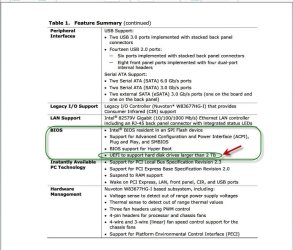
In the motherboard manual Feature Summary > Bios - Page No.10 it says " UEFI to support hard disk drives larger than 2 TB"

12-09-2016 18-26-22.jpg

In compliance with it you may have to enable UEFI .Whether it will necessitate your boot drive to be a GPT, I don't know.This appears to be a peculiar standard bios with UEFI option.To your bad luck Intel does not provide technical support of any sort to this motherboard any longer. The user manual I have seen is silent on this.

Note: Most User manuals have a chapter on BIOS where the BIOS setup is pictorially presented defining the various setups and the default setup. Unfortunately the manual which I got in this case doesn't say where and how you enable UEFI in the Bios.So I can't help you more than what I have shown above.

What I have noticed: Since the time you built the PC you don't seem to have updated the BIOS/Chipset Drivers/IRST drivers etc., You may consider updating the BIOS version 0160 dated 12/4/2012 and IRST to 11.7.0.1013 dated 12/6/2012. ( This of course has nothing to do with enabling UEFI in the BIOS to support more than 2TB drives. Your motherboard as I suspected is a 2011 version at which time larger than 2 TB drives started appearing and Intel has put a "enable UEFI" option in the BIOS. All current motherboards are UEFI where if you want you can opt for Legacy/ MBR. :))
 
Last edited:

My Computer My Computer

At a glance

Windows 7 Home Premium 32 bit
OS
Windows 7 Home Premium 32 bit
If your Win 7 installation is more than 2 years old, I recommend you to do a clean install as mentioned on post 3. As time goes by, your win gets a lot of trash in it. A clean install will make it run faster then it's today.
-Launch \windows\system32\migwiz\migwiz.exe and save your settings on an external disk. As I've already seen that sometimes it doesn't recover on the new installation, I don't trust it for data.
- Save all your data files on an external disk.
- Consider to buy a small SSD. It will cost you around US$ 50 for a 120G. You have no idea how a SSD can improve your computer performance. PNY CS1311 120GB Internal SATA Solid State Drive Black SSD7CS1311-120-RB - Best Buy. You can use your actual C as D for data.
- After installation as UEFI, in disk manager, try to expand your 4T disk to all its capacity.

Remember: Before installing Win, detach all other HDD from MB.

For almost all the updates:
KB3125574 contains all the security and non-security fixes released since the release of Windows 7 SP1 that are suitable for general distribution, up through April 2016.
It’s single, Multi language, 488MB update file (msu). On a recent installation, you must have first to install KB3020369.
For more information read this article: https://blogs.technet.microsoft.com...17/simplifying-updates-for-windows-7-and-8-1/
 

My Computers My Computers

  • At a glance

    Windows 7 HP 64i5 6600K - 800MHz to 4200MHz4+4G GSkill DDR4 3000IG - Intel 530
    Computer type
    PC/Desktop
    Computer Manufacturer/Model Number
    custom build
    OS
    Windows 7 HP 64
    CPU
    i5 6600K - 800MHz to 4200MHz
    Motherboard
    GA-Z170-HD3P
    Memory
    4+4G GSkill DDR4 3000
    Graphics Card(s)
    IG - Intel 530
    Monitor(s) Displays
    Samsung 226BW
    Screen Resolution
    1680x1050
    Hard Drives
    (1) -1 SM951 – 128GB M.2 AHCI PCIe SSD drive for Windows 7 and Lubuntu
    (2) -1 WD SATA 3 - 1T for Data
    (3) -1 WD SATA 3 - 1T for backup
    PSU
    Thermaltake 450W TR2 gold
    Keyboard
    Old and good Chicony mechanical keyboard
    Mouse
    Logitech mX performance - 9 buttons (had to disable some)
    Internet Speed
    500Mb/s
    Browser
    Firefox 64
    Other Info
    TinyWall firewall
  • At a glance

    Windows 7 Proi7-4500U 800MHz to 3.0GHz(4+4)G DDR3 1600IG intel 4400 + NVIDIA GeForce GT 745M
    Computer type
    Laptop
    System Manufacturer/Model Number
    Asus Q550LF
    OS
    Windows 7 Pro
    CPU
    i7-4500U 800MHz to 3.0GHz
    Motherboard
    Asus Q550LF
    Memory
    (4+4)G DDR3 1600
    Graphics Card(s)
    IG intel 4400 + NVIDIA GeForce GT 745M
    Sound Card
    Realtek
    Monitor(s) Displays
    LG Display LP156WF4-SPH1
    Screen Resolution
    1920 x 1080
    Hard Drives
    BX500 120G SSD for Windows and programs +
    1T HDD for data
    Internet Speed
    500 Mb/s
    Browser
    Firefox
    Other Info
    TinyWall firewall
For the 4TB drive, maybe try to separate the drive to 2 partition.
Partition 1 to up to 2TB
Partition 2 to use as logical partition.

Not sure if it works or not.

Eric.
 

My Computer My Computer

At a glance

Windows 7 x64
Computer type
Laptop
Computer Manufacturer/Model Number
Toshiba L630 and L735
OS
Windows 7 x64
Hard Drives
240 GB SSD
If I remember well, 5 years old MB where legacy with a UEFI support for drives. They used to call hybrid Bios.
Try to enable UEFI drive support on BIOS and boot. If it boots, go to disk manager and extend your partition to the end. This way you don't need to reinstall win 7.
 

My Computers My Computers

  • At a glance

    Windows 7 HP 64i5 6600K - 800MHz to 4200MHz4+4G GSkill DDR4 3000IG - Intel 530
    Computer type
    PC/Desktop
    Computer Manufacturer/Model Number
    custom build
    OS
    Windows 7 HP 64
    CPU
    i5 6600K - 800MHz to 4200MHz
    Motherboard
    GA-Z170-HD3P
    Memory
    4+4G GSkill DDR4 3000
    Graphics Card(s)
    IG - Intel 530
    Monitor(s) Displays
    Samsung 226BW
    Screen Resolution
    1680x1050
    Hard Drives
    (1) -1 SM951 – 128GB M.2 AHCI PCIe SSD drive for Windows 7 and Lubuntu
    (2) -1 WD SATA 3 - 1T for Data
    (3) -1 WD SATA 3 - 1T for backup
    PSU
    Thermaltake 450W TR2 gold
    Keyboard
    Old and good Chicony mechanical keyboard
    Mouse
    Logitech mX performance - 9 buttons (had to disable some)
    Internet Speed
    500Mb/s
    Browser
    Firefox 64
    Other Info
    TinyWall firewall
  • At a glance

    Windows 7 Proi7-4500U 800MHz to 3.0GHz(4+4)G DDR3 1600IG intel 4400 + NVIDIA GeForce GT 745M
    Computer type
    Laptop
    System Manufacturer/Model Number
    Asus Q550LF
    OS
    Windows 7 Pro
    CPU
    i7-4500U 800MHz to 3.0GHz
    Motherboard
    Asus Q550LF
    Memory
    (4+4)G DDR3 1600
    Graphics Card(s)
    IG intel 4400 + NVIDIA GeForce GT 745M
    Sound Card
    Realtek
    Monitor(s) Displays
    LG Display LP156WF4-SPH1
    Screen Resolution
    1920 x 1080
    Hard Drives
    BX500 120G SSD for Windows and programs +
    1T HDD for data
    Internet Speed
    500 Mb/s
    Browser
    Firefox
    Other Info
    TinyWall firewall
thanks guys, your help is really appreciated
@megahertz078 @jumanji
i will try to enable the UEFI (just after i finish writing zeros to the HDD, it takes ages :))

what i did not mention earlier is that i actually dis-attached the HDD that contained the OS & all the other HDDs (by the way one of them was 3 TB & it was working) & made a clean install of win7 on another HDD.
Then attached the new OS & the 4TB storage only to MoBo (performed almost all important updates & currently working on optional updates)

i will test the above & come back to you

i have the BIOS update downloaded but i am keeping this as last resort since:
1- it was working before
2- i can not revert back to previous BIOS versions if -god forbid- any thing happens
 

My Computer My Computer

At a glance

Windows 7 Ultimate x64
Computer type
PC/Desktop
OS
Windows 7 Ultimate x64

My Computers My Computers

  • At a glance

    Windows 7 HP 64i5 6600K - 800MHz to 4200MHz4+4G GSkill DDR4 3000IG - Intel 530
    Computer type
    PC/Desktop
    Computer Manufacturer/Model Number
    custom build
    OS
    Windows 7 HP 64
    CPU
    i5 6600K - 800MHz to 4200MHz
    Motherboard
    GA-Z170-HD3P
    Memory
    4+4G GSkill DDR4 3000
    Graphics Card(s)
    IG - Intel 530
    Monitor(s) Displays
    Samsung 226BW
    Screen Resolution
    1680x1050
    Hard Drives
    (1) -1 SM951 – 128GB M.2 AHCI PCIe SSD drive for Windows 7 and Lubuntu
    (2) -1 WD SATA 3 - 1T for Data
    (3) -1 WD SATA 3 - 1T for backup
    PSU
    Thermaltake 450W TR2 gold
    Keyboard
    Old and good Chicony mechanical keyboard
    Mouse
    Logitech mX performance - 9 buttons (had to disable some)
    Internet Speed
    500Mb/s
    Browser
    Firefox 64
    Other Info
    TinyWall firewall
  • At a glance

    Windows 7 Proi7-4500U 800MHz to 3.0GHz(4+4)G DDR3 1600IG intel 4400 + NVIDIA GeForce GT 745M
    Computer type
    Laptop
    System Manufacturer/Model Number
    Asus Q550LF
    OS
    Windows 7 Pro
    CPU
    i7-4500U 800MHz to 3.0GHz
    Motherboard
    Asus Q550LF
    Memory
    (4+4)G DDR3 1600
    Graphics Card(s)
    IG intel 4400 + NVIDIA GeForce GT 745M
    Sound Card
    Realtek
    Monitor(s) Displays
    LG Display LP156WF4-SPH1
    Screen Resolution
    1920 x 1080
    Hard Drives
    BX500 120G SSD for Windows and programs +
    1T HDD for data
    Internet Speed
    500 Mb/s
    Browser
    Firefox
    Other Info
    TinyWall firewall
* i enabled UEFI but no dice :( same issue

* i wrote zeros to partition (approx. 1678 GB) using minitool:
in Win7 CD it shows as full capacity
also BIOS sees it as 4TB
& within OS it shows 1678 GB (& the rest of the space that should show as un-allocated in disk management is not even there!) & i am unable to restore the 4 TB again

* i am almost sure it is an issue with GPT Tables. i will write zeros to it using 'WD life guard' then if this doesn't fix it i'll have a go on some thing like 'Gparted' any body with experience?
* if any one can read the 'CrystalDiskInfo' file that i have attached it will be extremely helpful in determining the problem
 

My Computer My Computer

At a glance

Windows 7 Ultimate x64
Computer type
PC/Desktop
OS
Windows 7 Ultimate x64
Hi,
For what it's worth the green series I looked at on Newegg.com have a lot of bad reviews.
Most people use the blue series that I've read here on SevenForums for data I personally stick with Black series.

Another note flashing your bios most here again would say unless you're seeing serious issues don't :)
I doubt flashing your bios would address this issue.
Seems the best thing to do is get smaller hdd's 2tb
Heck I use 1tb because if they fail larger ones just hurt more :D
 

My Computer My Computer

At a glance

Win-7-Pro64bit 7-H-Prem-64biti7-5930K 2nd i9-9940x both water blocked VRM'...Trident-z 3200C14 2nd Trident-z 3600C16EVGA 1080ti ftw3 2nd Titan Xp both water blocked
Computer type
PC/Desktop
Computer Manufacturer/Model Number
Custom assembled by me :}
OS
Win-7-Pro64bit 7-H-Prem-64bit
CPU
i7-5930K 2nd i9-9940x both water blocked VRM's too
Motherboard
ASUS SABERTOOTH X99 2nd ASUS x299 Apex
Memory
Trident-z 3200C14 2nd Trident-z 3600C16
Graphics Card(s)
EVGA 1080ti ftw3 2nd Titan Xp both water blocked
Sound Card
Built-in Realtek
Monitor(s) Displays
1-AOC G2460PG 24"G-Sync 144Hz/ 2nd 1-ASUS VG248QE 24" 144Hz
Screen Resolution
1920 x 1080 144Hz
Hard Drives
2-Samsung M.2 Evo & Evo Plus
2-Samsung 850 EVO 500GB SSD's/ 3-2.5 W.D. Black 1tb-&3-1tb/3-3.5 WD Black 1tb hdd's
PSU
EVGA SuperNOVA 1000-P2 2nd 1200-P2
Case
2-Corsair Obsidian Series 450D Black ATX Mid Tower
Cooling
Custom water loops
Keyboard
Logitech G710+/ 2nd Logitech G910
Mouse
2-RedDragon M901 Perdition 16400 dpi Gaming mouse = wired
Internet Speed
Comcast Ping 19ms 89.31mbps download speed 6.12mbps upload
Antivirus
Malwarebytes Pro/ Superantispyware Pro
Browser
FireFox & Pale moon
Other Info
2nd ASUS X299 Apex/Intel i9-9940x with Custom water loop/7H-Prem-x64/Corsair 450D case/Ram Trident-z 3600C16 4x8gb / Samsung970Evo plus 500gb SSD/Dual ssd EZ swap evo/PSU EVGA SuperNova 1200w-P2 80+Platinum/GPU Titan Xp /8-ML-140 on push-pull on 2-280GTX rads
If its sata3 is it on a sata3 controller not sata2?
 

My Computer My Computer

At a glance

win 8 32 bit
Computer type
PC/Desktop
OS
win 8 32 bit
It is SATA 6Gb/s and if OP is using SATA connection, he should connect it to one of the two SATA 6 ports in the motherboard. I would think the OP is aware of this.

While trying to resolve this problem the OP is well advised to adhere to SATA connection to the motherboard since traditionally people have reported many problems with eSata and Windows 7.

On the suggestion of ThrashZone, I entirely agree that one will be better off with 2TB drives rather than >2TB drives especially with old motherboards. Two 2TB drives is definitely better than one large 4TB drive ( I have consciously avoided >2TB drives throughout.) Here two birds in the bush is better than one that flies :D.
 

My Computer My Computer

At a glance

Windows 7 Home Premium 32 bit
OS
Windows 7 Home Premium 32 bit
Last edited:

My Computer My Computer

At a glance

W7 Ultimate SP1, LM19.2 MATE, W10 Home 1703, ...AMD Phenom II x6 1100T, 3.3 GHz12GB DDR3 1333 G-Skill (4GB x 2), G-Skill (2G...NVIDIA GeForce GTX 660
Computer type
PC/Desktop
Computer Manufacturer/Model Number
n/a
OS
W7 Ultimate SP1, LM19.2 MATE, W10 Home 1703, W10 Pro 1703 VM, #All 64 bit
CPU
AMD Phenom II x6 1100T, 3.3 GHz
Motherboard
ASUS M4A88T-M/USB3 (AM3)
Memory
12GB DDR3 1333 G-Skill (4GB x 2), G-Skill (2GB x 2)
Graphics Card(s)
NVIDIA GeForce GTX 660
Sound Card
Realtek?
Monitor(s) Displays
Samsung S23B350
Screen Resolution
1920x1080
Hard Drives
WD Green 2TB (SATA), WD Green 3TB (SATA), WD Blue 4TB (SATA), WD Blue 6TB (SATA)
PSU
Cooler Master
Case
Antec GX300 Tower
Cooling
3x Antec TRICOOL 120mm Fans
Mouse
Wired Optical
Internet Speed
DSL
Antivirus
Avast
Browser
Pale Moon (64 bit)
Other Info
2018-12-27 Upgraded HDDs
2015-12-10 Upgraded case, graphics card, storage
2015-08-15 Upgraded motherboard & RAM
2015-07-15 Upgraded LM17.1 to LM17.2
connected to a 'SATA' port instead of 'e-SATA' same situtation
 

My Computer My Computer

At a glance

Windows 7 Ultimate x64
Computer type
PC/Desktop
OS
Windows 7 Ultimate x64
Back
Top