
WD laptop HDD not loading

You cannot copy files from PW. Only on TestDisk you can copy files.( Can you not access the drive I : 102.7 GB in Windows? Try and see but do not close PW. You can also right click on that partition in PW and explore. (If your files are shown you can use the Copy Partition Wizard in PW to copy the partition to another drive. I haven't done it anytime before and so may not be able to help you on that Keep it as a second option only if you are unable to do a partition recovery as detailed below)

Now that you have Partition Wizard showing up, you can try Partition Recovery.

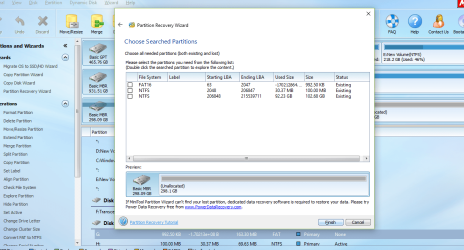
On the left Pane click on Partition Recovery Wizard> Next > Select your problem drive > Next > Full Disk > Next> QuickScan > Next. Allow the quickscan to complete. At the end of the quickscan you will get a window showing all the found partitions. Post a screenshot of it.

Out of the partitions shown, you have to select only those partitions that would make the preview map in that Window look the same as the drive was before that is the same three partitons you had, the System Reserved partition, your C drive and the Recovery partition.( Do you remember how much was your C drive space and how much was your recovery drive?

But I would request you to post the screenshot so that I can try to workout which partitions to select.


screenshot attached Jumanji, which partition you want me to select?
 

Attachments
  • Capture10.PNG
    Capture10.PNG
    119.9 KB · Views: 0

My Computer My Computer

Computer type
PC/Desktop
OS
win 8.1 64 bit
You did not answer: Can you not access the drive I : 102.7 GB in Windows? Try and see but do not close PW. You can also right click on that partition in PW and explore.

The screenshot you posted does not show your third partition. Click on cancel and instead of Quick Scan do a Full Scan. This will take a longtime but let it finish. At the end post the screenshot.
 

My Computer My Computer

OS
Windows 7 Home Premium 32 bit
You did not answer: Can you not access the drive I : 102.7 GB in Windows? Try and see but do not close PW. You can also right click on that partition in PW and explore.

The screenshot you posted does not show your third partition. Click on cancel and instead of Quick Scan do a Full Scan. This will take a longtime but let it finish. At the end post the screenshot.

HDD has gone back to sleep. I will have to plug out and back in to get the full scan done. Will post the result once completed.
 

My Computer My Computer

Computer type
PC/Desktop
OS
win 8.1 64 bit
OK, That is the problem with the almost dying Disk.

Meanwhile here is a bit of information. Dell PCs the HDD has a small FAT16 partition(Dell Utility) at the beginning. The partition Type is DE. It will not show up in Windows Disk Management. Following this small FAT16 partition, there is the 100MB System Reserved Partition. Following this PW shows the 102GB partition. All these three as per the Quick Scan are existing. But beyond this Quick Scan does not find any partition. Hence a Full Scan is required.

Windows Disk Management did show a 195 GB partition following the 102 GB Partition (RAW).

But Partition Wizard in the first screenshot your post #57 showed J: Movies and Music 67.7GB followed by 127.7GB Unallocated space. Both together is 195.4 GB ( But Quick scan did not find these two)

In one post you said the127.7GB I: drive is your original C drive and you will primarily be interested in recovering data from this drive.

In another post you said you are only able to access the recovery Partition(Drive) . Where is it and how many GB is it? I still have no clue.

In short you had not very clearly explained the composition of your DELL HDD .as it existed.

Anyway let us see what the Full Scan finds.

When you are able to run a Full Scan post the Partitions found Window.

All along we have been looking for three partitions. But Bootice showed four partitions. Remember we changed from 42 to 07 in those partitions. Now I would say we should have put DE for the first 42. The next three 42 to 07. 07 denotes PartitionType ID for NTFS. So next time you are able to get sector 0 in bootice change the First(top) 07 to DE. Rest three in the column will remain 07.
 

My Computer My Computer

OS
Windows 7 Home Premium 32 bit
OK, That is the problem with the almost dying Disk.

Meanwhile here is a bit of information. Dell PCs the HDD has a small FAT16 partition(Dell Utility) at the beginning. The partition Type is DE. It will not show up in Windows Disk Management. Following this small FAT16 partition, there is the 100MB System Reserved Partition. Following this PW shows the 102GB partition. All these three as per the Quick Scan are existing. But beyond this Quick Scan does not find any partition. Hence a Full Scan is required.

Windows Disk Management did show a 195 GB partition following the 102 GB Partition (RAW).

But Partition Wizard in the first screenshot your post #57 showed J: Movies and Music 67.7GB followed by 127.7GB Unallocated space. Both together is 195.4 GB ( But Quick scan did not find these two)

In one post you said the127.7GB I: drive is your original C drive and you will primarily be interested in recovering data from this drive.

In another post you said you are only able to access the recovery Partition(Drive) . Where is it and how many GB is it? I still have no clue.

In short you had not very clearly explained the composition of your DELL HDD .as it existed.

Anyway let us see what the Full Scan finds.

When you are able to run a Full Scan post the Partitions found Window.

All along we have been looking for three partitions. But Bootice showed four partitions. Remember we changed from 42 to 07 in those partitions. Now I would say we should have put DE for the first 42. The next three 42 to 07. 07 denotes PartitionType ID for NTFS. So next time you are able to get sector 0 in bootice change the First(top) 07 to DE. Rest three in the column will remain 07.

Apologies for not being able to explain the composition as I last used this HDD back in mid june last year. So vaguely remembered what's on and what's not.

I am still trying to get this thing to do full scan. So am going to try and run bootice to see if I can make the changes you have suggested. Keep you posted...
 

My Computer My Computer

Computer type
PC/Desktop
OS
win 8.1 64 bit
OK, That is the problem with the almost dying Disk.

Meanwhile here is a bit of information. Dell PCs the HDD has a small FAT16 partition(Dell Utility) at the beginning. The partition Type is DE. It will not show up in Windows Disk Management. Following this small FAT16 partition, there is the 100MB System Reserved Partition. Following this PW shows the 102GB partition. All these three as per the Quick Scan are existing. But beyond this Quick Scan does not find any partition. Hence a Full Scan is required.

Windows Disk Management did show a 195 GB partition following the 102 GB Partition (RAW).

But Partition Wizard in the first screenshot your post #57 showed J: Movies and Music 67.7GB followed by 127.7GB Unallocated space. Both together is 195.4 GB ( But Quick scan did not find these two)

In one post you said the127.7GB I: drive is your original C drive and you will primarily be interested in recovering data from this drive.

In another post you said you are only able to access the recovery Partition(Drive) . Where is it and how many GB is it? I still have no clue.

In short you had not very clearly explained the composition of your DELL HDD .as it existed.

Anyway let us see what the Full Scan finds.

When you are able to run a Full Scan post the Partitions found Window.

All along we have been looking for three partitions. But Bootice showed four partitions. Remember we changed from 42 to 07 in those partitions. Now I would say we should have put DE for the first 42. The next three 42 to 07. 07 denotes PartitionType ID for NTFS. So next time you are able to get sector 0 in bootice change the First(top) 07 to DE. Rest three in the column will remain 07.


Also, can you pls let me know if that's how you want me to change the figures? I have depicted it in the screenshot.
DE
07
07
07

Is that the right understanding?
 

Attachments

  • capture11.png
    capture11.png
    103.7 KB · Views: 0

My Computer My Computer

Computer type
PC/Desktop
OS
win 8.1 64 bit
Back
Top