
hi,
i am using eset smart security 5 as my laptop antivirus...
then i connect the wireless in my college..after connected, i open my web browser..
before it show the web page i had to insert the username and password in "Web Authentication" page by cisco (https://1.1.1.1/login.html) setup by my college web technician..
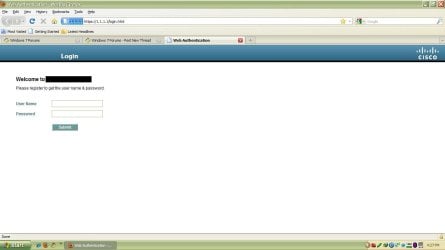
the main problem is when i open the web browser...it's not automatically open that "Web Authentication" page..so i had to bookmark this https://1.1.1.1/login.html link then when i open the browser i had to type this https://1.1.1.1/login.html in the address bar so i can open this link...if i do not type this https://1.1.1.1/login.html link the browser will continue loading until it shown the "Problem loading page"...
i hope you guys can help me to solve this problem so that my browser can automatically open the https://1.1.1.1/login.html link without trouble me to type the link...i think this problem is caused by the eset antivirus...is there any solution without to remove eset antivirus...
sorry for bad english..
i am using eset smart security 5 as my laptop antivirus...
then i connect the wireless in my college..after connected, i open my web browser..
before it show the web page i had to insert the username and password in "Web Authentication" page by cisco (https://1.1.1.1/login.html) setup by my college web technician..
the main problem is when i open the web browser...it's not automatically open that "Web Authentication" page..so i had to bookmark this https://1.1.1.1/login.html link then when i open the browser i had to type this https://1.1.1.1/login.html in the address bar so i can open this link...if i do not type this https://1.1.1.1/login.html link the browser will continue loading until it shown the "Problem loading page"...
i hope you guys can help me to solve this problem so that my browser can automatically open the https://1.1.1.1/login.html link without trouble me to type the link...i think this problem is caused by the eset antivirus...is there any solution without to remove eset antivirus...
sorry for bad english..
My Computer
- Computer Manufacturer/Model Number
- Dell Inspiron N4010
- OS
- Windows 7 Home Premium 64bit (main), Windows XP Professional 32bit


